

The HyperSpace Trackpad Pro arrives as the first serious attempt to give Windows users a Magic Trackpad‑style surface — but what started as a straight clone has quietly become something more ambitious: a configurable, haptic macro surface that aims to reshape input for creators and multitaskers, provided its software lives up to the promise.
Windows has long lagged behind macOS in the market for high‑quality external trackpads. Apple’s Magic Trackpad set expectations for a clickable glass surface with reliable multi‑touch gestures, and third‑party options have been limited or under‑featured. Hyper’s new HyperSpace Trackpad Pro targets that gap by combining haptic, click‑anywhere hardware with a software layer — Hydra Connect — that exposes app‑specific profiles, action zones, and multi‑level press mapping. Early press materials and hands‑on previews describe the product as Windows‑first, with macOS receiving basic support and Linux left for later. Hyper took the product to Kickstarter and to CES, where the Trackpad Pro was named a CES Innovation Awards honoree for 2026 — a signal that the industry sees the idea as noteworthy even before mass retail. Hyper’s own press announcements and CES listings, and independent coverage from tech outlets, align on the device’s core pitch: haptics, force sensing, app profiles, and improved responsiveness.
That said, the product’s fate depends on software reliability, driver compatibility, and the usual manufacturing realities of crowdfunded devices. Early press coverage, BusinessWire and CES entries back Hyper’s claims on specs like 240 Hz reporting, piezo haptics, and app profiles, but independent long‑term testing will be needed to confirm durability, Bluetooth latency in varied environments, and Hydra Connect’s robustness. For Windows power users hungry for a high‑quality external trackpad, the Trackpad Pro is the first device that checks the right boxes on paper while also offering a compelling software story. If Hyper can maintain that software focus and deliver stable drivers, the Trackpad Pro could move beyond being “a Magic Trackpad for Windows” and into becoming a genuinely new class of input device. If the software falters or shipping is delayed, it will still leave the market wanting — but at least this time a contender exists to drive innovation.
The HyperSpace Trackpad Pro is worth watching: exciting in design and potential, but still dependent on Hydra Connect’s maturity and the usual Kickstarter-to‑retail execution. For those who value gesture‑centric workflows and creative macros, it may be the most interesting peripheral to arrive for Windows in years — provided the delivery matches the ambition.
Source: Windows Central https://www.windowscentral.com/accessories/hyperspace-trackpad-pro-review/
 Background
Windows has long lagged behind macOS in the market for high‑quality external trackpads. Apple’s Magic Trackpad set expectations for a clickable glass surface with reliable multi‑touch gestures, and third‑party options have been limited or under‑featured. Hyper’s new HyperSpace Trackpad Pro targets that gap by combining haptic, click‑anywhere hardware with a software layer — Hydra Connect — that exposes app‑specific profiles, action zones, and multi‑level press mapping. Early press materials and hands‑on previews describe the product as Windows‑first, with macOS receiving basic support and Linux left for later. Hyper took the product to Kickstarter and to CES, where the Trackpad Pro was named a CES Innovation Awards honoree for 2026 — a signal that the industry sees the idea as noteworthy even before mass retail. Hyper’s own press announcements and CES listings, and independent coverage from tech outlets, align on the device’s core pitch: haptics, force sensing, app profiles, and improved responsiveness. What the Trackpad Pro actually is
Hardware headline specs (what Hyper claims)
- Haptic, click‑anywhere surface driven by third‑generation piezo actuators for realistic ‘click’ feedback regardless of where you press.
- Independent force sensing across multiple touch points (Hyper advertises detection for up to 10 fingers).
- 240 Hz report rate for low‑latency tracking.
- Connectivity: Bluetooth (reported as Bluetooth 5.2 by multiple outlets) and USB‑C wired mode.
- Battery: a roughly 1,000 mAh cell claimed to provide weeks of use per charge; USB‑C charging allows continuous use while plugged in.
The hardware feel and build
The Trackpad Pro’s surface is described as glass over a CNC‑machined metal body with rubber feet and a subtle slope to aid ergonomics. Because the click is simulated via haptics rather than mechanical switches, there are no dead zones and feedback is deliberately uniform across the pad, a key UX advantage over older physical domes. Early hands‑on impressions note a satisfying and surprisingly realistic “deep click” sensation that can be mapped to distinct actions.Hydra Connect: where the product becomes a platform
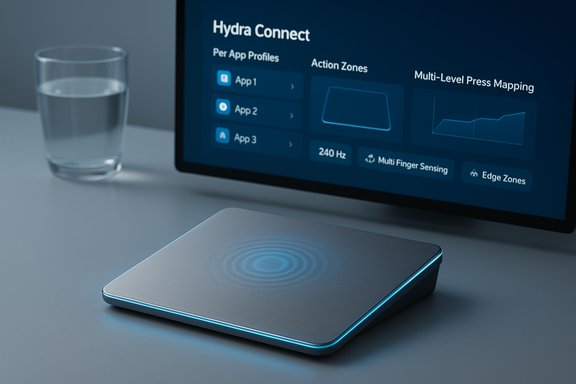
The single biggest differentiator for Hyper is Hydra Connect, the companion software that transforms the trackpad into an adaptive control surface. Out of the box, the Trackpad Pro functions as a precision touch surface with standard Windows gestures; Hydra Connect unlocks per‑app profiles, zone mapping, click-depth assignments, and community-shared profiles. Preloaded profiles target apps like Microsoft Office, Adobe Premiere Pro, and Figma, and users can author and share their own. Hydra Connect’s marquee features:- Per‑app automatic profile switching so the same gesture can mean “scrub timeline” in Premiere and “scroll” in Edge.
- Action zones and edge scrollers that partition the pad logically (corners, edges, center) for mapped shortcuts.
- Multi‑level press mapping: light tap, firm “click,” and a configurable deep press can trigger different events.
- Cloud profile sharing and a community hub for downloading optimized mappings.
Strengths — what the HyperSpace Trackpad Pro does well
1. A true Mac‑style trackpad experience on Windows
For users who have envied Apple’s tactile trackpads, the Trackpad Pro delivers a similar, consistent clickable surface — plus Windows‑centric driver support and gesture parity. That alone fills a long‑standing void in the Windows accessory space.2. Haptics and click uniformity
Piezo haptics remove the mechanical failure modes and spatial inconsistencies of switch‑based pads. The result is uniform feedback across the pad and the ability to tune feedback strength and “depth” in software — a real UX improvement over many older external trackpads.3. Workflow acceleration via Hydra Connect
App‑specific profiles and zone mapping turn repeated mouse/keyboard operations into single gestures. For creative users (timeline scrubbing, brush size changes) and meeting-heavy workers (mute/unmute edge swipes), the Trackpad Pro can materially speed tasks and reduce hand movement.4. Premium build and ergonomics
CNC metal finish, a low sloping profile, and a large glass surface make the device feel professional and durable. The size and angle aim to reduce wrist extension compared with a conventional mouse. Early impressions put the hardware feel in the same class as premium laptop trackpads.Risks and caveats — where buyers should be cautious
Software and driver maturity are the single largest risk
Hydra Connect is the product’s competitive moat — and its biggest single point of failure. Companion apps for high‑function peripherals routinely experience teething issues: driver conflicts with Windows Precision Touchpad stacks, fragile auto‑profile switching, and permission headaches (especially with macOS sandboxing or privacy controls) are common. Early coverage and Hyper’s own Kickstarter positioning show the product as software‑dependent and still receiving updates, so expect refinement cycles after shipping. Treat early units like a version 1 product in software terms.Crowdfunding risks
This rollout began on Kickstarter; while early bird pricing and preorders provide access, crowdfunded hardware often sees specification tweaks, shipping delays, and firmware changes between campaign and retail. Hyper’s materials set a Q1 2026 shipping window with retail set near $149.99, but backers and buyers should expect the usual Kickstarter schedule volatility until fulfillment begins.Bluetooth latency and real‑world responsiveness
A 240 Hz report rate is an excellent headline number, but real‑world latency depends on Bluetooth implementation, host drivers, and OS input stacks. Wired USB‑C mode should be the lowest‑latency option; Bluetooth will be influenced by interference and the host adapter. For pro workflows that demand absolute minimal latency (certain pro‑level video editing scrubbing or precision pointer work), verify wired performance first.Privacy and the cloud
Hydra Connect’s cloud profile sharing is convenient, but uploadable macros and profiles raise questions: what metadata is stored, are macros executable snippets, and how are profiles secured? Hyper’s press materials advertise “cloud sharing,” but buyers who plan to use macros that interact with local apps should watch for encryption, permissioning, and profile export/import safeguards.Platform scope
Hyper positions the Trackpad Pro as Windows‑first. Basic macOS functionality is reported as possible, but advanced Hydra features appear Windows‑exclusive at launch. Linux support is unconfirmed. Cross‑platform users or those relying on Linux should view support as limited for now.The learning curve and real‑world use
Multi‑level presses and muscle memory
The Trackpad Pro’s multi‑depth haptics allow one gesture to map to multiple actions depending on press strength. That can be powerful — but it requires retraining. Heavy‑handed users will need to adjust tapping force or map deep‑click to the same action to avoid accidental triggers. The ability to tune or effectively disable deep‑click overlap in software mitigates this, but the initial learning curve is real and worth budgeting time for.Placement and desk ergonomics
The Trackpad Pro can function as a replacement for a laptop’s built‑in pad or as a secondary input. In practice, many users will adopt it as a dedicated tool next to a mouse or keyboard, switching depending on task. For tight‑workspace setups, note the device’s larger footprint compared to typical laptop pads.Where it shines
- Video editors: timeline scrubbing mapped to a zone or a press depth can speed edits.
- Designers: brush size, pan/zoom, and undo mapping reduce reliance on keyboard shortcuts.
- Presentation hosts: quick mute/unmute or slide navigation via edge swipes simplifies remote meetings.
Comparison: HyperSpace Trackpad Pro vs Apple Magic Trackpad (and alternatives)
The Magic Trackpad remains the benchmark in feel and macOS integration. Where Hyper’s product differs:- Windows‑first software: Hydra Connect delivers Windows‑centric customizations that Apple’s trackpad does not.
- Multi‑level force mapping across more fingers: Hyper advertises independent pressure detection for many fingers, a capability Apple does not publicize to that scale.
- Community profiles and macros: Cloud sharing and app profiles are a clear difference in strategy.
Pricing, availability, and what to expect at retail
Hyper launched the Trackpad Pro on Kickstarter with early‑bird pricing reported in the $90–$109 range and has announced a planned SRP of $149.99 after the campaign, with shipping expected in Q1 2026 for Kickstarter backers and early retail thereafter. The device was named a CES 2026 Innovation Awards honoree, which strengthens its credibility for buyers considering later retail purchases. Buyers should expect incremental firmware updates during fulfillment and the months following retail availability as Hydra Connect matures. If you value stability over early access, waiting for retail units and multiple independent reviews is the conservative choice. Crowdfunded hardware often stabilizes after an initial production run and post‑fulfillment firmware updates.Practical buying guidance
- If you want a near‑Magic‑Trackpad experience on Windows today and are comfortable with Kickstarter risks, the Trackpad Pro’s early price and promise are attractive.
- If your work depends on rock‑solid, mission‑critical input (studio racks, production timelines), wait for retail reviews and firmware maturity.
- If you need broad platform support (macOS + Linux equally), verify feature parity — Hydra’s advanced features appear Windows‑centric at launch.
Final analysis — promise vs. practicality
The HyperSpace Trackpad Pro is one of the first dedicated attempts to deliver a Magic Trackpad‑style experience purpose‑built for Windows — and it does more than emulate Apple. Its real ambition is software‑driven: convert a piece of glass into a context‑aware control surface that shortens workflows for creatives and power users. Where Hyper is strongest is in thinking beyond “point and gesture” and into “action surface.”That said, the product’s fate depends on software reliability, driver compatibility, and the usual manufacturing realities of crowdfunded devices. Early press coverage, BusinessWire and CES entries back Hyper’s claims on specs like 240 Hz reporting, piezo haptics, and app profiles, but independent long‑term testing will be needed to confirm durability, Bluetooth latency in varied environments, and Hydra Connect’s robustness. For Windows power users hungry for a high‑quality external trackpad, the Trackpad Pro is the first device that checks the right boxes on paper while also offering a compelling software story. If Hyper can maintain that software focus and deliver stable drivers, the Trackpad Pro could move beyond being “a Magic Trackpad for Windows” and into becoming a genuinely new class of input device. If the software falters or shipping is delayed, it will still leave the market wanting — but at least this time a contender exists to drive innovation.
The HyperSpace Trackpad Pro is worth watching: exciting in design and potential, but still dependent on Hydra Connect’s maturity and the usual Kickstarter-to‑retail execution. For those who value gesture‑centric workflows and creative macros, it may be the most interesting peripheral to arrive for Windows in years — provided the delivery matches the ambition.
Source: Windows Central https://www.windowscentral.com/accessories/hyperspace-trackpad-pro-review/
