

Installing the YouTube app on Windows 11 is less about finding a native desktop app and more about choosing the right delivery method for the experience you want. In practice, Windows 11 does not offer an official standalone YouTube application from Google in the Microsoft Store, so the most reliable options are to use the website, create a browser-based app shortcut, or install a third-party wrapper. That distinction matters because many “YouTube app” guides online blur the line between an actual native app and a web app shortcut. Microsoft’s own Windows app strategy has increasingly favored store-distributed and web-integrated experiences, which is why this topic is more nuanced than it first appears.
YouTube remains one of the most-used video platforms on the web, but its relationship with desktop operating systems has always been indirect. Unlike streaming services that publish dedicated Windows apps, YouTube has historically prioritized browser access, mobile apps, smart TVs, and living-room platforms. On Windows, that means users often have to decide whether they want a browser tab, a progressive web app, or a third-party client rather than a canonical “YouTube.exe” installation.
Windows 11 changed the equation somewhat by making the browser-to-app transition feel more native. Microsoft has leaned heavily into the idea that websites can become installable experiences, and that philosophy is visible in the way the Microsoft Store, Edge, and Windows shell work together. The company has even emphasized the ability to install apps from the browser via a pop-up store flow, reflecting a broader push toward seamless distribution rather than old-school standalone installers.
That shift matters for YouTube because users often search for an “app” when they really want three things: a pinned icon, a distraction-free window, and a more app-like launch experience. Those goals are achievable on Windows 11, but the solution is usually a browser-installed web app rather than a native package. For most people, that is actually the best outcome, because it preserves security, updates automatically, and avoids the risk of sketchy clone apps.
The confusion is understandable. Windows 11 is full of examples where Microsoft has blurred the old boundaries between installed software and web experiences. Its app model increasingly supports PWAs, Microsoft Store listings, and browser-driven installs, which makes it easy to assume every major service should have a straightforward Store listing. YouTube is one of the clearest examples of where that assumption fails.
Windows 11 is especially friendly to this model because Microsoft has spent years refining the installable web app experience. The company’s broader Windows app strategy has openly embraced PWAs and browser-installed experiences, making the desktop feel more like a launchpad for services than a wall of traditional programs.
The broader issue is trust. Third-party YouTube clients can be useful, but they may have limits, ads, account concerns, or policy risks. If you are installing software just to watch videos, the security tradeoff rarely makes sense unless you have a specific feature need. In other words, the simplest path is often the best path.
This matters because Windows 11 is designed to support these kinds of transitions. Microsoft has repeatedly pushed the idea that apps can come from the web and still feel integrated into the OS. That design direction is not accidental; it is part of the company’s answer to app distribution in a web-first world.
This route also has a practical advantage: updates are automatic. You are not waiting on a separate app developer to push a Windows build or fix compatibility issues. The browser handles the plumbing, which is exactly what you want for a service that changes constantly.
This is where Windows 11’s app ecosystem can become confusing. Microsoft’s Store strategy has become more open over time, with support for many app types and a broad emphasis on discovery and convenience. That openness is good for choice, but it also means users have to exercise judgment when they browse for popular services like YouTube.
For most people, however, the browser web app still wins. It is more likely to be stable, less likely to break after a YouTube redesign, and easier to trust. Convenience without provenance is a bad bargain.
A shortcut also keeps things flexible. If you switch browsers, change accounts, or prefer opening YouTube in a regular tab, the shortcut can be discarded instantly. That makes it a low-risk way to experiment before committing to a more app-like workflow.
The tradeoff is that shortcuts do not always behave like full apps. You may still see browser elements, and notifications may be tied to the browser rather than a dedicated container. But for speed and simplicity, this method is hard to beat.
Third-party app wrappers are not inherently malicious, but they should be treated like any other internet download. Check hashes if available, prefer open-source projects with a visible release history, and avoid software that promises “premium YouTube” features without explaining how it works. If the app has no clear developer identity, that is a warning sign.
If you are using a shared Windows 11 PC, browser profiles matter even more. Separate profiles can keep watch history, recommendations, and cookies from bleeding across users. That is a practical privacy improvement that many so-called app clients do not provide as cleanly.
The real usability win is focus. An app window without tabs, bookmarks, or the rest of your browsing clutter can reduce friction dramatically. That is why many users feel they are using a “real app” even when the underlying technology is still the web.
But it is worth remembering that wrappers can also introduce problems. If YouTube changes its interface or behavior, unofficial clients can break in ways that are hard to predict. The cleaner the software, the less maintenance burden you are taking on.
For managed devices, a browser-installed app can also be easier to support than a conventional desktop package. There is no MSI to stage, no unpredictable installer behavior, and no separate update channel to track. In enterprise terms, that simplicity is a real operational advantage.
That is especially true in environments where data leakage or distraction is a concern. The more app-like you make YouTube, the more likely users are to treat it as a persistent consumer application rather than a controlled web destination. In enterprise IT, simplicity is often security by another name.
For students, researchers, and power users, this may be the sweet spot. YouTube stays available, but it does not dominate the desktop. That balance is often more valuable than a polished icon on the Start menu.
You may think you need an app when you actually need better organization. Or you may need a browser profile, a playlist strategy, or a second monitor. The software choice becomes easier once the real problem is clear.
At the same time, users should expect continued confusion in the market. As more third-party clients appear, and as the Microsoft Store keeps broadening its catalog, the line between official and unofficial software will remain blurry. That makes education more important than ever, because the best installation method is only useful if users can identify it.
Source: Fathom Journal Fathom - For a deeper understanding of Israel, the region, and global antisemitism
 Overview
YouTube remains one of the most-used video platforms on the web, but its relationship with desktop operating systems has always been indirect. Unlike streaming services that publish dedicated Windows apps, YouTube has historically prioritized browser access, mobile apps, smart TVs, and living-room platforms. On Windows, that means users often have to decide whether they want a browser tab, a progressive web app, or a third-party client rather than a canonical “YouTube.exe” installation.Windows 11 changed the equation somewhat by making the browser-to-app transition feel more native. Microsoft has leaned heavily into the idea that websites can become installable experiences, and that philosophy is visible in the way the Microsoft Store, Edge, and Windows shell work together. The company has even emphasized the ability to install apps from the browser via a pop-up store flow, reflecting a broader push toward seamless distribution rather than old-school standalone installers.
That shift matters for YouTube because users often search for an “app” when they really want three things: a pinned icon, a distraction-free window, and a more app-like launch experience. Those goals are achievable on Windows 11, but the solution is usually a browser-installed web app rather than a native package. For most people, that is actually the best outcome, because it preserves security, updates automatically, and avoids the risk of sketchy clone apps.
The confusion is understandable. Windows 11 is full of examples where Microsoft has blurred the old boundaries between installed software and web experiences. Its app model increasingly supports PWAs, Microsoft Store listings, and browser-driven installs, which makes it easy to assume every major service should have a straightforward Store listing. YouTube is one of the clearest examples of where that assumption fails.
What You Really Mean by “YouTube App”
The first thing to clarify is whether you want the actual YouTube service on your PC or merely a convenient shortcut that behaves like an app. On Windows 11, those are not the same thing, and the difference affects installation, updates, notifications, and trust. A browser-based app can feel almost identical to a native desktop client, but under the hood it is still the YouTube website running in its own shell.Native app versus web app
A true native app is built and distributed specifically for the operating system. A web app, by contrast, is a browser-rendered experience wrapped in a desktop container, often with its own icon and taskbar presence. For a service like YouTube, the web app route is generally the practical choice because it keeps the experience up to date with the website itself. That also means Google can iterate on features without pushing Windows-specific builds.Windows 11 is especially friendly to this model because Microsoft has spent years refining the installable web app experience. The company’s broader Windows app strategy has openly embraced PWAs and browser-installed experiences, making the desktop feel more like a launchpad for services than a wall of traditional programs.
Why the Microsoft Store is not the answer
Many users look in the Microsoft Store first, expecting to find a YouTube app from Google. In most cases, they will not. The Store does offer some third-party wrappers or unofficial clients, but those are not the same as an official Google product, and their quality varies. That is why the Store should be treated as a convenience option, not the default recommendation.The broader issue is trust. Third-party YouTube clients can be useful, but they may have limits, ads, account concerns, or policy risks. If you are installing software just to watch videos, the security tradeoff rarely makes sense unless you have a specific feature need. In other words, the simplest path is often the best path.
- Native YouTube desktop app: generally not available from Google on Windows 11
- Browser-based app shortcut: recommended for most users
- Third-party wrapper: useful only if you understand the tradeoffs
- Microsoft Store listings: may exist, but quality and legitimacy vary
Method 1: Install YouTube as a Web App
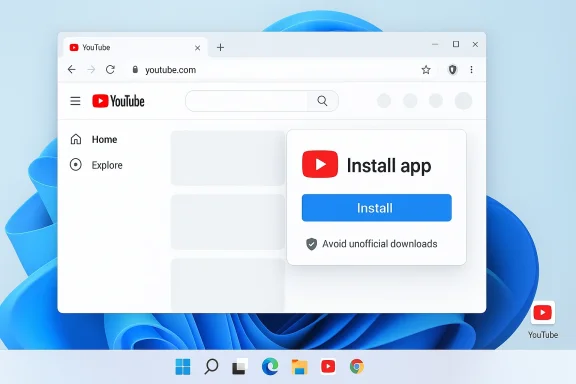
For most Windows 11 users, the best way to “install” YouTube is to turn it into a web app using Microsoft Edge or another Chromium-based browser. This gives you an app icon, a dedicated window, and quick launch behavior without relying on an unofficial installer. It is the closest thing to a native YouTube app that most users actually need.Using Microsoft Edge
In Microsoft Edge, open YouTube in a tab and look for the browser menu that lets you install the site as an app. Edge can create a desktop shortcut and open YouTube in a standalone window, which feels much more like a real application than a normal browser tab. The result is cleaner, faster to access, and easier to pin to the taskbar or Start menu.This matters because Windows 11 is designed to support these kinds of transitions. Microsoft has repeatedly pushed the idea that apps can come from the web and still feel integrated into the OS. That design direction is not accidental; it is part of the company’s answer to app distribution in a web-first world.
Using Google Chrome
Chrome users can do something similar. Open YouTube, use the browser’s menu, and choose the option to install the site or create a shortcut that opens in its own window. Depending on the browser version, the wording may differ slightly, but the result is the same: YouTube becomes a desktop-like experience without requiring a download from Google.This route also has a practical advantage: updates are automatic. You are not waiting on a separate app developer to push a Windows build or fix compatibility issues. The browser handles the plumbing, which is exactly what you want for a service that changes constantly.
Step-by-step setup
- Open your browser and go to YouTube.
- Sign in if you want subscriptions, watch history, and recommendations.
- Open the browser menu.
- Select the install or create app option.
- Name the app YouTube.
- Choose whether to pin it to the taskbar or Start menu.
- Launch it from the shortcut to verify it opens in a separate window.
- Fast to set up
- No risky downloads
- Works with your Google account
- Automatically follows YouTube updates
- Easy to uninstall if you change your mind
Method 2: Use the Microsoft Store Carefully
The Microsoft Store can be useful, but with YouTube it requires more caution than many users expect. If you search for YouTube in the Store, you may see unofficial clients, companion tools, or wrappers that present themselves as a desktop app. Some may work well enough, but they are not interchangeable with an official Google release.What to watch for
The key issue is provenance. If an app is not published by Google, you should assume it is a third-party project unless proven otherwise. That does not automatically make it bad, but it does mean you need to look at reviews, publisher history, update cadence, and permissions. A polished icon does not guarantee a trustworthy codebase.This is where Windows 11’s app ecosystem can become confusing. Microsoft’s Store strategy has become more open over time, with support for many app types and a broad emphasis on discovery and convenience. That openness is good for choice, but it also means users have to exercise judgment when they browse for popular services like YouTube.
When a Store app makes sense
A third-party YouTube client can make sense if you need special playback options, minimal interface design, or focused multitasking. Some users prefer lightweight clients that strip away recommendations, comments, or extra navigation. Others simply like the feel of a separate desktop program. Those are valid preferences, but they come with the usual software caveats.For most people, however, the browser web app still wins. It is more likely to be stable, less likely to break after a YouTube redesign, and easier to trust. Convenience without provenance is a bad bargain.
- Check the publisher name carefully
- Read recent reviews, not just star ratings
- Avoid apps that ask for unnecessary permissions
- Prefer projects with active maintenance
- Treat “download YouTube” claims with skepticism
Method 3: Create a Desktop Shortcut
If you do not want a full app wrapper, the lightest-weight option is to create a desktop shortcut to YouTube. This gives you one-click access without changing how YouTube works under the hood. It is not as polished as an installed web app, but it is quick and simple.Why shortcuts still matter
Shortcuts are underrated because they solve the most common user problem: I just want this thing easy to reach. Many Windows 11 users do not need a dedicated container or deep integration. They just want YouTube on the desktop, pinned where it is obvious and convenient.A shortcut also keeps things flexible. If you switch browsers, change accounts, or prefer opening YouTube in a regular tab, the shortcut can be discarded instantly. That makes it a low-risk way to experiment before committing to a more app-like workflow.
How to set one up
Depending on your browser, you can drag the address bar icon to the desktop or use the browser’s shortcut creation menu. Then rename it YouTube and pin it where you want. You can even set it to open in a new window if your browser supports that behavior. This creates a cleaner access point without changing your media setup.The tradeoff is that shortcuts do not always behave like full apps. You may still see browser elements, and notifications may be tied to the browser rather than a dedicated container. But for speed and simplicity, this method is hard to beat.
- Best for minimalists
- No extra software required
- Easy to undo
- Good for shared PCs
- Works across browsers
Security, Privacy, and Trust
Any discussion of YouTube on Windows 11 should include security, because the search for an “app” often leads people to unofficial downloads. That is where risk creeps in. The more popular the service, the more likely it is that somebody will package a fake client, bundle adware, or redirect users to the wrong installer.The phishing problem
Fake download pages are a major hazard for Windows users. Search results can surface lookalike sites that mimic official branding and try to persuade users to install unwanted software. Because YouTube is globally familiar, scammers can rely on recognition rather than technical sophistication. That makes the threat more annoying than exotic, which is often how the most effective scams work.Third-party app wrappers are not inherently malicious, but they should be treated like any other internet download. Check hashes if available, prefer open-source projects with a visible release history, and avoid software that promises “premium YouTube” features without explaining how it works. If the app has no clear developer identity, that is a warning sign.
Account and data considerations
Using YouTube through the browser or a browser-installed app keeps your Google sign-in in a familiar security context. That makes authentication, password management, and session recovery easier. It also avoids the need to hand your credentials to a new app ecosystem that may not be transparent about storage or telemetry.If you are using a shared Windows 11 PC, browser profiles matter even more. Separate profiles can keep watch history, recommendations, and cookies from bleeding across users. That is a practical privacy improvement that many so-called app clients do not provide as cleanly.
- Prefer official web access over random executables
- Use two-factor authentication on your Google account
- Keep browser and Windows updates current
- Be skeptical of “YouTube Pro” or “YouTube Premium desktop” claims
- Use separate browser profiles for multiple users
Performance and Usability
One reason users keep searching for a desktop YouTube app is performance. They want faster startup, fewer tabs, and a smoother playback experience. On modern Windows 11 hardware, though, a browser-installed YouTube app is usually efficient enough that the difference is mostly about workflow rather than raw speed.Browser apps are lighter than you think
Modern browsers are heavy compared with old-school single-purpose programs, but they are also extremely optimized for video playback. Hardware acceleration, codec support, and streaming optimizations all work in your favor. As a result, the practical performance gap between a web app and a standalone wrapper is often smaller than users expect.The real usability win is focus. An app window without tabs, bookmarks, or the rest of your browsing clutter can reduce friction dramatically. That is why many users feel they are using a “real app” even when the underlying technology is still the web.
When a wrapper might help
A third-party wrapper may help if you want a stripped-down environment with fewer distractions. Some clients remove sidebars, minimize interface chrome, or support custom playback behaviors. For users who spend hours on YouTube, that can be attractive.But it is worth remembering that wrappers can also introduce problems. If YouTube changes its interface or behavior, unofficial clients can break in ways that are hard to predict. The cleaner the software, the less maintenance burden you are taking on.
- Better focus with standalone windows
- Faster access than browser tabs
- Automatic update handling
- Potentially fewer distractions
- Limited upside if your browser is already optimized
Enterprise and Managed PC Environments
In business settings, the answer to “How do I install YouTube app on Windows 11?” is often different from the consumer answer. Enterprises typically care less about novelty and more about control, compliance, bandwidth, and policy enforcement. That means the safest path is usually to allow browser access rather than install an app at all.Policy-first thinking
If a company wants employees to access YouTube for training, marketing, or support, browser-based access through managed profiles is straightforward. IT can monitor usage, apply content policies, and avoid the risk of third-party desktop clients. That approach aligns well with modern Windows management, where the browser is often the safest delivery layer.For managed devices, a browser-installed app can also be easier to support than a conventional desktop package. There is no MSI to stage, no unpredictable installer behavior, and no separate update channel to track. In enterprise terms, that simplicity is a real operational advantage.
Shared device implications
On shared workstations, kiosk systems, and lab machines, the question is less about convenience and more about containment. A shortcut to YouTube may be acceptable, while a third-party client may not be. If the system is locked down, administrators may prefer to pin a browser shortcut and leave the actual browsing environment under policy control.That is especially true in environments where data leakage or distraction is a concern. The more app-like you make YouTube, the more likely users are to treat it as a persistent consumer application rather than a controlled web destination. In enterprise IT, simplicity is often security by another name.
- Use browser-based access where possible
- Avoid unvetted third-party clients
- Manage with browser profiles and group policy
- Prefer pinned shortcuts over custom installers
- Reserve app wrappers for approved use cases only
Alternatives to a Traditional App
If your goal is simply to watch video efficiently, YouTube is not your only option on Windows 11. You can use browser picture-in-picture, a pinned web app, or even external media players that support certain streaming workflows. Those alternatives are not full replacements, but they can be better suited to specific habits.Picture-in-picture and multitasking
Picture-in-picture is a strong alternative for people who watch videos while working. It keeps playback visible without forcing you into a dedicated app window. On Windows 11, this kind of multitasking often feels more useful than a separate app, because you can keep YouTube floating while continuing other tasks.For students, researchers, and power users, this may be the sweet spot. YouTube stays available, but it does not dominate the desktop. That balance is often more valuable than a polished icon on the Start menu.
Dedicated media workflows
Some users build workflows around playlists, subscriptions, downloads, or offline viewing. In those cases, a generic browser app may not be enough. But those needs usually point toward specific tools rather than a generic “YouTube app.” The important thing is to identify the real requirement before choosing the software.You may think you need an app when you actually need better organization. Or you may need a browser profile, a playlist strategy, or a second monitor. The software choice becomes easier once the real problem is clear.
- Picture-in-picture for multitasking
- Browser profiles for account separation
- Pinned web apps for quick launch
- Separate display layouts for long viewing sessions
- Special-purpose tools for creators or researchers
Strengths and Opportunities
The biggest strength of the Windows 11 approach is that it gives users flexibility without forcing them into risky downloads. You can make YouTube feel app-like, keep it up to date, and preserve the security benefits of the browser. That is a strong combination, especially for casual users who just want reliable access.- No official app needed to get an app-like experience
- Automatic updates through the browser
- Lower security risk than random installers
- Easy pinning to Start or the taskbar
- Better account control through browser profiles
- Works on most Windows 11 PCs
- Simple rollback if you change your mind
Risks and Concerns
The main danger is that users searching for a YouTube app may end up installing the wrong thing. The second danger is assuming all Store listings or download pages are equally trustworthy. In reality, the safest option is usually the least glamorous one: the official website opened in a browser-installed app shell.- Fake download sites can mimic legitimate software
- Unofficial clients may collect data or break unexpectedly
- Account security can suffer if you sign into untrusted apps
- Feature drift may make wrappers unstable over time
- Permission creep can expose unnecessary system access
- User confusion can lead to poor security choices
- Enterprise misuse can create policy and compliance issues
Looking Ahead
The longer-term trend is clear: Windows is becoming more comfortable with web apps, and that means the definition of an “app” keeps expanding. For YouTube, this probably means the browser-installed model will remain the most practical desktop solution for the foreseeable future. It is simple, secure, and aligned with how both Microsoft and the broader web ecosystem now think about app distribution.At the same time, users should expect continued confusion in the market. As more third-party clients appear, and as the Microsoft Store keeps broadening its catalog, the line between official and unofficial software will remain blurry. That makes education more important than ever, because the best installation method is only useful if users can identify it.
- Watch for broader browser-to-app integration
- Expect more unofficial YouTube wrappers to appear
- Check whether Microsoft Store listings are actually official
- Look for improvements in notification and playback support
- Monitor how Windows 11 handles web app lifecycle features
Source: Fathom Journal Fathom - For a deeper understanding of Israel, the region, and global antisemitism
