

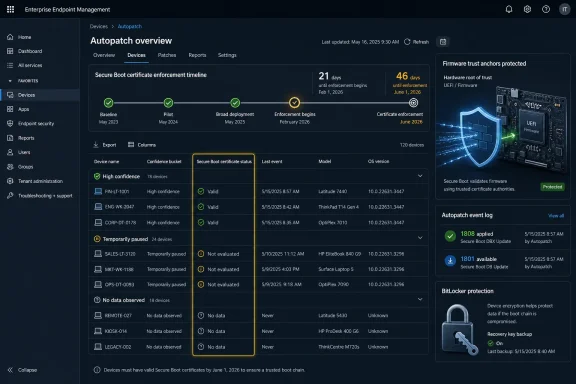
Microsoft has added a Secure Boot status report to Windows Autopatch in the Intune admin center to help organizations identify Windows devices that have not received the 2023 UEFI Secure Boot certificates before legacy 2011 certificates begin expiring in June 2026. The move is less a cosmetic dashboard update than a sign that Microsoft knows this migration sits in the danger zone between cloud policy and motherboard reality. Secure Boot lives in firmware, BitLocker reacts badly to unexpected boot-chain changes, and fleet administrators do not get many second chances when a certificate rollout turns into a morning-after boot failure. Autopatch is being asked to do something harder than deploy an update: prove that the machine underneath Windows is actually ready to trust it.
The Secure Boot certificate rollover has always had the shape of an enterprise incident waiting for a calendar invite. Secure Boot depends on trust anchors stored in UEFI firmware, and the original Microsoft certificates from the Windows 8 era are reaching the end of their life after more than a decade of service. That is not surprising in cryptographic terms; certificates expire, roots get replaced, and trust chains age out.
What makes this different is the blast radius. Secure Boot is not a browser certificate warning or a server-side TLS renewal that can be fixed by one hurried administrator with the right private key. It is embedded in the pre-OS path of millions of PCs, laptops, workstations, and virtual machines, often with OEM-specific firmware behavior layered underneath Windows’ own servicing logic.
Microsoft’s new Autopatch report is a tacit admission that a traditional update compliance view is not enough. A device can be targeted by the right policy, enrolled in the right ring, and still be blocked by firmware state, OEM settings, unavailable telemetry, or a BIOS version that does not yet cooperate. In that world, “deployed” is not the same thing as “safe.”
The company’s answer is to move the question from policy intent to observed readiness. The report does not simply tell administrators that Windows Update was allowed to offer the certificate update. It groups devices by what Microsoft can infer from live hardware telemetry, certificate state, firmware data, and local events. That shift matters because the riskiest part of this transition is not whether the update exists; it is whether the endpoint can absorb it without becoming tomorrow’s help desk flood.
The 2011-era certificates were part of the foundation that made Secure Boot a mainstream Windows PC feature. They helped validate Windows bootloaders and, depending on configuration, third-party UEFI components such as option ROMs or non-Windows bootloaders. For years, most users never had to think about them. That invisibility was the point.
Now the trust foundation has to be refreshed. Microsoft’s 2023 certificate set is meant to carry Secure Boot forward, but replacing trust anchors in firmware is a much more delicate operation than installing a cumulative update. The change has to survive reboots, align with firmware rules, preserve device recoverability, and avoid triggering protective systems such as BitLocker into assuming the boot environment has been tampered with.
That is why the June 2026 deadline has become a forcing function for corporate IT. Unsupported or unmanaged machines may continue to run in some cases, but they risk drifting into a degraded security posture and may eventually encounter compatibility failures with newer boot components. Managed fleets, meanwhile, need proof that they are not about to discover a firmware edge case only after enforcement becomes unavoidable.
That distinction has haunted endpoint management for years. Cloud consoles are very good at reporting whether a policy was assigned, whether an update was offered, and whether a device checked in. They are less good at representing the messy boundary where Windows hands control to firmware, especially when the deciding factor may be a BIOS setting that was changed years ago, a vendor-specific implementation, or a device model awaiting an OEM firmware fix.
Autopatch now sorts devices into confidence-style buckets rather than pretending every endpoint is a binary success or failure. Machines can be marked with high confidence, placed under observation, shown as lacking observed data, temporarily paused, or treated as unsupported. That taxonomy is more honest than a green check mark, because this is a rollout where uncertainty itself is operationally meaningful.
A “high confidence” device is the best-case path: Autopatch believes the device can receive the updated certificates through normal Windows Update servicing. “Temporarily paused” is more interesting, because it means the service sees enough risk to hold back rather than force the migration through. In enterprise terms, a pause is not procrastination; it is damage control before damage occurs.
The device-level labels are deliberately blunt: up to date, not up to date, or not applicable. That is useful for triage, but the more nuanced Autopatch grouping tells the deeper story. A machine may be technically managed and still not have enough observed data to make a confident decision. Another may need an OEM firmware update before Autopatch will proceed. A third may be configured in a way that makes a particular certificate not applicable.
There is also a timing wrinkle that administrators cannot ignore. Microsoft says dashboard data can lag local state, with cloud diagnostics updating after reboot rather than instantly. In practice, that means the Intune view is a fleet-management instrument, not a courtroom transcript. It is good for trends, targeting, and prioritization, but it should not be the only evidence used when troubleshooting a stubborn endpoint.
That matters because admins under deadline pressure tend to distrust stale dashboards, and rightly so. If a local device says one thing and the cloud says another, the temptation is to call the service broken. The better interpretation is that Secure Boot reporting now spans several layers: local firmware, Windows eventing, telemetry ingestion, Autopatch confidence scoring, and Intune presentation. Each layer has its own delay and failure modes.
Event ID 1808 is the reassuring one. It indicates that the firmware has successfully applied the new 2023 Secure Boot certificates. In the practical language of endpoint operations, that is the event an administrator wants to see before counting a machine as migrated.
Event ID 1801 is the warning sign. It indicates that updated Secure Boot certificates are available but have not yet been applied to firmware, or that the process has been blocked. The cause may be benign, temporary, or firmware-specific, but the operational message is the same: this device needs attention before it can be treated as finished.
The return of event logs to center stage is almost refreshing. Modern device management often sells the dream that everything can be abstracted into a portal. Secure Boot is a reminder that the portal is only as good as the signals coming from the hardware, and sometimes the decisive evidence is still buried in a local log entry that a technician can verify with their own eyes.
That is where the nightmare scenario comes from: a wave of machines rebooting into recovery prompts, users who do not have recovery keys handy, and support teams trying to distinguish a real security event from a certificate migration side effect. In a hybrid workforce, that problem gets uglier. A BitLocker recovery screen in a branch office is inconvenient; a BitLocker recovery screen on a remote executive’s laptop five minutes before a flight is a business continuity issue.
Microsoft’s staged, telemetry-driven approach is meant to reduce that risk by avoiding blind enforcement. If Autopatch can identify devices with known firmware conflicts and pause them, it can prevent a security maintenance task from turning into an availability incident. That is the right instinct, even if it also means the report will generate uncomfortable homework for IT teams that had assumed Windows Update would quietly handle everything.
The uncomfortable truth is that Secure Boot’s strength is also its operational weakness. It protects the earliest part of the startup sequence precisely because it sits below the operating system. But anything below the operating system is harder to inventory, harder to patch uniformly, and harder to recover when automation gets it wrong.
That is the part of the story that enterprise administrators should treat with the most suspicion. A fleet might look standardized on paper while still spanning multiple BIOS branches, hardware revisions, vendor utilities, and Secure Boot settings. A model purchased in 2021 may not behave like the same family purchased in 2024. A BIOS update that fixes the certificate path for one configuration may be irrelevant to another.
The “temporarily paused” bucket is therefore not just a Microsoft label; it is a map of where the Windows servicing model depends on the hardware ecosystem. When Autopatch pauses a device because of a known OEM issue, the next action may not be a Windows policy tweak. It may be a firmware update, a vendor advisory, or a change in how the organization handles BIOS lifecycle management.
This is where mature IT shops will have an advantage. Organizations that already track BIOS versions, enforce firmware baselines, escrow BitLocker keys, and test vendor updates in rings will treat the Secure Boot report as another signal in an existing process. Organizations that have treated firmware as a thing that happens randomly through vendor utilities may find the next few weeks educational.
The Secure Boot report shows Autopatch moving into a more consequential role. It is no longer merely pushing Windows quality updates through rings. It is making risk judgments about whether a device should receive a low-level trust update, and it is exposing those judgments to administrators before the deadline does the judging for everyone.
That is a subtle but important evolution. In the old model, update management was mostly about cadence: who gets the patch first, who gets it later, and how fast the rollout expands. In this model, update management becomes conditional on hardware confidence. The system is not just asking “which ring is this device in?” It is asking “do we believe this device can survive the next step?”
There is an upside and a downside. The upside is obvious: fewer preventable boot problems, better visibility, and a more intelligent rollout. The downside is that customers are being asked to trust Microsoft’s confidence model at a moment when the cost of a mistaken classification is high. A device wrongly treated as safe could become a support incident; a device wrongly paused could remain exposed or noncompliant.
A useful report can still be ignored, misunderstood, or checked too late. The Secure Boot migration needs time because the remediation path may involve several slow steps: identifying affected devices, validating local event logs, applying OEM firmware, rebooting, waiting for telemetry, and confirming that BitLocker recovery keys are escrowed and accessible. None of that is well suited to a last Friday sprint before a June cutoff.
The report also cannot fully explain every local variation. A device may show no data because it has not checked in properly, because it has not rebooted, because telemetry has not landed, or because it sits outside the supported reporting path. “No data observed” is not a neutral state. For risk planning, unknown devices should be treated as a problem category of their own.
There is a lesson here that extends beyond Secure Boot. Cloud management has made Windows administration more centralized, but it has not eliminated the need for endpoint-level validation. The more Windows depends on hardware-backed security, the more administrators need visibility below the OS line.
This one does. That changes behavior. Deadlines force executive attention, vendor guidance, emergency dashboards, and hurried internal meetings. They also expose the organizations that lack clean asset data. If you do not know which devices have Secure Boot enabled, which firmware versions they run, and whether they are checking in to management, the certificate rollover becomes an inventory problem before it becomes a security problem.
Microsoft’s handling of the rollout also reflects a broader shift in Windows servicing. The operating system is no longer just patched in isolation. Its security posture depends on firmware, TPM state, cloud policy, identity enrollment, update rings, and telemetry feedback. That is powerful when it works, but it turns “Windows update” into a distributed negotiation among several subsystems.
The irony is that Secure Boot was supposed to make trust more deterministic. Only signed boot components should run. Yet maintaining that trust over a 15-year lifecycle requires a messy operational apparatus: dashboards, confidence levels, event IDs, OEM firmware coordination, and administrator judgment. The cryptography may be clean; the fleet reality is not.
The first priority is to reduce the unknowns. Devices without observed data should be made to check in, reboot, and report, or they should be treated as exceptions. The second priority is to validate representative hardware locally. If an organization has ten common laptop models, it should not wait for all ten to fail or succeed at scale before checking event logs and firmware versions on test units.
The third priority is to involve OEM firmware management earlier than usual. Secure Boot certificate readiness may depend on BIOS updates that Windows Update alone cannot guarantee in every environment. For many organizations, that means dusting off vendor tooling or revisiting processes that were never integrated cleanly into modern endpoint management.
Finally, BitLocker recovery readiness should be assumed part of the project rather than an adjacent concern. If recovery keys are not escrowed, searchable, and support-accessible, the organization has a bigger problem than a certificate report. The worst time to discover that gap is after a Secure Boot-related reboot has already stranded a user.
That distinction matters because enterprise patch culture often treats delay as weakness. Security teams want completion. Compliance teams want green dashboards. Operations teams want fewer surprises. The Secure Boot rollout forces those instincts into tension, because the fastest path to a green policy state may not be the safest path to a bootable fleet.
Microsoft’s confidence buckets are an attempt to make that tension visible. They create a vocabulary for staged trust: some devices are ready, some are being watched, some are silent, and some should not be touched yet. That is more sophisticated than the usual update compliance binary, and it is exactly the kind of nuance low-level platform changes require.
But nuance only helps if organizations act on it. The report should drive model-by-model testing, exception handling, and firmware coordination, not merely a screenshot in a change advisory. A dashboard that identifies risk but does not change behavior is just a prettier incident postmortem.
 Microsoft Turns a Firmware Deadline Into an Autopatch Problem
The Secure Boot certificate rollover has always had the shape of an enterprise incident waiting for a calendar invite. Secure Boot depends on trust anchors stored in UEFI firmware, and the original Microsoft certificates from the Windows 8 era are reaching the end of their life after more than a decade of service. That is not surprising in cryptographic terms; certificates expire, roots get replaced, and trust chains age out.What makes this different is the blast radius. Secure Boot is not a browser certificate warning or a server-side TLS renewal that can be fixed by one hurried administrator with the right private key. It is embedded in the pre-OS path of millions of PCs, laptops, workstations, and virtual machines, often with OEM-specific firmware behavior layered underneath Windows’ own servicing logic.
Microsoft’s new Autopatch report is a tacit admission that a traditional update compliance view is not enough. A device can be targeted by the right policy, enrolled in the right ring, and still be blocked by firmware state, OEM settings, unavailable telemetry, or a BIOS version that does not yet cooperate. In that world, “deployed” is not the same thing as “safe.”
The company’s answer is to move the question from policy intent to observed readiness. The report does not simply tell administrators that Windows Update was allowed to offer the certificate update. It groups devices by what Microsoft can infer from live hardware telemetry, certificate state, firmware data, and local events. That shift matters because the riskiest part of this transition is not whether the update exists; it is whether the endpoint can absorb it without becoming tomorrow’s help desk flood.
The Old Secure Boot Model Is Running Out of Road
Secure Boot was designed to stop untrusted code from sneaking into the boot path before Windows and endpoint security tools have a chance to defend themselves. The concept is straightforward: firmware checks signatures on boot components, and only trusted code continues. The operational reality is less tidy, because those trust decisions rely on certificates that must be present in firmware databases and accepted by the hardware platform.The 2011-era certificates were part of the foundation that made Secure Boot a mainstream Windows PC feature. They helped validate Windows bootloaders and, depending on configuration, third-party UEFI components such as option ROMs or non-Windows bootloaders. For years, most users never had to think about them. That invisibility was the point.
Now the trust foundation has to be refreshed. Microsoft’s 2023 certificate set is meant to carry Secure Boot forward, but replacing trust anchors in firmware is a much more delicate operation than installing a cumulative update. The change has to survive reboots, align with firmware rules, preserve device recoverability, and avoid triggering protective systems such as BitLocker into assuming the boot environment has been tampered with.
That is why the June 2026 deadline has become a forcing function for corporate IT. Unsupported or unmanaged machines may continue to run in some cases, but they risk drifting into a degraded security posture and may eventually encounter compatibility failures with newer boot components. Managed fleets, meanwhile, need proof that they are not about to discover a firmware edge case only after enforcement becomes unavoidable.
The New Report Measures the Thing Admins Actually Fear
The important part of the Autopatch report is not the column itself. It is the philosophy behind the column. Microsoft is trying to tell administrators whether a machine is genuinely ready for the Secure Boot transition, not merely whether it was included in a deployment scope.That distinction has haunted endpoint management for years. Cloud consoles are very good at reporting whether a policy was assigned, whether an update was offered, and whether a device checked in. They are less good at representing the messy boundary where Windows hands control to firmware, especially when the deciding factor may be a BIOS setting that was changed years ago, a vendor-specific implementation, or a device model awaiting an OEM firmware fix.
Autopatch now sorts devices into confidence-style buckets rather than pretending every endpoint is a binary success or failure. Machines can be marked with high confidence, placed under observation, shown as lacking observed data, temporarily paused, or treated as unsupported. That taxonomy is more honest than a green check mark, because this is a rollout where uncertainty itself is operationally meaningful.
A “high confidence” device is the best-case path: Autopatch believes the device can receive the updated certificates through normal Windows Update servicing. “Temporarily paused” is more interesting, because it means the service sees enough risk to hold back rather than force the migration through. In enterprise terms, a pause is not procrastination; it is damage control before damage occurs.
Intune Becomes the Place Where Firmware Reality Surfaces
The report lives where many administrators would expect to find it: inside the Microsoft Intune admin center, under Windows quality updates, with a certificate status column added to the view. That placement is not accidental. Microsoft is framing this as part of update operations, not as a niche firmware auditing chore.The device-level labels are deliberately blunt: up to date, not up to date, or not applicable. That is useful for triage, but the more nuanced Autopatch grouping tells the deeper story. A machine may be technically managed and still not have enough observed data to make a confident decision. Another may need an OEM firmware update before Autopatch will proceed. A third may be configured in a way that makes a particular certificate not applicable.
There is also a timing wrinkle that administrators cannot ignore. Microsoft says dashboard data can lag local state, with cloud diagnostics updating after reboot rather than instantly. In practice, that means the Intune view is a fleet-management instrument, not a courtroom transcript. It is good for trends, targeting, and prioritization, but it should not be the only evidence used when troubleshooting a stubborn endpoint.
That matters because admins under deadline pressure tend to distrust stale dashboards, and rightly so. If a local device says one thing and the cloud says another, the temptation is to call the service broken. The better interpretation is that Secure Boot reporting now spans several layers: local firmware, Windows eventing, telemetry ingestion, Autopatch confidence scoring, and Intune presentation. Each layer has its own delay and failure modes.
Event Logs Are Still the Admin’s Lie Detector
For all the sophistication of Autopatch telemetry, the local Windows event log remains the tool that administrators will reach for when a specific machine needs a verdict. Microsoft’s guidance points to the Windows System log, where TPM-WMI events can reveal whether the updated Secure Boot certificates were actually applied.Event ID 1808 is the reassuring one. It indicates that the firmware has successfully applied the new 2023 Secure Boot certificates. In the practical language of endpoint operations, that is the event an administrator wants to see before counting a machine as migrated.
Event ID 1801 is the warning sign. It indicates that updated Secure Boot certificates are available but have not yet been applied to firmware, or that the process has been blocked. The cause may be benign, temporary, or firmware-specific, but the operational message is the same: this device needs attention before it can be treated as finished.
The return of event logs to center stage is almost refreshing. Modern device management often sells the dream that everything can be abstracted into a portal. Secure Boot is a reminder that the portal is only as good as the signals coming from the hardware, and sometimes the decisive evidence is still buried in a local log entry that a technician can verify with their own eyes.
BitLocker Is the Shadow Hanging Over the Migration
The reason this rollout makes administrators nervous is not simply that a device might fail to update its certificates. It is that a botched or poorly timed Secure Boot change can look to the rest of the security stack like a boot-chain surprise. BitLocker, by design, does not shrug when the measured boot environment changes in ways it does not expect.That is where the nightmare scenario comes from: a wave of machines rebooting into recovery prompts, users who do not have recovery keys handy, and support teams trying to distinguish a real security event from a certificate migration side effect. In a hybrid workforce, that problem gets uglier. A BitLocker recovery screen in a branch office is inconvenient; a BitLocker recovery screen on a remote executive’s laptop five minutes before a flight is a business continuity issue.
Microsoft’s staged, telemetry-driven approach is meant to reduce that risk by avoiding blind enforcement. If Autopatch can identify devices with known firmware conflicts and pause them, it can prevent a security maintenance task from turning into an availability incident. That is the right instinct, even if it also means the report will generate uncomfortable homework for IT teams that had assumed Windows Update would quietly handle everything.
The uncomfortable truth is that Secure Boot’s strength is also its operational weakness. It protects the earliest part of the startup sequence precisely because it sits below the operating system. But anything below the operating system is harder to inventory, harder to patch uniformly, and harder to recover when automation gets it wrong.
OEM Firmware Is the Variable Microsoft Cannot Fully Own
Microsoft can ship Windows updates. It can operate Autopatch. It can define certificates, publish guidance, and build reports in Intune. What it cannot do is make every OEM firmware implementation behave identically.That is the part of the story that enterprise administrators should treat with the most suspicion. A fleet might look standardized on paper while still spanning multiple BIOS branches, hardware revisions, vendor utilities, and Secure Boot settings. A model purchased in 2021 may not behave like the same family purchased in 2024. A BIOS update that fixes the certificate path for one configuration may be irrelevant to another.
The “temporarily paused” bucket is therefore not just a Microsoft label; it is a map of where the Windows servicing model depends on the hardware ecosystem. When Autopatch pauses a device because of a known OEM issue, the next action may not be a Windows policy tweak. It may be a firmware update, a vendor advisory, or a change in how the organization handles BIOS lifecycle management.
This is where mature IT shops will have an advantage. Organizations that already track BIOS versions, enforce firmware baselines, escrow BitLocker keys, and test vendor updates in rings will treat the Secure Boot report as another signal in an existing process. Organizations that have treated firmware as a thing that happens randomly through vendor utilities may find the next few weeks educational.
Autopatch Is Becoming a Risk Broker, Not Just an Update Service
Windows Autopatch began as Microsoft’s attempt to make update management less artisanal. The promise was that Microsoft could operate deployment rings, monitor quality signals, and keep endpoints current with less manual orchestration by IT departments. That promise is attractive, especially for organizations drowning in patch debt.The Secure Boot report shows Autopatch moving into a more consequential role. It is no longer merely pushing Windows quality updates through rings. It is making risk judgments about whether a device should receive a low-level trust update, and it is exposing those judgments to administrators before the deadline does the judging for everyone.
That is a subtle but important evolution. In the old model, update management was mostly about cadence: who gets the patch first, who gets it later, and how fast the rollout expands. In this model, update management becomes conditional on hardware confidence. The system is not just asking “which ring is this device in?” It is asking “do we believe this device can survive the next step?”
There is an upside and a downside. The upside is obvious: fewer preventable boot problems, better visibility, and a more intelligent rollout. The downside is that customers are being asked to trust Microsoft’s confidence model at a moment when the cost of a mistaken classification is high. A device wrongly treated as safe could become a support incident; a device wrongly paused could remain exposed or noncompliant.
The Report Will Not Save Fleets That Ignore It
The most dangerous interpretation of the new report is that it means Microsoft has solved the problem. It has not. Microsoft has given administrators a better instrument panel, but someone still has to fly the plane.A useful report can still be ignored, misunderstood, or checked too late. The Secure Boot migration needs time because the remediation path may involve several slow steps: identifying affected devices, validating local event logs, applying OEM firmware, rebooting, waiting for telemetry, and confirming that BitLocker recovery keys are escrowed and accessible. None of that is well suited to a last Friday sprint before a June cutoff.
The report also cannot fully explain every local variation. A device may show no data because it has not checked in properly, because it has not rebooted, because telemetry has not landed, or because it sits outside the supported reporting path. “No data observed” is not a neutral state. For risk planning, unknown devices should be treated as a problem category of their own.
There is a lesson here that extends beyond Secure Boot. Cloud management has made Windows administration more centralized, but it has not eliminated the need for endpoint-level validation. The more Windows depends on hardware-backed security, the more administrators need visibility below the OS line.
Security Debt Has a Calendar Now
The Secure Boot certificate deadline is a rare example of security debt with a visible expiration date. Many enterprise risks are vague: old software, weak configuration, unsupported hardware, incomplete inventory. They matter, but they do not always arrive with a day circled on the calendar.This one does. That changes behavior. Deadlines force executive attention, vendor guidance, emergency dashboards, and hurried internal meetings. They also expose the organizations that lack clean asset data. If you do not know which devices have Secure Boot enabled, which firmware versions they run, and whether they are checking in to management, the certificate rollover becomes an inventory problem before it becomes a security problem.
Microsoft’s handling of the rollout also reflects a broader shift in Windows servicing. The operating system is no longer just patched in isolation. Its security posture depends on firmware, TPM state, cloud policy, identity enrollment, update rings, and telemetry feedback. That is powerful when it works, but it turns “Windows update” into a distributed negotiation among several subsystems.
The irony is that Secure Boot was supposed to make trust more deterministic. Only signed boot components should run. Yet maintaining that trust over a 15-year lifecycle requires a messy operational apparatus: dashboards, confidence levels, event IDs, OEM firmware coordination, and administrator judgment. The cryptography may be clean; the fleet reality is not.
The Admin Playbook Narrows Before June
The practical path from here is not complicated, but it is unforgiving. Administrators should treat the Autopatch report as a starting point for segmentation. High-confidence devices can continue through the managed path, while paused, unsupported, not-up-to-date, and no-data devices deserve separate remediation queues.The first priority is to reduce the unknowns. Devices without observed data should be made to check in, reboot, and report, or they should be treated as exceptions. The second priority is to validate representative hardware locally. If an organization has ten common laptop models, it should not wait for all ten to fail or succeed at scale before checking event logs and firmware versions on test units.
The third priority is to involve OEM firmware management earlier than usual. Secure Boot certificate readiness may depend on BIOS updates that Windows Update alone cannot guarantee in every environment. For many organizations, that means dusting off vendor tooling or revisiting processes that were never integrated cleanly into modern endpoint management.
Finally, BitLocker recovery readiness should be assumed part of the project rather than an adjacent concern. If recovery keys are not escrowed, searchable, and support-accessible, the organization has a bigger problem than a certificate report. The worst time to discover that gap is after a Secure Boot-related reboot has already stranded a user.
The Real Signal Is the Devices Microsoft Refuses to Rush
The most useful thing about the new Autopatch report may be that it gives administrators permission to slow down for the right machines. A temporarily paused device is not a failure of automation. It is automation noticing that confidence is not high enough.That distinction matters because enterprise patch culture often treats delay as weakness. Security teams want completion. Compliance teams want green dashboards. Operations teams want fewer surprises. The Secure Boot rollout forces those instincts into tension, because the fastest path to a green policy state may not be the safest path to a bootable fleet.
Microsoft’s confidence buckets are an attempt to make that tension visible. They create a vocabulary for staged trust: some devices are ready, some are being watched, some are silent, and some should not be touched yet. That is more sophisticated than the usual update compliance binary, and it is exactly the kind of nuance low-level platform changes require.
But nuance only helps if organizations act on it. The report should drive model-by-model testing, exception handling, and firmware coordination, not merely a screenshot in a change advisory. A dashboard that identifies risk but does not change behavior is just a prettier incident postmortem.
The June Deadline Leaves Little Room for Magical Thinking
There are a few concrete lessons administrators should take from Microsoft’s Secure Boot reporting push before the certificate rollover moves from planning exercise to operational reality.- The new Autopatch report is designed to measure observed Secure Boot certificate readiness, not merely whether an update policy was assigned to a device.
- Devices marked with high confidence are the easiest path, but machines under observation, lacking data, temporarily paused, or unsupported need separate handling before the deadline.
- Event ID 1808 in the local Windows System log is the cleanest device-level confirmation that the 2023 Secure Boot certificates were applied to firmware.
- Event ID 1801 should be treated as an investigation trigger, especially when it appears across a model family or after attempted rollout.
- OEM firmware updates, BIOS settings, reboot timing, telemetry delays, and BitLocker recovery readiness are all part of the same migration, even if they live in different tools.
- The riskiest devices are not necessarily the ones reporting failure; they may be the ones that have not reported enough data for Autopatch to judge them at all.
References
- Primary source: Notebookcheck
Published: 2026-06-08T06:59:07.471690
Microsoft Autopatch adds Secure Boot report to block boot loops - Notebookcheck News
Prevent enterprise BitLocker recovery loops and boot failures. The new Microsoft Autopatch Secure Boot status report validates critical firmware certificate updates. www.notebookcheck.net
- Official source: learn.microsoft.com
Secure Boot status report in Windows Autopatch | Microsoft Learn
Use the Secure Boot status report to see devices that have Secure Boot enabled, those that are up to date, and those that need certificate updates.learn.microsoft.com - Official source: support.microsoft.com
Surface Secure Boot Certificates | Microsoft Support
Secure Boot in UEFI firmware verifies pre-boot software using trusted certificates. Microsoft will update expiring Windows Secure Boot certificates starting June 2026 to maintain device protection.support.microsoft.com - Related coverage: dell.com
Windows Server TPM-WMI Event ID 1801 Secure Boot Certificates | Dell US
Event 1801 from Trusted Platform Module Windows Management Instrumentation (TPM-WMI) logs that Windows thinks Secure Boot certificates are not applied due to unsynchronized Secure Boot databases.www.dell.com - Related coverage: windowslatest.com
How to check if Windows 11 has applied the new Secure Boot 2023 certificates (replaces Secure Boot 2011)
Windows 11 is refreshing Secure Boot keys in 2026. Here's why TPM-WMI Event ID 1801 appears, and how to verify the new certificate. www.windowslatest.com
- Official source: techcommunity.microsoft.com
Act now: Secure Boot certificates expire in June 2026 - Windows IT Pro Blog
Get tips to prepare for the rollout of updated certificates across your organization. techcommunity.microsoft.com
- Related coverage: windowscentral.com
Microsoft warns Secure Boot certificates will expire in 2026 | Windows Central
After 15 years, the original Secure Boot certificates that keep your PC secure during boot are expiring. Here's what you need to know.www.windowscentral.com - Related coverage: tomshardware.com
Microsoft is refreshing Secure Boot certificates to plug security holes before they happen — if you bought a PC last year, you should be set | Tom's Hardware
Be sure to keep Windows 11 systems updated to get refreshed security certificates.www.tomshardware.com - Related coverage: pcgamer.com
Secure Boot certificates used by anti-cheat software are set to expire in June but new ones are already in the mail | PC Gamer
You shouldn't have to worry about expired certificates if you keep your PC up-to-date.www.pcgamer.com - Related coverage: cisco.com
- Related coverage: techriver.com
