

Microsoft is preparing to extend Intune Device control policies to Windows 10 and Windows 11 PCs managed through Microsoft Defender for Endpoint security settings management—even when those devices are not enrolled in Intune. Administrators should review every existing Device control assignment now, narrow broad groups, confirm exclusions, and test the policy against a dedicated pilot population before Microsoft activates the expanded reach.
The policy path is Microsoft Intune admin center > Endpoint security > Attack surface reduction > Device control. Microsoft lists the capability as in development and has not provided a public rollout date, but its warning is unusually direct: Defender-managed devices assigned an existing policy will begin applying its settings after support becomes available.
The immediate task is not to build another peripheral-control policy. It is to determine whether policies that were safe under their original deployment boundary will remain safe when Defender-managed, non-Intune-enrolled Windows devices become eligible.
Use this review sequence for each Device control policy:
The underlying reporting comes from Microsoft’s Intune In development documentation and its Defender for Endpoint Device control guidance. Microsoft does not describe this as a new policy that administrators must opt into; it warns that assigned, non-enrolled devices will apply the settings when support takes effect.
That makes existing assignments the central risk.
Microsoft is now preparing to remove that exception for Windows 10 and Windows 11. A Defender-managed PC with the relevant assignment can become subject to the same Device control configuration as an enrolled endpoint, despite the absence of conventional Intune enrollment.
This distinction matters operationally. An Intune administrator may think of an assignment as targeting an enrolled fleet, while a security administrator may view the same Microsoft Entra group as the logical container for all Defender-protected endpoints. Once Device control supports security settings management, the policy follows the assignment rather than the administrator’s historical assumption about which devices could process it.
The newly affected population is therefore not every Windows computer running Defender. It is the set of Windows 10 and Windows 11 devices that are managed through Defender for Endpoint security settings management and assigned the Device control policy, despite not being enrolled in Intune.
Enrolled Intune devices are already within the established Device control management path. The change is consequential because assigned Defender-managed devices that previously could not apply this profile are due to become eligible.
That breadth changes the risk calculation for a policy using a default enforcement of Deny. Microsoft explains that default enforcement can apply across all enabled Device control components when no applicable rule grants the requested access.
The printer impact deserves particular attention. If printers are among the protected device types, a broad Deny posture can block printing unless printer access is explicitly allowed or scoped out. A policy created to stop unapproved removable storage can therefore produce an apparently unrelated help-desk incident on a newly eligible Defender-managed PC.
The same concern applies to portable devices and optical media. Workflows involving phones, cameras, specialist portable hardware, CD or DVD drives, or removable storage may have developed outside the population originally expected to receive the Intune policy.
Before rollout, administrators should map each enabled component to an actual business workflow:
That can create a delayed-enforcement trap: the assignment already exists, the policy already contains restrictions, and the device already belongs to the targeted group. The only missing piece is platform support for delivering that profile through Defender for Endpoint security settings management.
When Microsoft enables support, all three conditions can align without an administrator editing the policy on rollout day.
This is why assignment review must begin with group membership rather than policy content alone. A carefully constructed Device control rule can still have an unintended result if it lands on an unexpected class of endpoint. Conversely, narrowing the assignment can contain the rollout risk even when the policy itself remains unchanged.
Administrators should be especially skeptical of organization-wide Windows groups, broad Defender deployment groups, and assignments intended to cover every managed endpoint. These patterns are not inherently wrong, but their effective reach is about to change.
Policy collisions also need to be evaluated before broad deployment. If a newly eligible device already receives peripheral restrictions through another management route, adding Intune Device control creates another enforcement source to investigate during troubleshooting. Microsoft’s Device control documentation also warns that Intune does not honor rule ordering as a dependable priority mechanism, so explicit inclusion and exclusion design is safer than assuming one rule will consistently override another.
The pilot should therefore include representative Defender-managed, non-Intune-enrolled Windows 10 and Windows 11 devices. Testing only enrolled Intune endpoints would confirm the existing deployment path, not the forthcoming eligibility expansion.
A useful pilot should exercise the peripherals employees actually use. Connect approved removable storage, attempt expected read and write operations, print through required workflows, test relevant portable devices, and verify any optical-media dependency. The goal is to expose the difference between the policy administrators believe they assigned and the behavior users will encounter.
Start with audit-oriented behavior where the existing design permits it, then move to enforcement after the resulting activity has been reviewed. Device control can generate events for Advanced Hunting, giving security teams a way to observe matching activity before treating every match as a block.
Rollback planning should remain assignment-focused. If a pilot produces unexpected denials, removing the newly eligible population from the assignment or adding the appropriate exclusion is more controlled than dismantling a policy that continues to work correctly for enrolled endpoints.
This also preserves a clearer troubleshooting boundary. Administrators can determine whether the problem comes from expanded eligibility, group membership, default enforcement, or an individual Device control rule instead of changing every layer simultaneously.
That uncertainty is not a reason to defer action. It is the reason the scope audit belongs ahead of the rollout.
Waiting for a release announcement assumes that policy owners will see it, interpret its assignment implications, coordinate with Defender administrators, review group membership, test peripherals, and change production scope before devices begin processing the settings. Microsoft’s own warning points toward a safer approach: verify now that only intended devices are assigned.
The expansion fits Microsoft’s wider move toward centralized, policy-driven Windows administration, also reflected in WindowsForum’s coverage of Microsoft-managed device management and policy-driven Windows 11 update controls. But Device control carries a more immediate physical consequence than many reporting or update-management changes: a user inserts media or sends a print job, and access either works or it does not.
For IT teams, the next milestone is not a named release date. It is having a reviewed assignment map, an explicit Defender-only pilot group, tested exclusions, and a rollback path ready before Microsoft turns an existing Intune assignment into active enforcement on a larger Windows fleet.
The policy path is Microsoft Intune admin center > Endpoint security > Attack surface reduction > Device control. Microsoft lists the capability as in development and has not provided a public rollout date, but its warning is unusually direct: Defender-managed devices assigned an existing policy will begin applying its settings after support becomes available.
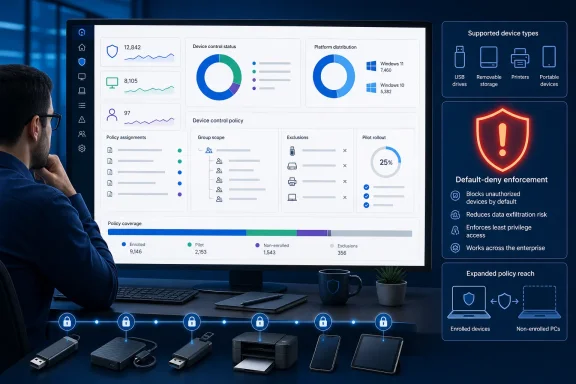 Audit Existing Device Control Assignments Now
The immediate task is not to build another peripheral-control policy. It is to determine whether policies that were safe under their original deployment boundary will remain safe when Defender-managed, non-Intune-enrolled Windows devices become eligible.Use this review sequence for each Device control policy:
- Open the Microsoft Intune admin center and go to Endpoint security > Attack surface reduction.
- Open each policy that uses the Device control profile.
- Record its assigned device groups and any excluded groups.
- Identify whether those assigned groups contain Windows 10 or Windows 11 devices managed through Microsoft Defender for Endpoint security settings management.
- Confirm that every Defender-managed device in those groups is supposed to receive the policy, even if it is not enrolled in Intune.
- Add exclusions or replace overly broad assignments where the newly eligible devices should not receive Device control enforcement.
- Review the policy’s default enforcement and every enabled device-control component.
- Place the policy into a limited pilot scope before relying on it across the broader Defender-managed population.
- Monitor policy status and device behavior before expanding the assignment.
The underlying reporting comes from Microsoft’s Intune In development documentation and its Defender for Endpoint Device control guidance. Microsoft does not describe this as a new policy that administrators must opt into; it warns that assigned, non-enrolled devices will apply the settings when support takes effect.
That makes existing assignments the central risk.
Policy Eligibility Is Expanding Beyond Intune Enrollment
Defender for Endpoint security settings management allows selected Intune endpoint-security policies to reach devices that are not enrolled in Intune. WindowsForum previously examined that broader management model in its coverage of Intune endpoint-security policies reaching Defender-managed devices, but Device control has remained an important exception.Microsoft is now preparing to remove that exception for Windows 10 and Windows 11. A Defender-managed PC with the relevant assignment can become subject to the same Device control configuration as an enrolled endpoint, despite the absence of conventional Intune enrollment.
This distinction matters operationally. An Intune administrator may think of an assignment as targeting an enrolled fleet, while a security administrator may view the same Microsoft Entra group as the logical container for all Defender-protected endpoints. Once Device control supports security settings management, the policy follows the assignment rather than the administrator’s historical assumption about which devices could process it.
The newly affected population is therefore not every Windows computer running Defender. It is the set of Windows 10 and Windows 11 devices that are managed through Defender for Endpoint security settings management and assigned the Device control policy, despite not being enrolled in Intune.
Enrolled Intune devices are already within the established Device control management path. The change is consequential because assigned Defender-managed devices that previously could not apply this profile are due to become eligible.
A Default Deny Can Reach Far Beyond USB Storage
Device control is often treated as shorthand for blocking USB flash drives, but Microsoft’s policy surface is broader. Policies can govern removable media, CD and DVD devices, Windows Portable Devices, and printers.That breadth changes the risk calculation for a policy using a default enforcement of Deny. Microsoft explains that default enforcement can apply across all enabled Device control components when no applicable rule grants the requested access.
The printer impact deserves particular attention. If printers are among the protected device types, a broad Deny posture can block printing unless printer access is explicitly allowed or scoped out. A policy created to stop unapproved removable storage can therefore produce an apparently unrelated help-desk incident on a newly eligible Defender-managed PC.
The same concern applies to portable devices and optical media. Workflows involving phones, cameras, specialist portable hardware, CD or DVD drives, or removable storage may have developed outside the population originally expected to receive the Intune policy.
Before rollout, administrators should map each enabled component to an actual business workflow:
- Confirm that removable-media rules account for devices employees are authorized to use.
- Verify that printer access remains available wherever printing is required.
- Check whether Windows Portable Devices are used for file or photo transfer.
- Identify systems that still depend on CD or DVD media.
- Ensure exclusions are explicit rather than dependent on a device being unable to process the policy.
Broad Groups Create a Delayed-Enforcement Trap
The most dangerous configuration may be one that currently appears healthy. Intune can show an assignment to a broad group without every member necessarily processing every profile available through the service.That can create a delayed-enforcement trap: the assignment already exists, the policy already contains restrictions, and the device already belongs to the targeted group. The only missing piece is platform support for delivering that profile through Defender for Endpoint security settings management.
When Microsoft enables support, all three conditions can align without an administrator editing the policy on rollout day.
This is why assignment review must begin with group membership rather than policy content alone. A carefully constructed Device control rule can still have an unintended result if it lands on an unexpected class of endpoint. Conversely, narrowing the assignment can contain the rollout risk even when the policy itself remains unchanged.
Administrators should be especially skeptical of organization-wide Windows groups, broad Defender deployment groups, and assignments intended to cover every managed endpoint. These patterns are not inherently wrong, but their effective reach is about to change.
Policy collisions also need to be evaluated before broad deployment. If a newly eligible device already receives peripheral restrictions through another management route, adding Intune Device control creates another enforcement source to investigate during troubleshooting. Microsoft’s Device control documentation also warns that Intune does not honor rule ordering as a dependable priority mechanism, so explicit inclusion and exclusion design is safer than assuming one rule will consistently override another.
Pilot by Device Population, Not Just Policy Revision
A conventional pilot often tests a newly edited policy on a handful of machines. Here, the policy may not be new at all; the variable is the population that can receive it.The pilot should therefore include representative Defender-managed, non-Intune-enrolled Windows 10 and Windows 11 devices. Testing only enrolled Intune endpoints would confirm the existing deployment path, not the forthcoming eligibility expansion.
A useful pilot should exercise the peripherals employees actually use. Connect approved removable storage, attempt expected read and write operations, print through required workflows, test relevant portable devices, and verify any optical-media dependency. The goal is to expose the difference between the policy administrators believe they assigned and the behavior users will encounter.
Start with audit-oriented behavior where the existing design permits it, then move to enforcement after the resulting activity has been reviewed. Device control can generate events for Advanced Hunting, giving security teams a way to observe matching activity before treating every match as a block.
Rollback planning should remain assignment-focused. If a pilot produces unexpected denials, removing the newly eligible population from the assignment or adding the appropriate exclusion is more controlled than dismantling a policy that continues to work correctly for enrolled endpoints.
This also preserves a clearer troubleshooting boundary. Administrators can determine whether the problem comes from expanded eligibility, group membership, default enforcement, or an individual Device control rule instead of changing every layer simultaneously.
Microsoft’s Missing Date Is Part of the Risk
Microsoft has not published a rollout date for Device control support through Defender for Endpoint security settings management. The roadmap status remains in development, leaving administrators without a specific general-availability window around which to schedule review.That uncertainty is not a reason to defer action. It is the reason the scope audit belongs ahead of the rollout.
Waiting for a release announcement assumes that policy owners will see it, interpret its assignment implications, coordinate with Defender administrators, review group membership, test peripherals, and change production scope before devices begin processing the settings. Microsoft’s own warning points toward a safer approach: verify now that only intended devices are assigned.
The expansion fits Microsoft’s wider move toward centralized, policy-driven Windows administration, also reflected in WindowsForum’s coverage of Microsoft-managed device management and policy-driven Windows 11 update controls. But Device control carries a more immediate physical consequence than many reporting or update-management changes: a user inserts media or sends a print job, and access either works or it does not.
For IT teams, the next milestone is not a named release date. It is having a reviewed assignment map, an explicit Defender-only pilot group, tested exclusions, and a rollback path ready before Microsoft turns an existing Intune assignment into active enforcement on a larger Windows fleet.
References
- Primary source: learn.microsoft.com
Device control policies in Microsoft Defender for Endpoint - Microsoft Defender for Endpoint | Microsoft Learn
Learn about Device control policies in Defender for Endpointlearn.microsoft.com - Primary source: WindowsForum
New Windows Update Alerts in Microsoft Intune: Enhance Device Management | Windows Forum
According to a recent article from the Microsoft Tech Community, titled "New Alerts for Windows Updates in Microsoft Intune," published on September 18...windowsforum.com
