

To get the five notable CarPlay additions covered here, users need iOS 26.4 for supported AI chatbot apps and Ambient Music, Apple Sports 3.10 for the Sports widgets, an updated WhatsApp installation for its CarPlay experience, and Google Meet installed with the user signed in. Some additions also require manual widget setup on the iPhone.
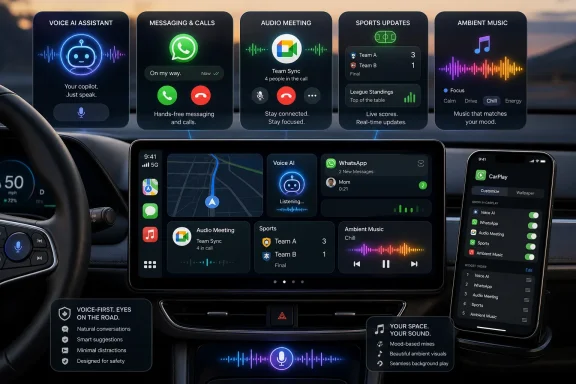
The changes bring voice-based access to ChatGPT and Perplexity, Apple Sports widgets, an Ambient Music widget, WhatsApp, and Google Meet to CarPlay. Individually, they are focused additions rather than a dashboard overhaul. Together, they make CarPlay more useful for voice interaction, communication, audio, and glanceable information without attempting to reproduce every function of the corresponding iPhone apps.
The April additions are not primarily about changing how CarPlay looks. They expand what drivers can do through voice controls, compact widgets, and simplified versions of familiar services.
According to the supplied AOL reporting, two changes arrived with iOS 26.4: support for compatible voice-based AI chatbot experiences and an Ambient Music widget. Apple Sports, WhatsApp, and Google Meet reached CarPlay through updates to their respective apps.
That difference matters when a newly announced feature does not appear. Updating iOS is sufficient for some additions, while others require a specific app version, an installed app, an active sign-in, or manual widget configuration.
For example, an iPhone may be running iOS 26.4 without having Apple Sports 3.10 installed. Google Meet may be present but unusable until an account is signed in. Apple Sports and Ambient Music may also need to be added to the CarPlay widget layout before they become visible where the user expects them.
The AI rollout is similarly limited to the services identified in the source reporting. ChatGPT and Perplexity are the highlighted CarPlay-compatible chatbot options. The absence of other major chatbot services from that reporting should not be treated as proof that they will never support CarPlay, only that they were not among the documented additions covered here.
The result is capability without full interface parity. CarPlay can provide access to a service without duplicating everything available on the iPhone.
For AI, the emphasis is spoken conversation. For WhatsApp, it is voice communication and recent-chat access. For Google Meet, it is joining a scheduled meeting and participating through audio. Apple Sports and Ambient Music use widgets to keep interaction brief.
That narrower approach is appropriate for a dashboard. A CarPlay feature should be evaluated less by how completely it reproduces an iPhone app and more by whether it handles a common task without encouraging the driver to pick up the phone.
At the time covered by the source material, ChatGPT and Perplexity were the two prominent AI chatbot apps identified as available through CarPlay. This is not the same as saying every major chatbot is supported or that the available apps expose their complete mobile feature sets.
The CarPlay experience centers on voice. Drivers can speak to the chatbot and hear its response, but CarPlay does not become a conventional chatbot window with a keyboard, long blocks of text, generated images, or video.
This limitation is central to the feature rather than a minor omission. The dashboard version is designed for conversation, not for reproducing the visual experience of an AI app on an iPhone.
Drivers should nevertheless use judgment about when to begin or continue a complicated conversation. An interface can reduce the need to look at the screen without eliminating the mental demands of a detailed discussion. Questions requiring careful comparison, note-taking, verification, or sustained concentration are better handled after parking.
The same caution applies to accuracy. Voice delivery does not guarantee that an AI-generated answer is correct. Information involving navigation, safety, money, health, legal matters, or other consequential decisions should not be accepted solely because it was presented confidently through the car’s speakers.
Future participation by additional AI providers is possible, but it should be treated as an open question rather than a promised outcome. Availability will need to be judged from actual app releases and documented support, not assumptions about what other companies are likely to do.
The interface provides recent-chat context and supports actions including voice messages and calls. That makes it easier to continue a conversation with someone who is already visible in the recent list.
The CarPlay experience does not reproduce the full WhatsApp interface. Drivers cannot use it as a general-purpose conversation browser filled with message text, photos, videos, reactions, GIFs, and stickers.
That reduction is appropriate for an in-car version. WhatsApp on CarPlay is intended to help complete a small number of communication tasks, not to recreate the social and visual experience available on a phone, tablet, or computer.
A recent-chat list can also help resolve one of the weaknesses of a voice-only system: uncertainty about which contact or conversation is being selected. Limited visual context can support a quick decision without turning the dashboard into a scrolling messaging application.
Voice control remains important even with a dedicated app interface. The visible structure and spoken interaction can complement each other, giving the driver enough context to choose a conversation while keeping the main communication task voice-based.
Users looking for WhatsApp in CarPlay should first install or update the app on the paired iPhone. The source material does not establish a separate CarPlay configuration sequence beyond having the appropriate WhatsApp release available.
The prerequisite is straightforward: Google Meet must be installed on the iPhone, and the user must already be signed in. Anyone troubleshooting a missing or unusable Meet experience should verify those two points before changing broader CarPlay settings.
Once available, the CarPlay interface can present scheduled meeting information and provide a direct way to join. The user participates without incoming video or shared visual content appearing on the CarPlay display.
That limitation has practical consequences. A driver may be able to listen and speak during a meeting but may not be able to follow a presentation, demonstration, document, chart, or screen share. Meeting organizers should not assume that an audio-only participant has access to the same information as colleagues seated at computers.
The feature is therefore best understood as an audio continuity option. It may help someone join a discussion during a transition between locations, but it does not provide the complete Google Meet experience.
The same principle applies to individual users. If a meeting becomes complex, contentious, or dependent on shared visual material, the appropriate response may be to leave the discussion, listen without actively participating, or park safely before continuing.
Widgets can surface selected information or a small number of controls within an existing CarPlay layout. They require less navigation than opening an app and moving through multiple pages.
Apple Sports 3.10 supplies two CarPlay widgets: My Teams and Leagues. The source material identifies those widget names but does not provide enough verified detail to define every data field, event state, or personalization rule they may display. Users should therefore expect compact sports information rather than assume a specific schedule, score, or favorite-team presentation in every circumstance.
Ambient Music uses a widget to provide quick access to curated audio choices. Instead of recreating a complete music catalog, it offers a shorter route to playback organized around broad moods or activities.
This approach is less visually expansive than filling the dashboard with app icons, but it is better matched to the purpose of CarPlay. A full application often requires the user to enter, navigate, make several choices, and exit. A widget can place the relevant action or information closer to the surface.
April 2026: WhatsApp added its CarPlay experience for recent-chat access and voice-centered communication.
April 2026: iOS 26.4 added support for compatible voice-based AI chatbot apps and brought the Ambient Music widget to CarPlay.
Late April 2026: Apple Sports 3.10 added the My Teams and Leagues widgets for CarPlay.
June 2026, anticipated rather than shipping: Apple was expected to discuss the next major iOS release, referred to in the source material as iOS 27. Any related CarPlay, interface, or Siri changes should be treated as expected announcements until Apple formally confirms them and the features ship.
The source material supports the existence and names of the widgets but does not establish the precise information each widget will show in all situations. It would therefore be premature to promise that My Teams always presents a particular favorite-team view or that Leagues always displays a defined set of past and upcoming events.
The reliable takeaway is simpler: the widgets provide compact access to Apple Sports information through CarPlay. Exactly what appears may depend on the information available to the app and the widget configuration selected by the user.
Setup takes place through the iPhone. After updating Apple Sports to version 3.10, go to:
Settings > General > CarPlay > My Car > Widgets
From there, select the available Sports widgets for the CarPlay layout.
Using the iPhone for configuration also lets users arrange the feature before beginning a trip. If the widgets do not appear, confirm the Apple Sports version and revisit the widget list for the correct vehicle under My Car.
The widgets should not be confused with a complete Apple Sports interface. Users should not expect all the statistics, standings, schedules, news, or other information that may be available elsewhere in the app.
The CarPlay widget emphasizes quick playback rather than detailed browsing. A user can choose an available Ambient Music option without searching through a large catalog of artists, albums, playlists, or individual tracks.
To add it, use the iPhone and open:
Settings > General > CarPlay > Widgets
The feature should then be available from the configured CarPlay widget layout.
Reduced choice is part of the appeal. Traditional music services are built around large catalogs and extensive recommendations. Ambient Music instead assumes that the listener wants to start suitable background audio with as little selection work as possible.
Drivers should still choose audio appropriate to the situation. Any option that makes a driver feel less alert should be changed or stopped. The presence of a category or playlist in a general-purpose audio feature does not mean it is suitable for every driving condition.
AI chatbots are voice-oriented rather than visual workspaces. WhatsApp supports selected communication tasks without becoming a full message and media browser. Google Meet allows audio participation without placing incoming video or shared screens on the dashboard. Apple Sports and Ambient Music use widgets instead of dense, multipage app interfaces.
These limitations should not automatically be read as unfinished development. They are part of what separates a dashboard experience from the corresponding iPhone app.
That does not make every use of the features appropriate while driving. A difficult conversation, an intense meeting, a complicated AI exchange, or repeated checking of sports information can be distracting even when the interface requires few taps.
CarPlay can limit what appears on the display. It cannot determine whether the subject of a call or conversation is consuming too much of the driver’s attention. Drivers remain responsible for deciding when to postpone an interaction or pull over safely.
The most useful standard is not whether a feature is technically available. It is whether it can be used without interfering with control of the vehicle and awareness of surrounding traffic.
For this group of features:
For Apple Sports, check the app version and then inspect Settings > General > CarPlay > My Car > Widgets. For Ambient Music, confirm iOS 26.4 and inspect Settings > General > CarPlay > Widgets. For Meet, open the iPhone app and verify the account sign-in. For WhatsApp, check for the current available app update.
It may also help to confirm that the correct vehicle is selected under My Car, especially for users who connect the same iPhone to more than one CarPlay-equipped vehicle.
Avoid assuming that every newly reported capability will appear as a conventional icon on the CarPlay Home Screen. Apple Sports and Ambient Music are widget-based additions, so searching only the app grid can make an installed feature appear to be missing.
Google Meet can provide audio access to scheduled meetings. That does not establish that employees should be required to join meetings while driving. Organizations may want to state clearly that safety takes priority and that in-car attendance is not expected.
The same caution applies to AI chatbot and messaging use. Existing organizational rules about confidential information, approved communication systems, account access, and responsible device use continue to apply. A voice interface does not remove those obligations.
Any broader enterprise policy will depend on the organization, its managed-device tools, its industry, and local law. Administrators should verify the controls available in their own environment rather than assume that every CarPlay feature can be managed independently.
The April additions already offer a clear practical direction without requiring speculation about unannounced products. CarPlay is gaining more voice interaction, more compact information, and more ways to continue communication from the iPhone, but each addition remains narrower than its full mobile counterpart.
That balance is the defining feature of this release. Users gain access to AI conversations, sports information, curated audio, WhatsApp communication, and Google Meet calls, yet the dashboard does not become an unrestricted phone screen.
For now, the best path is straightforward: install iOS 26.4, update Apple Sports to 3.10, update WhatsApp, install and sign in to Google Meet, and configure the two widget-based additions from the iPhone. Anything expected for June or iOS 27 belongs to the next chapter—and should not be mistaken for a feature already shipping today.
The changes bring voice-based access to ChatGPT and Perplexity, Apple Sports widgets, an Ambient Music widget, WhatsApp, and Google Meet to CarPlay. Individually, they are focused additions rather than a dashboard overhaul. Together, they make CarPlay more useful for voice interaction, communication, audio, and glanceable information without attempting to reproduce every function of the corresponding iPhone apps.
How to get each feature
- AI chatbots: Update the iPhone to iOS 26.4.
- Apple Sports: Update Apple Sports to version 3.10.
- Sports widgets: On the iPhone, open Settings > General > CarPlay > My Car > Widgets.
- Ambient Music: Update to iOS 26.4, then add it through Settings > General > CarPlay > Widgets.
- WhatsApp: Install or update WhatsApp on the iPhone.
- Google Meet: Install Google Meet on the iPhone and sign in.
 April Turned CarPlay Into More Than an App Launcher
The April additions are not primarily about changing how CarPlay looks. They expand what drivers can do through voice controls, compact widgets, and simplified versions of familiar services.According to the supplied AOL reporting, two changes arrived with iOS 26.4: support for compatible voice-based AI chatbot experiences and an Ambient Music widget. Apple Sports, WhatsApp, and Google Meet reached CarPlay through updates to their respective apps.
That difference matters when a newly announced feature does not appear. Updating iOS is sufficient for some additions, while others require a specific app version, an installed app, an active sign-in, or manual widget configuration.
For example, an iPhone may be running iOS 26.4 without having Apple Sports 3.10 installed. Google Meet may be present but unusable until an account is signed in. Apple Sports and Ambient Music may also need to be added to the CarPlay widget layout before they become visible where the user expects them.
The AI rollout is similarly limited to the services identified in the source reporting. ChatGPT and Perplexity are the highlighted CarPlay-compatible chatbot options. The absence of other major chatbot services from that reporting should not be treated as proof that they will never support CarPlay, only that they were not among the documented additions covered here.
Five Features, Five Focused Dashboard Roles
The five additions do not share one installation method or interface. What connects them is that each has been reduced to a focused set of functions suitable for use through CarPlay.| Addition | How it arrived | Primary CarPlay function | Requirement or setup | Main limitation |
|---|---|---|---|---|
| AI chatbots | iOS 26.4 and supported apps | Voice conversations with ChatGPT or Perplexity | Update the iPhone to iOS 26.4 and have a supported app | No typing or rich visual chatbot experience |
| Apple Sports | Apple Sports 3.10 | My Teams and Leagues widgets | Update the app and configure widgets in CarPlay settings | Widgets rather than a full CarPlay app |
| Ambient Music | iOS 26.4 | Start curated mood-based audio | Add it under Settings > General > CarPlay > Widgets | Focused playback choices rather than full music browsing |
| WhatsApp app update | Recent-chat access, voice messages, and calls | Install or update WhatsApp on the iPhone | No full message or media-browsing interface | |
| Google Meet | Google Meet app with CarPlay support | Join scheduled meetings and participate through audio | Install Google Meet and sign in | No incoming video or shared visual content on the CarPlay display |
For AI, the emphasis is spoken conversation. For WhatsApp, it is voice communication and recent-chat access. For Google Meet, it is joining a scheduled meeting and participating through audio. Apple Sports and Ambient Music use widgets to keep interaction brief.
That narrower approach is appropriate for a dashboard. A CarPlay feature should be evaluated less by how completely it reproduces an iPhone app and more by whether it handles a common task without encouraging the driver to pick up the phone.
AI Reaches the Dashboard Behind a Voice-Only Wall
The most consequential platform-level change in iOS 26.4 is support for compatible third-party conversational AI apps. It gives drivers access to spoken conversations with services that can respond to open-ended questions and follow-up prompts.At the time covered by the source material, ChatGPT and Perplexity were the two prominent AI chatbot apps identified as available through CarPlay. This is not the same as saying every major chatbot is supported or that the available apps expose their complete mobile feature sets.
The CarPlay experience centers on voice. Drivers can speak to the chatbot and hear its response, but CarPlay does not become a conventional chatbot window with a keyboard, long blocks of text, generated images, or video.
This limitation is central to the feature rather than a minor omission. The dashboard version is designed for conversation, not for reproducing the visual experience of an AI app on an iPhone.
Drivers should nevertheless use judgment about when to begin or continue a complicated conversation. An interface can reduce the need to look at the screen without eliminating the mental demands of a detailed discussion. Questions requiring careful comparison, note-taking, verification, or sustained concentration are better handled after parking.
The same caution applies to accuracy. Voice delivery does not guarantee that an AI-generated answer is correct. Information involving navigation, safety, money, health, legal matters, or other consequential decisions should not be accepted solely because it was presented confidently through the car’s speakers.
Editorial perspective: useful, but deliberately limited
The important development is not that CarPlay has become a complete AI workstation. It has not. The practical change is that supported chatbot conversations can now occur through a voice-oriented in-car interface.Future participation by additional AI providers is possible, but it should be treated as an open question rather than a promised outcome. Availability will need to be judged from actual app releases and documented support, not assumptions about what other companies are likely to do.
WhatsApp Becomes Native Without Becoming a Text Browser
WhatsApp’s CarPlay experience gives the service a more direct presence on the dashboard. Drivers can access recent conversations and use supported voice-centered communication features without opening WhatsApp on the iPhone.The interface provides recent-chat context and supports actions including voice messages and calls. That makes it easier to continue a conversation with someone who is already visible in the recent list.
The CarPlay experience does not reproduce the full WhatsApp interface. Drivers cannot use it as a general-purpose conversation browser filled with message text, photos, videos, reactions, GIFs, and stickers.
That reduction is appropriate for an in-car version. WhatsApp on CarPlay is intended to help complete a small number of communication tasks, not to recreate the social and visual experience available on a phone, tablet, or computer.
A recent-chat list can also help resolve one of the weaknesses of a voice-only system: uncertainty about which contact or conversation is being selected. Limited visual context can support a quick decision without turning the dashboard into a scrolling messaging application.
Voice control remains important even with a dedicated app interface. The visible structure and spoken interaction can complement each other, giving the driver enough context to choose a conversation while keeping the main communication task voice-based.
Users looking for WhatsApp in CarPlay should first install or update the app on the paired iPhone. The source material does not establish a separate CarPlay configuration sequence beyond having the appropriate WhatsApp release available.
Google Meet Makes Meetings Available Through Audio
Google Meet’s CarPlay support allows users to view scheduled meetings, join an invitation, and participate through audio. It is intended to provide continuity when a meeting begins while the user is in the car, not to turn the dashboard into a full video-conferencing display.The prerequisite is straightforward: Google Meet must be installed on the iPhone, and the user must already be signed in. Anyone troubleshooting a missing or unusable Meet experience should verify those two points before changing broader CarPlay settings.
Once available, the CarPlay interface can present scheduled meeting information and provide a direct way to join. The user participates without incoming video or shared visual content appearing on the CarPlay display.
That limitation has practical consequences. A driver may be able to listen and speak during a meeting but may not be able to follow a presentation, demonstration, document, chart, or screen share. Meeting organizers should not assume that an audio-only participant has access to the same information as colleagues seated at computers.
The feature is therefore best understood as an audio continuity option. It may help someone join a discussion during a transition between locations, but it does not provide the complete Google Meet experience.
Editorial perspective: availability is not an obligation
The presence of Google Meet on CarPlay does not mean employees should be expected to attend meetings while driving. Organizations and managers can choose to treat in-car participation as optional and recognize that some meetings require visual attention or detailed note-taking.The same principle applies to individual users. If a meeting becomes complex, contentious, or dependent on shared visual material, the appropriate response may be to leave the discussion, listen without actively participating, or park safely before continuing.
Widgets Add Utility Without Requiring Full Apps
Apple Sports and Ambient Music demonstrate how CarPlay can add useful functions without placing another conventional app interface on the dashboard.Widgets can surface selected information or a small number of controls within an existing CarPlay layout. They require less navigation than opening an app and moving through multiple pages.
Apple Sports 3.10 supplies two CarPlay widgets: My Teams and Leagues. The source material identifies those widget names but does not provide enough verified detail to define every data field, event state, or personalization rule they may display. Users should therefore expect compact sports information rather than assume a specific schedule, score, or favorite-team presentation in every circumstance.
Ambient Music uses a widget to provide quick access to curated audio choices. Instead of recreating a complete music catalog, it offers a shorter route to playback organized around broad moods or activities.
This approach is less visually expansive than filling the dashboard with app icons, but it is better matched to the purpose of CarPlay. A full application often requires the user to enter, navigate, make several choices, and exit. A widget can place the relevant action or information closer to the surface.
Timeline
Early April 2026: Google Meet was reported as adding CarPlay support for scheduled meeting access and audio participation.April 2026: WhatsApp added its CarPlay experience for recent-chat access and voice-centered communication.
April 2026: iOS 26.4 added support for compatible voice-based AI chatbot apps and brought the Ambient Music widget to CarPlay.
Late April 2026: Apple Sports 3.10 added the My Teams and Leagues widgets for CarPlay.
June 2026, anticipated rather than shipping: Apple was expected to discuss the next major iOS release, referred to in the source material as iOS 27. Any related CarPlay, interface, or Siri changes should be treated as expected announcements until Apple formally confirms them and the features ship.
Apple Sports Adds My Teams and Leagues Widgets
Apple Sports 3.10 adds My Teams and Leagues widgets to CarPlay. These are widgets rather than a full Apple Sports app designed for extended dashboard browsing.The source material supports the existence and names of the widgets but does not establish the precise information each widget will show in all situations. It would therefore be premature to promise that My Teams always presents a particular favorite-team view or that Leagues always displays a defined set of past and upcoming events.
The reliable takeaway is simpler: the widgets provide compact access to Apple Sports information through CarPlay. Exactly what appears may depend on the information available to the app and the widget configuration selected by the user.
Setup takes place through the iPhone. After updating Apple Sports to version 3.10, go to:
Settings > General > CarPlay > My Car > Widgets
From there, select the available Sports widgets for the CarPlay layout.
Using the iPhone for configuration also lets users arrange the feature before beginning a trip. If the widgets do not appear, confirm the Apple Sports version and revisit the widget list for the correct vehicle under My Car.
The widgets should not be confused with a complete Apple Sports interface. Users should not expect all the statistics, standings, schedules, news, or other information that may be available elsewhere in the app.
Ambient Music Treats Simplicity as a Feature
Ambient Music reaches CarPlay through iOS 26.4 and provides a compact way to start curated audio intended for broad moods or activities.The CarPlay widget emphasizes quick playback rather than detailed browsing. A user can choose an available Ambient Music option without searching through a large catalog of artists, albums, playlists, or individual tracks.
To add it, use the iPhone and open:
Settings > General > CarPlay > Widgets
The feature should then be available from the configured CarPlay widget layout.
Reduced choice is part of the appeal. Traditional music services are built around large catalogs and extensive recommendations. Ambient Music instead assumes that the listener wants to start suitable background audio with as little selection work as possible.
Drivers should still choose audio appropriate to the situation. Any option that makes a driver feel less alert should be changed or stopped. The presence of a category or playlist in a general-purpose audio feature does not mean it is suitable for every driving condition.
The Restrictions Define the CarPlay Experience
The April additions share a recurring pattern: CarPlay provides the useful core of a service while leaving out features that would demand sustained visual attention.AI chatbots are voice-oriented rather than visual workspaces. WhatsApp supports selected communication tasks without becoming a full message and media browser. Google Meet allows audio participation without placing incoming video or shared screens on the dashboard. Apple Sports and Ambient Music use widgets instead of dense, multipage app interfaces.
These limitations should not automatically be read as unfinished development. They are part of what separates a dashboard experience from the corresponding iPhone app.
That does not make every use of the features appropriate while driving. A difficult conversation, an intense meeting, a complicated AI exchange, or repeated checking of sports information can be distracting even when the interface requires few taps.
CarPlay can limit what appears on the display. It cannot determine whether the subject of a call or conversation is consuming too much of the driver’s attention. Drivers remain responsible for deciding when to postpone an interaction or pull over safely.
The most useful standard is not whether a feature is technically available. It is whether it can be used without interfering with control of the vehicle and awareness of surrounding traffic.
Troubleshooting Requires Checking iOS, Apps, Accounts, and Widgets
Users can no longer assume that every missing CarPlay addition will be fixed by updating iOS alone.For this group of features:
- AI chatbot support and Ambient Music require iOS 26.4.
- Apple Sports widgets require Apple Sports 3.10.
- WhatsApp requires the relevant app to be installed or updated.
- Google Meet requires the app to be installed and the user signed in.
- Apple Sports and Ambient Music require widget configuration on the iPhone.
For Apple Sports, check the app version and then inspect Settings > General > CarPlay > My Car > Widgets. For Ambient Music, confirm iOS 26.4 and inspect Settings > General > CarPlay > Widgets. For Meet, open the iPhone app and verify the account sign-in. For WhatsApp, check for the current available app update.
It may also help to confirm that the correct vehicle is selected under My Car, especially for users who connect the same iPhone to more than one CarPlay-equipped vehicle.
Avoid assuming that every newly reported capability will appear as a conventional icon on the CarPlay Home Screen. Apple Sports and Ambient Music are widget-based additions, so searching only the app grid can make an installed feature appear to be missing.
Limited Administrative Guidance for Managed Devices
The new communication and AI options may be relevant to organizations that issue or support iPhones, but policy decisions should be separated from claims about the technology itself.Google Meet can provide audio access to scheduled meetings. That does not establish that employees should be required to join meetings while driving. Organizations may want to state clearly that safety takes priority and that in-car attendance is not expected.
The same caution applies to AI chatbot and messaging use. Existing organizational rules about confidential information, approved communication systems, account access, and responsible device use continue to apply. A voice interface does not remove those obligations.
Any broader enterprise policy will depend on the organization, its managed-device tools, its industry, and local law. Administrators should verify the controls available in their own environment rather than assume that every CarPlay feature can be managed independently.
Action checklist for admins
- Confirm which supported iPhones are intended to receive iOS 26.4.
- Update Apple Sports to version 3.10 on devices that need the Sports widgets.
- Verify that Google Meet is installed and that the intended account is signed in before vehicle testing.
- Install or update WhatsApp where its CarPlay experience is approved for use.
- Configure Apple Sports and Ambient Music widgets from the iPhone while the vehicle is parked.
- Confirm that users know the path Settings > General > CarPlay > My Car > Widgets for vehicle-specific widget setup.
- Test audio output, microphone input, steering-wheel controls, and call behavior in each supported vehicle.
- Verify that meeting participants understand CarPlay users may not see shared screens or other visual material.
- Remind employees that in-car meeting attendance is optional unless the vehicle is safely parked.
- Reinforce existing rules for confidential information when using messaging or AI services.
- Document which features require an iOS update, which require an app update, and which require an account sign-in.
- Provide a short troubleshooting sequence so users check app versions and widget settings before requesting a full CarPlay reset.
What Comes Next Should Remain an Expectation, Not a Shipping Claim
The source material anticipated that Apple would discuss iOS 27 in June 2026, potentially including interface refinements and new Siri capabilities. Those possibilities should remain explicitly framed as expectations until Apple announces them and provides release details.The April additions already offer a clear practical direction without requiring speculation about unannounced products. CarPlay is gaining more voice interaction, more compact information, and more ways to continue communication from the iPhone, but each addition remains narrower than its full mobile counterpart.
That balance is the defining feature of this release. Users gain access to AI conversations, sports information, curated audio, WhatsApp communication, and Google Meet calls, yet the dashboard does not become an unrestricted phone screen.
For now, the best path is straightforward: install iOS 26.4, update Apple Sports to 3.10, update WhatsApp, install and sign in to Google Meet, and configure the two widget-based additions from the iPhone. Anything expected for June or iOS 27 belongs to the next chapter—and should not be mistaken for a feature already shipping today.
References
- Primary source: aol.com
Published: 2026-07-11T21:50:11.598663
5 New Features Added To Apple CarPlay In April 2026 - AOL
Apple CarPlay has already gained quite a few new features in 2026, and April has been no different. Here's five new features to enjoy behind the wheel.www.aol.com - Related coverage: workspaceupdates.googleblog.com
Google Workspace Updates: Google Meet is now available on CarPlay
workspaceupdates.googleblog.com
- Related coverage: macrumors.com
iOS 26.4 Adds Two New Features to CarPlay
iOS 26.4 was released today, and it includes a couple of new features for CarPlay: an Ambient Music widget and support for voice-based chatbot apps. To update your iPhone 11 or newer to iOS 26.4, open the Settings app and tap on General → Software Update. CarPlay will automatically offer the new...www.macrumors.com - Official source: apps.apple.com
- Related coverage: 9to5mac.com
iOS 26.4 gave CarPlay two new features, with another big one coming - 9to5Mac
iOS 26.4 recently gave CarPlay two new features while also laying the groundwork for another big upgrade soon.9to5mac.com - Related coverage: idownloadblog.com
How to use WhatsApp in your car with CarPlay
Find out how to send messages, listen to new texts, and make calls over WhatsApp directly from your car’s screen using Apple CarPlay. www.idownloadblog.com
- Related coverage: neowin.net
WhatsApp launches native CarPlay app for iPhone users in its latest major update - Neowin
WhatsApp has launched a new native app for CarPlay with an upgraded experience. Here's what it offers to iPhone users. www.neowin.net
- Related coverage: news9live.com
WhatsApp Apple CarPlay app launched with native dashboard support, chat and call features | Tech News - News9live
WhatsApp has rolled out a native app for Apple CarPlay with its latest iOS update. Users can now access chats, calls, and favourite contacts directly from the car dashboard. The update removes the need for Siri-only controls and focuses on safer, simpler driving interactions.www.news9live.com
- Official source: support.apple.com
Soundtrack your day with Ambient Music on iPhone or iPad - Apple Support (SG)
To help you focus, create a calm moment, or wind down your day, listen to a mood-based playlist in Ambient Music.support.apple.com
- Official source: apple.com
- Official source: developer.apple.com
- Related coverage: techradar.com
iOS 26.4 is here with some handy upgrades for your iPhone — here are the 5 best new features | TechRadar
Time to tune up your iPhonewww.techradar.com - Related coverage: tomsguide.com
Forget Siri — I just tried the new CarPlay with iOS 26.5 beta and now I can talk to ChatGPT while I drive | Tom's Guide
Soon after iOS 26.4 rolled out, I tested out some of the new CarPlay features that came with the new iOS 26.5 beta 1 update — like adding more support for different AI chatbots.www.tomsguide.com - Related coverage: t3.com
Apple CarPlay looks set to snag a killer new app very soon | T3
Finally WhatsApp offers proper controls that aren't voice commanded alonewww.t3.com - Related coverage: cincodias.elpais.com
WhatsApp ya funciona en CarPlay de Apple, pero hay algo que debes saber | Lifestyle | SmartLife | Cinco Días
Se incluye una app propia pensada para darle uso en el coche, por lo que se ha logrado una buena integración.cincodias.elpais.com - Related coverage: whathifi.com
iOS Beta update adds five new Apple Music features (inspired by Spotify) | What Hi-Fi?
An AI playlist tool and concert info are the headline updateswww.whathifi.com - Related coverage: phonearena.com
iOS 27: Release date expectations, new features, and compatible iPhones - PhoneArena
Here's everything Apple announced for iOS 27 and the new Siri AI during WWDC 2026.www.phonearena.com - Official source: podcasts.apple.com
iOS Today (Video) - Video Podcast - Apple Podcasts
Listen to and watch iOS Today (Video) podcast on Apple Podcasts. podcasts.apple.com
- Related coverage: techcrunch.com
iOS 27 features we didn't see onstage | TechCrunch
While iOS 27 isn't bringing major changes, it's still got many small features that could improve everyday usage for iPhone users.techcrunch.com
