

WidBar, a free beta app from developer Andrea Del Bello, lets Windows 11 users place small live widgets in unused taskbar space, with early support for media controls and system metrics and a Store-based model for third-party widget distribution. That sounds like a small utility story, because in one sense it is. But it also exposes a larger failure in Windows 11: Microsoft has spent years insisting widgets matter while refusing to make them feel indispensable. A lone developer is not replacing the Windows shell, but WidBar understands something Microsoft keeps missing — glanceable information belongs where users already look.
Windows 11’s taskbar is one of the most scrutinized strips of real estate in consumer computing. Microsoft has redesigned it, restricted it, slowly restored missing features, and used it as a launchpad for Search, Copilot, Widgets, Teams Chat, and whatever else Redmond wanted users to notice that quarter. Yet for all that attention, the taskbar still contains something oddly valuable: dead air.
WidBar’s pitch is almost embarrassingly simple. Instead of forcing widgets into a flyout panel, it lets users drop them into the empty areas of the taskbar itself. If music is playing, a Now Playing widget can show media controls. If a user wants machine telemetry, a System Metrics widget can surface CPU, memory, GPU, disk, or network data without opening Task Manager, Game Bar, a browser tab, or a separate monitoring app.
That is not a revolutionary interface in the abstract. Windows users have been decorating desktops with Rainmeter skins, hardware monitors, launchers, and tray utilities for decades. What makes WidBar interesting is that it works with the Windows 11 taskbar as users actually experience it: a persistent, always-visible horizontal control surface that Microsoft has made cleaner and less flexible at the same time.
The app is still in beta, and that caveat matters. Two widgets do not make an ecosystem, and anyone treating WidBar as a finished platform is getting ahead of the software. But early utilities often reveal more about user demand than mature platforms do, precisely because they emerge where the official product has left a gap.
That model is not useless. Weather, calendar entries, photos, stock tickers, sports scores, traffic, and Microsoft 365 snippets can all make sense in a board. But the board makes widgets feel like a place to visit rather than a layer of the operating system. It asks for attention before it earns utility.
The original sin was the news feed. Windows 11’s Widgets panel too often felt less like a personal dashboard and more like a rebranded MSN surface, with widgets attached to justify its presence. Microsoft has been moving toward a quieter, more customizable experience, including changes that reduce the prominence of the feed, but the reputational damage is real. For many users, the word Widgets in Windows 11 does not mean useful mini-apps; it means a panel they turned off.
WidBar’s approach dodges that baggage. It does not begin with a content feed. It begins with a control you might actually need while working. That difference is subtle but fundamental: Microsoft made widgets an engagement surface, while WidBar treats them as tools.
That absence captures the problem better than any app count could. A media control widget is not a niche request from power users running obscure workflows. It is the kind of baseline, universally understandable feature that should have appeared early in the life of the panel. Music, podcasts, video streams, browser playback, and conferencing audio are daily realities for Windows users.
Microsoft’s current placement of media controls in system flyouts is defensible, but it is not a substitute for a flexible widget. The Action Center and quick settings area are transient controls; a widget is persistent information. One is where you go to adjust a thing, the other is where a thing lives while you work.
WidBar’s Now Playing widget is therefore more than a convenience. It is a critique. It says the Windows shell has the underlying capability, users have the demand, and the missing piece is not technology but product priority.
WidBar instead bets on the taskbar as the dashboard. That is risky, because taskbar space is finite and highly personal. A bad widget on the taskbar is more annoying than a bad widget hidden in a board. But it is also powerful because the taskbar has one thing the Widgets panel lacks: permanence.
For ultrawide monitor users, multi-monitor users, and anyone who keeps only a handful of pinned apps, there is often unused horizontal space sitting between the centered app icons and the system tray. Microsoft’s own design made that emptiness more visible by centering icons and simplifying the bar. WidBar looks at that negative space and sees opportunity.
This is the same reason small utilities like traffic meters, clock replacements, and hardware monitors continue to thrive among enthusiasts. The desktop is not just a canvas for apps; it is a cockpit. Users who care about performance, music, meetings, downloads, battery health, or system state want those signals close to their hands, not buried under another UI layer.
But an ecosystem is not created by a category page. It is created by incentives, defaults, examples, and momentum. Developers build for surfaces that users visit, and users visit surfaces that solve problems. Windows 11’s Widgets panel has struggled on both sides of that loop.
The reported count of available Store widgets remains strikingly small for a platform with Windows’ reach. More importantly, the selection lacks the gravitational pull that would make users check the board every day. A widget ecosystem can survive without thousands of options if the core set is excellent. Windows 11 does not yet have that luxury.
There is a telling contrast with smartphones. On iOS and Android, widgets became useful not merely because Apple and Google exposed APIs, but because the home screen and lock screen are habit-forming surfaces. Developers had a reason to compete there. Windows has not yet made its widget surface feel equally inevitable.
That model is clever because it borrows trust and distribution from the platform while avoiding the overhead of building an entire marketplace. If it works as advertised, a developer can publish a widget-like companion app through familiar Store channels, and a user can install it without learning a new plugin ritual. For a beta utility, that is a serious architectural choice.
It also shows a pragmatic understanding of Windows culture. Enthusiast software often dies when installation is too fiddly, when plugins break silently, or when users cannot tell what is trustworthy. Store distribution does not solve every problem, and plenty of Windows power users remain skeptical of the Store, but it gives WidBar a cleaner path than the traditional “download this ZIP from a forum thread” model.
There is a larger irony here. WidBar may succeed by using Microsoft’s own distribution machinery to route around Microsoft’s underwhelming widget experience. That is not rebellion so much as opportunism. The platform exposed enough seams for a third-party developer to build the thing many users assumed the platform vendor would build first.
There are also ordinary software questions. How much memory does WidBar consume? How reliably does it handle display scaling? What happens on rotated monitors, auto-hidden taskbars, multiple DPI environments, corporate lockdowns, or heavily customized setups? How cleanly do widgets unload, update, and fail?
Those are not reasons to dismiss the app. They are reasons to evaluate it like a serious shell-adjacent utility rather than a novelty. Enthusiasts may tolerate rough edges in exchange for immediate value; administrators generally will not. If WidBar grows beyond hobbyist adoption, stability and predictability will matter as much as the widget catalog.
Security and privacy deserve the same scrutiny. A widget surface that invites third-party mini-apps to live persistently in the taskbar must be conservative about permissions, telemetry, and data access. The Microsoft Store model helps, but it is not a magic shield. A widget that displays useful information often has to observe useful information, and that is exactly where trust becomes the product.
The discomfort is just as obvious. Enterprises spend years trying to reduce shell variability, not increase it. Third-party widgets on the taskbar introduce support questions, policy questions, accessibility questions, and lifecycle questions. If the widget stops updating, is the device noncompliant or is the widget broken? If the taskbar looks different across departments, who owns the help desk confusion?
Microsoft could solve some of this with proper management hooks. A mature version of the concept would need policies for enabling or disabling the host, allow-listing widget packages, controlling placement, and preventing consumer widgets from appearing on managed machines. Without that, WidBar will remain mostly an enthusiast and prosumer tool.
Still, enterprise caution should not be mistaken for lack of value. IT departments already rely on tray agents, notification clients, management portals, and custom line-of-business launchers. A controlled widget strip could be more humane than many of those options. The problem is not the idea; it is whether the implementation can be governed.
That history matters because widgets are inherently a boundary problem. They are small enough to feel harmless, but privileged enough to become risky. They sit close to the shell, run persistently, and often consume network data or system state. The more capable they become, the more they resemble small applications with a better seat.
Modern app packaging, sandboxing, Store review, and Windows security architecture give today’s developers better tools than the gadget era had. But the fundamental tension remains. Users want widgets to be powerful, personal, and always available. Platform vendors want them to be safe, predictable, and manageable.
WidBar is interesting because it does not pretend that tension vanishes. By using packaged apps and Store distribution, it gestures toward a safer model than old-school gadget downloads. But it also revives the old dream: a Windows desktop where small utilities can live in plain sight rather than hiding inside full applications.
The less generous reading is that Microsoft has spent years tuning the wrong instrument. The core question is not whether the Widgets board is cleaner this month than last month. The core question is why a Windows user should open it at all. If the answer is weather and headlines, the feature will remain disposable.
WidBar’s existence sharpens that question because it demonstrates a different theory of value. A widget does not need to be a destination. It can be ambient. It can be a narrow strip of state that saves one click, one glance, one context switch.
That is where Microsoft’s product instincts seem divided. The company wants Windows to be cleaner and more modern, but it also wants surfaces for services, feeds, recommendations, and AI entry points. Widgets got caught between those ambitions. They were supposed to be useful, but they were also useful to Microsoft.
The word restraint is doing a lot of work there. A taskbar widget cannot behave like a miniature web page screaming for attention. It has to be glanceable, legible, low-power, and visually subordinate to the user’s work. The taskbar is prime territory precisely because it is quiet most of the time.
That gives WidBar a design challenge Microsoft knows well: success can ruin the surface. If every developer treats taskbar space as a billboard, users will uninstall the host or bury the widgets. If developers treat it as a disciplined status layer, the taskbar becomes more valuable without becoming more chaotic.
The best version of WidBar would not be a carnival of tiny apps. It would be a carefully constrained lane for persistent state. That distinction is the difference between a productivity feature and a new class of desktop clutter.
This is why small tools can generate outsized attention. They do not need to defeat Microsoft at scale. They only need to show that a missing option was possible all along. When a developer fills an empty taskbar area with a media widget, it retroactively makes the official experience look less inevitable and more like a choice.
That dynamic has repeated across Windows history. Start menu replacements, Explorer enhancers, window managers, tiling tools, tray utilities, and desktop customization apps flourish when Microsoft standardizes around the median user and leaves enthusiasts behind. Sometimes Microsoft later absorbs the idea. Sometimes it ignores it. Sometimes it breaks it accidentally.
WidBar now enters that familiar bargain. It can delight the users Microsoft underserves, but it must live on a platform whose owner may change direction at any time. That uncertainty is part of the Windows customization tradition, for better and worse.
Microsoft’s Widgets board has often felt optimized for engagement. Open the panel, consume a feed, click into services, browse cards, personalize the stream. Even when the company improves the experience, the board still inherits that engagement-surface DNA.
WidBar is optimized for glanceability. The best taskbar widget is not something users browse; it is something they absorb while doing something else. It reduces interaction rather than generating it.
That distinction matters because desktop operating systems are under pressure from every direction. Browsers want to be operating systems. AI assistants want to be front doors. Cloud services want notification channels. The user’s attention is the scarce resource, and Windows cannot afford to squander it on surfaces that feel self-serving.
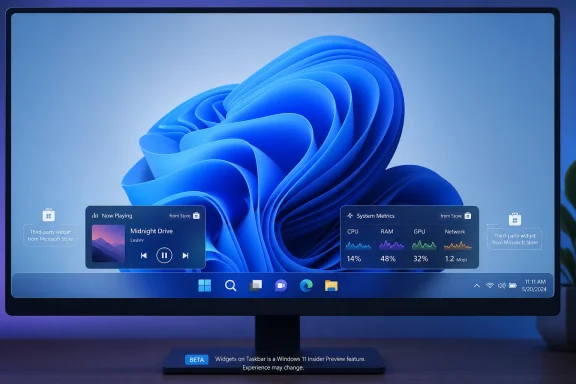 A Tiny Beta App Finds the Space Microsoft Left Empty
Windows 11’s taskbar is one of the most scrutinized strips of real estate in consumer computing. Microsoft has redesigned it, restricted it, slowly restored missing features, and used it as a launchpad for Search, Copilot, Widgets, Teams Chat, and whatever else Redmond wanted users to notice that quarter. Yet for all that attention, the taskbar still contains something oddly valuable: dead air.WidBar’s pitch is almost embarrassingly simple. Instead of forcing widgets into a flyout panel, it lets users drop them into the empty areas of the taskbar itself. If music is playing, a Now Playing widget can show media controls. If a user wants machine telemetry, a System Metrics widget can surface CPU, memory, GPU, disk, or network data without opening Task Manager, Game Bar, a browser tab, or a separate monitoring app.
That is not a revolutionary interface in the abstract. Windows users have been decorating desktops with Rainmeter skins, hardware monitors, launchers, and tray utilities for decades. What makes WidBar interesting is that it works with the Windows 11 taskbar as users actually experience it: a persistent, always-visible horizontal control surface that Microsoft has made cleaner and less flexible at the same time.
The app is still in beta, and that caveat matters. Two widgets do not make an ecosystem, and anyone treating WidBar as a finished platform is getting ahead of the software. But early utilities often reveal more about user demand than mature platforms do, precisely because they emerge where the official product has left a gap.
Windows 11 Has Widgets, but It Still Lacks a Widget Habit
Microsoft’s current Widgets experience has always suffered from a mismatch between name and behavior. A widget should be a small, immediate, useful thing. Windows 11’s Widgets board is instead a destination: click or hover, wait for the panel, scan the cards, endure or disable the feed, and then maybe find the information you wanted.That model is not useless. Weather, calendar entries, photos, stock tickers, sports scores, traffic, and Microsoft 365 snippets can all make sense in a board. But the board makes widgets feel like a place to visit rather than a layer of the operating system. It asks for attention before it earns utility.
The original sin was the news feed. Windows 11’s Widgets panel too often felt less like a personal dashboard and more like a rebranded MSN surface, with widgets attached to justify its presence. Microsoft has been moving toward a quieter, more customizable experience, including changes that reduce the prominence of the feed, but the reputational damage is real. For many users, the word Widgets in Windows 11 does not mean useful mini-apps; it means a panel they turned off.
WidBar’s approach dodges that baggage. It does not begin with a content feed. It begins with a control you might actually need while working. That difference is subtle but fundamental: Microsoft made widgets an engagement surface, while WidBar treats them as tools.
The Now Playing Widget Is the Small Feature That Says the Most
The most damning part of the WidBar story is not that it has a Now Playing widget. It is that Microsoft does not already have an obvious, first-party equivalent in the Widgets panel. Windows already knows what is playing. It already exposes media controls through system UI. It already has a dedicated widget framework. Somehow, those pieces still do not meet in the place named Widgets.That absence captures the problem better than any app count could. A media control widget is not a niche request from power users running obscure workflows. It is the kind of baseline, universally understandable feature that should have appeared early in the life of the panel. Music, podcasts, video streams, browser playback, and conferencing audio are daily realities for Windows users.
Microsoft’s current placement of media controls in system flyouts is defensible, but it is not a substitute for a flexible widget. The Action Center and quick settings area are transient controls; a widget is persistent information. One is where you go to adjust a thing, the other is where a thing lives while you work.
WidBar’s Now Playing widget is therefore more than a convenience. It is a critique. It says the Windows shell has the underlying capability, users have the demand, and the missing piece is not technology but product priority.
The Taskbar Is Becoming the Real Dashboard
The Windows desktop has always had competing zones of attention. The Start menu launches, the system tray whispers, the desktop stores clutter, and the taskbar anchors everything. Widgets should have been the layer that tied those zones together, but Microsoft placed them mostly off-screen, behind a button and a panel.WidBar instead bets on the taskbar as the dashboard. That is risky, because taskbar space is finite and highly personal. A bad widget on the taskbar is more annoying than a bad widget hidden in a board. But it is also powerful because the taskbar has one thing the Widgets panel lacks: permanence.
For ultrawide monitor users, multi-monitor users, and anyone who keeps only a handful of pinned apps, there is often unused horizontal space sitting between the centered app icons and the system tray. Microsoft’s own design made that emptiness more visible by centering icons and simplifying the bar. WidBar looks at that negative space and sees opportunity.
This is the same reason small utilities like traffic meters, clock replacements, and hardware monitors continue to thrive among enthusiasts. The desktop is not just a canvas for apps; it is a cockpit. Users who care about performance, music, meetings, downloads, battery health, or system state want those signals close to their hands, not buried under another UI layer.
Microsoft’s Widget Ecosystem Still Feels Like an Afterthought
Microsoft can argue, fairly, that Windows 11 widgets are not abandoned. The company has documented the experience, opened pathways for supported apps, and continued tweaking the board. The Microsoft Store includes a widgets category, and the operating system gives users ways to discover more supported widgets.But an ecosystem is not created by a category page. It is created by incentives, defaults, examples, and momentum. Developers build for surfaces that users visit, and users visit surfaces that solve problems. Windows 11’s Widgets panel has struggled on both sides of that loop.
The reported count of available Store widgets remains strikingly small for a platform with Windows’ reach. More importantly, the selection lacks the gravitational pull that would make users check the board every day. A widget ecosystem can survive without thousands of options if the core set is excellent. Windows 11 does not yet have that luxury.
There is a telling contrast with smartphones. On iOS and Android, widgets became useful not merely because Apple and Google exposed APIs, but because the home screen and lock screen are habit-forming surfaces. Developers had a reason to compete there. Windows has not yet made its widget surface feel equally inevitable.
WidBar’s Developer Model Is the Clever Part
The most promising part of WidBar may not be its first two widgets at all. According to Del Bello’s description, each WidBar widget is packaged as a small app distributed through the Microsoft Store, and WidBar detects installed widgets automatically. There is no separate plugin store, no manual copying into an app folder, and no developer gatekeeping by the WidBar author.That model is clever because it borrows trust and distribution from the platform while avoiding the overhead of building an entire marketplace. If it works as advertised, a developer can publish a widget-like companion app through familiar Store channels, and a user can install it without learning a new plugin ritual. For a beta utility, that is a serious architectural choice.
It also shows a pragmatic understanding of Windows culture. Enthusiast software often dies when installation is too fiddly, when plugins break silently, or when users cannot tell what is trustworthy. Store distribution does not solve every problem, and plenty of Windows power users remain skeptical of the Store, but it gives WidBar a cleaner path than the traditional “download this ZIP from a forum thread” model.
There is a larger irony here. WidBar may succeed by using Microsoft’s own distribution machinery to route around Microsoft’s underwhelming widget experience. That is not rebellion so much as opportunism. The platform exposed enough seams for a third-party developer to build the thing many users assumed the platform vendor would build first.
Beta Software Is Still Beta Software
The excitement around WidBar should not obscure the obvious caution signs. Anything that inserts live UI into the taskbar is operating near sensitive territory. Windows shell behavior changes across releases, Insider builds, cumulative updates, and feature enablement waves. A utility that feels seamless today can become fragile tomorrow if Microsoft adjusts taskbar internals.There are also ordinary software questions. How much memory does WidBar consume? How reliably does it handle display scaling? What happens on rotated monitors, auto-hidden taskbars, multiple DPI environments, corporate lockdowns, or heavily customized setups? How cleanly do widgets unload, update, and fail?
Those are not reasons to dismiss the app. They are reasons to evaluate it like a serious shell-adjacent utility rather than a novelty. Enthusiasts may tolerate rough edges in exchange for immediate value; administrators generally will not. If WidBar grows beyond hobbyist adoption, stability and predictability will matter as much as the widget catalog.
Security and privacy deserve the same scrutiny. A widget surface that invites third-party mini-apps to live persistently in the taskbar must be conservative about permissions, telemetry, and data access. The Microsoft Store model helps, but it is not a magic shield. A widget that displays useful information often has to observe useful information, and that is exactly where trust becomes the product.
Enterprise IT Will See the Promise and the Problem
For sysadmins, WidBar is both tempting and uncomfortable. The temptation is obvious: a taskbar widget could expose VPN state, device compliance, ticket queue status, battery health, backup state, update deadlines, or endpoint security posture in a place users cannot easily miss. That is a far more direct communication channel than a toast notification users dismiss on reflex.The discomfort is just as obvious. Enterprises spend years trying to reduce shell variability, not increase it. Third-party widgets on the taskbar introduce support questions, policy questions, accessibility questions, and lifecycle questions. If the widget stops updating, is the device noncompliant or is the widget broken? If the taskbar looks different across departments, who owns the help desk confusion?
Microsoft could solve some of this with proper management hooks. A mature version of the concept would need policies for enabling or disabling the host, allow-listing widget packages, controlling placement, and preventing consumer widgets from appearing on managed machines. Without that, WidBar will remain mostly an enthusiast and prosumer tool.
Still, enterprise caution should not be mistaken for lack of value. IT departments already rely on tray agents, notification clients, management portals, and custom line-of-business launchers. A controlled widget strip could be more humane than many of those options. The problem is not the idea; it is whether the implementation can be governed.
The Ghost of Desktop Gadgets Still Haunts Windows
Microsoft’s hesitation around widgets did not appear from nowhere. Windows has been here before. Vista and Windows 7 had Desktop Gadgets, which offered clocks, calendars, meters, feeds, and third-party mini-apps before Microsoft eventually backed away from the model amid security concerns and shifting design priorities.That history matters because widgets are inherently a boundary problem. They are small enough to feel harmless, but privileged enough to become risky. They sit close to the shell, run persistently, and often consume network data or system state. The more capable they become, the more they resemble small applications with a better seat.
Modern app packaging, sandboxing, Store review, and Windows security architecture give today’s developers better tools than the gadget era had. But the fundamental tension remains. Users want widgets to be powerful, personal, and always available. Platform vendors want them to be safe, predictable, and manageable.
WidBar is interesting because it does not pretend that tension vanishes. By using packaged apps and Store distribution, it gestures toward a safer model than old-school gadget downloads. But it also revives the old dream: a Windows desktop where small utilities can live in plain sight rather than hiding inside full applications.
Microsoft Keeps Optimizing the Panel Instead of the Purpose
The most generous reading of Microsoft’s widget strategy is that the company has been iterating toward sanity. Reducing feed noise, improving board layouts, and making widgets easier to discover are all worthwhile. A less distracting panel is better than a noisy one.The less generous reading is that Microsoft has spent years tuning the wrong instrument. The core question is not whether the Widgets board is cleaner this month than last month. The core question is why a Windows user should open it at all. If the answer is weather and headlines, the feature will remain disposable.
WidBar’s existence sharpens that question because it demonstrates a different theory of value. A widget does not need to be a destination. It can be ambient. It can be a narrow strip of state that saves one click, one glance, one context switch.
That is where Microsoft’s product instincts seem divided. The company wants Windows to be cleaner and more modern, but it also wants surfaces for services, feeds, recommendations, and AI entry points. Widgets got caught between those ambitions. They were supposed to be useful, but they were also useful to Microsoft.
The Developer Opportunity Is Wider Than Music and Metrics
If WidBar’s SDK and Store-discovery approach catch on, the obvious next wave is not hard to imagine. A clock and calendar are table stakes. Recent files, clipboard history, package build status, weather, meeting countdowns, Pomodoro timers, download progress, unread mail, GitHub notifications, and smart home controls would all make sense in a taskbar strip if implemented with restraint.The word restraint is doing a lot of work there. A taskbar widget cannot behave like a miniature web page screaming for attention. It has to be glanceable, legible, low-power, and visually subordinate to the user’s work. The taskbar is prime territory precisely because it is quiet most of the time.
That gives WidBar a design challenge Microsoft knows well: success can ruin the surface. If every developer treats taskbar space as a billboard, users will uninstall the host or bury the widgets. If developers treat it as a disciplined status layer, the taskbar becomes more valuable without becoming more chaotic.
The best version of WidBar would not be a carnival of tiny apps. It would be a carefully constrained lane for persistent state. That distinction is the difference between a productivity feature and a new class of desktop clutter.
Windows Enthusiasts Are Voting Against the Default
The enthusiasm around WidBar also says something about the Windows community in 2026. Power users are not merely asking for nostalgia. They are asking for agency. Windows 11’s early taskbar restrictions left a long memory, and every utility that restores flexibility benefits from that frustration.This is why small tools can generate outsized attention. They do not need to defeat Microsoft at scale. They only need to show that a missing option was possible all along. When a developer fills an empty taskbar area with a media widget, it retroactively makes the official experience look less inevitable and more like a choice.
That dynamic has repeated across Windows history. Start menu replacements, Explorer enhancers, window managers, tiling tools, tray utilities, and desktop customization apps flourish when Microsoft standardizes around the median user and leaves enthusiasts behind. Sometimes Microsoft later absorbs the idea. Sometimes it ignores it. Sometimes it breaks it accidentally.
WidBar now enters that familiar bargain. It can delight the users Microsoft underserves, but it must live on a platform whose owner may change direction at any time. That uncertainty is part of the Windows customization tradition, for better and worse.
The Real Contest Is Between Glanceability and Engagement
The WidBar-versus-Widgets comparison is not really about whether one beta app is “better” than Microsoft’s built-in feature. That framing is fun, but it is too small. The deeper contest is between two philosophies of attention.Microsoft’s Widgets board has often felt optimized for engagement. Open the panel, consume a feed, click into services, browse cards, personalize the stream. Even when the company improves the experience, the board still inherits that engagement-surface DNA.
WidBar is optimized for glanceability. The best taskbar widget is not something users browse; it is something they absorb while doing something else. It reduces interaction rather than generating it.
That distinction matters because desktop operating systems are under pressure from every direction. Browsers want to be operating systems. AI assistants want to be front doors. Cloud services want notification channels. The user’s attention is the scarce resource, and Windows cannot afford to squander it on surfaces that feel self-serving.
The Small Strip of Taskbar That Explains the Whole Fight
WidBar is still young, but the lesson from its debut is already concrete: users do not reject widgets; they reject widgets that feel like someone else’s agenda. A taskbar widget host succeeds or fails on usefulness, restraint, and trust, not on how loudly the platform declares widgets to be strategic.- WidBar currently matters because it places live widgets directly in unused Windows 11 taskbar space instead of hiding them behind a flyout board.
- Its first two widgets, Now Playing and System Metrics, target everyday utility rather than content consumption.
- Its Store-based widget model could make third-party extensions easier to install and discover, provided the ecosystem remains trustworthy.
- Microsoft’s own Widgets panel still suffers from a weak app catalog and years of association with feed-driven clutter.
- The biggest risk for WidBar is not lack of imagination, but the stability, security, and governance burden that comes with living near the Windows shell.
- The opportunity for Microsoft is obvious: treat widgets as ambient tools first and engagement surfaces second.
References
- Primary source: Windows Central
Published: Thu, 25 Jun 2026 13:44:02 GMT
This free app puts Microsoft to shame by bringing widgets to the Windows 11 taskbar | Windows Central
A new app fills the empty space on your taskbar and highlights just how stale Microsoft's official Widgets Panel has become.www.windowscentral.com - Official source: support.microsoft.com
Stay up to date with Widgets in Windows | Microsoft Support
Learn more about how to use the widgets board to keep track of the things you care about.support.microsoft.com - Related coverage: howtogeek.com
- Related coverage: windowslatest.com
Windows 11 tests a new widget board layout with a navigation pane
Microsoft is testing a new widget board layout in the Windows 11 Canary build, adding a navigation pane and some design tweaks. www.windowslatest.com
- Official source: learn.microsoft.com
Widget Issues Since Windows 11 24H2 Update - Microsoft Q&A
Since updating to Windows 11 24H2, upon startup, the widgets pane opens up by itself and there is a temporary black box around the widgets icon on the taskbar which disappears after a few seconds. Is there an explanation for this because I don't want the…learn.microsoft.com - Related coverage: techradar.com
Microsoft continues the good work on Windows 11, with tweaks to 'quiet' ads — and that big taskbar change is 'coming soon' | TechRadar
Useful changes for the widgets panel are in testingwww.techradar.com

- Related coverage: techpp.com
How to Customize Windows 11 Widgets - TechPP
Windows 11 has a new and improved Start Menu, and a dedicated button on the taskbar to access the new widgets. Find out how to customize Windows 11 widgets and personalize the experience.techpp.com - Official source: answers.microsoft.com
The Widgets icon is totally missing from my Windows 11 computer. How do I get it back on Windows 11 taskbar - Microsoft Q&A
As I told in the subject box that my Windows 11 computer is totally missing Widgets on the taskbar. I would like to know how to get it back on my Windows Computer.answers.microsoft.com - Related coverage: mspoweruser.com
Windows 11 widgets board panel is now simpler in the latest improvement rolling out
The changes are now rolling out to all users of Windows 11 22H2 and 21H2. mspoweruser.com
- Related coverage: scscc.club
- Related coverage: teachucomp.com
- Related coverage: welcomehomevetsofnj.org
