

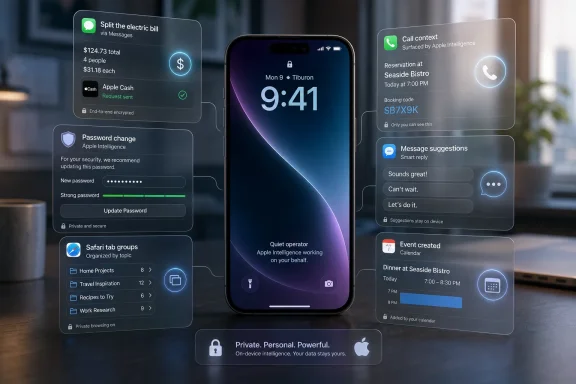
Apple’s iOS 27, previewed at WWDC 2026 and now in developer beta, adds a set of Apple Intelligence features for iPhone that automate everyday tasks such as bill splitting, password changes, Safari tab organization, call context, message suggestions, and calendar creation. The important part is not that Apple has suddenly won the AI race. It is that the company is trying to make AI disappear into chores users already understand. That makes iOS 27 less of a chatbot story and more of a systems story: Apple is turning the iPhone into a quiet operator for small, repetitive digital labor.
The first wave of consumer AI was built around spectacle. Type a prompt, get a poem, generate an image, summarize a document, ask a chatbot to pretend it is a travel agent. Apple’s iOS 27 pitch, at least in the features now being discussed from the beta and developer material, moves in a more Apple-like direction: the AI is supposed to do something useful before the user has time to admire it.
That is why the bill-splitting feature matters more than it sounds. A restaurant receipt is messy real-world data: item names, taxes, tips, quantities, shared plates, and social awkwardness. If the iPhone can turn that into a clean payment flow through Messages and Apple Cash, it is not merely recognizing text. It is inserting itself into a familiar end-of-meal ritual and trying to remove friction.
The same logic runs through password fixing. Apple’s Passwords app already warns users about reused, weak, or compromised credentials. In iOS 27, the more ambitious step is letting the phone navigate eligible sites and change those passwords with minimal user intervention. That is not glamorous AI, but it is exactly the kind of thing normal people postpone for years because the process is tedious.
This is the argument Apple wants to win: AI should not be a destination app. It should be a capability embedded in the operating system, close enough to personal data to be useful and restrained enough not to feel like a stranger rummaging through your phone.
That sounds simple until you remember how fragmented personal computing still is. Your confirmation email lives in Mail, the conversation is in Messages, the payment is in Wallet, the reminder is in Reminders, the web research is in Safari, and the call is in Phone. Users have learned to bridge those gaps manually with copy and paste, screenshots, search, and memory.
Apple Intelligence in iOS 27 is an attempt to make those boundaries more porous. The phone does not just wait for commands; it tries to recognize an actionable moment. A sentence becomes an event. A call becomes a prompt to surface a document. A cluttered browser becomes a set of topical piles instead of a single long strip of digital guilt.
This is where Apple has a structural advantage over independent AI apps. A chatbot can summarize text you paste into it. The operating system can see when that text matters, where it came from, what app should receive the output, and whether the next action should be a payment, reminder, event, or password update.
Apple Intelligence grouping tabs by topic is a small admission that browser organization has failed most people. Tab groups have existed for years, but they require users to behave like archivists. Automatic grouping flips that burden. The browser becomes responsible for recognizing that several open pages belong together.
The feature also shows how Apple is avoiding the trap of making every AI feature conversational. Nobody wants to ask a chatbot to organize browser tabs every night. The better experience is ambient. You open tab view and the mess has already been softened into categories.
For Windows users and administrators watching from the other side of the platform divide, the lesson is familiar. The best AI features in operating systems may not look like “AI features” at all. They will look like File Explorer guessing the right file, Outlook preparing the right attachment, Edge grouping research, or Windows Security explaining and fixing a weak setting before a user opens a ticket.
If Apple executes it well, this could be one of the most useful security features on the iPhone. Users are notoriously bad at password hygiene not because they love risk, but because fixing passwords is boring, repetitive, and occasionally punishing. Sites have different rules, broken forms, confusing flows, and unpredictable two-factor prompts.
But this is also where trust becomes fragile. If the automation fails, users may be locked out. If it changes a password without clear confirmation, they may not understand what happened. If it works only on a subset of websites, it may produce the familiar disappointment of an impressive demo meeting the web’s ugly reality.
Apple’s privacy and security reputation gives it a head start, but not a blank check. The company will need to make the process legible: what password is being changed, where it is stored, how the user can recover it, and what happens when a site blocks automation. In security, invisible magic is useful only until the first unexplained failure.
Basic Apple Intelligence support centers on the iPhone 15 Pro and newer models. The most advanced on-device Siri and AI capabilities reportedly require the iPhone Air and iPhone 17 Pro models, along with newer high-memory iPads and Macs. In plain English: many users may get the operating system but not the full intelligence layer.
This is not new for Apple. The company has always used silicon transitions to draw lines around features. What is different now is that AI turns those lines into a more visible class system. Two iPhones may both run iOS 27, but only one may perform the newest AI tasks locally, quickly, and privately.
That creates a marketing problem and a business opportunity. The marketing problem is user confusion: “My phone got iOS 27, so why don’t I have the feature from the keynote?” The business opportunity is obvious: Apple Intelligence becomes another reason to buy the newest Pro-class hardware.
For enterprises, this matters because fleet planning gets more complicated. A company can standardize on an iOS version and still have inconsistent feature availability across devices. That affects support scripts, training, compliance reviews, and decisions about whether a feature should be enabled at all.
But on-device AI is also expensive in hardware terms. It needs modern neural engines, memory, thermal headroom, and battery management. Apple can use privacy as the moral case for local processing while using hardware requirements as the commercial engine behind upgrades.
That duality is not hypocrisy; it is the Apple model. The company builds vertically integrated systems, then reserves the best version of the experience for the devices capable of running them. The user gets a more private and responsive feature. Apple gets another reason to sell premium hardware.
The risk is that Apple Intelligence becomes fragmented before it becomes trusted. Some features run locally. Some may use Private Cloud Compute. Some may be unavailable on older devices. Some may launch later by region or language. Apple has to explain this without turning its product pages into compatibility spreadsheets.
That is especially important outside the United States. In markets such as India, where iPhones are aspirational but price-sensitive, the gap between “iOS 27 is available” and “the best AI features are available on your phone” may be large. Apple can win headlines with AI, but adoption will depend on how many real users own the hardware that can run it well.
That is why the quieter features may be strategically useful. Bill splitting, password fixing, tab sorting, and calendar creation do not require Siri to become a brilliant conversational partner overnight. They require Apple Intelligence to handle bounded tasks in known apps with clear outcomes.
This is how Apple often rehabilitates a technology. It avoids competing on the most chaotic version of the category and instead narrows the problem until the user experience can be controlled. The iPod was not the first MP3 player. The iPhone was not the first smartphone. Apple Intelligence does not need to be the wildest chatbot if it becomes the most useful layer inside the phone.
Still, Siri matters because voice remains the natural interface for many of these actions. “Split this bill with Alex and Priya,” “remind me about this when I get home,” “make that dinner plan a calendar event,” and “find my booking code” are exactly the kinds of commands users expect an assistant to understand. If Siri cannot reliably connect intent to action, the rest of the system has to work harder.
That matters because Shortcuts is one of Apple’s bridges between apps. If natural language can generate useful automations, Apple Intelligence becomes a way to compose actions across the system without requiring users to understand scripting concepts. It also gives developers another reason to expose clean app intents and automation hooks.
For app makers, the message is blunt. If your app’s actions are not visible to the system, they may become invisible to the user. As operating systems grow more agentic, users will increasingly ask the platform to do things rather than open individual apps and hunt through menus.
This has consequences beyond iOS. Microsoft is trying to thread a similar needle with Copilot in Windows and Microsoft 365: AI that can reason across apps, files, messages, and workflows. The platform owner that controls the context layer controls the automation layer. Everyone else becomes a plug-in, a data source, or a destination.
Bundling related smart-home alerts into tidier notifications is not a science-fiction feature. It is a mercy feature. If Apple Intelligence can reduce alert fatigue while making saved video clips easier to search, it attacks one of the main reasons normal users stop paying attention to their smart-home systems.
That has security implications too. Alerts that users ignore are not effective alerts. A smarter notification layer can make home monitoring more useful by making it less frantic. The challenge is preserving urgency when it matters. A package delivery, a family member arriving home, and a possible break-in should not feel like the same category of “AI summarized my house.”
For WindowsForum readers, the enterprise parallel is obvious. Notification overload is not limited to homes. Endpoint tools, identity platforms, email security systems, and cloud dashboards all compete for attention. AI that compresses noisy event streams into meaningful action could be genuinely valuable, provided it does not hide the one alert that mattered.
India makes that tension especially visible because the iPhone has strong brand appeal but remains costly relative to average income. If the newest Siri features require iPhone Air or iPhone 17 Pro-class hardware, they will reach a small slice of users at first. For mass-market developers, that means cloud-based AI and lightweight server-side features are not going away.
This complicates the on-device privacy narrative. On the newest hardware, Apple can say the most personal tasks happen locally. On older or less capable devices, features may be limited, delayed, or dependent on cloud infrastructure. The result is a tiered AI experience shaped by purchasing power.
Apple can live with that because it sells premium hardware. Developers cannot ignore it because they sell to the installed base. A startup building for India, Southeast Asia, Latin America, or even budget-conscious users in the United States cannot assume that every iPhone customer has a recent Pro model with ample memory and the latest Apple Intelligence stack.
Developer betas exist so app makers can test compatibility and Apple can find problems before the public release. Public betas are safer but still unfinished. The final release is expected later in 2026, following Apple’s usual fall software cadence.
The more interesting question is not whether beta users can make the features work today. It is whether they still feel useful after the novelty wears off. AI features that save five seconds but require trust, confirmation, and cleanup may not survive daily use. Features that save minutes and rarely get in the way will become invisible infrastructure.
That is the standard Apple has set for itself. The company is not merely promising intelligence. It is promising delegated action inside the most personal computer most users own.
 Apple Stops Selling the Magic Trick and Starts Selling the Errand
The first wave of consumer AI was built around spectacle. Type a prompt, get a poem, generate an image, summarize a document, ask a chatbot to pretend it is a travel agent. Apple’s iOS 27 pitch, at least in the features now being discussed from the beta and developer material, moves in a more Apple-like direction: the AI is supposed to do something useful before the user has time to admire it.That is why the bill-splitting feature matters more than it sounds. A restaurant receipt is messy real-world data: item names, taxes, tips, quantities, shared plates, and social awkwardness. If the iPhone can turn that into a clean payment flow through Messages and Apple Cash, it is not merely recognizing text. It is inserting itself into a familiar end-of-meal ritual and trying to remove friction.
The same logic runs through password fixing. Apple’s Passwords app already warns users about reused, weak, or compromised credentials. In iOS 27, the more ambitious step is letting the phone navigate eligible sites and change those passwords with minimal user intervention. That is not glamorous AI, but it is exactly the kind of thing normal people postpone for years because the process is tedious.
This is the argument Apple wants to win: AI should not be a destination app. It should be a capability embedded in the operating system, close enough to personal data to be useful and restrained enough not to feel like a stranger rummaging through your phone.
The Real Apple Intelligence Upgrade Is Context
The most practical iOS 27 features share one underlying idea: the iPhone should understand what you are trying to do because it can see the relevant context. If you are texting about dinner, it should suggest a calendar event. If you are on the phone with an airline, it should surface the booking code from Mail. If you have 80 Safari tabs open, it should infer that half of them belong to a trip, a work project, or a shopping comparison.That sounds simple until you remember how fragmented personal computing still is. Your confirmation email lives in Mail, the conversation is in Messages, the payment is in Wallet, the reminder is in Reminders, the web research is in Safari, and the call is in Phone. Users have learned to bridge those gaps manually with copy and paste, screenshots, search, and memory.
Apple Intelligence in iOS 27 is an attempt to make those boundaries more porous. The phone does not just wait for commands; it tries to recognize an actionable moment. A sentence becomes an event. A call becomes a prompt to surface a document. A cluttered browser becomes a set of topical piles instead of a single long strip of digital guilt.
This is where Apple has a structural advantage over independent AI apps. A chatbot can summarize text you paste into it. The operating system can see when that text matters, where it came from, what app should receive the output, and whether the next action should be a payment, reminder, event, or password update.
Safari Tabs Become a Confession of How People Actually Browse
Safari tab sorting is the kind of feature that sounds minor until you look at a real iPhone. Users do not browse in neat sessions. They accumulate. A recipe search becomes a product comparison, which becomes a hotel search, which becomes a half-read article, which becomes a forgotten support page.Apple Intelligence grouping tabs by topic is a small admission that browser organization has failed most people. Tab groups have existed for years, but they require users to behave like archivists. Automatic grouping flips that burden. The browser becomes responsible for recognizing that several open pages belong together.
The feature also shows how Apple is avoiding the trap of making every AI feature conversational. Nobody wants to ask a chatbot to organize browser tabs every night. The better experience is ambient. You open tab view and the mess has already been softened into categories.
For Windows users and administrators watching from the other side of the platform divide, the lesson is familiar. The best AI features in operating systems may not look like “AI features” at all. They will look like File Explorer guessing the right file, Outlook preparing the right attachment, Edge grouping research, or Windows Security explaining and fixing a weak setting before a user opens a ticket.
Password Automation Moves AI Into Higher-Stakes Territory
The password feature is more consequential because it crosses from convenience into account security. A tool that detects weak or leaked passwords is advisory. A tool that logs in and changes credentials is operational. That is a meaningful escalation.If Apple executes it well, this could be one of the most useful security features on the iPhone. Users are notoriously bad at password hygiene not because they love risk, but because fixing passwords is boring, repetitive, and occasionally punishing. Sites have different rules, broken forms, confusing flows, and unpredictable two-factor prompts.
But this is also where trust becomes fragile. If the automation fails, users may be locked out. If it changes a password without clear confirmation, they may not understand what happened. If it works only on a subset of websites, it may produce the familiar disappointment of an impressive demo meeting the web’s ugly reality.
Apple’s privacy and security reputation gives it a head start, but not a blank check. The company will need to make the process legible: what password is being changed, where it is stored, how the user can recover it, and what happens when a site blocks automation. In security, invisible magic is useful only until the first unexplained failure.
The Hardware Line Is the Feature Apple Does Not Advertise Too Loudly
The catch with iOS 27 is compatibility. Apple can say that iOS 27 runs on a broad range of iPhones, reportedly going back to the iPhone 11 family, while still reserving the richer Apple Intelligence experience for newer hardware. That distinction matters more every year.Basic Apple Intelligence support centers on the iPhone 15 Pro and newer models. The most advanced on-device Siri and AI capabilities reportedly require the iPhone Air and iPhone 17 Pro models, along with newer high-memory iPads and Macs. In plain English: many users may get the operating system but not the full intelligence layer.
This is not new for Apple. The company has always used silicon transitions to draw lines around features. What is different now is that AI turns those lines into a more visible class system. Two iPhones may both run iOS 27, but only one may perform the newest AI tasks locally, quickly, and privately.
That creates a marketing problem and a business opportunity. The marketing problem is user confusion: “My phone got iOS 27, so why don’t I have the feature from the keynote?” The business opportunity is obvious: Apple Intelligence becomes another reason to buy the newest Pro-class hardware.
For enterprises, this matters because fleet planning gets more complicated. A company can standardize on an iOS version and still have inconsistent feature availability across devices. That affects support scripts, training, compliance reviews, and decisions about whether a feature should be enabled at all.
On-Device AI Is Apple’s Privacy Argument and Its Upgrade Lever
Apple’s preferred AI story is on-device processing. The company wants users to believe that the iPhone can understand personal context without turning every interaction into a cloud upload. That is a powerful argument, especially for messages, emails, calls, passwords, and home-camera clips.But on-device AI is also expensive in hardware terms. It needs modern neural engines, memory, thermal headroom, and battery management. Apple can use privacy as the moral case for local processing while using hardware requirements as the commercial engine behind upgrades.
That duality is not hypocrisy; it is the Apple model. The company builds vertically integrated systems, then reserves the best version of the experience for the devices capable of running them. The user gets a more private and responsive feature. Apple gets another reason to sell premium hardware.
The risk is that Apple Intelligence becomes fragmented before it becomes trusted. Some features run locally. Some may use Private Cloud Compute. Some may be unavailable on older devices. Some may launch later by region or language. Apple has to explain this without turning its product pages into compatibility spreadsheets.
That is especially important outside the United States. In markets such as India, where iPhones are aspirational but price-sensitive, the gap between “iOS 27 is available” and “the best AI features are available on your phone” may be large. Apple can win headlines with AI, but adoption will depend on how many real users own the hardware that can run it well.
Siri’s Shadow Still Hangs Over the Practical Stuff
The practical iOS 27 features are arriving in the shadow of Siri. Apple’s voice assistant has spent years as the most obvious symbol of the company’s AI underperformance: deeply integrated, widely available, and too often unable to handle anything beyond narrow commands. The promise of a more capable Siri has therefore become both a product story and a credibility test.That is why the quieter features may be strategically useful. Bill splitting, password fixing, tab sorting, and calendar creation do not require Siri to become a brilliant conversational partner overnight. They require Apple Intelligence to handle bounded tasks in known apps with clear outcomes.
This is how Apple often rehabilitates a technology. It avoids competing on the most chaotic version of the category and instead narrows the problem until the user experience can be controlled. The iPod was not the first MP3 player. The iPhone was not the first smartphone. Apple Intelligence does not need to be the wildest chatbot if it becomes the most useful layer inside the phone.
Still, Siri matters because voice remains the natural interface for many of these actions. “Split this bill with Alex and Priya,” “remind me about this when I get home,” “make that dinner plan a calendar event,” and “find my booking code” are exactly the kinds of commands users expect an assistant to understand. If Siri cannot reliably connect intent to action, the rest of the system has to work harder.
The Developer Story Is Bigger Than Shortcuts
The “vibe-coding” Shortcuts feature may sound like a novelty, but it points to a deeper shift. Shortcuts has always been powerful and oddly un-Apple-like: a visual automation tool that rewards patient tinkerers and intimidates everyone else. Letting users describe an automation in plain language could turn it from a hobbyist feature into a mainstream interface.That matters because Shortcuts is one of Apple’s bridges between apps. If natural language can generate useful automations, Apple Intelligence becomes a way to compose actions across the system without requiring users to understand scripting concepts. It also gives developers another reason to expose clean app intents and automation hooks.
For app makers, the message is blunt. If your app’s actions are not visible to the system, they may become invisible to the user. As operating systems grow more agentic, users will increasingly ask the platform to do things rather than open individual apps and hunt through menus.
This has consequences beyond iOS. Microsoft is trying to thread a similar needle with Copilot in Windows and Microsoft 365: AI that can reason across apps, files, messages, and workflows. The platform owner that controls the context layer controls the automation layer. Everyone else becomes a plug-in, a data source, or a destination.
Home Notifications Show the Boring Future of Smart Homes
The Home app changes are another example of Apple aiming AI at accumulated annoyance. Smart homes generate too many notifications: motion detected, person detected, doorbell pressed, camera offline, accessory not responding, automation failed. Individually, each alert may be defensible. Collectively, they become noise.Bundling related smart-home alerts into tidier notifications is not a science-fiction feature. It is a mercy feature. If Apple Intelligence can reduce alert fatigue while making saved video clips easier to search, it attacks one of the main reasons normal users stop paying attention to their smart-home systems.
That has security implications too. Alerts that users ignore are not effective alerts. A smarter notification layer can make home monitoring more useful by making it less frantic. The challenge is preserving urgency when it matters. A package delivery, a family member arriving home, and a possible break-in should not feel like the same category of “AI summarized my house.”
For WindowsForum readers, the enterprise parallel is obvious. Notification overload is not limited to homes. Endpoint tools, identity platforms, email security systems, and cloud dashboards all compete for attention. AI that compresses noisy event streams into meaningful action could be genuinely valuable, provided it does not hide the one alert that mattered.
The India Caveat Is Really a Global Affordability Caveat
The submitted report emphasizes India, but the underlying issue is global. Apple’s best AI features are increasingly tied to newer, more expensive devices. That creates a lag between announcement and meaningful adoption, especially in markets where users keep phones longer or buy older models.India makes that tension especially visible because the iPhone has strong brand appeal but remains costly relative to average income. If the newest Siri features require iPhone Air or iPhone 17 Pro-class hardware, they will reach a small slice of users at first. For mass-market developers, that means cloud-based AI and lightweight server-side features are not going away.
This complicates the on-device privacy narrative. On the newest hardware, Apple can say the most personal tasks happen locally. On older or less capable devices, features may be limited, delayed, or dependent on cloud infrastructure. The result is a tiered AI experience shaped by purchasing power.
Apple can live with that because it sells premium hardware. Developers cannot ignore it because they sell to the installed base. A startup building for India, Southeast Asia, Latin America, or even budget-conscious users in the United States cannot assume that every iPhone customer has a recent Pro model with ample memory and the latest Apple Intelligence stack.
The Beta Label Should Still Make Normal Users Wait
iOS 27 is in developer beta, which means the correct default advice remains boring: do not install it on your primary phone unless you are prepared for bugs. AI features make that warning more important, not less. When a wallpaper glitches, it is annoying. When a password automation, calendar parser, or call-context feature misfires, the consequences are more practical.Developer betas exist so app makers can test compatibility and Apple can find problems before the public release. Public betas are safer but still unfinished. The final release is expected later in 2026, following Apple’s usual fall software cadence.
The more interesting question is not whether beta users can make the features work today. It is whether they still feel useful after the novelty wears off. AI features that save five seconds but require trust, confirmation, and cleanup may not survive daily use. Features that save minutes and rarely get in the way will become invisible infrastructure.
That is the standard Apple has set for itself. The company is not merely promising intelligence. It is promising delegated action inside the most personal computer most users own.
The iPhone’s New AI Contract Is Convenience in Exchange for Newer Silicon
The practical lesson of iOS 27 is that Apple Intelligence is becoming less abstract and more transactional. It reads the bill, changes the password, groups the tabs, creates the event, suggests the next action, and surfaces the code while you are on the call. The user gives the phone more authority because the payoff is immediate.- iOS 27’s most useful AI features are aimed at everyday chores rather than flashy chatbot demonstrations.
- Installing iOS 27 and getting the full Apple Intelligence experience are two different things.
- The strongest on-device AI features appear tied to Apple’s newest high-memory devices, especially iPhone Air and iPhone 17 Pro-class hardware.
- Password automation could be one of the most valuable additions, but it also carries higher trust and failure risks than simpler suggestion features.
- Developers should treat system-level AI as a new interface layer, not merely another feature category.
- Markets with older or more price-sensitive iPhone fleets will experience Apple’s AI rollout more slowly and unevenly.
References
- Primary source: Lapaas Voice
Published: 2026-06-23T09:59:16.297160
iOS 27 AI Features: What's Coming to Your iPhone
The practical iOS 27 AI features explained: bill splitting, password fixing, smart Siri, plus which iPhones get them and India availability notes.voice.lapaas.com - Related coverage: techradar.com
Apple just future-proofed the iPhone Air in a way that only the iPhone 17 Pro can match | TechRadar
iOS 27 will breathe new life into Apple’s most beautiful iPhonewww.techradar.com - Related coverage: techcrunch.com
Beyond Siri: Here are the practical AI features coming to your iPhone in iOS 27 | TechCrunch
Siri’s AI overhaul may have grabbed the headlines at WWDC, but some of Apple’s most useful AI features are arriving elsewhere in iOS 27.techcrunch.com - Related coverage: macrumors.com
Two iOS 27 Features Are Only Available on iPhone 17 Pro and iPhone Air
iOS 27's more intelligent and personal version of Siri is available on the iPhone 15 Pro and newer, but two specific features tied to it are exclusive to the iPhone 17 Pro, iPhone 17 Pro Max, and iPhone Air, according to Apple.www.macrumors.com - Related coverage: 9to5mac.com
iOS 27’s most powerful on-device AI requires iPhone 17 Pro, iPhone Air - 9to5Mac
iOS 27’s most powerful on-device AI model will be restricted to some of Apple’s newest products. Here are the details9to5mac.com - Related coverage: macworld.com
iOS 27 Guide: All the new features coming to compatible iPhones, 2026 release date and more | Macworld
iOS 27 will introduce major Apple Intelligence upgrades, changes to Siri, and improvements across core iPhone apps. Here's what you need to know.www.macworld.com
- Related coverage: t3.com
While iOS 27 will run on older iPhones, new Apple Intelligence features are another matter | T3
Apple will release iOS 27 for iPhone 11 and above, but to get the new Siri AI you'll need something much more recentwww.t3.com - Related coverage: tomsguide.com
iOS 27: 11 biggest features coming to your iPhone | Tom's Guide
Our first look at iOS 27 is going to arrive at WWDC 2027 next week, and here are 11 of the biggest upgrades you can expect to see.www.tomsguide.com - Related coverage: androidcentral.com
Siri's biggest upgrade in years comes with help from Gemini | Android Central
Apple is using Gemini-powered models to help deliver next-generation Siri.www.androidcentral.com
