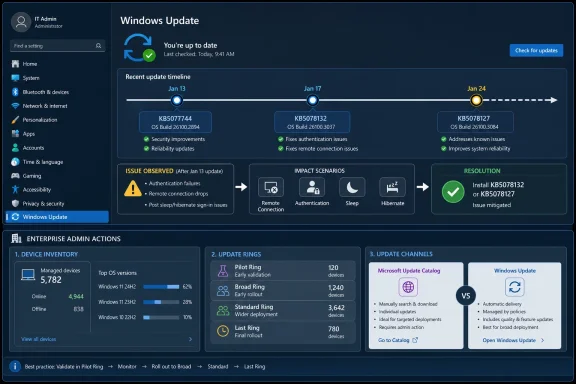
Microsoft’s January 2026 Windows emergency update sequence began on January 17 with KB5077744, followed on January 24 by the KB5078132 and KB5078127 family, after the January 13 security update triggered remote connection, authentication, shutdown, and hibernation problems on affected systems. The practical answer for administrators is simple but uncomfortable: treat these out-of-band releases as part of normal Windows servicing, not as freak events. If your patch process still assumes Patch Tuesday is the only meaningful servicing date on the calendar, Windows is now telling you that assumption is obsolete.
The January fixes matter because they arrived in two waves. The first emergency update landed in the Microsoft Update Catalog, aimed at organizations that needed to remediate quickly or avoid deploying the problematic January security update in the first place. The second wave made the fix available more broadly through Windows Update for eligible systems that had already installed the January updates, reducing friction for users and admins who do not manage every endpoint through catalog imports or enterprise tooling.
For individual Windows users, the immediate action is to open Settings > Windows Update, check for updates, and install the available January 2026 out-of-band update if the device is offered one. For managed fleets, the action is to identify devices that received the January 13 security update, prioritize machines affected by remote access or hibernation failures, and deploy the relevant OOB package through the same channel you normally use for emergency rings. For Windows Server and remaining Windows 10 servicing scenarios, Microsoft’s guidance points administrators toward the Microsoft Update Catalog rather than assuming every emergency package will arrive the same way for every platform.
The temptation is to read the January 2026 out-of-band updates as another Windows update mishap: a bad Patch Tuesday, a rushed correction, a few days of administrator pain, and then business as usual. That framing is too small. Microsoft is not merely fixing a broken update; it is operating Windows maintenance as a rapid-response pipeline.
The January 13 security update created enough trouble that Microsoft issued KB5077744 on January 17. The reported fallout included failures in remote connection and authentication workflows, along with shutdown or hibernation problems on some systems. A week later, Microsoft followed with another out-of-band release family, including KB5078132 and KB5078127, to continue addressing the same January update fallout and make the fix easier to obtain through Windows Update.
That sequence matters. The first fix was fast and targeted; the second was distribution-aware. In other words, the story is not just remediation but choreography: identify the breakage, ship a catalog fix, then fold the repair into a broader update mechanism for the devices that need it.
For admins, that is the new operating model. Windows servicing is no longer a neat monthly ritual with the occasional surprise. It is a running system of security baselines, known-issue remediation, phased distribution, compatibility holds, catalog-only interventions, and follow-up releases that may arrive days after the update everyone planned around.
That simplicity hides an important distinction. Some emergency fixes are delivered through Windows Update for eligible devices, while others are initially catalog-first or platform-specific. Microsoft’s January 17 update was released through the Microsoft Update Catalog, while the January 24 follow-up expanded availability through Windows Update for Windows 11 devices running the January updates that caused the issue.
For IT teams, the practical workflow is not “tell users to click update.” It is inventory first, then targeted remediation. Admins need to know which devices installed the January 13 update, which ones rely on affected remote connection paths, which ones exhibit hibernation or shutdown problems, and which servicing channel applies to each Windows version.
That means the emergency checklist now belongs in the same operational drawer as incident response. Confirm scope, decide whether to pause wider deployment, test the OOB in a small ring, push to affected devices, and document the cleanup path. The organizations that handle this smoothly will be the ones that already treat update health as telemetry, not folklore.
Remote access is no longer a convenience layer bolted onto office computing. It is how help desks reach machines, how hybrid workers reach desktops, how cloud PC environments function, and how administrators keep distributed fleets under control. A Windows update that disrupts that chain can make the fix harder to deliver precisely when the fix is most needed.
That is why the January 17 catalog release was significant. It gave administrators a package they could obtain and deploy outside the normal consumer-oriented update flow. But the January 24 follow-up was just as important, because emergency remediation that depends entirely on manual catalog handling does not scale cleanly across every environment.
The pattern is familiar to anyone who has managed Windows long enough: Microsoft first solves for urgency, then solves for reach. The gap between those two things is where administrators live. It is also where outages, help desk tickets, and executive complaints multiply.
WindowsForum readers have seen versions of this movie before. Community discussions around Windows update errors, failed installations, and emergency fixes tend to converge on the same operational reality: the official update mechanism is only part of the story. When servicing goes sideways, admins need logs, rollback plans, manual packages, and a sober understanding of which machines are actually affected.
That is a more serious development than it may sound. Reset and recovery tools are the safety net users and administrators reach for when a device cannot be repaired cleanly. If a security update damages that safety net, the failure mode shifts from “this device has a problem” to “the normal escape route may not work.”
WindowsForum’s related coverage of Microsoft’s August 2025 recovery OOB update captured why the issue resonated with administrators. Recovery is not an edge feature for people who like clicking advanced startup menus; it is part of enterprise wipe workflows, device reuse, remote troubleshooting, and consumer self-service repair. When recovery breaks, the cost of a bad update rises.
The August incident also showed how narrow descriptions can understate operational impact. A reset or recovery failure may sound like something that only matters after a user has already decided to rebuild. In practice, it changes help desk triage, device redeployment schedules, and the confidence administrators have in remote remediation.
The January and August cases belong in the same mental folder. One affected remote connection and power-state behavior; the other affected recovery. Together, they suggest that emergency Windows servicing is increasingly about protecting the infrastructure around Windows, not just the visible desktop experience inside it.
That does not mean every Windows 10 machine instantly became unmanaged or unsafe. It does mean the servicing conversation became segmented. Some devices may remain under ESU, some may be LTSC, some may be on a migration roadmap, and some may be stranded because hardware, application compatibility, or budget reality did not line up with the calendar.
Emergency updates expose those seams. A Windows 11 machine may be offered a fix through Windows Update. A Windows Server or Windows 10 servicing scenario may require catalog handling or a different package. The administrator’s problem is not simply knowing that a fix exists; it is knowing whether a particular endpoint is entitled to it, able to see it, and safe to install it.
This is where the Windows 10 end-of-support date turns from a lifecycle milestone into a daily operations problem. Migration plans that looked acceptable on a slide deck can become fragile when an OOB release lands and a subset of the fleet needs special handling. The more exceptions an environment carries, the more expensive emergency servicing becomes.
For enthusiasts, the lesson is similar but more personal. If a household or small business still depends on Windows 10 after October 14, 2025, the update question is no longer just “did Microsoft issue a fix?” It is “does my edition, support status, and servicing path still put me in line to receive the right fix at the right time?”
Secure Boot sits below the everyday Windows experience. Users do not see it when it works, and many only hear about it when installation requirements, firmware settings, or boot failures force the issue. That invisibility is precisely why certificate rotation is operationally delicate.
Microsoft’s message is that devices need to move to newer Secure Boot certificates through servicing before older certificates age out. The worry is not that every PC suddenly refuses to boot the moment the calendar flips. The more realistic concern is that future protections for early boot components become harder to validate or deploy correctly on machines that never received the certificate updates.
For enterprises, this is a fleet inventory problem. Which devices have Secure Boot enabled? Which devices have received the relevant servicing updates? Which devices are blocked by firmware, policy, imaging practices, or maintenance windows? Those questions take time, and June 2026 is close enough that “we’ll check later” is no longer a strategy.
The Secure Boot deadline also sharpens the argument that emergency servicing cannot be separated from routine servicing. If organizations defer ordinary updates for too long, they may miss the preparatory work that prevents future emergencies. The best rapid-response system is still the one that does not need to panic.
That distinction matters because vendors often describe modern servicing in the language of agility. Faster detection, faster fixes, broader telemetry, and staged rollout all sound reassuring. They are reassuring, up to a point. But from the administrator’s chair, agility can look like another release to test, another exception to track, and another executive asking why the fix for the fix is not already installed.
The organizations best positioned for this model will be almost boring in their discipline. They will maintain update rings, keep pilot groups representative, monitor known issues after every Patch Tuesday, and preserve enough deployment flexibility to move outside the monthly cadence. They will know which devices are on Windows 11, which are on Windows 10 ESU or LTSC, and which should no longer be treated as ordinary endpoints.
They will also resist the false comfort of blanket delay. Pausing every update indefinitely is not a strategy; it is an accumulation of future emergencies. The more Windows servicing becomes a chain of monthly baselines and targeted remediations, the more dangerous it becomes to fall far behind.
The better posture is conditional speed. Move quickly where exposure or breakage demands it, move cautiously through rings where business impact is uncertain, and keep enough visibility to know which machines are exceptions. That is less glamorous than arguing about whether Patch Tuesday is good or bad, but it is how modern Windows fleets survive.
First, every Windows environment needs a reliable inventory of OS version, servicing channel, support status, and recent update history. Without that, an out-of-band release becomes a scavenger hunt. Admins waste time asking which devices are exposed when they should already have the answer.
Second, remote management paths need redundancy. If the problem involves remote connection or authentication, relying on a single remote access method is asking for pain. Organizations should know how they will reach devices if the primary connection path is degraded.
Third, recovery workflows need regular validation. The August 2025 reset and recovery incident is a reminder that recovery is not something to test only during a crisis. If Reset this PC, cloud repair, remote wipe, or imaging workflows matter to the business, they deserve periodic checks after major servicing changes.
Fourth, Windows 10 exceptions need names, owners, and deadlines. “Still on Windows 10” is no longer a neutral inventory fact after October 14, 2025. It is a servicing condition with consequences.
Finally, Secure Boot certificate readiness needs to move from security background noise to operational tracking. June 2026 is not just a date for firmware specialists. It is a deadline that touches endpoint security, update compliance, and the trust chain Windows relies on before the OS even loads.
That is not a normal patch calendar in the old sense. It is a risk register. Each date changes what administrators need to know about their environments, and each emergency release tests whether that knowledge is real.
This is also where Microsoft’s communication strategy matters. When an issue is acknowledged quickly and an OOB fix appears within days, the vendor has done something meaningful. But the burden of interpretation still falls on customers. They must decide whether to deploy, pause, test, wait, or manually remediate.
For smaller shops and enthusiasts, the practical advice is to stop treating Windows Update as a black box that either works or does not. Keep track of recently installed KBs, know how to view update history, and understand that an emergency update may appear only if your device has the affected prerequisite update. If Windows Update does not offer the fix, that may reflect eligibility, rollout targeting, or the need for a catalog package rather than proof that the issue is irrelevant.
For enterprise teams, the lesson is sharper. The difference between a manageable emergency and a chaotic one is rarely the KB number itself. It is whether the organization can rapidly answer the first five questions: what changed, who is affected, what channel carries the fix, what breaks if we wait, and what breaks if we deploy now.
The January fixes matter because they arrived in two waves. The first emergency update landed in the Microsoft Update Catalog, aimed at organizations that needed to remediate quickly or avoid deploying the problematic January security update in the first place. The second wave made the fix available more broadly through Windows Update for eligible systems that had already installed the January updates, reducing friction for users and admins who do not manage every endpoint through catalog imports or enterprise tooling.
For individual Windows users, the immediate action is to open Settings > Windows Update, check for updates, and install the available January 2026 out-of-band update if the device is offered one. For managed fleets, the action is to identify devices that received the January 13 security update, prioritize machines affected by remote access or hibernation failures, and deploy the relevant OOB package through the same channel you normally use for emergency rings. For Windows Server and remaining Windows 10 servicing scenarios, Microsoft’s guidance points administrators toward the Microsoft Update Catalog rather than assuming every emergency package will arrive the same way for every platform.
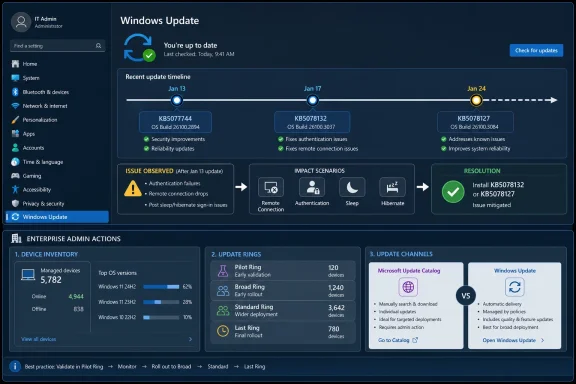 Microsoft’s Emergency Patch Is Now a Servicing Signal
The temptation is to read the January 2026 out-of-band updates as another Windows update mishap: a bad Patch Tuesday, a rushed correction, a few days of administrator pain, and then business as usual. That framing is too small. Microsoft is not merely fixing a broken update; it is operating Windows maintenance as a rapid-response pipeline.The January 13 security update created enough trouble that Microsoft issued KB5077744 on January 17. The reported fallout included failures in remote connection and authentication workflows, along with shutdown or hibernation problems on some systems. A week later, Microsoft followed with another out-of-band release family, including KB5078132 and KB5078127, to continue addressing the same January update fallout and make the fix easier to obtain through Windows Update.
That sequence matters. The first fix was fast and targeted; the second was distribution-aware. In other words, the story is not just remediation but choreography: identify the breakage, ship a catalog fix, then fold the repair into a broader update mechanism for the devices that need it.
For admins, that is the new operating model. Windows servicing is no longer a neat monthly ritual with the occasional surprise. It is a running system of security baselines, known-issue remediation, phased distribution, compatibility holds, catalog-only interventions, and follow-up releases that may arrive days after the update everyone planned around.
The First Move Is No Longer “Wait for Patch Tuesday”
The standard home-user procedure is still straightforward. Go to Settings > Windows Update, select Check for updates, and install the out-of-band update if Windows offers it. If the machine is affected by the January 2026 issue and has already installed the relevant January security update, the later OOB release may appear directly in Windows Update.That simplicity hides an important distinction. Some emergency fixes are delivered through Windows Update for eligible devices, while others are initially catalog-first or platform-specific. Microsoft’s January 17 update was released through the Microsoft Update Catalog, while the January 24 follow-up expanded availability through Windows Update for Windows 11 devices running the January updates that caused the issue.
For IT teams, the practical workflow is not “tell users to click update.” It is inventory first, then targeted remediation. Admins need to know which devices installed the January 13 update, which ones rely on affected remote connection paths, which ones exhibit hibernation or shutdown problems, and which servicing channel applies to each Windows version.
That means the emergency checklist now belongs in the same operational drawer as incident response. Confirm scope, decide whether to pause wider deployment, test the OOB in a small ring, push to affected devices, and document the cleanup path. The organizations that handle this smoothly will be the ones that already treat update health as telemetry, not folklore.
January’s Two-Step Fix Exposed the Real Risk
The January 2026 episode is particularly revealing because it touched remote access. When Windows breaks a cosmetic feature, administrators can buy time. When it interferes with remote connection and authentication workflows, the servicing problem becomes an access problem.Remote access is no longer a convenience layer bolted onto office computing. It is how help desks reach machines, how hybrid workers reach desktops, how cloud PC environments function, and how administrators keep distributed fleets under control. A Windows update that disrupts that chain can make the fix harder to deliver precisely when the fix is most needed.
That is why the January 17 catalog release was significant. It gave administrators a package they could obtain and deploy outside the normal consumer-oriented update flow. But the January 24 follow-up was just as important, because emergency remediation that depends entirely on manual catalog handling does not scale cleanly across every environment.
The pattern is familiar to anyone who has managed Windows long enough: Microsoft first solves for urgency, then solves for reach. The gap between those two things is where administrators live. It is also where outages, help desk tickets, and executive complaints multiply.
WindowsForum readers have seen versions of this movie before. Community discussions around Windows update errors, failed installations, and emergency fixes tend to converge on the same operational reality: the official update mechanism is only part of the story. When servicing goes sideways, admins need logs, rollback plans, manual packages, and a sober understanding of which machines are actually affected.
August 2025 Was the Warning Shot
The January 2026 OOB releases did not arrive in isolation. On August 19, 2025, Microsoft shipped KB5066187 to fix reset and recovery failures introduced by the August 12, 2025 security update. That earlier emergency update hit a different layer of Windows, but it pointed to the same broader truth: the recovery path itself is now part of the monthly servicing risk surface.That is a more serious development than it may sound. Reset and recovery tools are the safety net users and administrators reach for when a device cannot be repaired cleanly. If a security update damages that safety net, the failure mode shifts from “this device has a problem” to “the normal escape route may not work.”
WindowsForum’s related coverage of Microsoft’s August 2025 recovery OOB update captured why the issue resonated with administrators. Recovery is not an edge feature for people who like clicking advanced startup menus; it is part of enterprise wipe workflows, device reuse, remote troubleshooting, and consumer self-service repair. When recovery breaks, the cost of a bad update rises.
The August incident also showed how narrow descriptions can understate operational impact. A reset or recovery failure may sound like something that only matters after a user has already decided to rebuild. In practice, it changes help desk triage, device redeployment schedules, and the confidence administrators have in remote remediation.
The January and August cases belong in the same mental folder. One affected remote connection and power-state behavior; the other affected recovery. Together, they suggest that emergency Windows servicing is increasingly about protecting the infrastructure around Windows, not just the visible desktop experience inside it.
Windows 10’s Exit Makes Every Emergency Patch More Political
Windows 10 support ended on October 14, 2025, which changes the meaning of every emergency update that follows. Before that date, administrators could treat Windows 10 as an aging but still-mainstream part of the fleet. After it, every Windows 10 incident intersects with Extended Security Updates, LTSC eligibility, and migration timing.That does not mean every Windows 10 machine instantly became unmanaged or unsafe. It does mean the servicing conversation became segmented. Some devices may remain under ESU, some may be LTSC, some may be on a migration roadmap, and some may be stranded because hardware, application compatibility, or budget reality did not line up with the calendar.
Emergency updates expose those seams. A Windows 11 machine may be offered a fix through Windows Update. A Windows Server or Windows 10 servicing scenario may require catalog handling or a different package. The administrator’s problem is not simply knowing that a fix exists; it is knowing whether a particular endpoint is entitled to it, able to see it, and safe to install it.
This is where the Windows 10 end-of-support date turns from a lifecycle milestone into a daily operations problem. Migration plans that looked acceptable on a slide deck can become fragile when an OOB release lands and a subset of the fleet needs special handling. The more exceptions an environment carries, the more expensive emergency servicing becomes.
For enthusiasts, the lesson is similar but more personal. If a household or small business still depends on Windows 10 after October 14, 2025, the update question is no longer just “did Microsoft issue a fix?” It is “does my edition, support status, and servicing path still put me in line to receive the right fix at the right time?”
Secure Boot Turns the Calendar Into an Incident Plan
The June 2026 Secure Boot certificate deadline is the looming example of Microsoft trying to move administrators from reaction to preparation. Secure Boot certificates used by most Windows devices begin expiring in June 2026, and Microsoft has been emphasizing proactive servicing before that date arrives. This is not the same kind of emergency as a broken January update, but it belongs to the same era of Windows maintenance.Secure Boot sits below the everyday Windows experience. Users do not see it when it works, and many only hear about it when installation requirements, firmware settings, or boot failures force the issue. That invisibility is precisely why certificate rotation is operationally delicate.
Microsoft’s message is that devices need to move to newer Secure Boot certificates through servicing before older certificates age out. The worry is not that every PC suddenly refuses to boot the moment the calendar flips. The more realistic concern is that future protections for early boot components become harder to validate or deploy correctly on machines that never received the certificate updates.
For enterprises, this is a fleet inventory problem. Which devices have Secure Boot enabled? Which devices have received the relevant servicing updates? Which devices are blocked by firmware, policy, imaging practices, or maintenance windows? Those questions take time, and June 2026 is close enough that “we’ll check later” is no longer a strategy.
The Secure Boot deadline also sharpens the argument that emergency servicing cannot be separated from routine servicing. If organizations defer ordinary updates for too long, they may miss the preparatory work that prevents future emergencies. The best rapid-response system is still the one that does not need to panic.
The New Windows Maintenance Model Rewards Boring Discipline
There is a contradiction at the heart of modern Windows administration. Microsoft is moving faster to correct update failures, but customers still experience the disruption locally, unevenly, and often before the fix reaches the easiest channel. A rapid-response servicing model is better than silence, but it is not the same thing as stability.That distinction matters because vendors often describe modern servicing in the language of agility. Faster detection, faster fixes, broader telemetry, and staged rollout all sound reassuring. They are reassuring, up to a point. But from the administrator’s chair, agility can look like another release to test, another exception to track, and another executive asking why the fix for the fix is not already installed.
The organizations best positioned for this model will be almost boring in their discipline. They will maintain update rings, keep pilot groups representative, monitor known issues after every Patch Tuesday, and preserve enough deployment flexibility to move outside the monthly cadence. They will know which devices are on Windows 11, which are on Windows 10 ESU or LTSC, and which should no longer be treated as ordinary endpoints.
They will also resist the false comfort of blanket delay. Pausing every update indefinitely is not a strategy; it is an accumulation of future emergencies. The more Windows servicing becomes a chain of monthly baselines and targeted remediations, the more dangerous it becomes to fall far behind.
The better posture is conditional speed. Move quickly where exposure or breakage demands it, move cautiously through rings where business impact is uncertain, and keep enough visibility to know which machines are exceptions. That is less glamorous than arguing about whether Patch Tuesday is good or bad, but it is how modern Windows fleets survive.
The Admin Playbook Now Has to Assume the Exception
The concrete preparation work is not exotic. It is the kind of operational plumbing that many teams know they should have but only fund after a bad week. The January 2026 and August 2025 OOB updates should be treated as evidence that this plumbing is no longer optional.First, every Windows environment needs a reliable inventory of OS version, servicing channel, support status, and recent update history. Without that, an out-of-band release becomes a scavenger hunt. Admins waste time asking which devices are exposed when they should already have the answer.
Second, remote management paths need redundancy. If the problem involves remote connection or authentication, relying on a single remote access method is asking for pain. Organizations should know how they will reach devices if the primary connection path is degraded.
Third, recovery workflows need regular validation. The August 2025 reset and recovery incident is a reminder that recovery is not something to test only during a crisis. If Reset this PC, cloud repair, remote wipe, or imaging workflows matter to the business, they deserve periodic checks after major servicing changes.
Fourth, Windows 10 exceptions need names, owners, and deadlines. “Still on Windows 10” is no longer a neutral inventory fact after October 14, 2025. It is a servicing condition with consequences.
Finally, Secure Boot certificate readiness needs to move from security background noise to operational tracking. June 2026 is not just a date for firmware specialists. It is a deadline that touches endpoint security, update compliance, and the trust chain Windows relies on before the OS even loads.
The Patch Calendar Has Become a Risk Register
The important dates now form a pattern. August 12, 2025 brought a security update that introduced reset and recovery failures, followed by KB5066187 on August 19. October 14, 2025 ended Windows 10 support, pushing legacy devices into ESU, LTSC, or migration exceptions. January 13, 2026 brought a Windows security update that caused remote connection and hibernation-related failures, followed by OOB updates on January 17 and January 24. June 2026 brings the beginning of Secure Boot certificate expirations for most Windows devices.That is not a normal patch calendar in the old sense. It is a risk register. Each date changes what administrators need to know about their environments, and each emergency release tests whether that knowledge is real.
This is also where Microsoft’s communication strategy matters. When an issue is acknowledged quickly and an OOB fix appears within days, the vendor has done something meaningful. But the burden of interpretation still falls on customers. They must decide whether to deploy, pause, test, wait, or manually remediate.
For smaller shops and enthusiasts, the practical advice is to stop treating Windows Update as a black box that either works or does not. Keep track of recently installed KBs, know how to view update history, and understand that an emergency update may appear only if your device has the affected prerequisite update. If Windows Update does not offer the fix, that may reflect eligibility, rollout targeting, or the need for a catalog package rather than proof that the issue is irrelevant.
For enterprise teams, the lesson is sharper. The difference between a manageable emergency and a chaotic one is rarely the KB number itself. It is whether the organization can rapidly answer the first five questions: what changed, who is affected, what channel carries the fix, what breaks if we wait, and what breaks if we deploy now.
The WindowsForum Reader’s Shortlist for This OOB Era
The January emergency updates are not a reason to panic, but they are a reason to update the mental model. Windows servicing is becoming more continuous, more conditional, and more dependent on administrators understanding support state as well as patch state.- The January 2026 OOB sequence began with KB5077744 on January 17 and continued with the KB5078132 and KB5078127 family on January 24 to address fallout from the January 13 security update.
- Affected users should check Settings > Windows Update first, while administrators should verify whether their platform requires Windows Update, Microsoft Update Catalog handling, or enterprise deployment tooling.
- The August 19, 2025 KB5066187 recovery fix showed that emergency servicing can affect recovery and reset workflows, not just normal desktop features.
- Windows 10’s October 14, 2025 support end means emergency patch planning now depends on ESU, LTSC, and migration status.
- The June 2026 Secure Boot certificate deadline makes proactive servicing a security requirement, not just a housekeeping task.
- Admins should plan for recurring OOB events by maintaining update rings, device inventory, remote access alternatives, and tested recovery paths.
References
- Primary source: learn.microsoft.com
- Independent coverage: support.microsoft.com
August 19, 2025—KB5066187 (OS Build 17763.7683) Out-of-band - Microsoft Support
 support.microsoft.com