

Microsoft’s June 2026 Windows news roundup centers on Secure Boot certificate deployment, Windows 11 preview updates, hotpatching tradeoffs, Windows Autopatch reporting, and the growing pressure on IT administrators to manage Windows as a continuously measured security platform rather than a periodically patched desktop operating system. The month’s message is practical, not flashy. Microsoft is telling customers that the modern Windows estate is now judged by telemetry, firmware readiness, restart behavior, and cloud policy alignment. That is useful news, but it is also a warning.
The old mental model of Windows Update was simple: install the cumulative update, reboot, move on. June 2026 shows how incomplete that model has become. Microsoft’s most important Windows work this month lives below the visible UI, in the trust chain that decides what a PC is allowed to boot before Windows itself has a chance to defend anything.
That is why Secure Boot certificate rotation is the real spine of the month’s news. The original Windows Secure Boot certificates used across much of the ecosystem began reaching their planned expiration window in June 2026, and Microsoft has spent months trying to make the rollover feel routine. For many consumer and unmanaged business PCs, the answer remains reassuringly boring: keep Windows updated, keep Secure Boot enabled, and the newer certificates should arrive through the normal update channel.
But administrators know that “should” is doing a lot of work. Firmware variations, older hardware, virtual machines, hotpatch update cadence, diagnostic data gaps, and enterprise policy all complicate a process that looks simple only from Redmond’s marketing altitude. The important shift is that Microsoft is no longer framing the certificate transition as a one-time patch; it is framing it as an estate-readiness exercise.
That matters because readiness is not the same thing as compliance. A device may be patched but not yet restarted. It may be enrolled but not reporting the right diagnostic data. It may support one trust configuration but not another. The June story is that Windows servicing now expects administrators to understand those distinctions before a problem becomes visible to users.
Microsoft’s public posture has been careful. Devices that have not yet received updated Secure Boot certificates are not supposed to suddenly stop booting or stop receiving standard Windows updates. That reassurance is important, because panic is the enemy of good firmware work. But the absence of immediate failure does not mean the transition is optional.
The deeper issue is the age of the trust material. Certificates introduced in the early UEFI Secure Boot era have had a long run, and Microsoft is trying to move the ecosystem to newer 2023-era certificates without creating a boot crisis across billions of wildly different devices. That requires operating system updates, firmware cooperation, OEM validation, telemetry, and administrator patience.
For home users, the guidance is deliberately conservative. Install updates, avoid disabling Secure Boot, check the Windows Security app if available, and look to the device manufacturer if the PC appears to need firmware support. For businesses, the task is more procedural: inventory devices, pilot the update, validate firmware behavior, monitor reporting, and phase deployment.
This is the kind of Windows news that separates enthusiasts from operators. Enthusiasts see a security housekeeping item. Operators see the possibility of help desk tickets, change windows, reboot coordination, and awkward conversations about aging hardware that no longer fits a modern trust model.
Windows Autopatch is no longer just about deferring or accelerating monthly updates. It is becoming a dashboard for whether the Windows estate is structurally ready for Microsoft’s security assumptions. That includes whether Secure Boot is enabled, whether certificates are current, whether a device is considered high-confidence for automated rollout, and whether reported data is fresh enough to trust.
This is a more mature way to manage risk than blasting a policy across a fleet and hoping nothing falls over. It also introduces a new dependency: the quality of management telemetry becomes part of the security control. If devices are inactive, under-reporting, or outside the expected management plane, the organization’s view of readiness gets blurry.
The confidence-level concept is especially revealing. Microsoft is effectively saying that not every firmware and device combination should be treated equally. Some devices have enough observed success data to justify automation; others need controlled testing; some should be paused; some may not be supported. That is sensible, but it also makes Windows servicing feel more like cloud operations than traditional desktop administration.
There is a tradeoff here. Microsoft can reduce catastrophic rollout risk by relying on telemetry and staged confidence. But the same approach can make administrators feel like they are managing a moving target, where device eligibility changes as Microsoft’s backend confidence changes. The upside is safer deployment. The downside is another layer of abstraction between the admin and the actual machine.
That sounds obvious, but it matters operationally. Secure Boot certificate updates and related boot manager changes cannot be fully completed in the same way a user-mode fix might be applied. If the change affects the pre-OS trust chain, the restart is not an inconvenience; it is the mechanism by which the system enters the new trusted state.
Microsoft’s guidance around hotpatching and Secure Boot readiness is therefore a useful reality check. Devices receiving hotpatch updates may not consume preview update data at the same pace as devices taking conventional monthly updates. Since high-confidence Secure Boot deployment can depend on data delivered through non-security preview updates, hotpatched devices may lag until a baseline month or until administrators temporarily change strategy.
This is not a failure of hotpatching. It is a reminder that “no reboot” is not a universal property of security maintenance. The Windows platform is layered, and some layers are closer to firmware than to the desktop shell. Enterprises that bought into hotpatching as a way to reduce disruption now need to preserve the ability to schedule disruption when the security boundary demands it.
The most practical reading is that hotpatching needs a maintenance calendar, not a maintenance fantasy. IT teams should know when baseline months occur, when Secure Boot work needs a restart, and how to temporarily step outside a hotpatch rhythm without losing control of update compliance. Microsoft is not backing away from hotpatching; it is making clear that hotpatching does not repeal physics.
That gradual rollout model is now part of Windows 11’s identity. It reduces blast radius and lets Microsoft meter features, but it also makes version numbers less useful as a shorthand for experience. Two machines can be on the same major Windows 11 release and still differ meaningfully in UI behavior, feature availability, and preview exposure.
The June feature stream includes the sort of changes that show where Microsoft thinks Windows is headed. Task Manager visibility into NPU usage reflects the Copilot+ PC and AI hardware push. Multi-App Camera and shared audio point toward more flexible collaboration and accessibility scenarios. Search refinements, File Explorer archive handling, and Magnifier improvements are smaller quality-of-life changes, but they continue the theme of Windows becoming more adaptive and more instrumented.
For enthusiasts, this is the fun part of the monthly cycle. For administrators, it is another reason to separate update rings, communicate expectations, and understand which features are tied to optional previews versus security updates. Microsoft’s Windows 11 cadence rewards organizations that can test continuously and punishes those still hoping for a single annual “new Windows” moment.
That is a subtle but important change. Traditional endpoint management focused on installed software, update state, disk encryption, firewall posture, and identity. AI-capable PCs add hardware acceleration, local model execution, privacy expectations, and feature segmentation based on silicon. The estate becomes harder to describe with old inventory categories.
Microsoft is also threading AI through Microsoft 365 Copilot, Windows taskbar experiences, and developer tooling. That creates a familiar enterprise dilemma: business leaders want AI capability quickly, while IT has to account for data controls, user training, support boundaries, and device eligibility. Windows is becoming the place where those pressures meet.
The practical consequence is that “AI PC readiness” will become another management report, not just a purchasing slogan. Which devices have NPUs? Which users get which Copilot experiences? Which features require Copilot+ hardware? Which settings are controllable by policy? June does not answer all of those questions, but it shows the direction of travel.
Security defaults, recovery behavior, Copilot-era features, management integration, and hardware-backed protections are increasingly centered on Windows 11. Windows 10 machines may keep doing their jobs, but they are no longer where Microsoft is placing the platform’s future bets. For organizations still carrying large Windows 10 populations, every Windows 11 monthly update is another reminder that migration is not just an operating system project; it is a hardware, policy, application, and user-readiness project.
This is where Secure Boot and Windows 10 lifecycle pressures intersect. Older devices are more likely to have firmware limitations, less likely to align cleanly with modern hardware security assumptions, and more likely to create exceptions. A Windows 11 migration plan that ignores firmware readiness is not a complete migration plan.
Microsoft’s updated skilling and deployment resources are useful, but they do not erase the hard work. Organizations need to know which devices can move, which should be replaced, which applications still block progress, and which users need staged transition support. The calendar is doing what calendars do: turning a strategic intention into an operational deadline.
For consumers, Windows remains a device experience. For enterprises, Windows is increasingly a cloud-managed state machine. A device is not merely updated or not updated; it is enrolled, reporting, policy-targeted, restart-pending, confidence-scored, ring-assigned, and lifecycle-mapped. That is powerful when everything works and maddening when it does not.
This centralization has a security logic. Microsoft can ship guidance, surface risk, automate deployment, and correlate device health at a scale no individual admin team could replicate. It also gives Microsoft more leverage to define the “right” way to run Windows: Intune, Autopatch, Defender, Entra, Graph, and cloud-backed reporting.
The risk is that smaller organizations and hybrid environments can get caught between worlds. They may not be fully cloud-managed, but they are still affected by Windows’ cloud-shaped assumptions. The June Secure Boot work is a good example: unmanaged or lightly managed devices may update automatically, while sophisticated enterprise fleets need deliberate control. The awkward middle is where surprises tend to live.
The narrative says the future is cloud-managed, telemetry-informed, hardware-rooted, AI-enhanced, and serviced continuously. That may be true. It is also the future that best aligns with Microsoft’s commercial stack. Windows Autopatch, Intune, Defender, Windows 365, Microsoft 365 Copilot, and Copilot+ PCs all look more necessary when Windows itself is described as an always-evolving managed platform.
That does not make the guidance wrong. In many cases, Microsoft’s recommended path is the safest and most practical path. But IT pros should distinguish between a technical requirement and a preferred Microsoft operating model. Secure Boot certificate readiness is a technical requirement. Managing every endpoint through Microsoft’s cloud stack is a strategic choice, even if Microsoft is making that choice progressively easier to justify.
The best administrators will use Microsoft’s tooling without surrendering their own judgment. They will validate device behavior, test policy changes, keep rollback plans, understand vendor dependencies, and communicate user impact. The worst will mistake a green dashboard for operational certainty.
Microsoft’s June 2026 Windows news is useful because it is concrete, but it is important because it reveals the operating system Microsoft is building toward: less standalone, more cloud-governed, more dependent on firmware and telemetry, and increasingly shaped by AI-era hardware. The organizations that treat this as another monthly recap will muddle through for now; the ones that treat it as a map of Windows’ next operating model will be better prepared for the updates that do not fit neatly into the old patch-and-reboot world.
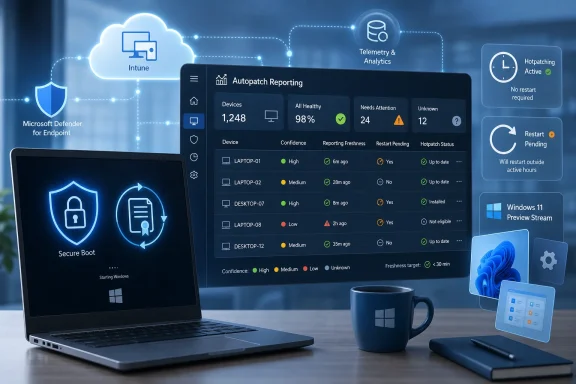 June Turned Windows Servicing Into an Inventory Problem
The old mental model of Windows Update was simple: install the cumulative update, reboot, move on. June 2026 shows how incomplete that model has become. Microsoft’s most important Windows work this month lives below the visible UI, in the trust chain that decides what a PC is allowed to boot before Windows itself has a chance to defend anything.That is why Secure Boot certificate rotation is the real spine of the month’s news. The original Windows Secure Boot certificates used across much of the ecosystem began reaching their planned expiration window in June 2026, and Microsoft has spent months trying to make the rollover feel routine. For many consumer and unmanaged business PCs, the answer remains reassuringly boring: keep Windows updated, keep Secure Boot enabled, and the newer certificates should arrive through the normal update channel.
But administrators know that “should” is doing a lot of work. Firmware variations, older hardware, virtual machines, hotpatch update cadence, diagnostic data gaps, and enterprise policy all complicate a process that looks simple only from Redmond’s marketing altitude. The important shift is that Microsoft is no longer framing the certificate transition as a one-time patch; it is framing it as an estate-readiness exercise.
That matters because readiness is not the same thing as compliance. A device may be patched but not yet restarted. It may be enrolled but not reporting the right diagnostic data. It may support one trust configuration but not another. The June story is that Windows servicing now expects administrators to understand those distinctions before a problem becomes visible to users.
Secure Boot Is Where the Boring Stuff Becomes Strategic
Secure Boot is easy to ignore precisely because, when it works, users never see it. It is part of the pre-OS security plumbing that helps ensure trusted, signed components load during startup. That makes the certificate rollover one of those rare Windows events where the most important change is also the least screenshot-friendly.Microsoft’s public posture has been careful. Devices that have not yet received updated Secure Boot certificates are not supposed to suddenly stop booting or stop receiving standard Windows updates. That reassurance is important, because panic is the enemy of good firmware work. But the absence of immediate failure does not mean the transition is optional.
The deeper issue is the age of the trust material. Certificates introduced in the early UEFI Secure Boot era have had a long run, and Microsoft is trying to move the ecosystem to newer 2023-era certificates without creating a boot crisis across billions of wildly different devices. That requires operating system updates, firmware cooperation, OEM validation, telemetry, and administrator patience.
For home users, the guidance is deliberately conservative. Install updates, avoid disabling Secure Boot, check the Windows Security app if available, and look to the device manufacturer if the PC appears to need firmware support. For businesses, the task is more procedural: inventory devices, pilot the update, validate firmware behavior, monitor reporting, and phase deployment.
This is the kind of Windows news that separates enthusiasts from operators. Enthusiasts see a security housekeeping item. Operators see the possibility of help desk tickets, change windows, reboot coordination, and awkward conversations about aging hardware that no longer fits a modern trust model.
Autopatch Becomes a Window Into the Boot Chain
The improved Secure Boot status report in Windows Autopatch is one of June’s most consequential admin-facing pieces, even if it will not excite anyone outside endpoint management. Its purpose is straightforward: give administrators a device-level view of certificate status, trust configuration, and readiness. The more interesting part is what that says about Microsoft’s direction.Windows Autopatch is no longer just about deferring or accelerating monthly updates. It is becoming a dashboard for whether the Windows estate is structurally ready for Microsoft’s security assumptions. That includes whether Secure Boot is enabled, whether certificates are current, whether a device is considered high-confidence for automated rollout, and whether reported data is fresh enough to trust.
This is a more mature way to manage risk than blasting a policy across a fleet and hoping nothing falls over. It also introduces a new dependency: the quality of management telemetry becomes part of the security control. If devices are inactive, under-reporting, or outside the expected management plane, the organization’s view of readiness gets blurry.
The confidence-level concept is especially revealing. Microsoft is effectively saying that not every firmware and device combination should be treated equally. Some devices have enough observed success data to justify automation; others need controlled testing; some should be paused; some may not be supported. That is sensible, but it also makes Windows servicing feel more like cloud operations than traditional desktop administration.
There is a tradeoff here. Microsoft can reduce catastrophic rollout risk by relying on telemetry and staged confidence. But the same approach can make administrators feel like they are managing a moving target, where device eligibility changes as Microsoft’s backend confidence changes. The upside is safer deployment. The downside is another layer of abstraction between the admin and the actual machine.
Hotpatching Meets the Reality of Reboots
Hotpatching is one of Microsoft’s most attractive enterprise promises: fewer restarts, less disruption, and a Windows update cadence that fits modern uptime expectations. June’s Secure Boot work exposes the boundary of that promise. Some changes still need the machine to restart because the boot path itself is being updated.That sounds obvious, but it matters operationally. Secure Boot certificate updates and related boot manager changes cannot be fully completed in the same way a user-mode fix might be applied. If the change affects the pre-OS trust chain, the restart is not an inconvenience; it is the mechanism by which the system enters the new trusted state.
Microsoft’s guidance around hotpatching and Secure Boot readiness is therefore a useful reality check. Devices receiving hotpatch updates may not consume preview update data at the same pace as devices taking conventional monthly updates. Since high-confidence Secure Boot deployment can depend on data delivered through non-security preview updates, hotpatched devices may lag until a baseline month or until administrators temporarily change strategy.
This is not a failure of hotpatching. It is a reminder that “no reboot” is not a universal property of security maintenance. The Windows platform is layered, and some layers are closer to firmware than to the desktop shell. Enterprises that bought into hotpatching as a way to reduce disruption now need to preserve the ability to schedule disruption when the security boundary demands it.
The most practical reading is that hotpatching needs a maintenance calendar, not a maintenance fantasy. IT teams should know when baseline months occur, when Secure Boot work needs a restart, and how to temporarily step outside a hotpatch rhythm without losing control of update compliance. Microsoft is not backing away from hotpatching; it is making clear that hotpatching does not repeal physics.
Windows 11’s Feature Stream Keeps Moving Under the Security Story
While Secure Boot dominates the enterprise risk conversation, June also continues the familiar Windows 11 pattern: new features arrive through optional preview updates first, then roll into broader security releases later. For Windows 11 versions 25H2 and 24H2, Microsoft’s late-June preview update carried another set of incremental changes and fixes. It also included the now-familiar warning that some improvements arrive gradually, so not every eligible device sees the same feature set on the same day.That gradual rollout model is now part of Windows 11’s identity. It reduces blast radius and lets Microsoft meter features, but it also makes version numbers less useful as a shorthand for experience. Two machines can be on the same major Windows 11 release and still differ meaningfully in UI behavior, feature availability, and preview exposure.
The June feature stream includes the sort of changes that show where Microsoft thinks Windows is headed. Task Manager visibility into NPU usage reflects the Copilot+ PC and AI hardware push. Multi-App Camera and shared audio point toward more flexible collaboration and accessibility scenarios. Search refinements, File Explorer archive handling, and Magnifier improvements are smaller quality-of-life changes, but they continue the theme of Windows becoming more adaptive and more instrumented.
For enthusiasts, this is the fun part of the monthly cycle. For administrators, it is another reason to separate update rings, communicate expectations, and understand which features are tied to optional previews versus security updates. Microsoft’s Windows 11 cadence rewards organizations that can test continuously and punishes those still hoping for a single annual “new Windows” moment.
The AI PC Is Being Smuggled In Through Management Plumbing
Microsoft’s AI story in Windows is usually told through Copilot branding, NPUs, and premium hardware. June’s more interesting signal is that AI-era Windows is being prepared through management and observability as much as through consumer-facing features. If Task Manager reports more NPU activity, if Windows Roadmap filters Copilot+ PC exclusives, and if agents increasingly surface through the taskbar, then IT has to manage not just applications but new classes of local compute behavior.That is a subtle but important change. Traditional endpoint management focused on installed software, update state, disk encryption, firewall posture, and identity. AI-capable PCs add hardware acceleration, local model execution, privacy expectations, and feature segmentation based on silicon. The estate becomes harder to describe with old inventory categories.
Microsoft is also threading AI through Microsoft 365 Copilot, Windows taskbar experiences, and developer tooling. That creates a familiar enterprise dilemma: business leaders want AI capability quickly, while IT has to account for data controls, user training, support boundaries, and device eligibility. Windows is becoming the place where those pressures meet.
The practical consequence is that “AI PC readiness” will become another management report, not just a purchasing slogan. Which devices have NPUs? Which users get which Copilot experiences? Which features require Copilot+ hardware? Which settings are controllable by policy? June does not answer all of those questions, but it shows the direction of travel.
Windows 10 Is Now the Shadow Behind Every Windows 11 Update
The June roundup also lands against a bigger lifecycle reality: Windows 10 is running out of mainstream runway. Microsoft’s monthly Windows 11 improvements may look incremental, but each one widens the gap between the actively developed client and the estate many organizations still have in production. That gap is not only cosmetic.Security defaults, recovery behavior, Copilot-era features, management integration, and hardware-backed protections are increasingly centered on Windows 11. Windows 10 machines may keep doing their jobs, but they are no longer where Microsoft is placing the platform’s future bets. For organizations still carrying large Windows 10 populations, every Windows 11 monthly update is another reminder that migration is not just an operating system project; it is a hardware, policy, application, and user-readiness project.
This is where Secure Boot and Windows 10 lifecycle pressures intersect. Older devices are more likely to have firmware limitations, less likely to align cleanly with modern hardware security assumptions, and more likely to create exceptions. A Windows 11 migration plan that ignores firmware readiness is not a complete migration plan.
Microsoft’s updated skilling and deployment resources are useful, but they do not erase the hard work. Organizations need to know which devices can move, which should be replaced, which applications still block progress, and which users need staged transition support. The calendar is doing what calendars do: turning a strategic intention into an operational deadline.
The Admin Center Is Becoming the Real Windows Control Panel
One of the most striking patterns in the June news is how much of “Windows” now lives outside the local PC. Enterprise State Roaming shifts into Windows Backup for Organizations policies through Intune. Autopatch reports reveal boot-chain readiness. Defender surfaces Secure Boot certificate readiness. Windows 365 and Azure Virtual Desktop get tailored guidance. The local Settings app still matters, but the center of gravity has moved.For consumers, Windows remains a device experience. For enterprises, Windows is increasingly a cloud-managed state machine. A device is not merely updated or not updated; it is enrolled, reporting, policy-targeted, restart-pending, confidence-scored, ring-assigned, and lifecycle-mapped. That is powerful when everything works and maddening when it does not.
This centralization has a security logic. Microsoft can ship guidance, surface risk, automate deployment, and correlate device health at a scale no individual admin team could replicate. It also gives Microsoft more leverage to define the “right” way to run Windows: Intune, Autopatch, Defender, Entra, Graph, and cloud-backed reporting.
The risk is that smaller organizations and hybrid environments can get caught between worlds. They may not be fully cloud-managed, but they are still affected by Windows’ cloud-shaped assumptions. The June Secure Boot work is a good example: unmanaged or lightly managed devices may update automatically, while sophisticated enterprise fleets need deliberate control. The awkward middle is where surprises tend to live.
Microsoft’s Useful News Is Also Vendor Strategy
Microsoft’s monthly “news you can use” format is designed to be helpful, and much of it is. It gathers scattered release notes, admin guidance, preview features, security updates, and lifecycle reminders into something readable. But it is still a vendor narrative, and readers should treat it as such.The narrative says the future is cloud-managed, telemetry-informed, hardware-rooted, AI-enhanced, and serviced continuously. That may be true. It is also the future that best aligns with Microsoft’s commercial stack. Windows Autopatch, Intune, Defender, Windows 365, Microsoft 365 Copilot, and Copilot+ PCs all look more necessary when Windows itself is described as an always-evolving managed platform.
That does not make the guidance wrong. In many cases, Microsoft’s recommended path is the safest and most practical path. But IT pros should distinguish between a technical requirement and a preferred Microsoft operating model. Secure Boot certificate readiness is a technical requirement. Managing every endpoint through Microsoft’s cloud stack is a strategic choice, even if Microsoft is making that choice progressively easier to justify.
The best administrators will use Microsoft’s tooling without surrendering their own judgment. They will validate device behavior, test policy changes, keep rollback plans, understand vendor dependencies, and communicate user impact. The worst will mistake a green dashboard for operational certainty.
The June Checklist Is Really a Trust Checklist
June’s Windows news is not a grab bag once you look at it through the right lens. It is a trust checklist: trust in boot components, trust in management telemetry, trust in update rings, trust in hardware capability, and trust in Microsoft’s cloud control plane. The concrete work is less glamorous than the strategy, but it is where the strategy either succeeds or fails.- Organizations should verify Secure Boot certificate readiness at the device level instead of assuming that update compliance means certificate compliance.
- Administrators using hotpatching should plan for restart-based maintenance when boot-chain changes require it.
- Windows 11 preview updates should remain in controlled rings because gradual rollout makes feature availability inconsistent by design.
- Older hardware should be evaluated for firmware support, not merely for whether it can still run Windows acceptably.
- AI PC planning should include inventory, policy, privacy, and support considerations rather than only Copilot branding.
- Windows 10 migration plans should account for security posture and device trust, not just application compatibility.
Microsoft’s June 2026 Windows news is useful because it is concrete, but it is important because it reveals the operating system Microsoft is building toward: less standalone, more cloud-governed, more dependent on firmware and telemetry, and increasingly shaped by AI-era hardware. The organizations that treat this as another monthly recap will muddle through for now; the ones that treat it as a map of Windows’ next operating model will be better prepared for the updates that do not fit neatly into the old patch-and-reboot world.
References
- Primary source: Windows IT Pro Blog
Published: Wed, 01 Jul 2026 22:00:00 GMT
- Official source: learn.microsoft.com
- Related coverage: windowsforum.com
Windows June 2026: Secure Boot Rollover, Autopatch Hotpatching, Intune Updates | Windows Forum
Microsoft’s May 2026 Windows recap tells administrators that June will be dominated by Secure Boot certificate rollover work, default-on Windows hotpatching...windowsforum.com - Related coverage: releasebot.io

Windows Updates by Microsoft - June 2026 - Releasebot
Browse a full list of updates made to Windows by Microsoft. Follow to get all release notes by email, RSS, and more.
releasebot.io
- Related coverage: techfixbk.de

Windows Security Update: 6 Zero-Days and Secure Boot Crisis | TechFixBK
February 2026 Patch Tuesday fixes 6 actively exploited zero-days. Learn about SolarWinds vulnerabilities, mandatory MFA, and the June Secure Boot deadline.
techfixbk.de
- Related coverage: azurefeeds.com

Windows news you can use: December 2025 – Azure Feeds
Keep up to date with the ever changing and evolving Microsoft Azure ecosystem.
azurefeeds.com
