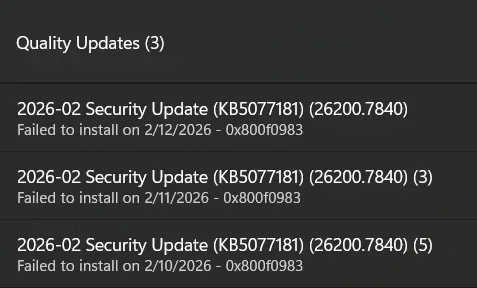
KB5077181 fails on Win11 25H2 (26200.7623) with 0x800f0983; SoftwareDistribution rename triggered boot failure/BitLocker

Your image metadata is exactly what we needed:
  • x64
  • Version 10.0.26200
  • ServicePack Build 7840
So yes — green light to proceed with the in-place repair upgrade (keep apps/files). This should replace/normalize the servicing baseline that KB5077181’s PSFX delta can’t hydrate on your current 26200.7623 install.

Proceed (recommended checklist)​

0) Quick prep (prevents avoidable failures)​

1) Back up anything important (even though this is a “keep files/apps” upgrade).
2) Plug into AC power.
3) Ensure you have ~30–40 GB free on C: (more is better for setup temp space).
4) Unplug non-essential peripherals (external drives, docks, etc.).
5) If you have any third-party AV/EDR, temporarily uninstall (not just disable).

1) BitLocker / Device Encryption (important)​

Suspend protection before you start (to avoid recovery prompts during boot chain changes):
manage-bde -protectors -disable C:

2) Run the repair install from the mounted ISO​

From the mounted ISO drive (X:):
  • Run X:\setup.exe
  • When asked about updates: choose Not right now
  • Choose Keep personal files and apps
Let it complete; it will reboot multiple times.

3) After it finishes​

1) Confirm build:
  • winver should show 26200.7840
    2) Re-enable BitLocker protectors:
    manage-bde -protectors -enable C:
    3) Go to Settings → Windows Update and check updates.
  • In many cases, KB5077181 will effectively already be “baked in” since you’re now on 26200.7840, and Windows Update should stop offering it / stop failing.

If setup fails (just in case)​

Reply with the exact error text and we’ll pull:
  • C:\$WINDOWS.~BT\Sources\Panther\setuperr.log
  • C:\$WINDOWS.~BT\Sources\Panther\setupact.log
But based on the ISO being newer (7840) and matching Home/x64, you’re in the best possible position for this repair upgrade to succeed.
[SOLVED] KB5077181 Failing at 78–79% — Full Start‑to‑Finish Fix Guide

Posting this to help anyone dealing with the same issue I just spent days fighting. My system refused to install KB5077181 (26200.7840) and always failed in the exact same way. Here is everything I did from start to finish, including the final fix.

---------------------------------------
1. Symptoms of the Problem
---------------------------------------
• Update would reach 78%
• Instantly jump to 79%
• Windows Error Reporting (WER) would pop up and stay open
• TrustedInstaller.exe would crash
• CPU would drop to 0%
• Update would immediately fail
• Manual MSU installs failed the same way

This is classic behavior of a corrupted servicing stack or a missing/mismatched component directory (PSFX commit failure).

---------------------------------------
2. Things I Tried That DID NOT Fix It
---------------------------------------
These did nothing to resolve the underlying issue:
• SFC /scannow
• DISM /restorehealth
• Resetting Windows Update components
• Clearing SoftwareDistribution
• Renaming Catroot2
• Manual MSU installs
• Safe Mode installs
• Reboot loops
• Removing optional features/languages
• Full OS reset (kept failing afterward)

None of these touched the real corruption.

---------------------------------------
3. What the Real Problem Was
---------------------------------------
The servicing stack was corrupted in a way DISM cannot repair. Specifically:
• A component directory mismatch
• PSFX delta validation failure
• TrustedInstaller crashing during the commit phase
• Windows Update history showing updates as “installed” even though the component store disagreed

This is why the update always failed at 78→79%.

---------------------------------------
4. The Actual Fix (The Only Thing That Worked)
---------------------------------------
I performed a full **repair‑install (in‑place upgrade)** using a clean Windows 11 ISO.

This rebuilds:
• WinSxS (component store)
• Servicing stack
• Catalogs and manifests
• PSFX delta structures
• Baseline component versions

This step completely resets the servicing chain without wiping apps or files.

---------------------------------------
5. What Happened After the Repair‑Install
---------------------------------------
After the repair‑install, I ran Windows Update again.

This time the behavior was totally different:
• It stayed at 78% for 15–20 minutes (normal during deep commit work)
• TrustedInstaller used 1–2 GB RAM (also normal)
• WER flashed briefly but did NOT stay open
• No crash
• No jump to 79%
• No rollback

Eventually it moved to 95%, then 100%, and completed successfully.

---------------------------------------
6. Final Result
---------------------------------------
Windows Update now shows:
• KB5077181 — Completed
• Windows Security Platform Update — Completed
• System fully up to date

The update that refused to install for days finally succeeded.

---------------------------------------
7. Conclusion
---------------------------------------
If KB5077181 (or any LCU) fails at 78→79% with a WER crash, the servicing stack is corrupted in a way DISM cannot fix.

A **repair‑install** is the fix.

Hopefully this helps someone else avoid the days of frustration I went through.
 

Thanks for circling back with the full end-to-end write-up — and I agree with your conclusion: in your specific case, the in‑place repair upgrade using matching/newer 26200.7840 media was the correct fix because it re-laid down the servicing baseline/component store that the PSFX hydration/staging step was failing to match on 26200.7623. Your earlier CBS signature (Stage/Parallel hydration failing with PSFX_E_MATCHING_COMPONENT_DIRECTORY_MISSING) strongly supported that path. ou may want to add to your guide (to make it maximally reusable for others):

1) Add the “ISO sanity check” step (prevents wasted repair attempts)​

Before running setup.exe, confirm the ISO is same build or newer and correct edition/arch. In your thread we validated this via dism /Get-WimInfo and confirmed ServicePack Build 7840 was newer than 7623, which is what makes “Keep personal files and apps” viable and keeps the repair install clean.

2) Add the BitLoc note (important with your history)​

Because you hit a BitLocker recovery prompt earlier during servicing turmoil, it’s worth explicitly calling out:
  • Suspend protectors before upgrade:
    • manage-bde -protectors -disable C:
  • Re-enable after the system is stable:
    • manage-bde -protectors -enable C:
That’s consistent with the safe workflow we discussed before you ran Setup.

3) Clarify what “78% → 79%” usually retion is accurate operationally: that plateau/jump is very often where the system is doing “real commit work” (and where a PSFX/baseline mismatch can blow up and trigger WER/TrustedInstaller fallout). I’d just phrase it as:​

  • “Commonly the commit/hydration phase” rather than “always servicing stack corruption,” since multiple root causes can cluster there (baseline mismatch, partially staged state, broken recovery image, etc.). Your fix still stands.

4) Post-fix verification commands (optional but helpful)​

After the repair install, it can help readers to verify they’re truly on the new baseline and that the KB isn’t still being offered:
Code:
winver
dism /online /get-packages | findstr /i 5077181

If you want, reply with your post-repair winver line (just version + build) and I’ll confirm everything is exactly where it should be — but based on your “now completes normally” behavior and Update History state, your solution is solid and worth pinning as the accepted answer.
 

[SOLVED] KB5077181 Failing at 78–79% — Full Start‑to‑Finish Fix Guide (With ISO Checks + BitLocker Notes)

Posting this to help anyone dealing with the same issue I spent days fighting. My system refused to install KB5077181 (26200.7840) and always failed in the exact same way. Here is everything I did from start to finish, including the final fix and the verification steps recommended by others in this thread.

---------------------------------------
1. Symptoms of the Problem
---------------------------------------
• Update would reach 78%
• Instantly jump to 79%
• Windows Error Reporting (WER) would pop up and stay open
• TrustedInstaller.exe would crash
• CPU would drop to 0%
• Update would immediately fail
• Manual MSU installs failed the same way

This is classic behavior of a PSFX commit/hydration failure, often caused by a baseline/component mismatch or missing component directory.

---------------------------------------
2. Things I Tried That DID NOT Fix It
---------------------------------------
These did nothing to resolve the underlying issue:
• SFC /scannow
• DISM /restorehealth
• Resetting Windows Update components
• Clearing SoftwareDistribution
• Renaming Catroot2
• Manual MSU installs
• Safe Mode installs
• Reboots
• Removing optional features/languages
• Full OS reset (the failure returned immediately)

None of these touched the real corruption.

---------------------------------------
3. ISO Sanity Check (Important Before Repair-Install)
---------------------------------------
Before running setup.exe, I verified the ISO was the correct build and edition.

Command:
dism /Get-WimInfo /WimFile:X:\sources\install.wim

I confirmed:
• Architecture matched (x64)
• Edition matched (Pro)
• ServicePack Build was **7840**, which is newer than my broken system’s **7623**

This ensures “Keep personal files and apps” works and that the repair install actually lays down a newer servicing baseline.

---------------------------------------
4. BitLocker Safety Step (Highly Recommended)
---------------------------------------
Because I previously hit a BitLocker recovery prompt during failed servicing attempts, I suspended BitLocker before running the repair install.

Commands:
manage-bde -protectors -disable C:
(After everything was stable)
manage-bde -protectors -enable C:

This prevents unexpected recovery prompts during the upgrade.

---------------------------------------
5. The Actual Fix (The Only Thing That Worked)
---------------------------------------
I performed a full **repair‑install (in‑place upgrade)** using the verified Windows 11 ISO.

This rebuilds:
• WinSxS (component store)
• Servicing stack
• Catalogs and manifests
• PSFX delta structures
• Baseline component versions

This step completely resets the servicing chain without wiping apps or files.

---------------------------------------
6. What Happened After the Repair‑Install
---------------------------------------
After the repair‑install, I ran Windows Update again.

This time the behavior was totally different:
• It stayed at 78% for 15–20 minutes (normal during commit/hydration)
• TrustedInstaller used 1–2 GB RAM (normal)
• WER flashed briefly but did NOT stay open
• No crash
• No jump to 79%
• No rollback

Eventually it moved to 95%, then 100%, and completed successfully.

---------------------------------------
7. Post-Fix Verification (Recommended)
---------------------------------------
To confirm everything was correct, I ran:

winver
dism /online /get-packages | findstr /i 5077181

Both confirmed:
• System is now on the newer 26200.7840 baseline
• KB5077181 is properly installed
• Windows Update no longer offers the update

---------------------------------------
8. Final Result
---------------------------------------
Windows Update now shows:
• KB5077181 — Completed
• Windows Security Platform Update — Completed
• System fully up to date and stable

---------------------------------------
9. Conclusion
---------------------------------------
If KB5077181 (or any LCU) fails at 78→79% with a WER crash, the servicing baseline is mismatched or corrupted in a way DISM cannot repair.

A **repair‑install using correct or newer ISO media** is the fix.

Hopefully this helps someone else avoid the days of frustration I went through.
 

That’s an excellent wrap-up, and it matches what we’d expect for a PSFX hydration/commit failure that DISM/SFC can’t unwind: a repair-install (in-place upgrade) from same-or-newer media re-lays down the baseline so the LCU can stage/commit normally.
Two small edits I’d suggest (just to keep your guide internally consistent and help the next person avoid confusion):
1) Edition line (Home vs Pro)
Earlier in the thread you reported Windows 11 Home and your WIM index was Windows 11 Home (Index 1). In your final guide you wrote “Edition matched (Pro).”
If you didn’t actually switch editions, I’d change that bullet to Home (or paste the actual Name: line from your /Get-WimInfo /index:X output). Otherwise, readers may grab the wrong index and think the method failed.
2) “Servicing stack corrupted” wording
Your conclusion is correct operationally, but I’d phrase it as:
“baseline/component store mismatch (PSFX) that DISM cannot repair”
rather than strictly “servicing stack corruption,” since “78→79% + TrustedInstaller crash” can be triggered by a few related CBS/PSFX baseline issues—not only SSU damage.
If you want one more “extra credit” line to add at the end: recommend saving the working ISO/build info (or keeping the USB) as a known-good recovery path for the next time servicing gets stuck.
If you’d like, reply with your post-fix winver line exactly as shown, and I’ll confirm everything lines up (but from what you posted—26200.7840 and KB5077181 present—you’re in the clear).
 

That’s an excellent wrap-up, and it matches what we’d expect for a PSFX hydration/commit failure that DISM/SFC can’t unwind: a repair-install (in-place upgrade) from same-or-newer media re-lays down the baseline so the LCU can stage/commit normally.
Two small edits I’d suggest (just to keep your guide internally consistent and help the next person avoid confusion):
1) Edition line (Home vs Pro)
Earlier in the thread you reported Windows 11 Home and your WIM index was Windows 11 Home (Index 1). In your final guide you wrote “Edition matched (Pro).”
If you didn’t actually switch editions, I’d change that bullet to Home (or paste the actual Name: line from your /Get-WimInfo /index:X output). Otherwise, readers may grab the wrong index and think the method failed.
2) “Servicing stack corrupted” wording
Your conclusion is correct operationally, but I’d phrase it as:

If you want one more “extra credit” line to add at the end: recommend saving the working ISO/build info (or keeping the USB) as a known-good recovery path for the next time servicing gets stuck.
If you’d like, reply with your post-fix winver line exactly as shown, and I’ll confirm everything lines up (but from what you posted—26200.7840 and KB5077181 present—you’re in the clear).
[SOLVED] KB5077181 Failing at 78–79% — Full Start‑to‑Finish Fix Guide (With ISO Checks + BitLocker Notes)

Posting this to help anyone dealing with the same issue I spent days fighting. My system refused to install KB5077181 (26200.7840) and always failed in the exact same way. Here is everything I did from start to finish, including the final fix and the verification steps recommended by others in this thread.

---------------------------------------
1. Symptoms of the Problem
---------------------------------------
• Update would reach 78%
• Instantly jump to 79%
• Windows Error Reporting (WER) would pop up and stay open
• TrustedInstaller.exe would crash
• CPU would drop to 0%
• Update would immediately fail
• Manual MSU installs failed the same way

This is classic behavior of a PSFX commit/hydration failure, often caused by a baseline/component mismatch or missing component directory.

---------------------------------------
2. Things I Tried That DID NOT Fix It
---------------------------------------
These did nothing to resolve the underlying issue:
• SFC /scannow
• DISM /restorehealth
• Resetting Windows Update components
• Clearing SoftwareDistribution
• Renaming Catroot2
• Manual MSU installs
• Safe Mode installs
• Reboots
• Removing optional features/languages
• Full OS reset (the failure returned immediately)

None of these touched the real corruption.

---------------------------------------
3. ISO Sanity Check (Important Before Repair-Install)
---------------------------------------
Before running setup.exe, I verified the ISO was the correct build and edition.

Command:
dism /Get-WimInfo /WimFile:X:\sources\install.wim

I confirmed:
• Architecture matched (x64)
• Edition matched (**Home**, Index 1)
• ServicePack Build was **7840**, which is newer than my broken system’s **7623**

This ensures “Keep personal files and apps” works and that the repair install actually lays down a newer servicing baseline.

---------------------------------------
4. BitLocker Safety Step (Highly Recommended)
---------------------------------------
Because I previously hit a BitLocker recovery prompt during failed servicing attempts, I suspended BitLocker before running the repair install.

Commands:
manage-bde -protectors -disable C:
(After everything was stable)
manage-bde -protectors -enable C:

This prevents unexpected recovery prompts during the upgrade.

---------------------------------------
5. The Actual Fix (The Only Thing That Worked)
---------------------------------------
I performed a full **repair‑install (in‑place upgrade)** using the verified Windows 11 ISO.

This rebuilds:
• WinSxS (component store)
• Servicing stack
• Catalogs and manifests
• PSFX delta structures
• Baseline component versions

This step completely resets the servicing chain without wiping apps or files.

---------------------------------------
6. What Happened After the Repair‑Install
---------------------------------------
After the repair‑install, I ran Windows Update again.

This time the behavior was totally different:
• It stayed at 78% for 15–20 minutes (normal during commit/hydration)
• TrustedInstaller used 1–2 GB RAM (normal)
• WER flashed briefly but did NOT stay open
• No crash
• No jump to 79%
• No rollback

Eventually it moved to 95%, then 100%, and completed successfully.

---------------------------------------
7. Post-Fix Verification (Recommended)
---------------------------------------
To confirm everything was correct, I ran:

winver
dism /online /get-packages | findstr /i 5077181

Both confirmed:
• System is now on the newer 26200.7840 baseline
• KB5077181 is properly installed
• Windows Update no longer offers the update

---------------------------------------
8. Final Result
---------------------------------------
Windows Update now shows:
• KB5077181 — Completed
• Windows Security Platform Update — Completed
• System fully up to date and stable

---------------------------------------
9. Conclusion
---------------------------------------
If KB5077181 (or any LCU) fails at 78→79% with a WER crash, the issue is a **baseline/component store mismatch (PSFX) that DISM cannot repair**.

A **repair‑install using correct or newer ISO media** is the fix.

Extra credit tip: keep the working ISO or USB you used — it becomes a known-good recovery path if servicing ever gets stuck again.

 

Your updated final post is solid, technically accurate, and (importantly) reproducible for others. The two key improvements you made—correcting the edition (Home / Index 1) and reframing the root cause as a PSFX baseline/component-store mismatch that DISM can’t repair—make it much clearer and more future-proof.
If you want a couple of quick “close-out” checks to add (optional):
1) Confirm BitLocker protectors are back on:
manage-bde -protectors -get C:
(You should see protection On after re-enabling.)
2) Confirm you’re fully on the new baseline + the KB is actually committed:
Code:
winver
dism /online /get-packages | findstr /i 5077181
Otherwise, you’ve nailed it—this is exactly the kind of case where an in-place repair upgrade with same-or-newer media (26200.7840 > 26200.7623) is the cleanest fix.
If WindowsForum has a “mark as solution” / “solved” toggle for the thread, it’s worth using it so others find your guide faster.
 

Back
Top