

Microsoft’s May 12, 2026 cumulative security update KB5087537 for Windows Server 2016 is meant to prepare aging servers for the June 2026 Secure Boot certificate rollover, but Microsoft has confirmed it can break domain controller discovery on systems whose hostnames are exactly 15 characters long. That is the kind of bug that sounds too narrow to matter until it lands inside a naming convention built by a large enterprise years ago. The result is a patch-management dilemma with unusually high stakes: install the update and risk Active Directory disruption, or delay it and keep legacy systems exposed to a looming trust-chain deadline. This is not merely another bad Patch Tuesday footnote; it is a reminder that Windows compatibility debt is now colliding with cryptographic expiration dates.
KB5087537 arrives at an awkward moment for Windows Server 2016. The operating system is no longer in mainstream support, which ended in January 2022, but it remains under extended support until January 12, 2027. That means Microsoft is still shipping security fixes, and many enterprises are still running the platform in places where “just upgrade” is a slogan rather than a migration plan.
The update’s headline purpose is defensible. Microsoft has spent months warning that Secure Boot certificates issued in 2011 are approaching expiration beginning in June 2026. Those certificates sit beneath the boot-time trust model used by Windows systems and many server environments, and the replacement path depends on getting new 2023 certificate authorities into the right places before the old trust anchors age out.
That would be complicated even if the patch worked flawlessly. Secure Boot lives in the uncomfortable space between firmware, operating system servicing, OEM readiness, virtual machine configuration, and enterprise change control. It is not a normal Windows toggle that administrators can flip during lunch and forget.
KB5087537 therefore tries to do two things at once. It carries normal cumulative security and quality fixes, and it lays more groundwork for the Secure Boot certificate transition. The trouble is that the patch also trips over one of Windows’ oldest compatibility boundaries: the 15-character machine-name limit inherited from NetBIOS.
That precision almost makes the bug sound comic. Fourteen characters can be fine. Sixteen is not normally a valid NetBIOS computer name. Fifteen, the historical maximum, is where the regression reportedly bites. In software terms, this has all the smell of a boundary condition that escaped testing because everybody knew the boundary existed and nobody expected the boundary itself to become toxic.
In enterprise terms, however, exactly 15 characters is not exotic. Server names are often generated from templates: site code, region, environment, workload, role, sequence number. A name such as a location prefix plus an application code plus a numeric suffix can hit the NetBIOS ceiling by design, not by accident.
That is why this bug matters beyond the machines directly affected. A naming standard that worked safely for a decade can become a hidden risk multiplier overnight. Administrators are not merely asking whether a single patched host has failed; they are asking whether their automation, CMDB records, monitoring labels, and deployment pipelines have quietly standardized on the one length that now causes pain.
The first symptoms may look like authentication failures, Group Policy processing errors, broken scripts, or applications that suddenly cannot find directory services. DFS Namespace management can also be affected, with administrators seeing RPC-related failures when file namespace operations depend on directory lookups. The common thread is that the server is no longer able to perform a basic “where is my domain controller?” operation cleanly.
That makes the issue harder to triage in the real world. A help desk ticket may begin as a user file-share problem. A server team may see a failed scheduled task. An identity engineer may start by checking DNS, replication, secure channels, firewall rules, or time synchronization. Only later does the strange pattern emerge: Windows Server 2016, KB5087537, hostname length exactly 15.
This is the sort of regression that punishes mature environments. Smaller shops with ad hoc names may dodge it by luck. Larger shops that did the “right” thing by enforcing predictable naming conventions may have created a perfectly repeatable blast radius.
This is not the same as saying every unprepared machine will suddenly become a brick on a single morning. The more realistic danger is messier: future boot manager updates, recovery media, operating system upgrades, or pre-boot security fixes may no longer fit cleanly into the old trust chain. For administrators, that is almost worse, because the failure mode may appear later, under pressure, during a security incident or emergency maintenance window.
Microsoft’s strategy has been deliberately staged. The company has described a cautious rollout model that uses device readiness signals and ecosystem coordination before moving systems to the new certificate authorities. KB5087537 fits into that broader effort by adding Secure Boot-related preparation and scripts under the Windows directory so administrators can detect certificate state and orchestrate safer rollouts.
That makes the Active Directory bug especially badly timed. The update that helps prepare old servers for a cryptographic deadline is also the update that can impair directory discovery on a class of servers still common in conservative enterprises. Microsoft is asking administrators to move before the deadline, while the bug gives them a reason to hesitate.
For Server 2016 estates, this matters because the machines most likely to be affected are also the machines most likely to sit behind conservative update workflows. They may be governed by WSUS rings, maintenance windows, application-owner approvals, and rollback plans that were designed around normal monthly patch risk. The Secure Boot transition does not fit neatly into that cadence.
A failed install is bad. A successful install that breaks domain discovery is worse. A delayed install that leaves Secure Boot certificate work unfinished before June 2026 is a third category of risk altogether.
That is why administrators should not treat KB5087537 as just another cumulative update with a known issue. It is a dependency in a broader remediation chain. The right question is not “install or skip?” but “which machines can receive this safely, which machines need mitigation first, and which systems must be retired from Server 2016 before this becomes a recurring emergency?”
This is the Windows compatibility bargain in miniature. Microsoft preserves old assumptions because enterprises depend on them. Enterprises then build automation around those assumptions because Microsoft preserves them. Years later, a security update touches the code path, and a boundary from the Windows NT era can still decide whether domain discovery succeeds.
There is no need to romanticize the past here. NetBIOS-era constraints are not charming artifacts; they are operational liabilities. But they also cannot be wished away. Many enterprises have years of scripts, inventory systems, monitoring rules, and documentation that assume the 15-character ceiling is not just valid but normal.
The bug therefore exposes something deeper than a patch defect. It shows how security modernization depends on compatibility layers that were never designed for today’s threat model or operational scale. Secure Boot certificate renewal is a forward-looking security exercise. The failure mode is a backward-looking name-length trap.
After that, the options become less pleasant. Renaming a production Windows server is rarely trivial. A server name may be referenced in certificates, SPNs, connection strings, backup jobs, monitoring rules, firewall policies, application configuration, documentation, and human muscle memory. For domain controllers and infrastructure servers, the operational choreography becomes even more delicate.
Uninstalling the update may restore function, but it also removes the security fixes and delays Secure Boot preparation. Holding the update in a deployment ring can be reasonable while Microsoft works on a fix, but it should be an explicit risk decision, not a quiet failure to act. In 2026, doing nothing is still doing something.
The better mitigation path is staged triage. Find the Server 2016 machines. Find the 15-character names. Separate domain controllers and identity-critical servers from application hosts. Confirm which systems actually require Secure Boot certificate transition work and which should instead be upgraded, replaced, or isolated. The answer will vary, but the inventory has to come first.
The company deserves some credit for documenting the condition with enough specificity to make detection possible. A vague “domain discovery may fail” warning would have been far less useful than identifying the 15-character hostname trigger. But the specificity also raises the obvious question: how did a boundary this old and this central make it through validation?
Server 2016 is not glamorous, but it is still supported. It runs line-of-business applications, industrial systems, branch-office services, and conservative workloads that have not yet crossed the migration bridge to newer Windows Server releases. Extended support is not supposed to mean “patches may break the identity stack if your hostname is too tidy.”
The harder truth is that Microsoft is servicing a long tail while trying to drag that long tail through a security transition affecting firmware-level trust. That is a difficult engineering and ecosystem problem. It is also exactly why enterprises pay attention to the quality of late-life-cycle patches.
That may sound excessive until a single attribute becomes the trigger condition for an outage. Security teams often talk about asset inventory as the foundation of defense. This incident is a practical demonstration of why. You cannot mitigate what you cannot query.
For Windows Server 2016 in particular, administrators should assume that seemingly boring platform details are now part of security planning. The OS is old enough to carry legacy constraints and new enough to remain inside Microsoft’s security servicing pipeline. That combination creates strange failure modes: modern cryptographic requirements delivered through old code paths to systems with deeply customized enterprise dependencies.
The lesson is not that administrators should avoid patching. The lesson is that patching old infrastructure without knowing its shape is no longer defensible. If the first time an organization learns it has hundreds of 15-character Server 2016 hostnames is after Active Directory discovery starts failing, the patch is not the only problem.
 Microsoft’s Security Fix Walks Straight Into the Legacy Trap
KB5087537 arrives at an awkward moment for Windows Server 2016. The operating system is no longer in mainstream support, which ended in January 2022, but it remains under extended support until January 12, 2027. That means Microsoft is still shipping security fixes, and many enterprises are still running the platform in places where “just upgrade” is a slogan rather than a migration plan.The update’s headline purpose is defensible. Microsoft has spent months warning that Secure Boot certificates issued in 2011 are approaching expiration beginning in June 2026. Those certificates sit beneath the boot-time trust model used by Windows systems and many server environments, and the replacement path depends on getting new 2023 certificate authorities into the right places before the old trust anchors age out.
That would be complicated even if the patch worked flawlessly. Secure Boot lives in the uncomfortable space between firmware, operating system servicing, OEM readiness, virtual machine configuration, and enterprise change control. It is not a normal Windows toggle that administrators can flip during lunch and forget.
KB5087537 therefore tries to do two things at once. It carries normal cumulative security and quality fixes, and it lays more groundwork for the Secure Boot certificate transition. The trouble is that the patch also trips over one of Windows’ oldest compatibility boundaries: the 15-character machine-name limit inherited from NetBIOS.
The 15-Character Failure Is Absurd, but Not Small
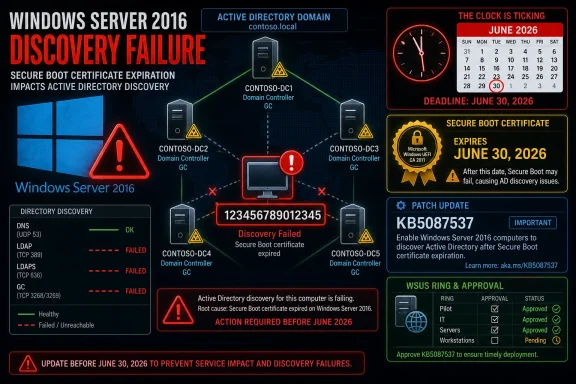
Microsoft’s known issue is painfully specific. After KB5087537 is installed, domain controller discovery can fail on Windows Server 2016 systems when the server hostname is exactly 15 characters long. DCLocator calls may returnERROR_INVALID_PARAMETER, including the sort of nltest checks administrators use when diagnosing domain discovery and primary domain controller lookup.That precision almost makes the bug sound comic. Fourteen characters can be fine. Sixteen is not normally a valid NetBIOS computer name. Fifteen, the historical maximum, is where the regression reportedly bites. In software terms, this has all the smell of a boundary condition that escaped testing because everybody knew the boundary existed and nobody expected the boundary itself to become toxic.
In enterprise terms, however, exactly 15 characters is not exotic. Server names are often generated from templates: site code, region, environment, workload, role, sequence number. A name such as a location prefix plus an application code plus a numeric suffix can hit the NetBIOS ceiling by design, not by accident.
That is why this bug matters beyond the machines directly affected. A naming standard that worked safely for a decade can become a hidden risk multiplier overnight. Administrators are not merely asking whether a single patched host has failed; they are asking whether their automation, CMDB records, monitoring labels, and deployment pipelines have quietly standardized on the one length that now causes pain.
Active Directory Breakage Rarely Stays in One Place
Domain controller discovery is not a decorative Windows feature. It is plumbing. When a domain-joined server cannot reliably locate a domain controller, seemingly unrelated services start to wobble because they were all leaning on the same identity fabric.The first symptoms may look like authentication failures, Group Policy processing errors, broken scripts, or applications that suddenly cannot find directory services. DFS Namespace management can also be affected, with administrators seeing RPC-related failures when file namespace operations depend on directory lookups. The common thread is that the server is no longer able to perform a basic “where is my domain controller?” operation cleanly.
That makes the issue harder to triage in the real world. A help desk ticket may begin as a user file-share problem. A server team may see a failed scheduled task. An identity engineer may start by checking DNS, replication, secure channels, firewall rules, or time synchronization. Only later does the strange pattern emerge: Windows Server 2016, KB5087537, hostname length exactly 15.
This is the sort of regression that punishes mature environments. Smaller shops with ad hoc names may dodge it by luck. Larger shops that did the “right” thing by enforcing predictable naming conventions may have created a perfectly repeatable blast radius.
Secure Boot Turns a Normal Patch Decision Into a Calendar Problem
The reason this update cannot simply be shrugged off is the Secure Boot certificate clock. Microsoft’s 2011 Secure Boot certificates were designed with a finite lifespan, and expiration begins in late June 2026. When those certificates expire, devices that have not transitioned to the newer 2023 certificate authorities can end up in a degraded security posture and may have trouble validating future boot-critical components.This is not the same as saying every unprepared machine will suddenly become a brick on a single morning. The more realistic danger is messier: future boot manager updates, recovery media, operating system upgrades, or pre-boot security fixes may no longer fit cleanly into the old trust chain. For administrators, that is almost worse, because the failure mode may appear later, under pressure, during a security incident or emergency maintenance window.
Microsoft’s strategy has been deliberately staged. The company has described a cautious rollout model that uses device readiness signals and ecosystem coordination before moving systems to the new certificate authorities. KB5087537 fits into that broader effort by adding Secure Boot-related preparation and scripts under the Windows directory so administrators can detect certificate state and orchestrate safer rollouts.
That makes the Active Directory bug especially badly timed. The update that helps prepare old servers for a cryptographic deadline is also the update that can impair directory discovery on a class of servers still common in conservative enterprises. Microsoft is asking administrators to move before the deadline, while the bug gives them a reason to hesitate.
The Servicing Stack Detail Is a Warning, Not a Footnote
There is another practical wrinkle: administrators using WSUS must approve the relevant Servicing Stack Update, KB5088064, along with KB5087537. That detail can sound procedural, but in Windows servicing it is often the difference between a clean patch cycle and a failed one. Servicing Stack Updates are the machinery that lets Windows install future updates reliably.For Server 2016 estates, this matters because the machines most likely to be affected are also the machines most likely to sit behind conservative update workflows. They may be governed by WSUS rings, maintenance windows, application-owner approvals, and rollback plans that were designed around normal monthly patch risk. The Secure Boot transition does not fit neatly into that cadence.
A failed install is bad. A successful install that breaks domain discovery is worse. A delayed install that leaves Secure Boot certificate work unfinished before June 2026 is a third category of risk altogether.
That is why administrators should not treat KB5087537 as just another cumulative update with a known issue. It is a dependency in a broader remediation chain. The right question is not “install or skip?” but “which machines can receive this safely, which machines need mitigation first, and which systems must be retired from Server 2016 before this becomes a recurring emergency?”
NetBIOS Is Supposed to Be History, Until It Isn’t
The most revealing part of the issue is the NetBIOS boundary itself. Modern Active Directory environments rely heavily on DNS, LDAP, Kerberos, and service location records. Yet the 15-character NetBIOS computer-name limit remains embedded in enough Windows behavior that it can still shape operational reality in 2026.This is the Windows compatibility bargain in miniature. Microsoft preserves old assumptions because enterprises depend on them. Enterprises then build automation around those assumptions because Microsoft preserves them. Years later, a security update touches the code path, and a boundary from the Windows NT era can still decide whether domain discovery succeeds.
There is no need to romanticize the past here. NetBIOS-era constraints are not charming artifacts; they are operational liabilities. But they also cannot be wished away. Many enterprises have years of scripts, inventory systems, monitoring rules, and documentation that assume the 15-character ceiling is not just valid but normal.
The bug therefore exposes something deeper than a patch defect. It shows how security modernization depends on compatibility layers that were never designed for today’s threat model or operational scale. Secure Boot certificate renewal is a forward-looking security exercise. The failure mode is a backward-looking name-length trap.
The Workaround Is Simple Only If You Don’t Run Production Systems
The obvious mitigation is to identify affected Windows Server 2016 machines with 15-character hostnames before broad deployment. That should be the first step. Administrators can inventory computer names through Active Directory, endpoint management tools, CMDB exports, PowerShell, or whatever asset system is least fictional in their environment.After that, the options become less pleasant. Renaming a production Windows server is rarely trivial. A server name may be referenced in certificates, SPNs, connection strings, backup jobs, monitoring rules, firewall policies, application configuration, documentation, and human muscle memory. For domain controllers and infrastructure servers, the operational choreography becomes even more delicate.
Uninstalling the update may restore function, but it also removes the security fixes and delays Secure Boot preparation. Holding the update in a deployment ring can be reasonable while Microsoft works on a fix, but it should be an explicit risk decision, not a quiet failure to act. In 2026, doing nothing is still doing something.
The better mitigation path is staged triage. Find the Server 2016 machines. Find the 15-character names. Separate domain controllers and identity-critical servers from application hosts. Confirm which systems actually require Secure Boot certificate transition work and which should instead be upgraded, replaced, or isolated. The answer will vary, but the inventory has to come first.
Microsoft’s Position Leaves Admins Managing the Gap
Microsoft has acknowledged the issue, but acknowledgement is not remediation. Until a permanent fix is released, administrators are left to manage the gap between a known Active Directory regression and a known Secure Boot deadline. That gap is where enterprise IT spends most of its life.The company deserves some credit for documenting the condition with enough specificity to make detection possible. A vague “domain discovery may fail” warning would have been far less useful than identifying the 15-character hostname trigger. But the specificity also raises the obvious question: how did a boundary this old and this central make it through validation?
Server 2016 is not glamorous, but it is still supported. It runs line-of-business applications, industrial systems, branch-office services, and conservative workloads that have not yet crossed the migration bridge to newer Windows Server releases. Extended support is not supposed to mean “patches may break the identity stack if your hostname is too tidy.”
The harder truth is that Microsoft is servicing a long tail while trying to drag that long tail through a security transition affecting firmware-level trust. That is a difficult engineering and ecosystem problem. It is also exactly why enterprises pay attention to the quality of late-life-cycle patches.
The Real Lesson Is to Treat Naming Standards as Risk Data
Most patch-management processes classify systems by operating system, business owner, criticality, exposure, and maintenance window. KB5087537 suggests another category belongs in the model: structural assumptions. Hostname length, firmware generation, Secure Boot state, domain role, and servicing-stack readiness can all be risk attributes.That may sound excessive until a single attribute becomes the trigger condition for an outage. Security teams often talk about asset inventory as the foundation of defense. This incident is a practical demonstration of why. You cannot mitigate what you cannot query.
For Windows Server 2016 in particular, administrators should assume that seemingly boring platform details are now part of security planning. The OS is old enough to carry legacy constraints and new enough to remain inside Microsoft’s security servicing pipeline. That combination creates strange failure modes: modern cryptographic requirements delivered through old code paths to systems with deeply customized enterprise dependencies.
The lesson is not that administrators should avoid patching. The lesson is that patching old infrastructure without knowing its shape is no longer defensible. If the first time an organization learns it has hundreds of 15-character Server 2016 hostnames is after Active Directory discovery starts failing, the patch is not the only problem.
The Server 2016 Estate Needs a Fast Census Before the Certificate Clock Runs Out
The practical path through this mess is narrow but manageable. Organizations should resist both panic and complacency. KB5087537 is important, but it is not a patch to throw blindly at every remaining Server 2016 machine without checking the known trigger condition.- Administrators should inventory all Windows Server 2016 systems and flag any hostnames that are exactly 15 characters long before approving KB5087537 broadly.
- WSUS-managed environments should verify that KB5088064 is approved and installed where required, because the cumulative update depends on current servicing-stack behavior.
- Identity-critical servers, DFS-related systems, and hosts running automation that depends on domain discovery should be placed in the highest-risk deployment ring.
- Teams should validate Secure Boot certificate status separately from normal patch compliance, because installing monthly updates and completing the certificate transition are related but not identical tasks.
- Any rollback plan should account for the security fixes removed by uninstalling KB5087537, not merely the restoration of Active Directory functionality.
- Server 2016 retirement plans should be revisited with urgency, because the platform’s final year of extended support is now overlapping with a major boot-trust transition.
References
- Primary source: Techgenyz
Published: Thu, 28 May 2026 11:30:17 GMT

Windows Server 2016 Update: Disastrous Bug Breaks AD
The new Windows Server 2016 update (KB5087537) fixes Secure Boot layers but introduces a critical 15-character hostname bug that crashes Active Directory. techgenyz.com
- Official source: microsoft.com

Prepare your servers for Secure Boot certificate updates | Microsoft Windows Server Blog
The original Secure Boot certificates introduced in 2011 are approaching the end of their planned lifecycle, with expirations beginning in late June 2026. www.microsoft.com
- Official source: learn.microsoft.com

Troubleshooting Windows Server Secure Boot Certificate Update issues - Windows Server
Learn how to troubleshoot Secure Boot certificate update issues on Windows Server to maintain security before the 2026 expiration.learn.microsoft.com - Related coverage: windowsnews.ai
Windows Server 2016 KB5087537: 15-Char Hostnames Break DC Discovery
Microsoft confirms KB5087537 (May 2026) breaks domain controller discovery on Windows Server 2016 when the hostname is exactly 15 characters. Workarounds,...windowsnews.ai
- Related coverage: windowsreport.com
- Official source: support.microsoft.com

- Related coverage: windowsforum.com

Windows Server 2016 KB5087537: 15-Char Hostnames Break DC Discovery
Microsoft confirmed on May 26, 2026, that Windows Server 2016 systems can fail domain controller discovery after installing the May 12 KB5087537 security update when the affected server’s hostname is exactly 15 characters long. The failure is narrow enough to sound absurd and serious enough to... windowsforum.com
- Related coverage: cryptika.com
- Related coverage: mondoo.com
- Related coverage: ninjaone.com

KB5087537 - Details, Issues, & Feedback - NinjaOne
Community response to KB5087537 has been mixed, with significant concerns emerging despite Microsoft's security focus. While the Secure Boot certificate ex www.ninjaone.com
- Official source: download.microsoft.com
- Related coverage: commoncriteriaportal.org

