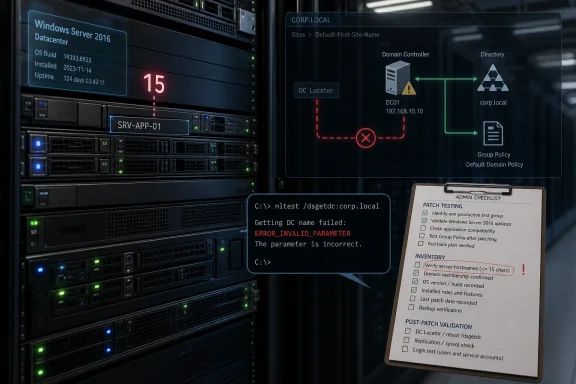
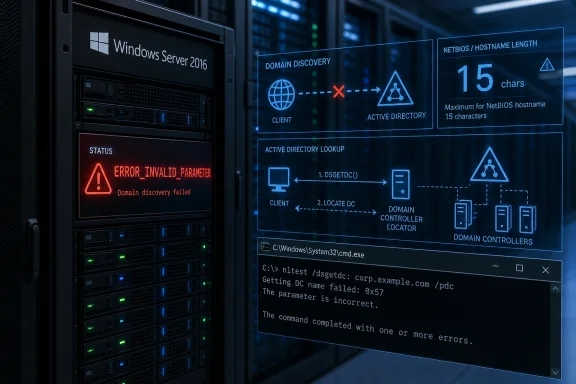
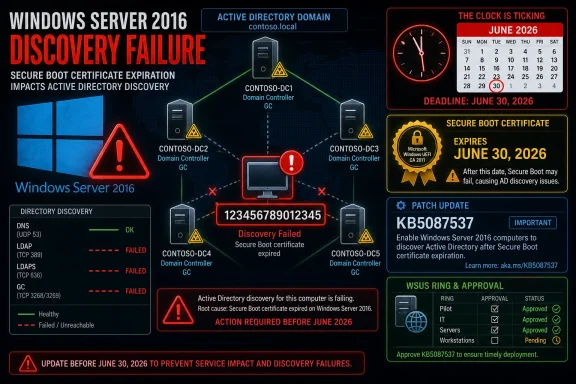
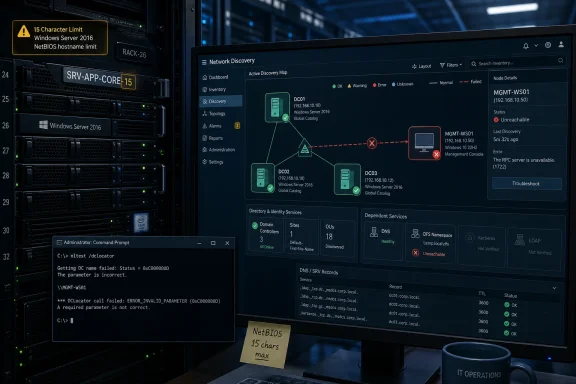
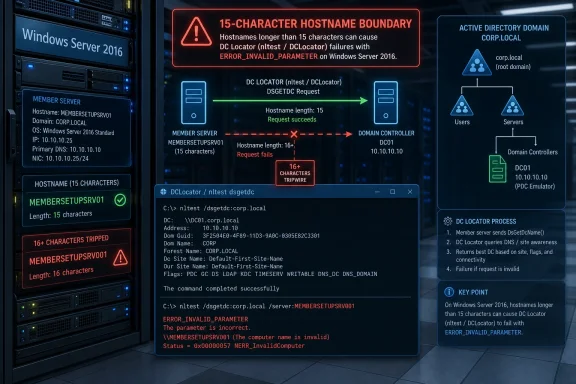
Microsoft confirmed on May 26, 2026, that Windows Server 2016 systems can fail domain controller discovery after installing the May 12 KB5087537 security update when the affected server’s hostname is exactly 15 characters long. The failure is narrow enough to sound absurd and serious enough to break real administrative workflows. That combination is precisely why this bug matters: it sits at the intersection of legacy naming constraints, Active Directory dependency, and the operational gamble every Patch Tuesday asks administrators to make. A one-character boundary condition has turned into a reminder that the oldest assumptions in Windows networking still have teeth.
The strange part of Microsoft’s latest Windows Server 2016 issue is not that a monthly cumulative update introduced a regression. Anyone responsible for a Windows estate has lived through that movie. The strange part is the specificity: domain controller discovery may fail only when the server hostname is exactly 15 characters long.
That is not an arbitrary number in Windows history. Fifteen characters is the old NetBIOS computer-name ceiling, a limit that has survived far beyond the era in which most administrators thought about NetBIOS as an everyday design constraint. Active Directory, DNS, Kerberos, LDAP, DFS, and modern management tooling may dominate the conversation now, but the Windows networking stack still carries decades of compatibility baggage.
Microsoft says the affected systems can return
The bug’s narrow trigger also makes it easy to underestimate. A hostname length condition sounds like trivia until it collides with a fleet naming convention. Many enterprises use rigid patterns that encode environment, location, role, sequence number, or ownership into a predictable string. In those shops, “exactly 15 characters” may not describe a weird edge case. It may describe a standard.
That update model is one reason this issue feels more consequential than its narrow description suggests. Domain controller discovery is not an optional convenience layer. It is part of the plumbing that lets domain-joined systems locate authentication and directory services without hard-coding infrastructure assumptions into every script and application.
DCLocator is the Windows mechanism that helps clients and services find suitable domain controllers. It considers domain information, site topology, DNS records, and role requirements. If a request asks for a primary domain controller emulator, a global catalog, or a domain controller in a particular site, the lookup result can determine whether an administrative operation succeeds, stalls, or fails in a misleading way.
A failure here can ripple outward. Microsoft specifically calls out DFS Namespace management as one affected scenario, which is notable because DFS often sits in the path of everyday file access and administrative maintenance. When DFS tooling cannot locate a domain controller, the visible symptom may not look like an Active Directory lookup regression. It may look like a namespace management failure, an RPC error, a broken console, or an unreliable automation job.
That is where bugs like this become expensive. A backup product may need to enumerate domain resources. A deployment script may query domain roles before changing configuration. A monitoring agent may test domain reachability. A file services console may need to resolve DFS namespace metadata. A line-of-business application may ask Windows for a domain controller and simply report that something “invalid” happened.
The error string matters.
This is the operational cruelty of boundary-condition bugs. They do not fail uniformly. They divide the estate into the apparently healthy and the inexplicably broken based on a property few people are actively checking during incident response. If a domain controller lookup fails only from hosts with names such as
The result is a bug that may look small in Microsoft’s release notes and large inside an enterprise ticket queue. The affected population may be tiny across the entire Windows Server install base, but it can be highly concentrated inside organizations that standardized on fixed-width names. That is the difference between a low-probability defect and a high-impact local incident.
That matters because Server 2016 is not a museum piece. It still runs domain controllers, file servers, application back ends, management servers, and infrastructure services in real businesses. In some environments, it is not the shiny new workload tier; it is the tier nobody wants to touch because it works and because the migration plan has not yet survived contact with budget season.
Microsoft’s own product lifecycle creates a tension here. The company is pushing customers toward newer Windows Server releases, and the security argument for staying patched remains overwhelming. But regressions in legacy-but-supported platforms force administrators into a familiar bind: apply the update and risk operational breakage, or delay the update and carry known security exposure.
That dilemma is especially sharp for domain-connected infrastructure. Administrators cannot casually roll back security updates across critical servers without understanding what vulnerabilities they are reopening. They also cannot ignore failures in directory discovery, because identity and file services are often foundational dependencies for everything else.
The lesson is not that administrators should avoid KB5087537. It is that older supported platforms need the same disciplined validation as current ones, perhaps more. The idea that “it is only an old server” is exactly how brittle dependencies escape inventory, patch testing, and naming audits until a very specific bug exposes them.
That is useful, but it is not yet enough. As of the confirmation, Microsoft says it is investigating. The company has not published a workaround or a timeline for a permanent fix. For administrators, that leaves an uncomfortable space between diagnosis and remediation.
There are obvious things an organization can test, but not all of them are clean solutions. Renaming a server is rarely a casual workaround, especially for domain-joined systems with application dependencies, certificates, service principal names, monitoring configuration, backup policies, and documentation tied to the existing name. Rolling back a cumulative security update may restore functionality, but it can also reintroduce patched vulnerabilities and complicate compliance posture.
The absence of a workaround also means IT teams have to build their own triage plan. That plan starts with identifying Server 2016 systems that have KB5087537 installed and hostnames exactly 15 characters long. It then moves to testing DCLocator behavior from those systems and checking whether DFS, scripts, management tools, or dependent applications are showing secondary symptoms.
In other words, Microsoft’s note may be short, but the enterprise response is not. The work is inventory, correlation, impact analysis, and change control. That is the unglamorous side of Windows servicing: a known issue becomes a known cost.
NetBIOS names have long been capped at 15 visible characters, with the sixteenth byte historically used as a suffix to indicate service type. Administrators who have dealt with legacy domains, old scripts, SMB behavior, or mixed environments know this limit well. But many newer systems expose longer DNS hostnames, cloud naming conventions, and management layers that make the old boundary feel less central.
Active Directory bridged eras rather than replacing them all at once. DNS became central to domain location, but Windows retained compatibility pathways and naming assumptions from earlier networking models. That continuity is one reason enterprises could migrate gradually. It is also why a boundary condition from the 1990s can still appear in a 2026 Windows Server update.
The irony is that many administrators intentionally keep server names at or below 15 characters to avoid compatibility trouble. The safe historical advice was often to respect the NetBIOS limit, especially for domain-joined Windows systems. This bug appears to punish the exact boundary value that conservative naming standards may have chosen.
That does not mean enterprises should abandon disciplined naming conventions. It does mean fixed-width schemes deserve scrutiny. A naming rule that always generates 15-character server names may be elegant for asset management and awkward for fault isolation. When every name hits the same boundary, a rare edge case becomes a pattern.
If a server cannot locate a domain controller properly, DFS management can fail even if the file data itself has not disappeared. That distinction matters during incidents. Users may report that a path is unavailable, administrators may see management tools fail, and the root cause may sit in directory discovery rather than storage, networking, or permissions.
DFS also illustrates why infrastructure bugs are often misdiagnosed. A DFS symptom can lead teams to inspect replication, namespace targets, referrals, SMB, firewall rules, DNS, or RPC before anyone thinks to count the characters in a server hostname. If the failure appears after a Patch Tuesday reboot, the update may be suspected, but the hostname condition could remain hidden.
This is why Microsoft’s explicit example is valuable. It gives administrators a direct test. Running
In a large environment, shortening that path is worth real money. Mean time to innocence matters. If the storage team, network team, identity team, and endpoint team all spend hours proving their components are not at fault, the cost of a narrow Windows regression multiplies quickly.
That matters because patch confidence is cumulative. Administrators do not judge a single update in isolation. They judge the recent pattern: which updates caused outages, which ones required out-of-band fixes, which ones had documentation gaps, and which ones forced emergency change windows.
Microsoft’s servicing machinery has improved in many ways over the years. Cumulative updates are easier to reason about than the old patch-by-patch dependency maze. Known issue documentation is faster and more transparent than it once was. But the tradeoff is that one monthly package can carry a lot of consequence, and a regression in an identity-adjacent component can overshadow the security value of the release.
For Windows Server 2016 specifically, the fatigue is sharper because many organizations already know they should migrate. A regression becomes another argument in the internal debate: stay on the familiar platform and absorb maintenance risk, or accelerate migration and absorb project risk. Neither path is free.
The wrong lesson would be to treat this as proof that patching is more dangerous than vulnerabilities. The better lesson is that patching old infrastructure without representative testing is dangerous. Those are not the same thing.
The next step is functional validation. From candidate systems, test DCLocator behavior using Microsoft’s example or equivalent domain controller discovery checks. If the server participates in DFS administration, hosts management tooling, runs automation that queries Active Directory, or supports applications that depend on domain discovery, those workflows deserve targeted testing.
Organizations should also resist overcorrecting before understanding exposure. Renaming servers can be disruptive. Uninstalling security updates can be risky. Disabling or reconfiguring dependent services without confirming the DCLocator failure can create new problems. The immediate goal is to map the affected set, not to thrash the estate.
For many shops, the affected group may be empty. For others, it may be a handful of systems. For organizations with fixed-length naming standards, it may be a surprisingly large slice of the Server 2016 footprint. The difference is not theoretical; it determines whether this is a help desk note, an emergency change advisory, or a weekend project.
This is also a useful moment to revisit naming standards. Not because every standard must change overnight, but because exact-boundary naming deserves attention. A policy that reliably lands on historical limits should be treated as a compatibility dependency, not just a documentation convention.
In this case, Microsoft has at least documented the condition clearly enough for administrators to look for it. That is better than a vague “some operations might fail” advisory. The mention of the 15-character hostname condition and the DCLocator error gives IT teams something concrete to test.
But the missing workaround is a problem. Without one, administrators must choose among imperfect options while waiting for Microsoft’s investigation to produce a fix. That is especially frustrating when the trigger is so specific. A bug that can be described in one sentence still may not be safe to work around in one change.
This is where enterprise patch strategy has to be more than a calendar. Rings, pilot groups, synthetic tests, and service-specific validation all matter. A pilot pool that contains no 15-character Server 2016 hostnames would never catch this issue. A pilot pool that does not exercise DFS management or DCLocator calls would miss the operational symptom.
Patch testing must reflect the weirdness of the environment, not just the version numbers. The servers with odd names, old roles, legacy applications, and awkward dependencies are often the ones most likely to expose regressions. They are also the ones organizations least like to disturb. That is a contradiction administrators have to design around.
The cost is that old assumptions persist. A modern cumulative update can still trip over a hostname length with roots in NetBIOS-era design. A directory discovery path can still expose a boundary that most users never see. A management tool can still fail because the operating system cannot resolve a domain controller in the expected way.
This is not unique to Microsoft. Every mature enterprise platform carries sedimentary layers of compatibility. The difference with Windows Server is scale. When a regression lands in a component tied to Active Directory discovery, even a small bug can affect an outsized number of workflows because so many products assume the domain is simply there.
That is the part worth emphasizing: the domain is not magic. It is located, queried, authenticated against, and depended upon through mechanisms that can fail. DCLocator is one of those mechanisms. When it breaks, the symptoms surface elsewhere.
Microsoft’s challenge is to preserve compatibility without letting old constraints become recurring traps. Customers’ challenge is to remember that “supported” does not mean “low maintenance.” Server 2016 remains supported for security updates, but it still lives in a shrinking space between modern servicing expectations and legacy infrastructure reality.
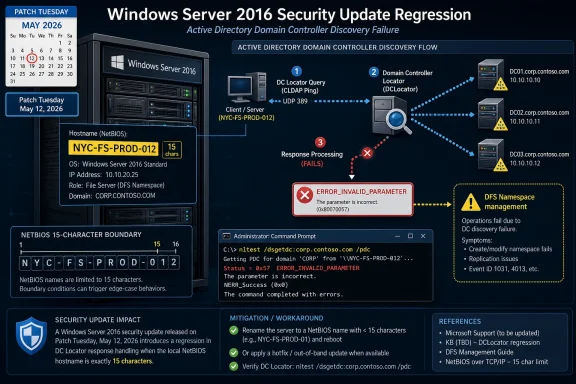 A 15-Character Name Should Not Be This Interesting
The strange part of Microsoft’s latest Windows Server 2016 issue is not that a monthly cumulative update introduced a regression. Anyone responsible for a Windows estate has lived through that movie. The strange part is the specificity: domain controller discovery may fail only when the server hostname is exactly 15 characters long.That is not an arbitrary number in Windows history. Fifteen characters is the old NetBIOS computer-name ceiling, a limit that has survived far beyond the era in which most administrators thought about NetBIOS as an everyday design constraint. Active Directory, DNS, Kerberos, LDAP, DFS, and modern management tooling may dominate the conversation now, but the Windows networking stack still carries decades of compatibility baggage.
Microsoft says the affected systems can return
ERROR_INVALID_PARAMETER when DCLocator calls are made. Its example is the familiar diagnostic command nltest /dsgetdc:<domain> /pdc, the sort of tool administrators reach for when they need to verify that a machine can find a domain controller. When that lookup fails, the failure is not cosmetic. It can prevent applications, scripts, and administrative consoles from finding the domain services they assume will always be discoverable.The bug’s narrow trigger also makes it easy to underestimate. A hostname length condition sounds like trivia until it collides with a fleet naming convention. Many enterprises use rigid patterns that encode environment, location, role, sequence number, or ownership into a predictable string. In those shops, “exactly 15 characters” may not describe a weird edge case. It may describe a standard.
Patch Tuesday Hits the Directory Layer
KB5087537 was released on May 12, 2026, as the monthly cumulative security update for Windows Server 2016, bringing the platform to OS build 14393.9140. Like most cumulative updates, it is not a modular buffet. Administrators who need the security fixes generally take the package as a whole, with the usual expectation that any regressions will be documented later and fixed in a subsequent update, a Known Issue Rollback, or an out-of-band release.That update model is one reason this issue feels more consequential than its narrow description suggests. Domain controller discovery is not an optional convenience layer. It is part of the plumbing that lets domain-joined systems locate authentication and directory services without hard-coding infrastructure assumptions into every script and application.
DCLocator is the Windows mechanism that helps clients and services find suitable domain controllers. It considers domain information, site topology, DNS records, and role requirements. If a request asks for a primary domain controller emulator, a global catalog, or a domain controller in a particular site, the lookup result can determine whether an administrative operation succeeds, stalls, or fails in a misleading way.
A failure here can ripple outward. Microsoft specifically calls out DFS Namespace management as one affected scenario, which is notable because DFS often sits in the path of everyday file access and administrative maintenance. When DFS tooling cannot locate a domain controller, the visible symptom may not look like an Active Directory lookup regression. It may look like a namespace management failure, an RPC error, a broken console, or an unreliable automation job.
The Real Blast Radius Is Hidden in Scripts and Consoles
The most obvious diagnostic failure isnltest, but the practical blast radius is broader. Windows administrators rarely interact with DCLocator directly during normal operations. They interact with tools that call it for them.That is where bugs like this become expensive. A backup product may need to enumerate domain resources. A deployment script may query domain roles before changing configuration. A monitoring agent may test domain reachability. A file services console may need to resolve DFS namespace metadata. A line-of-business application may ask Windows for a domain controller and simply report that something “invalid” happened.
The error string matters.
ERROR_INVALID_PARAMETER does not naturally point an administrator toward hostname length. It suggests a bad argument, malformed request, or tool misuse. In a production outage, that can send responders down the wrong path, especially if only some servers are affected and others with shorter or longer names behave normally.This is the operational cruelty of boundary-condition bugs. They do not fail uniformly. They divide the estate into the apparently healthy and the inexplicably broken based on a property few people are actively checking during incident response. If a domain controller lookup fails only from hosts with names such as
NYC-FS-PROD-012 or LON-APP-SQL-07A, the naming policy becomes part of the failure analysis.The result is a bug that may look small in Microsoft’s release notes and large inside an enterprise ticket queue. The affected population may be tiny across the entire Windows Server install base, but it can be highly concentrated inside organizations that standardized on fixed-width names. That is the difference between a low-probability defect and a high-impact local incident.
Windows Server 2016 Is Old, but It Is Not Gone
Windows Server 2016 occupies an awkward place in Microsoft’s server portfolio. It is old enough to feel like yesterday’s platform and current enough to remain embedded in plenty of production environments. Mainstream support has ended, but extended support keeps security updates flowing, and many organizations continue to run it for application compatibility, vendor certification, cost, or inertia.That matters because Server 2016 is not a museum piece. It still runs domain controllers, file servers, application back ends, management servers, and infrastructure services in real businesses. In some environments, it is not the shiny new workload tier; it is the tier nobody wants to touch because it works and because the migration plan has not yet survived contact with budget season.
Microsoft’s own product lifecycle creates a tension here. The company is pushing customers toward newer Windows Server releases, and the security argument for staying patched remains overwhelming. But regressions in legacy-but-supported platforms force administrators into a familiar bind: apply the update and risk operational breakage, or delay the update and carry known security exposure.
That dilemma is especially sharp for domain-connected infrastructure. Administrators cannot casually roll back security updates across critical servers without understanding what vulnerabilities they are reopening. They also cannot ignore failures in directory discovery, because identity and file services are often foundational dependencies for everything else.
The lesson is not that administrators should avoid KB5087537. It is that older supported platforms need the same disciplined validation as current ones, perhaps more. The idea that “it is only an old server” is exactly how brittle dependencies escape inventory, patch testing, and naming audits until a very specific bug exposes them.
Microsoft’s Known-Issue Language Leaves Admins in the Gap
Microsoft’s published description is concise: after installing the update, domain controller discovery might fail on Windows Server 2016 systems when the server hostname is 15 characters long. DCLocator calls can returnERROR_INVALID_PARAMETER, preventing applications and administrative tools from locating a domain controller. Administrative operations that rely on domain controller lookup might fail, including DFS Namespace management.That is useful, but it is not yet enough. As of the confirmation, Microsoft says it is investigating. The company has not published a workaround or a timeline for a permanent fix. For administrators, that leaves an uncomfortable space between diagnosis and remediation.
There are obvious things an organization can test, but not all of them are clean solutions. Renaming a server is rarely a casual workaround, especially for domain-joined systems with application dependencies, certificates, service principal names, monitoring configuration, backup policies, and documentation tied to the existing name. Rolling back a cumulative security update may restore functionality, but it can also reintroduce patched vulnerabilities and complicate compliance posture.
The absence of a workaround also means IT teams have to build their own triage plan. That plan starts with identifying Server 2016 systems that have KB5087537 installed and hostnames exactly 15 characters long. It then moves to testing DCLocator behavior from those systems and checking whether DFS, scripts, management tools, or dependent applications are showing secondary symptoms.
In other words, Microsoft’s note may be short, but the enterprise response is not. The work is inventory, correlation, impact analysis, and change control. That is the unglamorous side of Windows servicing: a known issue becomes a known cost.
The NetBIOS Boundary Still Shapes Modern Windows
There is a deeper architectural story here than one bad update. The 15-character hostname condition is a reminder that Windows compatibility is not just an abstract promise to old applications. It is a set of constraints that continue to shape how modern systems behave.NetBIOS names have long been capped at 15 visible characters, with the sixteenth byte historically used as a suffix to indicate service type. Administrators who have dealt with legacy domains, old scripts, SMB behavior, or mixed environments know this limit well. But many newer systems expose longer DNS hostnames, cloud naming conventions, and management layers that make the old boundary feel less central.
Active Directory bridged eras rather than replacing them all at once. DNS became central to domain location, but Windows retained compatibility pathways and naming assumptions from earlier networking models. That continuity is one reason enterprises could migrate gradually. It is also why a boundary condition from the 1990s can still appear in a 2026 Windows Server update.
The irony is that many administrators intentionally keep server names at or below 15 characters to avoid compatibility trouble. The safe historical advice was often to respect the NetBIOS limit, especially for domain-joined Windows systems. This bug appears to punish the exact boundary value that conservative naming standards may have chosen.
That does not mean enterprises should abandon disciplined naming conventions. It does mean fixed-width schemes deserve scrutiny. A naming rule that always generates 15-character server names may be elegant for asset management and awkward for fault isolation. When every name hits the same boundary, a rare edge case becomes a pattern.
DFS Is the Canary Because It Depends on the Forest
Microsoft’s mention of DFS Namespace management is not incidental. DFS is one of those Windows Server features that looks simple to users and complicated to administrators. A namespace can make distributed file shares appear under a unified logical path, but behind that convenience is an infrastructure that depends heavily on Active Directory and domain controller availability.If a server cannot locate a domain controller properly, DFS management can fail even if the file data itself has not disappeared. That distinction matters during incidents. Users may report that a path is unavailable, administrators may see management tools fail, and the root cause may sit in directory discovery rather than storage, networking, or permissions.
DFS also illustrates why infrastructure bugs are often misdiagnosed. A DFS symptom can lead teams to inspect replication, namespace targets, referrals, SMB, firewall rules, DNS, or RPC before anyone thinks to count the characters in a server hostname. If the failure appears after a Patch Tuesday reboot, the update may be suspected, but the hostname condition could remain hidden.
This is why Microsoft’s explicit example is valuable. It gives administrators a direct test. Running
nltest /dsgetdc:<domain> /pdc from an affected server can help distinguish a domain locator failure from a DFS-specific problem. That does not fix the bug, but it shortens the path from symptom to cause.In a large environment, shortening that path is worth real money. Mean time to innocence matters. If the storage team, network team, identity team, and endpoint team all spend hours proving their components are not at fault, the cost of a narrow Windows regression multiplies quickly.
The Update Arrives in a Noisy Server Season
The timing is not ideal. Windows Server administrators have recently dealt with emergency updates for server crash issues, continued pressure to modernize older deployments, and the arrival of Windows Server 2025 feature upgrade availability through Windows Update in some scenarios. Even when those events are unrelated, they create a background hum of servicing anxiety.That matters because patch confidence is cumulative. Administrators do not judge a single update in isolation. They judge the recent pattern: which updates caused outages, which ones required out-of-band fixes, which ones had documentation gaps, and which ones forced emergency change windows.
Microsoft’s servicing machinery has improved in many ways over the years. Cumulative updates are easier to reason about than the old patch-by-patch dependency maze. Known issue documentation is faster and more transparent than it once was. But the tradeoff is that one monthly package can carry a lot of consequence, and a regression in an identity-adjacent component can overshadow the security value of the release.
For Windows Server 2016 specifically, the fatigue is sharper because many organizations already know they should migrate. A regression becomes another argument in the internal debate: stay on the familiar platform and absorb maintenance risk, or accelerate migration and absorb project risk. Neither path is free.
The wrong lesson would be to treat this as proof that patching is more dangerous than vulnerabilities. The better lesson is that patching old infrastructure without representative testing is dangerous. Those are not the same thing.
The Admin Response Starts With Counting
There is no glamorous first step here. Administrators should inventory Windows Server 2016 machines with KB5087537 installed and identify those whose hostnames are exactly 15 characters long. That sounds almost too simple, but it is exactly the kind of environmental query that separates a manageable known issue from a sprawling investigation.The next step is functional validation. From candidate systems, test DCLocator behavior using Microsoft’s example or equivalent domain controller discovery checks. If the server participates in DFS administration, hosts management tooling, runs automation that queries Active Directory, or supports applications that depend on domain discovery, those workflows deserve targeted testing.
Organizations should also resist overcorrecting before understanding exposure. Renaming servers can be disruptive. Uninstalling security updates can be risky. Disabling or reconfiguring dependent services without confirming the DCLocator failure can create new problems. The immediate goal is to map the affected set, not to thrash the estate.
For many shops, the affected group may be empty. For others, it may be a handful of systems. For organizations with fixed-length naming standards, it may be a surprisingly large slice of the Server 2016 footprint. The difference is not theoretical; it determines whether this is a help desk note, an emergency change advisory, or a weekend project.
This is also a useful moment to revisit naming standards. Not because every standard must change overnight, but because exact-boundary naming deserves attention. A policy that reliably lands on historical limits should be treated as a compatibility dependency, not just a documentation convention.
Security Updates Need Operational Design, Not Faith
The uncomfortable truth for Microsoft and its customers is that security servicing depends on trust, and trust depends on predictability. Enterprises know updates can break things. What they need is a servicing ecosystem that makes breakage discoverable, bounded, and recoverable.In this case, Microsoft has at least documented the condition clearly enough for administrators to look for it. That is better than a vague “some operations might fail” advisory. The mention of the 15-character hostname condition and the DCLocator error gives IT teams something concrete to test.
But the missing workaround is a problem. Without one, administrators must choose among imperfect options while waiting for Microsoft’s investigation to produce a fix. That is especially frustrating when the trigger is so specific. A bug that can be described in one sentence still may not be safe to work around in one change.
This is where enterprise patch strategy has to be more than a calendar. Rings, pilot groups, synthetic tests, and service-specific validation all matter. A pilot pool that contains no 15-character Server 2016 hostnames would never catch this issue. A pilot pool that does not exercise DFS management or DCLocator calls would miss the operational symptom.
Patch testing must reflect the weirdness of the environment, not just the version numbers. The servers with odd names, old roles, legacy applications, and awkward dependencies are often the ones most likely to expose regressions. They are also the ones organizations least like to disturb. That is a contradiction administrators have to design around.
Microsoft’s Legacy Promise Comes With Legacy Risk
Windows Server’s great enterprise strength has always been continuity. Organizations can run old applications, preserve domain models, support mixed clients, and keep infrastructure stable across long hardware and software cycles. That continuity is one reason Windows Server remains deeply embedded.The cost is that old assumptions persist. A modern cumulative update can still trip over a hostname length with roots in NetBIOS-era design. A directory discovery path can still expose a boundary that most users never see. A management tool can still fail because the operating system cannot resolve a domain controller in the expected way.
This is not unique to Microsoft. Every mature enterprise platform carries sedimentary layers of compatibility. The difference with Windows Server is scale. When a regression lands in a component tied to Active Directory discovery, even a small bug can affect an outsized number of workflows because so many products assume the domain is simply there.
That is the part worth emphasizing: the domain is not magic. It is located, queried, authenticated against, and depended upon through mechanisms that can fail. DCLocator is one of those mechanisms. When it breaks, the symptoms surface elsewhere.
Microsoft’s challenge is to preserve compatibility without letting old constraints become recurring traps. Customers’ challenge is to remember that “supported” does not mean “low maintenance.” Server 2016 remains supported for security updates, but it still lives in a shrinking space between modern servicing expectations and legacy infrastructure reality.
The 15-Character Bug Gives IT a Short Checklist With Long Consequences
The immediate response does not require panic, but it does require precision. This is a narrow issue with a potentially sharp edge, and the administrators who move fastest will be the ones who treat the hostname condition as a searchable fact rather than an oddity buried in release notes.- Windows Server 2016 systems should be checked for KB5087537 installation before assuming DFS or Active Directory tooling failures have an unrelated cause.
- Servers with hostnames exactly 15 characters long deserve priority testing because Microsoft has identified that length as the trigger condition.
- DCLocator checks such as
nltest /dsgetdc:<domain> /pdccan help confirm whether the failure matches Microsoft’s documented behavior. - DFS Namespace management failures after the May 2026 update should be investigated through the domain controller discovery path, not only through storage, SMB, or RPC troubleshooting.
- Server renames and update rollbacks should be treated as change-controlled mitigations, not casual fixes, until Microsoft publishes clearer guidance.
- Naming standards that consistently produce 15-character hostnames should be reviewed as a fleet-level risk, especially in environments that still rely heavily on Windows Server 2016.
References
- Primary source: Windows Report
Published: Tue, 26 May 2026 08:35:12 GMT
- Official source: support.microsoft.com
May 12, 2026—KB5087537 (OS Build 14393.9140) - Microsoft Support
 support.microsoft.com
- Related coverage: bleepingcomputer.com
Microsoft: Domain Controller lookup may fail on Windows Server 2016
Microsoft has confirmed a new known issue affecting Windows Server 2016 systems that causes domain controller lookups to fail after installing the KB5087537 May 2026 security update.www.bleepingcomputer.com - Related coverage: techepages.com
KB5087537 for Windows Server 2016 - May 2026
KB5087537 is the cumulative update for Windows Server 2016 released on 12 May 2026. It addresses 46 security vulnerabilities. www.techepages.com
- Related coverage: borncity.com
Windows Server 2016 Mai 2026-Update: Domain Controller Lookup scheitertBorns IT- und Windows-Blog
Kurze Information für Administratoren, die noch einen Windows Server 2016 in einer Domäne betreiben. Nach Installation des kumulativen Updates KB5087537 vom…borncity.com - Related coverage: ninjaone.com
KB5087537 - Details, Issues, & Feedback - NinjaOne
With no reported known issues documented and minimal public discussion volume available, this patch appears to have a neutral to positive reception. The abwww.ninjaone.com
- Official source: learn.microsoft.com
Locating Active Directory Domain Controllers in Windows and Windows Server | Microsoft Learn
Learn how domain controllers are located in Windows and Windows Server using the DC locator algorithm.learn.microsoft.com - Related coverage: mondoo.com
KB5087537 | Mondoo Vulnerability Intelligence
KB5087537 - UNKNOWN severity: May 12, 2026—KB5087537 (OS Build 14393.9140)mondoo.com - Related coverage: bitsavers.computerhistory.org
- Related coverage: cisco.com
Resolve the Error "The Server cannot handle directory requests"
PDF documentwww.cisco.com