Windows Server 2016 KB5087537: 15-Char Hostnames Break DC Discovery

Microsoft confirmed on May 26, 2026, that Windows Server 2016 systems can fail domain controller discovery after installing the May 12 KB5087537 security update when the affected server’s hostname is exactly 15 characters long. The failure is narrow enough to sound absurd and serious enough to break real administrative workflows. That combination is precisely why this bug matters: it sits at the intersection of legacy naming constraints, Active Directory dependency, and the operational gamble every Patch Tuesday asks administrators to make. A one-character boundary condition has turned into a reminder that the oldest assumptions in Windows networking still have teeth.

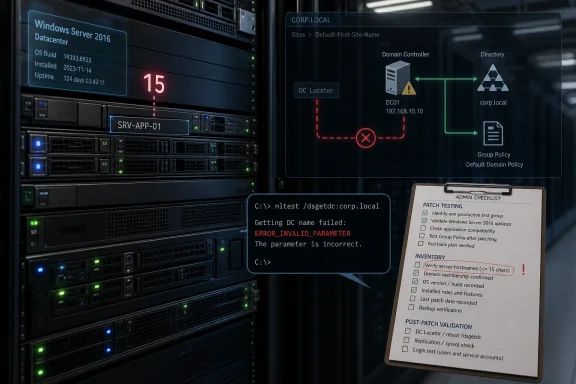
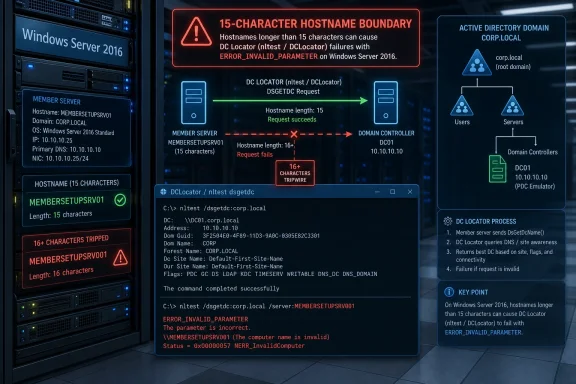
Infographic shows Windows Server 2016 Patch Tuesday regression causing AD DC locator failures (error: invalid parameter).A 15-Character Name Should Not Be This Interesting​

The strange part of Microsoft’s latest Windows Server 2016 issue is not that a monthly cumulative update introduced a regression. Anyone responsible for a Windows estate has lived through that movie. The strange part is the specificity: domain controller discovery may fail only when the server hostname is exactly 15 characters long.
That is not an arbitrary number in Windows history. Fifteen characters is the old NetBIOS computer-name ceiling, a limit that has survived far beyond the era in which most administrators thought about NetBIOS as an everyday design constraint. Active Directory, DNS, Kerberos, LDAP, DFS, and modern management tooling may dominate the conversation now, but the Windows networking stack still carries decades of compatibility baggage.
Microsoft says the affected systems can return ERROR_INVALID_PARAMETER when DCLocator calls are made. Its example is the familiar diagnostic command nltest /dsgetdc:<domain> /pdc, the sort of tool administrators reach for when they need to verify that a machine can find a domain controller. When that lookup fails, the failure is not cosmetic. It can prevent applications, scripts, and administrative consoles from finding the domain services they assume will always be discoverable.
The bug’s narrow trigger also makes it easy to underestimate. A hostname length condition sounds like trivia until it collides with a fleet naming convention. Many enterprises use rigid patterns that encode environment, location, role, sequence number, or ownership into a predictable string. In those shops, “exactly 15 characters” may not describe a weird edge case. It may describe a standard.

Patch Tuesday Hits the Directory Layer​

KB5087537 was released on May 12, 2026, as the monthly cumulative security update for Windows Server 2016, bringing the platform to OS build 14393.9140. Like most cumulative updates, it is not a modular buffet. Administrators who need the security fixes generally take the package as a whole, with the usual expectation that any regressions will be documented later and fixed in a subsequent update, a Known Issue Rollback, or an out-of-band release.
That update model is one reason this issue feels more consequential than its narrow description suggests. Domain controller discovery is not an optional convenience layer. It is part of the plumbing that lets domain-joined systems locate authentication and directory services without hard-coding infrastructure assumptions into every script and application.
DCLocator is the Windows mechanism that helps clients and services find suitable domain controllers. It considers domain information, site topology, DNS records, and role requirements. If a request asks for a primary domain controller emulator, a global catalog, or a domain controller in a particular site, the lookup result can determine whether an administrative operation succeeds, stalls, or fails in a misleading way.
A failure here can ripple outward. Microsoft specifically calls out DFS Namespace management as one affected scenario, which is notable because DFS often sits in the path of everyday file access and administrative maintenance. When DFS tooling cannot locate a domain controller, the visible symptom may not look like an Active Directory lookup regression. It may look like a namespace management failure, an RPC error, a broken console, or an unreliable automation job.

The Real Blast Radius Is Hidden in Scripts and Consoles​

The most obvious diagnostic failure is nltest, but the practical blast radius is broader. Windows administrators rarely interact with DCLocator directly during normal operations. They interact with tools that call it for them.
That is where bugs like this become expensive. A backup product may need to enumerate domain resources. A deployment script may query domain roles before changing configuration. A monitoring agent may test domain reachability. A file services console may need to resolve DFS namespace metadata. A line-of-business application may ask Windows for a domain controller and simply report that something “invalid” happened.
The error string matters. ERROR_INVALID_PARAMETER does not naturally point an administrator toward hostname length. It suggests a bad argument, malformed request, or tool misuse. In a production outage, that can send responders down the wrong path, especially if only some servers are affected and others with shorter or longer names behave normally.
This is the operational cruelty of boundary-condition bugs. They do not fail uniformly. They divide the estate into the apparently healthy and the inexplicably broken based on a property few people are actively checking during incident response. If a domain controller lookup fails only from hosts with names such as NYC-FS-PROD-012 or LON-APP-SQL-07A, the naming policy becomes part of the failure analysis.
The result is a bug that may look small in Microsoft’s release notes and large inside an enterprise ticket queue. The affected population may be tiny across the entire Windows Server install base, but it can be highly concentrated inside organizations that standardized on fixed-width names. That is the difference between a low-probability defect and a high-impact local incident.

Windows Server 2016 Is Old, but It Is Not Gone​

Windows Server 2016 occupies an awkward place in Microsoft’s server portfolio. It is old enough to feel like yesterday’s platform and current enough to remain embedded in plenty of production environments. Mainstream support has ended, but extended support keeps security updates flowing, and many organizations continue to run it for application compatibility, vendor certification, cost, or inertia.
That matters because Server 2016 is not a museum piece. It still runs domain controllers, file servers, application back ends, management servers, and infrastructure services in real businesses. In some environments, it is not the shiny new workload tier; it is the tier nobody wants to touch because it works and because the migration plan has not yet survived contact with budget season.
Microsoft’s own product lifecycle creates a tension here. The company is pushing customers toward newer Windows Server releases, and the security argument for staying patched remains overwhelming. But regressions in legacy-but-supported platforms force administrators into a familiar bind: apply the update and risk operational breakage, or delay the update and carry known security exposure.
That dilemma is especially sharp for domain-connected infrastructure. Administrators cannot casually roll back security updates across critical servers without understanding what vulnerabilities they are reopening. They also cannot ignore failures in directory discovery, because identity and file services are often foundational dependencies for everything else.
The lesson is not that administrators should avoid KB5087537. It is that older supported platforms need the same disciplined validation as current ones, perhaps more. The idea that “it is only an old server” is exactly how brittle dependencies escape inventory, patch testing, and naming audits until a very specific bug exposes them.

Microsoft’s Known-Issue Language Leaves Admins in the Gap​

Microsoft’s published description is concise: after installing the update, domain controller discovery might fail on Windows Server 2016 systems when the server hostname is 15 characters long. DCLocator calls can return ERROR_INVALID_PARAMETER, preventing applications and administrative tools from locating a domain controller. Administrative operations that rely on domain controller lookup might fail, including DFS Namespace management.
That is useful, but it is not yet enough. As of the confirmation, Microsoft says it is investigating. The company has not published a workaround or a timeline for a permanent fix. For administrators, that leaves an uncomfortable space between diagnosis and remediation.
There are obvious things an organization can test, but not all of them are clean solutions. Renaming a server is rarely a casual workaround, especially for domain-joined systems with application dependencies, certificates, service principal names, monitoring configuration, backup policies, and documentation tied to the existing name. Rolling back a cumulative security update may restore functionality, but it can also reintroduce patched vulnerabilities and complicate compliance posture.
The absence of a workaround also means IT teams have to build their own triage plan. That plan starts with identifying Server 2016 systems that have KB5087537 installed and hostnames exactly 15 characters long. It then moves to testing DCLocator behavior from those systems and checking whether DFS, scripts, management tools, or dependent applications are showing secondary symptoms.
In other words, Microsoft’s note may be short, but the enterprise response is not. The work is inventory, correlation, impact analysis, and change control. That is the unglamorous side of Windows servicing: a known issue becomes a known cost.

The NetBIOS Boundary Still Shapes Modern Windows​

There is a deeper architectural story here than one bad update. The 15-character hostname condition is a reminder that Windows compatibility is not just an abstract promise to old applications. It is a set of constraints that continue to shape how modern systems behave.
NetBIOS names have long been capped at 15 visible characters, with the sixteenth byte historically used as a suffix to indicate service type. Administrators who have dealt with legacy domains, old scripts, SMB behavior, or mixed environments know this limit well. But many newer systems expose longer DNS hostnames, cloud naming conventions, and management layers that make the old boundary feel less central.
Active Directory bridged eras rather than replacing them all at once. DNS became central to domain location, but Windows retained compatibility pathways and naming assumptions from earlier networking models. That continuity is one reason enterprises could migrate gradually. It is also why a boundary condition from the 1990s can still appear in a 2026 Windows Server update.
The irony is that many administrators intentionally keep server names at or below 15 characters to avoid compatibility trouble. The safe historical advice was often to respect the NetBIOS limit, especially for domain-joined Windows systems. This bug appears to punish the exact boundary value that conservative naming standards may have chosen.
That does not mean enterprises should abandon disciplined naming conventions. It does mean fixed-width schemes deserve scrutiny. A naming rule that always generates 15-character server names may be elegant for asset management and awkward for fault isolation. When every name hits the same boundary, a rare edge case becomes a pattern.

DFS Is the Canary Because It Depends on the Forest​

Microsoft’s mention of DFS Namespace management is not incidental. DFS is one of those Windows Server features that looks simple to users and complicated to administrators. A namespace can make distributed file shares appear under a unified logical path, but behind that convenience is an infrastructure that depends heavily on Active Directory and domain controller availability.
If a server cannot locate a domain controller properly, DFS management can fail even if the file data itself has not disappeared. That distinction matters during incidents. Users may report that a path is unavailable, administrators may see management tools fail, and the root cause may sit in directory discovery rather than storage, networking, or permissions.
DFS also illustrates why infrastructure bugs are often misdiagnosed. A DFS symptom can lead teams to inspect replication, namespace targets, referrals, SMB, firewall rules, DNS, or RPC before anyone thinks to count the characters in a server hostname. If the failure appears after a Patch Tuesday reboot, the update may be suspected, but the hostname condition could remain hidden.
This is why Microsoft’s explicit example is valuable. It gives administrators a direct test. Running nltest /dsgetdc:<domain> /pdc from an affected server can help distinguish a domain locator failure from a DFS-specific problem. That does not fix the bug, but it shortens the path from symptom to cause.
In a large environment, shortening that path is worth real money. Mean time to innocence matters. If the storage team, network team, identity team, and endpoint team all spend hours proving their components are not at fault, the cost of a narrow Windows regression multiplies quickly.

The Update Arrives in a Noisy Server Season​

The timing is not ideal. Windows Server administrators have recently dealt with emergency updates for server crash issues, continued pressure to modernize older deployments, and the arrival of Windows Server 2025 feature upgrade availability through Windows Update in some scenarios. Even when those events are unrelated, they create a background hum of servicing anxiety.
That matters because patch confidence is cumulative. Administrators do not judge a single update in isolation. They judge the recent pattern: which updates caused outages, which ones required out-of-band fixes, which ones had documentation gaps, and which ones forced emergency change windows.
Microsoft’s servicing machinery has improved in many ways over the years. Cumulative updates are easier to reason about than the old patch-by-patch dependency maze. Known issue documentation is faster and more transparent than it once was. But the tradeoff is that one monthly package can carry a lot of consequence, and a regression in an identity-adjacent component can overshadow the security value of the release.
For Windows Server 2016 specifically, the fatigue is sharper because many organizations already know they should migrate. A regression becomes another argument in the internal debate: stay on the familiar platform and absorb maintenance risk, or accelerate migration and absorb project risk. Neither path is free.
The wrong lesson would be to treat this as proof that patching is more dangerous than vulnerabilities. The better lesson is that patching old infrastructure without representative testing is dangerous. Those are not the same thing.

The Admin Response Starts With Counting​

There is no glamorous first step here. Administrators should inventory Windows Server 2016 machines with KB5087537 installed and identify those whose hostnames are exactly 15 characters long. That sounds almost too simple, but it is exactly the kind of environmental query that separates a manageable known issue from a sprawling investigation.
The next step is functional validation. From candidate systems, test DCLocator behavior using Microsoft’s example or equivalent domain controller discovery checks. If the server participates in DFS administration, hosts management tooling, runs automation that queries Active Directory, or supports applications that depend on domain discovery, those workflows deserve targeted testing.
Organizations should also resist overcorrecting before understanding exposure. Renaming servers can be disruptive. Uninstalling security updates can be risky. Disabling or reconfiguring dependent services without confirming the DCLocator failure can create new problems. The immediate goal is to map the affected set, not to thrash the estate.
For many shops, the affected group may be empty. For others, it may be a handful of systems. For organizations with fixed-length naming standards, it may be a surprisingly large slice of the Server 2016 footprint. The difference is not theoretical; it determines whether this is a help desk note, an emergency change advisory, or a weekend project.
This is also a useful moment to revisit naming standards. Not because every standard must change overnight, but because exact-boundary naming deserves attention. A policy that reliably lands on historical limits should be treated as a compatibility dependency, not just a documentation convention.

Security Updates Need Operational Design, Not Faith​

The uncomfortable truth for Microsoft and its customers is that security servicing depends on trust, and trust depends on predictability. Enterprises know updates can break things. What they need is a servicing ecosystem that makes breakage discoverable, bounded, and recoverable.
In this case, Microsoft has at least documented the condition clearly enough for administrators to look for it. That is better than a vague “some operations might fail” advisory. The mention of the 15-character hostname condition and the DCLocator error gives IT teams something concrete to test.
But the missing workaround is a problem. Without one, administrators must choose among imperfect options while waiting for Microsoft’s investigation to produce a fix. That is especially frustrating when the trigger is so specific. A bug that can be described in one sentence still may not be safe to work around in one change.
This is where enterprise patch strategy has to be more than a calendar. Rings, pilot groups, synthetic tests, and service-specific validation all matter. A pilot pool that contains no 15-character Server 2016 hostnames would never catch this issue. A pilot pool that does not exercise DFS management or DCLocator calls would miss the operational symptom.
Patch testing must reflect the weirdness of the environment, not just the version numbers. The servers with odd names, old roles, legacy applications, and awkward dependencies are often the ones most likely to expose regressions. They are also the ones organizations least like to disturb. That is a contradiction administrators have to design around.

Microsoft’s Legacy Promise Comes With Legacy Risk​

Windows Server’s great enterprise strength has always been continuity. Organizations can run old applications, preserve domain models, support mixed clients, and keep infrastructure stable across long hardware and software cycles. That continuity is one reason Windows Server remains deeply embedded.
The cost is that old assumptions persist. A modern cumulative update can still trip over a hostname length with roots in NetBIOS-era design. A directory discovery path can still expose a boundary that most users never see. A management tool can still fail because the operating system cannot resolve a domain controller in the expected way.
This is not unique to Microsoft. Every mature enterprise platform carries sedimentary layers of compatibility. The difference with Windows Server is scale. When a regression lands in a component tied to Active Directory discovery, even a small bug can affect an outsized number of workflows because so many products assume the domain is simply there.
That is the part worth emphasizing: the domain is not magic. It is located, queried, authenticated against, and depended upon through mechanisms that can fail. DCLocator is one of those mechanisms. When it breaks, the symptoms surface elsewhere.
Microsoft’s challenge is to preserve compatibility without letting old constraints become recurring traps. Customers’ challenge is to remember that “supported” does not mean “low maintenance.” Server 2016 remains supported for security updates, but it still lives in a shrinking space between modern servicing expectations and legacy infrastructure reality.
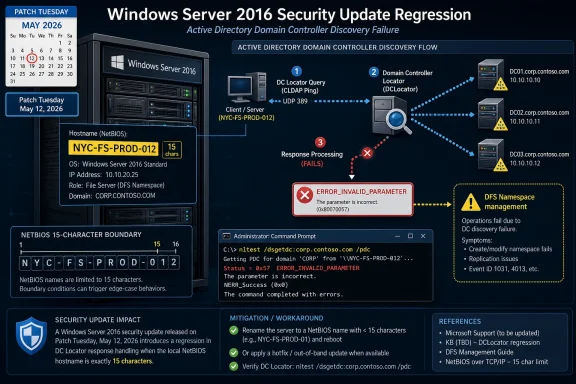
The 15-Character Bug Gives IT a Short Checklist With Long Consequences​

The immediate response does not require panic, but it does require precision. This is a narrow issue with a potentially sharp edge, and the administrators who move fastest will be the ones who treat the hostname condition as a searchable fact rather than an oddity buried in release notes.
  • Windows Server 2016 systems should be checked for KB5087537 installation before assuming DFS or Active Directory tooling failures have an unrelated cause.
  • Servers with hostnames exactly 15 characters long deserve priority testing because Microsoft has identified that length as the trigger condition.
  • DCLocator checks such as nltest /dsgetdc:<domain> /pdc can help confirm whether the failure matches Microsoft’s documented behavior.
  • DFS Namespace management failures after the May 2026 update should be investigated through the domain controller discovery path, not only through storage, SMB, or RPC troubleshooting.
  • Server renames and update rollbacks should be treated as change-controlled mitigations, not casual fixes, until Microsoft publishes clearer guidance.
  • Naming standards that consistently produce 15-character hostnames should be reviewed as a fleet-level risk, especially in environments that still rely heavily on Windows Server 2016.
The bug is small enough to describe precisely and awkward enough to disrupt the systems that keep Windows domains manageable. That is the recurring bargain of enterprise Windows: decades of compatibility buy stability until a forgotten boundary becomes operationally relevant again. Microsoft will likely fix the regression, but administrators should take the hint before the next one arrives. The safest Windows environments in 2026 will not be the ones that patch slowly or blindly; they will be the ones that know their own weird edges well enough to test them before those edges become outages.

References​

  1. Primary source: Windows Report
    Published: Tue, 26 May 2026 08:35:12 GMT
  2. Official source: support.microsoft.com
  3. Related coverage: bleepingcomputer.com
  4. Related coverage: techepages.com
  5. Related coverage: borncity.com
  6. Related coverage: ninjaone.com
 

Microsoft confirmed on May 26, 2026 that Windows Server 2016 systems with hostnames of exactly 15 characters can fail domain controller discovery after installing the May 12 KB5087537 security update, causing DCLocator calls to return ERROR_INVALID_PARAMETER and breaking tools that depend on Active Directory lookup. The bug is narrow enough to sound absurd and serious enough to interrupt real administration. That combination is precisely why it matters. In mature Windows estates, the most dangerous patch regressions are often not the loudest ones, but the ones that hide behind naming conventions, legacy dependencies, and assumptions nobody has revisited in years.

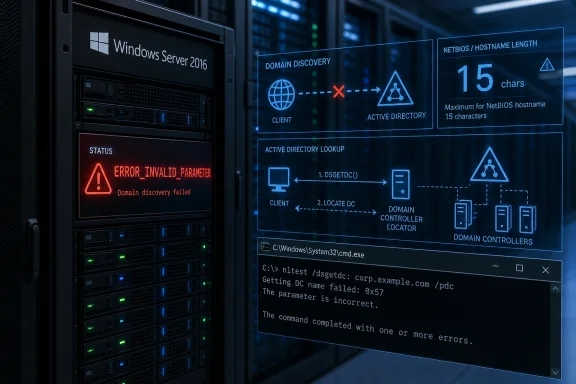
Server rack and admin UI show Windows Server 2016 status with an nltest/dsgetdc.corp.local DC lookup error.Microsoft Finds a 15-Character Trap in the Server Room​

The affected condition is almost comically specific: a Windows Server 2016 machine must have a hostname that is exactly 15 characters long. Fourteen characters is fine. Sixteen characters is apparently fine. Fifteen characters, after the May 2026 cumulative security update, can send DCLocator into failure with an invalid-parameter error.
That specificity does not make the problem trivial. Domain controller discovery is one of those background mechanisms that disappears when it works and becomes a business continuity problem when it fails. Applications, administrative consoles, scripts, DFS Namespace tools, authentication workflows, and policy-adjacent operations all assume the machine can locate a domain controller when needed.
Microsoft’s own example is blunt: nltest /dsgetdc:<domain> /pdc can return ERROR_INVALID_PARAMETER on affected systems. For administrators, that is not an abstract diagnostic failure. It is the moment a server that appears healthy at the operating-system level stops being able to participate reliably in the domain fabric around it.
The current wrinkle is that Microsoft has acknowledged the bug but has not provided a fix date or public workaround beyond investigation. That leaves administrators in the least comfortable state of patch management: the failure mode is known, the trigger is testable, but the remediation clock belongs to Redmond.

The NetBIOS Ceiling Comes Back as a Modern Patch Bug​

The 15-character number is not random in Windows networking history. NetBIOS computer names have long carried a 15-character practical limit, with the sixteenth byte reserved for service identification. Even in environments that otherwise live in DNS, Kerberos, LDAP, and modern Active Directory tooling, that old boundary still lurks beneath naming standards and compatibility code.
That is what makes this bug feel less like a freak accident and more like a reminder. Windows Server is full of strata: decades of naming rules, discovery paths, compatibility shims, and administrative interfaces stacked on top of each other. A cumulative security update does not merely patch “the OS” in some clean-room abstraction; it touches code paths that may have been shaped by decisions made when Windows NT networking still cast a long shadow.
The affected hostname length also tells administrators where to look first. Many enterprises use rigid naming schemes: location code, role code, environment marker, sequence number. A 15-character standard is entirely plausible, especially in shops that designed names around older NetBIOS constraints and then kept the pattern because changing server names is painful.
That irony is sharp. Organizations that were disciplined enough to stay within the historical limit may be the ones exposed by a regression at the boundary. The problem is not sloppy naming. It is that an edge case at the exact maximum supported length appears to have become poisonous after a security update.

DCLocator Is Boring Until Everything Needs It​

DCLocator is not a dashboard feature. It is not the kind of component Microsoft highlights in a keynote. It is plumbing, and Active Directory plumbing is valuable because almost nobody wants to think about it during normal operations.
When a computer needs to find a domain controller, it must locate a suitable DC for authentication, directory queries, policy operations, and role-specific tasks. That discovery process can account for site topology, DNS records, domain roles, and the type of controller requested. The administrative beauty of Active Directory has always been that much of this feels automatic when the environment is correctly configured.
A failure in that discovery layer can therefore masquerade as several different problems. One admin may see DFS Namespace management break. Another may see an application fail a domain lookup. A third may chase DNS, firewall rules, secure channel state, or replication health before realizing the trigger is a patched Server 2016 hostname of a particular length.
That is the operational danger of this bug. It does not necessarily announce itself as “the May 2026 update broke 15-character hostnames.” It surfaces as the kind of domain weirdness that consumes hours because every symptom points toward a different subsystem.

The Update Is Doing Its Job and Breaking Trust at the Same Time​

KB5087537 is a security update, which means the default advice remains to deploy it. Windows Server 2016 is in extended support, and for many organizations these monthly cumulative updates are the thin line between a tolerable legacy footprint and an indefensible one. Delaying security updates on domain-connected servers is not a neutral act.
But the trust model of patching is not built only on CVE counts. It is built on the expectation that installing a security update will not break the machinery used to administer the estate. When a patch interferes with domain controller discovery, the affected system is not merely less convenient to manage; it may become unreliable in the very identity environment the patch was meant to help protect.
This is why Windows Server regressions land differently from desktop annoyances. A consumer PC that suffers a post-update glitch is frustrating. A domain-joined server that cannot locate a domain controller can interrupt authentication-dependent workloads, management routines, and recovery playbooks. The blast radius is smaller than a universal outage, but the stakes per affected machine are higher.
The uncomfortable calculus for administrators is familiar. Apply the update broadly and risk a narrow but disruptive regression. Hold the update and accept known security exposure. Test the update and discover that your pilot ring did not include the one naming pattern that triggers the fault.

A Bug This Narrow Can Still Evade Good Testing​

It is tempting to ask how a 15-character hostname bug escaped testing, but that question is less simple than it sounds. Large validation matrices rarely cover every historical boundary condition across every supported server generation, role, naming scheme, domain topology, and administrative tool. The real lesson is not that Microsoft failed to test “a server name with 15 characters” in isolation. It is that enterprise regressions often emerge from combinations that appear ordinary only after the fact.
A test lab with Server 2016 machines named DC01, APP01, and FILE01 would not catch this. A pilot group using modern, shorter cloud-style names would not catch it. Even a reasonably mature pre-production Active Directory environment might miss it if the affected servers happen to sit outside the patch validation ring.
The bug also illustrates a chronic weakness in enterprise patch testing: test populations often reflect technical roles but not naming conventions. Admins validate domain controllers, file servers, application servers, and management servers. They may not validate that every hostname-length boundary used in production is represented.
This is a place where boring inventory becomes strategic. If a configuration management database can answer “which Windows Server 2016 machines have exactly 15-character hostnames?” in minutes, the issue is annoying but bounded. If the answer requires manual spreadsheet archaeology, the patch regression has already exposed a management problem beyond the Microsoft bug.

Server 2016 Is Supported, but It Is No Longer Young​

Windows Server 2016 is not abandoned software. Its mainstream support ended in January 2022, but extended support continues until January 12, 2027. That means Microsoft still ships security updates, and customers still have a reasonable expectation that those updates will not break core domain behavior.
At the same time, Server 2016 is now late-life infrastructure. Many organizations still run it because migrations are expensive, applications are fragile, vendor support matrices are conservative, and domain environments tend to accumulate legacy dependencies. Extended support is not a magic preservation field. It is a maintenance lane for an aging platform.
That aging matters because late-life platforms tend to receive fewer architectural improvements while still being exposed to modern security hardening work. The code must be patched against current threats without the broader modernization that newer server releases may receive. In practice, that can mean more pressure on old compatibility paths.
For administrators, this is the distinction between “supported” and “strategically safe.” Server 2016 remains supportable for now. But each regression is another reminder that the runway is short, and that estates still relying heavily on it are operating inside a shrinking window.

The Recent Pattern Is What Makes This More Than a One-Off​

This issue arrives after a run of uncomfortable Windows Server update stories. In April 2026, Microsoft dealt with Windows Server domain controller reboot problems tied to LSASS crashes in certain enterprise configurations. Other recent reporting has described Windows Server 2025 domain contact issues after restart, Windows Update failures in constrained network environments, and a previously fixed bug that unintentionally offered or applied Windows Server 2025 upgrades to Server 2019 and 2022 systems.
Not every one of those issues is the same kind of failure. Some affect installation. Some affect boot behavior. Some affect domain services. Some are limited to particular deployment models. But the pattern is still meaningful for IT teams because the operational conclusion is the same: Windows Server patching has become less of a calendar event and more of a risk-management process.
Microsoft has spent years pushing Windows toward cumulative servicing, faster remediation, and a more standardized update pipeline. That model has real advantages, especially for security. But cumulative updates also concentrate trust. When one monthly package carries many fixes, administrators cannot easily take the security content while rejecting the risky behavioral change.
The result is a patch culture built around rings, deferrals, out-of-band fixes, and known-issue dashboards. That is better than blind deployment, but it is also an admission that the monthly update is no longer a simple transaction. It is a controlled rollout of operating-system change into environments that may have decades of accumulated assumptions.

The Practical First Step Is Inventory, Not Panic​

The good news is that this particular bug has a crisp detection condition. Administrators do not need to guess whether every Server 2016 machine is equally exposed. They need to identify Windows Server 2016 systems that have installed KB5087537 and whose hostnames are exactly 15 characters long.
That should become an immediate inventory query. Pull from PowerShell, endpoint management, CMDB data, vulnerability tooling, or whatever system has authoritative device names and OS versions. The point is to reduce uncertainty quickly. A known issue that affects five servers is a different incident from one that may affect five hundred.
Testing should then focus on DCLocator behavior, not just patch installation success. A server can install the update cleanly, reboot normally, and still fail a domain controller lookup. Running a targeted nltest check on machines in the risk set is more useful than assuming “patched and online” means “healthy.”
Admins should also be careful about renaming as an improvised workaround. Changing a server hostname in a domain environment is not the same as changing a label in an asset database. It can affect certificates, SPNs, monitoring, backups, application licensing, scripts, firewall rules, and documentation. In some environments, a temporary rename may be more dangerous than the bug.

The Hidden Cost Is in the Admin Workflows​

The most visible symptom is domain controller lookup failure, but the cost lands in administrator time. DFS Namespace management is one example because it depends on domain access and directory lookups. Other tools that rely on locating a DC may fail in ways that are initially hard to connect to hostname length.
This is where legacy server fleets become expensive even before support ends. The software license may be paid. The hardware or VM may be amortized. The application may be stable. But every patch regression forces skilled staff to revalidate assumptions around systems that the business would prefer not to touch.
There is also a documentation tax. Help desks and operations teams need to know that “Server 2016 plus KB5087537 plus exactly 15 characters” is now a meaningful diagnostic phrase. Without that shared knowledge, incidents will be triaged as isolated domain failures, and teams will duplicate effort across tickets.
For security teams, the issue complicates compliance reporting. A scanner may correctly report KB5087537 as installed, while operations reports that the patched server is functionally impaired. Conversely, a server held back from the update to avoid the bug may show as vulnerable. Neither dashboard tells the whole story unless patch state is correlated with operational health.

Microsoft’s Silence on Timing Leaves Admins Owning the Gap​

Microsoft says it is investigating. That is expected, but it is not enough for administrators who must decide what to do this week. Without a public fix timeline, organizations have to operate a temporary policy around a known failure condition.
The most conservative approach is to identify affected systems, validate whether DCLocator is failing, and avoid expanding deployment to matching servers until Microsoft publishes a fix or mitigation. The most security-forward approach is to deploy while preparing for targeted rollback or workaround on the narrow affected set. Neither choice is universally correct.
The decision depends on server role, exposure, compensating controls, domain dependency, and business tolerance. A lightly used internal utility server with a 15-character hostname may be treated differently from a critical application server that must perform domain lookups continuously. A server in a tightly controlled network segment may carry different patch urgency than one exposed to broader lateral-movement risk.
What Microsoft owes customers in these moments is clarity: whether rollback is recommended, whether renaming is safe or discouraged, whether a Known Issue Rollback is possible for this class of bug, and whether an out-of-band update is likely. In the absence of those details, admins are left to build their own risk models.

This Is a Naming Standards Problem Now​

The bug should prompt a review of naming standards, not because administrators caused the issue, but because naming conventions are now part of the risk surface. If an organization uses exactly 15-character names as a standard for Server 2016, this issue is likely to recur across a class of machines. If names vary widely, the impact may be scattered and harder to find.
A good naming standard balances human readability, automation, uniqueness, and compatibility. Historically, the 15-character NetBIOS limit pushed many Windows shops to compact names. But compact does not always mean short enough to avoid boundary bugs, and legacy compatibility does not always mean future resilience.
This does not mean everyone should rename servers en masse. That would be reckless. It means naming standards should be treated as living infrastructure policy, especially during migration planning. If a shop is moving from Server 2016 to Server 2022 or Server 2025, it should decide whether to preserve the old naming scheme, modify it, or introduce aliases and documentation that reduce dependence on exact hostnames.
The larger point is that “we have always named servers this way” is not a technical argument. It is a historical fact. Sometimes history is useful. Sometimes it becomes a hidden dependency waiting for Patch Tuesday.

The Migration Argument Just Got Easier to Make​

Every organization still running Server 2016 has its reasons. Some are legitimate. Line-of-business applications may be certified only on older server releases. Budget cycles may be slow. Migrations may require vendor projects, downtime windows, schema concerns, or hardware refreshes. Nobody who has run a real Windows estate believes server upgrades happen because a lifecycle page says they should.
But the argument for migration rarely turns on lifecycle dates alone. It turns on accumulated friction. A patch breaks domain discovery here. A vendor drops support there. A security tool raises its minimum OS version. A backup agent becomes awkward. A compliance auditor asks why a platform with less than a year of standard support remains in production.
This incident adds another data point. Server 2016 remains inside extended support, but it is now close enough to the end that every operational problem should be measured against the migration plan. If there is no plan, the bug is a warning. If there is a plan, it is a reason to accelerate the servers most entangled with Active Directory and administrative workflows.
The right response is not panic-upgrading domain infrastructure because of one bug. It is using the bug to prioritize. Servers with 15-character names, domain-heavy dependencies, and Server 2016 as the underlying OS should move higher on the list.

The Patch Ring Needs to Reflect the Weird Parts of Production​

The textbook answer to update risk is staged deployment. Test first. Pilot next. Roll out broadly after validation. That remains correct, but this bug shows why many patch rings are too tidy.
A useful pilot ring should include not only representative roles, but representative weirdness. That means old naming conventions, legacy applications, unusual domain dependencies, servers in constrained network segments, and machines that still exercise compatibility paths newer systems do not. If the pilot ring contains only the cleanest servers, it validates the least interesting part of the environment.
This is especially important for Active Directory-adjacent testing. A basic reboot check is not enough. Patch validation should include domain controller discovery, authentication, Group Policy processing where relevant, DFS operations, service account behavior, scheduled tasks, and administrative tools used in real operations.
The hard truth is that many organizations do not have the staff time to build perfect test coverage. That is why targeted checks matter. When Microsoft identifies a precise trigger, admins can convert it into a fast validation rule. In this case, hostname length becomes part of the patch assessment.

The Fifteen-Character Lesson Belongs in the Runbook​

Here is the operational shape of the issue as it stands: narrow trigger, high-value dependency, no published fix timeline, and an affected platform approaching the end of extended support. That combination calls for calm triage rather than drama.
  • Windows Server 2016 machines with exactly 15-character hostnames should be identified immediately, especially if KB5087537 has already been installed.
  • Affected servers should be tested with domain controller discovery commands instead of relying only on patch compliance or reboot success.
  • Administrators should treat server renaming as a change-management event, not as a casual workaround.
  • Patch rings should be reviewed to ensure they include legacy naming patterns and domain-dependent workloads, not only clean representative systems.
  • Server 2016 migration plans should be revisited with priority given to systems whose business function depends heavily on Active Directory lookup.
  • Operations and security teams should share a single view of both patch status and post-patch service health, because either signal alone can be misleading.
The lesson is not that KB5087537 should be avoided everywhere. The lesson is that enterprise patching has become an exercise in identifying the exact machines where general guidance collides with local reality.
Microsoft will almost certainly fix this, either through a future cumulative update, a targeted mitigation, or updated guidance once the root cause is fully understood. But the more durable lesson will remain after the invalid-parameter error disappears: old Windows assumptions do not retire just because the infrastructure around them modernizes. For administrators, the path forward is not to fear every Patch Tuesday, but to build inventories, test rings, and migration plans that are honest about the strange, aging details still holding the domain together.

References​

  1. Primary source: Techzine Global
    Published: Wed, 27 May 2026 09:39:24 GMT
  2. Official source: learn.microsoft.com
  3. Related coverage: bleepingcomputer.com
  4. Related coverage: windowsforum.com
  5. Official source: support.microsoft.com
  6. Related coverage: csirt.telconet.net
 

Microsoft confirmed on May 22, 2026, that Windows Server 2016 systems can fail domain controller discovery after installing the May 12 KB5087537 security update when the server hostname is exactly 15 characters long. The failure is narrow, but it lands in one of the least forgiving parts of a Windows estate: Active Directory lookup. A bug that turns nltest /dsgetdc:<domain> /pdc into ERROR_INVALID_PARAMETER is not a cosmetic regression. It is a reminder that legacy constraints still sit underneath modern Windows administration like old plumbing under a renovated office tower.

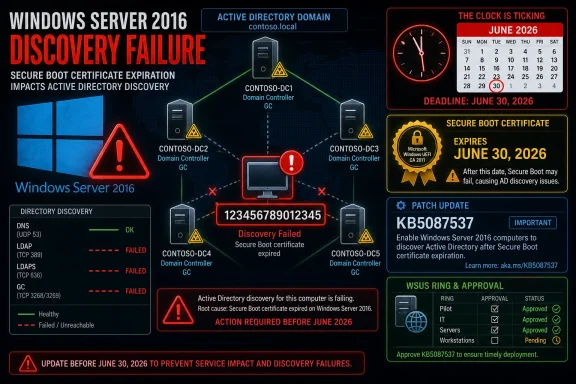
Server rack with Windows Server 2016 dashboard showing Active Directory lookup error and NetBIOS hostname length.Microsoft Finds a Fifteen-Character Trap in the Server Room​

The confirmed issue affects Windows Server 2016 after KB5087537, the May 2026 cumulative security update for OS build 14393.9140. Microsoft’s own description is unusually specific: when the server hostname is 15 characters long, DCLocator calls can fail and return ERROR_INVALID_PARAMETER, preventing applications and administrative tools from locating a domain controller.
That 15-character condition is not random trivia. It points straight at the NetBIOS-era naming ceiling that still influences Windows identity infrastructure decades after administrators were told to think in DNS names, forests, sites, and service records. Active Directory may present itself as a modern directory service, but it still contains seams from the Windows NT lineage, and those seams matter most when code gets changed deep in the servicing stack.
The practical result is that some administrative operations can fail even though the domain controller is not necessarily offline, DNS may appear healthy, and the wider domain may continue operating well enough to confuse first-line troubleshooting. Microsoft specifically calls out DFS Namespace management as one affected scenario, which makes sense: DFS depends on reliable domain discovery, and failures there can quickly look like storage, permissions, replication, or namespace corruption before anyone suspects a hostname-length regression.
This is why the bug is more serious than its small blast radius suggests. A problem that affects every server would be caught quickly. A problem that affects only machines with exactly 15-character hostnames can sit in the dark, striking the organizations most likely to have rigid naming conventions and mature infrastructure automation.

The Oldest Limits Are Often the Ones Nobody Tests First​

Administrators have long lived with the 15-character NetBIOS computer name limit as a background rule, the sort of thing baked into naming standards and forgotten until a migration or domain join fails. Many shops use compact naming schemes precisely because they were designed to fit old Windows limits: location code, environment, role, number, sometimes all packed into the maximum available space.
That means exactly 15 characters is not an exotic edge case. It is a target. A naming standard might produce server names such as regional prefixes plus workload identifiers that reliably land on the limit because the limit was treated as a design boundary.
The danger in Microsoft’s bug is that it punishes compliance with an old rule. These are not necessarily sloppy environments with strange hostnames. They may be disciplined environments whose server names were constructed to remain compatible with NetBIOS, legacy scripts, monitoring tools, backup systems, and old documentation.
That is the frustrating part for IT teams. The organizations most likely to hit this bug may be the same ones least inclined to randomly rename servers, especially domain controllers or infrastructure servers, because server identity has a long tail. Certificates, SPNs, scripts, backup jobs, monitoring dashboards, inventory databases, firewall rules, and vendor integrations can all treat a hostname as if it were a permanent fixture.

DCLocator Is Boring Until It Stops Working​

DCLocator is one of those Windows mechanisms that rarely receives attention until it breaks. Its job is foundational: help clients and tools find appropriate domain controllers, including role-specific targets such as a primary domain controller emulator. When that lookup path fails, the error can appear far away from the root cause.
That distance is what makes this class of regression expensive. An administrator troubleshooting DFS Namespace management may initially inspect namespace servers, referrals, permissions, replication health, DNS zones, site configuration, or firewall policy. Those are all reasonable places to look. But if the trigger is a post-update DCLocator parameter failure tied to the local hostname length, the diagnostic path becomes strangely sideways.
The sample Microsoft gives, nltest /dsgetdc:<domain> /pdc, is useful precisely because it gives admins a direct test. If the command fails with ERROR_INVALID_PARAMETER on a Windows Server 2016 machine whose hostname is exactly 15 characters long and KB5087537 is installed, the incident has a much clearer shape.
But clarity is not the same as relief. Microsoft has not published a concrete workaround. That leaves administrators with the usual unpleasant menu: wait, roll back where risk permits, avoid affected workflows, move specific roles away from impacted systems, or accelerate migration plans that may already have been penciled in for budgetary reasons rather than emergency response.

Patch Tuesday’s Quiet Failures Are the Ones Enterprises Fear​

The May 12 update was not supposed to become a story about hostname length. Like most cumulative security updates, KB5087537 arrived carrying security fixes and quality improvements, including Secure Boot-related preparation work as Microsoft moves toward certificate changes that matter across Windows fleets. In the ordinary rhythm of enterprise patching, that is exactly the sort of update organizations are expected to deploy through rings, testing groups, WSUS, Windows Update for Business, or Configuration Manager.
The problem is that domain controllers and adjacent infrastructure do not behave like ordinary endpoints. A regression that would be annoying on a workstation can become operationally disruptive on a server that holds identity, namespace, authentication, or file access responsibilities together. Active Directory has always been one of Windows’ great strengths because so many enterprise systems depend on it. That dependency is also why regressions around it feel disproportionate.
This incident also exposes the limits of test coverage in the real world. It is easy to say Microsoft should test every hostname length across every supported server role and every administrative utility. It is harder to build that matrix across cumulative updates, legacy SKUs, localization, domain topologies, mixed functional levels, and all the dusty-but-supported combinations enterprise customers still run.
Still, that does not absolve Microsoft of the impact. Windows Server 2016 remains supported until January 12, 2027, and support is not supposed to mean merely receiving security patches with a shrug. If a supported server release can receive an update that breaks domain controller discovery under a valid naming condition, customers are right to expect a timely fix and a plain explanation.

The Affected SKU Says as Much as the Bug​

The known issue appears tied to Windows Server 2016, not the newer supported Windows Server 2019, 2022, or 2025 releases according to current reporting and Microsoft’s posted known-issue scope. That matters because Server 2016 is now in its final stretch of mainstream operational relevance, but it has not disappeared from production.
In many environments, Windows Server 2016 occupies a middle place: too new to be treated like Windows Server 2008 R2 nostalgia, too old to be the default build for new workloads. It is often still present because applications were certified against it, because domain controllers were not first in line for upgrades, because hardware refreshes were deferred, or because “if it isn’t broken” became policy.
This bug weakens that policy. It gives administrators another concrete example to take into planning meetings: older supported platforms may still receive patches, but the operational risk of staying put rises as the ecosystem’s testing attention shifts forward. The difference between “supported” and “strategic” is not just a licensing distinction. It shows up in how quickly edge cases are found, how much telemetry exists, and how urgently organizations feel pressure to move.
At the same time, the answer cannot simply be “upgrade everything tomorrow.” Domain controllers are not disposable pets in most enterprises, and Active Directory migrations are not weekend hobby projects. Moving from Server 2016 to a newer release involves compatibility checks, replication planning, FSMO role handling, backup validation, monitoring changes, and usually a long conversation with every team that assumes the directory will just be there.

The Missing Workaround Leaves Admins Managing Risk, Not Fixing Root Cause​

The most uncomfortable line in Microsoft’s known issue is the absence of a workaround. “Under investigation” is a familiar phrase, but for administrators staring at failed lookup calls, it is not an operational plan. Without a registry switch, configuration mitigation, or hotfix timeline, IT teams must make their own risk decisions.
Rolling back a security update is rarely clean. It may restore functionality, but it also reopens vulnerabilities the update was meant to close. On a domain controller or infrastructure server, that tradeoff must be weighed carefully, documented, and ideally limited to systems where the business impact is clear and compensating controls exist.
Renaming the server is not a casual workaround either. On paper, the bug is tied to a hostname length, so a name of 14 or 16 characters sounds tempting. In practice, renaming infrastructure servers can produce cascading work, especially if the system has AD-integrated roles, certificates, SPNs, scripts, or third-party dependencies. For a domain controller, the bar is even higher.
That leaves the most realistic immediate move: identify exposure. Admins need to know which Windows Server 2016 systems have exactly 15-character hostnames, whether KB5087537 is installed, and whether those systems participate in workflows that rely on domain controller discovery. The sooner that inventory exists, the less likely the bug becomes a vague “DFS is broken” incident at the worst possible time.

Secure Boot Work Complicates the Patch Decision​

KB5087537 is not just any monthly update. It also includes Secure Boot certificate preparation work, including Microsoft’s broader push to get organizations ready for certificate expiration beginning in June 2026. That gives the update extra strategic weight beyond the immediate security fixes.
For administrators, this is the classic Windows servicing squeeze. The update that introduces an operational regression may also contain work needed to avoid future boot or security disruption. Deferring it is not free. Deploying it blindly is not free either.
This is where patch rings earn their budget. A well-run environment should be able to detect a narrow regression before it reaches the broadest production population. But even good rings can miss a bug if the pilot group does not include a Windows Server 2016 system with an exactly 15-character hostname performing the affected administrative tasks.
The lesson is not that patching is bad. The lesson is that infrastructure patch validation needs adversarial test cases, including the strange old limits most teams assume are settled. If your naming standard pushes hostnames to the NetBIOS ceiling, that condition belongs in your test plan.

A Small Bug With a Large Trust Cost​

Microsoft’s update cadence depends on trust. Enterprises accept cumulative updates because the alternative — hand-picking individual fixes across thousands of machines — is worse. But cumulative servicing also means one package can carry security fixes, quality improvements, feature preparation, and regressions together.
When a regression touches Active Directory discovery, it lands in a sensitive place. AD is not merely another Windows component; it is the map many organizations use to find users, computers, policies, shares, applications, and authority itself. If the map becomes unreliable after a security update, administrators do not just lose time. They lose confidence in the patching process.
That confidence is hard to rebuild because the incident rewards conservatism. The next time a Patch Tuesday release arrives, some admins will remember the 15-character hostname issue and widen their test windows. Others will delay deployment on older server SKUs. Some will accelerate upgrades. All of those reactions are rational, but they also complicate Microsoft’s security story.
The irony is that Windows administrators already understand complexity. They are not expecting perfection. What they need is fast acknowledgement, precise scoping, and realistic mitigations. Microsoft has provided the scoping; the next test is whether it can provide the fix quickly enough to prevent the workaround vacuum from becoming the real incident.

The Calendar Now Belongs to June’s Patch Cycle, Unless Microsoft Moves Faster​

The next regular Patch Tuesday falls on June 9, 2026. It is plausible that Microsoft could use that release to ship a fix if engineering and validation line up. It is also possible the company could deliver an out-of-band update if the impact proves severe enough across enterprise customers.
The difference matters. A June Patch Tuesday fix would fit Microsoft’s servicing rhythm, but it leaves affected administrators living with uncertainty for roughly two weeks from the public acknowledgement window. An out-of-band fix would signal urgency, but it would also require another deployment decision for already cautious teams.
Microsoft’s choice will likely depend on telemetry, support cases, enterprise escalation, and how easily the defect can be corrected without risking a broader Netlogon or DCLocator regression. Identity plumbing is not an area where vendors should rush blindly. But neither is it an area where vague timelines feel acceptable.
For now, the safest assumption is that admins must operate as if no immediate fix exists. That means inventory, testing, and communication. Help desks and infrastructure teams should know what the symptom looks like, which systems are exposed, and which business services might surface the failure indirectly.

The Practical Read From Redmond’s Fifteen-Character Mistake​

This is not the broadest Windows Server bug of the year, but it is a useful one because it is so specific. A narrowly scoped defect can still teach broad lessons about legacy constraints, patch validation, and the difference between supported and comfortable.
  • Organizations should inventory Windows Server 2016 systems with exactly 15-character hostnames and confirm whether KB5087537 is installed.
  • Administrators should test DCLocator behavior directly with tools such as nltest before assuming DFS Namespace or management-console failures are standalone problems.
  • Teams should avoid treating server renaming as an easy mitigation, especially for domain controllers or systems with certificates, SPNs, scripts, and monitoring dependencies.
  • Patch rings should include representative legacy naming patterns, not just representative operating system versions and server roles.
  • Server 2016 migration plans deserve renewed attention because support continues into January 2027, but operational risk is already rising as newer Windows Server releases become the center of gravity.
  • Any rollback decision should be treated as a security exception, not a routine troubleshooting step.
The bug’s lesson is not that every Windows Server 2016 deployment is suddenly fragile. The lesson is that mature infrastructure fails at the boundaries: maximum lengths, old compatibility layers, assumed naming rules, and code paths so boring that nobody thinks about them until a cumulative update changes one of them.
Microsoft will almost certainly fix this, whether through June’s regular servicing cycle or a faster release if customer pressure warrants it. The more lasting question is whether administrators treat the incident as a one-off oddity or as another signal that legacy Windows estates need sharper inventories, better patch laboratories, and fewer assumptions about the ancient limits still carrying modern enterprise identity.

References​

  1. Primary source: Neowin
    Published: Thu, 28 May 2026 06:58:00 GMT
  2. Related coverage: cryptika.com
  3. Related coverage: windowsreport.com
  4. Related coverage: windowsforum.com
  5. Related coverage: techzine.eu
  6. Related coverage: windowsnews.ai
 

Microsoft’s May 12, 2026 cumulative security update KB5087537 for Windows Server 2016 is meant to prepare aging servers for the June 2026 Secure Boot certificate rollover, but Microsoft has confirmed it can break domain controller discovery on systems whose hostnames are exactly 15 characters long. That is the kind of bug that sounds too narrow to matter until it lands inside a naming convention built by a large enterprise years ago. The result is a patch-management dilemma with unusually high stakes: install the update and risk Active Directory disruption, or delay it and keep legacy systems exposed to a looming trust-chain deadline. This is not merely another bad Patch Tuesday footnote; it is a reminder that Windows compatibility debt is now colliding with cryptographic expiration dates.

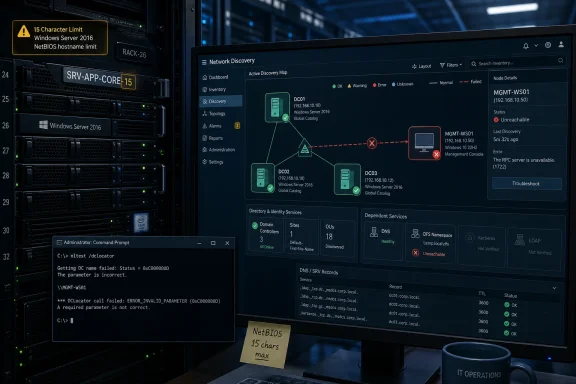
Windows Server 2016 Active Directory discovery failure due to expired Secure Boot certificate (June 2026 deadline).Microsoft’s Security Fix Walks Straight Into the Legacy Trap​

KB5087537 arrives at an awkward moment for Windows Server 2016. The operating system is no longer in mainstream support, which ended in January 2022, but it remains under extended support until January 12, 2027. That means Microsoft is still shipping security fixes, and many enterprises are still running the platform in places where “just upgrade” is a slogan rather than a migration plan.
The update’s headline purpose is defensible. Microsoft has spent months warning that Secure Boot certificates issued in 2011 are approaching expiration beginning in June 2026. Those certificates sit beneath the boot-time trust model used by Windows systems and many server environments, and the replacement path depends on getting new 2023 certificate authorities into the right places before the old trust anchors age out.
That would be complicated even if the patch worked flawlessly. Secure Boot lives in the uncomfortable space between firmware, operating system servicing, OEM readiness, virtual machine configuration, and enterprise change control. It is not a normal Windows toggle that administrators can flip during lunch and forget.
KB5087537 therefore tries to do two things at once. It carries normal cumulative security and quality fixes, and it lays more groundwork for the Secure Boot certificate transition. The trouble is that the patch also trips over one of Windows’ oldest compatibility boundaries: the 15-character machine-name limit inherited from NetBIOS.

The 15-Character Failure Is Absurd, but Not Small​

Microsoft’s known issue is painfully specific. After KB5087537 is installed, domain controller discovery can fail on Windows Server 2016 systems when the server hostname is exactly 15 characters long. DCLocator calls may return ERROR_INVALID_PARAMETER, including the sort of nltest checks administrators use when diagnosing domain discovery and primary domain controller lookup.
That precision almost makes the bug sound comic. Fourteen characters can be fine. Sixteen is not normally a valid NetBIOS computer name. Fifteen, the historical maximum, is where the regression reportedly bites. In software terms, this has all the smell of a boundary condition that escaped testing because everybody knew the boundary existed and nobody expected the boundary itself to become toxic.
In enterprise terms, however, exactly 15 characters is not exotic. Server names are often generated from templates: site code, region, environment, workload, role, sequence number. A name such as a location prefix plus an application code plus a numeric suffix can hit the NetBIOS ceiling by design, not by accident.
That is why this bug matters beyond the machines directly affected. A naming standard that worked safely for a decade can become a hidden risk multiplier overnight. Administrators are not merely asking whether a single patched host has failed; they are asking whether their automation, CMDB records, monitoring labels, and deployment pipelines have quietly standardized on the one length that now causes pain.

Active Directory Breakage Rarely Stays in One Place​

Domain controller discovery is not a decorative Windows feature. It is plumbing. When a domain-joined server cannot reliably locate a domain controller, seemingly unrelated services start to wobble because they were all leaning on the same identity fabric.
The first symptoms may look like authentication failures, Group Policy processing errors, broken scripts, or applications that suddenly cannot find directory services. DFS Namespace management can also be affected, with administrators seeing RPC-related failures when file namespace operations depend on directory lookups. The common thread is that the server is no longer able to perform a basic “where is my domain controller?” operation cleanly.
That makes the issue harder to triage in the real world. A help desk ticket may begin as a user file-share problem. A server team may see a failed scheduled task. An identity engineer may start by checking DNS, replication, secure channels, firewall rules, or time synchronization. Only later does the strange pattern emerge: Windows Server 2016, KB5087537, hostname length exactly 15.
This is the sort of regression that punishes mature environments. Smaller shops with ad hoc names may dodge it by luck. Larger shops that did the “right” thing by enforcing predictable naming conventions may have created a perfectly repeatable blast radius.

Secure Boot Turns a Normal Patch Decision Into a Calendar Problem​

The reason this update cannot simply be shrugged off is the Secure Boot certificate clock. Microsoft’s 2011 Secure Boot certificates were designed with a finite lifespan, and expiration begins in late June 2026. When those certificates expire, devices that have not transitioned to the newer 2023 certificate authorities can end up in a degraded security posture and may have trouble validating future boot-critical components.
This is not the same as saying every unprepared machine will suddenly become a brick on a single morning. The more realistic danger is messier: future boot manager updates, recovery media, operating system upgrades, or pre-boot security fixes may no longer fit cleanly into the old trust chain. For administrators, that is almost worse, because the failure mode may appear later, under pressure, during a security incident or emergency maintenance window.
Microsoft’s strategy has been deliberately staged. The company has described a cautious rollout model that uses device readiness signals and ecosystem coordination before moving systems to the new certificate authorities. KB5087537 fits into that broader effort by adding Secure Boot-related preparation and scripts under the Windows directory so administrators can detect certificate state and orchestrate safer rollouts.
That makes the Active Directory bug especially badly timed. The update that helps prepare old servers for a cryptographic deadline is also the update that can impair directory discovery on a class of servers still common in conservative enterprises. Microsoft is asking administrators to move before the deadline, while the bug gives them a reason to hesitate.

The Servicing Stack Detail Is a Warning, Not a Footnote​

There is another practical wrinkle: administrators using WSUS must approve the relevant Servicing Stack Update, KB5088064, along with KB5087537. That detail can sound procedural, but in Windows servicing it is often the difference between a clean patch cycle and a failed one. Servicing Stack Updates are the machinery that lets Windows install future updates reliably.
For Server 2016 estates, this matters because the machines most likely to be affected are also the machines most likely to sit behind conservative update workflows. They may be governed by WSUS rings, maintenance windows, application-owner approvals, and rollback plans that were designed around normal monthly patch risk. The Secure Boot transition does not fit neatly into that cadence.
A failed install is bad. A successful install that breaks domain discovery is worse. A delayed install that leaves Secure Boot certificate work unfinished before June 2026 is a third category of risk altogether.
That is why administrators should not treat KB5087537 as just another cumulative update with a known issue. It is a dependency in a broader remediation chain. The right question is not “install or skip?” but “which machines can receive this safely, which machines need mitigation first, and which systems must be retired from Server 2016 before this becomes a recurring emergency?”

NetBIOS Is Supposed to Be History, Until It Isn’t​

The most revealing part of the issue is the NetBIOS boundary itself. Modern Active Directory environments rely heavily on DNS, LDAP, Kerberos, and service location records. Yet the 15-character NetBIOS computer-name limit remains embedded in enough Windows behavior that it can still shape operational reality in 2026.
This is the Windows compatibility bargain in miniature. Microsoft preserves old assumptions because enterprises depend on them. Enterprises then build automation around those assumptions because Microsoft preserves them. Years later, a security update touches the code path, and a boundary from the Windows NT era can still decide whether domain discovery succeeds.
There is no need to romanticize the past here. NetBIOS-era constraints are not charming artifacts; they are operational liabilities. But they also cannot be wished away. Many enterprises have years of scripts, inventory systems, monitoring rules, and documentation that assume the 15-character ceiling is not just valid but normal.
The bug therefore exposes something deeper than a patch defect. It shows how security modernization depends on compatibility layers that were never designed for today’s threat model or operational scale. Secure Boot certificate renewal is a forward-looking security exercise. The failure mode is a backward-looking name-length trap.

The Workaround Is Simple Only If You Don’t Run Production Systems​

The obvious mitigation is to identify affected Windows Server 2016 machines with 15-character hostnames before broad deployment. That should be the first step. Administrators can inventory computer names through Active Directory, endpoint management tools, CMDB exports, PowerShell, or whatever asset system is least fictional in their environment.
After that, the options become less pleasant. Renaming a production Windows server is rarely trivial. A server name may be referenced in certificates, SPNs, connection strings, backup jobs, monitoring rules, firewall policies, application configuration, documentation, and human muscle memory. For domain controllers and infrastructure servers, the operational choreography becomes even more delicate.
Uninstalling the update may restore function, but it also removes the security fixes and delays Secure Boot preparation. Holding the update in a deployment ring can be reasonable while Microsoft works on a fix, but it should be an explicit risk decision, not a quiet failure to act. In 2026, doing nothing is still doing something.
The better mitigation path is staged triage. Find the Server 2016 machines. Find the 15-character names. Separate domain controllers and identity-critical servers from application hosts. Confirm which systems actually require Secure Boot certificate transition work and which should instead be upgraded, replaced, or isolated. The answer will vary, but the inventory has to come first.

Microsoft’s Position Leaves Admins Managing the Gap​

Microsoft has acknowledged the issue, but acknowledgement is not remediation. Until a permanent fix is released, administrators are left to manage the gap between a known Active Directory regression and a known Secure Boot deadline. That gap is where enterprise IT spends most of its life.
The company deserves some credit for documenting the condition with enough specificity to make detection possible. A vague “domain discovery may fail” warning would have been far less useful than identifying the 15-character hostname trigger. But the specificity also raises the obvious question: how did a boundary this old and this central make it through validation?
Server 2016 is not glamorous, but it is still supported. It runs line-of-business applications, industrial systems, branch-office services, and conservative workloads that have not yet crossed the migration bridge to newer Windows Server releases. Extended support is not supposed to mean “patches may break the identity stack if your hostname is too tidy.”
The harder truth is that Microsoft is servicing a long tail while trying to drag that long tail through a security transition affecting firmware-level trust. That is a difficult engineering and ecosystem problem. It is also exactly why enterprises pay attention to the quality of late-life-cycle patches.

The Real Lesson Is to Treat Naming Standards as Risk Data​

Most patch-management processes classify systems by operating system, business owner, criticality, exposure, and maintenance window. KB5087537 suggests another category belongs in the model: structural assumptions. Hostname length, firmware generation, Secure Boot state, domain role, and servicing-stack readiness can all be risk attributes.
That may sound excessive until a single attribute becomes the trigger condition for an outage. Security teams often talk about asset inventory as the foundation of defense. This incident is a practical demonstration of why. You cannot mitigate what you cannot query.
For Windows Server 2016 in particular, administrators should assume that seemingly boring platform details are now part of security planning. The OS is old enough to carry legacy constraints and new enough to remain inside Microsoft’s security servicing pipeline. That combination creates strange failure modes: modern cryptographic requirements delivered through old code paths to systems with deeply customized enterprise dependencies.
The lesson is not that administrators should avoid patching. The lesson is that patching old infrastructure without knowing its shape is no longer defensible. If the first time an organization learns it has hundreds of 15-character Server 2016 hostnames is after Active Directory discovery starts failing, the patch is not the only problem.

The Server 2016 Estate Needs a Fast Census Before the Certificate Clock Runs Out​

The practical path through this mess is narrow but manageable. Organizations should resist both panic and complacency. KB5087537 is important, but it is not a patch to throw blindly at every remaining Server 2016 machine without checking the known trigger condition.
  • Administrators should inventory all Windows Server 2016 systems and flag any hostnames that are exactly 15 characters long before approving KB5087537 broadly.
  • WSUS-managed environments should verify that KB5088064 is approved and installed where required, because the cumulative update depends on current servicing-stack behavior.
  • Identity-critical servers, DFS-related systems, and hosts running automation that depends on domain discovery should be placed in the highest-risk deployment ring.
  • Teams should validate Secure Boot certificate status separately from normal patch compliance, because installing monthly updates and completing the certificate transition are related but not identical tasks.
  • Any rollback plan should account for the security fixes removed by uninstalling KB5087537, not merely the restoration of Active Directory functionality.
  • Server 2016 retirement plans should be revisited with urgency, because the platform’s final year of extended support is now overlapping with a major boot-trust transition.
The uncomfortable conclusion is that KB5087537 is both necessary and dangerous in exactly the way late-life enterprise software often becomes necessary and dangerous. Microsoft is trying to move customers through a real Secure Boot certificate deadline, but the path runs across old naming limits, old directory assumptions, and old servers that still carry modern businesses. The winning administrators will not be the ones who simply patch fastest or defer longest; they will be the ones who turn this incident into a full inventory of what their Windows estate actually is before the next calendar-driven security deadline arrives.

References​

  1. Primary source: Techgenyz
    Published: Thu, 28 May 2026 11:30:17 GMT
  2. Official source: microsoft.com
  3. Official source: learn.microsoft.com
  4. Related coverage: windowsnews.ai
  5. Related coverage: windowsreport.com
  6. Official source: support.microsoft.com
 

Microsoft has confirmed that its May 12, 2026 security update for Windows Server 2016 can break domain controller discovery on systems whose hostnames are exactly 15 characters long, causing DCLocator calls to fail with ERROR_INVALID_PARAMETER and disrupting tools that rely on Active Directory lookup. The bug is almost comically narrow, but that is precisely why it deserves attention. Enterprise outages rarely arrive wearing a sign that says “platform failure”; more often, they hide in old assumptions, naming conventions, and update paths that nobody has touched in years. This is a Windows Server 2016 story, but the lesson is bigger than one aging release.

Data center screens show Active Directory/NetBIOS network discovery errors with an open command prompt.Microsoft Finds a Fifteen-Character Tripwire in the Server Room​

The affected update is KB5087537, the May 2026 security release for Windows 10 version 1607 and Windows Server 2016. Microsoft’s known-issue note says domain controller discovery may fail after installation when the server hostname is exactly 15 characters long. The example Microsoft gives is an nltest /dsgetdc:<domain> /pdc call returning ERROR_INVALID_PARAMETER.
That matters because DCLocator is not some ornamental subsystem used only by certification exam authors. It is part of the machinery Windows uses to find a domain controller, and a great deal of enterprise administration assumes that lookup will work. If that assumption collapses, the symptoms can appear far away from the actual defect.
Microsoft specifically calls out DFS Namespace management as an affected scenario. That is not a minor footnote in a Windows estate where file services are still a daily business dependency. DFS Namespaces lets administrators present shared folders across multiple servers through a single logical namespace; when domain controller discovery falters, management tasks that should be routine can suddenly look like directory, DNS, permissions, or tooling problems.
The absurdity is the boundary condition. Fourteen characters is not the trigger. Sixteen characters is not the trigger, though Windows computer names have their own legacy constraints. Exactly 15 characters is the trapdoor, which immediately suggests the sort of edge case that testing is supposed to catch and old platforms are especially good at exposing.

The NetBIOS Past Still Collects Rent​

The 15-character detail is not random trivia. Windows computer naming still carries the residue of NetBIOS-era constraints, where the machine name occupies 15 usable characters and the sixteenth byte is used as a service suffix. Modern Active Directory environments lean heavily on DNS, LDAP, Kerberos, and a much larger stack of directory services, but old naming limits continue to shape real behavior.
That is the deeper story here. Windows Server 2016 is not dead software in the legal sense; it remains in extended support until January 12, 2027. But it is old enough that much of its deployment base reflects decisions made under different operational pressures: naming schemes designed for on-premises racks, business units, geography codes, asset tags, and server roles squeezed into short strings.
A 15-character hostname is not an exotic configuration in that world. It is often the endpoint of a naming standard. An administrator may have inherited names like NYC-FS-PRD-001, LON-APP-SQL-02, or some equally compact code that makes perfect sense to the people who built the environment. The most brittle bugs are often the ones that punish organizations for being consistent.
Microsoft’s note does not say every domain operation fails, nor does it claim all Windows Server 2016 systems are affected. It says DCLocator calls can fail under a specific name-length condition after the May security update. That specificity is useful for triage, but it also narrows the blast radius in a way that can delay recognition. If only a few machines match the trigger, the first instinct may be to blame local corruption, DNS registration, firewall policy, replication, or the administrator who happened to be on call.

A Small Bug Can Look Like a Directory Meltdown​

The failure mode is especially unpleasant because domain controller discovery sits near the beginning of so many troubleshooting trees. When a server cannot locate a domain controller, administrators tend to ask broad questions. Is DNS broken? Is the domain reachable? Are SRV records missing? Is the secure channel damaged? Is time skew causing Kerberos to fail?
In this case, the answer may be none of those. The server may be perfectly capable of reaching the network, and the domain controllers may be healthy. The lookup path may be derailed because the hostname lands on an exact length boundary after a security update.
That distinction matters operationally. A team chasing DNS ghosts can burn hours making changes that do not address the defect. A team that knows to search for 15-character hostnames can at least separate affected systems from the broader estate and avoid turning a patch regression into a self-inflicted outage.
The catch is that production environments do not fail in tidy lab demonstrations. A broken DCLocator call might surface through a management console, a scheduled task, a backup product, a file namespace operation, a legacy application, or a script written by someone who retired in 2019. The administrator sees the symptom, not the API call.
This is why Microsoft’s current lack of a published workaround is so frustrating. Renaming the server to avoid the exact 15-character condition may dodge the trigger, but renaming a domain-joined Windows Server is not a casual act in many environments. Names are embedded in monitoring systems, certificates, scripts, backup catalogs, documentation, firewall rules, and the muscle memory of the operations team.

The Workaround Nobody Wants Is Still a Workaround​

In a small environment, changing a server hostname from 15 characters to 14 or 16 may sound simple. In a mature enterprise, it can feel like pulling a thread from a suit. A server name is often a primary key in asset management, alerting, configuration management, and compliance records.
The technical act of renaming a Windows Server is the easy part. The hard part is proving that nothing else assumes the old name. That includes scripts that map drives, scheduled jobs that target UNC paths, application configuration files, SQL connection strings, certificate subject names, SPNs, backup agents, inventory databases, and human procedures that have not been updated since the server was built.
That does not mean renaming is off the table. For some affected machines, especially non-critical management hosts or test systems, it may be the fastest path back to normal. But presenting it as a universal workaround would be irresponsible, and Microsoft has not done so in its advisory.
The safer immediate response is inventory. Administrators should identify Windows Server 2016 systems that have installed KB5087537 and whose hostnames are exactly 15 characters long. Then they should test DCLocator behavior directly before assuming the estate is healthy. If the system performs domain-dependent administrative functions, it deserves priority.
There is also an uncomfortable patch-management decision. Security updates exist for a reason, and rolling them back can reopen vulnerabilities the update was meant to close. But leaving a server unable to perform domain lookup tasks can also create business risk. The correct answer will vary by role, exposure, compensating controls, and how quickly Microsoft produces a fix.

Windows Server 2016 Is Old, Not Gone​

The temptation is to shrug and say this is what happens when organizations run decade-old server platforms. There is truth in that, but it is too easy. Windows Server 2016 remains officially supported, and supported software should not be treated as a museum exhibit that administrators touch at their own risk.
At the same time, this episode is a reminder that extended support is not the same as platform vitality. Mainstream support for Windows Server 2016 ended years ago. The product still receives security updates, but it is no longer where Microsoft’s engineering energy, customer storytelling, and feature development live. That gap matters.
The installed base still matters, too. Windows Server 2016 persists because server operating systems are not replaced like browsers. They host applications with vendor certification matrices, line-of-business dependencies, maintenance windows measured in quarters, and migration budgets that compete with everything else IT is asked to fund. Some environments are still untangling Windows Server 2012 R2 workloads; Server 2016 can feel comparatively modern.
That is why regressions on older supported platforms sting. The customers still running them are often the least able to absorb surprise breakage. They may be in highly regulated sectors, resource-constrained organizations, or businesses with applications that cannot simply be lifted onto Windows Server 2025 without vendor approval.
Microsoft plans up to three more years of Extended Security Updates after Windows Server 2016 reaches end of support, but ESU should be understood for what it is: a paid runway, not a modernization strategy. It buys time. It does not make an old operating system young again.

Patch Tuesday Is Becoming a Test of Operational Design​

The May 2026 Windows update cycle has not been flattering. Alongside the Windows Server 2016 hostname issue, Microsoft also acknowledged Windows 11 installation failures tied to insufficient free space on the EFI System Partition. Different products, different symptoms, same operational pattern: a security update encounters an edge case buried in the infrastructure and turns it into an administrator problem.
That pattern is familiar to anyone who manages Windows at scale. The monthly security cadence is mandatory in practice, but the environments receiving those updates are wildly diverse. They include clean cloud VMs, ancient physical servers, OEM images with unusual partitions, branch-office boxes, domain controllers, file servers, kiosk devices, and machines upgraded through several OS generations.
Microsoft cannot test every possible estate. No vendor can. But when the failing condition is as crisp as an exact hostname length or a small EFI partition, administrators are entitled to ask whether the relevant edge cases should have been in the test matrix. These are not science-fiction configurations.
The modern Windows servicing model increasingly depends on telemetry, phased rollout, Known Issue Rollback, and rapid post-release acknowledgement. That works better on consumer and broadly connected client systems than it does on locked-down server estates. A production Windows Server 2016 system performing domain duties is not a canary; it is infrastructure.
This is where the vendor and customer responsibilities meet. Microsoft has to reduce regressions and document them quickly when they happen. Customers have to stop treating Patch Tuesday as a binary choice between “install everywhere immediately” and “ignore for a month.” The middle ground is controlled rollout with real validation against the organization’s own ugly, inherited, business-critical reality.

The Naming Standard Just Became a Risk Register​

The practical value of this bug is that it gives administrators a concrete query to run. Find the Windows Server 2016 machines. Find the ones with 15-character hostnames. Find the ones with KB5087537 installed or queued. Then decide which of those systems actually rely on domain controller discovery for administrative or application workflows.
This is not glamorous work, but it is exactly the work that separates resilient environments from lucky ones. Naming standards, OS versions, patch levels, and server roles should be searchable facts, not folklore. If a team cannot answer how many 15-character Windows Server 2016 hostnames it has, the hostname bug is only revealing a broader inventory problem.
There is a security angle here as well. Administrators under pressure may be tempted to pause or roll back updates broadly because a few systems are affected. That is understandable, but it creates a larger exposure if done indiscriminately. The better approach is targeted mitigation: isolate the affected population, test the failure, and make role-specific decisions.
For domain controllers themselves, the calculus may be especially delicate. For file servers, DFS Namespace servers, management hosts, and application servers, the symptoms may vary. A one-size-fits-all response is unlikely to be correct. The same bug can be an annoyance on one server and a business interruption on another.
This is also a useful moment to revisit migration planning. If a Windows Server 2016 system is important enough that this bug causes anxiety, it is important enough to have an upgrade path. That does not mean the migration can happen this week. It does mean the organization should stop pretending January 2027 is a distant abstraction.

The Real Outage Is Trust​

Every Windows administrator understands that software contains bugs. What wears people down is not the existence of defects; it is the steady erosion of confidence in routine maintenance. Security updates are supposed to reduce risk. When they introduce brittle failures in directory lookup or boot partitions, they force administrators into the least comfortable position in IT: choosing between known vulnerability exposure and unknown operational breakage.
That trust problem is cumulative. One month it is a printing issue. Another month it is VPN behavior. Another month it is BitLocker recovery prompts, installation rollbacks, or a server that cannot locate a domain controller because its name is exactly the length Windows has historically allowed. Each incident may be explainable in isolation, but administrators experience them as a pattern.
Microsoft’s challenge is not merely to fix KB5087537. It is to convince customers that supported Windows platforms, including older ones near the end of their lifecycle, remain safe to maintain. That requires more than a known-issues table. It requires fast root-cause communication, credible mitigations, and test coverage that reflects how Windows is actually deployed.
The Register’s framing lands because it captures the weary humor of the situation. A 15-character hostname breaking domain controller discovery sounds like a punchline until it is your file namespace, your change window, and your users. Then it becomes another reminder that enterprise Windows is a stack of current code, legacy contracts, and assumptions with very long half-lives.

The Checklist Hidden Inside the Punchline​

Before this becomes just another patch anecdote, administrators should turn it into an audit. The bug’s narrow trigger gives IT teams a rare advantage: the affected population can be identified with a simple inventory pass, and the risky workflows can be tested before a help desk queue fills up.
  • Organizations should identify all Windows Server 2016 systems with hostnames that are exactly 15 characters long.
  • Administrators should verify whether KB5087537 has been installed, approved, deferred, or rolled back on those systems.
  • Teams should test DCLocator behavior directly on affected servers rather than inferring health from general network connectivity.
  • Servers involved in DFS Namespace management, administrative tooling, authentication-adjacent workflows, or legacy applications should receive priority review.
  • Any hostname change should be treated as a controlled change, because dependencies may exist in certificates, scripts, monitoring tools, SPNs, backup software, and documentation.
  • The incident should be used to accelerate Windows Server 2016 migration planning ahead of the January 12, 2027 support deadline.
The larger lesson is not that every administrator should fear 15-character names forever. It is that mature Windows environments are full of limits that have become invisible through familiarity. Patch testing has to include those inherited constraints, because Microsoft’s lab is never going to look exactly like your server room.
Windows Server 2016 will not vanish when this bug is fixed, and neither will the operational reality that made the bug matter. Microsoft will continue shipping security updates, administrators will continue applying them under pressure, and old infrastructure will continue finding creative ways to remind everyone that compatibility is not the same as simplicity. The forward path is not panic or paralysis; it is better inventory, tighter rollout discipline, and a migration plan that treats January 2027 as a deadline already in motion.

References​

  1. Primary source: The Register
    Published: Thu, 28 May 2026 16:30:00 GMT
  2. Related coverage: techzine.eu
  3. Official source: support.microsoft.com
  4. Related coverage: cryptika.com
  5. Related coverage: windowsforum.com
  6. Related coverage: windowsreport.com
 

Microsoft acknowledged in late May 2026 that Windows Server 2016 systems can fail domain controller discovery after installing the May 12 KB5087537 security update when the server hostname is exactly 15 characters long. The bug is narrow, almost absurdly so, but it lands in one of the least optional pieces of Windows infrastructure: Active Directory lookup. A failure in DCLocator is not a cosmetic regression or a dashboard annoyance. It is the kind of small platform crack that can turn a routine patch cycle into a hunt through naming conventions, old build standards, and forgotten dependencies.

Diagram showing Windows Server 2016 DC Locator workflow and an invalid-parameter error for a 16+ character hostname.Microsoft Finds a Fifteen-Character Tripwire in the Server Room​

The confirmed issue affects Windows Server 2016 after KB5087537, the May 2026 cumulative security update that brings the platform to OS build 14393.9140. Microsoft’s known-issue language is concise: after installing the update, domain controller discovery might fail when the server hostname is 15 characters long. In practical terms, DCLocator calls such as nltest /dsgetdc:<domain> /pdc can return ERROR_INVALID_PARAMETER.
That error string is the giveaway that this is not a simple connectivity problem. A server that cannot reach a domain controller because of DNS, firewalling, replication lag, or site topology usually leaves administrators with a familiar chain of symptoms. This one is stranger because the affected condition is local and deterministic: the machine name length itself becomes part of the failure path.
The bug appears to affect only Windows Server 2016 systems with hostnames of exactly 15 characters. That matters because 15 characters is not a random number in Windows history. It is the old NetBIOS computer-name boundary, a limit that has survived long after most administrators stopped thinking of NetBIOS as a daily concern.
That is why this issue is more than a one-line patch warning. It is a reminder that Windows Server is not one clean stack; it is a layered system where modern identity, legacy naming, compatibility shims, and decades of administrative tooling still meet in production.

Domain Controller Discovery Is Boring Until It Stops Working​

Domain controller discovery is one of those mechanisms that becomes visible only when it fails. A Windows machine or application needs to find a suitable domain controller for authentication, directory queries, password operations, Group Policy processing, DFS Namespace management, or administrative tooling. DCLocator is the plumbing that helps the system locate the right domain controller for the domain, site, and requested role.
When that lookup works, nobody thanks it. When it fails, symptoms scatter across the estate. An administrator may see a management console hang, a script fail, a service account behave oddly, or a tool report that it cannot locate a primary domain controller. The immediate temptation is to start debugging DNS, ports, time sync, trust relationships, or the domain controllers themselves.
That is what makes this bug dangerous in the real world. A 15-character hostname is not the first thing most responders will check during an Active Directory incident. In many environments, server names are generated by convention: location code, workload code, role code, environment marker, and a sequence number. It is easy for a naming standard to land repeatedly on 15 characters without anyone treating that as a risk.
The affected machines do not have to be domain controllers to matter. A member server running administrative jobs, file services, monitoring agents, identity-aware applications, backup tools, or DFS-related workflows may depend on domain controller discovery. If the server is old enough to still be on Windows Server 2016 and happens to sit at the NetBIOS ceiling, the failure can look like a domain problem while actually being a patch-and-name-length problem.

The NetBIOS Ceiling Never Really Went Away​

The 15-character boundary is a fossil, but fossils can still break production. Windows has supported DNS-style names for decades, yet the short computer name remains part of the system’s identity model. Active Directory environments continue to carry both DNS names and NetBIOS-compatible names, and many Windows APIs, administrative tools, and compatibility paths still understand the world through that older lens.
That does not mean every 15-character hostname is bad, or that administrators have been doing something wrong by using the full limit. The point is subtler. Microsoft has long allowed 15-character computer names, and plenty of organizations have used them safely for years. The regression is that an update appears to have made a valid edge case invalid for one critical lookup path.
Edge cases like this are particularly punishing in server fleets because they often map onto standards. A company does not usually have one carefully hand-crafted 15-character server name. It has a naming template that may produce hundreds of them across branch offices, data centers, test labs, and disaster-recovery environments. If the template was designed years ago to squeeze meaning into the NetBIOS limit, it may have created exactly the condition KB5087537 now exposes.
This is why the bug feels familiar to veteran Windows administrators. Not because domain controller discovery fails every month, but because the root pattern is common: a modern update intersects with an old compatibility boundary, and the blast radius is determined by local conventions that Microsoft cannot see from Redmond.

The Narrowness of the Bug Makes It Harder, Not Easier​

A broad outage announces itself. A narrow regression whispers. If every Windows Server 2016 machine lost domain controller discovery after KB5087537, the industry would identify the problem quickly, correlate reports, and hold the patch at scale. A bug that affects only machines with 15-character hostnames is much harder to spot because unaffected servers sitting beside affected ones appear to prove the update is fine.
That creates an ugly diagnostic split. One Windows Server 2016 system may process the May update and continue operating normally. Another, with the same operating system and patch level but a 15-character hostname, may fail DCLocator. If administrators compare only patch history, network placement, or domain membership, the key difference hides in plain sight.
It also complicates change management. Security teams want KB5087537 installed because it is a monthly security update. Operations teams want directory-dependent workloads to keep functioning. The bug forces both sides into a familiar but uncomfortable calculation: accept an Active Directory regression on a subset of systems, rename servers where feasible, delay deployment to vulnerable machines, or remove an update that was installed for a reason.
Microsoft has said it is investigating, but as of the reporting around the issue, there is no official fix. The obvious mitigation is also the most operationally awkward: change the affected server name so it is not exactly 15 characters. That may be easy for a disposable lab VM. It may be painful for a production server referenced in scripts, monitoring systems, backup policies, certificates, service principal names, documentation, firewall rules, and human memory.

Renaming a Server Is Not a Workaround, It Is a Project​

“Rename the server” sounds simple only to people who do not operate Windows estates at scale. A hostname is not just a label. It is an addressable identity stitched into logs, dashboards, DNS records, Kerberos assumptions, certificates, file paths, scheduled tasks, deployment tools, documentation, and occasionally the habits of an entire support team.
For some member servers, a rename may be tolerable after impact analysis. For others, it may trigger a cascade of secondary work. Applications may store the old name. Legacy scripts may use it directly. Monitoring tools may treat the renamed machine as a new asset. Backup systems may need re-association. If the system participates in DFS Namespace management, remote administration, or certificate-bound services, the cleanup can be nontrivial.
That does not mean organizations should avoid renaming under all circumstances. If a server is lightly used, well documented, and not deeply embedded in external dependencies, changing a 15-character hostname may be the safest way to move forward while waiting for Microsoft. But administrators should treat it as a controlled change, not a casual tweak.
The more prudent first step is inventory. Find Windows Server 2016 machines. Determine which have KB5087537 installed. Identify which hostnames are exactly 15 characters. Then prioritize by dependency: systems that run identity-aware services, administrative tooling, scheduled jobs, DFS-related operations, or anything that performs domain controller discovery deserve attention before idle or isolated workloads.

Windows Server 2016 Is Still Supported, But It Is Living on Borrowed Time​

Windows Server 2016 is not abandonware. It remains in extended support until January 12, 2027, meaning Microsoft still ships security updates for organizations that continue to run it. After that, customers that need more time can use the Extended Security Updates program for critical security fixes while they migrate.
But “supported” is not the same as “comfortable.” Server 2016 is now deep into the part of the lifecycle where organizations are often running it because applications are sticky, vendors are slow, budgets are constrained, or migration risk feels higher than maintenance risk. That is a defensible reality in many enterprises. It is also exactly the environment where a patch regression can be expensive.
Older server platforms tend to sit under older applications and older operational assumptions. They are more likely to have handcrafted scripts, legacy management agents, old naming standards, and fragile dependencies. A bug like this does not merely test Microsoft’s update quality. It tests whether an organization still understands the systems it has deferred replacing.
The deadline matters because January 2027 is not far away in infrastructure planning terms. If a Windows Server 2016 estate is still large enough that a hostname-specific DCLocator regression creates uncertainty, that is a migration signal. Not a panic signal, necessarily, but a clear indication that the platform is still carrying workloads important enough to deserve a modernization plan.

Patch Tuesday’s Real Risk Is the Unknown Local Variable​

Every Patch Tuesday contains two opposing truths. Unpatched systems are exposed to known vulnerabilities, and patched systems can sometimes encounter regressions. Good administrators do not resolve that tension with slogans. They manage it with staged deployment, test rings, telemetry, rollback plans, and enough asset intelligence to know which systems are different.
This incident is a case study in why asset intelligence matters. The difference between an uneventful update and a broken lookup path may be a hostname length. That is the sort of property many organizations can query easily if their configuration management is healthy, and cannot answer quickly if their inventory is a spreadsheet, a hope, and a half-remembered naming convention.
A serious Windows patch process should now include checks that feel annoyingly specific because real regressions are often annoyingly specific. Which systems are on Server 2016? Which installed KB5087537? Which hostnames are exactly 15 characters? Which of those machines run services that call into Active Directory? Which have already logged DCLocator failures?
This is also a useful reminder that test coverage should include boundary cases, not just representative systems. If an enterprise naming convention commonly produces maximum-length names, the test ring should include one. If branch servers differ from data-center servers, include both. If older OS versions remain in production, do not let the newest platform be the only one that receives meaningful predeployment validation.

Active Directory Still Sets the Terms of Windows Reliability​

Cloud identity has changed the Windows estate, but it has not erased Active Directory. Many organizations now run hybrid identity architectures where Microsoft Entra ID handles modern cloud authentication while on-premises Active Directory continues to underpin servers, legacy applications, file services, Group Policy, Kerberos, LDAP integrations, and operational tooling. A DCLocator bug on Server 2016 therefore reaches into a world that still matters.
That is the uncomfortable reality behind this incident. Active Directory is old, resilient, deeply understood, and deeply embedded. It can be boring for years and then become the center of a high-severity incident because some application, admin tool, or server role cannot find a domain controller at the wrong moment.
The affected command example, nltest /dsgetdc:<domain> /pdc, is not exotic. It belongs to the toolbox of administrators who diagnose trust, discovery, and domain controller selection issues. If that call returns ERROR_INVALID_PARAMETER because of the local hostname length after a security update, the platform is violating an expectation administrators reasonably rely on.
Microsoft will likely fix the regression in a subsequent update, because the affected condition is specific and the failure mode is now public. But the operational lesson should survive the fix. Directory discovery remains a dependency worth testing directly after patching, especially on older server releases and on machines that run automation against the domain.

The Patch Is Small; the Lesson Is Not​

The most concrete response to this issue is straightforward: administrators should identify Windows Server 2016 machines with exactly 15-character hostnames, check whether KB5087537 is installed, and test domain controller discovery before a business process discovers the failure for them. That is not dramatic advice, but it is the kind that prevents dramatic weekends.
  • Organizations should inventory Windows Server 2016 systems and flag any hostnames that are exactly 15 characters long.
  • Administrators should verify whether KB5087537 is installed before assuming a DCLocator failure is caused by DNS, networking, or domain controller health.
  • Teams should test domain controller discovery from affected candidates using standard tools such as nltest rather than waiting for dependent applications to fail.
  • Server renaming may avoid the trigger, but it should be handled as a controlled change because hostnames often appear in scripts, certificates, monitoring, backups, and documentation.
  • Patch rings for older Windows Server releases should include edge-case machines that reflect real naming standards and legacy dependencies.

Microsoft’s Fix Will Not Fix Everyone’s Blind Spots​

When Microsoft ships a repair, the immediate pressure will ease. DCLocator calls should stop tripping over the 15-character condition, and Server 2016 administrators will have one less reason to dread the May 2026 update. But the broader blind spot will remain if organizations treat the episode as merely another Microsoft patch mishap.
The more useful reading is that infrastructure risk increasingly hides in metadata. A hostname length, a certificate template, a service principal name, a site boundary, a dormant GPO, or an old script can be the hinge on which reliability turns. None of these are glamorous. All of them can decide whether a routine update behaves routinely.
For WindowsForum readers, the practical lesson is not to stop patching and not to assume every known issue will hit your estate. It is to make the estate knowable enough that narrow bugs stay narrow. Server 2016 is nearing the end of its ordinary supported life, Active Directory remains a central nervous system for many shops, and the next regression may be just as specific. The administrators who fare best will be the ones who can answer the boring questions quickly, because in Windows infrastructure, boring details are often where the outage begins.

References​

  1. Primary source: Petri IT Knowledgebase
    Published: Fri, 29 May 2026 13:10:47 GMT
  2. Related coverage: windowsforum.com
  3. Related coverage: windowsreport.com
  4. Related coverage: cryptika.com
  5. Related coverage: windowsnews.ai
  6. Related coverage: bleepingcomputer.com
 

Back
Top