

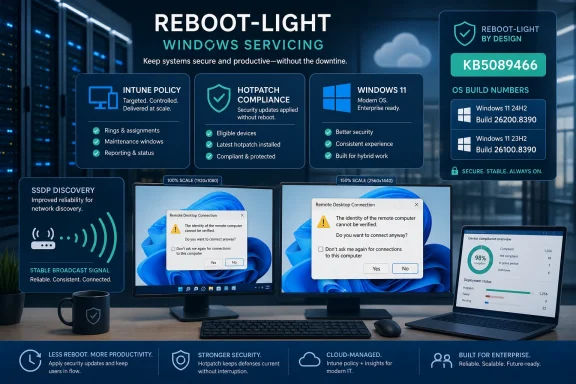
Microsoft released Hotpatch KB5089466 on May 12, 2026, for Windows 11 Enterprise version 25H2 and 24H2, moving eligible systems to OS builds 26200.8390 and 26100.8390 while delivering security improvements plus fixes for SSDP reliability and a Remote Desktop warning-dialog rendering bug. The update is small in description but large in implication: Microsoft is continuing to normalize reboot-light patching as an enterprise operating model, not a novelty. For administrators, the story is less about two tidy bug fixes than about the discipline required to keep hotpatch fleets eligible, observable, and boring. That is the promise, and also the trap.
KB5089466 is not one of those Windows updates that arrives with a theatrical list of new features, Start menu experiments, Copilot rearrangements, or buried behavior changes. Its public payload is spare: security improvements, better reliability for Simple Service Discovery Protocol notifications, and a fix for a Remote Desktop Connection security warning dialog that could render incorrectly on multi-monitor setups with mixed scaling. Microsoft also says it is not currently aware of known issues in this release.
That minimalism is precisely why the update matters. Hotpatching is supposed to make the monthly Windows security rhythm less dramatic. The ideal hotpatch is not a news event; it is the patch that lands, updates the relevant code paths, leaves users working, and gives administrators one fewer maintenance window to negotiate.
But “less dramatic” is not the same thing as “simple.” Hotpatch turns Windows servicing into a more continuous, policy-driven, eligibility-sensitive process. That is a genuine operational upgrade for enterprises that can meet the prerequisites, but it also means that the real work shifts from the reboot screen to the management plane.
That does not mean Windows has suddenly escaped reboots. Hotpatch programs still depend on baseline updates, and those baseline moments matter. They reset the servicing foundation on which later hotpatches can land, and they are where the old Windows patching ritual still asserts itself.
KB5089466 sits in that rhythm. It follows the April 2026 baseline listed in Microsoft’s release sequence and continues the hotpatch track for supported Windows 11 Enterprise 25H2 and 24H2 systems. In other words, the update is part of a managed servicing calendar, not a magic bypass around the calendar.
The distinction matters because some administrators and end users hear “hotpatch” and mentally translate it as “never reboot.” Microsoft has never really promised that. The more accurate translation is: fewer disruptive reboots, provided the device stays inside the lines Microsoft has drawn.
Those lines are not incidental. They include the right Windows edition, the right build level, eligible licensing, appropriate management through Intune policy, and security prerequisites such as virtualization-based security. On Arm64 systems, Microsoft’s page also highlights the need to disable Compiled Hybrid PE, or CHPE, because that compatibility layer is not compatible with hotpatching.
That is the bargain: less interruption in exchange for more standardized fleet posture. Enterprises that already live in Intune, enforce VBS, and segment devices by update policy will see the appeal. Shops with messy licensing, inconsistent baselines, or sprawling unmanaged endpoints will see something closer to a compliance test.
Microsoft says this update improves the reliability of SSDP notifications to help prevent the service from becoming unresponsive. That is a narrow sentence, but it points at a familiar class of enterprise annoyance: intermittent discovery failures that look random from the help desk and slippery from the admin console. A service that becomes unresponsive may not create a cinematic outage, but it can create a thousand small frictions across offices, labs, conference rooms, and hybrid networks.
In consumer terms, SSDP problems can show up as devices that do not appear where expected. In business environments, discovery failures can complicate workflows involving printers, media devices, specialized equipment, or local service advertisement. In locked-down enterprise networks, many of these discovery features may be curtailed or filtered, but the underlying service still exists in the Windows ecosystem and can still become part of troubleshooting.
The interesting thing is that Microsoft describes the change in terms of reliability rather than a sweeping security posture change. That makes KB5089466 feel more like operational hardening than architectural reform. It is the sort of fix that administrators appreciate only after they have lost hours to a service that looked fine until it stopped responding under conditions nobody could easily reproduce.
There is also a security-adjacent dimension here. SSDP and UPnP have long occupied an awkward space in network administration: convenient for discovery, uncomfortable for tightly controlled environments. Improving the reliability of notifications does not erase those concerns. It does, however, reduce the likelihood that administrators are debugging a Windows service hang when they should be making intentional policy decisions about whether discovery belongs on a given network segment at all.
The practical takeaway is not that everyone should suddenly embrace network discovery. It is that Microsoft is still tuning the plumbing beneath modern Windows, and hotpatching is now one vehicle for distributing those repairs. The less glamorous the subsystem, the more administrators should notice when it appears in release notes.
Mixed-DPI setups are now normal. A sysadmin may have a high-resolution laptop docked to two 1440p monitors. A developer may move between a built-in OLED display and a conference-room screen. A help desk technician may spend the day dragging remote sessions across displays that Windows scales differently because the hardware demands it.
When the affected UI is a security warning, however, rendering is not just cosmetic. A warning dialog that is clipped, oddly scaled, partially obscured, or visually confusing can undermine the very point of showing the warning. Security prompts depend on legibility and trust; if the user cannot comfortably read the message or the interface looks broken, the prompt becomes another obstacle to click through.
This is especially relevant for RDP files, which are commonly used to launch Remote Desktop sessions with predefined settings. In managed environments, they can be legitimate shortcuts into administrative workflows. In less controlled contexts, they can also be artifacts users receive, download, or reuse without always understanding the risk boundary.
The fix does not imply that the underlying RDP security model was broken. It means the warning experience could fail in a specific display configuration. But enterprise security is made of exactly these specifics: the prompt that appears on the wrong monitor, the button that is partly hidden, the warning text that wraps badly, the user who clicks through because the system has trained them that dialogs are interruptions rather than information.
KB5089466 therefore lands in a category Microsoft rarely markets but badly needs to keep improving: security usability. The best authentication scheme, certificate warning, or remote-access prompt can still be weakened by a badly rendered box. Fixing that box is not glamorous. It is necessary.
Every Patch Tuesday teaches the same lesson. Some problems are known before publication, some emerge after broad deployment, and some never rise to the level of an official known issue because they affect narrow hardware, driver, policy, or application combinations. The lack of a known-issues section is a green light to proceed through normal rings, not an invitation to skip telemetry and rollback planning.
Hotpatching changes the emotional texture of this process. If users do not have to reboot, organizations may feel more comfortable accelerating deployment. That is one of the points of the model. But a hotpatch can still touch security-sensitive code paths, networking behavior, and remote access components, and those are areas where enterprise validation remains essential.
The better interpretation is that KB5089466 should be lower-friction, not no-friction. Pilot rings still matter. Update compliance still matters. Endpoint health still matters. Remote Desktop workflows still deserve spot checks, particularly in organizations where administrators or users rely heavily on saved RDP files and mixed-monitor workstations.
Microsoft’s public wording also leaves room for the usual distinction between install health and post-install behavior. An update may install cleanly and still expose an environmental issue. Conversely, a device may fail to take the update because it has drifted from hotpatch eligibility, has a servicing stack problem, or is stuck behind policy sequencing.
That is why “no known issues” is a helpful data point, not a replacement for operational discipline. The most dangerous Windows update is rarely the one with a long list of documented caveats. It is the one everyone assumes they do not need to watch.
For years, servicing stack updates were a quiet but critical part of Windows administration. They became more visible when update failures, supersedence rules, or manual installation order made them impossible to ignore. Microsoft has since reduced some of that pain by combining SSUs with cumulative updates in many scenarios, but the underlying concept remains: before Windows can patch itself reliably, the updater itself must be in a known-good state.
Hotpatching does not remove that dependency. If anything, it makes the servicing stack more important because the promise of lower-disruption patching depends on trustworthy orchestration. A hotpatch program that fails unpredictably is worse than a traditional rebooting update because administrators will have built schedules and expectations around reduced interruption.
KB5089466’s file information also references an SSU version associated with the release. For most users, that detail is background noise. For enterprise administrators, it is part of the evidence trail used to understand what changed, why a device is eligible, and whether a fleet is converging on the expected state.
This is where Windows Update, Intune, reporting, and local device state all have to agree. A user may see only that Windows is current. An admin needs to know whether the device is current through the intended hotpatch path, whether it has the baseline expected by policy, and whether it will remain eligible for the next cycle.
That is a different kind of patch management from the old model of “install the cumulative update and reboot by Friday.” It is more automated, but also more conditional. The administrator’s job shifts from pushing packages to maintaining the conditions under which Microsoft’s servicing machinery can do the right thing.
That matters because Arm64 Windows is no longer an exotic sideshow. Qualcomm’s recent PC push, Microsoft’s Copilot+ PC messaging, and the broader industry fixation on battery life and neural processing have all made Arm-based Windows devices more visible in business planning. They are still not the default enterprise endpoint, but they are plausible in executive fleets, mobile-heavy teams, and organizations standardizing on newer thin-and-light hardware.
CHPE complicates the story. Compiled Hybrid PE is a compatibility mechanism designed to help Arm64 Windows run more of the Windows software universe effectively. Asking administrators to disable it for hotpatch readiness is not a trivial footnote; it is a reminder that compatibility layers and live patching can pull in opposite directions.
Microsoft’s position is understandable. Hotpatching depends on precise assumptions about binaries and memory. Compatibility mechanisms that reshape execution can interfere with those assumptions. But from an enterprise buyer’s perspective, this creates another evaluation axis: does the device need maximum compatibility, or does the organization value hotpatch eligibility more?
That tradeoff may be easy for some fleets and awkward for others. A tightly managed cloud-first department running modern native apps may accept the hotpatch prerequisites without much drama. A specialized team relying on older x86 software may find that disabling compatibility features introduces more risk than a reduced reboot cadence is worth.
This is the shape of Windows on Arm in 2026: promising, increasingly serious, but still full of operational caveats. KB5089466 does not create those caveats. It exposes them.
That fits Microsoft’s broader strategy. Windows is still an operating system, but enterprise Windows is increasingly a managed service with the local device as one endpoint of a policy pipeline. Hotpatching strengthens that model because the feature’s value depends on enrollment, compliance, and policy targeting.
For Microsoft, this is elegant. It gives customers a reason to keep devices in Intune, maintain eligible licenses, and adopt security prerequisites that align with Microsoft’s preferred baseline. For customers, the value is real if it reduces disruption and improves patch velocity. The tension is that a technical improvement also becomes a lever for platform consolidation.
This is not inherently sinister. Centralized management is exactly what many organizations need. The chaos of unmanaged Windows endpoints is worse than the discipline of a cloud policy plane. But administrators should be clear-eyed about the dependency they are accepting.
If hotpatching becomes a standard expectation for executives, frontline workers, or security-sensitive teams, then Intune policy health becomes part of uptime. Licensing mistakes, mis-scoped update rings, VBS drift, baseline gaps, or enrollment failures are no longer abstract compliance issues. They become reasons a device falls out of the low-disruption update lane.
That changes internal conversations. Patch management stops being only a security operations task and becomes part of endpoint experience management. The device that cannot hotpatch may still be secure after a rebooting cumulative update, but it is now an exception to the experience the business was promised.
For administrators, that ordering should drive deployment priority. The SSDP and RDP fixes are tangible, but the security content is the reason this belongs in Patch Tuesday workflows. Hotpatching may make deployment less disruptive, but it should not make it feel optional.
The broader industry lesson is that patch latency remains one of the most stubborn security problems. Attackers do not need every device to be unpatched forever; they need enough devices to lag long enough. Anything that narrows that window without shutting down productivity is strategically valuable.
That is why Microsoft’s hotpatch push deserves attention beyond the mechanics of this one KB. If the company can reliably reduce reboot friction, it removes one of the excuses organizations use, explicitly or implicitly, to delay patching. The less painful the update, the harder it is to justify waiting.
But there is a caution here too. Reduced friction can create a false sense of completion. A security update is not fully operationalized just because Microsoft can install it without a traditional reboot. Organizations still need confirmation that the right devices received it, that exceptions are understood, that failures are remediated, and that baseline cycles are not missed.
The future of Windows security is not just faster patches. It is faster patches with better proof.
That matters when troubleshooting. A user saying “I installed the May update” is not precise enough. An administrator needs the KB number, the OS version, the build number, the update channel, and ideally the device’s update history. In a hotpatch environment, the baseline state matters as much as the latest patch state.
The dual-build pattern also reflects Microsoft’s attempt to keep Windows 11 moving without fragmenting enterprise manageability too badly. Versions 24H2 and 25H2 can be serviced in parallel, and Microsoft can issue release notes that cover both where appropriate. That is administratively convenient, but it should not lull anyone into treating all Windows 11 devices as interchangeable.
The practical differences may show up in drivers, hardware enablement, feature exposure, policy behavior, or compatibility. Even when a cumulative or hotpatch update shares fixes across versions, organizations still need inventory clarity. A fleet that mixes 24H2 and 25H2 is manageable; a fleet that does not know which is which is not.
KB5089466 is therefore another argument for boring asset hygiene. Build numbers are not trivia. They are the coordinates administrators use when Microsoft’s release notes, security guidance, and real-world support tickets need to line up.
Secure Boot is one of those foundational technologies that normally stays out of sight. When it works, it helps ensure that a device starts with trusted boot components. When the certificate chain becomes a lifecycle problem, the consequences can be ugly because boot trust sits below the operating system experience users normally understand.
The timing is what sharpens the issue. May 12, 2026, is not far from June 2026. If an organization is only now discovering that Secure Boot certificate expiration requires attention, it is already in the zone where planning, testing, firmware behavior, hardware diversity, and recovery procedures matter.
This is exactly the kind of slow-moving infrastructure deadline that enterprises are bad at until it becomes a crisis. Certificates expire on a schedule, but hardware fleets age messily. Some devices are docked, some are remote, some are rarely rebooted, some have firmware updates held back, and some are in closets doing jobs nobody documented properly.
KB5089466’s hotpatch nature makes the contrast almost poetic. Microsoft is trying to make routine Windows security updates less disruptive, while simultaneously reminding customers that the boot trust foundation has its own calendar and its own consequences. You can reduce reboots for monthly patches, but you cannot wish away platform lifecycle maintenance.
For WindowsForum readers, this is the part worth underlining. Do not let the neatness of KB5089466 distract from the Secure Boot clock. The patch may be uneventful; the certificate transition deserves deliberate attention.
Start with the device classes that are actually eligible for hotpatching. Confirm that they are on the expected baseline and that the new builds appear after installation. Then separate hotpatch success from general update success. A device that updates through a different path may still be secure, but it is not proof that the hotpatch policy is working as designed.
Remote Desktop validation should include the messy desks real users have. Test RDP files on a laptop panel and an external display, with different scaling values, and move the dialog across monitors. The point is not to recreate every possible display topology; it is to confirm that the security warning is legible and trustworthy in the scenarios your administrators and power users actually use.
For SSDP, the right test depends heavily on the environment. In networks where discovery is disabled or tightly segmented, the fix may have little visible effect. In environments where local discovery matters, administrators should watch for service stability and device discovery behavior over time rather than expecting a dramatic before-and-after moment.
Finally, track the exceptions. Hotpatching creates an attractive “green lane,” but the exceptions tell you where your endpoint estate is drifting. Devices missing VBS, stuck below the required build, outside the right license group, or mis-scoped in Intune are not just update problems. They are management problems.
The most mature organizations will treat KB5089466 as a servicing-health exercise as much as a patch. Did the right devices get it automatically? Did reporting converge? Did any devices require fallback remediation? Did the help desk see fewer or different complaints than after a rebooting baseline month? Those answers matter more than the release note length.
That is not unusual. Microsoft often proves manageability and security features first in enterprise contexts where the company can assume policy control, telemetry, and support channels. Consumer Windows is a much more chaotic universe of hardware, drivers, local accounts, third-party utilities, gaming overlays, VPN clients, and users who may not know or care what update ring they are in.
Still, the direction of travel is worth watching. If hotpatching continues to mature on enterprise Windows, it will raise expectations for the rest of the ecosystem. Consumers may not use the word hotpatch, but they absolutely understand the annoyance of forced restarts, update delays, and “working on updates” screens appearing at the worst possible time.
The challenge is that consumer convenience and enterprise control are different design problems. Enterprises can be told to use Intune, meet licensing conditions, enable VBS, and follow baseline schedules. Consumers cannot be managed that way at scale without creating a different kind of backlash.
So KB5089466 is not a sign that every Windows Home laptop is about to receive reboot-free Patch Tuesday updates. It is a sign that Microsoft is refining the machinery that could, over time, reshape what users expect from Windows servicing. The future may arrive first through managed fleets, but consumer patience with disruptive updates will not increase just because the best experience is gated behind Enterprise.
KB5089466 is not a blockbuster update, and that is the point: Microsoft’s ideal future for Windows servicing is one in which security fixes arrive with less ceremony, fewer reboots, and more dependence on policy hygiene than user patience. The May 2026 hotpatch shows that future taking shape in modest, practical increments, but it also reminds administrators that the quietest updates can carry the clearest message: the Windows endpoint is becoming easier to patch only if it is first made easier to govern.
Source: Microsoft Support May 12, 2026—Hotpatch KB5089466 (OS Builds 26200.8390 and 26100.8390) - Microsoft Support
 Microsoft’s Quiet Patch Says the Loud Part About Windows Servicing
KB5089466 is not one of those Windows updates that arrives with a theatrical list of new features, Start menu experiments, Copilot rearrangements, or buried behavior changes. Its public payload is spare: security improvements, better reliability for Simple Service Discovery Protocol notifications, and a fix for a Remote Desktop Connection security warning dialog that could render incorrectly on multi-monitor setups with mixed scaling. Microsoft also says it is not currently aware of known issues in this release.That minimalism is precisely why the update matters. Hotpatching is supposed to make the monthly Windows security rhythm less dramatic. The ideal hotpatch is not a news event; it is the patch that lands, updates the relevant code paths, leaves users working, and gives administrators one fewer maintenance window to negotiate.
But “less dramatic” is not the same thing as “simple.” Hotpatch turns Windows servicing into a more continuous, policy-driven, eligibility-sensitive process. That is a genuine operational upgrade for enterprises that can meet the prerequisites, but it also means that the real work shifts from the reboot screen to the management plane.
Hotpatching Is Becoming a Contract, Not a Convenience
The basic sales pitch remains powerful. Traditional Windows security updates usually bring the familiar reboot tax: save your work, close your apps, wait for the machine to churn, and hope nothing in the login path or VPN stack has decided to reinterpret reality. Hotpatching aims to reduce that pain by applying certain security updates without requiring the same restart cadence.That does not mean Windows has suddenly escaped reboots. Hotpatch programs still depend on baseline updates, and those baseline moments matter. They reset the servicing foundation on which later hotpatches can land, and they are where the old Windows patching ritual still asserts itself.
KB5089466 sits in that rhythm. It follows the April 2026 baseline listed in Microsoft’s release sequence and continues the hotpatch track for supported Windows 11 Enterprise 25H2 and 24H2 systems. In other words, the update is part of a managed servicing calendar, not a magic bypass around the calendar.
The distinction matters because some administrators and end users hear “hotpatch” and mentally translate it as “never reboot.” Microsoft has never really promised that. The more accurate translation is: fewer disruptive reboots, provided the device stays inside the lines Microsoft has drawn.
Those lines are not incidental. They include the right Windows edition, the right build level, eligible licensing, appropriate management through Intune policy, and security prerequisites such as virtualization-based security. On Arm64 systems, Microsoft’s page also highlights the need to disable Compiled Hybrid PE, or CHPE, because that compatibility layer is not compatible with hotpatching.
That is the bargain: less interruption in exchange for more standardized fleet posture. Enterprises that already live in Intune, enforce VBS, and segment devices by update policy will see the appeal. Shops with messy licensing, inconsistent baselines, or sprawling unmanaged endpoints will see something closer to a compliance test.
The SSDP Fix Is a Small Line With a Big Blast Radius
The first named fix in KB5089466 concerns SSDP notifications. SSDP, the Simple Service Discovery Protocol, is one of those unglamorous network technologies that users rarely know exists until discovery breaks. It underpins device discovery scenarios around Universal Plug and Play and local network awareness, where services and devices announce themselves rather than waiting for a user to type an address.Microsoft says this update improves the reliability of SSDP notifications to help prevent the service from becoming unresponsive. That is a narrow sentence, but it points at a familiar class of enterprise annoyance: intermittent discovery failures that look random from the help desk and slippery from the admin console. A service that becomes unresponsive may not create a cinematic outage, but it can create a thousand small frictions across offices, labs, conference rooms, and hybrid networks.
In consumer terms, SSDP problems can show up as devices that do not appear where expected. In business environments, discovery failures can complicate workflows involving printers, media devices, specialized equipment, or local service advertisement. In locked-down enterprise networks, many of these discovery features may be curtailed or filtered, but the underlying service still exists in the Windows ecosystem and can still become part of troubleshooting.
The interesting thing is that Microsoft describes the change in terms of reliability rather than a sweeping security posture change. That makes KB5089466 feel more like operational hardening than architectural reform. It is the sort of fix that administrators appreciate only after they have lost hours to a service that looked fine until it stopped responding under conditions nobody could easily reproduce.
There is also a security-adjacent dimension here. SSDP and UPnP have long occupied an awkward space in network administration: convenient for discovery, uncomfortable for tightly controlled environments. Improving the reliability of notifications does not erase those concerns. It does, however, reduce the likelihood that administrators are debugging a Windows service hang when they should be making intentional policy decisions about whether discovery belongs on a given network segment at all.
The practical takeaway is not that everyone should suddenly embrace network discovery. It is that Microsoft is still tuning the plumbing beneath modern Windows, and hotpatching is now one vehicle for distributing those repairs. The less glamorous the subsystem, the more administrators should notice when it appears in release notes.
Remote Desktop’s Warning Box Gets a Usability Fix With Security Consequences
The second named fix is for Remote Desktop Connection, specifically the security warning dialog shown when opening RDP files. Microsoft says the dialog could render incorrectly in a multi-monitor scenario when monitors had different scaling set. Anyone who has used a modern Windows workstation with a laptop panel at one DPI and an external monitor at another can probably imagine the failure mode before seeing it.Mixed-DPI setups are now normal. A sysadmin may have a high-resolution laptop docked to two 1440p monitors. A developer may move between a built-in OLED display and a conference-room screen. A help desk technician may spend the day dragging remote sessions across displays that Windows scales differently because the hardware demands it.
When the affected UI is a security warning, however, rendering is not just cosmetic. A warning dialog that is clipped, oddly scaled, partially obscured, or visually confusing can undermine the very point of showing the warning. Security prompts depend on legibility and trust; if the user cannot comfortably read the message or the interface looks broken, the prompt becomes another obstacle to click through.
This is especially relevant for RDP files, which are commonly used to launch Remote Desktop sessions with predefined settings. In managed environments, they can be legitimate shortcuts into administrative workflows. In less controlled contexts, they can also be artifacts users receive, download, or reuse without always understanding the risk boundary.
The fix does not imply that the underlying RDP security model was broken. It means the warning experience could fail in a specific display configuration. But enterprise security is made of exactly these specifics: the prompt that appears on the wrong monitor, the button that is partly hidden, the warning text that wraps badly, the user who clicks through because the system has trained them that dialogs are interruptions rather than information.
KB5089466 therefore lands in a category Microsoft rarely markets but badly needs to keep improving: security usability. The best authentication scheme, certificate warning, or remote-access prompt can still be weakened by a badly rendered box. Fixing that box is not glamorous. It is necessary.
The Absence of Known Issues Is Useful, Not Definitive
Microsoft says it is not currently aware of any known issues with KB5089466. That is good news, but administrators should read it with the right tone. It is not a guarantee that the update is free of problems; it is a statement about Microsoft’s public issue tracking at release time.Every Patch Tuesday teaches the same lesson. Some problems are known before publication, some emerge after broad deployment, and some never rise to the level of an official known issue because they affect narrow hardware, driver, policy, or application combinations. The lack of a known-issues section is a green light to proceed through normal rings, not an invitation to skip telemetry and rollback planning.
Hotpatching changes the emotional texture of this process. If users do not have to reboot, organizations may feel more comfortable accelerating deployment. That is one of the points of the model. But a hotpatch can still touch security-sensitive code paths, networking behavior, and remote access components, and those are areas where enterprise validation remains essential.
The better interpretation is that KB5089466 should be lower-friction, not no-friction. Pilot rings still matter. Update compliance still matters. Endpoint health still matters. Remote Desktop workflows still deserve spot checks, particularly in organizations where administrators or users rely heavily on saved RDP files and mixed-monitor workstations.
Microsoft’s public wording also leaves room for the usual distinction between install health and post-install behavior. An update may install cleanly and still expose an environmental issue. Conversely, a device may fail to take the update because it has drifted from hotpatch eligibility, has a servicing stack problem, or is stuck behind policy sequencing.
That is why “no known issues” is a helpful data point, not a replacement for operational discipline. The most dangerous Windows update is rarely the one with a long list of documented caveats. It is the one everyone assumes they do not need to watch.
The Servicing Stack Still Sits Under the Magic Trick
Microsoft notes that the latest servicing stack update is combined with the hotpatch update, and that Windows Update installs the latest SSU along with it. This is easy to skim past, but it is central to how Windows servicing survives its own complexity. The servicing stack is the machinery that installs Windows updates; if the machinery is unhealthy, the payload is not the only thing that matters.For years, servicing stack updates were a quiet but critical part of Windows administration. They became more visible when update failures, supersedence rules, or manual installation order made them impossible to ignore. Microsoft has since reduced some of that pain by combining SSUs with cumulative updates in many scenarios, but the underlying concept remains: before Windows can patch itself reliably, the updater itself must be in a known-good state.
Hotpatching does not remove that dependency. If anything, it makes the servicing stack more important because the promise of lower-disruption patching depends on trustworthy orchestration. A hotpatch program that fails unpredictably is worse than a traditional rebooting update because administrators will have built schedules and expectations around reduced interruption.
KB5089466’s file information also references an SSU version associated with the release. For most users, that detail is background noise. For enterprise administrators, it is part of the evidence trail used to understand what changed, why a device is eligible, and whether a fleet is converging on the expected state.
This is where Windows Update, Intune, reporting, and local device state all have to agree. A user may see only that Windows is current. An admin needs to know whether the device is current through the intended hotpatch path, whether it has the baseline expected by policy, and whether it will remain eligible for the next cycle.
That is a different kind of patch management from the old model of “install the cumulative update and reboot by Friday.” It is more automated, but also more conditional. The administrator’s job shifts from pushing packages to maintaining the conditions under which Microsoft’s servicing machinery can do the right thing.
Arm64 Hotpatching Shows the Future Is Not Evenly Distributed
One of the more revealing parts of Microsoft’s KB5089466 page is the Arm64 note. Hotpatch is now generally available for Windows 11 version 25H2 and 24H2 Arm64 devices, but the path is not simply “turn it on.” Microsoft calls out prerequisites, Intune enrollment, licensing, VBS, and the need to disable CHPE.That matters because Arm64 Windows is no longer an exotic sideshow. Qualcomm’s recent PC push, Microsoft’s Copilot+ PC messaging, and the broader industry fixation on battery life and neural processing have all made Arm-based Windows devices more visible in business planning. They are still not the default enterprise endpoint, but they are plausible in executive fleets, mobile-heavy teams, and organizations standardizing on newer thin-and-light hardware.
CHPE complicates the story. Compiled Hybrid PE is a compatibility mechanism designed to help Arm64 Windows run more of the Windows software universe effectively. Asking administrators to disable it for hotpatch readiness is not a trivial footnote; it is a reminder that compatibility layers and live patching can pull in opposite directions.
Microsoft’s position is understandable. Hotpatching depends on precise assumptions about binaries and memory. Compatibility mechanisms that reshape execution can interfere with those assumptions. But from an enterprise buyer’s perspective, this creates another evaluation axis: does the device need maximum compatibility, or does the organization value hotpatch eligibility more?
That tradeoff may be easy for some fleets and awkward for others. A tightly managed cloud-first department running modern native apps may accept the hotpatch prerequisites without much drama. A specialized team relying on older x86 software may find that disabling compatibility features introduces more risk than a reduced reboot cadence is worth.
This is the shape of Windows on Arm in 2026: promising, increasingly serious, but still full of operational caveats. KB5089466 does not create those caveats. It exposes them.
Intune Becomes the Gatekeeper for the Reboot-Light PC
The update’s hotpatch story is inseparable from Microsoft Intune. Microsoft’s prerequisites point administrators toward a hotpatch-enabled Windows quality update policy, which means hotpatching is not merely a local Windows feature. It is a cloud-managed servicing behavior tied to Microsoft’s endpoint management stack.That fits Microsoft’s broader strategy. Windows is still an operating system, but enterprise Windows is increasingly a managed service with the local device as one endpoint of a policy pipeline. Hotpatching strengthens that model because the feature’s value depends on enrollment, compliance, and policy targeting.
For Microsoft, this is elegant. It gives customers a reason to keep devices in Intune, maintain eligible licenses, and adopt security prerequisites that align with Microsoft’s preferred baseline. For customers, the value is real if it reduces disruption and improves patch velocity. The tension is that a technical improvement also becomes a lever for platform consolidation.
This is not inherently sinister. Centralized management is exactly what many organizations need. The chaos of unmanaged Windows endpoints is worse than the discipline of a cloud policy plane. But administrators should be clear-eyed about the dependency they are accepting.
If hotpatching becomes a standard expectation for executives, frontline workers, or security-sensitive teams, then Intune policy health becomes part of uptime. Licensing mistakes, mis-scoped update rings, VBS drift, baseline gaps, or enrollment failures are no longer abstract compliance issues. They become reasons a device falls out of the low-disruption update lane.
That changes internal conversations. Patch management stops being only a security operations task and becomes part of endpoint experience management. The device that cannot hotpatch may still be secure after a rebooting cumulative update, but it is now an exception to the experience the business was promised.
Security Improvements Are the Headline Microsoft Does Not Detail
Microsoft says KB5089466 includes security improvements, but the public summary does not enumerate specific vulnerabilities in the text provided on the support page. That is normal for many cumulative Windows releases, where the deeper vulnerability mapping lives across Microsoft’s security update guidance, CVE entries, and release-health materials. Still, the wording matters because it frames the update as a security release first and a quality release second.For administrators, that ordering should drive deployment priority. The SSDP and RDP fixes are tangible, but the security content is the reason this belongs in Patch Tuesday workflows. Hotpatching may make deployment less disruptive, but it should not make it feel optional.
The broader industry lesson is that patch latency remains one of the most stubborn security problems. Attackers do not need every device to be unpatched forever; they need enough devices to lag long enough. Anything that narrows that window without shutting down productivity is strategically valuable.
That is why Microsoft’s hotpatch push deserves attention beyond the mechanics of this one KB. If the company can reliably reduce reboot friction, it removes one of the excuses organizations use, explicitly or implicitly, to delay patching. The less painful the update, the harder it is to justify waiting.
But there is a caution here too. Reduced friction can create a false sense of completion. A security update is not fully operationalized just because Microsoft can install it without a traditional reboot. Organizations still need confirmation that the right devices received it, that exceptions are understood, that failures are remediated, and that baseline cycles are not missed.
The future of Windows security is not just faster patches. It is faster patches with better proof.
The Build Numbers Tell a Two-Track Windows Story
KB5089466 advances Windows 11 version 25H2 systems to build 26200.8390 and version 24H2 systems to build 26100.8390. The paired build numbers are a reminder of Microsoft’s current servicing reality: multiple Windows 11 release lines can receive aligned updates while retaining distinct base build identities. The update experience may look unified to administrators, but the platform underneath still has branches.That matters when troubleshooting. A user saying “I installed the May update” is not precise enough. An administrator needs the KB number, the OS version, the build number, the update channel, and ideally the device’s update history. In a hotpatch environment, the baseline state matters as much as the latest patch state.
The dual-build pattern also reflects Microsoft’s attempt to keep Windows 11 moving without fragmenting enterprise manageability too badly. Versions 24H2 and 25H2 can be serviced in parallel, and Microsoft can issue release notes that cover both where appropriate. That is administratively convenient, but it should not lull anyone into treating all Windows 11 devices as interchangeable.
The practical differences may show up in drivers, hardware enablement, feature exposure, policy behavior, or compatibility. Even when a cumulative or hotpatch update shares fixes across versions, organizations still need inventory clarity. A fleet that mixes 24H2 and 25H2 is manageable; a fleet that does not know which is which is not.
KB5089466 is therefore another argument for boring asset hygiene. Build numbers are not trivia. They are the coordinates administrators use when Microsoft’s release notes, security guidance, and real-world support tickets need to line up.
Microsoft’s Secure Boot Warning Casts a Shadow Over the Month
The KB5089466 page also carries an important announcement about Secure Boot certificates used by most Windows devices expiring starting in June 2026. Microsoft warns that certain personal and business devices may be affected if they are not updated in time and points users toward preparation guidance. That notice is not the main payload of KB5089466, but it may be the most consequential thing many administrators see on the page.Secure Boot is one of those foundational technologies that normally stays out of sight. When it works, it helps ensure that a device starts with trusted boot components. When the certificate chain becomes a lifecycle problem, the consequences can be ugly because boot trust sits below the operating system experience users normally understand.
The timing is what sharpens the issue. May 12, 2026, is not far from June 2026. If an organization is only now discovering that Secure Boot certificate expiration requires attention, it is already in the zone where planning, testing, firmware behavior, hardware diversity, and recovery procedures matter.
This is exactly the kind of slow-moving infrastructure deadline that enterprises are bad at until it becomes a crisis. Certificates expire on a schedule, but hardware fleets age messily. Some devices are docked, some are remote, some are rarely rebooted, some have firmware updates held back, and some are in closets doing jobs nobody documented properly.
KB5089466’s hotpatch nature makes the contrast almost poetic. Microsoft is trying to make routine Windows security updates less disruptive, while simultaneously reminding customers that the boot trust foundation has its own calendar and its own consequences. You can reduce reboots for monthly patches, but you cannot wish away platform lifecycle maintenance.
For WindowsForum readers, this is the part worth underlining. Do not let the neatness of KB5089466 distract from the Secure Boot clock. The patch may be uneventful; the certificate transition deserves deliberate attention.
Where Administrators Should Spend Their Testing Time
Because KB5089466 has only two named quality fixes, test planning can be more focused than with a feature-heavy release. That does not mean testing should be perfunctory. It means the validation should match the changed surfaces: discovery behavior, Remote Desktop prompts, hotpatch eligibility, and servicing compliance.Start with the device classes that are actually eligible for hotpatching. Confirm that they are on the expected baseline and that the new builds appear after installation. Then separate hotpatch success from general update success. A device that updates through a different path may still be secure, but it is not proof that the hotpatch policy is working as designed.
Remote Desktop validation should include the messy desks real users have. Test RDP files on a laptop panel and an external display, with different scaling values, and move the dialog across monitors. The point is not to recreate every possible display topology; it is to confirm that the security warning is legible and trustworthy in the scenarios your administrators and power users actually use.
For SSDP, the right test depends heavily on the environment. In networks where discovery is disabled or tightly segmented, the fix may have little visible effect. In environments where local discovery matters, administrators should watch for service stability and device discovery behavior over time rather than expecting a dramatic before-and-after moment.
Finally, track the exceptions. Hotpatching creates an attractive “green lane,” but the exceptions tell you where your endpoint estate is drifting. Devices missing VBS, stuck below the required build, outside the right license group, or mis-scoped in Intune are not just update problems. They are management problems.
The most mature organizations will treat KB5089466 as a servicing-health exercise as much as a patch. Did the right devices get it automatically? Did reporting converge? Did any devices require fallback remediation? Did the help desk see fewer or different complaints than after a rebooting baseline month? Those answers matter more than the release note length.
The Consumer PC Is Still Watching From the Other Side of the Glass
For many Windows enthusiasts, hotpatching inspires a predictable reaction: when do ordinary PCs get this? The answer remains complicated. KB5089466 is aimed at Windows 11 Enterprise hotpatch scenarios, with licensing and management requirements that put it squarely in business territory.That is not unusual. Microsoft often proves manageability and security features first in enterprise contexts where the company can assume policy control, telemetry, and support channels. Consumer Windows is a much more chaotic universe of hardware, drivers, local accounts, third-party utilities, gaming overlays, VPN clients, and users who may not know or care what update ring they are in.
Still, the direction of travel is worth watching. If hotpatching continues to mature on enterprise Windows, it will raise expectations for the rest of the ecosystem. Consumers may not use the word hotpatch, but they absolutely understand the annoyance of forced restarts, update delays, and “working on updates” screens appearing at the worst possible time.
The challenge is that consumer convenience and enterprise control are different design problems. Enterprises can be told to use Intune, meet licensing conditions, enable VBS, and follow baseline schedules. Consumers cannot be managed that way at scale without creating a different kind of backlash.
So KB5089466 is not a sign that every Windows Home laptop is about to receive reboot-free Patch Tuesday updates. It is a sign that Microsoft is refining the machinery that could, over time, reshape what users expect from Windows servicing. The future may arrive first through managed fleets, but consumer patience with disruptive updates will not increase just because the best experience is gated behind Enterprise.
The May Hotpatch Leaves a Short Checklist and a Long Tail
KB5089466 is the kind of release that can look forgettable in a monthly update roundup, but it gives administrators several concrete things to verify. The named fixes are narrow, the deployment path is specific, and the surrounding platform warnings are too important to ignore.- Eligible Windows 11 Enterprise 25H2 devices should land on OS build 26200.8390 after KB5089466, while eligible 24H2 devices should land on OS build 26100.8390.
- The update includes security improvements, so it belongs in normal Patch Tuesday deployment workflows rather than being treated as an optional quality tweak.
- The SSDP change is most relevant to environments where local network discovery and service notifications matter, especially if administrators have seen unresponsive discovery behavior.
- The Remote Desktop fix should be validated on mixed-DPI multi-monitor workstations because the affected dialog is a security warning, not merely a cosmetic interface element.
- Hotpatch eligibility remains dependent on baseline state, management policy, licensing, VBS, and, for Arm64 scenarios, CHPE being disabled.
- Microsoft’s Secure Boot certificate expiration warning deserves separate planning before June 2026, because boot-chain lifecycle work is not the same thing as monthly patch deployment.
KB5089466 is not a blockbuster update, and that is the point: Microsoft’s ideal future for Windows servicing is one in which security fixes arrive with less ceremony, fewer reboots, and more dependence on policy hygiene than user patience. The May 2026 hotpatch shows that future taking shape in modest, practical increments, but it also reminds administrators that the quietest updates can carry the clearest message: the Windows endpoint is becoming easier to patch only if it is first made easier to govern.
Source: Microsoft Support May 12, 2026—Hotpatch KB5089466 (OS Builds 26200.8390 and 26100.8390) - Microsoft Support
