

Microsoft’s May 12, 2026 cumulative update KB5089549 for Windows 11 versions 24H2 and 25H2 fixes taskbar freezes, blank desktop delays, and explorer.exe reliability problems, but Microsoft has also confirmed that the same update can fail to install on some PCs with error 0x800f0922. That is the kind of Windows irony administrators know too well: the repair truck is real, but it may not make it up the driveway. The episode is not merely another Patch Tuesday nuisance. It exposes the fragile bargain Windows 11 now asks users to accept, where the shell, the boot chain, and the update engine are all tightly coupled enough that one cumulative package can be both cure and complication.
KB5089549 is not a cosmetic update. Microsoft says the May 2026 release contains underlying reliability changes for explorer.exe, the process that effectively holds much of the Windows desktop experience together. When explorer.exe stumbles, users do not experience it as a technical subsystem failure; they experience it as Windows itself becoming unusable.
That distinction matters because the reported symptoms are highly visible. A frozen taskbar after sign-in, a desktop that remains blank longer than expected, a lagging Task View, or a right-click menu that hesitates are not obscure enterprise corner cases. They are the front door of the operating system failing to open cleanly.
The fix reportedly improves behavior during sign-in, interactions with taskbar menus and Task View, and actions such as removing items from File Explorer’s Quick Access. Microsoft also highlights better performance when launching startup apps after the device is turned on. In plain English, the company is trying to make Windows 11 feel less stuck during the moments when users are least patient with it.
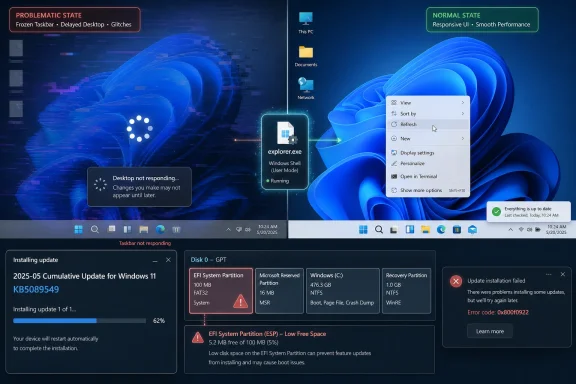
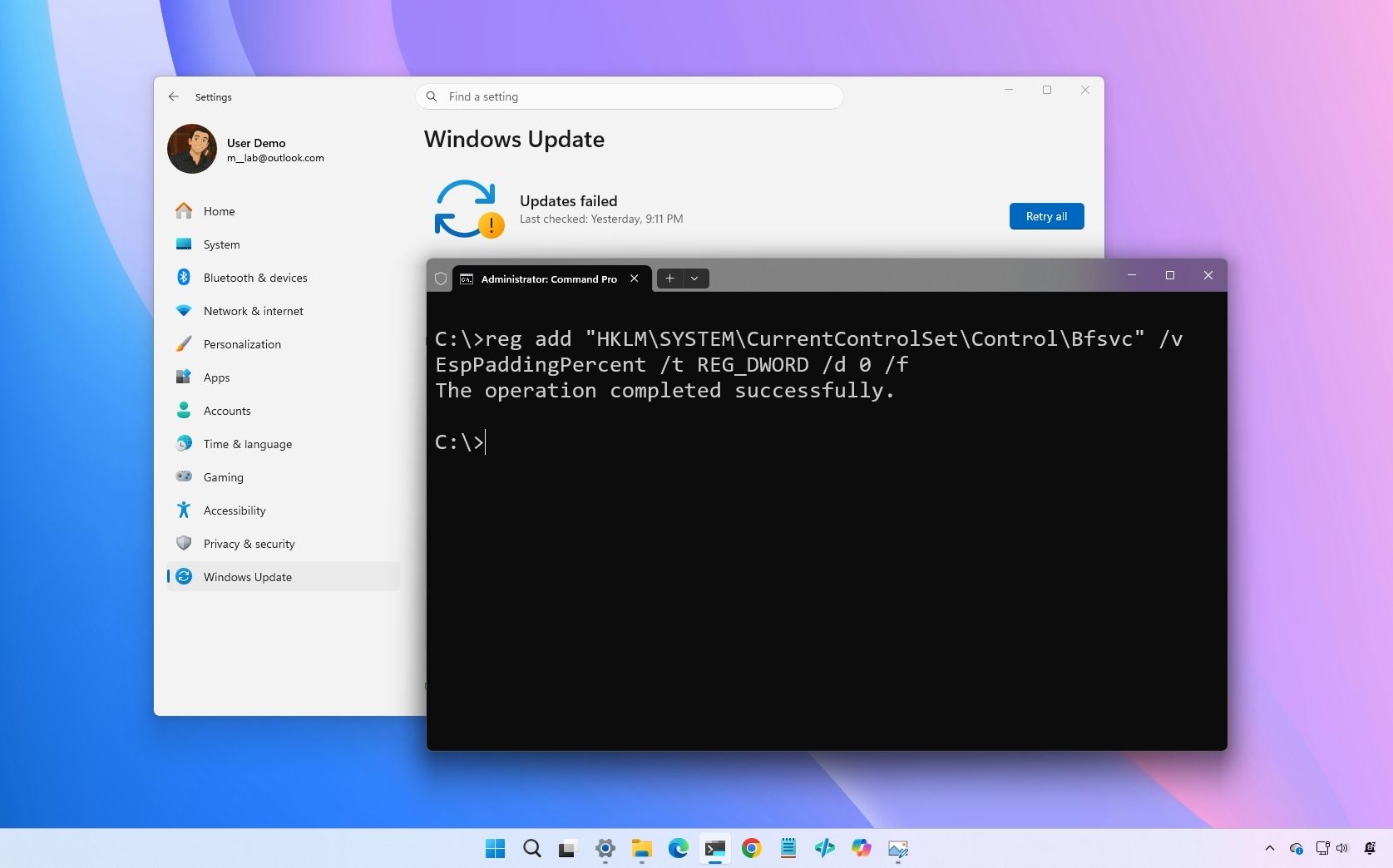
But that promise is undercut by the installation failure. Some systems attempting KB5089549 roll back during installation and show error 0x800f0922. Microsoft’s known-issue note points to cramped EFI System Partitions as a trigger, especially when available space is critically low. So the update meant to stabilize the visible desktop can be blocked by a hidden boot partition most users have never seen.
When the taskbar freezes immediately after sign-in, the user’s first assumption is not “explorer.exe reliability regression.” It is “my PC is broken.” That is the reputational cost Microsoft pays whenever the desktop fails before the user has opened an app.
The blank-desktop reports are even more damaging because they mimic deeper system failure. A black or empty desktop after login feels like a corrupted profile, a bad GPU driver, or a botched feature update. If the eventual explanation is a taskbar or shell reliability issue, the diagnosis may be less catastrophic, but the user anxiety is already spent.
KB5089549’s shell changes suggest Microsoft understands this. Improving explorer.exe during login is not a minor polish item; it is foundational quality work. The strange part is that the company is still delivering such fixes through a package that can itself fail for reasons tied to system layout and servicing assumptions.
In this case, Microsoft’s explanation gives administrators a useful lead. The failure can occur when the EFI System Partition has too little free space for update operations. That partition is small, normally hidden, and typically created during Windows installation or by an OEM image. Users do not choose its size during normal setup, do not manage it in Settings, and are rarely warned that it could someday block a monthly security update.
That is why the issue lands awkwardly. If a user’s main drive has hundreds of gigabytes free, being told an update failed because of “low space” sounds wrong. The constrained area is not the visible C: drive but the boot partition where Windows and firmware-related files live. From the user’s perspective, the PC has plenty of storage; from the servicing stack’s perspective, the room that matters is full.
This is a classic Windows servicing problem: the operating system’s internal map does not match the user’s mental map. Microsoft can document the condition, publish mitigations, and eventually ship a more durable fix, but the trust damage happens at the moment Windows says only that the update failed.
PC makers, in-place upgrades, dual-boot tools, recovery environments, and years of servicing history can all leave machines with different partition layouts. A Windows 11 fleet that looks uniform in Intune or Windows Update for Business may hide a surprisingly uneven set of EFI partition sizes. That unevenness becomes operational risk when a cumulative update needs space the partition cannot provide.
For home users, the fix path is uncomfortable because resizing or cleaning an EFI partition is not the kind of maintenance people should casually perform after reading a forum post. A mistake in the boot partition can turn an annoying update failure into a non-booting PC. Microsoft’s workaround path is therefore useful but not especially friendly.
For enterprise IT, the issue is more tractable but still irritating. Admins can inventory update failures, identify affected hardware cohorts, and test remediation scripts or manual procedures. But any remediation touching boot partitions raises the bar for validation. It is the sort of work that turns a routine monthly patch into a change-control item.
That leaves administrators with a split decision. Machines that install KB5089549 cleanly should generally keep it, because the update includes security fixes and reliability improvements. Machines that fail with 0x800f0922 need triage, not endless retries. Repeatedly pushing the same update to the same failing system may burn maintenance windows without changing the underlying condition.
The risk calculus is different for consumers. A home user seeing 0x800f0922 may be better served waiting for Microsoft’s mitigation or the next cumulative update than attempting unsupported partition surgery. But the user should still understand that “failed install” does not mean “harmless annoyance.” It means the system may remain behind on security and reliability fixes until the servicing blockage is resolved.
Microsoft’s challenge is to make that distinction clearer. Windows Update should be able to say, in normal language, that the boot partition may not have enough free space and that Microsoft is applying or preparing a mitigation. Instead, users often receive the old ritual: a percentage counter, a rollback, and an error code.
If Microsoft has improved how Windows handles that early-session pressure, users may feel the difference even if they never read the release notes. A PC that becomes usable sooner after login feels faster, regardless of benchmark numbers. That is exactly the kind of polish Windows 11 needs.
But reliability delivery is part of performance perception. A patch that improves startup responsiveness for some users while failing to install for others creates two Windows realities. In one, the desktop feels smoother and explorer.exe behaves better. In the other, Windows Update repeatedly fails, rolls back, and leaves the user searching for 0x800f0922.
That split undermines the message Microsoft would prefer to send. The company wants KB5089549 to be seen as evidence that Windows 11 quality is improving. The installation failure turns it into evidence that Windows servicing remains too brittle.
The downside is concentration. When one cumulative package includes security fixes, shell reliability improvements, BitLocker-related repairs, performance changes, and servicing behavior that may fail on some machines, the package becomes a single point of operational tension. You do not get to accept only the explorer.exe fix while deferring the part that exposes the EFI-space problem.
That trade-off is not new, but KB5089549 makes it vivid. The update is simultaneously desirable and troublesome. It fixes problems that users can see immediately, yet may be blocked by a condition users cannot see at all. That is a particularly Windows-shaped paradox.
Microsoft’s answer has generally been to improve known-issue handling, staged rollouts, safeguard holds, rollback mechanisms, and documentation. Those are necessary tools. But they do not erase the core dependency: the health of Windows Update is now inseparable from the perceived health of Windows itself.
The EFI partition angle should prompt a review of standard images and provisioning history. If affected machines share a small EFI System Partition created years ago, the May 2026 update may simply be the first highly visible sign of a latent design problem. That does not mean every device needs immediate repartitioning, but it does mean the partition layout belongs in the fleet-health conversation.
Help desks also need better language than “try again.” A user whose taskbar freezes wants the patch; a user whose patch fails needs a calm explanation that the failure may involve a hidden boot partition, not a lack of normal disk space. That distinction prevents wasted troubleshooting and reduces the temptation to run random cleanup tools against the wrong target.
The best enterprise response is measured: monitor, test Microsoft’s mitigation, validate any manual remediation, and avoid improvising boot-partition changes at scale. The worst response is pretending the issue is just another transient Windows Update hiccup. Sometimes it is. This time, Microsoft’s own known-issue language points to a concrete structural cause.
If the update fails with 0x800f0922, endless retrying is unlikely to be satisfying. Users can run the basic Windows Update troubleshooter, reboot, ensure the system has normal free disk space, and wait for Microsoft’s mitigation or a later cumulative update. More advanced steps involving the EFI partition should be treated with caution, especially on a primary PC without a current backup.
The “new folder” reports tied to KB5089549 are a sideshow compared with the install failure and shell fixes. Windows updates sometimes leave behind servicing artifacts, logs, or temporary directories. They may be untidy, but they are not the central issue here.
The central issue is access to the fix. Microsoft has a patch that can improve the desktop experience and update the system’s security posture. The users who need it most may include people least equipped to diagnose why it will not install.
That mismatch shapes the user’s emotional response. A visible failure creates frustration; an invisible cause creates helplessness. Windows has always contained layers most users should not need to understand, but modern servicing increasingly forces those layers into the foreground when something goes wrong.
Microsoft has made progress in acknowledging known issues faster than it did in earlier Windows eras. The company’s documentation is more candid, and its release-health pages often give administrators enough information to make decisions. But the operating system interface still lags behind the documentation. Windows Update should not require a scavenger hunt to distinguish a general install failure from a specific EFI-space condition.
There is also a product-design lesson here. When the taskbar, File Explorer, Task View, and startup-app handling all converge around explorer.exe reliability, Microsoft is reminded that the Windows shell is not just another component. It is the user’s confidence meter. If it freezes, the whole OS feels suspect.
If the update installs, KB5089549 may be remembered as a useful repair for taskbar and desktop weirdness. If it fails, it becomes another data point in the long-running complaint that Windows Update is still too unpredictable. Both experiences can be true at once.
That duality is why Microsoft’s next move matters. A clear mitigation, a durable fix in a subsequent cumulative update, and better preflight detection for low EFI partition space would turn this into a contained incident. Silence, vague retry guidance, or a long wait would make it feel like the old Windows servicing roulette.
The company should also resist the temptation to treat this solely as a support article problem. If Windows can detect that a hidden system partition is critically low on space, it should tell the user that plainly before the update fails. If it cannot detect that reliably, this incident should become a reason to improve the servicing stack’s checks.
 Microsoft’s Shell Fix Arrives With a Catch
KB5089549 is not a cosmetic update. Microsoft says the May 2026 release contains underlying reliability changes for explorer.exe, the process that effectively holds much of the Windows desktop experience together. When explorer.exe stumbles, users do not experience it as a technical subsystem failure; they experience it as Windows itself becoming unusable.That distinction matters because the reported symptoms are highly visible. A frozen taskbar after sign-in, a desktop that remains blank longer than expected, a lagging Task View, or a right-click menu that hesitates are not obscure enterprise corner cases. They are the front door of the operating system failing to open cleanly.
The fix reportedly improves behavior during sign-in, interactions with taskbar menus and Task View, and actions such as removing items from File Explorer’s Quick Access. Microsoft also highlights better performance when launching startup apps after the device is turned on. In plain English, the company is trying to make Windows 11 feel less stuck during the moments when users are least patient with it.
But that promise is undercut by the installation failure. Some systems attempting KB5089549 roll back during installation and show error 0x800f0922. Microsoft’s known-issue note points to cramped EFI System Partitions as a trigger, especially when available space is critically low. So the update meant to stabilize the visible desktop can be blocked by a hidden boot partition most users have never seen.
The Taskbar Is No Longer Just a Strip of Icons
For years, the Windows taskbar was treated as familiar furniture: Start button, pinned apps, clock, tray icons, maybe a little muscle memory about where a program lived. In Windows 11, it has become a more complex front end for identity, search, widgets, Copilot-era affordances, notification routing, and modern shell animation. That complexity makes failures more consequential.When the taskbar freezes immediately after sign-in, the user’s first assumption is not “explorer.exe reliability regression.” It is “my PC is broken.” That is the reputational cost Microsoft pays whenever the desktop fails before the user has opened an app.
The blank-desktop reports are even more damaging because they mimic deeper system failure. A black or empty desktop after login feels like a corrupted profile, a bad GPU driver, or a botched feature update. If the eventual explanation is a taskbar or shell reliability issue, the diagnosis may be less catastrophic, but the user anxiety is already spent.
KB5089549’s shell changes suggest Microsoft understands this. Improving explorer.exe during login is not a minor polish item; it is foundational quality work. The strange part is that the company is still delivering such fixes through a package that can itself fail for reasons tied to system layout and servicing assumptions.
Error 0x800f0922 Is the Kind of Failure Windows Explains Badly
The problem with 0x800f0922 is not only that it appears. It is that it rarely tells ordinary users what to do next. Windows Update error codes often function less like diagnostic messages and more like receipt numbers from a bureaucracy: precise enough for the system, opaque to the person holding them.In this case, Microsoft’s explanation gives administrators a useful lead. The failure can occur when the EFI System Partition has too little free space for update operations. That partition is small, normally hidden, and typically created during Windows installation or by an OEM image. Users do not choose its size during normal setup, do not manage it in Settings, and are rarely warned that it could someday block a monthly security update.
That is why the issue lands awkwardly. If a user’s main drive has hundreds of gigabytes free, being told an update failed because of “low space” sounds wrong. The constrained area is not the visible C: drive but the boot partition where Windows and firmware-related files live. From the user’s perspective, the PC has plenty of storage; from the servicing stack’s perspective, the room that matters is full.
This is a classic Windows servicing problem: the operating system’s internal map does not match the user’s mental map. Microsoft can document the condition, publish mitigations, and eventually ship a more durable fix, but the trust damage happens at the moment Windows says only that the update failed.
The Hidden Partition Becomes a Front-Page Problem
The EFI System Partition is usually invisible because invisibility is part of its design. It exists so modern UEFI systems can boot reliably without asking users to care about bootloaders, firmware files, or partition flags. That arrangement works beautifully until the hidden part becomes the part that blocks a security update.PC makers, in-place upgrades, dual-boot tools, recovery environments, and years of servicing history can all leave machines with different partition layouts. A Windows 11 fleet that looks uniform in Intune or Windows Update for Business may hide a surprisingly uneven set of EFI partition sizes. That unevenness becomes operational risk when a cumulative update needs space the partition cannot provide.
For home users, the fix path is uncomfortable because resizing or cleaning an EFI partition is not the kind of maintenance people should casually perform after reading a forum post. A mistake in the boot partition can turn an annoying update failure into a non-booting PC. Microsoft’s workaround path is therefore useful but not especially friendly.
For enterprise IT, the issue is more tractable but still irritating. Admins can inventory update failures, identify affected hardware cohorts, and test remediation scripts or manual procedures. But any remediation touching boot partitions raises the bar for validation. It is the sort of work that turns a routine monthly patch into a change-control item.
The “Known Issue” Label Does Not Make the Patch Optional
The uncomfortable truth is that KB5089549 is still a security update. It is not merely a shell-quality release for users annoyed by taskbar freezes. The May 2026 cumulative update carries the normal Patch Tuesday weight, and skipping it wholesale because some systems fail to install is not a serious long-term strategy.That leaves administrators with a split decision. Machines that install KB5089549 cleanly should generally keep it, because the update includes security fixes and reliability improvements. Machines that fail with 0x800f0922 need triage, not endless retries. Repeatedly pushing the same update to the same failing system may burn maintenance windows without changing the underlying condition.
The risk calculus is different for consumers. A home user seeing 0x800f0922 may be better served waiting for Microsoft’s mitigation or the next cumulative update than attempting unsupported partition surgery. But the user should still understand that “failed install” does not mean “harmless annoyance.” It means the system may remain behind on security and reliability fixes until the servicing blockage is resolved.
Microsoft’s challenge is to make that distinction clearer. Windows Update should be able to say, in normal language, that the boot partition may not have enough free space and that Microsoft is applying or preparing a mitigation. Instead, users often receive the old ritual: a percentage counter, a rollback, and an error code.
Performance Fixes Are Hard to Celebrate When Delivery Is Unreliable
The most interesting part of KB5089549 may be the startup-performance work. Microsoft specifically calls out better performance when launching apps configured to run after the device turns on. That is a smart target because perceived Windows sluggishness often happens in the first minute after login, when cloud sync tools, launchers, security agents, chat clients, updaters, and vendor utilities all elbow their way into memory.If Microsoft has improved how Windows handles that early-session pressure, users may feel the difference even if they never read the release notes. A PC that becomes usable sooner after login feels faster, regardless of benchmark numbers. That is exactly the kind of polish Windows 11 needs.
But reliability delivery is part of performance perception. A patch that improves startup responsiveness for some users while failing to install for others creates two Windows realities. In one, the desktop feels smoother and explorer.exe behaves better. In the other, Windows Update repeatedly fails, rolls back, and leaves the user searching for 0x800f0922.
That split undermines the message Microsoft would prefer to send. The company wants KB5089549 to be seen as evidence that Windows 11 quality is improving. The installation failure turns it into evidence that Windows servicing remains too brittle.
Cumulative Updates Concentrate Both Relief and Risk
Microsoft’s cumulative update model has real advantages. It reduces patch fragmentation, simplifies baseline management, and ensures that machines receiving the latest update also receive prior fixes. For administrators, that model is far easier to reason about than a sprawling menu of optional, individually selected patches.The downside is concentration. When one cumulative package includes security fixes, shell reliability improvements, BitLocker-related repairs, performance changes, and servicing behavior that may fail on some machines, the package becomes a single point of operational tension. You do not get to accept only the explorer.exe fix while deferring the part that exposes the EFI-space problem.
That trade-off is not new, but KB5089549 makes it vivid. The update is simultaneously desirable and troublesome. It fixes problems that users can see immediately, yet may be blocked by a condition users cannot see at all. That is a particularly Windows-shaped paradox.
Microsoft’s answer has generally been to improve known-issue handling, staged rollouts, safeguard holds, rollback mechanisms, and documentation. Those are necessary tools. But they do not erase the core dependency: the health of Windows Update is now inseparable from the perceived health of Windows itself.
Where Enterprise IT Sees a Small Partition and a Big Process Problem
For managed environments, the immediate action is not panic; it is segmentation. IT teams should determine which Windows 11 24H2 and 25H2 devices have installed KB5089549, which have failed, and whether failures cluster around specific OEM models, deployment images, or older upgrade paths. A random handful of failures is one thing; a pattern across a hardware generation is another.The EFI partition angle should prompt a review of standard images and provisioning history. If affected machines share a small EFI System Partition created years ago, the May 2026 update may simply be the first highly visible sign of a latent design problem. That does not mean every device needs immediate repartitioning, but it does mean the partition layout belongs in the fleet-health conversation.
Help desks also need better language than “try again.” A user whose taskbar freezes wants the patch; a user whose patch fails needs a calm explanation that the failure may involve a hidden boot partition, not a lack of normal disk space. That distinction prevents wasted troubleshooting and reduces the temptation to run random cleanup tools against the wrong target.
The best enterprise response is measured: monitor, test Microsoft’s mitigation, validate any manual remediation, and avoid improvising boot-partition changes at scale. The worst response is pretending the issue is just another transient Windows Update hiccup. Sometimes it is. This time, Microsoft’s own known-issue language points to a concrete structural cause.
The Consumer Advice Is Boring Because It Has to Be
For individual Windows 11 users, the most defensible guidance is conservative. If KB5089549 installs successfully, there is little reason to remove it merely because other users have reported failures. The update carries security fixes and may improve the desktop behavior many people have been complaining about.If the update fails with 0x800f0922, endless retrying is unlikely to be satisfying. Users can run the basic Windows Update troubleshooter, reboot, ensure the system has normal free disk space, and wait for Microsoft’s mitigation or a later cumulative update. More advanced steps involving the EFI partition should be treated with caution, especially on a primary PC without a current backup.
The “new folder” reports tied to KB5089549 are a sideshow compared with the install failure and shell fixes. Windows updates sometimes leave behind servicing artifacts, logs, or temporary directories. They may be untidy, but they are not the central issue here.
The central issue is access to the fix. Microsoft has a patch that can improve the desktop experience and update the system’s security posture. The users who need it most may include people least equipped to diagnose why it will not install.
This Patch Turns Windows Quality Into a Visibility Problem
The KB5089549 story is really about visibility. The taskbar freeze is visible. The blank desktop is visible. A sluggish login experience is visible. The EFI System Partition is invisible until it blocks the update that is supposed to fix the visible problems.That mismatch shapes the user’s emotional response. A visible failure creates frustration; an invisible cause creates helplessness. Windows has always contained layers most users should not need to understand, but modern servicing increasingly forces those layers into the foreground when something goes wrong.
Microsoft has made progress in acknowledging known issues faster than it did in earlier Windows eras. The company’s documentation is more candid, and its release-health pages often give administrators enough information to make decisions. But the operating system interface still lags behind the documentation. Windows Update should not require a scavenger hunt to distinguish a general install failure from a specific EFI-space condition.
There is also a product-design lesson here. When the taskbar, File Explorer, Task View, and startup-app handling all converge around explorer.exe reliability, Microsoft is reminded that the Windows shell is not just another component. It is the user’s confidence meter. If it freezes, the whole OS feels suspect.
The Patch Notes Say Fix; the Rollback Says Wait
The cleanest reading of KB5089549 is that Microsoft shipped an important Windows 11 quality update with an unfortunate servicing defect affecting a subset of systems. That is probably true. But users and administrators do not experience updates as abstractly as release notes describe them. They experience the outcome on the machine in front of them.If the update installs, KB5089549 may be remembered as a useful repair for taskbar and desktop weirdness. If it fails, it becomes another data point in the long-running complaint that Windows Update is still too unpredictable. Both experiences can be true at once.
That duality is why Microsoft’s next move matters. A clear mitigation, a durable fix in a subsequent cumulative update, and better preflight detection for low EFI partition space would turn this into a contained incident. Silence, vague retry guidance, or a long wait would make it feel like the old Windows servicing roulette.
The company should also resist the temptation to treat this solely as a support article problem. If Windows can detect that a hidden system partition is critically low on space, it should tell the user that plainly before the update fails. If it cannot detect that reliably, this incident should become a reason to improve the servicing stack’s checks.
The Lesson From KB5089549 Is Written in the First Minute After Login
The practical reading of this update is narrow but important: KB5089549 is worth having, yet not worth reckless troubleshooting on machines where it fails. The broader reading is that Windows 11’s reliability story now lives or dies in the first minute after sign-in and in the last few percent of an update reboot.- KB5089549 is the May 2026 cumulative update for Windows 11 24H2 and 25H2, and it includes security fixes alongside explorer.exe reliability improvements.
- The update is intended to address taskbar freezes, blank desktop delays, Task View problems, and related File Explorer shell behavior.
- Microsoft has acknowledged that the update can fail with error 0x800f0922 on some systems, with critically low EFI System Partition space identified as a cause.
- Users whose systems install the update successfully should generally keep it, because removing it also removes security and reliability fixes.
- Users whose systems repeatedly fail to install it should avoid risky EFI partition changes unless they have a tested backup and know exactly what they are doing.
- Administrators should treat clustered 0x800f0922 failures as a fleet-health signal, not merely a one-off Windows Update nuisance.
References
- Primary source: PCWorld
Published: Tue, 26 May 2026 13:38:00 GMT

Windows 11’s latest patch is both the problem and the fix
Microsoft has admitted to issues with the taskbar and the desktop. That’s the bad news. But there is also some good news, which, of all things, is linked to the problematic update KB5089549. www.pcworld.com
- Related coverage: techradar.com
- Related coverage: windowscentral.com
Microsoft confirms Windows 11 May update is failing with error 0x800f0922
Microsoft confirms that the Windows 11 May 2026 update fails with error 0x800f0922 on some computers, but a rollback and a fix are already available. www.windowscentral.com
- Related coverage: windowsreport.com
- Related coverage: windowslatest.com

Microsoft says latest Windows 11 issue crashes explorer.exe, makes taskbar disappear, but a fix is rolling out
A bug in Windows 11 is crashing Explorer.exe, which could make your desktop UI disappear, including the taskbar. www.windowslatest.com
- Related coverage: windowsforum.com

KB5089549 May 2026 Update Fixes explorer.exe Freezes After Windows 11 Sign-In
Microsoft’s May 12, 2026 cumulative update for Windows 11 versions 24H2 and 25H2, KB5089549, includes reliability fixes for explorer.exe problems that could freeze the taskbar after sign-in, break desktop right-click behavior, stall Task View, and interfere with unpinning items from File... windowsforum.com
- Related coverage: vpncentral.com

Microsoft confirms Windows 11 KB5089549 can fail with error 0x800f0922
Microsoft has confirmed that the May 2026 security update for Windows 11 can fail to install on some devices with error code 0x800f0922. The issue affects KB5089549, the cumulative update released on May 12, 2026, for Windows 11 version 25H2 and version 24H2. The update moves devices to OS... vpncentral.com
- Related coverage: tutos-informatique.com

Windows 11 KB5089549 : erreur 0x800f0922 confirmée
Microsoft confirme un problème d’installation de KB5089549 sur Windows 11 avec l’erreur 0x800f0922. Voici les causes et les solutions proposées.www.tutos-informatique.com - Related coverage: ilsoftware.it

KB5089549: Windows 11 ha problemi di installazione e Microsoft corre ai ripari
Windows 11 KB5089549 fallisce su molti PC: Microsoft conferma problemi nella partizione EFI e rilascia una correzione lato server. www.ilsoftware.it
