

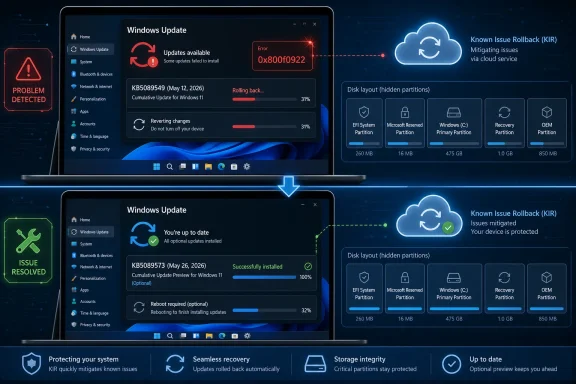
Microsoft’s optional May 26, 2026 preview update KB5089573 fixes a Windows 11 installation failure that caused the May 12 security update KB5089549 to roll back on some version 24H2 and 25H2 PCs with error 0x800f0922. The fix matters because the broken update was not a cosmetic nuisance; it was a mandatory security patch that could leave affected machines stuck in a loop of failed servicing attempts. Microsoft mitigated the issue first through Known Issue Rollback, but the durable repair now arrives through an optional update before broader automatic distribution in June. That sequence says a great deal about the modern Windows servicing bargain: the cloud can soften a bad patch, but the endpoint still has to swallow the cure.
The bug at the center of this episode is almost comically Windows-like: a security update tries to install, the system reboots, progress reaches roughly the mid-30 percent range, and then the machine announces that something did not go as planned. Windows then undoes the changes, returns the user to the desktop, and leaves behind error code 0x800f0922 as the clue.
That code has a long and unglamorous history in Windows Update troubleshooting. It has been associated with servicing failures, reserved partition trouble, VPN interference, .NET update issues, and other conditions that make the Windows servicing stack less deterministic than users would like. In this case, reporting around Microsoft’s known issue points to a low-level system memory or EFI System Partition condition that prevented the May update from completing on some devices.
The important point is not that every Windows 11 PC was at risk. The important point is that a security update can fail for a subset of machines in a way that looks, to the person in front of the screen, like Windows has simply changed its mind. For consumers, that is annoying. For IT departments, it is noise, compliance drift, and another dashboard full of devices that need explanation.
KB5089573 is therefore less interesting as a feature update than as a correction to the servicing pipeline itself. It is a preview cumulative update, which means it is optional, non-security, and aimed at users and administrators willing to take fixes before the next Patch Tuesday bundle. The contradiction is obvious: the fix for a mandatory patch failure arrives first through an optional channel.
That is not necessarily reckless. Microsoft has long used preview updates to validate non-security fixes before shipping them broadly in the following month’s security release. But when the defect being fixed blocks a security update, the distinction between optional and essential becomes more theoretical than practical.
That ambiguity is why this particular failure spread quickly through user forums and tech sites. Many affected users saw the same broad pattern: KB5089549 downloaded, attempted installation, rebooted, failed during the restart phase, and rolled back. The message “Something didn’t go as planned” was technically reassuring because the system recovered, but operationally maddening because it offered no path forward.
Microsoft’s initial response leaned on Known Issue Rollback, or KIR, one of the more underappreciated pieces of Windows servicing infrastructure. KIR allows Microsoft to disable problematic non-security changes through cloud-delivered configuration, often without requiring a full update uninstall. For unmanaged consumer and small-business devices, that mitigation can arrive quietly through Windows Update plumbing.
In managed environments, the process is less magical. Administrators may need to deploy special Group Policy packages to apply the rollback across their fleets. That is a reasonable enterprise control model, but it also means that the fastest fix is not always automatic for the machines where predictability matters most.
This distinction is central to understanding the incident. Microsoft did not simply “fix Windows Update” in one motion. It mitigated the blast radius, gave administrators a policy path, and then folded the permanent fix into KB5089573 and later updates. That is modern Windows maintenance in miniature: layered, cloud-assisted, and still dependent on the old rituals of installing another cumulative update.
For careful home users, that can be a good deal. If a bug is actively hurting a machine, a preview update may deliver relief weeks earlier than the standard Patch Tuesday cadence. For administrators, preview updates are often treated as test-ring material: deploy to a small set of representative devices, watch telemetry, and decide whether the fix is safe enough to accelerate.
KB5089573 fits that model neatly. It repairs the May 2026 installation failure for Windows 11 24H2 and 25H2 systems and moves affected PCs beyond the broken servicing state. Users who install it, or any newer cumulative update containing the fix, should no longer need the workaround associated with the May failure.
But optional delivery also guarantees uneven adoption. Many Windows 11 users never touch preview updates. Some have the “get the latest updates as soon as they’re available” toggle enabled, while others prefer to wait for security releases. Enterprises may block previews entirely unless they are part of a controlled validation ring.
That means Microsoft’s fix exists in the world before it reaches much of the world. From a software engineering standpoint, that is sensible. From a user’s standpoint, it can feel like being told that the cure is available, but only if one already understands the update channel taxonomy that caused the headache in the first place.
That is especially awkward because many affected systems may have been upgraded through several Windows generations. OEM partition layouts vary. Older devices may have EFI System Partitions sized for earlier assumptions. Recovery partitions may have been shuffled, enlarged, or stranded by feature upgrades and WinRE servicing changes.
Administrators know this pattern well. Microsoft can publish a clean requirement, but the installed base rarely looks clean. Fleet reality includes cloned images, third-party encryption, OEM utilities, old recovery partitions, dual-boot experiments, firmware oddities, and years of cumulative maintenance decisions that no longer have an owner.
The result is that a Windows update can expose a latent system condition that was invisible the day before. The user experiences that as Microsoft breaking something. Microsoft experiences it as a servicing edge case. Both interpretations can be true.
This is why update reliability has become a security issue in its own right. A patch that fails gracefully is better than a patch that bricks a machine, but it still leaves the system without the intended security fixes. In a consumer setting, the machine may try again later and eventually succeed after Microsoft’s mitigation lands. In an enterprise setting, every failed endpoint becomes a compliance exception with a clock attached.
But KIR also changes the psychology of Windows updates. Users no longer receive a single static package whose behavior is wholly determined at install time. Instead, part of the update’s effective behavior can depend on post-release cloud configuration, policy state, and whether the device is managed or unmanaged.
For Microsoft, this is a rational way to operate at Windows scale. The company ships to an almost absurd diversity of hardware and software combinations, and the ability to defuse a bad change remotely reduces harm. For users, however, it can make update behavior feel opaque. Two devices with the same KB number installed may not behave identically if one has received a rollback configuration and the other has not.
That opacity is manageable when the issue is minor. It becomes more consequential when the failure is tied to a security update. Administrators need to know whether a machine is vulnerable, mitigated, repaired, or merely lucky. Consumers mostly need Windows Update to stop presenting the same failed install as if repetition were a troubleshooting strategy.
KB5089573 helps because it turns a configuration-based mitigation into a conventional servicing fix. Once the cumulative update containing the correction is installed, the machine is no longer relying on the rollback state as the primary escape hatch. That is the cleaner ending, even if it arrives through the preview lane first.
Windows 11 24H2 has already been a complicated release in the public imagination. It brought platform changes, hardware enablement, and a variety of compatibility frictions that made it feel larger than a routine annual update. Windows 11 25H2, in turn, continues Microsoft’s pattern of incremental enablement on top of the same broad servicing foundation.
That shared foundation is efficient for Microsoft, but it also means servicing problems can span both versions. If a cumulative update has a condition that affects 24H2 and 25H2, the overlap is not surprising. The versions are distinct in branding and support lifecycle, but they are close enough under the hood that many update behaviors travel together.
For Windows enthusiasts, that reinforces a familiar lesson: the KB number matters as much as the marketing version. A machine being “on Windows 11” is not specific enough. Build numbers, cumulative update history, servicing stack state, and known issues all determine what the machine is actually experiencing.
For IT pros, the more useful lens is rings. A preview update like KB5089573 should generally land first on sacrificial or representative hardware, not the entire fleet. But when a previous mandatory update is failing, the preview may become the least risky way to restore forward motion.
There is a legitimate design challenge here. Most users do not need to see raw CBS log output during a reboot. A boot-time servicing failure is also a delicate moment; Windows should prioritize safe rollback over verbose diagnostics. But once the desktop returns, Windows Update could do better than a hex code and an invitation to retry.
The operating system knows far more than it tells the user. It can distinguish broad failure classes. It can link a failed KB to a known issue. It can say whether Microsoft has published a mitigation or whether a newer update resolves the problem. The Windows Release Health dashboard carries some of that truth, but it is still too detached from the Settings app where normal users encounter the failure.
This gap creates a market for folklore. Users search the code, find old advice about resizing partitions or clearing caches, and start applying fixes that may be irrelevant or risky. Some of those steps are harmless. Others, especially anything involving EFI partitions, are not ideal for casual experimentation.
Microsoft does not need to turn every Windows PC into a support workstation. It does need to connect known update failures to clearer guidance inside Windows itself. If an update is failing because of a known Microsoft-side issue, the user should not have to learn that from Reddit, a tech blog, or a sysadmin friend.
If the May security update failed repeatedly and the PC is actively stuck, installing KB5089573 is a reasonable path. It contains the permanent fix and should move the machine beyond the failed-install condition. The usual cautions apply: back up important data, avoid interrupting the update, and do not attempt risky partition surgery unless there is a clear reason and a verified procedure.
If the machine already received Microsoft’s KIR mitigation and later installed successfully, there may be less urgency. The next cumulative security update should include the same repair. Users who normally avoid preview updates can wait, provided Windows Update is no longer failing and the device is not stuck missing the May security content.
For managed environments, the calculus is different. Administrators should identify which devices failed KB5089549, confirm whether KIR was applied, and decide whether KB5089573 belongs in an accelerated ring. The answer may vary by fleet size, risk tolerance, and how quickly the organization needs compliance dashboards to turn green.
The worst response is blind repetition. If a machine has failed the same cumulative update multiple times with 0x800f0922, clicking retry indefinitely is unlikely to become a strategy. The appearance of KB5089573 changes the decision tree: the issue is no longer merely a mystery to troubleshoot, but a known failure with a known servicing fix.
The better framing is that optional preview updates are Microsoft’s public repair lane. They are where fixes often appear before being absorbed into the next mandatory security release. If you are not affected by the bug being fixed, waiting is usually sensible. If you are affected, the preview may be the official answer.
That distinction is important because Windows Update advice too often collapses into slogans. “Install everything immediately” ignores Microsoft’s long history of patch regressions. “Never install previews” ignores the fact that previews can fix real production problems. The mature position is less satisfying and more accurate: know what problem you are solving before changing the update policy.
KB5089573 is a good example. It is not a feature update one installs for novelty. It is not a random driver package or a speculative performance tweak. It is a cumulative preview that fixes a specific servicing failure affecting a specific May security update on specific Windows 11 versions.
That specificity should guide the decision. If your system is healthy, the June Patch Tuesday release is the cleaner path. If your system is blocked, the optional update is no longer merely optional in any practical sense.
For WindowsForum readers, the concrete takeaways are narrower and more useful than the usual “keep your PC updated” sermon.
That is the trade Microsoft has chosen for Windows at scale: faster mitigation, fewer catastrophic failures, and a servicing model that increasingly depends on cloud policy, staged rollout, and cumulative repair. KB5089573 closes this particular wound, but it also previews the future of Windows maintenance. The patch that fixes the patch is no longer an exception to the system; it is part of how the system works.
 Microsoft Fixed the Patch, but Not the Patch Habit
The bug at the center of this episode is almost comically Windows-like: a security update tries to install, the system reboots, progress reaches roughly the mid-30 percent range, and then the machine announces that something did not go as planned. Windows then undoes the changes, returns the user to the desktop, and leaves behind error code 0x800f0922 as the clue.That code has a long and unglamorous history in Windows Update troubleshooting. It has been associated with servicing failures, reserved partition trouble, VPN interference, .NET update issues, and other conditions that make the Windows servicing stack less deterministic than users would like. In this case, reporting around Microsoft’s known issue points to a low-level system memory or EFI System Partition condition that prevented the May update from completing on some devices.
The important point is not that every Windows 11 PC was at risk. The important point is that a security update can fail for a subset of machines in a way that looks, to the person in front of the screen, like Windows has simply changed its mind. For consumers, that is annoying. For IT departments, it is noise, compliance drift, and another dashboard full of devices that need explanation.
KB5089573 is therefore less interesting as a feature update than as a correction to the servicing pipeline itself. It is a preview cumulative update, which means it is optional, non-security, and aimed at users and administrators willing to take fixes before the next Patch Tuesday bundle. The contradiction is obvious: the fix for a mandatory patch failure arrives first through an optional channel.
That is not necessarily reckless. Microsoft has long used preview updates to validate non-security fixes before shipping them broadly in the following month’s security release. But when the defect being fixed blocks a security update, the distinction between optional and essential becomes more theoretical than practical.
The Error Code Was the Symptom, Not the Story
Windows users have learned to fear strings like 0x800f0922 because they are precise without being useful. The code tells Windows Update, support engineers, and log parsers where to begin. It does not tell a normal person whether to free disk space, resize a partition, rerun DISM, disable a VPN, or wait for Microsoft to fix the server-side logic.That ambiguity is why this particular failure spread quickly through user forums and tech sites. Many affected users saw the same broad pattern: KB5089549 downloaded, attempted installation, rebooted, failed during the restart phase, and rolled back. The message “Something didn’t go as planned” was technically reassuring because the system recovered, but operationally maddening because it offered no path forward.
Microsoft’s initial response leaned on Known Issue Rollback, or KIR, one of the more underappreciated pieces of Windows servicing infrastructure. KIR allows Microsoft to disable problematic non-security changes through cloud-delivered configuration, often without requiring a full update uninstall. For unmanaged consumer and small-business devices, that mitigation can arrive quietly through Windows Update plumbing.
In managed environments, the process is less magical. Administrators may need to deploy special Group Policy packages to apply the rollback across their fleets. That is a reasonable enterprise control model, but it also means that the fastest fix is not always automatic for the machines where predictability matters most.
This distinction is central to understanding the incident. Microsoft did not simply “fix Windows Update” in one motion. It mitigated the blast radius, gave administrators a policy path, and then folded the permanent fix into KB5089573 and later updates. That is modern Windows maintenance in miniature: layered, cloud-assisted, and still dependent on the old rituals of installing another cumulative update.
Optional Updates Have Become Microsoft’s Public Test Track
Preview cumulative updates occupy a strange place in the Windows ecosystem. They are not beta builds, and they are not the Insider Program. They are production updates for production machines, but they contain non-security fixes that Microsoft plans to include in the next security update after additional real-world exposure.For careful home users, that can be a good deal. If a bug is actively hurting a machine, a preview update may deliver relief weeks earlier than the standard Patch Tuesday cadence. For administrators, preview updates are often treated as test-ring material: deploy to a small set of representative devices, watch telemetry, and decide whether the fix is safe enough to accelerate.
KB5089573 fits that model neatly. It repairs the May 2026 installation failure for Windows 11 24H2 and 25H2 systems and moves affected PCs beyond the broken servicing state. Users who install it, or any newer cumulative update containing the fix, should no longer need the workaround associated with the May failure.
But optional delivery also guarantees uneven adoption. Many Windows 11 users never touch preview updates. Some have the “get the latest updates as soon as they’re available” toggle enabled, while others prefer to wait for security releases. Enterprises may block previews entirely unless they are part of a controlled validation ring.
That means Microsoft’s fix exists in the world before it reaches much of the world. From a software engineering standpoint, that is sensible. From a user’s standpoint, it can feel like being told that the cure is available, but only if one already understands the update channel taxonomy that caused the headache in the first place.
Security Patching Still Depends on the Smallest Partitions
The reported connection to memory or EFI partition conditions is a reminder that Windows Update is not just a download service. It is a choreography of boot files, recovery assets, component store transactions, reserved storage, firmware-adjacent partitions, and rollback logic. A modern cumulative update can fail because a machine’s visible C: drive has plenty of space while a tiny hidden partition does not.That is especially awkward because many affected systems may have been upgraded through several Windows generations. OEM partition layouts vary. Older devices may have EFI System Partitions sized for earlier assumptions. Recovery partitions may have been shuffled, enlarged, or stranded by feature upgrades and WinRE servicing changes.
Administrators know this pattern well. Microsoft can publish a clean requirement, but the installed base rarely looks clean. Fleet reality includes cloned images, third-party encryption, OEM utilities, old recovery partitions, dual-boot experiments, firmware oddities, and years of cumulative maintenance decisions that no longer have an owner.
The result is that a Windows update can expose a latent system condition that was invisible the day before. The user experiences that as Microsoft breaking something. Microsoft experiences it as a servicing edge case. Both interpretations can be true.
This is why update reliability has become a security issue in its own right. A patch that fails gracefully is better than a patch that bricks a machine, but it still leaves the system without the intended security fixes. In a consumer setting, the machine may try again later and eventually succeed after Microsoft’s mitigation lands. In an enterprise setting, every failed endpoint becomes a compliance exception with a clock attached.
KIR Is Powerful, but It Is Not a Substitute for Trust
Known Issue Rollback has saved Microsoft from worse outcomes more than once. It lets the company reverse problematic changes without forcing users to uninstall entire cumulative updates, preserving the security fixes while backing out the offending non-security behavior. That is a major improvement over the blunt tools of the past.But KIR also changes the psychology of Windows updates. Users no longer receive a single static package whose behavior is wholly determined at install time. Instead, part of the update’s effective behavior can depend on post-release cloud configuration, policy state, and whether the device is managed or unmanaged.
For Microsoft, this is a rational way to operate at Windows scale. The company ships to an almost absurd diversity of hardware and software combinations, and the ability to defuse a bad change remotely reduces harm. For users, however, it can make update behavior feel opaque. Two devices with the same KB number installed may not behave identically if one has received a rollback configuration and the other has not.
That opacity is manageable when the issue is minor. It becomes more consequential when the failure is tied to a security update. Administrators need to know whether a machine is vulnerable, mitigated, repaired, or merely lucky. Consumers mostly need Windows Update to stop presenting the same failed install as if repetition were a troubleshooting strategy.
KB5089573 helps because it turns a configuration-based mitigation into a conventional servicing fix. Once the cumulative update containing the correction is installed, the machine is no longer relying on the rollback state as the primary escape hatch. That is the cleaner ending, even if it arrives through the preview lane first.
Windows 11 24H2 and 25H2 Are Now the Real Servicing Test
The affected versions, Windows 11 24H2 and 25H2, are not side stories. They represent Microsoft’s current Windows 11 servicing baseline, especially as older releases age out of mainstream attention and newer hardware ships with recent builds preinstalled. When updates stumble here, the issue is not confined to enthusiasts living dangerously on experimental builds.Windows 11 24H2 has already been a complicated release in the public imagination. It brought platform changes, hardware enablement, and a variety of compatibility frictions that made it feel larger than a routine annual update. Windows 11 25H2, in turn, continues Microsoft’s pattern of incremental enablement on top of the same broad servicing foundation.
That shared foundation is efficient for Microsoft, but it also means servicing problems can span both versions. If a cumulative update has a condition that affects 24H2 and 25H2, the overlap is not surprising. The versions are distinct in branding and support lifecycle, but they are close enough under the hood that many update behaviors travel together.
For Windows enthusiasts, that reinforces a familiar lesson: the KB number matters as much as the marketing version. A machine being “on Windows 11” is not specific enough. Build numbers, cumulative update history, servicing stack state, and known issues all determine what the machine is actually experiencing.
For IT pros, the more useful lens is rings. A preview update like KB5089573 should generally land first on sacrificial or representative hardware, not the entire fleet. But when a previous mandatory update is failing, the preview may become the least risky way to restore forward motion.
The User-Facing Message Still Needs Work
The line “Something didn’t go as planned” is friendly in the way airport delay announcements are friendly. It lowers the emotional temperature, but it does not reduce uncertainty. Windows tells the user not to worry while giving almost no actionable explanation.There is a legitimate design challenge here. Most users do not need to see raw CBS log output during a reboot. A boot-time servicing failure is also a delicate moment; Windows should prioritize safe rollback over verbose diagnostics. But once the desktop returns, Windows Update could do better than a hex code and an invitation to retry.
The operating system knows far more than it tells the user. It can distinguish broad failure classes. It can link a failed KB to a known issue. It can say whether Microsoft has published a mitigation or whether a newer update resolves the problem. The Windows Release Health dashboard carries some of that truth, but it is still too detached from the Settings app where normal users encounter the failure.
This gap creates a market for folklore. Users search the code, find old advice about resizing partitions or clearing caches, and start applying fixes that may be irrelevant or risky. Some of those steps are harmless. Others, especially anything involving EFI partitions, are not ideal for casual experimentation.
Microsoft does not need to turn every Windows PC into a support workstation. It does need to connect known update failures to clearer guidance inside Windows itself. If an update is failing because of a known Microsoft-side issue, the user should not have to learn that from Reddit, a tech blog, or a sysadmin friend.
The Preview Fix Is a Choice, Not a Command
For an affected home user, KB5089573 presents a practical question: install the optional preview now or wait for the June security update. The answer depends on whether KB5089549 is still failing and whether the machine is otherwise stable.If the May security update failed repeatedly and the PC is actively stuck, installing KB5089573 is a reasonable path. It contains the permanent fix and should move the machine beyond the failed-install condition. The usual cautions apply: back up important data, avoid interrupting the update, and do not attempt risky partition surgery unless there is a clear reason and a verified procedure.
If the machine already received Microsoft’s KIR mitigation and later installed successfully, there may be less urgency. The next cumulative security update should include the same repair. Users who normally avoid preview updates can wait, provided Windows Update is no longer failing and the device is not stuck missing the May security content.
For managed environments, the calculus is different. Administrators should identify which devices failed KB5089549, confirm whether KIR was applied, and decide whether KB5089573 belongs in an accelerated ring. The answer may vary by fleet size, risk tolerance, and how quickly the organization needs compliance dashboards to turn green.
The worst response is blind repetition. If a machine has failed the same cumulative update multiple times with 0x800f0922, clicking retry indefinitely is unlikely to become a strategy. The appearance of KB5089573 changes the decision tree: the issue is no longer merely a mystery to troubleshoot, but a known failure with a known servicing fix.
The Real Lesson Is Not to Fear Optional Updates, but to Respect Them
Optional updates have an image problem because they sit between ordinary stability and early adoption. Many users hear “optional” and assume “unnecessary.” Many cautious administrators hear it and assume “not yet.” Both instincts can be right, depending on the circumstances.The better framing is that optional preview updates are Microsoft’s public repair lane. They are where fixes often appear before being absorbed into the next mandatory security release. If you are not affected by the bug being fixed, waiting is usually sensible. If you are affected, the preview may be the official answer.
That distinction is important because Windows Update advice too often collapses into slogans. “Install everything immediately” ignores Microsoft’s long history of patch regressions. “Never install previews” ignores the fact that previews can fix real production problems. The mature position is less satisfying and more accurate: know what problem you are solving before changing the update policy.
KB5089573 is a good example. It is not a feature update one installs for novelty. It is not a random driver package or a speculative performance tweak. It is a cumulative preview that fixes a specific servicing failure affecting a specific May security update on specific Windows 11 versions.
That specificity should guide the decision. If your system is healthy, the June Patch Tuesday release is the cleaner path. If your system is blocked, the optional update is no longer merely optional in any practical sense.
The May Patch Failure Leaves a Checklist Behind
This episode will fade quickly for users whose machines update normally in June, but it leaves behind a useful operational checklist. The lesson is not that Windows Update is broken beyond repair. It is that update health is now a first-class maintenance signal, especially on Windows 11 systems close to the current servicing edge.For WindowsForum readers, the concrete takeaways are narrower and more useful than the usual “keep your PC updated” sermon.
- KB5089549 was the May 12, 2026 Windows 11 security update that failed on some 24H2 and 25H2 systems with error 0x800f0922 during the reboot phase.
- Microsoft mitigated the issue through Known Issue Rollback, with managed environments potentially requiring Group Policy deployment to apply the rollback reliably.
- KB5089573, released as a May 26, 2026 optional preview update, contains the permanent fix for the installation failure.
- Users who do not install preview updates should receive the fix through a later cumulative update, expected with the June security update cycle.
- Repeatedly retrying the failed May update is less useful now that Microsoft has shipped a specific corrective update.
- Administrators should treat affected devices as patch-compliance exceptions until they confirm that the May security content or a later cumulative update has installed successfully.
That is the trade Microsoft has chosen for Windows at scale: faster mitigation, fewer catastrophic failures, and a servicing model that increasingly depends on cloud policy, staged rollout, and cumulative repair. KB5089573 closes this particular wound, but it also previews the future of Windows maintenance. The patch that fixes the patch is no longer an exception to the system; it is part of how the system works.
References
- Primary source: Research Snipers
Published: 2026-06-05T08:03:34.770646
Optional Windows 11 update fixes annoying installation bug – Research Snipers
Windows update with a stumbling block: The May update for Windows 11 failed for some...researchsnipers.com - Related coverage: windowscentral.com
Microsoft confirms Windows 11’s May 2026 update is failing to install with error 0x800f0922 and outlines a mitigation for affected PCs | Windows Central
Windows 11 May 2026 update fails on some PCs, but Microsoft has already shipped a workaround, and it's working on a permanent fix.www.windowscentral.com - Related coverage: windowslatest.com
Microsoft confirms Windows 11 update is failing on some PCs, explains if you need a workaround
Microsoft confirms Windows 11 update is failing at 35% on some PCs, releases a fix, and publishes a workaround. www.windowslatest.com
- Related coverage: allthings.how
Windows 11 KB5089549 Won’t Install? Fix for Error 0x800f0922
The May 2026 update rolls back at 35% on PCs with a nearly full EFI partition, and here's how to get it to install.allthings.how - Related coverage: otontechnology.com
Microsoft Fixes Windows 11 KB5089549 Update Install Failure
Microsoft has closed the book on KB5089549, the May 2026 Windows 11 security update that refused to install on some PCs and rolled back with error code 0x800f0922. The repair shipped on May 26 inside the KB5089573 preview update, and a server-side mitigation has already reached most home and...otontechnology.com - Related coverage: deskmodder.de
Windows 11 25H2/24H2 Mai Update wird mit 0x800f0922 zurückgesetzt (Update: Korrigiert) - Deskmodder.de
(Update 31.05.2026): Das Problem mit der Fehlermeldung beim Update 0x800f0922 wurde jetzt mit dem optionalen Update KB5089573 korrigiert und nachträglich in die Release Notes mit aufgenommen. (Original 17.05.2026): Beim Mai-Update KB5089549 für Windows 11 25H2 und 24H2 konnte bei einigen…www.deskmodder.de
- Related coverage: windowsforum.com
KB5089549 Update Fails on Windows 11 24H2/25H2: EFI Space Error 0x800f0922 | Windows Forum
Microsoft confirmed on May 15, 2026, that Windows 11 security update KB5089549 can fail to install on version 24H2 and 25H2 systems when the EFI System...windowsforum.com - Related coverage: windowsreport.com
Microsoft Fixes Windows 11 KB5089549 Install Failure With New Update
Microsoft has fixed the Windows 11 KB5089549 install error 0x800f0922 through KB5089573 for 24H2 and 25H2 PCs. windowsreport.com
- Related coverage: errors.decodesignals.com
Windows 11 KB5089573 Fix for 0x800f0922 EFI Install Rollback | DecodeSignals ERRORS
Getting Windows 11 KB5089573 Fix for 0x800f0922 EFI Install Rollback? Here are proven fixes that work in 2026. Fix Windows 11 0x800f0922 install rollback with the May 26 KB5089573 patch. Manual diskpart ESP cleanup procedure and KIR verification checklist.errors.decodesignals.com - Related coverage: cryptika.com
- Related coverage: windowstechit.com
Windows 11 24H2 Update Issues & Fixes Guide (May 2026)
Windows 11 24H2 update issues in May 2026? Get fixes for error 0x800f0922, KB5089549 failures, EFI partition errors, and the end-of-support deadline.www.windowstechit.com - Related coverage: tomshardware.com
Microsoft rushes out emergency Windows 11 patch after botched update breaks Recovery — restores USB keyboard and mouse input inside WinRE for Windows 11 versions 24H2 and 25H2 | Tom's Hardware
KB5070773 fixes a WinRE bug introduced by October’s cumulative update.www.tomshardware.com

