

Microsoft released KB5089872 on April 30, 2026, as an automatic Windows Update package for Qualcomm-powered Copilot+ PCs running Windows 11 version 26H1, updating the Image Processing AI component to version 1.2603.373.0 after the latest 26H1 cumulative update is installed. That sounds like plumbing, and in one sense it is. But this is the kind of plumbing that reveals where Windows is headed: away from monolithic operating-system releases and toward a layered AI stack that can be revised by silicon family, model family, and feature dependency. The interesting part of KB5089872 is not that it changes image processing; it is that Microsoft now treats on-device AI capability as a serviced Windows subsystem.
KB5089872 is a narrow update by design. It applies to Copilot+ PCs, targets Qualcomm-powered systems, and belongs to Windows 11 version 26H1 rather than the broader 24H2 and 25H2 population most users still recognize as the mainstream Windows line. The update replaces KB5083509 and appears in Update history as a 2026-04 Image Processing version 1.2603.373.0 package for Qualcomm-powered systems.
That specificity is the story. Windows used to draw most update boundaries around editions, architectures, and cumulative OS builds. With Copilot+ PCs, Microsoft is drawing a new boundary around AI components — modular packages that sit above the silicon execution layer and below user-visible experiences such as enhancement, accessibility, search, and image editing.
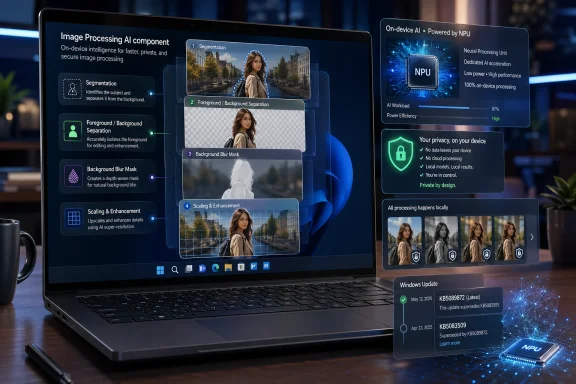
The Image Processing AI component is described as enabling on-device image understanding and image manipulation across Windows features and applications. Microsoft lists tasks including scaling, segmentation, foreground and background extraction, and visual analysis. Those are not flashy marketing phrases; they are the basic operations behind background blur, subject isolation, image enhancement, smarter search, and the kind of assistive workflows that make AI feel less like a chatbot and more like an operating-system primitive.
For Qualcomm systems, this means Windows is not merely “supporting Arm.” It is maintaining a Qualcomm-specific AI path, tuned enough to justify a separate KB article and a separate entry in the AI update history. That is a meaningful shift for administrators who still think of Windows Update as one pipeline delivering one monthly payload to everyone.
That minimalism can be frustrating, especially for IT teams that want to know whether an update changes model behavior, runtime behavior, hardware scheduling, app compatibility, or privacy posture. But the lack of drama is also intentional. Microsoft is normalizing these AI component updates as routine servicing, not as feature drops that require a launch event.
This is how platforms mature. Graphics drivers, browser engines, antimalware definitions, camera effects, and codec stacks all became separately serviced because tying them to the operating system’s major release cadence was too slow. AI components are now entering that same category. The models and runtimes are too fast-moving, too silicon-dependent, and too intertwined with applications to wait for one annual Windows feature update.
KB5089872 therefore matters less as a standalone update than as a signal. Microsoft is building an AI substrate inside Windows that can move independently of the Windows shell, the kernel marketing version, and even the broader Copilot brand. The operating system is becoming a distribution mechanism for local inference capability.
This does not mean Intel and AMD are being ignored. Microsoft’s AI component release history shows parallel packages for different silicon vendors, including separate Image Processing, Phi Silica, Image Transform, and execution provider updates. But Qualcomm remains the clearest test case for the future Microsoft wants: a Windows PC whose identity is not just CPU, GPU, RAM, and SSD, but NPU capability plus a serviced local AI runtime.
That is a different procurement conversation. A laptop is no longer merely “Windows-compatible” because it runs the OS and receives cumulative updates. It is increasingly compatible with a moving stack of AI models, execution providers, and feature packages. The supported feature set may vary depending on whether the machine is Qualcomm-powered, Intel-powered, AMD-powered, or not a Copilot+ PC at all.
For consumers, this will look like some features arriving on some machines first. For enterprises, it will look like another matrix to test. For Microsoft, it is a way to preserve Windows as the integration layer while letting silicon vendors compete underneath it.
That makes KB5089872 part of a controlled rollout pattern. Microsoft can service AI components for a defined class of machines without pretending the update applies to every Windows 11 PC. The company can update Qualcomm-oriented image processing for 26H1 without dragging along older devices, non-Copilot+ hardware, or PCs whose NPUs do not meet the same assumptions.
There is a strategic advantage here. By narrowing the target, Microsoft can move faster and take fewer compatibility risks. If an AI component depends on a particular execution provider, memory behavior, model format, or hardware capability, the company does not have to wrap that dependency in endless fallback logic for machines that will never use it.
The tradeoff is fragmentation. Windows has always had fragmentation, but users usually experienced it through editions, optional features, regional availability, and hardware drivers. AI servicing adds another layer: two PCs may both say “Windows 11,” but one may have a newer image-processing model, another may have a different Phi Silica package, and a third may not be eligible for the local feature at all.
On-device processing changes the risk model. It does not eliminate risk, but it shifts attention from network transfer to local storage, model behavior, app permissions, and endpoint management. If the image never leaves the device, administrators still need to know which Windows features can invoke the component, which applications can benefit from it, and how policy controls apply.
The hard part is that AI functionality tends to blur traditional boundaries. An image enhancement pipeline can be a camera feature, a Photos feature, an accessibility feature, a creative editing feature, or a background service used by search and indexing. If all of those experiences depend on the same serviced component, the component becomes operationally important even when the KB article looks minor.
This is why vague “improvements” language will not satisfy every enterprise customer. Microsoft may not want to document model-level changes in consumer-facing KB articles, but managed environments will eventually demand more transparency. If local AI is going to be a trusted Windows subsystem, IT needs something closer to driver release notes than marketing copy.
The update can be verified in Settings under Windows Update, Update history. That instruction is fine for a single device. It is less useful for a fleet. Enterprises will want inventory signals, reporting hooks, and predictable classification so these packages do not become mystery entries in compliance dashboards.
AI component servicing also complicates the old mental model of Patch Tuesday. A cumulative update may still be the prerequisite, but the AI component itself can arrive as a separate item with its own KB number, version, and replacement chain. KB5089872 replaces KB5083509, which means the component line has already developed the familiar lifecycle of supersedence and maintenance.
That is not bad. In fact, it is necessary. But it means administrators should stop treating Copilot+ AI updates as novelty items. They are becoming part of the Windows baseline, and baselines have to be measured.
That invisibility is Microsoft’s best chance to make Copilot+ matter. The original Copilot branding encouraged users to imagine AI as a pane, a button, or an assistant. The more durable value may come from components that never present themselves as assistants at all. Better image segmentation, faster enhancement, and local visual analysis can improve apps without asking users to change behavior.
For Windows developers, that is the more interesting platform. If Microsoft exposes stable APIs and predictable component behavior, application makers can lean on Windows for local AI acceleration rather than bundling their own models and runtimes. That could reduce duplication and make AI features more battery-friendly, especially on thin-and-light devices.
But the developer bargain depends on trust. If the underlying component changes silently and the KB article says only “improvements,” developers will test defensively. Microsoft has to balance rapid iteration with enough disclosure for software vendors to understand whether a model update affects quality, latency, or output consistency.
That ledger also reveals how Microsoft is decomposing AI into serviceable parts. Execution providers connect Windows AI workloads to vendor-specific acceleration stacks. Model components provide capabilities such as image processing or language inference. Higher-level Windows features then call into those layers.
This is a more durable strategy than betting everything on one assistant UI. Assistants rise and fall with user taste, regulation, and competitive pressure. Platform components, once depended on by apps and OS features, are harder to dislodge. They become infrastructure.
KB5089872 is therefore another brick in a wall Microsoft has been building quietly. The company wants Windows to be the place where local AI models are distributed, updated, accelerated, and governed. Whether users call that Copilot is almost beside the point.
A serviced image-processing component can affect user-visible output in subtle ways. A segmentation model might handle hair, glass, shadows, low-light images, or document edges differently after an update. A scaling path might change perceived sharpness. A visual-analysis pipeline might improve one workload while introducing an oddity in another.
For most users, those changes will be welcome or unnoticed. For regulated industries, creative workflows, accessibility scenarios, and software QA labs, subtle changes can matter. If a workflow depends on repeatable visual output, model drift is not an academic concern.
Microsoft has experience managing this kind of tension. Defender definitions update constantly; graphics drivers change behavior; Edge ships on its own cadence. The difference is that AI outputs can be harder to characterize. A driver either crashes or it does not, at least in the simple version of the story. A model can be better on average while still changing one edge case that a particular business cares about.
Yet first-class support does not mean simplicity. Qualcomm systems now need the cumulative Windows servicing stack, Qualcomm-specific execution support, AI component packages, app compatibility layers, and OEM firmware updates to work together. When everything aligns, the result can be impressive: efficient local inference, strong battery life, and features that feel native rather than bolted on.
When something fails, the troubleshooting path can be less obvious. Is the issue the cumulative update, the AI component, the execution provider, the app, the NPU driver, or a device-specific firmware package? The more modular the stack becomes, the more important diagnostics become.
That is the next frontier for Microsoft. Updating AI components is only half the platform story. Explaining them, inventorying them, testing them, and repairing them will determine whether Copilot+ PCs feel enterprise-ready or merely futuristic.
That cadence is exactly what AI needs. Models improve, runtimes change, silicon vendors optimize, and Windows features gain new dependencies. A yearly AI refresh would be obsolete before it landed. A modular servicing channel lets Microsoft adjust quickly without shipping a whole new Windows release.
But cadence creates expectations. If Microsoft ships AI component updates regularly, users and administrators will begin asking what changed regularly. “Improvements” is acceptable in the early phase, when the audience is small and the components are new. It will age poorly as these packages become more central to Windows behavior.
The company has an opportunity to set a better standard now. It does not need to disclose proprietary model internals. It does need to explain whether an update is about reliability, performance, quality, compatibility, security, or feature enablement. Those categories alone would make AI servicing feel less like a black box.
The more important operational move is to start treating AI components as inventory items. If a device’s local AI behavior matters, then the component version matters. If a help desk is troubleshooting a Copilot+ image feature, the Image Processing version is no longer trivia.
This also means that “fully patched” needs a slightly richer definition. A Windows 11 26H1 Qualcomm machine may have the current cumulative update but still be waiting on a component package, depending on rollout timing, policy, or update source behavior. Conversely, a machine may show the component update but still need validation that the higher-level feature depending on it works correctly.
That is the unglamorous truth of platform evolution. New capabilities become real when they enter the patching, inventory, and support workflow.
It normalizes AI models as Windows components. It normalizes silicon-specific AI servicing. It normalizes Copilot+ features depending on separately versioned packages. And it normalizes the idea that Windows Update is not just patching the operating system; it is maintaining the intelligence layer that applications and features will increasingly call into.
That is a big conceptual shift for a tiny-looking KB. The Windows platform is being reassembled into a stack where user-visible AI experiences sit on top of models, model packages sit on top of execution providers, and execution providers sit on top of NPUs and vendor runtimes. The old Windows version number still matters, but it no longer tells the whole story.
If Microsoft executes well, users will not need to understand any of this. Their PCs will simply become better at local, private, low-latency tasks over time. If Microsoft executes poorly, administrators will inherit a new class of poorly documented moving parts with uneven tooling and vague release notes.
Source: Microsoft Support KB5089872: Image Processing AI component update (version 1.2603.373.0) for Qualcomm-powered systems - Microsoft Support
 Microsoft Is Turning Copilot+ Into a Servicing Channel
KB5089872 is a narrow update by design. It applies to Copilot+ PCs, targets Qualcomm-powered systems, and belongs to Windows 11 version 26H1 rather than the broader 24H2 and 25H2 population most users still recognize as the mainstream Windows line. The update replaces KB5083509 and appears in Update history as a 2026-04 Image Processing version 1.2603.373.0 package for Qualcomm-powered systems.That specificity is the story. Windows used to draw most update boundaries around editions, architectures, and cumulative OS builds. With Copilot+ PCs, Microsoft is drawing a new boundary around AI components — modular packages that sit above the silicon execution layer and below user-visible experiences such as enhancement, accessibility, search, and image editing.
The Image Processing AI component is described as enabling on-device image understanding and image manipulation across Windows features and applications. Microsoft lists tasks including scaling, segmentation, foreground and background extraction, and visual analysis. Those are not flashy marketing phrases; they are the basic operations behind background blur, subject isolation, image enhancement, smarter search, and the kind of assistive workflows that make AI feel less like a chatbot and more like an operating-system primitive.
For Qualcomm systems, this means Windows is not merely “supporting Arm.” It is maintaining a Qualcomm-specific AI path, tuned enough to justify a separate KB article and a separate entry in the AI update history. That is a meaningful shift for administrators who still think of Windows Update as one pipeline delivering one monthly payload to everyone.
The Small KB Article Hides a Bigger Architectural Bet
Microsoft’s support text is characteristically sparse. There is no detailed changelog, no performance claim, no bug list, and no security advisory. The summary says the update includes improvements to the Image Processing AI component for Windows 11 version 26H1.That minimalism can be frustrating, especially for IT teams that want to know whether an update changes model behavior, runtime behavior, hardware scheduling, app compatibility, or privacy posture. But the lack of drama is also intentional. Microsoft is normalizing these AI component updates as routine servicing, not as feature drops that require a launch event.
This is how platforms mature. Graphics drivers, browser engines, antimalware definitions, camera effects, and codec stacks all became separately serviced because tying them to the operating system’s major release cadence was too slow. AI components are now entering that same category. The models and runtimes are too fast-moving, too silicon-dependent, and too intertwined with applications to wait for one annual Windows feature update.
KB5089872 therefore matters less as a standalone update than as a signal. Microsoft is building an AI substrate inside Windows that can move independently of the Windows shell, the kernel marketing version, and even the broader Copilot brand. The operating system is becoming a distribution mechanism for local inference capability.
Qualcomm Gets the Sharp Edge of the Windows AI Experiment
The Qualcomm angle is not incidental. Copilot+ PCs began life in the public imagination as Snapdragon-first machines, and the early Windows-on-Arm pitch was inseparable from battery life, neural processing units, and local AI features. KB5089872 continues that pattern by giving Qualcomm-powered 26H1 systems their own Image Processing package.This does not mean Intel and AMD are being ignored. Microsoft’s AI component release history shows parallel packages for different silicon vendors, including separate Image Processing, Phi Silica, Image Transform, and execution provider updates. But Qualcomm remains the clearest test case for the future Microsoft wants: a Windows PC whose identity is not just CPU, GPU, RAM, and SSD, but NPU capability plus a serviced local AI runtime.
That is a different procurement conversation. A laptop is no longer merely “Windows-compatible” because it runs the OS and receives cumulative updates. It is increasingly compatible with a moving stack of AI models, execution providers, and feature packages. The supported feature set may vary depending on whether the machine is Qualcomm-powered, Intel-powered, AMD-powered, or not a Copilot+ PC at all.
For consumers, this will look like some features arriving on some machines first. For enterprises, it will look like another matrix to test. For Microsoft, it is a way to preserve Windows as the integration layer while letting silicon vendors compete underneath it.
Version 26H1 Is the Tell
The prerequisite is important: KB5089872 requires the latest cumulative update for Windows 11 version 26H1. That version has been unusual from the beginning because it is not positioned as a conventional broad feature update for the installed Windows base. It is a hardware-specific branch associated with newer Qualcomm systems and the next phase of Windows-on-Arm enablement.That makes KB5089872 part of a controlled rollout pattern. Microsoft can service AI components for a defined class of machines without pretending the update applies to every Windows 11 PC. The company can update Qualcomm-oriented image processing for 26H1 without dragging along older devices, non-Copilot+ hardware, or PCs whose NPUs do not meet the same assumptions.
There is a strategic advantage here. By narrowing the target, Microsoft can move faster and take fewer compatibility risks. If an AI component depends on a particular execution provider, memory behavior, model format, or hardware capability, the company does not have to wrap that dependency in endless fallback logic for machines that will never use it.
The tradeoff is fragmentation. Windows has always had fragmentation, but users usually experienced it through editions, optional features, regional availability, and hardware drivers. AI servicing adds another layer: two PCs may both say “Windows 11,” but one may have a newer image-processing model, another may have a different Phi Silica package, and a third may not be eligible for the local feature at all.
Local AI Is a Privacy Promise With Operational Consequences
Microsoft emphasizes that the component runs locally on dedicated AI hardware and keeps image data on the device. That is the right message, especially after years of cloud-AI anxiety and regulatory scrutiny. Image understanding is sensitive by nature; photos, screenshots, scanned documents, and camera frames can expose personal, corporate, medical, and legal information.On-device processing changes the risk model. It does not eliminate risk, but it shifts attention from network transfer to local storage, model behavior, app permissions, and endpoint management. If the image never leaves the device, administrators still need to know which Windows features can invoke the component, which applications can benefit from it, and how policy controls apply.
The hard part is that AI functionality tends to blur traditional boundaries. An image enhancement pipeline can be a camera feature, a Photos feature, an accessibility feature, a creative editing feature, or a background service used by search and indexing. If all of those experiences depend on the same serviced component, the component becomes operationally important even when the KB article looks minor.
This is why vague “improvements” language will not satisfy every enterprise customer. Microsoft may not want to document model-level changes in consumer-facing KB articles, but managed environments will eventually demand more transparency. If local AI is going to be a trusted Windows subsystem, IT needs something closer to driver release notes than marketing copy.
The New Windows Stack Has More Moving Parts Than Patch Tuesday
KB5089872 is delivered automatically through Windows Update. For home users, that is simple enough. For IT pros, automatic delivery raises the usual questions: when does it appear, how is it classified, how does it interact with WSUS or Windows Update for Business, and what telemetry confirms successful installation?The update can be verified in Settings under Windows Update, Update history. That instruction is fine for a single device. It is less useful for a fleet. Enterprises will want inventory signals, reporting hooks, and predictable classification so these packages do not become mystery entries in compliance dashboards.
AI component servicing also complicates the old mental model of Patch Tuesday. A cumulative update may still be the prerequisite, but the AI component itself can arrive as a separate item with its own KB number, version, and replacement chain. KB5089872 replaces KB5083509, which means the component line has already developed the familiar lifecycle of supersedence and maintenance.
That is not bad. In fact, it is necessary. But it means administrators should stop treating Copilot+ AI updates as novelty items. They are becoming part of the Windows baseline, and baselines have to be measured.
Image Processing Is Where AI Becomes Invisible
The term “Image Processing AI component” is bland, almost aggressively so. But image processing is one of the places where AI disappears into ordinary computing. Users may not think they are “using AI” when a foreground is extracted cleanly, a background is separated in a video call, or an image is made more searchable. They will just think the PC is doing what it should have done all along.That invisibility is Microsoft’s best chance to make Copilot+ matter. The original Copilot branding encouraged users to imagine AI as a pane, a button, or an assistant. The more durable value may come from components that never present themselves as assistants at all. Better image segmentation, faster enhancement, and local visual analysis can improve apps without asking users to change behavior.
For Windows developers, that is the more interesting platform. If Microsoft exposes stable APIs and predictable component behavior, application makers can lean on Windows for local AI acceleration rather than bundling their own models and runtimes. That could reduce duplication and make AI features more battery-friendly, especially on thin-and-light devices.
But the developer bargain depends on trust. If the underlying component changes silently and the KB article says only “improvements,” developers will test defensively. Microsoft has to balance rapid iteration with enough disclosure for software vendors to understand whether a model update affects quality, latency, or output consistency.
The Copilot+ Brand Is Becoming Less Important Than the Component Ledger
Copilot+ remains the consumer-facing label, but the real action is in the component ledger: Image Processing, Image Transform, Phi Silica, Image Search, Semantic Analysis, Content Extraction, and execution providers. These names may never appear in television ads, but they define what the PC can actually do locally.That ledger also reveals how Microsoft is decomposing AI into serviceable parts. Execution providers connect Windows AI workloads to vendor-specific acceleration stacks. Model components provide capabilities such as image processing or language inference. Higher-level Windows features then call into those layers.
This is a more durable strategy than betting everything on one assistant UI. Assistants rise and fall with user taste, regulation, and competitive pressure. Platform components, once depended on by apps and OS features, are harder to dislodge. They become infrastructure.
KB5089872 is therefore another brick in a wall Microsoft has been building quietly. The company wants Windows to be the place where local AI models are distributed, updated, accelerated, and governed. Whether users call that Copilot is almost beside the point.
The Risks Are Boring, Which Makes Them Real
The biggest risks around KB5089872 are not science-fiction risks. They are the old Windows risks wearing new clothes: opaque release notes, inconsistent fleet visibility, driver-like compatibility problems, and uncertain rollback procedures. AI does not make these problems exotic. It makes them more frequent.A serviced image-processing component can affect user-visible output in subtle ways. A segmentation model might handle hair, glass, shadows, low-light images, or document edges differently after an update. A scaling path might change perceived sharpness. A visual-analysis pipeline might improve one workload while introducing an oddity in another.
For most users, those changes will be welcome or unnoticed. For regulated industries, creative workflows, accessibility scenarios, and software QA labs, subtle changes can matter. If a workflow depends on repeatable visual output, model drift is not an academic concern.
Microsoft has experience managing this kind of tension. Defender definitions update constantly; graphics drivers change behavior; Edge ships on its own cadence. The difference is that AI outputs can be harder to characterize. A driver either crashes or it does not, at least in the simple version of the story. A model can be better on average while still changing one edge case that a particular business cares about.
Qualcomm Systems Are Becoming First-Class, but Not Simpler
Windows on Arm has spent years fighting the perception that it is an alternate Windows universe with caveats. Copilot+ helped change that conversation by making Arm systems the flagship for a new class of local AI features. KB5089872 reinforces that Qualcomm-powered PCs are no longer passengers waiting for x86 Windows to define the agenda.Yet first-class support does not mean simplicity. Qualcomm systems now need the cumulative Windows servicing stack, Qualcomm-specific execution support, AI component packages, app compatibility layers, and OEM firmware updates to work together. When everything aligns, the result can be impressive: efficient local inference, strong battery life, and features that feel native rather than bolted on.
When something fails, the troubleshooting path can be less obvious. Is the issue the cumulative update, the AI component, the execution provider, the app, the NPU driver, or a device-specific firmware package? The more modular the stack becomes, the more important diagnostics become.
That is the next frontier for Microsoft. Updating AI components is only half the platform story. Explaining them, inventorying them, testing them, and repairing them will determine whether Copilot+ PCs feel enterprise-ready or merely futuristic.
The April Update Shows the Cadence Microsoft Wants
The release history around Windows AI components shows a brisk cadence in early 2026, with February, March, and April entries across multiple AI components and silicon families. KB5089872 fits that rhythm. It is not a one-off patch; it is part of a monthly-ish refinement cycle for AI building blocks.That cadence is exactly what AI needs. Models improve, runtimes change, silicon vendors optimize, and Windows features gain new dependencies. A yearly AI refresh would be obsolete before it landed. A modular servicing channel lets Microsoft adjust quickly without shipping a whole new Windows release.
But cadence creates expectations. If Microsoft ships AI component updates regularly, users and administrators will begin asking what changed regularly. “Improvements” is acceptable in the early phase, when the audience is small and the components are new. It will age poorly as these packages become more central to Windows behavior.
The company has an opportunity to set a better standard now. It does not need to disclose proprietary model internals. It does need to explain whether an update is about reliability, performance, quality, compatibility, security, or feature enablement. Those categories alone would make AI servicing feel less like a black box.
The Admin View Is Verification, Not Hype
For WindowsForum readers managing real machines, the practical story is straightforward. KB5089872 should arrive automatically on eligible Qualcomm-powered Copilot+ PCs running Windows 11 version 26H1, assuming the latest cumulative update is already installed. The presence check is Update history, where the April 2026 Image Processing entry should appear.The more important operational move is to start treating AI components as inventory items. If a device’s local AI behavior matters, then the component version matters. If a help desk is troubleshooting a Copilot+ image feature, the Image Processing version is no longer trivia.
This also means that “fully patched” needs a slightly richer definition. A Windows 11 26H1 Qualcomm machine may have the current cumulative update but still be waiting on a component package, depending on rollout timing, policy, or update source behavior. Conversely, a machine may show the component update but still need validation that the higher-level feature depending on it works correctly.
That is the unglamorous truth of platform evolution. New capabilities become real when they enter the patching, inventory, and support workflow.
The KB Number Is Small, but the Servicing Model Is Not
KB5089872 is best understood as a maintenance release for a new class of Windows dependency. It is not a feature announcement, not a security bulletin, and not a reason to run out and buy a new laptop by itself. Its significance comes from what it normalizes.It normalizes AI models as Windows components. It normalizes silicon-specific AI servicing. It normalizes Copilot+ features depending on separately versioned packages. And it normalizes the idea that Windows Update is not just patching the operating system; it is maintaining the intelligence layer that applications and features will increasingly call into.
That is a big conceptual shift for a tiny-looking KB. The Windows platform is being reassembled into a stack where user-visible AI experiences sit on top of models, model packages sit on top of execution providers, and execution providers sit on top of NPUs and vendor runtimes. The old Windows version number still matters, but it no longer tells the whole story.
If Microsoft executes well, users will not need to understand any of this. Their PCs will simply become better at local, private, low-latency tasks over time. If Microsoft executes poorly, administrators will inherit a new class of poorly documented moving parts with uneven tooling and vague release notes.
The April Qualcomm Package Leaves a Short Checklist Behind
KB5089872 does not demand panic or celebration. It demands that we update our mental model of what a Windows update can be, especially on Copilot+ hardware.- KB5089872 updates the Image Processing AI component for Qualcomm-powered Copilot+ PCs running Windows 11 version 26H1 to version 1.2603.373.0.
- The update is delivered automatically through Windows Update and requires the latest cumulative update for Windows 11 version 26H1.
- The package replaces KB5083509, making it part of a normal supersedence chain rather than a one-time experimental release.
- The component supports local image understanding and processing tasks such as scaling, segmentation, foreground and background extraction, and visual analysis.
- Administrators should verify installation through Update history and begin tracking AI component versions as part of Copilot+ device support.
- Microsoft still needs clearer release-note categories if these AI components are going to become trusted enterprise dependencies.
Source: Microsoft Support KB5089872: Image Processing AI component update (version 1.2603.373.0) for Qualcomm-powered systems - Microsoft Support
