

Microsoft’s June 9, 2026 cumulative update KB5095051 for Windows 11 version 26H1, OS Build 28000.2269, has a confirmed known issue that can stop Microsoft Office apps from opening when invoked by certain third-party applications. That sounds narrower than the usual Patch Tuesday breakage, but in enterprise Windows estates, “certain third-party applications” is exactly where a lot of real work begins. The bug does not merely inconvenience people who click Word from the Start menu; it threatens the glue code, workflow platforms, document systems, and automation paths that make Office part of business infrastructure. Microsoft’s acknowledgement is therefore less a footnote than a reminder that Windows compatibility is still won or lost in the seams between products.
For home users, Office is often a set of icons: Word, Excel, PowerPoint, Outlook. For businesses, Office is more often an endpoint in a chain. A case-management system opens a template in Word, a CRM launches Outlook with a populated message, a document repository hands off a spreadsheet to Excel, or a ticketing platform invokes PowerPoint through a shell command, COM automation path, protocol handler, or integration layer.
That is why the KB5095051 issue matters even if direct launches continue to work. If Word opens from the Start menu but not from the enterprise app that generates a contract, the affected user does not experience a subtle integration defect. They experience a broken workflow.
Microsoft’s known-issue wording points to a failure mode in which third-party apps may be unable to launch Office applications or open documents after installing Windows updates released on or after June 9, 2026. The phrasing is important because it suggests the company is not treating this as a single app vendor’s bug. It is a Windows update interaction with a class of launch behavior.
That class is exactly where corporate environments accumulate risk. Over years, organizations build thin layers of automation around Office because Office is the common denominator. The more routine the integration, the less visible it becomes — until a security update changes an assumption underneath it.
That servicing model is defensible. Fragmented patching is a security liability, and cumulative updates simplify dependency tracking. The problem is that cumulative updates also collapse many kinds of change into one decision point: security fixes, shell hardening, servicing-stack improvements, AI component refreshes, and compatibility regressions all arrive together.
The result is a familiar enterprise dilemma. Delay the update, and you extend exposure to vulnerabilities addressed in the June cycle. Deploy it too quickly, and critical Office-integrated workflows may fail in front of users who reasonably assume “Office is down.”
The Office issue is a particularly awkward example because it does not appear to break Office in the most obvious test. A quick smoke test that launches Word, Excel, Outlook, and PowerPoint from pinned shortcuts may pass. The real break appears when Office is launched through something else, and that “something else” may be different in every department.
The Windows shell is one of the oldest and most compatibility-sensitive surfaces in the operating system. It is also one of the most abused. Anything that influences how folders appear, how files are opened, how applications are invoked, or how trusted-looking UI is assembled deserves scrutiny.
Security hardening in that layer is not optional theater. Attackers have long exploited user trust in files, folders, links, templates, and launch paths. Tightening the rules is exactly what Microsoft should be doing.
But every hardening move has blast-radius risk because decades of Windows software were written against behavior rather than ideal documentation. A change that is correct from a platform-security standpoint can still expose integrations that depended on permissive shell behavior, ambiguous invocation rules, or undocumented assumptions. That is the uncomfortable bargain of Windows servicing in 2026: the operating system has to become stricter without breaking the ecosystem that made it useful.
Windows is no longer just kernel, shell, drivers, networking, and inbox apps. It is increasingly a platform for local indexing, semantic processing, AI-assisted search, cloud-adjacent experiences, policy-controlled intelligence, and background models. That expansion means more moving parts in every build and more opportunities for unexpected interactions.
Administrators do not necessarily object to new components when they are documented, manageable, and policy-aware. What they object to is surprise. A cumulative security update that also refreshes AI components and changes shell-processing behavior reinforces the need for disciplined staging, even in organizations that would rather treat Patch Tuesday as a routine maintenance window.
The Office bug is therefore not just a single regression. It is a case study in why Windows update validation has become harder. The operating system is changing in more layers at once.
That sounds boring until it is not. A broken or outdated servicing stack can turn ordinary patching into a recovery exercise. Microsoft’s decision to keep improving the servicing foundation reflects the reality that Windows Update itself is critical infrastructure.
The awkward part is that servicing reliability and application compatibility are felt very differently. An SSU improvement may reduce future installation failures across thousands of machines, but the help desk ticket that arrives first will be the user whose workflow app can no longer open Excel. IT departments have to weigh systemic maintenance benefits against immediate productivity failures.
There is also a deployment-specific warning attached to this update cycle: dynamic update installations must include the
That is where Secure Boot validation becomes unforgiving. If the necessary boot file is missing from a dynamic update path, the failure mode is not a cosmetic warning. It can become a startup-blocking error.
Microsoft’s guidance to use the Update WinPE script or manually copy
The two issues belong together in operational terms. One affects productivity after login; the other can affect boot reliability during deployment. Both argue against casual rollout of KB5095051 in environments that depend on managed images and line-of-business integrations.
The simplest user-facing workaround may be to launch Office directly and then open the document from within the application. That is serviceable for a small number of users and straightforward documents. It is much less helpful when the third-party application passes metadata, templates, workflow context, record identifiers, or automation parameters into the Office session.
In heavily integrated environments, asking users to work around the integration can mean quietly breaking the business process. A legal department may need the document system to open the correct template with the correct matter metadata. A support organization may need Outlook launched from a ticket with customer context intact. A finance team may rely on a reporting platform that hands generated spreadsheets directly to Excel.
That is why IT should resist framing this as “Office still works.” The more accurate message is that Office may still launch directly, while integrated launch paths require validation. That distinction will save time in both user communication and incident triage.
A proper staging plan for this update should include third-party document management tools, CRM systems, help desk platforms, contract-generation tools, custom launchers, Office add-ins, and any application that programmatically opens Office files. It should include both interactive launches and automated paths. It should also test different Office applications rather than assuming Word tells the whole story.
The hard part is discovery. Some Office integrations are well documented because they are part of managed enterprise applications. Others are departmental macros, old intranet tools, packaged scripts, or vendor utilities that survived several migrations because they kept working.
That is the integration debt behind this incident. Organizations often know which systems are mission critical, but they may not know every way those systems invoke Office. KB5095051 turns that hidden map into an operational requirement.
The risk is that organizations turn this into a binary argument: patch or do not patch. The better response is segmentation. Machines that do not rely on third-party Office launch paths may be able to proceed after normal validation, while departments with known document workflow dependencies may need a delayed ring until Microsoft provides mitigation.
That approach requires more communication than a blanket pause, but it is also more defensible. It avoids leaving the whole estate exposed because a subset of workflows is fragile. It also avoids breaking high-value business processes in the name of uniform compliance.
Microsoft’s cumulative model makes selective decision-making harder, but not impossible. Administrators still have deployment rings, policy controls, deferrals, and targeted holds. The question is whether they have enough inventory and workflow knowledge to use those tools intelligently.
The Office launch problem may or may not be directly tied to any specific hardening change in KB5095051. Microsoft has not publicly confirmed a root cause. But the broader pattern is unmistakable: Windows is becoming more controlled at the same time enterprise environments remain deeply dependent on flexible inter-application behavior.
That tension will not go away. Office is not just a productivity suite; it is a document runtime for business processes. Windows is not just an operating system; it is a compatibility layer for years of vendor tools and internal automation. Every tightening of the platform risks revealing how much business logic lives in launch paths nobody has audited recently.
The answer is not to avoid hardening. It is to treat compatibility as something that must be continuously tested, not something inherited from the past. The old assumption that “if Office opens, Office is fine” is no longer good enough.
That second track is where many organizations will find surprises. A document management system may use one launch method for Word templates and another for Excel exports. A workflow platform may behave differently depending on whether Outlook is already running. A custom app may succeed when opening a local file but fail when invoking a network-hosted document.
The correct response is not panic. It is instrumentation and prioritization. IT teams should document affected launch paths, capture error behavior, identify whether direct Office launches remain available, and determine which workflows can tolerate a temporary manual workaround.
They should also be careful with user messaging. Telling users “Office is broken” may generate unnecessary noise. Telling them “some apps may not be able to open Office documents automatically after the June Windows update” is more precise and more useful.
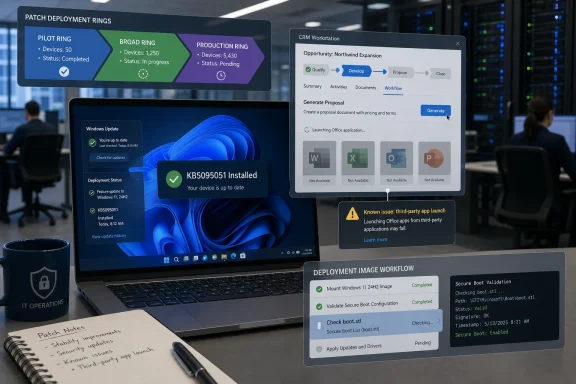 The Office Bug Lands Where Businesses Actually Use Office
For home users, Office is often a set of icons: Word, Excel, PowerPoint, Outlook. For businesses, Office is more often an endpoint in a chain. A case-management system opens a template in Word, a CRM launches Outlook with a populated message, a document repository hands off a spreadsheet to Excel, or a ticketing platform invokes PowerPoint through a shell command, COM automation path, protocol handler, or integration layer.That is why the KB5095051 issue matters even if direct launches continue to work. If Word opens from the Start menu but not from the enterprise app that generates a contract, the affected user does not experience a subtle integration defect. They experience a broken workflow.
Microsoft’s known-issue wording points to a failure mode in which third-party apps may be unable to launch Office applications or open documents after installing Windows updates released on or after June 9, 2026. The phrasing is important because it suggests the company is not treating this as a single app vendor’s bug. It is a Windows update interaction with a class of launch behavior.
That class is exactly where corporate environments accumulate risk. Over years, organizations build thin layers of automation around Office because Office is the common denominator. The more routine the integration, the less visible it becomes — until a security update changes an assumption underneath it.
Patch Tuesday’s Promise Meets the Reality of Integration Debt
KB5095051 is not an optional tweak hiding in a preview channel. It is the June 2026 cumulative update for Windows 11 version 26H1, bundling security fixes and previous non-security improvements into the normal servicing train. In Microsoft’s modern Windows model, that makes it the kind of update administrators are conditioned to deploy, validate, and move through rings rather than debate from first principles.That servicing model is defensible. Fragmented patching is a security liability, and cumulative updates simplify dependency tracking. The problem is that cumulative updates also collapse many kinds of change into one decision point: security fixes, shell hardening, servicing-stack improvements, AI component refreshes, and compatibility regressions all arrive together.
The result is a familiar enterprise dilemma. Delay the update, and you extend exposure to vulnerabilities addressed in the June cycle. Deploy it too quickly, and critical Office-integrated workflows may fail in front of users who reasonably assume “Office is down.”
The Office issue is a particularly awkward example because it does not appear to break Office in the most obvious test. A quick smoke test that launches Word, Excel, Outlook, and PowerPoint from pinned shortcuts may pass. The real break appears when Office is launched through something else, and that “something else” may be different in every department.
Microsoft’s Shell Hardening Is the Other Story Hiding in the Same Update
KB5095051 also includes a security hardening change related to how Windows processesdesktop.ini files, the small configuration files used for folder customization. On paper, that is separate from the Office launch failure. In practice, it belongs to the same broader story: Microsoft is continuing to close off old Windows behaviors that attackers, administrators, legacy apps, and customization tools have all learned to rely on in different ways.The Windows shell is one of the oldest and most compatibility-sensitive surfaces in the operating system. It is also one of the most abused. Anything that influences how folders appear, how files are opened, how applications are invoked, or how trusted-looking UI is assembled deserves scrutiny.
Security hardening in that layer is not optional theater. Attackers have long exploited user trust in files, folders, links, templates, and launch paths. Tightening the rules is exactly what Microsoft should be doing.
But every hardening move has blast-radius risk because decades of Windows software were written against behavior rather than ideal documentation. A change that is correct from a platform-security standpoint can still expose integrations that depended on permissive shell behavior, ambiguous invocation rules, or undocumented assumptions. That is the uncomfortable bargain of Windows servicing in 2026: the operating system has to become stricter without breaking the ecosystem that made it useful.
The AI Component Refresh Shows How Crowded Windows Updates Have Become
The June update also refreshes several AI-related Windows components, including Image Search, Content Extraction, Semantic Analysis, and Settings Model components to version 1.2604.515.0. These pieces are not the headline problem here, and there is no evidence from Microsoft’s known-issue language that they are responsible for the Office launch failure. Still, their presence in the same package says something about the density of modern Windows updates.Windows is no longer just kernel, shell, drivers, networking, and inbox apps. It is increasingly a platform for local indexing, semantic processing, AI-assisted search, cloud-adjacent experiences, policy-controlled intelligence, and background models. That expansion means more moving parts in every build and more opportunities for unexpected interactions.
Administrators do not necessarily object to new components when they are documented, manageable, and policy-aware. What they object to is surprise. A cumulative security update that also refreshes AI components and changes shell-processing behavior reinforces the need for disciplined staging, even in organizations that would rather treat Patch Tuesday as a routine maintenance window.
The Office bug is therefore not just a single regression. It is a case study in why Windows update validation has become harder. The operating system is changing in more layers at once.
The Servicing Stack Still Matters When Everything Else Is on Fire
KB5095051 bundles a servicing stack update, SSU KB5101277, moving the servicing infrastructure to Build 28000.2263. Servicing stack updates are easy to overlook because they do not usually produce user-facing features. Their job is more fundamental: making future Windows updates install reliably.That sounds boring until it is not. A broken or outdated servicing stack can turn ordinary patching into a recovery exercise. Microsoft’s decision to keep improving the servicing foundation reflects the reality that Windows Update itself is critical infrastructure.
The awkward part is that servicing reliability and application compatibility are felt very differently. An SSU improvement may reduce future installation failures across thousands of machines, but the help desk ticket that arrives first will be the user whose workflow app can no longer open Excel. IT departments have to weigh systemic maintenance benefits against immediate productivity failures.
There is also a deployment-specific warning attached to this update cycle: dynamic update installations must include the
boot.stl file used during Secure Boot validation, or systems can encounter startup error 0xc0430001. That is not the same bug as the Office launch issue, but it raises the same practical lesson. Organizations building custom media, WinPE environments, or automated deployment images cannot assume the monthly update is only a post-install patch.The Secure Boot Advisory Is a Reminder That Imaging Is Still a Craft
Theboot.stl advisory will matter most to teams maintaining custom Windows images, task sequences, or deployment pipelines. In those environments, updates are not simply pulled from Windows Update on a finished machine. They are injected, staged, layered into media, or applied as part of a broader provisioning flow.That is where Secure Boot validation becomes unforgiving. If the necessary boot file is missing from a dynamic update path, the failure mode is not a cosmetic warning. It can become a startup-blocking error.
Microsoft’s guidance to use the Update WinPE script or manually copy
boot.stl from Windows\Boot\EFI is the sort of detail that separates routine patching from weekend recovery work. It is also the sort of detail that can be missed when the public conversation focuses on a more visible Office failure.The two issues belong together in operational terms. One affects productivity after login; the other can affect boot reliability during deployment. Both argue against casual rollout of KB5095051 in environments that depend on managed images and line-of-business integrations.
The Workaround Is Not a Fix, It Is a Triage Strategy
As of Microsoft’s acknowledgement, there is no public permanent fix or out-of-band patch timeline for the Office launch issue. That leaves administrators with the usual unsatisfying menu: pause deployment, narrow the affected population, test launch paths, or provide alternate user instructions.The simplest user-facing workaround may be to launch Office directly and then open the document from within the application. That is serviceable for a small number of users and straightforward documents. It is much less helpful when the third-party application passes metadata, templates, workflow context, record identifiers, or automation parameters into the Office session.
In heavily integrated environments, asking users to work around the integration can mean quietly breaking the business process. A legal department may need the document system to open the correct template with the correct matter metadata. A support organization may need Outlook launched from a ticket with customer context intact. A finance team may rely on a reporting platform that hands generated spreadsheets directly to Excel.
That is why IT should resist framing this as “Office still works.” The more accurate message is that Office may still launch directly, while integrated launch paths require validation. That distinction will save time in both user communication and incident triage.
Update Rings Are Only as Good as the Tests Inside Them
The KB5095051 issue is a test of whether organizations’ update rings are meaningful or merely ceremonial. Many shops have pilot, broad, and production rings on paper. Fewer have pilot tests that mirror the weird, business-specific workflows that actually break.A proper staging plan for this update should include third-party document management tools, CRM systems, help desk platforms, contract-generation tools, custom launchers, Office add-ins, and any application that programmatically opens Office files. It should include both interactive launches and automated paths. It should also test different Office applications rather than assuming Word tells the whole story.
The hard part is discovery. Some Office integrations are well documented because they are part of managed enterprise applications. Others are departmental macros, old intranet tools, packaged scripts, or vendor utilities that survived several migrations because they kept working.
That is the integration debt behind this incident. Organizations often know which systems are mission critical, but they may not know every way those systems invoke Office. KB5095051 turns that hidden map into an operational requirement.
Security Teams and Desktop Teams Will Read This Update Differently
Security teams will see a June cumulative update with security fixes and shell hardening and will reasonably push for deployment. Desktop engineering teams will see a confirmed Office interoperability bug and ask for time. Neither side is wrong.The risk is that organizations turn this into a binary argument: patch or do not patch. The better response is segmentation. Machines that do not rely on third-party Office launch paths may be able to proceed after normal validation, while departments with known document workflow dependencies may need a delayed ring until Microsoft provides mitigation.
That approach requires more communication than a blanket pause, but it is also more defensible. It avoids leaving the whole estate exposed because a subset of workflows is fragile. It also avoids breaking high-value business processes in the name of uniform compliance.
Microsoft’s cumulative model makes selective decision-making harder, but not impossible. Administrators still have deployment rings, policy controls, deferrals, and targeted holds. The question is whether they have enough inventory and workflow knowledge to use those tools intelligently.
The Windows Compatibility Contract Is Being Renegotiated
For decades, one of Windows’ great strengths was that old software kept working. That compatibility contract helped Microsoft dominate the desktop, but it also preserved old assumptions about launching, scripting, shell behavior, file handling, and automation. Security pressure is now forcing Microsoft to renegotiate that contract piece by piece.The Office launch problem may or may not be directly tied to any specific hardening change in KB5095051. Microsoft has not publicly confirmed a root cause. But the broader pattern is unmistakable: Windows is becoming more controlled at the same time enterprise environments remain deeply dependent on flexible inter-application behavior.
That tension will not go away. Office is not just a productivity suite; it is a document runtime for business processes. Windows is not just an operating system; it is a compatibility layer for years of vendor tools and internal automation. Every tightening of the platform risks revealing how much business logic lives in launch paths nobody has audited recently.
The answer is not to avoid hardening. It is to treat compatibility as something that must be continuously tested, not something inherited from the past. The old assumption that “if Office opens, Office is fine” is no longer good enough.
The June Patch Turns Office Integrations Into the Real Test Bed
Administrators deciding what to do with KB5095051 should separate the update into two operational tracks. The first is the normal security and servicing track: assess exposure, validate installation, watch for deployment failures, and keep machines moving through rings. The second is the workflow track: identify where third-party apps invoke Office and test those paths explicitly.That second track is where many organizations will find surprises. A document management system may use one launch method for Word templates and another for Excel exports. A workflow platform may behave differently depending on whether Outlook is already running. A custom app may succeed when opening a local file but fail when invoking a network-hosted document.
The correct response is not panic. It is instrumentation and prioritization. IT teams should document affected launch paths, capture error behavior, identify whether direct Office launches remain available, and determine which workflows can tolerate a temporary manual workaround.
They should also be careful with user messaging. Telling users “Office is broken” may generate unnecessary noise. Telling them “some apps may not be able to open Office documents automatically after the June Windows update” is more precise and more useful.
The Practical Read for WindowsForum Readers
The lesson of KB5095051 is not that every Windows 11 26H1 machine should be frozen indefinitely. It is that this update deserves more than a checkbox validation if Office is wired into business workflows. The most concrete actions are about scope, staging, and knowing which launch paths matter before users discover them for you.- Organizations running Windows 11 version 26H1 should treat KB5095051 as a security update with a confirmed Office integration risk, not as a generic Office outage.
- Directly launching Word, Excel, Outlook, or PowerPoint is not enough validation because the known issue concerns launches from certain third-party applications.
- IT teams should test document management systems, CRM platforms, ticketing tools, workflow applications, Office automation paths, and custom business apps before broad deployment.
- Deployment engineers maintaining custom images or WinPE-based workflows should account for the
boot.stlSecure Boot requirement to avoid startup error 0xc0430001. - A targeted rollout pause for departments dependent on Office integrations is more defensible than either ignoring the issue or halting every machine without analysis.
- Administrators should monitor Microsoft’s release-health communications and be prepared for either a mitigation, a revised known-issue entry, or a later cumulative fix.
References
- Primary source: cyberpress.org
Published: 2026-06-18T08:10:18.016882
- Official source: support.microsoft.com
June 9, 2026—KB5095051 (OS Build 28000.2269) - Microsoft Support
 support.microsoft.com
- Related coverage: elevenforum.com
KB5095051 Windows 11 Cumulative Update build 28000.2269 (26H1) - June 9 | Windows 11 Forum
Microsoft Support: This cumulative update for Windows 11, version 26H1 (KB5095051) includes the latest security fixes and improvements, along with...www.elevenforum.com - Related coverage: thewincentral.com
Windows 11 26H1 June 2026 Update KB5095051: Download link & What's new- WinCentral
Windows 11 26H1 June 2026 Update KB5095051 (Build 28000.2269) brings BitLocker improvements, AI updates, and June security fixes. Download Link - Read in Software updates News on WinCentral thewincentral.com
- Related coverage: computerworld.com
Windows 11: A guide to the updates – Computerworld
Here’s what you need to know about the latest updates to Windows 11 as they’re released from Microsoft. Now updated for KB5094126 (Windows 11 24H2 and 25H2) and KB5095051 (Windows 11 26H1), both released on June 9, 2026. www.computerworld.com
