

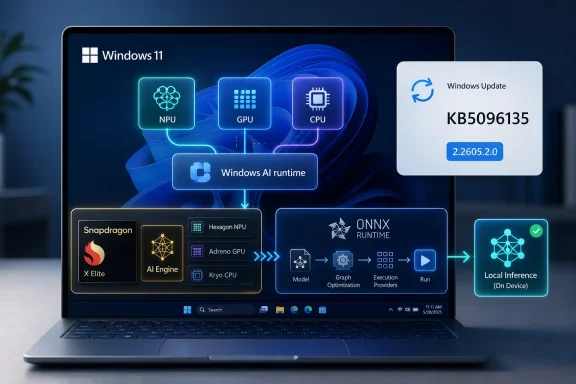
Microsoft has released KB5096135, an automatic Windows Update package for Windows 11 version 24H2 and 25H2 devices that updates the Qualcomm QNN Execution Provider to version 2.2605.2.0 for ONNX Runtime and Windows machine-learning workloads on supported Qualcomm chipsets. That sounds like a tiny plumbing update, because in one sense it is. But it also shows where Windows AI is really being built: not in the splashy Copilot button, but in the low-level runtime layers that decide whether local models run on the NPU, GPU, or CPU. For Snapdragon-powered PCs, KB5096135 is another sign that Microsoft wants AI acceleration to become an operating-system service rather than an app-by-app science project.
The most important thing about KB5096135 is not the size of the support note. It is the location of the change. Microsoft is updating a vendor-specific execution provider through Windows Update, separately from the application that may eventually use it and separately from the model that may run on it.
That is a subtle architectural bet. In the older Windows world, hardware acceleration for a new class of workloads usually arrived as a driver update, an SDK download, or a bundled runtime inside an application. In the Windows ML world Microsoft is describing, the operating system brokers access to specialized AI backends through ONNX Runtime and dynamically serviced execution providers.
The Qualcomm QNN Execution Provider sits in that broker layer. It lets ONNX Runtime hand supported model operations to Qualcomm’s AI Engine Direct stack, which can then target the appropriate accelerator backend on Snapdragon hardware. In plain English, it is one of the pieces that makes “run this model locally on the NPU” something Windows software can request without every developer shipping a private copy of Qualcomm’s runtime.
That matters because the AI PC market is currently noisy, uneven, and heavily marketed. Users see badges, TOPS figures, and Copilot branding. Developers see model formats, quantization constraints, provider registration, and hardware-specific caveats. KB5096135 lives on the developer side of that divide, but its effects are meant to disappear into the user experience.
The version number is more revealing than the prose. The package moves the Qualcomm QNN Execution Provider to 2.2605.2.0, replacing a previously released QNN update. Microsoft’s Windows ML documentation has been tracking a broader transition from the 1.8.x Windows ML generation to newer 2.x execution-provider packages, and this KB lands squarely in that newer cadence.
That cadence is the story. Microsoft is treating execution providers as living components, not static SDK artifacts. If the runtime layer can be refreshed independently, applications can benefit from fixes and optimizations without every ISV rebuilding and redistributing its own hardware acceleration stack.
There is a tradeoff hidden inside that convenience. A runtime that updates automatically is easier for consumers and smaller for apps, but it can also make reproducibility harder for developers and enterprise IT. If an AI feature behaves differently after Patch Tuesday or an optional preview release, the culprit may not be the app or the model. It may be the system-provided execution provider underneath.
The QNN Execution Provider is part of that second victory. ONNX Runtime gives developers a common inference runtime. Execution providers give that runtime hardware-specific acceleration paths. Qualcomm’s QNN layer translates the model graph into work that Qualcomm’s AI stack can execute on supported Snapdragon components.
This is why a minor-looking KB article is relevant to Windows on Arm. The old knock against Windows on Arm was not just emulation performance or app availability; it was ecosystem friction. Every area where Windows can hide hardware-specific complexity behind a stable API makes Snapdragon PCs feel less like a special case.
The catch is that AI acceleration has a much narrower compatibility envelope than ordinary application execution. A model may need to be quantized in a particular way. Operators may or may not map cleanly to a given backend. The runtime may fall back to CPU for unsupported portions of a graph. For users, that can look like inconsistent performance; for developers, it can look like a debugging session that begins in ONNX and ends in silicon documentation.
This is a practical move. If Microsoft wants developers to depend on Windows ML execution providers, the company cannot ask every user to install separate vendor packages before an AI feature works. The more likely model is what KB5096135 demonstrates: Windows obtains the relevant provider, keeps it updated, and exposes it to apps through the Windows ML and ONNX Runtime stack.
It also makes Windows Update a more complicated venue. Administrators already use it for security fixes, cumulative OS changes, drivers, Store-adjacent components, and feature enablement. AI execution providers add another category: model-inference infrastructure that may affect app behavior, performance, and hardware utilization without looking like a traditional driver.
That is not necessarily bad. Centralized servicing can reduce the mess of duplicated runtimes and stale vendor packages. But it does mean IT departments need to understand that “AI components” are not decorative extras. They are runtime dependencies for a growing class of Windows applications.
For older Windows releases, ONNX Runtime can still be used. Developers can bundle runtimes, choose providers manually, and manage their own dependencies. But the newer Windows ML model is aimed at reducing that burden on Windows 11 24H2 and later, especially on AI PCs with NPUs and other specialized accelerators.
That means 24H2 is more than another annual Windows version in this context. It is the dividing line between “the app owns most of the AI acceleration stack” and “Windows can own more of it.” KB5096135 belongs to the latter model.
Windows 11 25H2’s inclusion is equally unsurprising but important. Microsoft has been trying to keep 24H2 and 25H2 close enough that component servicing can span both releases. For AI providers, that continuity matters because developers do not want to target a fragmented Windows ML base six months after committing to it.
That invisibility is also why the update may be easy to underestimate. The AI PC story has been sold through visible features: Recall, Cocreator, Studio Effects, Live Captions, local assistants, and future agentic workflows. But those features depend on layers of model packaging, runtime selection, silicon support, and update orchestration.
When those layers work, AI features feel native. When they fail, users see battery drain, slow inference, missing features, or mysterious CPU usage on a machine that was supposed to have an NPU. Execution-provider updates are one of the ways Microsoft and its silicon partners keep that native illusion intact.
The user-facing verification path is simple. Microsoft says the update should appear in Windows Update history as “Windows ML Runtime Qualcomm QNN Execution Provider Update (KB5096135).” That is useful for enthusiasts and admins trying to confirm whether a Snapdragon system has received the new component.
But KB5096135 should not be mistaken for a universal accelerator switch. An execution provider can only accelerate what it supports. Model architecture, operator coverage, data types, quantization, memory movement, and provider ordering all still matter.
That is especially true for local generative AI. Small language models, vision transformers, diffusion components, and hybrid pipelines do not become efficient simply because a PC has an NPU. They become efficient when the model has been prepared for the target backend and when the runtime can keep enough of the workload off the CPU to justify the handoff.
This is where Microsoft’s approach has a long-term advantage if it works. Developers can write against a Windows-supported ONNX Runtime path while Microsoft and hardware vendors iterate on execution providers. The same app can, in theory, discover and use Qualcomm, Intel, AMD, or NVIDIA acceleration depending on what the PC offers. In practice, developers will still need to test across real hardware, because “available” and “fast for my model” are not synonyms.
Those questions are not obstructionism. They are how managed Windows fleets avoid accidental change. If an internal app begins using Windows ML execution providers, then a QNN update may become part of that app’s operational profile. A regression in the provider could look like an application regression. A blocked provider update could look like a performance problem.
Microsoft’s documentation acknowledges the split by allowing developers to bring their own execution providers when they cannot rely on Windows-managed ones. That path gives stricter version control at the cost of larger packages and more deployment work. For heavily managed environments, that may remain the safer choice.
The broader tension is familiar. Microsoft wants Windows AI infrastructure to be evergreen. Enterprises want predictability. KB5096135 is a small example of the negotiation that will define AI PCs in business settings: how to keep the local inference stack current without turning every model runtime into a moving target.
KB5096135 is one of those alignment updates. It does not add a consumer feature by itself. It does not make every ONNX model fly. It does not prove that local AI has crossed from novelty to necessity. What it does is maintain one of the lanes through which Windows software can reach Qualcomm acceleration.
That distinction matters because the industry’s marketing has compressed too many things into one claim. “This PC has an NPU” is not the same as “your application will use the NPU.” “This model is ONNX” is not the same as “this model will run efficiently on QNN.” “Windows supports execution providers” is not the same as “all providers behave identically.”
The real progress is incremental and unglamorous. A provider gets updated. A backend gains stability. A runtime learns new registration behavior. An app stops bundling hundreds of megabytes of vendor-specific binaries. Eventually, if enough of those pieces improve, users experience local AI as part of Windows rather than as an add-on.
The next phase of Windows AI will not be won by a single feature reveal or a larger NPU number on a spec sheet. It will be won by the reliability of this plumbing: whether Windows can keep silicon-specific acceleration current, discoverable, testable, and boring enough that developers trust it and users never have to diagnose it. KB5096135 is a small update, but it points toward a Windows platform where local AI performance depends less on bundled vendor magic and more on an operating system that quietly keeps the acceleration layer alive.
 Microsoft Moves the AI Stack Below the Waterline
The most important thing about KB5096135 is not the size of the support note. It is the location of the change. Microsoft is updating a vendor-specific execution provider through Windows Update, separately from the application that may eventually use it and separately from the model that may run on it.That is a subtle architectural bet. In the older Windows world, hardware acceleration for a new class of workloads usually arrived as a driver update, an SDK download, or a bundled runtime inside an application. In the Windows ML world Microsoft is describing, the operating system brokers access to specialized AI backends through ONNX Runtime and dynamically serviced execution providers.
The Qualcomm QNN Execution Provider sits in that broker layer. It lets ONNX Runtime hand supported model operations to Qualcomm’s AI Engine Direct stack, which can then target the appropriate accelerator backend on Snapdragon hardware. In plain English, it is one of the pieces that makes “run this model locally on the NPU” something Windows software can request without every developer shipping a private copy of Qualcomm’s runtime.
That matters because the AI PC market is currently noisy, uneven, and heavily marketed. Users see badges, TOPS figures, and Copilot branding. Developers see model formats, quantization constraints, provider registration, and hardware-specific caveats. KB5096135 lives on the developer side of that divide, but its effects are meant to disappear into the user experience.
The Version Number Tells a Bigger Story Than the Changelog
Microsoft’s support article says KB5096135 includes improvements to the Qualcomm QNN Execution Provider AI component for Windows 11 24H2 and 25H2. It does not enumerate performance changes, operator coverage, bug fixes, model compatibility updates, or security fixes. That sparseness is normal for component updates, but it is also frustrating.The version number is more revealing than the prose. The package moves the Qualcomm QNN Execution Provider to 2.2605.2.0, replacing a previously released QNN update. Microsoft’s Windows ML documentation has been tracking a broader transition from the 1.8.x Windows ML generation to newer 2.x execution-provider packages, and this KB lands squarely in that newer cadence.
That cadence is the story. Microsoft is treating execution providers as living components, not static SDK artifacts. If the runtime layer can be refreshed independently, applications can benefit from fixes and optimizations without every ISV rebuilding and redistributing its own hardware acceleration stack.
There is a tradeoff hidden inside that convenience. A runtime that updates automatically is easier for consumers and smaller for apps, but it can also make reproducibility harder for developers and enterprise IT. If an AI feature behaves differently after Patch Tuesday or an optional preview release, the culprit may not be the app or the model. It may be the system-provided execution provider underneath.
Snapdragon PCs Need More Than Fast Silicon
Qualcomm’s Snapdragon X-era Windows push has always needed two victories at once. The first is obvious: competitive CPU, GPU, NPU, battery, and standby behavior in attractive laptops. The second is less visible but just as important: a software stack that convinces developers their AI workloads can land on Qualcomm hardware without custom integration pain.The QNN Execution Provider is part of that second victory. ONNX Runtime gives developers a common inference runtime. Execution providers give that runtime hardware-specific acceleration paths. Qualcomm’s QNN layer translates the model graph into work that Qualcomm’s AI stack can execute on supported Snapdragon components.
This is why a minor-looking KB article is relevant to Windows on Arm. The old knock against Windows on Arm was not just emulation performance or app availability; it was ecosystem friction. Every area where Windows can hide hardware-specific complexity behind a stable API makes Snapdragon PCs feel less like a special case.
The catch is that AI acceleration has a much narrower compatibility envelope than ordinary application execution. A model may need to be quantized in a particular way. Operators may or may not map cleanly to a given backend. The runtime may fall back to CPU for unsupported portions of a graph. For users, that can look like inconsistent performance; for developers, it can look like a debugging session that begins in ONNX and ends in silicon documentation.
Windows Update Becomes the Runtime Distribution Channel
KB5096135 is delivered automatically through Windows Update, provided the device is already on the latest cumulative update for Windows 11 24H2 or 25H2. That prerequisite is not administrative trivia. It shows Microsoft tying AI component servicing to the mainstream Windows servicing baseline.This is a practical move. If Microsoft wants developers to depend on Windows ML execution providers, the company cannot ask every user to install separate vendor packages before an AI feature works. The more likely model is what KB5096135 demonstrates: Windows obtains the relevant provider, keeps it updated, and exposes it to apps through the Windows ML and ONNX Runtime stack.
It also makes Windows Update a more complicated venue. Administrators already use it for security fixes, cumulative OS changes, drivers, Store-adjacent components, and feature enablement. AI execution providers add another category: model-inference infrastructure that may affect app behavior, performance, and hardware utilization without looking like a traditional driver.
That is not necessarily bad. Centralized servicing can reduce the mess of duplicated runtimes and stale vendor packages. But it does mean IT departments need to understand that “AI components” are not decorative extras. They are runtime dependencies for a growing class of Windows applications.
The 24H2 and 25H2 Boundary Is Doing Real Work
KB5096135 applies to Windows 11 version 24H2 and Windows 11 version 25H2. That boundary is not arbitrary. Windows 11 24H2 is the major platform line where Microsoft began formalizing the modern Windows ML story around system-provided ONNX Runtime integration and dynamically acquired execution providers.For older Windows releases, ONNX Runtime can still be used. Developers can bundle runtimes, choose providers manually, and manage their own dependencies. But the newer Windows ML model is aimed at reducing that burden on Windows 11 24H2 and later, especially on AI PCs with NPUs and other specialized accelerators.
That means 24H2 is more than another annual Windows version in this context. It is the dividing line between “the app owns most of the AI acceleration stack” and “Windows can own more of it.” KB5096135 belongs to the latter model.
Windows 11 25H2’s inclusion is equally unsurprising but important. Microsoft has been trying to keep 24H2 and 25H2 close enough that component servicing can span both releases. For AI providers, that continuity matters because developers do not want to target a fragmented Windows ML base six months after committing to it.
This Is the Kind of Update Users Should Not Notice
The ideal outcome for KB5096135 is that most users never think about it. They install Windows updates, their Snapdragon PC gains a refreshed QNN provider, and applications that rely on Windows ML have a better foundation for local inference. No wizard, no marketing pop-up, no driver hunting.That invisibility is also why the update may be easy to underestimate. The AI PC story has been sold through visible features: Recall, Cocreator, Studio Effects, Live Captions, local assistants, and future agentic workflows. But those features depend on layers of model packaging, runtime selection, silicon support, and update orchestration.
When those layers work, AI features feel native. When they fail, users see battery drain, slow inference, missing features, or mysterious CPU usage on a machine that was supposed to have an NPU. Execution-provider updates are one of the ways Microsoft and its silicon partners keep that native illusion intact.
The user-facing verification path is simple. Microsoft says the update should appear in Windows Update history as “Windows ML Runtime Qualcomm QNN Execution Provider Update (KB5096135).” That is useful for enthusiasts and admins trying to confirm whether a Snapdragon system has received the new component.
Developers Get Convenience, But Not Magic
For developers, the promise of Windows ML execution providers is seductive: target ONNX Runtime, ask Windows for certified providers, and let the platform handle hardware-specific acceleration. Compared with bundling separate vendor packages, this can reduce app size, simplify deployment, and allow performance improvements to arrive through Windows Update.But KB5096135 should not be mistaken for a universal accelerator switch. An execution provider can only accelerate what it supports. Model architecture, operator coverage, data types, quantization, memory movement, and provider ordering all still matter.
That is especially true for local generative AI. Small language models, vision transformers, diffusion components, and hybrid pipelines do not become efficient simply because a PC has an NPU. They become efficient when the model has been prepared for the target backend and when the runtime can keep enough of the workload off the CPU to justify the handoff.
This is where Microsoft’s approach has a long-term advantage if it works. Developers can write against a Windows-supported ONNX Runtime path while Microsoft and hardware vendors iterate on execution providers. The same app can, in theory, discover and use Qualcomm, Intel, AMD, or NVIDIA acceleration depending on what the PC offers. In practice, developers will still need to test across real hardware, because “available” and “fast for my model” are not synonyms.
Enterprise IT Will Read “Automatic” Differently
Consumers generally benefit when a component like this arrives automatically. Enterprise administrators are trained to ask different questions. What ring does it arrive in? Can it be deferred? Is it visible in reporting? Does it alter application behavior? Does it require a cumulative update baseline? What happens on machines where Windows Update access is restricted?Those questions are not obstructionism. They are how managed Windows fleets avoid accidental change. If an internal app begins using Windows ML execution providers, then a QNN update may become part of that app’s operational profile. A regression in the provider could look like an application regression. A blocked provider update could look like a performance problem.
Microsoft’s documentation acknowledges the split by allowing developers to bring their own execution providers when they cannot rely on Windows-managed ones. That path gives stricter version control at the cost of larger packages and more deployment work. For heavily managed environments, that may remain the safer choice.
The broader tension is familiar. Microsoft wants Windows AI infrastructure to be evergreen. Enterprises want predictability. KB5096135 is a small example of the negotiation that will define AI PCs in business settings: how to keep the local inference stack current without turning every model runtime into a moving target.
The AI PC Is Becoming a Servicing Model
The phrase “AI PC” is usually treated as a hardware label. It should increasingly be understood as a servicing model. A machine with an NPU is only useful to Windows applications if the operating system, runtime, drivers, execution providers, and model packages stay aligned.KB5096135 is one of those alignment updates. It does not add a consumer feature by itself. It does not make every ONNX model fly. It does not prove that local AI has crossed from novelty to necessity. What it does is maintain one of the lanes through which Windows software can reach Qualcomm acceleration.
That distinction matters because the industry’s marketing has compressed too many things into one claim. “This PC has an NPU” is not the same as “your application will use the NPU.” “This model is ONNX” is not the same as “this model will run efficiently on QNN.” “Windows supports execution providers” is not the same as “all providers behave identically.”
The real progress is incremental and unglamorous. A provider gets updated. A backend gains stability. A runtime learns new registration behavior. An app stops bundling hundreds of megabytes of vendor-specific binaries. Eventually, if enough of those pieces improve, users experience local AI as part of Windows rather than as an add-on.
The Quiet KB That Explains Microsoft’s AI Strategy
The concrete facts of KB5096135 are narrow, but the strategic signal is broader.- KB5096135 updates the Qualcomm QNN Execution Provider to version 2.2605.2.0 for Windows 11 24H2 and 25H2 systems.
- The update is delivered automatically through Windows Update and requires the latest cumulative update for the supported Windows release.
- The component helps ONNX Runtime and Windows ML scenarios use Qualcomm’s AI stack for hardware-accelerated inference on supported Snapdragon chipsets.
- The update replaces an earlier Qualcomm QNN provider package, reinforcing that execution providers are now serviced components rather than one-time SDK installs.
- Users can confirm installation in Windows Update history under the Windows ML Runtime Qualcomm QNN Execution Provider entry.
- Developers and administrators should treat these packages as real runtime dependencies, not cosmetic AI branding.
The next phase of Windows AI will not be won by a single feature reveal or a larger NPU number on a spec sheet. It will be won by the reliability of this plumbing: whether Windows can keep silicon-specific acceleration current, discoverable, testable, and boring enough that developers trust it and users never have to diagnose it. KB5096135 is a small update, but it points toward a Windows platform where local AI performance depends less on bundled vendor magic and more on an operating system that quietly keeps the acceleration layer alive.
References
- Primary source: Microsoft Support
Published: Tue, 26 May 2026 21:02:30 Z
KB5096135: Qualcomm QNN Execution Provider update (2.2605.2.0) - Microsoft Support
 support.microsoft.com
- Related coverage: onnxruntime.ai
- Related coverage: qualcomm.com
Unlocking the power of Qualcomm QNN Execution Provider GPU backend for ONNX Runtime
We are pleased to announce the preview of the ONNX Runtime QNN Execution Provider with the Qualcomm Adreno GPU backend.www.qualcomm.com
- Related coverage: fs-eire.github.io
- Related coverage: runtime.onnx.org.cn
Qualcomm - QNN | onnxruntime - ONNX 运行时
runtime.onnx.org.cn
- Official source: learn.microsoft.com

Windows ML execution providers
Learn which ONNX Runtime execution providers are available in Windows ML for accelerating local AI models across Windows PCs, and see their release history.learn.microsoft.com
- Related coverage: windowsforum.com

KB5096135 Update: Qualcomm QNN Execution Provider for Windows 11 Arm AI
Microsoft published KB5096135 on May 26, 2026, as an automatic Windows Update package that updates the Qualcomm QNN Execution Provider AI component to version 2.2605.2.0 for Windows 11 version 24H2 and Windows 11 version 25H2. The update is narrow, quiet, and easy to miss, but it is also a... windowsforum.com
- Related coverage: bd.com
- Related coverage: content.shi.com
- Related coverage: docs.qualcomm.com
