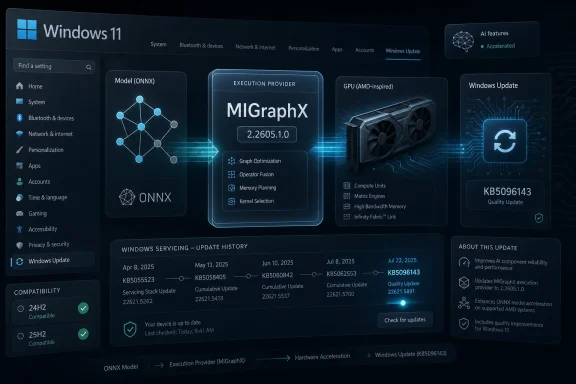
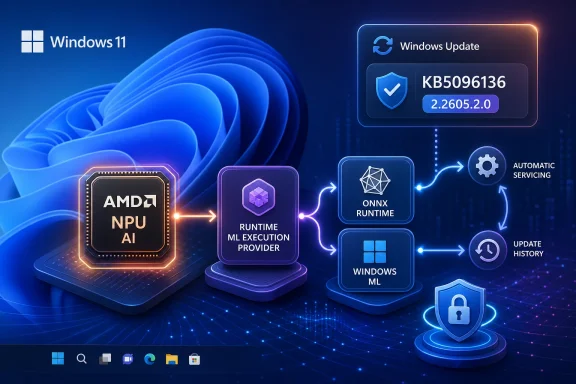
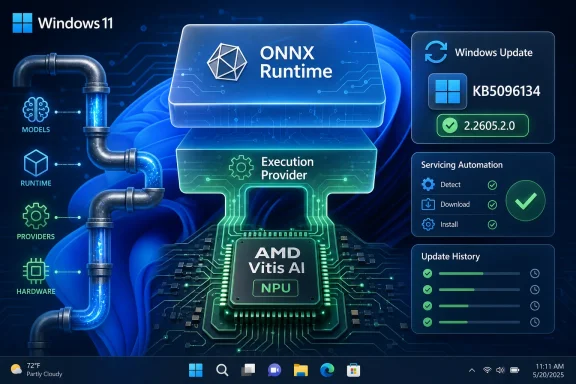
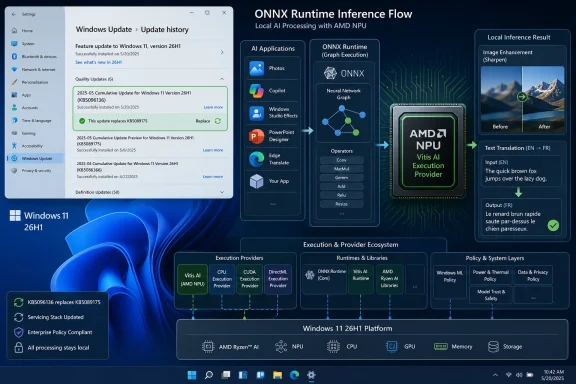
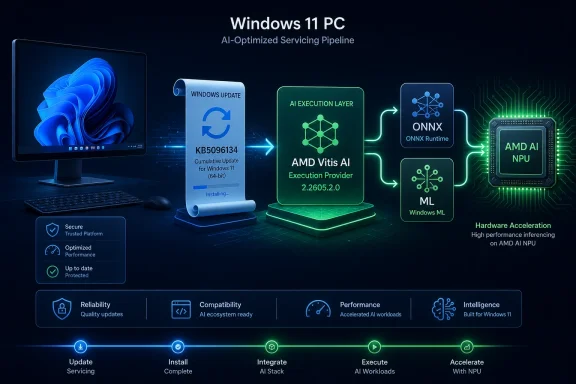
Microsoft has published KB5096136, an automatic Windows Update package for Windows 11 version 26H1 devices that updates the AMD Vitis AI Execution Provider to version 2.2605.2.0, replacing April’s KB5089175 and appearing in Update history as a Windows Runtime ML AMD NPU Execution Provider update. The update is small in description but large in implication: Microsoft is treating AI acceleration plumbing as an operating-system component, not an app dependency. That shift matters because Windows’ next competitive fight is not merely over chatbots or Copilot buttons, but over who controls the lowest layers of local inference. KB5096136 is one of those quiet support-page updates that says more about the future Windows platform than its spare wording admits.
For years, Windows hardware acceleration has been a messy bargain among drivers, SDKs, app frameworks, and vendor-specific runtimes. Developers could target GPUs and NPUs, but they often had to know too much about the exact silicon underneath the user’s machine. That approach made sense when acceleration was a specialist feature; it becomes untenable when every PC vendor wants to sell “AI PC” as a mainstream category.
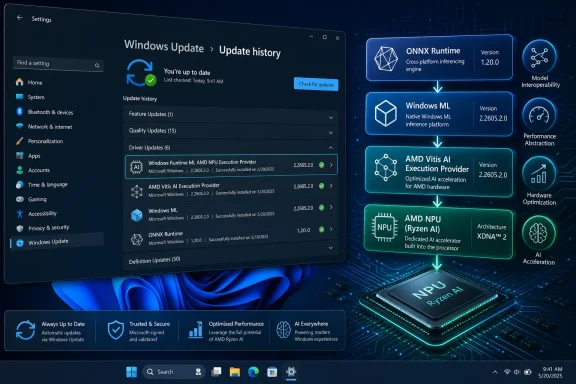
KB5096136 belongs to Microsoft’s answer to that problem. The AMD Vitis AI Execution Provider is not a consumer-facing app, and most users will never launch it, configure it, or even know it exists. It is an execution provider, or EP, used by ONNX Runtime and Windows Machine Learning to route supported AI model operations onto AMD hardware.
That is the critical architectural move. Instead of every app bundling its own vendor binaries and hoping the right driver is present, Windows ML can use system-managed execution providers that are installed and updated through Windows Update. Microsoft’s pitch is simple: developers bring ONNX models, Windows handles the hardware selection, and vendors tune the acceleration layer.
The update’s support note does not list a dramatic new feature. It says the package includes improvements to the AMD Vitis AI Execution Provider AI component for Windows 11 version 26H1. In ordinary Windows servicing language, that is boilerplate. In platform language, it is a sign that the AI stack is being folded into the same evergreen cadence as graphics drivers, firmware helpers, and system components.
That is exactly how Microsoft wants this class of component to feel. If local AI is going to become a normal part of Windows application behavior, the acceleration layer cannot remain a scavenger hunt of GitHub releases, OEM downloads, and vendor SDK installers. It has to become part of the platform’s maintenance fabric.
The name shown in update history — Windows Runtime ML AMD NPU Execution Provider Update — is clunky, but precise. It tells administrators that this is not a Radeon control panel update, not a generic chipset driver, and not an application framework from AMD’s consumer software suite. It is a runtime component sitting in the path between Windows ML workloads and AMD acceleration hardware.
That distinction matters for troubleshooting. If an app using ONNX Runtime performs differently after the update, the relevant layer may not be the app itself or the display driver. It may be the execution provider that Windows has acquired and registered for that device class.
That is especially important for Ryzen AI systems. AMD’s PC silicon strategy depends not only on TOPS numbers but on whether software can actually find and use the NPU reliably. Raw hardware capability is easy to market and difficult to exploit; the execution provider is one of the pieces that turns the marketing claim into a developer-accessible path.
Microsoft’s role is equally important. By distributing the provider through Windows Update, Microsoft gives AMD’s acceleration layer a place in the Windows trust and servicing model. The update is not framed as a downloadable AMD developer package. It is a Windows component update, gated by OS version and cumulative-update prerequisites.
This arrangement benefits both companies. AMD gets a more predictable route to users and developers. Microsoft gets a hardware-neutral story for Windows ML: Qualcomm, Intel, AMD, Nvidia, and others can bring optimized providers, while Windows presents developers with a more unified programming surface.
The risk is that the simplicity is only partial. Execution providers can be distributed by Windows, but models still need to be shaped, quantized, and tested for the hardware they target. Windows ML can reduce deployment friction; it cannot make every arbitrary model efficient on every NPU.
For enthusiasts, that creates confusion. A KB article for Windows 11 26H1 can sound like a general Windows 11 update when it is really scoped to a narrower set of devices and builds. Existing Windows 11 24H2 or 25H2 systems should not assume that this package is relevant simply because they have AMD hardware.
For administrators, the practical reading is even stricter. If the device is not on Windows 11 version 26H1 with the required cumulative update, KB5096136 is not something to chase manually. It is part of a servicing chain for supported 26H1 systems, and Windows Update is expected to deliver it automatically where applicable.
That means KB5096136 is less about the average desktop today and more about the direction of the platform. Microsoft is preparing Windows to treat AI accelerators the way it treats other first-class compute resources. But the initial rollout is gated, hardware-aware, and branch-specific.
The cadence also tells a story. KB5096136 replaces KB5089175, which carried version 2.2604.1.0. The new package moves the AMD Vitis AI Execution Provider to 2.2605.2.0. That looks like a monthly component update cycle, which is exactly what one would expect if Microsoft and AMD are tuning the AI runtime layer alongside cumulative OS servicing.
An execution provider tells ONNX Runtime how to execute model operations on a particular compute backend. Some work may run on a CPU. Some may go to a GPU. Some may be offloaded to an NPU. The EP handles the hardware-specific optimization and operator support that make that routing practical.
In older PC software terms, this resembles a graphics API abstraction, but the fit is imperfect. AI models are not games, and NPUs are not general-purpose GPUs with a mature consumer software model. Model graphs can be partitioned across devices, operators may or may not be supported by a given provider, and fallbacks can quietly move work back to the CPU.
That is why system-managed EPs matter. If Microsoft can make the acquisition, update, certification, and registration of these providers predictable, developers can spend less time shipping vendor-specific binaries and more time building features. If Microsoft fails, Windows AI development risks becoming another fragmentation story: works on one laptop, crawls on another, fails silently on a third.
KB5096136 is one brick in that wall. It does not guarantee that AMD NPU acceleration will work perfectly for every app. It does show that Microsoft intends to keep the EP layer moving through normal Windows servicing rather than leaving it frozen at device launch.
A developer testing an ONNX workload on an AMD 26H1 device may need to know whether version 2.2605.2.0 is present. A help desk investigating inconsistent AI feature behavior across a fleet may need to compare execution provider versions. A power user benchmarking local models may need to distinguish between app changes, model changes, driver changes, and EP changes.
This is where Microsoft’s sparse support articles become frustrating. “Includes improvements” is not enough for serious debugging. Administrators and developers need to know whether an update changes operator coverage, model compatibility, quantization behavior, fallback logic, performance tuning, memory handling, or crash fixes.
Microsoft may have reasons for keeping component notes brief. Some details are vendor-owned, some are too low-level for general support pages, and some may change rapidly. But as Windows ML becomes more central, the audience for these updates will not be only casual consumers. It will include developers and IT pros who need change control.
If execution providers are going to be serviced like drivers, they need driver-like transparency. Not necessarily every internal fix, but enough release-note detail to explain what changed and why it matters.
This is a logical move. AI PCs are being sold on local execution: privacy, latency, offline capability, and reduced cloud cost. But local execution depends on a deep software stack that must keep pace with models, drivers, security expectations, and hardware errata. A stale AI runtime can be as limiting as a stale graphics driver.
It is also a governance move. When Microsoft manages the delivery path, it can impose certification, compatibility testing, rollback behavior, and OS-version gating. That makes the platform easier to support, but it also centralizes control over which acceleration paths become mainstream on Windows.
For independent developers, the upside is obvious. Windows ML promises a route where apps can dynamically use vendor-optimized acceleration without shipping every vendor’s SDK. For enterprise administrators, the story is more complicated. Automatic updates are convenient until a regulated or highly controlled environment needs deterministic versions.
Microsoft’s documentation acknowledges the tension by describing both Windows-managed execution providers and bring-your-own approaches. That split will matter in real deployments. Consumer apps may happily rely on Windows Update; enterprises may pin versions, validate model behavior, and restrict automatic component churn.
But ease of installation is not the same as operational predictability. AI execution components sit close to application behavior, and subtle changes can produce visible differences. A model that previously fell back to CPU might begin using the NPU. A workload that was stable might expose a vendor bug. A performance improvement in one model class might change thermals or battery behavior in another.
That does not make the update dangerous. It makes it infrastructure. The more Windows features and third-party apps depend on local inference, the more these updates deserve the same attention admins already give display drivers, firmware, and monthly cumulative updates.
The most likely near-term impact is modest. Most users will not notice KB5096136 directly. Some AI-enabled apps on supported AMD 26H1 hardware may see improved behavior if they rely on Windows ML and the Vitis AI provider. Developers and testers are the group most likely to care about the exact version.
The long-term impact is more significant. This is how the AI PC stack becomes normal: not through one dramatic upgrade, but through a steady stream of low-visibility component updates that make hardware acceleration more reliable month by month.
In practice, AI acceleration remains full of edge cases. ONNX model compatibility varies. Operator support differs by provider. Quantization choices can decide whether an NPU is useful or irrelevant. Some workloads are better suited to GPUs; others benefit from NPUs; many still run acceptably on CPUs.
That is why KB5096136 should not be read as a magic unlock for AMD AI performance. It is an update to one execution provider. It can improve the path for compatible models on supported platforms, but it cannot erase the work of model optimization or the reality of heterogeneous hardware.
Developers should treat Windows-managed EPs as a distribution advantage, not a substitute for testing. If an application’s AI feature is important, it should be validated across the specific hardware classes the app claims to support. The promise of Windows ML is fewer packaging headaches, not zero engineering responsibility.
Still, the direction is healthier than the alternative. Without a common Windows-level mechanism, every AI app would risk becoming its own mini-runtime distribution system. That would waste disk space, increase update friction, and make security and compatibility harder to reason about.
KB5096136 is a reminder that AMD’s Windows AI story is not only about chip specifications. It is about whether the Windows runtime can reliably target AMD acceleration hardware. Vitis AI is the bridge AMD brings to that effort, and Windows Update is the bridge Microsoft provides to users.
There is also a broader competitive layer. Nvidia remains dominant in high-end AI development and GPU acceleration, but the PC market is not only about discrete GPUs. Microsoft wants Windows AI features to work across a spectrum of hardware, including NPUs that sip power during sustained local inference. AMD wants its silicon to be treated as a first-class target in that world.
This will not be settled by one KB article. It will be settled by compatibility tables, developer adoption, application behavior, OEM quality, and whether users experience AI features as fast and battery-friendly rather than sluggish and mysterious. Component updates like KB5096136 are the plumbing behind that contest.
The best outcome for Windows users would be boring interoperability. An app asks for efficient local inference, Windows finds the right provider, the model runs where it should, and the user never thinks about the silicon vendor. The fact that we are not there yet is precisely why these updates matter.
 Microsoft Moves AI Acceleration Into the Windows Servicing Machine
For years, Windows hardware acceleration has been a messy bargain among drivers, SDKs, app frameworks, and vendor-specific runtimes. Developers could target GPUs and NPUs, but they often had to know too much about the exact silicon underneath the user’s machine. That approach made sense when acceleration was a specialist feature; it becomes untenable when every PC vendor wants to sell “AI PC” as a mainstream category.KB5096136 belongs to Microsoft’s answer to that problem. The AMD Vitis AI Execution Provider is not a consumer-facing app, and most users will never launch it, configure it, or even know it exists. It is an execution provider, or EP, used by ONNX Runtime and Windows Machine Learning to route supported AI model operations onto AMD hardware.
That is the critical architectural move. Instead of every app bundling its own vendor binaries and hoping the right driver is present, Windows ML can use system-managed execution providers that are installed and updated through Windows Update. Microsoft’s pitch is simple: developers bring ONNX models, Windows handles the hardware selection, and vendors tune the acceleration layer.
The update’s support note does not list a dramatic new feature. It says the package includes improvements to the AMD Vitis AI Execution Provider AI component for Windows 11 version 26H1. In ordinary Windows servicing language, that is boilerplate. In platform language, it is a sign that the AI stack is being folded into the same evergreen cadence as graphics drivers, firmware helpers, and system components.
The Boring Name Is the Point
The most revealing thing about KB5096136 may be how unglamorous it is. There is no product launch, no Copilot demo, no benchmark chart, and no promise that an existing PC will suddenly become smarter overnight. The update simply arrives through Windows Update, requires the latest cumulative update for Windows 11 version 26H1, and can be verified in Settings under Windows Update history.That is exactly how Microsoft wants this class of component to feel. If local AI is going to become a normal part of Windows application behavior, the acceleration layer cannot remain a scavenger hunt of GitHub releases, OEM downloads, and vendor SDK installers. It has to become part of the platform’s maintenance fabric.
The name shown in update history — Windows Runtime ML AMD NPU Execution Provider Update — is clunky, but precise. It tells administrators that this is not a Radeon control panel update, not a generic chipset driver, and not an application framework from AMD’s consumer software suite. It is a runtime component sitting in the path between Windows ML workloads and AMD acceleration hardware.
That distinction matters for troubleshooting. If an app using ONNX Runtime performs differently after the update, the relevant layer may not be the app itself or the display driver. It may be the execution provider that Windows has acquired and registered for that device class.
AMD’s Vitis AI Stack Gets a Windows-Native Delivery Channel
Vitis AI has long been AMD’s development stack for hardware-accelerated inference across platforms such as Ryzen AI, AMD adaptable SoCs, and Alveo data center acceleration cards. In the Windows PC context, its importance is narrower but still strategic: it gives AMD a path for ONNX workloads to run against AMD’s AI hardware without forcing every developer to become an AMD platform specialist.That is especially important for Ryzen AI systems. AMD’s PC silicon strategy depends not only on TOPS numbers but on whether software can actually find and use the NPU reliably. Raw hardware capability is easy to market and difficult to exploit; the execution provider is one of the pieces that turns the marketing claim into a developer-accessible path.
Microsoft’s role is equally important. By distributing the provider through Windows Update, Microsoft gives AMD’s acceleration layer a place in the Windows trust and servicing model. The update is not framed as a downloadable AMD developer package. It is a Windows component update, gated by OS version and cumulative-update prerequisites.
This arrangement benefits both companies. AMD gets a more predictable route to users and developers. Microsoft gets a hardware-neutral story for Windows ML: Qualcomm, Intel, AMD, Nvidia, and others can bring optimized providers, while Windows presents developers with a more unified programming surface.
The risk is that the simplicity is only partial. Execution providers can be distributed by Windows, but models still need to be shaped, quantized, and tested for the hardware they target. Windows ML can reduce deployment friction; it cannot make every arbitrary model efficient on every NPU.
26H1 Is Becoming the Canary for the AI PC Stack
The KB applies to Windows 11 version 26H1, all editions, and requires the latest cumulative update for that release. That specificity is not incidental. Windows 11 26H1 has emerged as a targeted branch for new device innovation rather than a normal broad feature update offered to the installed base.For enthusiasts, that creates confusion. A KB article for Windows 11 26H1 can sound like a general Windows 11 update when it is really scoped to a narrower set of devices and builds. Existing Windows 11 24H2 or 25H2 systems should not assume that this package is relevant simply because they have AMD hardware.
For administrators, the practical reading is even stricter. If the device is not on Windows 11 version 26H1 with the required cumulative update, KB5096136 is not something to chase manually. It is part of a servicing chain for supported 26H1 systems, and Windows Update is expected to deliver it automatically where applicable.
That means KB5096136 is less about the average desktop today and more about the direction of the platform. Microsoft is preparing Windows to treat AI accelerators the way it treats other first-class compute resources. But the initial rollout is gated, hardware-aware, and branch-specific.
The cadence also tells a story. KB5096136 replaces KB5089175, which carried version 2.2604.1.0. The new package moves the AMD Vitis AI Execution Provider to 2.2605.2.0. That looks like a monthly component update cycle, which is exactly what one would expect if Microsoft and AMD are tuning the AI runtime layer alongside cumulative OS servicing.
Execution Providers Are the New Driver Boundary
Windows users understand drivers. They may not like them, but they understand that hardware needs driver software and that drivers can improve performance, fix bugs, or break things. Execution providers are less familiar, but in the AI PC era they may become just as important.An execution provider tells ONNX Runtime how to execute model operations on a particular compute backend. Some work may run on a CPU. Some may go to a GPU. Some may be offloaded to an NPU. The EP handles the hardware-specific optimization and operator support that make that routing practical.
In older PC software terms, this resembles a graphics API abstraction, but the fit is imperfect. AI models are not games, and NPUs are not general-purpose GPUs with a mature consumer software model. Model graphs can be partitioned across devices, operators may or may not be supported by a given provider, and fallbacks can quietly move work back to the CPU.
That is why system-managed EPs matter. If Microsoft can make the acquisition, update, certification, and registration of these providers predictable, developers can spend less time shipping vendor-specific binaries and more time building features. If Microsoft fails, Windows AI development risks becoming another fragmentation story: works on one laptop, crawls on another, fails silently on a third.
KB5096136 is one brick in that wall. It does not guarantee that AMD NPU acceleration will work perfectly for every app. It does show that Microsoft intends to keep the EP layer moving through normal Windows servicing rather than leaving it frozen at device launch.
The Update History Entry Is Now a Diagnostic Tool
The KB tells users to verify the update through Settings, Windows Update, and Update history. That instruction is routine, but it has a new significance for AI components. As more applications rely on local inference, update history becomes part of the diagnostic trail for performance and compatibility.A developer testing an ONNX workload on an AMD 26H1 device may need to know whether version 2.2605.2.0 is present. A help desk investigating inconsistent AI feature behavior across a fleet may need to compare execution provider versions. A power user benchmarking local models may need to distinguish between app changes, model changes, driver changes, and EP changes.
This is where Microsoft’s sparse support articles become frustrating. “Includes improvements” is not enough for serious debugging. Administrators and developers need to know whether an update changes operator coverage, model compatibility, quantization behavior, fallback logic, performance tuning, memory handling, or crash fixes.
Microsoft may have reasons for keeping component notes brief. Some details are vendor-owned, some are too low-level for general support pages, and some may change rapidly. But as Windows ML becomes more central, the audience for these updates will not be only casual consumers. It will include developers and IT pros who need change control.
If execution providers are going to be serviced like drivers, they need driver-like transparency. Not necessarily every internal fix, but enough release-note detail to explain what changed and why it matters.
Windows Update Becomes the AI Supply Chain
The biggest strategic implication of KB5096136 is not AMD-specific. It is that Windows Update is becoming a distribution channel for AI supply-chain components. That includes runtimes, execution providers, model components, and possibly more specialized accelerators as the platform matures.This is a logical move. AI PCs are being sold on local execution: privacy, latency, offline capability, and reduced cloud cost. But local execution depends on a deep software stack that must keep pace with models, drivers, security expectations, and hardware errata. A stale AI runtime can be as limiting as a stale graphics driver.
It is also a governance move. When Microsoft manages the delivery path, it can impose certification, compatibility testing, rollback behavior, and OS-version gating. That makes the platform easier to support, but it also centralizes control over which acceleration paths become mainstream on Windows.
For independent developers, the upside is obvious. Windows ML promises a route where apps can dynamically use vendor-optimized acceleration without shipping every vendor’s SDK. For enterprise administrators, the story is more complicated. Automatic updates are convenient until a regulated or highly controlled environment needs deterministic versions.
Microsoft’s documentation acknowledges the tension by describing both Windows-managed execution providers and bring-your-own approaches. That split will matter in real deployments. Consumer apps may happily rely on Windows Update; enterprises may pin versions, validate model behavior, and restrict automatic component churn.
The Admin Problem Is Not Installation, It Predictability
From an administrator’s perspective, KB5096136 is easy to install because there is effectively nothing to do. Windows Update downloads and installs it automatically on eligible devices. The prerequisite is clear: the latest cumulative update for Windows 11 version 26H1 must already be installed.But ease of installation is not the same as operational predictability. AI execution components sit close to application behavior, and subtle changes can produce visible differences. A model that previously fell back to CPU might begin using the NPU. A workload that was stable might expose a vendor bug. A performance improvement in one model class might change thermals or battery behavior in another.
That does not make the update dangerous. It makes it infrastructure. The more Windows features and third-party apps depend on local inference, the more these updates deserve the same attention admins already give display drivers, firmware, and monthly cumulative updates.
The most likely near-term impact is modest. Most users will not notice KB5096136 directly. Some AI-enabled apps on supported AMD 26H1 hardware may see improved behavior if they rely on Windows ML and the Vitis AI provider. Developers and testers are the group most likely to care about the exact version.
The long-term impact is more significant. This is how the AI PC stack becomes normal: not through one dramatic upgrade, but through a steady stream of low-visibility component updates that make hardware acceleration more reliable month by month.
The Developer Promise Still Has Sharp Edges
Microsoft’s Windows ML pitch is attractive because it hides hardware complexity. Developers can use ONNX Runtime APIs, request policies such as performance or efficiency, and let Windows select suitable execution providers. In theory, that means one app can scale across CPUs, GPUs, and NPUs without shipping separate hardware-specific builds.In practice, AI acceleration remains full of edge cases. ONNX model compatibility varies. Operator support differs by provider. Quantization choices can decide whether an NPU is useful or irrelevant. Some workloads are better suited to GPUs; others benefit from NPUs; many still run acceptably on CPUs.
That is why KB5096136 should not be read as a magic unlock for AMD AI performance. It is an update to one execution provider. It can improve the path for compatible models on supported platforms, but it cannot erase the work of model optimization or the reality of heterogeneous hardware.
Developers should treat Windows-managed EPs as a distribution advantage, not a substitute for testing. If an application’s AI feature is important, it should be validated across the specific hardware classes the app claims to support. The promise of Windows ML is fewer packaging headaches, not zero engineering responsibility.
Still, the direction is healthier than the alternative. Without a common Windows-level mechanism, every AI app would risk becoming its own mini-runtime distribution system. That would waste disk space, increase update friction, and make security and compatibility harder to reason about.
AMD Gets a Seat in Microsoft’s Local AI Contest
The AI PC conversation has often been dominated by Qualcomm’s early Copilot+ push and by Intel’s attempt to make NPUs a standard part of mainstream mobile PC silicon. AMD’s Ryzen AI systems are part of the same contest, but software enablement is where the race gets real.KB5096136 is a reminder that AMD’s Windows AI story is not only about chip specifications. It is about whether the Windows runtime can reliably target AMD acceleration hardware. Vitis AI is the bridge AMD brings to that effort, and Windows Update is the bridge Microsoft provides to users.
There is also a broader competitive layer. Nvidia remains dominant in high-end AI development and GPU acceleration, but the PC market is not only about discrete GPUs. Microsoft wants Windows AI features to work across a spectrum of hardware, including NPUs that sip power during sustained local inference. AMD wants its silicon to be treated as a first-class target in that world.
This will not be settled by one KB article. It will be settled by compatibility tables, developer adoption, application behavior, OEM quality, and whether users experience AI features as fast and battery-friendly rather than sluggish and mysterious. Component updates like KB5096136 are the plumbing behind that contest.
The best outcome for Windows users would be boring interoperability. An app asks for efficient local inference, Windows finds the right provider, the model runs where it should, and the user never thinks about the silicon vendor. The fact that we are not there yet is precisely why these updates matter.
The Small Print Carries the Real Message
KB5096136 is narrow, but it says several concrete things that WindowsForum readers should take seriously. It confirms that Microsoft is continuing monthly-style servicing for AI execution providers, that AMD’s Vitis AI layer is part of the 26H1 Windows ML story, and that update history is becoming a useful place to audit local AI components.- KB5096136 updates the AMD Vitis AI Execution Provider to version 2.2605.2.0 for eligible Windows 11 version 26H1 devices.
- The package replaces KB5089175, the earlier AMD Vitis AI Execution Provider update carrying version 2.2604.1.0.
- The update is delivered automatically through Windows Update and requires the latest cumulative update for Windows 11 version 26H1.
- Users can confirm installation in Windows Update history, where it should appear as a Windows Runtime ML AMD NPU Execution Provider update.
- The practical effect is most relevant to apps and developers using ONNX Runtime or Windows ML to accelerate AI inference on supported AMD platforms.
- The update does not imply that all AMD PCs, or all Windows 11 24H2 and 25H2 systems, are eligible for this specific 26H1 package.
References
- Primary source: Microsoft Support
Published: Tue, 26 May 2026 21:02:38 Z
- Official source: learn.microsoft.com
What is Windows ML? | Microsoft Learn
Learn how Windows Machine Learning (ML) helps your Windows apps run AI models locally.learn.microsoft.com - Related coverage: amd.github.io
AMD - Vitis AI | ZenDNN-onnxruntime
Instructions to execute ONNX Runtime on AMD devices with the Vitis AI execution provideramd.github.io
- Related coverage: runtime.onnx.org.cn
AMD - Vitis AI | ONNX Runtime - ONNX 运行时
runtime.onnx.org.cn
- Related coverage: amd.com