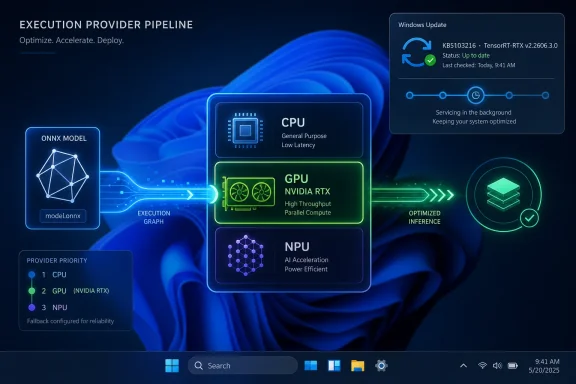
Microsoft’s KB5103221 updates the NVIDIA TensorRT-RTX Execution Provider to version 2.2606.3.0 for Windows 11 version 26H1, delivering an automatic Windows Update package for RTX-accelerated ONNX inference on eligible PCs with the latest 26H1 cumulative update installed. That sounds like the sort of small support-page entry most users will never read. It is not small in strategy. Microsoft is turning AI acceleration on Windows into an operating-system service, and NVIDIA’s RTX stack is now one of the pieces being serviced like any other Windows component.
For years, Windows AI development has been haunted by the same problem that dogs graphics, audio, and driver-adjacent software: the application thinks it knows the hardware, the hardware vendor thinks it knows the runtime, and the user is left holding a mismatched set of DLLs when the two disagree. KB5103221 is a quiet attempt to change that bargain.
The update targets the NVIDIA TensorRT-RTX Execution Provider, an ONNX Runtime and Windows Machine Learning component that lets supported AI models run inference on NVIDIA RTX GPUs instead of falling back to the CPU or a generic GPU path. In practical terms, it is the layer that helps Windows and Windows apps say, “This model can run better on that RTX card,” without every developer shipping and maintaining a full NVIDIA-specific inference stack inside each app.
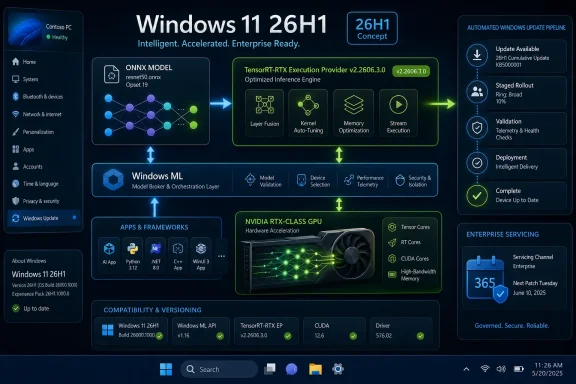
That distinction matters because Windows ML is no longer just a legacy API for running a demo image classifier. Microsoft’s newer Windows ML direction is built around ONNX Runtime, execution providers, and dynamic acquisition of hardware-specific acceleration components. The OS becomes a broker between app, model, silicon, and update channel.
KB5103221 is therefore not just “an NVIDIA update.” It is a signpost for how Microsoft wants local AI to behave on Windows PCs: less like a collection of developer toolkits, more like a managed subsystem.
That sounds abstract until you have tried to deploy AI features at scale. The hard part is not merely having a fast GPU. The hard part is making sure the model, runtime, driver, vendor libraries, app package, and OS version agree closely enough that inference happens where the developer expected it to happen.
Historically, developers solved that by bundling more. Ship the app with the runtime. Ship the provider. Ship the vendor DLLs. Pin versions. Test the combination. Hope the user’s driver and device do not make the bundle obsolete the week after release.
Microsoft’s Windows ML approach pushes in the opposite direction. The platform can obtain and update vendor execution providers, while apps use common APIs to discover and register what is available. That makes KB5103221 a servicing event for the AI acceleration layer itself, not merely an app dependency update.
The analogy is imperfect, but useful: execution providers are becoming to AI workloads what display drivers and media codecs have long been to graphics and playback. Users may not know their names, but mismatches can decide whether a workload feels instant, sluggish, broken, or unavailable.
Microsoft has been here before. When new silicon requires deeper platform changes, Windows sometimes moves ahead on a hardware-specific path before the broader installed base catches up. The AI PC era makes that pressure more intense, because platform value is no longer just about booting the device and managing power states. It is about exposing NPUs, GPUs, and hybrid compute paths in a way developers can actually use.
The KB wording says systems must have the latest cumulative update for Windows 11 version 26H1 installed. That dependency is not just housekeeping. It signals that the execution provider belongs to a coordinated platform stack, where cumulative OS updates and AI provider updates are expected to move together.
That will be familiar to sysadmins, and not necessarily comforting. The more Windows AI acceleration depends on an evergreen chain of OS builds, provider packages, GPU drivers, and vendor runtimes, the more valuable central servicing becomes. It also means troubleshooting local AI performance may increasingly start with the same question as any other Windows issue: what exact build and update history is on this machine?
TensorRT has long been NVIDIA’s performance-oriented inference technology, and TensorRT for RTX adapts that idea for RTX-equipped client PCs. The Windows execution provider wraps that capability into the ONNX Runtime and Windows ML model, giving applications a path to RTX acceleration without writing directly against a pile of NVIDIA-specific interfaces.
That is the prize: developers can target Windows ML and ONNX Runtime concepts while still benefiting from NVIDIA’s silicon-specific optimization. If it works as advertised, a Windows app can run a model locally, keep user data on the device, and pick up better GPU inference behavior through platform-managed updates.
But this is also where vendor positioning and user reality can diverge. Acceleration depends on the model, operators, precision, graph shape, driver compatibility, memory pressure, and the rest of the PC. An RTX badge does not guarantee that every AI feature suddenly becomes fast, nor does a Windows Update package mean every ONNX workload will use TensorRT-RTX automatically.
The more honest reading is narrower and more useful: KB5103221 improves the NVIDIA provider component that Windows ML can use for RTX-accelerated inference on eligible Windows 11 26H1 systems. That is enough to matter, especially for developers and IT teams standardizing around ONNX workflows.
Automatic delivery also reduces the odds that every AI-enabled application becomes its own update island. If five apps use the same platform-managed execution provider, the system can update one shared component rather than waiting for each vendor to ship a patched bundle.
That is the upside. The tradeoff is control.
Enterprise administrators often restrict Windows Update behavior for good reasons: compatibility testing, staged rollouts, offline environments, regulatory constraints, or simple fear of breaking a known-good workstation image. Microsoft’s own Windows ML guidance acknowledges that some developers and organizations may still choose to bring their own execution providers when they need strict version control or cannot rely on Windows-managed acquisition.
KB5103221 sits right in that tension. The consumer Windows model wants AI acceleration to be evergreen. The enterprise model wants it to be predictable. Microsoft will need to make those two instincts coexist, because local AI features are increasingly entering productivity software, creative tools, developer environments, and line-of-business apps.
If an update to an execution provider changes performance characteristics, memory behavior, model compatibility, or crash patterns, IT teams will want the same visibility they expect from drivers and cumulative updates. “It came from Windows Update” is not a root-cause analysis.
That sparseness is frustrating, but it is also typical of this new class of servicing. Microsoft is publishing these packages as part of a managed platform ecosystem, not as standalone developer release notes. The assumption appears to be that most users only need to know whether the component is present and current.
For enthusiasts and admins, that is not enough. If an RTX-backed AI app behaves differently after KB5103221, the useful questions are specific: Did TensorRT engine generation change? Did a supported operator path improve? Did the provider alter fallback behavior? Did a driver requirement shift? Did a crash fix land?
Microsoft’s article does not answer those questions. That does not mean the update is unimportant; it means the public servicing language has not caught up with the operational importance of AI runtime components.
This is a familiar Windows pattern. Components that begin as niche developer plumbing become user-visible only after something breaks or accelerates dramatically. DirectX, WDDM, media foundation, GPU scheduling, and driver models all spent time in that liminal space. AI execution providers are now entering it.
That is exactly how a platform component should behave when it is working. The best outcome is that AI-enabled applications run supported local inference workloads more reliably or more efficiently without asking users to understand ONNX, TensorRT, or provider catalogs.
The catch is that “no visible change” can be misread as “no impact.” On-device AI performance is often shaped by invisible layers. A model may run on the CPU because a GPU provider is missing. It may use a generic backend because a vendor provider is incompatible. It may perform well in one app and poorly in another because each app bundled a different runtime stack.
Windows-managed execution providers are meant to reduce that chaos. KB5103221 is one more move toward a world where the system, not the user, maintains the acceleration path.
That is good news for ordinary users. It is also a reminder that Windows Update is becoming a delivery channel for AI capability, not just security fixes, feature toggles, and hardware drivers.
But execution providers do not eliminate model engineering. Microsoft’s own Windows ML framing makes clear that developers remain responsible for optimizing models for different hardware. A provider can accelerate supported operations; it cannot magically turn every graph into a perfect RTX workload.
That distinction matters as Windows apps race to add local AI features. The temptation will be to advertise “runs on your GPU” as though acceleration is a binary property. In practice, it is a spectrum. Some workloads will map well to TensorRT-RTX, some will partially accelerate, and some may fall back to another provider or the CPU.
The developer responsibility is therefore twofold. First, build against the platform in a way that can use the provider when it is present. Second, handle the absence or failure of that provider gracefully. A Windows app should not become brittle because a specific EP version is missing, delayed by policy, or unsuitable for a particular model.
KB5103221 improves the platform piece. It does not excuse lazy runtime selection, poor fallback logic, or inflated performance claims.
A machine’s AI behavior will increasingly depend on more than CPU, RAM, GPU, and driver version. It will depend on which execution providers are installed, which versions they are, how Windows Update policies apply, and whether applications use the system-managed runtime or bring their own provider binaries.
That complicates troubleshooting. Imagine two RTX laptops with the same application and GPU driver, but only one has the newer TensorRT-RTX provider. If a local transcription, image, coding, or generative feature behaves differently, the execution provider version becomes part of the diagnostic surface.
Administrators do not need to panic over KB5103221. They do need to notice the category. This is a platform-managed AI acceleration update, and it will not be the last.
The sensible response is to fold these components into normal Windows servicing discipline. Check update history. Stage rollouts where policy allows. Capture provider versions in support scripts. Ask vendors whether their Windows AI features rely on Windows-managed execution providers or bundled ones. That small amount of process will save time later.
The numbering also hints at the rhythm: platform AI providers are likely to move on a schedule closer to drivers and runtime packages than to annual Windows features. That makes sense. AI frameworks, model requirements, GPU optimizations, and vendor runtimes evolve too quickly to wait for traditional OS milestones.
The risk is fatigue. Windows users already navigate cumulative updates, Store app updates, driver updates, firmware updates, Microsoft 365 updates, Edge updates, and vendor utilities. Adding AI provider updates to the stack could feel like yet another opaque maintenance stream.
Microsoft’s best defense is consistency. If these updates install cleanly, appear clearly in update history, respect enterprise controls, and improve real application behavior, users will not care what an execution provider is. If they create regressions with vague release notes, admins and enthusiasts will care very much.
KB5103221 is therefore a small test of a larger servicing model. The package itself may be routine. The category is not.
That is understandable. If every application ships its own AI runtime, the Windows ecosystem becomes fragmented quickly. Users waste disk space, developers duplicate work, security fixes land unevenly, and hardware vendors must support a maze of packaging choices.
A shared Windows ML stack offers a cleaner model. Microsoft maintains the runtime. Hardware vendors provide optimized execution providers. Apps target common APIs. Windows Update carries improvements. The user benefits from local acceleration without needing to become a machine learning infrastructure engineer.
But shared layers concentrate responsibility. When the OS becomes the AI broker, Microsoft inherits expectations around transparency, reliability, and compatibility. When NVIDIA’s provider is updated through Windows Update, NVIDIA’s performance story becomes partially dependent on Microsoft’s servicing story. When developers rely on dynamic acquisition, their app experience depends on policy and platform state.
That is the bargain Windows is now making. It is probably the right one for mainstream PCs. It is also one that demands more detailed public documentation than a single sparse KB page can provide over the long run.
For the people who do have eligible systems, the right reaction is measured attention. Check whether the entry appears in Windows Update history. If you are testing AI-enabled apps, note the provider version alongside GPU driver and Windows build. If you manage devices, treat this as part of the platform servicing picture rather than an optional curiosity.
The concrete lessons are narrow but useful:
 Microsoft Is Moving AI Acceleration Out of the App Bundle
For years, Windows AI development has been haunted by the same problem that dogs graphics, audio, and driver-adjacent software: the application thinks it knows the hardware, the hardware vendor thinks it knows the runtime, and the user is left holding a mismatched set of DLLs when the two disagree. KB5103221 is a quiet attempt to change that bargain.The update targets the NVIDIA TensorRT-RTX Execution Provider, an ONNX Runtime and Windows Machine Learning component that lets supported AI models run inference on NVIDIA RTX GPUs instead of falling back to the CPU or a generic GPU path. In practical terms, it is the layer that helps Windows and Windows apps say, “This model can run better on that RTX card,” without every developer shipping and maintaining a full NVIDIA-specific inference stack inside each app.
That distinction matters because Windows ML is no longer just a legacy API for running a demo image classifier. Microsoft’s newer Windows ML direction is built around ONNX Runtime, execution providers, and dynamic acquisition of hardware-specific acceleration components. The OS becomes a broker between app, model, silicon, and update channel.
KB5103221 is therefore not just “an NVIDIA update.” It is a signpost for how Microsoft wants local AI to behave on Windows PCs: less like a collection of developer toolkits, more like a managed subsystem.
The Execution Provider Is the New Driver Boundary
The term execution provider is inelegant, but it captures the new shape of Windows performance plumbing. An ONNX model describes the work. ONNX Runtime coordinates execution. The execution provider maps suitable parts of that work to a specific backend, whether that backend is a CPU, a DirectML path, an NPU, or a vendor-tuned GPU runtime such as TensorRT for RTX.That sounds abstract until you have tried to deploy AI features at scale. The hard part is not merely having a fast GPU. The hard part is making sure the model, runtime, driver, vendor libraries, app package, and OS version agree closely enough that inference happens where the developer expected it to happen.
Historically, developers solved that by bundling more. Ship the app with the runtime. Ship the provider. Ship the vendor DLLs. Pin versions. Test the combination. Hope the user’s driver and device do not make the bundle obsolete the week after release.
Microsoft’s Windows ML approach pushes in the opposite direction. The platform can obtain and update vendor execution providers, while apps use common APIs to discover and register what is available. That makes KB5103221 a servicing event for the AI acceleration layer itself, not merely an app dependency update.
The analogy is imperfect, but useful: execution providers are becoming to AI workloads what display drivers and media codecs have long been to graphics and playback. Users may not know their names, but mismatches can decide whether a workload feels instant, sluggish, broken, or unavailable.
Version 26H1 Makes This Feel Like a Preview of the Next Windows
There is an oddity in Microsoft’s KB5103221 page that should not be ignored: the update is for Windows 11, version 26H1. That version is not the mainstream Windows release most desktop users are running today. It is a newer branch associated with next-generation hardware enablement, and that context changes how to read this update.Microsoft has been here before. When new silicon requires deeper platform changes, Windows sometimes moves ahead on a hardware-specific path before the broader installed base catches up. The AI PC era makes that pressure more intense, because platform value is no longer just about booting the device and managing power states. It is about exposing NPUs, GPUs, and hybrid compute paths in a way developers can actually use.
The KB wording says systems must have the latest cumulative update for Windows 11 version 26H1 installed. That dependency is not just housekeeping. It signals that the execution provider belongs to a coordinated platform stack, where cumulative OS updates and AI provider updates are expected to move together.
That will be familiar to sysadmins, and not necessarily comforting. The more Windows AI acceleration depends on an evergreen chain of OS builds, provider packages, GPU drivers, and vendor runtimes, the more valuable central servicing becomes. It also means troubleshooting local AI performance may increasingly start with the same question as any other Windows issue: what exact build and update history is on this machine?
NVIDIA Gets a First-Class Seat in Windows’ Local AI Plan
NVIDIA’s role here is unsurprising but strategically important. RTX GPUs are already widely deployed in enthusiast desktops, creator workstations, gaming laptops, and developer machines. If Microsoft wants on-device AI on Windows to mean more than “Copilot+ PC with an NPU,” it needs a credible story for discrete GPUs.TensorRT has long been NVIDIA’s performance-oriented inference technology, and TensorRT for RTX adapts that idea for RTX-equipped client PCs. The Windows execution provider wraps that capability into the ONNX Runtime and Windows ML model, giving applications a path to RTX acceleration without writing directly against a pile of NVIDIA-specific interfaces.
That is the prize: developers can target Windows ML and ONNX Runtime concepts while still benefiting from NVIDIA’s silicon-specific optimization. If it works as advertised, a Windows app can run a model locally, keep user data on the device, and pick up better GPU inference behavior through platform-managed updates.
But this is also where vendor positioning and user reality can diverge. Acceleration depends on the model, operators, precision, graph shape, driver compatibility, memory pressure, and the rest of the PC. An RTX badge does not guarantee that every AI feature suddenly becomes fast, nor does a Windows Update package mean every ONNX workload will use TensorRT-RTX automatically.
The more honest reading is narrower and more useful: KB5103221 improves the NVIDIA provider component that Windows ML can use for RTX-accelerated inference on eligible Windows 11 26H1 systems. That is enough to matter, especially for developers and IT teams standardizing around ONNX workflows.
Automatic Delivery Solves One Problem and Creates Another
Microsoft says the update will be downloaded and installed automatically from Windows Update. For consumers, that is probably the right default. Few users want to manage AI execution providers by hand, and fewer still would know whether version 2.2606.3.0 is preferable to the build already installed.Automatic delivery also reduces the odds that every AI-enabled application becomes its own update island. If five apps use the same platform-managed execution provider, the system can update one shared component rather than waiting for each vendor to ship a patched bundle.
That is the upside. The tradeoff is control.
Enterprise administrators often restrict Windows Update behavior for good reasons: compatibility testing, staged rollouts, offline environments, regulatory constraints, or simple fear of breaking a known-good workstation image. Microsoft’s own Windows ML guidance acknowledges that some developers and organizations may still choose to bring their own execution providers when they need strict version control or cannot rely on Windows-managed acquisition.
KB5103221 sits right in that tension. The consumer Windows model wants AI acceleration to be evergreen. The enterprise model wants it to be predictable. Microsoft will need to make those two instincts coexist, because local AI features are increasingly entering productivity software, creative tools, developer environments, and line-of-business apps.
If an update to an execution provider changes performance characteristics, memory behavior, model compatibility, or crash patterns, IT teams will want the same visibility they expect from drivers and cumulative updates. “It came from Windows Update” is not a root-cause analysis.
The Support Page Is Sparse Because the Platform Is Doing the Talking
KB5103221’s public description is brief. It identifies the component, the version, the target OS, the prerequisite cumulative update, automatic delivery, and the Update History location where users can verify installation. It does not provide a detailed changelog of operator coverage, performance improvements, bug fixes, or known issues.That sparseness is frustrating, but it is also typical of this new class of servicing. Microsoft is publishing these packages as part of a managed platform ecosystem, not as standalone developer release notes. The assumption appears to be that most users only need to know whether the component is present and current.
For enthusiasts and admins, that is not enough. If an RTX-backed AI app behaves differently after KB5103221, the useful questions are specific: Did TensorRT engine generation change? Did a supported operator path improve? Did the provider alter fallback behavior? Did a driver requirement shift? Did a crash fix land?
Microsoft’s article does not answer those questions. That does not mean the update is unimportant; it means the public servicing language has not caught up with the operational importance of AI runtime components.
This is a familiar Windows pattern. Components that begin as niche developer plumbing become user-visible only after something breaks or accelerates dramatically. DirectX, WDDM, media foundation, GPU scheduling, and driver models all spent time in that liminal space. AI execution providers are now entering it.
For Users, the Visible Change May Be No Visible Change
Most Windows 11 users will not see a new app, a new setting, or a new NVIDIA control panel toggle after KB5103221. The expected user-facing behavior is quieter: eligible systems receive the provider update, and it appears in Windows Update history under the relevant Windows ML Runtime NVIDIA TensorRT-RTX Execution Provider entry.That is exactly how a platform component should behave when it is working. The best outcome is that AI-enabled applications run supported local inference workloads more reliably or more efficiently without asking users to understand ONNX, TensorRT, or provider catalogs.
The catch is that “no visible change” can be misread as “no impact.” On-device AI performance is often shaped by invisible layers. A model may run on the CPU because a GPU provider is missing. It may use a generic backend because a vendor provider is incompatible. It may perform well in one app and poorly in another because each app bundled a different runtime stack.
Windows-managed execution providers are meant to reduce that chaos. KB5103221 is one more move toward a world where the system, not the user, maintains the acceleration path.
That is good news for ordinary users. It is also a reminder that Windows Update is becoming a delivery channel for AI capability, not just security fixes, feature toggles, and hardware drivers.
Developers Get Convenience, But Not a Free Performance Pass
For developers, the most attractive promise of Windows ML is that hardware acceleration can become less bespoke. Apps can use ONNX Runtime-compatible flows, discover available execution providers, and rely on Windows to acquire certified providers for supported hardware. That is a cleaner story than shipping separate GPU backends for each vendor and hoping the installer gets everything right.But execution providers do not eliminate model engineering. Microsoft’s own Windows ML framing makes clear that developers remain responsible for optimizing models for different hardware. A provider can accelerate supported operations; it cannot magically turn every graph into a perfect RTX workload.
That distinction matters as Windows apps race to add local AI features. The temptation will be to advertise “runs on your GPU” as though acceleration is a binary property. In practice, it is a spectrum. Some workloads will map well to TensorRT-RTX, some will partially accelerate, and some may fall back to another provider or the CPU.
The developer responsibility is therefore twofold. First, build against the platform in a way that can use the provider when it is present. Second, handle the absence or failure of that provider gracefully. A Windows app should not become brittle because a specific EP version is missing, delayed by policy, or unsuitable for a particular model.
KB5103221 improves the platform piece. It does not excuse lazy runtime selection, poor fallback logic, or inflated performance claims.
Sysadmins Should Treat AI Providers Like a New Patch Class
The most practical audience for KB5103221 may be IT administrators managing early Windows 11 26H1 systems or preparing for a broader wave of AI-capable PCs. The update is automatic, but its implications belong in asset and change management.A machine’s AI behavior will increasingly depend on more than CPU, RAM, GPU, and driver version. It will depend on which execution providers are installed, which versions they are, how Windows Update policies apply, and whether applications use the system-managed runtime or bring their own provider binaries.
That complicates troubleshooting. Imagine two RTX laptops with the same application and GPU driver, but only one has the newer TensorRT-RTX provider. If a local transcription, image, coding, or generative feature behaves differently, the execution provider version becomes part of the diagnostic surface.
Administrators do not need to panic over KB5103221. They do need to notice the category. This is a platform-managed AI acceleration update, and it will not be the last.
The sensible response is to fold these components into normal Windows servicing discipline. Check update history. Stage rollouts where policy allows. Capture provider versions in support scripts. Ask vendors whether their Windows AI features rely on Windows-managed execution providers or bundled ones. That small amount of process will save time later.
The June Provider Update Shows the Cadence Taking Shape
Version 2.2606.3.0 is not appearing in isolation. Microsoft has already been publishing related NVIDIA TensorRT-RTX provider updates for Windows 11 26H1 in earlier version lines, including prior 2.2605 and 2.2604 packages. That cadence suggests a living component, not a one-off enablement shim.The numbering also hints at the rhythm: platform AI providers are likely to move on a schedule closer to drivers and runtime packages than to annual Windows features. That makes sense. AI frameworks, model requirements, GPU optimizations, and vendor runtimes evolve too quickly to wait for traditional OS milestones.
The risk is fatigue. Windows users already navigate cumulative updates, Store app updates, driver updates, firmware updates, Microsoft 365 updates, Edge updates, and vendor utilities. Adding AI provider updates to the stack could feel like yet another opaque maintenance stream.
Microsoft’s best defense is consistency. If these updates install cleanly, appear clearly in update history, respect enterprise controls, and improve real application behavior, users will not care what an execution provider is. If they create regressions with vague release notes, admins and enthusiasts will care very much.
KB5103221 is therefore a small test of a larger servicing model. The package itself may be routine. The category is not.
The RTX Update Is Really About Who Owns Local AI on Windows
The deeper story behind KB5103221 is control. In the cloud, the platform owner controls the accelerator stack. In traditional PC software, the app vendor often controlled its own dependencies. In the AI PC era, Microsoft wants Windows to reclaim the middle.That is understandable. If every application ships its own AI runtime, the Windows ecosystem becomes fragmented quickly. Users waste disk space, developers duplicate work, security fixes land unevenly, and hardware vendors must support a maze of packaging choices.
A shared Windows ML stack offers a cleaner model. Microsoft maintains the runtime. Hardware vendors provide optimized execution providers. Apps target common APIs. Windows Update carries improvements. The user benefits from local acceleration without needing to become a machine learning infrastructure engineer.
But shared layers concentrate responsibility. When the OS becomes the AI broker, Microsoft inherits expectations around transparency, reliability, and compatibility. When NVIDIA’s provider is updated through Windows Update, NVIDIA’s performance story becomes partially dependent on Microsoft’s servicing story. When developers rely on dynamic acquisition, their app experience depends on policy and platform state.
That is the bargain Windows is now making. It is probably the right one for mainstream PCs. It is also one that demands more detailed public documentation than a single sparse KB page can provide over the long run.
The Practical Read for WindowsForum Readers
KB5103221 is not a reason to chase an update manually on unsupported systems, and it is not evidence that every RTX PC has suddenly gained a new AI superpower. It is a targeted Windows 11 26H1 component update for the NVIDIA TensorRT-RTX Execution Provider, delivered automatically when the prerequisite cumulative update is in place.For the people who do have eligible systems, the right reaction is measured attention. Check whether the entry appears in Windows Update history. If you are testing AI-enabled apps, note the provider version alongside GPU driver and Windows build. If you manage devices, treat this as part of the platform servicing picture rather than an optional curiosity.
The concrete lessons are narrow but useful:
- KB5103221 updates the NVIDIA TensorRT-RTX Execution Provider to version 2.2606.3.0 on eligible Windows 11 version 26H1 systems.
- The update is installed through Windows Update and depends on the latest cumulative update for Windows 11 version 26H1.
- The component exists to accelerate supported ONNX model inference on NVIDIA RTX GPUs through Windows ML and ONNX Runtime.
- Users can verify installation in Settings under Windows Update history.
- Developers still need to optimize models and implement sensible fallback behavior when a specific hardware provider is unavailable.
- Administrators should begin tracking AI execution provider versions as part of Windows troubleshooting and change management.
References
- Primary source: Microsoft Support
Published: Tue, 23 Jun 2026 17:02:49 Z
- Official source: learn.microsoft.com
What is Windows ML? | Microsoft Learn
Learn how Windows Machine Learning (ML) helps your Windows apps run AI models locally.learn.microsoft.com - Related coverage: windowsforum.com
KB5089174 Update: NVIDIA TensorRT-RTX Execution Provider 2.2604.1.0 for Win 11 26H1 | Windows Forum
KB5089174: NVIDIA TensorRT-RTX Execution Provider Update Version 2.2604.1.0 for Windows 11 Version 26H1 Microsoft has released KB5089174, a Windows ML...windowsforum.com - Related coverage: docs.nvidia.com
- Related coverage: windowscentral.com
Windows 11 version 26H1: Everything you need to know about Microsoft's special OS release now shipping on new hardware | Windows Central
Microsoft has confirmed that Windows 11 version 26H1 is now shipping exclusively on new PCs that ship with Qualcomm's new Snapdragon X2 SoC. Here's what you need to know.www.windowscentral.com - Related coverage: developer.nvidia.com