

Microsoft released KB5096160 on May 26, 2026 as a Setup Dynamic Update for Windows 11 version 26H1, a narrowly scoped install-time package that refreshes setup components while repeating the company’s warning that Secure Boot certificates begin expiring in June 2026. The update is not the story because it changes the daily experience of Windows 11 users. The update is the story because it places a small setup package inside a much larger trust rollover that Microsoft, OEMs, and administrators have only weeks left to finish cleanly. Windows has had plenty of dramatic update moments; this one is quieter, lower in the stack, and potentially more consequential for machines that are ignored until they fail.
KB5096160 belongs to the category of Windows updates that most users never notice unless something goes wrong. Setup Dynamic Update is designed to improve the Windows setup process itself, supplying refreshed files that setup can use during installation, upgrade, or recovery scenarios. It is plumbing, not wallpaper.
That makes the inclusion of Microsoft’s Secure Boot warning more interesting, not less. Microsoft is using even these low-glamour support pages to repeat the same message: the Secure Boot certificate rollover is no longer an abstract future concern. The original certificates used by most Windows devices are reaching expiration, and the replacement path needs to be in place before the calendar forces the issue.
Windows 11 version 26H1 adds another wrinkle. Microsoft has described 26H1 as a release scoped for new devices that came to market in early 2026, not as a broad feature update for existing Windows 11 24H2 or 25H2 systems. In other words, KB5096160 is aimed at a relatively specific branch of Windows 11, but the Secure Boot warning attached to it is not narrow at all.
That is the strange shape of this moment: a specialized setup update for a specialized Windows release is also a reminder of a platform-wide security maintenance deadline. Microsoft is not shipping a flashy new feature here. It is trying to keep the chain of trust from aging out underneath the operating system.
The certificates now expiring are part of the original Secure Boot trust fabric introduced in the Windows 8 era. They helped define which bootloaders, firmware components, option ROMs, and pre-OS code could be trusted. That trust was never meant to be eternal, but for more than a decade it effectively became part of the assumed background of Windows computing.
Microsoft’s current guidance is careful on one important point: devices that miss the update are not expected to suddenly become bricks the moment the first certificate expires. Windows may still boot, and normal Windows updates may still install. That matters, because panic is a poor deployment strategy.
But Microsoft is equally clear that a device without the new 2023 Secure Boot certificates may stop receiving future protections for the earliest phase of startup. That includes updates to boot components, Secure Boot databases, revocation lists, and mitigations for newly discovered boot-level vulnerabilities. The machine may appear fine while silently falling behind where it is hardest for endpoint tooling to compensate.
This is the difference between an outage and a security regression. The former is easy to see. The latter is easier to postpone, explain away, or miss entirely until an attacker or a compliance auditor starts asking better questions.
That sequence matters because these certificates do different jobs. The KEK is tied to authority over Secure Boot database updates. The database certificates are tied to the code that is allowed to run before Windows fully starts. Losing freshness in one part of the chain affects the ability to maintain trust in the others.
Microsoft’s replacement certificates are from the 2023 generation. The new design also separates some trust roles that were previously bundled more broadly, including a split between third-party boot loader signing and option ROM signing. That is not merely housekeeping. It gives Microsoft and OEMs finer control over what a device trusts, which is especially important after years of bootloader vulnerabilities, revocation headaches, and awkward compatibility compromises.
The difficult part is that this trust state lives partly in firmware, not simply in Windows files on disk. Windows Update can deliver much of the remediation, but firmware behavior, OEM implementation, Secure Boot configuration, and enterprise management policy all influence whether the update actually lands. A cumulative update can be installed successfully while the pre-OS trust state still deserves inspection.
The bet will probably pay off for many current laptops and desktops. Devices sold recently are more likely to have firmware and factory images aligned with the new certificate era. Machines enrolled in Microsoft-managed update channels are more likely to receive the right payloads without administrators scripting every step by hand.
The problem is the long tail. Windows estates are full of hardware that is technically supported but operationally dusty: laptops in storage, kiosks behind counters, lab machines, conference-room PCs, factory workstations, loaner devices, and servers that everyone is afraid to reboot. These are exactly the systems that turn an orderly security migration into a scavenger hunt.
There is also a psychological trap. Because Microsoft says affected machines may continue to boot and receive ordinary Windows updates, some organizations will treat the issue as optional. That misreads the warning. The question is not whether Windows still starts on June 28. The question is whether the device remains eligible for the next round of boot-layer trust decisions.
Microsoft’s guidance for administrators sensibly starts with inventory and validation. Identify devices still using the 2011 certificates. Check event logs and registry indicators. Look for certificate status signals rather than assuming that a successfully installed Windows update means the firmware trust store is current.
That distinction is uncomfortable but necessary. Secure Boot data lives in UEFI variables, and not every device handles updates identically. Older firmware may need OEM remediation first. Some platforms may require staged deployment. BitLocker-enabled systems deserve particular care because changes near the boot chain can trigger recovery prompts if sequencing, protectors, or validation assumptions go sideways.
This is where IT departments should resist the temptation to treat the Secure Boot rollover like a routine Patch Tuesday item. It is not just another cumulative update. It is a trust migration across the boundary between Windows and firmware, and that boundary is where rollback plans become more complicated.
That reflects a more modular Windows world. Some releases exist to support new silicon, new device classes, or platform enablement work without dragging every existing PC through a feature update cycle. From Microsoft’s perspective, that is cleaner than making one monolithic Windows release carry every hardware and compatibility requirement.
From the outside, it can feel messy. Users see version numbers, KB numbers, build numbers, Dynamic Updates, cumulative updates, enablement packages, and feature releases that do not all map neatly to the old mental model of “new Windows version equals new features.” KB5096160 is exactly the kind of update that deepens that confusion because it matters mainly during setup, yet sits next to a security warning that matters across the ecosystem.
For WindowsForum readers, the practical interpretation is simple: do not assume 26H1 is coming to your existing 25H2 desktop as the next big thing, and do not assume the Secure Boot certificate issue is limited to 26H1 because this particular KB page mentions it. The update and the warning overlap, but they are not the same problem.
That is how infrastructure debt usually behaves. It does not announce itself with a theatrical crash. It accumulates as exceptions, unsupported configurations, one-off workarounds, and “we’ll get to that after quarter-end” tickets.
Secure Boot is particularly vulnerable to this kind of neglect because it has lived in the uneasy space between security feature and firmware dependency. Security teams like the assurance it provides. Operations teams fear the boot-time consequences of touching it. End users only notice when a game anti-cheat system complains, BitLocker asks for a recovery key, or a firmware menu suddenly becomes relevant.
Microsoft’s messaging tries to thread that needle. It avoids saying “your PC will die,” because that would be inaccurate. It also avoids saying “nothing to see here,” because that would be irresponsible. The actual message is harder to market: your device may continue to work, but its root-of-trust maintenance path may become stale if you do not update it.
Virtual machines add their own ambiguity. Secure Boot in a VM depends on the hypervisor, VM generation, template settings, trusted launch configuration, and cloud provider implementation. Administrators should not assume that a VM is unaffected simply because it has no physical keyboard and no visible BIOS splash screen.
Dormant devices may be the most easily overlooked category. A laptop in a drawer, a spare workstation in storage, or a disaster-recovery machine that rarely comes online may miss the update window entirely. Those systems have a way of reappearing during incidents, relocations, mergers, or executive travel, which is precisely when nobody wants to debug firmware trust.
This is where asset management becomes security work. If a device is important enough to keep, it is important enough to bring online, patch, validate, and document. If it is not important enough to maintain, it probably should not be sitting around as a future exception.
Administrators should build a representative pilot that includes multiple OEMs, older firmware, BitLocker-enabled laptops, remote users, and any oddball devices that normally get excluded from clean dashboards. The goal is not only to apply updates, but to confirm that the 2023 certificates are actually present and that systems reboot without recovery loops or Secure Boot validation errors.
For organizations using Intune, Group Policy, registry-based deployment, or configuration service providers, Microsoft has published supported methods for managing the rollout. The specific tool matters less than the discipline around it. Inventory first, update firmware where needed, deploy in rings, validate status, and keep a rollback and recovery process ready for the small percentage of devices that behave badly.
Consumers have a simpler but still meaningful checklist. Install current Windows updates. Install firmware updates from the PC maker. Do not ignore Secure Boot-related prompts simply because the PC still starts. And if Windows Security begins surfacing certificate status more visibly, treat that as a useful signal rather than yet another notification to dismiss.
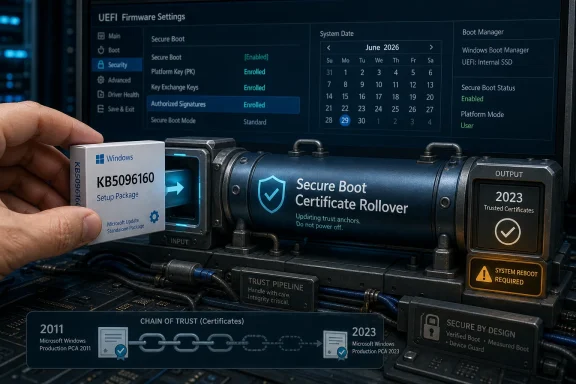 A Small Setup Package Carries a Larger Warning
KB5096160 belongs to the category of Windows updates that most users never notice unless something goes wrong. Setup Dynamic Update is designed to improve the Windows setup process itself, supplying refreshed files that setup can use during installation, upgrade, or recovery scenarios. It is plumbing, not wallpaper.That makes the inclusion of Microsoft’s Secure Boot warning more interesting, not less. Microsoft is using even these low-glamour support pages to repeat the same message: the Secure Boot certificate rollover is no longer an abstract future concern. The original certificates used by most Windows devices are reaching expiration, and the replacement path needs to be in place before the calendar forces the issue.
Windows 11 version 26H1 adds another wrinkle. Microsoft has described 26H1 as a release scoped for new devices that came to market in early 2026, not as a broad feature update for existing Windows 11 24H2 or 25H2 systems. In other words, KB5096160 is aimed at a relatively specific branch of Windows 11, but the Secure Boot warning attached to it is not narrow at all.
That is the strange shape of this moment: a specialized setup update for a specialized Windows release is also a reminder of a platform-wide security maintenance deadline. Microsoft is not shipping a flashy new feature here. It is trying to keep the chain of trust from aging out underneath the operating system.
Secure Boot’s Old Keys Are Finally Reaching the End of Their Lease
Secure Boot has always been one of those technologies that users experience mostly as a checkbox in firmware settings and administrators experience as a dependency chain. It sits before Windows loads, checking whether early boot software is trusted before control passes into the operating system. When it works, it is invisible. When it breaks, the machine may not get far enough for ordinary troubleshooting tools to matter.The certificates now expiring are part of the original Secure Boot trust fabric introduced in the Windows 8 era. They helped define which bootloaders, firmware components, option ROMs, and pre-OS code could be trusted. That trust was never meant to be eternal, but for more than a decade it effectively became part of the assumed background of Windows computing.
Microsoft’s current guidance is careful on one important point: devices that miss the update are not expected to suddenly become bricks the moment the first certificate expires. Windows may still boot, and normal Windows updates may still install. That matters, because panic is a poor deployment strategy.
But Microsoft is equally clear that a device without the new 2023 Secure Boot certificates may stop receiving future protections for the earliest phase of startup. That includes updates to boot components, Secure Boot databases, revocation lists, and mitigations for newly discovered boot-level vulnerabilities. The machine may appear fine while silently falling behind where it is hardest for endpoint tooling to compensate.
This is the difference between an outage and a security regression. The former is easy to see. The latter is easier to postpone, explain away, or miss entirely until an attacker or a compliance auditor starts asking better questions.
The June Deadline Is Not One Date, But a Chain Reaction
The Secure Boot rollover is often summarized as “certificates expire in June 2026,” but the actual schedule is more staggered. Microsoft’s updated guidance identifies the Microsoft Corporation KEK CA 2011 certificate as expiring on June 24, 2026, and the Microsoft UEFI CA 2011 certificate as expiring on June 27, 2026. Another major certificate, Microsoft Windows Production PCA 2011, follows on October 19, 2026.That sequence matters because these certificates do different jobs. The KEK is tied to authority over Secure Boot database updates. The database certificates are tied to the code that is allowed to run before Windows fully starts. Losing freshness in one part of the chain affects the ability to maintain trust in the others.
Microsoft’s replacement certificates are from the 2023 generation. The new design also separates some trust roles that were previously bundled more broadly, including a split between third-party boot loader signing and option ROM signing. That is not merely housekeeping. It gives Microsoft and OEMs finer control over what a device trusts, which is especially important after years of bootloader vulnerabilities, revocation headaches, and awkward compatibility compromises.
The difficult part is that this trust state lives partly in firmware, not simply in Windows files on disk. Windows Update can deliver much of the remediation, but firmware behavior, OEM implementation, Secure Boot configuration, and enterprise management policy all influence whether the update actually lands. A cumulative update can be installed successfully while the pre-OS trust state still deserves inspection.
Microsoft’s Quiet Bet Is That Windows Update Can Reach Enough Machines
For consumer PCs and many business devices, Microsoft’s preferred outcome is boring: leave Windows Update enabled, install current updates, and let the certificate refresh happen in the background. That is a reasonable default for modern, supported hardware. It is also a bet on a supply chain that includes Windows servicing, OEM firmware, cloud-managed policy, and a user base that frequently postpones anything that smells like risk.The bet will probably pay off for many current laptops and desktops. Devices sold recently are more likely to have firmware and factory images aligned with the new certificate era. Machines enrolled in Microsoft-managed update channels are more likely to receive the right payloads without administrators scripting every step by hand.
The problem is the long tail. Windows estates are full of hardware that is technically supported but operationally dusty: laptops in storage, kiosks behind counters, lab machines, conference-room PCs, factory workstations, loaner devices, and servers that everyone is afraid to reboot. These are exactly the systems that turn an orderly security migration into a scavenger hunt.
There is also a psychological trap. Because Microsoft says affected machines may continue to boot and receive ordinary Windows updates, some organizations will treat the issue as optional. That misreads the warning. The question is not whether Windows still starts on June 28. The question is whether the device remains eligible for the next round of boot-layer trust decisions.
Firmware Is Where Patch Management Gets Humbling
Enterprise patching has improved enormously over the past decade, but firmware remains the place where otherwise mature processes show their age. Windows Update can move operating system components at cloud scale. Firmware updates still vary by OEM, model, BIOS lineage, device age, and fleet-management discipline.Microsoft’s guidance for administrators sensibly starts with inventory and validation. Identify devices still using the 2011 certificates. Check event logs and registry indicators. Look for certificate status signals rather than assuming that a successfully installed Windows update means the firmware trust store is current.
That distinction is uncomfortable but necessary. Secure Boot data lives in UEFI variables, and not every device handles updates identically. Older firmware may need OEM remediation first. Some platforms may require staged deployment. BitLocker-enabled systems deserve particular care because changes near the boot chain can trigger recovery prompts if sequencing, protectors, or validation assumptions go sideways.
This is where IT departments should resist the temptation to treat the Secure Boot rollover like a routine Patch Tuesday item. It is not just another cumulative update. It is a trust migration across the boundary between Windows and firmware, and that boundary is where rollback plans become more complicated.
The 26H1 Context Shows How Fragmented Windows Servicing Has Become
Windows 11 version 26H1 is a useful symbol of the current Windows servicing model. It exists, it is supported, and it has a servicing channel, but it is not the general-purpose feature upgrade path for most existing Windows 11 users. Microsoft has positioned it for new hardware rather than broad in-place adoption from 24H2 or 25H2.That reflects a more modular Windows world. Some releases exist to support new silicon, new device classes, or platform enablement work without dragging every existing PC through a feature update cycle. From Microsoft’s perspective, that is cleaner than making one monolithic Windows release carry every hardware and compatibility requirement.
From the outside, it can feel messy. Users see version numbers, KB numbers, build numbers, Dynamic Updates, cumulative updates, enablement packages, and feature releases that do not all map neatly to the old mental model of “new Windows version equals new features.” KB5096160 is exactly the kind of update that deepens that confusion because it matters mainly during setup, yet sits next to a security warning that matters across the ecosystem.
For WindowsForum readers, the practical interpretation is simple: do not assume 26H1 is coming to your existing 25H2 desktop as the next big thing, and do not assume the Secure Boot certificate issue is limited to 26H1 because this particular KB page mentions it. The update and the warning overlap, but they are not the same problem.
The Real Risk Is Not Mass Boot Failure, But Quiet Decay
The most dramatic version of this story would be millions of PCs refusing to start in late June. That is not the scenario Microsoft is describing. The more plausible risk is duller: a subset of devices keeps working while losing the ability to receive future Secure Boot protections, and nobody notices until a later update, audit, exploit, or hardware refresh exposes the gap.That is how infrastructure debt usually behaves. It does not announce itself with a theatrical crash. It accumulates as exceptions, unsupported configurations, one-off workarounds, and “we’ll get to that after quarter-end” tickets.
Secure Boot is particularly vulnerable to this kind of neglect because it has lived in the uneasy space between security feature and firmware dependency. Security teams like the assurance it provides. Operations teams fear the boot-time consequences of touching it. End users only notice when a game anti-cheat system complains, BitLocker asks for a recovery key, or a firmware menu suddenly becomes relevant.
Microsoft’s messaging tries to thread that needle. It avoids saying “your PC will die,” because that would be inaccurate. It also avoids saying “nothing to see here,” because that would be irresponsible. The actual message is harder to market: your device may continue to work, but its root-of-trust maintenance path may become stale if you do not update it.
Servers, VMs, and Dormant Devices Deserve Their Own Plan
Client PCs will get most of the attention, but servers and managed virtual environments are where the stakes can become less forgiving. Windows Server fleets often include older hardware, stricter change windows, clustered dependencies, and firmware update processes that are slower than ordinary OS patching. Even when the technical fix is straightforward, the operational choreography can be painful.Virtual machines add their own ambiguity. Secure Boot in a VM depends on the hypervisor, VM generation, template settings, trusted launch configuration, and cloud provider implementation. Administrators should not assume that a VM is unaffected simply because it has no physical keyboard and no visible BIOS splash screen.
Dormant devices may be the most easily overlooked category. A laptop in a drawer, a spare workstation in storage, or a disaster-recovery machine that rarely comes online may miss the update window entirely. Those systems have a way of reappearing during incidents, relocations, mergers, or executive travel, which is precisely when nobody wants to debug firmware trust.
This is where asset management becomes security work. If a device is important enough to keep, it is important enough to bring online, patch, validate, and document. If it is not important enough to maintain, it probably should not be sitting around as a future exception.
The Administrator’s Job Is to Prove the Trust State, Not Hope for It
The right response to KB5096160’s warning is not to manually install that update on every machine and declare victory. The right response is to treat it as another flare from Microsoft that the Secure Boot certificate migration is now inside the active operational window. The work is verification.Administrators should build a representative pilot that includes multiple OEMs, older firmware, BitLocker-enabled laptops, remote users, and any oddball devices that normally get excluded from clean dashboards. The goal is not only to apply updates, but to confirm that the 2023 certificates are actually present and that systems reboot without recovery loops or Secure Boot validation errors.
For organizations using Intune, Group Policy, registry-based deployment, or configuration service providers, Microsoft has published supported methods for managing the rollout. The specific tool matters less than the discipline around it. Inventory first, update firmware where needed, deploy in rings, validate status, and keep a rollback and recovery process ready for the small percentage of devices that behave badly.
Consumers have a simpler but still meaningful checklist. Install current Windows updates. Install firmware updates from the PC maker. Do not ignore Secure Boot-related prompts simply because the PC still starts. And if Windows Security begins surfacing certificate status more visibly, treat that as a useful signal rather than yet another notification to dismiss.
The Windows Trust Rollover Leaves a Short List on the Whiteboard
This is not a story about one optional setup package. It is a story about Windows reaching the end of a 15-year trust assumption and trying to renew it without turning Secure Boot into the next great support desk fire drill. The concrete takeaways are narrower than the anxiety around them, but they are not optional for anyone responsible for real machines.- KB5096160 is a Setup Dynamic Update for Windows 11 version 26H1, not a broad feature release for existing Windows 11 24H2 or 25H2 systems.
- The Secure Boot warning attached to the update is ecosystem-wide, because most Windows devices still need the 2023 certificate refresh before the 2011 certificates age out.
- The first major expiration dates arrive in late June 2026, with another important Windows boot certificate expiring in October 2026.
- Devices that miss the refresh may still boot and install ordinary Windows updates, but they can lose future protections for early boot components and revocation updates.
- Administrators should validate the actual Secure Boot certificate state in firmware rather than relying only on Windows Update installation history.
- Older firmware, BitLocker-enabled systems, stored devices, servers, and managed virtual environments deserve extra testing before the deadline becomes an incident.
References
- Primary source: Microsoft Support
Published: Tue, 26 May 2026 21:02:58 Z
- Official source: learn.microsoft.com

Update Secure Boot Certificates for Windows Devices - Windows Client
Update your Windows devices to maintain Secure Boot protection with 2023 certificates before they expire in June 2026.learn.microsoft.com - Official source: microsoft.com

Prepare your servers for Secure Boot certificate updates | Microsoft Windows Server Blog
The original Secure Boot certificates introduced in 2011 are approaching the end of their planned lifecycle, with expirations beginning in late June 2026. www.microsoft.com
- Related coverage: asus.com
- Related coverage: notebookcheck.net
Microsoft sets 2026 deadline for Secure Boot certificate expiration
Microsoft has issued new guidance warning that 2011 Secure Boot certificates begin expiring in June 2026. Windows updates are rolling out 2023 replacement certificates, with some PCs requiring OEM firmware updates. www.notebookcheck.net
- Related coverage: windowscentral.com

- Official source: blogs.windows.com

Refreshing the root of trust: industry collaboration on Secure Boot certificate updates
Secure Boot is a foundational security feature of the Windows and Windows Server experience, providing protection from the moment a device powers on. Introduced in 2011, Secure Boot runs at startup – before Windows loads – and h blogs.windows.com
- Related coverage: tomshardware.com
Microsoft is refreshing Secure Boot certificates to plug security holes before they happen — if you bought a PC last year, you should be set
Be sure to keep Windows 11 systems updated to get refreshed security certificates.www.tomshardware.com
- Related coverage: techradar.com
- Related coverage: pcgamer.com
- Related coverage: cisco.com
- Official source: cdn-dynmedia-1.microsoft.com
- Related coverage: tomsguide.com
