Microsoft has published KB5096574, a May 2026 Image Processing AI component update to version 1.2605.856.0 for Qualcomm-powered Copilot+ PCs running Windows 11 version 24H2 or 25H2, delivered automatically through Windows Update after the latest cumulative update is installed. The plain-language description sounds modest, but the update is another sign that Windows’ AI era is being serviced less like a single feature release and more like a stack of silicon-specific components. For users, that means better on-device image features may arrive without a dramatic Windows version change. For administrators, it means the Windows update surface is getting wider, more granular, and more dependent on the exact processor inside the machine.
The first wave of Copilot+ PC coverage was dominated by hardware claims: NPUs, TOPS ratings, battery life, and whether Arm-based Windows could finally escape the shadow of compatibility caveats. KB5096574 is quieter, but arguably more revealing. It shows Microsoft treating AI capabilities as separately serviceable components, not merely as features baked into a monolithic operating-system build.
That distinction matters. Traditional Windows servicing has always included drivers, firmware, Defender intelligence, Store app updates, cumulative updates, optional previews, and feature enablement packages. But Copilot+ PCs add another layer: model and runtime updates that sit between hardware, Windows features, and apps. The user may see a better background extraction tool, a smoother visual effect, or a more responsive image-editing experience; the administrator sees yet another package with its own prerequisites, version number, replacement history, and device applicability.
KB5096574 applies only to Qualcomm-powered systems, which is not incidental. Microsoft’s first Copilot+ PCs shipped around Qualcomm’s Snapdragon X platform, and much of the early AI feature set was introduced there before broadening toward Intel and AMD machines with suitable NPUs. The result is a Windows ecosystem where “Windows 11 24H2” no longer tells the whole story. Two PCs can be on the same OS version and still have different AI component inventories, different model packages, and different feature readiness.
That is not necessarily bad. In fact, it may be the only practical way to ship on-device AI at Windows scale. But it does mean the definition of “fully patched” is expanding beyond the familiar security baseline.
The update’s version number, 1.2605.856.0, looks like a minor servicing detail. But componentized versioning is the story. Instead of waiting for a single annual Windows feature update, Microsoft can rev the image-processing layer independently, provided the machine already has the required cumulative update for Windows 11 24H2 or 25H2. That gives the company a path to improve quality, performance, and compatibility without forcing the broader Windows shell to move in lockstep.
This is how modern platforms behave. Browsers update rendering engines and security lists in the background. Phones update camera pipelines, speech models, and app frameworks without making every change feel like a new operating system. Microsoft is trying to bring that model to Windows, but Windows carries heavier baggage: enterprise change control, diverse OEM images, multiple silicon vendors, decades of driver dependencies, and a user base trained to view surprise updates with suspicion.
The promise is elegant. Image data stays on the device, inference runs on dedicated AI hardware, and latency drops because the PC does not need to round-trip every operation through the cloud. The operational reality is messier. Someone has to keep the model packages fresh, align them with cumulative updates, ensure they do not regress battery life or app behavior, and explain why one machine receives the package while another apparently similar machine does not.
That constrained target has benefits. Microsoft can validate model behavior against a smaller set of NPU drivers, power profiles, and OEM configurations. On-device image processing is especially sensitive to that kind of integration. A feature that looks instantaneous in a demo can feel broken if model loading is slow, memory pressure is high, thermal limits kick in, or the system falls back to CPU or GPU paths more often than expected.
Qualcomm’s early role also explains why these updates deserve attention even when they do not come with a glamorous feature name. Microsoft is still building the servicing muscle for AI components, and Qualcomm systems remain the proving ground for much of that work. If the model update channel is reliable on the first Copilot+ generation, it becomes easier to scale the same idea across Intel and AMD hardware. If it is confusing or failure-prone, IT departments will treat AI PC features as another consumer-grade flourish to be disabled, deferred, or ignored.
The hardware vendor split also complicates support conversations. A user may ask whether they have the “latest Windows AI update,” but the answer depends on processor type, OS version, cumulative update state, and whether the relevant component appears in Windows Update history. That is manageable for enthusiasts. It is less pleasant for help desks supporting mixed fleets.
Automatic delivery also shifts trust back onto Microsoft’s update pipeline. If AI components are part of the Windows experience, then they must be serviced with the same seriousness as drivers and security intelligence. Microsoft’s support article says the update replaces KB5090939, which gives administrators a useful breadcrumb: this is not a one-off. It is part of a sequence.
The prerequisite is equally important. Devices must have the latest cumulative update for Windows 11 version 24H2 or 25H2 installed. That ties AI servicing to the broader Windows servicing baseline, reducing the chance that a newer AI component lands on an OS build that lacks supporting plumbing. It also means users who delay cumulative updates may not receive the latest AI component, even if their hardware qualifies.
For enterprise IT, this creates a familiar tension in a new place. Organizations often stage cumulative updates to avoid regressions, but Copilot+ feature reliability may depend on staying current. If an AI feature misbehaves, the answer may not be a Store app update or a driver alone. It may be a missing LCU, a superseded AI component, or a processor-specific package that never applied.
Image segmentation, foreground-background separation, visual analysis, and scaling show up everywhere once a platform decides to make them common services. Background blur and portrait effects depend on separating people from scenes. Accessibility features may depend on recognizing visual structure. Image editing tools depend on selecting objects cleanly. Search and automation features may depend on understanding what is visible on the screen or inside an image without sending that content elsewhere.
When those capabilities work, users stop noticing them. When they fail, they become examples in a much broader case against AI bloat. A sloppy cutout in Photos, a laggy edit, a misidentified object, or a feature that works only after a mysterious update can sour users quickly. Microsoft’s challenge is not only to invent AI experiences; it is to make their supporting components boringly reliable.
That is why servicing cadence matters. Models improve, but they also regress. Runtime changes can produce different results on the same input. Hardware acceleration can expose driver bugs that never appeared in CPU-only paths. The platform owner must keep quality high while moving quickly enough to make the AI PC category feel alive after purchase.
But privacy is only half the equation. On-device inference is also about latency, cost, and product control. A background-removal operation that happens instantly on the NPU feels like a native feature. The same operation routed to a remote server feels like a service, with all the attendant questions about connectivity, accounts, quotas, regional availability, and policy.
This is where Copilot+ PCs differ from the AI features Microsoft has layered onto Windows over the last several years. The company is no longer just adding a web-connected assistant to the taskbar. It is trying to move model execution into the platform itself. If that works, Windows apps can call local AI capabilities the way they call graphics, camera, speech, or file APIs.
The catch is governance. Local processing does not automatically make a feature acceptable in every environment. Some organizations care less about whether data leaves the device and more about whether the device is performing analysis at all. Others will want auditability, policy controls, and a clear inventory of installed AI components. KB5096574 is benign on its face, but it belongs to a category of updates that enterprises will increasingly want to track.
For users, this is mostly good. A Qualcomm Copilot+ PC purchased during the 24H2 era should not feel abandoned as Windows 11 25H2 becomes current. Component updates like this allow Microsoft to support a rolling AI stack across both releases. The PC’s value proposition depends on that continuity. Buyers were sold not just a laptop, but a machine class that would receive AI experiences over time.
For administrators, mixed-version support is more complicated. A fleet may include 24H2 systems held for compatibility reasons and 25H2 systems arriving through new procurement. If both are eligible for the same AI component update, the operational question becomes whether policy, reporting, and troubleshooting tools can represent that clearly. Windows Update history is useful for an individual machine. It is not a fleet-management strategy by itself.
The replacement of KB5090939 also implies that support documentation will need to be read chronologically. AI components may evolve through multiple KBs, and the latest package may quietly supersede the one an admin documented last quarter. That is normal for Windows. It is still new terrain for AI model and runtime updates, where the practical impact may be harder to measure than a security fix or a driver version bump.
The support article tells users to check Settings, then Windows Update, then Update history. After installation, the relevant entry should identify the May 2026 Image Processing version 1.2605.856.0 package for Qualcomm-powered systems. That is fine for a single enthusiast checking a new Surface or Snapdragon laptop. It is insufficient for administrators who need reporting across hundreds or thousands of devices.
The broader management question is how AI components show up in existing tooling. Enterprises will want to know whether these updates are exposed cleanly through Windows Update for Business reports, Intune inventory, PowerShell queries, or other endpoint management systems. They will also want to distinguish between OS updates, Store-delivered app updates, driver updates, and AI component updates. If every layer reports differently, Copilot+ support will become a scavenger hunt.
This is not an argument against the update. It is an argument that Microsoft’s documentation and management plane need to mature alongside the AI stack. The company cannot ask enterprises to trust local AI features while making the installed model state feel opaque. The more invisible these components become to users, the more visible they must become to administrators.
That makes update history more important than usual. If a Qualcomm-powered Copilot+ PC is behaving differently after a May 2026 update, KB5096574 is one candidate to consider. If an image feature works on one machine and not another, the comparison should include the Image Processing AI component version as well as the OS build, app version, driver version, and NPU driver state.
The version number also gives the community something to test against. Enthusiasts can compare behavior before and after the package, document whether specific image operations improve, and identify regressions faster than Microsoft’s broad telemetry may reveal them. The Windows community has long played this role for drivers and cumulative updates. AI components are now entering the same informal QA ecosystem.
That said, expectations should be realistic. Microsoft’s article says the update includes improvements; it does not promise a new feature or publish a detailed model changelog. Some changes may be performance-related, some may be compatibility work, and some may support future app experiences not yet broadly visible. The absence of obvious UI changes does not mean the package did nothing.
The PC industry has always sold future potential. Graphics cards shipped before games fully exploited them. 64-bit CPUs arrived before most desktop software needed them. SSDs changed user experience before Windows was fully optimized around them. NPUs are following that pattern, but with a twist: the capabilities they enable are more abstract, more policy-sensitive, and more dependent on software trust.
A faster disk was obviously useful. A local image-understanding stack is useful too, but its value depends on integration. Users do not buy an NPU to admire TOPS numbers. They buy a machine that is supposed to make editing, search, accessibility, communication, and automation better. Updates like KB5096574 are where that promise either compounds or fizzles.
Microsoft’s challenge is to avoid making Copilot+ feel like a label waiting for software to catch up. The company needs a steady cadence of improvements, but also a steady cadence of explanation. A support article that says “improvements” is acceptable for a component update. It is not enough as the long-term language of the AI PC transition.
This is the shape of Windows AI servicing: silicon-aware, componentized, cumulative-update-dependent, and only partly visible through the normal user interface. It will reward users who stay current and administrators who build better inventory habits. It may frustrate anyone who expects one Windows version number to explain everything about a device’s capabilities.
The practical read is simple:
 Microsoft’s AI PC Strategy Is Now a Servicing Strategy
The first wave of Copilot+ PC coverage was dominated by hardware claims: NPUs, TOPS ratings, battery life, and whether Arm-based Windows could finally escape the shadow of compatibility caveats. KB5096574 is quieter, but arguably more revealing. It shows Microsoft treating AI capabilities as separately serviceable components, not merely as features baked into a monolithic operating-system build.That distinction matters. Traditional Windows servicing has always included drivers, firmware, Defender intelligence, Store app updates, cumulative updates, optional previews, and feature enablement packages. But Copilot+ PCs add another layer: model and runtime updates that sit between hardware, Windows features, and apps. The user may see a better background extraction tool, a smoother visual effect, or a more responsive image-editing experience; the administrator sees yet another package with its own prerequisites, version number, replacement history, and device applicability.
KB5096574 applies only to Qualcomm-powered systems, which is not incidental. Microsoft’s first Copilot+ PCs shipped around Qualcomm’s Snapdragon X platform, and much of the early AI feature set was introduced there before broadening toward Intel and AMD machines with suitable NPUs. The result is a Windows ecosystem where “Windows 11 24H2” no longer tells the whole story. Two PCs can be on the same OS version and still have different AI component inventories, different model packages, and different feature readiness.
That is not necessarily bad. In fact, it may be the only practical way to ship on-device AI at Windows scale. But it does mean the definition of “fully patched” is expanding beyond the familiar security baseline.
The Component Is Small; the Architectural Shift Is Not
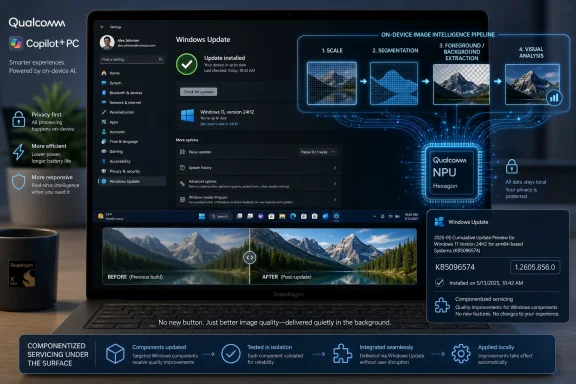
Microsoft describes the Image Processing AI component as enabling on-device image understanding and processing across Windows features and apps. The examples are revealing: scaling, segmentation, foreground and background extraction, and visual analysis. These are not exotic laboratory demos. They are the basic building blocks behind the everyday AI polish Microsoft wants users to encounter in Photos, Paint, accessibility tools, video effects, search surfaces, and future app experiences.The update’s version number, 1.2605.856.0, looks like a minor servicing detail. But componentized versioning is the story. Instead of waiting for a single annual Windows feature update, Microsoft can rev the image-processing layer independently, provided the machine already has the required cumulative update for Windows 11 24H2 or 25H2. That gives the company a path to improve quality, performance, and compatibility without forcing the broader Windows shell to move in lockstep.
This is how modern platforms behave. Browsers update rendering engines and security lists in the background. Phones update camera pipelines, speech models, and app frameworks without making every change feel like a new operating system. Microsoft is trying to bring that model to Windows, but Windows carries heavier baggage: enterprise change control, diverse OEM images, multiple silicon vendors, decades of driver dependencies, and a user base trained to view surprise updates with suspicion.
The promise is elegant. Image data stays on the device, inference runs on dedicated AI hardware, and latency drops because the PC does not need to round-trip every operation through the cloud. The operational reality is messier. Someone has to keep the model packages fresh, align them with cumulative updates, ensure they do not regress battery life or app behavior, and explain why one machine receives the package while another apparently similar machine does not.
Qualcomm Gets the First-Class, First-Wave Treatment Again
KB5096574 is specifically for Qualcomm-powered Copilot+ PCs. That framing keeps Qualcomm at the center of Microsoft’s AI PC rollout even as Intel and AMD now have their own Copilot+ stories. The Snapdragon X launch gave Microsoft a clean hardware target: Arm64 systems with NPUs powerful enough to satisfy the Copilot+ requirement and a relatively constrained platform compared with the sprawl of x86 PCs.That constrained target has benefits. Microsoft can validate model behavior against a smaller set of NPU drivers, power profiles, and OEM configurations. On-device image processing is especially sensitive to that kind of integration. A feature that looks instantaneous in a demo can feel broken if model loading is slow, memory pressure is high, thermal limits kick in, or the system falls back to CPU or GPU paths more often than expected.
Qualcomm’s early role also explains why these updates deserve attention even when they do not come with a glamorous feature name. Microsoft is still building the servicing muscle for AI components, and Qualcomm systems remain the proving ground for much of that work. If the model update channel is reliable on the first Copilot+ generation, it becomes easier to scale the same idea across Intel and AMD hardware. If it is confusing or failure-prone, IT departments will treat AI PC features as another consumer-grade flourish to be disabled, deferred, or ignored.
The hardware vendor split also complicates support conversations. A user may ask whether they have the “latest Windows AI update,” but the answer depends on processor type, OS version, cumulative update state, and whether the relevant component appears in Windows Update history. That is manageable for enthusiasts. It is less pleasant for help desks supporting mixed fleets.
Windows Update Becomes the AI Model Conveyor Belt
The delivery mechanism is ordinary by design: Windows Update downloads and installs KB5096574 automatically. That is exactly what Microsoft needs if it wants Copilot+ features to improve at consumer scale. Most users will not go hunting for model packages, and few should be expected to understand whether a segmentation model or runtime component is stale.Automatic delivery also shifts trust back onto Microsoft’s update pipeline. If AI components are part of the Windows experience, then they must be serviced with the same seriousness as drivers and security intelligence. Microsoft’s support article says the update replaces KB5090939, which gives administrators a useful breadcrumb: this is not a one-off. It is part of a sequence.
The prerequisite is equally important. Devices must have the latest cumulative update for Windows 11 version 24H2 or 25H2 installed. That ties AI servicing to the broader Windows servicing baseline, reducing the chance that a newer AI component lands on an OS build that lacks supporting plumbing. It also means users who delay cumulative updates may not receive the latest AI component, even if their hardware qualifies.
For enterprise IT, this creates a familiar tension in a new place. Organizations often stage cumulative updates to avoid regressions, but Copilot+ feature reliability may depend on staying current. If an AI feature misbehaves, the answer may not be a Store app update or a driver alone. It may be a missing LCU, a superseded AI component, or a processor-specific package that never applied.
The User-Facing Feature May Be Invisible Until It Isn’t
The most interesting thing about KB5096574 is that it does not announce a shiny new button. It improves a foundation. That makes it easy to dismiss, but foundational updates are precisely how AI features become either trustworthy or irritating.Image segmentation, foreground-background separation, visual analysis, and scaling show up everywhere once a platform decides to make them common services. Background blur and portrait effects depend on separating people from scenes. Accessibility features may depend on recognizing visual structure. Image editing tools depend on selecting objects cleanly. Search and automation features may depend on understanding what is visible on the screen or inside an image without sending that content elsewhere.
When those capabilities work, users stop noticing them. When they fail, they become examples in a much broader case against AI bloat. A sloppy cutout in Photos, a laggy edit, a misidentified object, or a feature that works only after a mysterious update can sour users quickly. Microsoft’s challenge is not only to invent AI experiences; it is to make their supporting components boringly reliable.
That is why servicing cadence matters. Models improve, but they also regress. Runtime changes can produce different results on the same input. Hardware acceleration can expose driver bugs that never appeared in CPU-only paths. The platform owner must keep quality high while moving quickly enough to make the AI PC category feel alive after purchase.
Privacy Is the Sales Pitch, but Local Processing Is Also a Performance Bet
Microsoft emphasizes that the Image Processing AI component keeps image data on the device. That is a necessary claim in the post-Recall era, when Windows AI features are scrutinized not merely for what they do, but for what they might collect, store, infer, or expose. Local processing gives Microsoft a cleaner argument: the machine can understand and manipulate images without uploading them to a cloud service.But privacy is only half the equation. On-device inference is also about latency, cost, and product control. A background-removal operation that happens instantly on the NPU feels like a native feature. The same operation routed to a remote server feels like a service, with all the attendant questions about connectivity, accounts, quotas, regional availability, and policy.
This is where Copilot+ PCs differ from the AI features Microsoft has layered onto Windows over the last several years. The company is no longer just adding a web-connected assistant to the taskbar. It is trying to move model execution into the platform itself. If that works, Windows apps can call local AI capabilities the way they call graphics, camera, speech, or file APIs.
The catch is governance. Local processing does not automatically make a feature acceptable in every environment. Some organizations care less about whether data leaves the device and more about whether the device is performing analysis at all. Others will want auditability, policy controls, and a clear inventory of installed AI components. KB5096574 is benign on its face, but it belongs to a category of updates that enterprises will increasingly want to track.
The 24H2 and 25H2 Bridge Shows Microsoft’s New Windows Rhythm
KB5096574 applies to Windows 11 version 24H2 and Windows 11 version 25H2. That pairing is worth pausing on because it reflects Microsoft’s current rhythm: big platform changes arrive in a base release, while enablement, refinements, and component updates continue across versions. Copilot+ features are not confined to a single launch moment.For users, this is mostly good. A Qualcomm Copilot+ PC purchased during the 24H2 era should not feel abandoned as Windows 11 25H2 becomes current. Component updates like this allow Microsoft to support a rolling AI stack across both releases. The PC’s value proposition depends on that continuity. Buyers were sold not just a laptop, but a machine class that would receive AI experiences over time.
For administrators, mixed-version support is more complicated. A fleet may include 24H2 systems held for compatibility reasons and 25H2 systems arriving through new procurement. If both are eligible for the same AI component update, the operational question becomes whether policy, reporting, and troubleshooting tools can represent that clearly. Windows Update history is useful for an individual machine. It is not a fleet-management strategy by itself.
The replacement of KB5090939 also implies that support documentation will need to be read chronologically. AI components may evolve through multiple KBs, and the latest package may quietly supersede the one an admin documented last quarter. That is normal for Windows. It is still new terrain for AI model and runtime updates, where the practical impact may be harder to measure than a security fix or a driver version bump.
The Admin Burden Is Inventory, Not Installation
Microsoft’s installation story is simple: install the latest cumulative update, then let Windows Update deliver the component automatically. The harder problem is knowing what is installed, why it is installed, and whether it matches the organization’s expectations.The support article tells users to check Settings, then Windows Update, then Update history. After installation, the relevant entry should identify the May 2026 Image Processing version 1.2605.856.0 package for Qualcomm-powered systems. That is fine for a single enthusiast checking a new Surface or Snapdragon laptop. It is insufficient for administrators who need reporting across hundreds or thousands of devices.
The broader management question is how AI components show up in existing tooling. Enterprises will want to know whether these updates are exposed cleanly through Windows Update for Business reports, Intune inventory, PowerShell queries, or other endpoint management systems. They will also want to distinguish between OS updates, Store-delivered app updates, driver updates, and AI component updates. If every layer reports differently, Copilot+ support will become a scavenger hunt.
This is not an argument against the update. It is an argument that Microsoft’s documentation and management plane need to mature alongside the AI stack. The company cannot ask enterprises to trust local AI features while making the installed model state feel opaque. The more invisible these components become to users, the more visible they must become to administrators.
Enthusiasts Should Watch the Version Number, Not Just the Feature List
Windows enthusiasts tend to chase visible features: new toggles, updated apps, redesigned panels, and hidden flags. KB5096574 is a reminder that the more consequential action may be happening in component version numbers. A PC can gain quality improvements without a changelog that maps neatly to screenshots.That makes update history more important than usual. If a Qualcomm-powered Copilot+ PC is behaving differently after a May 2026 update, KB5096574 is one candidate to consider. If an image feature works on one machine and not another, the comparison should include the Image Processing AI component version as well as the OS build, app version, driver version, and NPU driver state.
The version number also gives the community something to test against. Enthusiasts can compare behavior before and after the package, document whether specific image operations improve, and identify regressions faster than Microsoft’s broad telemetry may reveal them. The Windows community has long played this role for drivers and cumulative updates. AI components are now entering the same informal QA ecosystem.
That said, expectations should be realistic. Microsoft’s article says the update includes improvements; it does not promise a new feature or publish a detailed model changelog. Some changes may be performance-related, some may be compatibility work, and some may support future app experiences not yet broadly visible. The absence of obvious UI changes does not mean the package did nothing.
The Copilot+ PC Category Is Being Built After the Sale
The most generous reading of KB5096574 is that Microsoft is doing exactly what it should do: improving a new class of PCs after launch through targeted, hardware-aware updates. The less generous reading is that Copilot+ PCs are still being assembled in public, with features, models, privacy controls, and management practices evolving after customers have already bought the machines. Both readings can be true.The PC industry has always sold future potential. Graphics cards shipped before games fully exploited them. 64-bit CPUs arrived before most desktop software needed them. SSDs changed user experience before Windows was fully optimized around them. NPUs are following that pattern, but with a twist: the capabilities they enable are more abstract, more policy-sensitive, and more dependent on software trust.
A faster disk was obviously useful. A local image-understanding stack is useful too, but its value depends on integration. Users do not buy an NPU to admire TOPS numbers. They buy a machine that is supposed to make editing, search, accessibility, communication, and automation better. Updates like KB5096574 are where that promise either compounds or fizzles.
Microsoft’s challenge is to avoid making Copilot+ feel like a label waiting for software to catch up. The company needs a steady cadence of improvements, but also a steady cadence of explanation. A support article that says “improvements” is acceptable for a component update. It is not enough as the long-term language of the AI PC transition.
The Real Changelog Is the New Windows Stack
For now, KB5096574 is a narrow update: Qualcomm-powered Copilot+ PCs, Windows 11 24H2 or 25H2, Image Processing AI component version 1.2605.856.0, automatic delivery through Windows Update, and replacement of the prior KB5090939 package. Those facts are straightforward. The implications are bigger.This is the shape of Windows AI servicing: silicon-aware, componentized, cumulative-update-dependent, and only partly visible through the normal user interface. It will reward users who stay current and administrators who build better inventory habits. It may frustrate anyone who expects one Windows version number to explain everything about a device’s capabilities.
The practical read is simple:
- Qualcomm-powered Copilot+ PCs on Windows 11 24H2 or 25H2 should receive KB5096574 automatically through Windows Update once the required cumulative update baseline is in place.
- The installed component should appear in Windows Update history as the May 2026 Image Processing version 1.2605.856.0 update for Qualcomm-powered systems.
- The update replaces KB5090939, which suggests Microsoft is maintaining a continuing servicing chain for this AI component rather than treating it as a one-time package.
- The component supports local image-processing tasks such as scaling, segmentation, foreground and background extraction, and visual analysis across Windows features and apps.
- Administrators should treat AI component versions as part of device inventory, especially when troubleshooting inconsistent Copilot+ behavior across otherwise similar systems.
- Users should not expect a dramatic new interface from this package alone, because the most likely changes are quality, performance, compatibility, or readiness improvements under the surface.
References
- Primary source: Microsoft Support
Published: Tue, 26 May 2026 21:02:25 Z