

Microsoft has published KB5096578, an automatic Windows Update package for Intel-powered Copilot+ PCs running Windows 11 version 26H1 that updates the Image Processing AI component to version 1.2604.515.0, replacing the earlier KB5089871 release and requiring the latest cumulative update for 26H1. It is a small-looking support article with a larger implication: Windows is no longer just servicing an operating system, but a growing stack of local AI models and runtime pieces. For users, the visible change may be nothing more than a new entry in Update history. For administrators, developers, and privacy-conscious Windows watchers, it is another sign that the AI PC era is becoming a servicing problem as much as a silicon story.
KB5096578 is not the kind of update that will make a normal user stop mid-coffee and ask what changed. Microsoft’s description is deliberately restrained: the package includes improvements to the Image Processing AI component for Windows 11, version 26H1. The component is used on Intel-powered Copilot+ PCs for on-device image understanding and processing across Windows features and apps.
That dry phrasing hides a meaningful shift in how Windows is being built. In the old Windows servicing world, Patch Tuesday brought security fixes, reliability fixes, driver updates, and the occasional feature enablement. In the Copilot+ PC world, Windows also needs to maintain a set of AI components that sit somewhere between system library, model package, silicon abstraction layer, and feature dependency.
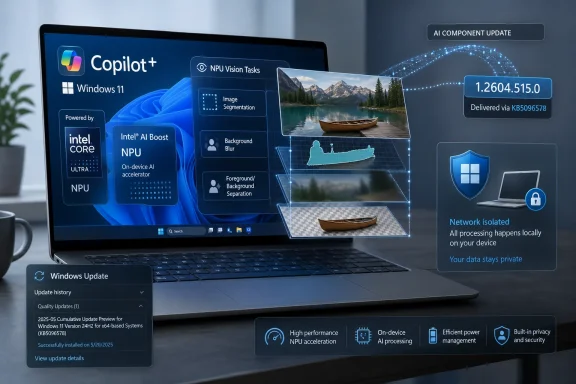
The Image Processing AI component is one of those pieces. Microsoft says it supports tasks such as scaling, segmentation, foreground and background extraction, and visual analysis. Those are not glamorous marketing words, but they are the machinery behind a widening class of Windows experiences: background blur, image enhancement, accessibility descriptions, object isolation, creative editing, and whatever Microsoft decides to wire into the shell next.
The important detail is that this update is scoped. It applies to Copilot+ PCs only, and specifically to Intel-powered systems. That tells us Microsoft is not treating “Windows AI” as a single universal payload. It is servicing AI by hardware family, Windows version, component name, and model/runtime version.
That is rational engineering. It is also the beginning of a more fragmented Windows support matrix.
Versioning is mundane until it becomes operationally important. Once an AI component has its own update history entry, IT teams can audit it. Once it has a KB number, it can be referenced in troubleshooting. Once it replaces an earlier KB, it becomes part of a lineage.
That lineage is already forming. Microsoft has separate pages for AI component update history and release information, and KB5096578 fits into that pattern. The company is effectively creating a parallel update ledger for Copilot+ capabilities: not just “what build of Windows are you on?” but “which AI component versions are installed on this device?”
This is how AI becomes boring enough to matter. The hype cycle talks about agents, copilots, and local inference. The enterprise reality is inventory, baselines, rollback strategy, user experience variance, and help desk scripts that begin with “open Settings, go to Windows Update, and check Update history.”
The presence of an update history entry — “2026-05 Image Processing version 1.2604.515.0 for Intel-powered systems (KB5096578)” — is therefore more than clerical housekeeping. It is Microsoft acknowledging that AI components need to be visible enough to support.
KB5096578 shows why. The same Windows version can behave differently depending on whether the machine is Intel-powered, AMD-powered, Qualcomm-powered, or not a Copilot+ PC at all. A feature that relies on image segmentation may require a working local model. That model may require an NPU runtime. The runtime may be tied to a silicon vendor. The update may arrive only if the device has the latest cumulative update installed.
This is not unprecedented. Windows has long had hardware-specific drivers, firmware updates, OEM extensions, and feature gates. But AI components are closer to the user experience than many drivers are. If an image feature works better on one Copilot+ PC after a component update and differently on another, users may see that as a Windows difference, not a hardware abstraction detail.
That creates a communications problem. Microsoft wants Copilot+ to be a simple consumer label: buy this class of PC, get the AI future. But under the hood, the AI future is made of separately serviced components that may not update in lockstep across chip vendors.
Intel’s role is especially interesting because the first wave of Copilot+ attention went heavily to Qualcomm’s Snapdragon X systems. Intel’s Core Ultra platform is now part of the Copilot+ conversation, but Microsoft has to make sure the Windows AI layer behaves consistently enough across architectures that Copilot+ feels like a platform rather than a collection of vendor-specific demos.
KB5096578 is one brick in that wall. It does not announce a new feature. It tries to keep the substrate beneath existing and future features moving.
But “on-device” is not the same as “simple.” Local AI shifts work away from the cloud, but it does not eliminate governance questions. It moves them into the PC, where components must be updated, validated, documented, and monitored.
For individual users, the privacy benefit is intuitive. If image understanding happens locally, the picture does not need to be uploaded for every enhancement or analysis task. A user editing a photo, extracting a foreground subject, or using an accessibility feature gets a faster response and a cleaner privacy story.
For administrators, the calculus is more complicated. Local models may reduce data exposure to cloud services, but they also introduce new software artifacts running across the fleet. Those artifacts may change behavior over time. They may improve accuracy, alter output, affect performance, or introduce regressions in features that employees increasingly rely on.
That is the bargain Microsoft is asking customers to accept. Copilot+ PCs promise that AI can be close to the user and close to the data. In exchange, Windows becomes responsible for keeping local intelligence current in much the same way it keeps Defender definitions, drivers, and system components current.
The comparison to security definitions is not perfect, but it is useful. Users rarely care which antimalware model revision is installed until something breaks or something gets missed. AI image components may follow a similar path: invisible when they work, suddenly important when an app’s segmentation quality changes or an accessibility output becomes less reliable.
For a traditional reliability update, that vagueness is annoying. For an AI component update, it is more consequential. Image-processing models and runtimes can affect quality, performance, battery life, accessibility, and app behavior. If Microsoft adjusts segmentation behavior, foreground extraction accuracy, scaling logic, or visual-analysis thresholds, those changes may be material to users even if they are not feature announcements.
The company does not need to publish model internals or hand attackers a map of every implementation detail. But a more useful changelog could distinguish between reliability fixes, performance tuning, model quality improvements, compatibility fixes, and security hardening. Those categories would give IT teams and developers a better sense of whether to expect behavior changes.
This is where Microsoft’s AI servicing story still feels immature. The company is making the update visible in history, which is good. It is giving the component a version number, which is better. But the actual release note remains too thin for an era when AI output quality and system behavior can change with the component.
The burden will grow as more Windows features depend on these local components. A vague update note is tolerable when the affected experience is niche. It becomes harder to defend when image understanding underpins accessibility workflows, creative tools, camera effects, search, or shell-level actions.
That makes sense technically. Local AI components depend on runtimes, drivers, frameworks, permissions, and integration points across the operating system. A model package that works correctly on one cumulative update may require APIs, fixes, or policy plumbing introduced in that update. The prerequisite protects Microsoft from supporting too many mismatched combinations.
But it also means Windows feature currency and AI feature currency are becoming linked. A user or organization that delays cumulative updates may also delay AI component updates. That could affect not only flashy Copilot+ features but also mundane experiences that gradually start relying on these components.
For managed environments, this will force a new kind of update thinking. It will not be enough to ask whether a Windows build is patched. Administrators may need to ask whether the relevant AI components are present, current, and aligned with the hardware platform. That is especially true in mixed fleets where Intel, AMD, Qualcomm, and non-Copilot+ machines coexist.
Microsoft has spent years trying to make Windows servicing more predictable. Copilot+ risks making it multidimensional again. The company can still keep the experience manageable, but only if the documentation and management tooling mature as quickly as the AI component stack.
A photo editor, accessibility tool, productivity app, or creative workflow may depend on Windows-provided image understanding rather than bundling every model itself. That is the platform dream: Microsoft handles the model, silicon acceleration, runtime, and privacy boundary; developers build experiences on top. In theory, everyone wins.
In practice, platform-provided intelligence means developers inherit platform variance. A feature may behave differently depending on the installed AI component version, the NPU vendor, and the Windows release. The difference may be small enough to ignore, or large enough to show up in support tickets.
This is not a reason to reject the model. It is the normal trade-off of building on any platform abstraction. Developers already deal with GPU drivers, media codecs, camera pipelines, and OS API versions. AI components simply add another layer — and one whose outputs are probabilistic rather than strictly deterministic.
That probabilistic nature changes the feel of compatibility. If a foreground extraction API returns a slightly cleaner mask after KB5096578, that is an improvement. If it returns a different edge around hair or transparent objects, it may also break a workflow that was tuned around the previous behavior. The line between bug fix and behavior change is blurrier in AI than it is in many conventional APIs.
Microsoft will need to communicate not just that AI components are updated, but how developers should reason about them. Version checks, capability discovery, testing guidance, and enterprise deployment notes will become increasingly important if Windows AI is to be more than a consumer showcase.
That makes component updates a quiet form of platform diplomacy. Each hardware family needs the right models, runtimes, and integration updates. Each must be good enough that users experience Copilot+ as a Windows capability, not a chip-specific science project.
The update’s focus on image processing is particularly relevant because image workloads are among the most visible demonstrations of local AI. Users may not know what an NPU is doing, but they can see whether background extraction is clean, whether image enhancement is fast, and whether visual analysis feels instant. These are the kinds of workloads that sell the idea of local AI better than an abstract benchmark.
They are also workloads where latency matters. If a feature requires a round trip to the cloud, it feels like a service. If it happens instantly on the device, it feels like the computer got smarter. Microsoft’s entire Copilot+ positioning depends on making the latter experience common enough that users stop thinking of AI as a separate chatbot and start seeing it as a property of the PC.
KB5096578 does not prove that vision has arrived. But it shows the maintenance pattern required to make it plausible.
That may sound grandiose for a settings page, but visibility matters. If a user has an Intel Copilot+ PC and an AI-powered image feature is behaving strangely, the first question becomes whether the correct component update landed. If an admin is comparing two machines with inconsistent behavior, the update history entry gives them a concrete data point.
The limitation is that Update history is not fleet management. Enterprises will want this information exposed cleanly through management tools, reporting APIs, inventory systems, and compliance dashboards. A KB entry visible to an end user is a start, not an operations strategy.
There is also a user-trust dimension. Microsoft has spent the past few years learning, sometimes painfully, that Windows users notice when AI features appear without adequate explanation. Making AI components visible in update history helps, but only if the surrounding explanation is good enough to satisfy the technically curious.
“Image Processing version 1.2604.515.0” will reassure some users and confuse others. Microsoft’s job is to make that entry feel like evidence of accountable servicing rather than a mysterious AI payload.
But it is also not trivial. It is a hardware-targeted, versioned, replaceable update for an AI component that Microsoft says supports on-device image understanding and processing. That is exactly the kind of update Windows will need more of if Copilot+ is to become a real platform rather than a launch-event slogan.
The most concrete reading is straightforward:
That does not mean every AI component update requires a months-long pilot. It does mean organizations should start thinking about Copilot+ PCs as a distinct management category. Devices with NPUs and local AI components are not just faster laptops. They are endpoints with additional capability layers that can change independently of the headline OS version.
The policy questions are predictable. Which AI features are enabled? Which are blocked? Which workloads are allowed to use local models? How are component versions inventoried? What happens when an accessibility feature depends on an AI component that is not current? How does the help desk distinguish a broken app from a stale model package?
Microsoft has the pieces to answer some of this, but the ecosystem is still early. The company’s documentation acknowledges the component model, but administrators will need better operational hooks if Copilot+ deployments scale beyond executive refresh cycles and pilot groups.
There is a risk here for Microsoft. If AI components feel opaque, enterprises will slow-roll them. If they feel manageable, auditable, and boring, they will become just another part of the Windows baseline. The difference will come down less to keynote demos than to documentation, controls, and predictable servicing.
There is a familiar Microsoft pattern here. The company often wins platforms not by being first with the most dazzling demo, but by grinding infrastructure into something deployable. Copilot+ PCs will need that treatment. The NPU has to become a normal resource. The local models have to become normal dependencies. The update history entries have to become normal audit artifacts.
KB5096578 is a marker on that road. It is not the destination, and Microsoft’s release note is still too thin for the role these components are likely to play. But the direction is clear: Windows is being reorganized around local AI capabilities that are serviced, versioned, and targeted with increasing specificity.
The next phase of the Copilot+ PC story will not be decided only by whether Microsoft can invent new AI experiences. It will be decided by whether it can maintain them without making Windows feel unpredictable. KB5096578 suggests the company understands the servicing challenge; now it has to prove that transparency and control can keep pace with the models themselves.
 Microsoft’s AI PC Strategy Is Now Arriving as Monthly Plumbing
KB5096578 is not the kind of update that will make a normal user stop mid-coffee and ask what changed. Microsoft’s description is deliberately restrained: the package includes improvements to the Image Processing AI component for Windows 11, version 26H1. The component is used on Intel-powered Copilot+ PCs for on-device image understanding and processing across Windows features and apps.That dry phrasing hides a meaningful shift in how Windows is being built. In the old Windows servicing world, Patch Tuesday brought security fixes, reliability fixes, driver updates, and the occasional feature enablement. In the Copilot+ PC world, Windows also needs to maintain a set of AI components that sit somewhere between system library, model package, silicon abstraction layer, and feature dependency.
The Image Processing AI component is one of those pieces. Microsoft says it supports tasks such as scaling, segmentation, foreground and background extraction, and visual analysis. Those are not glamorous marketing words, but they are the machinery behind a widening class of Windows experiences: background blur, image enhancement, accessibility descriptions, object isolation, creative editing, and whatever Microsoft decides to wire into the shell next.
The important detail is that this update is scoped. It applies to Copilot+ PCs only, and specifically to Intel-powered systems. That tells us Microsoft is not treating “Windows AI” as a single universal payload. It is servicing AI by hardware family, Windows version, component name, and model/runtime version.
That is rational engineering. It is also the beginning of a more fragmented Windows support matrix.
The Version Number Is the Real Headline
Microsoft’s support page gives KB5096578 a component version: 1.2604.515.0. Its replacement note says the update supersedes KB5089871, the prior Intel image-processing component package. That matters because this is not just a conventional cumulative update disappearing into the monthly servicing stream. Microsoft is assigning visible KB identities to individual AI components.Versioning is mundane until it becomes operationally important. Once an AI component has its own update history entry, IT teams can audit it. Once it has a KB number, it can be referenced in troubleshooting. Once it replaces an earlier KB, it becomes part of a lineage.
That lineage is already forming. Microsoft has separate pages for AI component update history and release information, and KB5096578 fits into that pattern. The company is effectively creating a parallel update ledger for Copilot+ capabilities: not just “what build of Windows are you on?” but “which AI component versions are installed on this device?”
This is how AI becomes boring enough to matter. The hype cycle talks about agents, copilots, and local inference. The enterprise reality is inventory, baselines, rollback strategy, user experience variance, and help desk scripts that begin with “open Settings, go to Windows Update, and check Update history.”
The presence of an update history entry — “2026-05 Image Processing version 1.2604.515.0 for Intel-powered systems (KB5096578)” — is therefore more than clerical housekeeping. It is Microsoft acknowledging that AI components need to be visible enough to support.
Copilot+ PCs Are Becoming a Hardware-Specific Windows Branch Without Saying So
Microsoft’s formal line is that Copilot+ PCs are a class of Windows 11 devices with NPUs capable of handling local AI workloads. In practical terms, they are becoming a tier of Windows with features and servicing behaviors that do not map cleanly onto the traditional edition model of Home, Pro, Enterprise, and Education.KB5096578 shows why. The same Windows version can behave differently depending on whether the machine is Intel-powered, AMD-powered, Qualcomm-powered, or not a Copilot+ PC at all. A feature that relies on image segmentation may require a working local model. That model may require an NPU runtime. The runtime may be tied to a silicon vendor. The update may arrive only if the device has the latest cumulative update installed.
This is not unprecedented. Windows has long had hardware-specific drivers, firmware updates, OEM extensions, and feature gates. But AI components are closer to the user experience than many drivers are. If an image feature works better on one Copilot+ PC after a component update and differently on another, users may see that as a Windows difference, not a hardware abstraction detail.
That creates a communications problem. Microsoft wants Copilot+ to be a simple consumer label: buy this class of PC, get the AI future. But under the hood, the AI future is made of separately serviced components that may not update in lockstep across chip vendors.
Intel’s role is especially interesting because the first wave of Copilot+ attention went heavily to Qualcomm’s Snapdragon X systems. Intel’s Core Ultra platform is now part of the Copilot+ conversation, but Microsoft has to make sure the Windows AI layer behaves consistently enough across architectures that Copilot+ feels like a platform rather than a collection of vendor-specific demos.
KB5096578 is one brick in that wall. It does not announce a new feature. It tries to keep the substrate beneath existing and future features moving.
Local AI Is a Privacy Argument and a Servicing Burden
Microsoft’s wording emphasizes that the Image Processing AI component runs on dedicated AI hardware, delivers low-latency performance, and keeps image data on the device. That is the right pitch. After the backlash around Recall and broader concern about AI features analyzing personal content, on-device processing is Microsoft’s safest argument.But “on-device” is not the same as “simple.” Local AI shifts work away from the cloud, but it does not eliminate governance questions. It moves them into the PC, where components must be updated, validated, documented, and monitored.
For individual users, the privacy benefit is intuitive. If image understanding happens locally, the picture does not need to be uploaded for every enhancement or analysis task. A user editing a photo, extracting a foreground subject, or using an accessibility feature gets a faster response and a cleaner privacy story.
For administrators, the calculus is more complicated. Local models may reduce data exposure to cloud services, but they also introduce new software artifacts running across the fleet. Those artifacts may change behavior over time. They may improve accuracy, alter output, affect performance, or introduce regressions in features that employees increasingly rely on.
That is the bargain Microsoft is asking customers to accept. Copilot+ PCs promise that AI can be close to the user and close to the data. In exchange, Windows becomes responsible for keeping local intelligence current in much the same way it keeps Defender definitions, drivers, and system components current.
The comparison to security definitions is not perfect, but it is useful. Users rarely care which antimalware model revision is installed until something breaks or something gets missed. AI image components may follow a similar path: invisible when they work, suddenly important when an app’s segmentation quality changes or an accessibility output becomes less reliable.
“Improvements” Is Doing Too Much Work
The weakest part of Microsoft’s KB5096578 disclosure is also the most familiar one: the update “includes improvements.” That phrase is a software industry classic because it is both true and evasive. It tells users that something changed while withholding nearly everything they would need to evaluate the change.For a traditional reliability update, that vagueness is annoying. For an AI component update, it is more consequential. Image-processing models and runtimes can affect quality, performance, battery life, accessibility, and app behavior. If Microsoft adjusts segmentation behavior, foreground extraction accuracy, scaling logic, or visual-analysis thresholds, those changes may be material to users even if they are not feature announcements.
The company does not need to publish model internals or hand attackers a map of every implementation detail. But a more useful changelog could distinguish between reliability fixes, performance tuning, model quality improvements, compatibility fixes, and security hardening. Those categories would give IT teams and developers a better sense of whether to expect behavior changes.
This is where Microsoft’s AI servicing story still feels immature. The company is making the update visible in history, which is good. It is giving the component a version number, which is better. But the actual release note remains too thin for an era when AI output quality and system behavior can change with the component.
The burden will grow as more Windows features depend on these local components. A vague update note is tolerable when the affected experience is niche. It becomes harder to defend when image understanding underpins accessibility workflows, creative tools, camera effects, search, or shell-level actions.
Windows 11 26H1 Looks Less Like a Feature Release and More Like an AI Servicing Platform
The KB5096578 article applies to Windows 11 version 26H1 and requires the latest cumulative update for that version. That dependency is worth pausing on. Microsoft is tying AI component servicing to the current state of the underlying OS, which suggests the AI layer is not floating independently above Windows.That makes sense technically. Local AI components depend on runtimes, drivers, frameworks, permissions, and integration points across the operating system. A model package that works correctly on one cumulative update may require APIs, fixes, or policy plumbing introduced in that update. The prerequisite protects Microsoft from supporting too many mismatched combinations.
But it also means Windows feature currency and AI feature currency are becoming linked. A user or organization that delays cumulative updates may also delay AI component updates. That could affect not only flashy Copilot+ features but also mundane experiences that gradually start relying on these components.
For managed environments, this will force a new kind of update thinking. It will not be enough to ask whether a Windows build is patched. Administrators may need to ask whether the relevant AI components are present, current, and aligned with the hardware platform. That is especially true in mixed fleets where Intel, AMD, Qualcomm, and non-Copilot+ machines coexist.
Microsoft has spent years trying to make Windows servicing more predictable. Copilot+ risks making it multidimensional again. The company can still keep the experience manageable, but only if the documentation and management tooling mature as quickly as the AI component stack.
Developers Get a New Dependency They Do Not Fully Control
The developer angle is easy to miss because KB5096578 is framed as a support update, not an SDK announcement. But if Windows apps increasingly call into OS-provided AI capabilities, component versions become part of the development environment whether developers asked for that or not.A photo editor, accessibility tool, productivity app, or creative workflow may depend on Windows-provided image understanding rather than bundling every model itself. That is the platform dream: Microsoft handles the model, silicon acceleration, runtime, and privacy boundary; developers build experiences on top. In theory, everyone wins.
In practice, platform-provided intelligence means developers inherit platform variance. A feature may behave differently depending on the installed AI component version, the NPU vendor, and the Windows release. The difference may be small enough to ignore, or large enough to show up in support tickets.
This is not a reason to reject the model. It is the normal trade-off of building on any platform abstraction. Developers already deal with GPU drivers, media codecs, camera pipelines, and OS API versions. AI components simply add another layer — and one whose outputs are probabilistic rather than strictly deterministic.
That probabilistic nature changes the feel of compatibility. If a foreground extraction API returns a slightly cleaner mask after KB5096578, that is an improvement. If it returns a different edge around hair or transparent objects, it may also break a workflow that was tuned around the previous behavior. The line between bug fix and behavior change is blurrier in AI than it is in many conventional APIs.
Microsoft will need to communicate not just that AI components are updated, but how developers should reason about them. Version checks, capability discovery, testing guidance, and enterprise deployment notes will become increasingly important if Windows AI is to be more than a consumer showcase.
Intel’s Copilot+ Moment Depends on Invisible Work Like This
Intel has a strategic stake in updates like KB5096578. The company cannot afford for Copilot+ to be perceived as a Qualcomm-first experience where x86 systems trail in polish or feature support. Microsoft, for its part, cannot let Copilot+ become synonymous with a single silicon vendor if it wants the label to define the next mainstream Windows PC.That makes component updates a quiet form of platform diplomacy. Each hardware family needs the right models, runtimes, and integration updates. Each must be good enough that users experience Copilot+ as a Windows capability, not a chip-specific science project.
The update’s focus on image processing is particularly relevant because image workloads are among the most visible demonstrations of local AI. Users may not know what an NPU is doing, but they can see whether background extraction is clean, whether image enhancement is fast, and whether visual analysis feels instant. These are the kinds of workloads that sell the idea of local AI better than an abstract benchmark.
They are also workloads where latency matters. If a feature requires a round trip to the cloud, it feels like a service. If it happens instantly on the device, it feels like the computer got smarter. Microsoft’s entire Copilot+ positioning depends on making the latter experience common enough that users stop thinking of AI as a separate chatbot and start seeing it as a property of the PC.
KB5096578 does not prove that vision has arrived. But it shows the maintenance pattern required to make it plausible.
The Update History Page Becomes an AI Audit Trail
Microsoft instructs users to verify KB5096578 through Settings, Windows Update, and Update history. That is ordinary support guidance, but it has new importance in this context. Update history is becoming the first consumer-facing AI component audit trail in Windows.That may sound grandiose for a settings page, but visibility matters. If a user has an Intel Copilot+ PC and an AI-powered image feature is behaving strangely, the first question becomes whether the correct component update landed. If an admin is comparing two machines with inconsistent behavior, the update history entry gives them a concrete data point.
The limitation is that Update history is not fleet management. Enterprises will want this information exposed cleanly through management tools, reporting APIs, inventory systems, and compliance dashboards. A KB entry visible to an end user is a start, not an operations strategy.
There is also a user-trust dimension. Microsoft has spent the past few years learning, sometimes painfully, that Windows users notice when AI features appear without adequate explanation. Making AI components visible in update history helps, but only if the surrounding explanation is good enough to satisfy the technically curious.
“Image Processing version 1.2604.515.0” will reassure some users and confuse others. Microsoft’s job is to make that entry feel like evidence of accountable servicing rather than a mysterious AI payload.
The Small KB That Shows Where Windows Is Headed
KB5096578 is easy to overread and easy to underread. It is not a blockbuster feature release. It does not announce a new Copilot interface, a Recall milestone, or a dramatic change to Windows. Most eligible machines will simply install it automatically and move on.But it is also not trivial. It is a hardware-targeted, versioned, replaceable update for an AI component that Microsoft says supports on-device image understanding and processing. That is exactly the kind of update Windows will need more of if Copilot+ is to become a real platform rather than a launch-event slogan.
The most concrete reading is straightforward:
- KB5096578 updates Intel-powered Copilot+ PCs on Windows 11 version 26H1 to Image Processing AI component version 1.2604.515.0.
- The update is delivered automatically through Windows Update and requires the latest cumulative update for Windows 11 version 26H1.
- Microsoft says the component supports local image tasks such as scaling, segmentation, foreground and background extraction, and visual analysis.
- The package replaces KB5089871, making it part of an emerging version chain for Windows AI components.
- Users can confirm installation in Windows Update history, where the May 2026 Image Processing entry should appear.
- The sparse release note leaves unanswered what specific quality, reliability, performance, or compatibility changes were made.
Enterprises Will Not Treat AI Components as Magic
For home users, the default answer is simple: if the update applies, let Windows Update install it. For enterprise IT, the answer is more conditional. AI components touch user experience, privacy posture, silicon utilization, and application behavior, so they will eventually need the same disciplined treatment as drivers and feature updates.That does not mean every AI component update requires a months-long pilot. It does mean organizations should start thinking about Copilot+ PCs as a distinct management category. Devices with NPUs and local AI components are not just faster laptops. They are endpoints with additional capability layers that can change independently of the headline OS version.
The policy questions are predictable. Which AI features are enabled? Which are blocked? Which workloads are allowed to use local models? How are component versions inventoried? What happens when an accessibility feature depends on an AI component that is not current? How does the help desk distinguish a broken app from a stale model package?
Microsoft has the pieces to answer some of this, but the ecosystem is still early. The company’s documentation acknowledges the component model, but administrators will need better operational hooks if Copilot+ deployments scale beyond executive refresh cycles and pilot groups.
There is a risk here for Microsoft. If AI components feel opaque, enterprises will slow-roll them. If they feel manageable, auditable, and boring, they will become just another part of the Windows baseline. The difference will come down less to keynote demos than to documentation, controls, and predictable servicing.
Microsoft’s Quietest AI Updates May Matter More Than Its Loudest Demos
The industry tends to judge AI progress by splashy feature announcements. Windows will be judged by something harsher: whether the AI features work reliably on millions of different PCs, across silicon vendors, under real user constraints, with privacy expectations intact. That work happens through updates like KB5096578.There is a familiar Microsoft pattern here. The company often wins platforms not by being first with the most dazzling demo, but by grinding infrastructure into something deployable. Copilot+ PCs will need that treatment. The NPU has to become a normal resource. The local models have to become normal dependencies. The update history entries have to become normal audit artifacts.
KB5096578 is a marker on that road. It is not the destination, and Microsoft’s release note is still too thin for the role these components are likely to play. But the direction is clear: Windows is being reorganized around local AI capabilities that are serviced, versioned, and targeted with increasing specificity.
The next phase of the Copilot+ PC story will not be decided only by whether Microsoft can invent new AI experiences. It will be decided by whether it can maintain them without making Windows feel unpredictable. KB5096578 suggests the company understands the servicing challenge; now it has to prove that transparency and control can keep pace with the models themselves.
References
- Primary source: Microsoft Support
Published: Tue, 26 May 2026 21:02:23 Z
- Related coverage: techradar.com
- Related coverage: windowscentral.com
Microsoft confirms Ask Copilot is still coming to Windows 11's Taskbar this summer
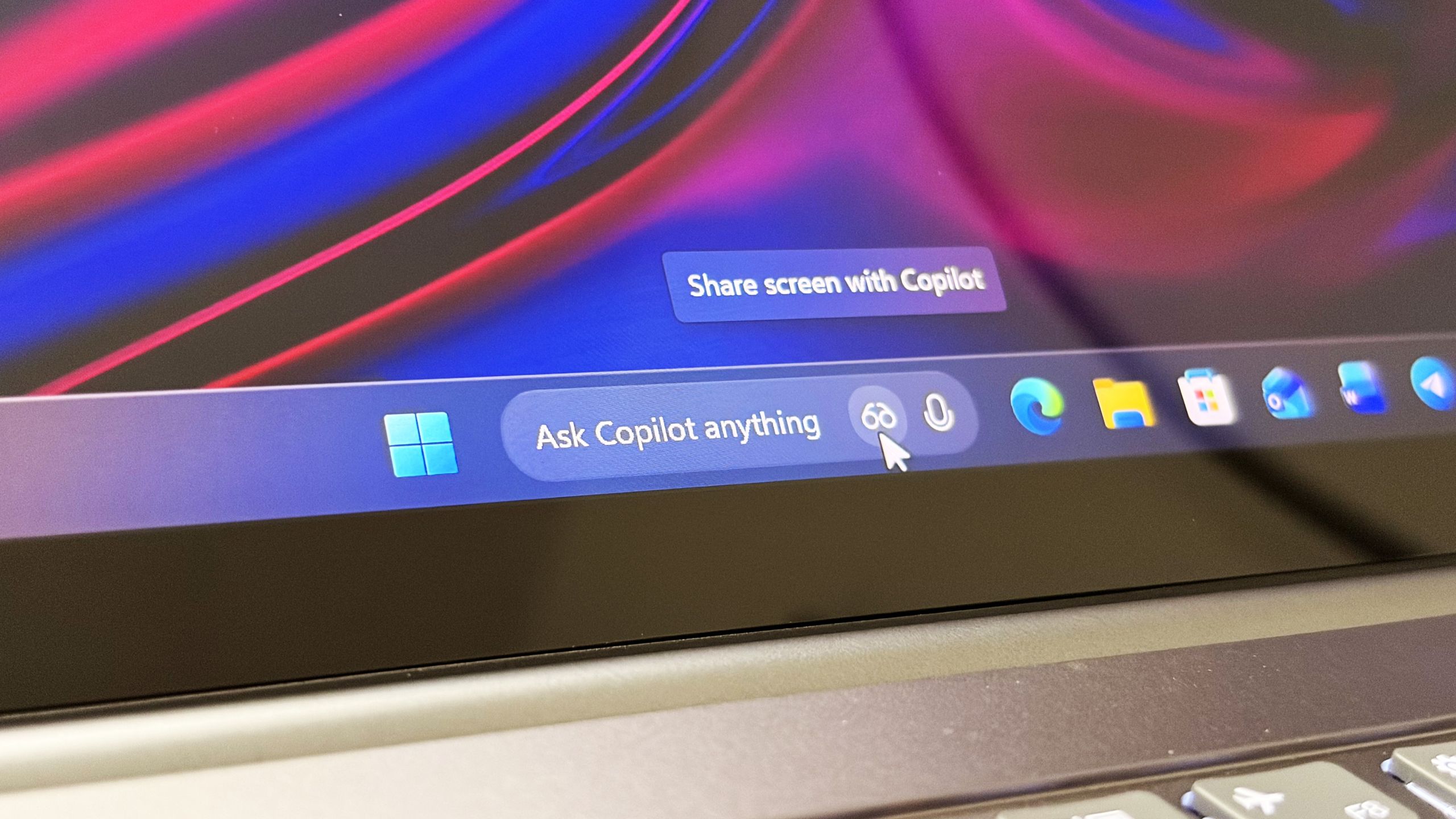
First announced last year, a new document has confirmed that Microsoft's upcoming "Ask Copilot" feature for Windows 11's Taskbar is arriving mid-2026. www.windowscentral.com
- Related coverage: windowslatest.com

Windows 11 AI components are getting their own changelogs (release history), as Microsoft plans model updates
Windows Latest today found a new support document called "Release information for AI components." This lists all AI model updates. www.windowslatest.com
- Official source: learn.microsoft.com

- Official source: microsoft.com
Shop Copilot+ PCs: Windows AI PCs and Laptop Devices | Microsoft Windows
Shop Copilot+ PCs, the fastest, most intelligent Windows PCs ever. Explore Windows AI tools and features built into the latest PCs, desktops, and laptop devices.www.microsoft.com

- Related coverage: windowsforum.com

KB5078977: Qualcomm Copilot+ Image Processing AI Update on Windows 11 26H1
Microsoft has quietly shipped a targeted Image Processing AI component update — KB5078977 — that delivers component version 1.2511.1196.0 to Qualcomm‑powered Copilot+ PCs running Windows 11, and Microsoft describes the package only as “includes improvements” to image scaling and... windowsforum.com
