

KDE Plasma 6.7 was officially released on June 16, 2026, as the latest stable version of KDE’s Linux desktop environment, bringing per-screen virtual desktops, stronger Wayland session behavior, better remote-control transparency, microphone and printing refinements, and a preview of KDE’s next-generation Union theming work. The headline is not that Plasma has found one spectacular trick. It is that KDE is turning the Linux desktop into a more coherent workstation, one release at a time. Plasma 6.7 is the kind of update that looks modest until it lands on a multi-monitor desk, a remote support session, or a gaming handheld plugged into a television.
The most consequential Plasma 6.7 change is not a new wallpaper, a dock redesign, or a dramatic visual rebrand. It is the arrival of per-screen virtual desktops, a feature that sounds like an obscure window-manager checkbox until you have spent years fighting the opposite behavior.
Traditional virtual desktops tend to treat all displays as one giant workspace. Switch from Desktop 1 to Desktop 2, and every monitor moves with you. That model is tidy from an implementation standpoint, but it is not how many people actually work. A developer may want documentation pinned on one screen while code changes on another. A sysadmin may want monitoring dashboards to stay put while terminals rotate through separate task contexts. A writer may want notes, chat, and browser windows to remain anchored while the primary display changes focus.
Plasma 6.7’s answer is to let displays behave more independently. That moves KDE closer to the mental model many power users have wanted for years: each monitor can be part of a larger desktop, but it does not have to march in lockstep with every other panel of glass on the desk. It is a practical concession to the way modern workstations are built.
This matters because Plasma has long sold itself on configurability. But configurability only counts when it reaches the routines that waste real time. Per-screen virtual desktops are not cosmetic flexibility; they are workflow flexibility. They reduce the friction of using two, three, or four displays without forcing users into tiling-window-manager austerity.
The Windows comparison is unavoidable for this audience. Microsoft has improved virtual desktops over the years, but Windows still carries a broad, generalized model designed for the median user. KDE is betting that desktop users who care about layout, persistence, and spatial organization deserve more granular control. Plasma 6.7 is one of those moments where Linux does not merely imitate the commercial desktop; it exposes how much room remains for the commercial desktop to improve.
The Plasma 6 series has been KDE’s post-X11 proving ground. Plasma 6.7’s improvements around session handling, screencasting, remote desktop requests, and input control are part of that larger move. This is not glamorous work, but it is the difference between a desktop that can be recommended to enthusiasts and one that can be trusted by people who have meetings, support calls, and production tasks.
Remote control transparency is especially important. Plasma 6.7 can notify users when an application has permission to control the system remotely without prompting again. That kind of alert is easy to dismiss as security theater until you consider how many legitimate tools now require deep desktop access: remote support agents, collaboration apps, accessibility utilities, testing tools, and enterprise management software. The modern desktop is full of software that wants to see, capture, or control other software.
The challenge is to make that power visible without making it unbearable. If every legitimate action triggers a permission panic, users learn to click through. If nothing is shown, remote control becomes invisible by default. KDE’s direction here is the right one: persistent trust should still come with an observable signal. The user should not need a security audit to know when the machine is being steered by something else.
There is a larger strategic point here. Wayland’s security model gives desktop environments a chance to revisit assumptions that X11 made decades ago. Plasma 6.7 shows KDE using that chance not just to close holes, but to build a more legible desktop. That is the real Wayland milestone: not merely replacing X11, but making previously hidden relationships between apps, windows, inputs, and screens understandable.
KDE has always been powerful and sometimes chaotic. Its flexibility is a strength, but visual and behavioral consistency across KDE applications, Qt applications, Flatpaks, sandboxed software, and third-party programs is hard to maintain. A Linux desktop in 2026 is not just a shell and a handful of bundled apps. It is a federation of packaging systems, toolkits, portals, themes, permissions, and legacy assumptions.
Union appears aimed at the layer where KDE’s design ambitions meet that messy reality. The goal is not merely to make one app prettier. It is to create a path toward more consistent styling for QML-based applications without breaking the universe of existing software. That is why KDE is treating it carefully. Theme systems are among the places where Linux desktops most often reveal their seams.
The Desde Linux report’s look ahead to Plasma 6.8 reinforces the same theme. KDE developers are already working on dark-theme detection improvements for older GTK 2 applications so icons do not disappear against dark backgrounds. That sounds like a tiny quality-of-life fix, but it speaks to a broader philosophy: a desktop environment should not punish users for running software that was not born yesterday.
This is where KDE’s ambitions differ from cleaner but more constrained desktop projects. Plasma wants to be modern without forcing a hard break from everything older, stranger, or more configurable than the design team might prefer. That is a harder path. It also may be the path that best fits Linux itself.
None of these turns KDE into a different desktop overnight. Together, they tell us what KDE thinks the Linux desktop needs next: less friction, fewer paper cuts, and better integration between features that used to feel bolted on. Plasma 6.7 is a polish release only if polish is understood as product strategy.
The microphone work is a good example. Audio input problems are not exciting until they ruin a meeting. Giving users easier ways to test and adjust microphone sensitivity is the sort of feature that disappears when it works and becomes maddening when it does not exist. KDE is spending effort on the mundane places where desktop operating systems earn trust.
Printing is similar. Linux printing has improved enormously over the years, but the experience still carries a cultural scar tissue among longtime users. A full-featured print queue viewer is not going to dominate social media, but it matters to offices, schools, home labs, and anyone who still has to get a shipping label or tax form onto paper. Desktop credibility is built in precisely these unglamorous corners.
KRunner’s refinement also matters because launchers are now command surfaces. They do not merely start apps; they search, calculate, trigger shortcuts, locate files, and expose system actions. When the launcher returns noisy results, the whole desktop feels less intelligent. Plasma 6.7’s cleaner ranking is part of the broader move from “KDE lets you do everything” toward “KDE helps you find the thing you meant.”
Bigscreen is KDE’s argument that Plasma can be more than a conventional mouse-and-keyboard desktop. A television interface needs larger targets, remote or gamepad navigation, and a different tolerance for distance and focus. It has to behave less like a shrunken workstation and more like a purpose-built shell.
That does not mean Plasma Bigscreen will suddenly become the default interface for living-room PCs. The gaming and HTPC markets have their own gravity, and Valve’s work around SteamOS remains the strongest force in Linux consumer visibility. But KDE’s presence here is important. It gives distributions and device makers another upstream building block rather than forcing every project to invent its own ten-foot interface.
The strategic value is optionality. Plasma can serve a traditional desktop, a tablet-like environment, a phone-adjacent shell, and a television interface without pretending they are all the same thing. That is messy, but it is also very KDE. The project’s long-term bet is that shared foundations can support different experiences without collapsing them into one lowest-common-denominator UI.
For Windows users watching from the other side, this is one area where Microsoft’s desktop strategy looks oddly rigid. Windows can run on handhelds, desktops, tablets, and TV-connected PCs, but the shell still often feels like one interface stretched across too many contexts. KDE’s modularity gives Linux builders room to experiment where Windows OEMs often wait for Redmond.
The reported 6.8 changes are not a pivot away from 6.7’s priorities. They are a continuation of them. Better GTK 2 dark-theme integration, improved Flatpak browser integration for Microsoft Edge, more consistent animations, revised XDG portal permission dialogs, and better low-battery behavior in fullscreen scenarios all point in the same direction: Plasma is trying to make mixed modern Linux environments feel less mixed.
The Microsoft Edge Flatpak detail is particularly interesting for WindowsForum readers. Edge is a Microsoft browser running as a sandboxed Linux app inside a KDE desktop. The fact that KDE is working to make its media controls and download progress integrate properly with Plasma’s panel is a perfect example of where desktop competition now lives. It is no longer about whether Linux can run the browser. It is about whether the browser feels like a first-class citizen once it is there.
The low-battery notification change is another example of KDE choosing practicality over purity. Fullscreen gaming and video playback often suppress interruptions for good reason. But a laptop that dies silently because the desktop was too polite is not a premium experience. Plasma 6.8’s planned behavior recognizes that some alerts are allowed to break the spell.
The animation consistency work is smaller but revealing. Users notice when effects ignore global speed settings, even if they cannot name the subsystem responsible. A desktop that respects its own settings feels more intentional. That kind of consistency is one of the hardest things for a highly configurable environment to maintain.
KDE’s advantage is not that it is simpler than Windows or macOS. It is not. Plasma can be intricate, and sometimes it still exposes more machinery than a mainstream user expects. But KDE’s proposition is that complexity can be placed under user control rather than hidden behind vendor policy.
That is why the remote-control notifications, portal dialog refinements, Flatpak integration, and Wayland permission work matter. They are all parts of the same trust negotiation. Users need to know when apps are interacting with sensitive desktop capabilities. Administrators need predictable behavior. Developers need APIs that do not require hacks. Distributions need a desktop that can absorb new packaging and security models without making users feel punished.
The Linux desktop’s old weakness was that it often felt like a collection of parts. Plasma 6.7 does not eliminate that history, but it shows KDE actively sanding down the joins. The project is not just adding knobs. It is deciding which knobs deserve better labels, which behaviors deserve notifications, and which legacy assumptions need to be replaced.
There is also a cultural contrast here. Microsoft often changes Windows by central decision, then spends years managing user backlash, enterprise deferral, and policy workarounds. KDE changes Plasma in public, sometimes messily, through visible merge requests, weekly development reports, beta cycles, and distribution packaging. That openness can look chaotic, but it also gives power users and downstream maintainers a clearer view of what is coming.
That gap is not a failure of KDE. It is part of the Linux distribution model. Upstream Plasma can move on a four-month cadence, while distributions decide how much change their users should absorb and when. The result is both a strength and a source of confusion. Linux users can choose stability or speed, but they must understand which bargain their distribution has made.
For Windows users, this can look alien. Microsoft largely controls the release train, even when OEMs, IT departments, and user settings affect timing. In Linux, the desktop environment, toolkit, kernel, graphics stack, packaging format, and distribution policy can all move on different clocks. Plasma 6.7’s real-world arrival will therefore be uneven.
Administrators should treat this as a testing event, not merely a news item. Multi-monitor behavior, remote desktop flows, Flatpak portals, printing, audio devices, and GPU reporting are all areas where local hardware and distribution packaging matter. The right question is not just “Does Plasma 6.7 have the feature?” It is “Does my distribution’s Plasma 6.7 build behave correctly on my fleet?”
Enthusiasts, meanwhile, will do what enthusiasts always do: install early, report bugs, and discover edge cases before everyone else. That is part of KDE’s feedback loop. The project’s velocity depends on a community willing to run the new code in real configurations that developers cannot all reproduce.
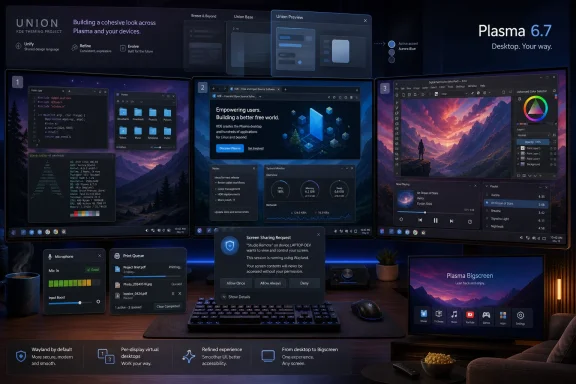 Plasma 6.7 Makes the Multi-Monitor Desktop Less Weird
The most consequential Plasma 6.7 change is not a new wallpaper, a dock redesign, or a dramatic visual rebrand. It is the arrival of per-screen virtual desktops, a feature that sounds like an obscure window-manager checkbox until you have spent years fighting the opposite behavior.Traditional virtual desktops tend to treat all displays as one giant workspace. Switch from Desktop 1 to Desktop 2, and every monitor moves with you. That model is tidy from an implementation standpoint, but it is not how many people actually work. A developer may want documentation pinned on one screen while code changes on another. A sysadmin may want monitoring dashboards to stay put while terminals rotate through separate task contexts. A writer may want notes, chat, and browser windows to remain anchored while the primary display changes focus.
Plasma 6.7’s answer is to let displays behave more independently. That moves KDE closer to the mental model many power users have wanted for years: each monitor can be part of a larger desktop, but it does not have to march in lockstep with every other panel of glass on the desk. It is a practical concession to the way modern workstations are built.
This matters because Plasma has long sold itself on configurability. But configurability only counts when it reaches the routines that waste real time. Per-screen virtual desktops are not cosmetic flexibility; they are workflow flexibility. They reduce the friction of using two, three, or four displays without forcing users into tiling-window-manager austerity.
The Windows comparison is unavoidable for this audience. Microsoft has improved virtual desktops over the years, but Windows still carries a broad, generalized model designed for the median user. KDE is betting that desktop users who care about layout, persistence, and spatial organization deserve more granular control. Plasma 6.7 is one of those moments where Linux does not merely imitate the commercial desktop; it exposes how much room remains for the commercial desktop to improve.
Wayland Is No Longer the Future Tense
Plasma 6.7 also continues KDE’s slow but decisive campaign to make Wayland feel less like a technology migration and more like the normal desktop. That distinction matters. Users do not care whether a compositor architecture is theoretically superior if screen sharing breaks, sessions do not restore properly, or input permissions become inscrutable.The Plasma 6 series has been KDE’s post-X11 proving ground. Plasma 6.7’s improvements around session handling, screencasting, remote desktop requests, and input control are part of that larger move. This is not glamorous work, but it is the difference between a desktop that can be recommended to enthusiasts and one that can be trusted by people who have meetings, support calls, and production tasks.
Remote control transparency is especially important. Plasma 6.7 can notify users when an application has permission to control the system remotely without prompting again. That kind of alert is easy to dismiss as security theater until you consider how many legitimate tools now require deep desktop access: remote support agents, collaboration apps, accessibility utilities, testing tools, and enterprise management software. The modern desktop is full of software that wants to see, capture, or control other software.
The challenge is to make that power visible without making it unbearable. If every legitimate action triggers a permission panic, users learn to click through. If nothing is shown, remote control becomes invisible by default. KDE’s direction here is the right one: persistent trust should still come with an observable signal. The user should not need a security audit to know when the machine is being steered by something else.
There is a larger strategic point here. Wayland’s security model gives desktop environments a chance to revisit assumptions that X11 made decades ago. Plasma 6.7 shows KDE using that chance not just to close holes, but to build a more legible desktop. That is the real Wayland milestone: not merely replacing X11, but making previously hidden relationships between apps, windows, inputs, and screens understandable.
KDE’s Theming Problem Is Becoming an Architecture Problem
The Union theming preview in Plasma 6.7 is easy to underrate because it arrives as a technology preview rather than a user-facing revolution. KDE is explicitly not telling ordinary users to flip it on globally and forget about it. But the presence of Union in the 6.7 cycle points to a deeper problem KDE has to solve if Plasma is going to keep scaling.KDE has always been powerful and sometimes chaotic. Its flexibility is a strength, but visual and behavioral consistency across KDE applications, Qt applications, Flatpaks, sandboxed software, and third-party programs is hard to maintain. A Linux desktop in 2026 is not just a shell and a handful of bundled apps. It is a federation of packaging systems, toolkits, portals, themes, permissions, and legacy assumptions.
Union appears aimed at the layer where KDE’s design ambitions meet that messy reality. The goal is not merely to make one app prettier. It is to create a path toward more consistent styling for QML-based applications without breaking the universe of existing software. That is why KDE is treating it carefully. Theme systems are among the places where Linux desktops most often reveal their seams.
The Desde Linux report’s look ahead to Plasma 6.8 reinforces the same theme. KDE developers are already working on dark-theme detection improvements for older GTK 2 applications so icons do not disappear against dark backgrounds. That sounds like a tiny quality-of-life fix, but it speaks to a broader philosophy: a desktop environment should not punish users for running software that was not born yesterday.
This is where KDE’s ambitions differ from cleaner but more constrained desktop projects. Plasma wants to be modern without forcing a hard break from everything older, stranger, or more configurable than the design team might prefer. That is a harder path. It also may be the path that best fits Linux itself.
The Small Fixes Are the Product Strategy
A release like Plasma 6.7 is full of improvements that look scattered in a changelog but coherent in use. Better microphone controls. A more capable print queue viewer. Cleaner handling of installed apps in Discover. KRunner result filtering that tries not to drown the user in irrelevant shortcut entries. Improvements to virtual keyboard behavior. Better support for sandboxed app notifications. More reliable screencast and remote desktop flows.None of these turns KDE into a different desktop overnight. Together, they tell us what KDE thinks the Linux desktop needs next: less friction, fewer paper cuts, and better integration between features that used to feel bolted on. Plasma 6.7 is a polish release only if polish is understood as product strategy.
The microphone work is a good example. Audio input problems are not exciting until they ruin a meeting. Giving users easier ways to test and adjust microphone sensitivity is the sort of feature that disappears when it works and becomes maddening when it does not exist. KDE is spending effort on the mundane places where desktop operating systems earn trust.
Printing is similar. Linux printing has improved enormously over the years, but the experience still carries a cultural scar tissue among longtime users. A full-featured print queue viewer is not going to dominate social media, but it matters to offices, schools, home labs, and anyone who still has to get a shipping label or tax form onto paper. Desktop credibility is built in precisely these unglamorous corners.
KRunner’s refinement also matters because launchers are now command surfaces. They do not merely start apps; they search, calculate, trigger shortcuts, locate files, and expose system actions. When the launcher returns noisy results, the whole desktop feels less intelligent. Plasma 6.7’s cleaner ranking is part of the broader move from “KDE lets you do everything” toward “KDE helps you find the thing you meant.”
Plasma Bigscreen Expands the Desktop Beyond the Desk
Plasma 6.7 also brings Plasma Bigscreen into the release conversation in a more serious way. That matters because the living-room Linux story has changed. A decade ago, a TV-oriented Linux shell sounded like a hobby project. In 2026, it sits in the orbit of SteamOS, handheld PCs, mini PCs, home theater setups, and a growing expectation that a Linux machine might move between desk, couch, and dock.Bigscreen is KDE’s argument that Plasma can be more than a conventional mouse-and-keyboard desktop. A television interface needs larger targets, remote or gamepad navigation, and a different tolerance for distance and focus. It has to behave less like a shrunken workstation and more like a purpose-built shell.
That does not mean Plasma Bigscreen will suddenly become the default interface for living-room PCs. The gaming and HTPC markets have their own gravity, and Valve’s work around SteamOS remains the strongest force in Linux consumer visibility. But KDE’s presence here is important. It gives distributions and device makers another upstream building block rather than forcing every project to invent its own ten-foot interface.
The strategic value is optionality. Plasma can serve a traditional desktop, a tablet-like environment, a phone-adjacent shell, and a television interface without pretending they are all the same thing. That is messy, but it is also very KDE. The project’s long-term bet is that shared foundations can support different experiences without collapsing them into one lowest-common-denominator UI.
For Windows users watching from the other side, this is one area where Microsoft’s desktop strategy looks oddly rigid. Windows can run on handhelds, desktops, tablets, and TV-connected PCs, but the shell still often feels like one interface stretched across too many contexts. KDE’s modularity gives Linux builders room to experiment where Windows OEMs often wait for Redmond.
Plasma 6.8 Is Already Casting a Shadow
The awkward thing about covering KDE Plasma 6.7 on release day is that KDE development does not pause for the release-day article. Plasma 6.8 is already visible on the horizon, with an expected October 14, 2026 release date, and the early work tells us where the project is headed after 6.7.The reported 6.8 changes are not a pivot away from 6.7’s priorities. They are a continuation of them. Better GTK 2 dark-theme integration, improved Flatpak browser integration for Microsoft Edge, more consistent animations, revised XDG portal permission dialogs, and better low-battery behavior in fullscreen scenarios all point in the same direction: Plasma is trying to make mixed modern Linux environments feel less mixed.
The Microsoft Edge Flatpak detail is particularly interesting for WindowsForum readers. Edge is a Microsoft browser running as a sandboxed Linux app inside a KDE desktop. The fact that KDE is working to make its media controls and download progress integrate properly with Plasma’s panel is a perfect example of where desktop competition now lives. It is no longer about whether Linux can run the browser. It is about whether the browser feels like a first-class citizen once it is there.
The low-battery notification change is another example of KDE choosing practicality over purity. Fullscreen gaming and video playback often suppress interruptions for good reason. But a laptop that dies silently because the desktop was too polite is not a premium experience. Plasma 6.8’s planned behavior recognizes that some alerts are allowed to break the spell.
The animation consistency work is smaller but revealing. Users notice when effects ignore global speed settings, even if they cannot name the subsystem responsible. A desktop that respects its own settings feels more intentional. That kind of consistency is one of the hardest things for a highly configurable environment to maintain.
The Linux Desktop Is Becoming a Contest of Trust
Plasma 6.7 arrives at a moment when desktop operating systems are being judged less by whether they can launch apps and more by whether users trust their defaults. Windows is under pressure from advertising surfaces, account nudges, AI integration, telemetry debates, and update fatigue. macOS remains polished but tightly bounded by Apple’s ecosystem. Linux, meanwhile, is still fragmented but increasingly credible on hardware that enthusiasts actually use.KDE’s advantage is not that it is simpler than Windows or macOS. It is not. Plasma can be intricate, and sometimes it still exposes more machinery than a mainstream user expects. But KDE’s proposition is that complexity can be placed under user control rather than hidden behind vendor policy.
That is why the remote-control notifications, portal dialog refinements, Flatpak integration, and Wayland permission work matter. They are all parts of the same trust negotiation. Users need to know when apps are interacting with sensitive desktop capabilities. Administrators need predictable behavior. Developers need APIs that do not require hacks. Distributions need a desktop that can absorb new packaging and security models without making users feel punished.
The Linux desktop’s old weakness was that it often felt like a collection of parts. Plasma 6.7 does not eliminate that history, but it shows KDE actively sanding down the joins. The project is not just adding knobs. It is deciding which knobs deserve better labels, which behaviors deserve notifications, and which legacy assumptions need to be replaced.
There is also a cultural contrast here. Microsoft often changes Windows by central decision, then spends years managing user backlash, enterprise deferral, and policy workarounds. KDE changes Plasma in public, sometimes messily, through visible merge requests, weekly development reports, beta cycles, and distribution packaging. That openness can look chaotic, but it also gives power users and downstream maintainers a clearer view of what is coming.
The Release Still Depends on Your Distribution
The usual Linux caveat applies: Plasma 6.7 being released upstream does not mean every KDE user receives it today. Rolling-release distributions and KDE-focused systems tend to move quickly. Conservative distributions, enterprise-oriented builds, and long-term-support releases may hold back, backport selectively, or wait for bugfix point releases.That gap is not a failure of KDE. It is part of the Linux distribution model. Upstream Plasma can move on a four-month cadence, while distributions decide how much change their users should absorb and when. The result is both a strength and a source of confusion. Linux users can choose stability or speed, but they must understand which bargain their distribution has made.
For Windows users, this can look alien. Microsoft largely controls the release train, even when OEMs, IT departments, and user settings affect timing. In Linux, the desktop environment, toolkit, kernel, graphics stack, packaging format, and distribution policy can all move on different clocks. Plasma 6.7’s real-world arrival will therefore be uneven.
Administrators should treat this as a testing event, not merely a news item. Multi-monitor behavior, remote desktop flows, Flatpak portals, printing, audio devices, and GPU reporting are all areas where local hardware and distribution packaging matter. The right question is not just “Does Plasma 6.7 have the feature?” It is “Does my distribution’s Plasma 6.7 build behave correctly on my fleet?”
Enthusiasts, meanwhile, will do what enthusiasts always do: install early, report bugs, and discover edge cases before everyone else. That is part of KDE’s feedback loop. The project’s velocity depends on a community willing to run the new code in real configurations that developers cannot all reproduce.
The 6.7 Upgrade Is Really a Workstation Upgrade
The practical reading of Plasma 6.7 is straightforward: upgrade when your distribution packages it well, but pay attention if your setup depends heavily on multi-monitor workflows, remote access, Flatpaks, or Wayland-specific behavior. This is not a release built around spectacle. It is a release built around daily desktop leverage.- Plasma 6.7’s per-screen virtual desktops are the standout workflow feature for users with multiple monitors.
- Remote-control notifications and portal improvements make powerful desktop permissions more visible and more manageable.
- The Union theming preview signals KDE’s longer-term effort to make Plasma applications look and behave more consistently.
- Plasma Bigscreen broadens KDE’s relevance beyond conventional desktops and into living-room, handheld, and docked Linux scenarios.
- Many of the most valuable changes are small fixes to audio, printing, search, notifications, and app integration rather than headline-grabbing redesigns.
- Plasma 6.8’s early work suggests KDE will keep focusing on visual consistency, Flatpak integration, and practical guardrails rather than chasing novelty for its own sake.
References
- Primary source: 9to5Linux
Published: Tue, 16 Jun 2026 09:01:46 GMT
- Independent coverage: Desde Linux
Published: 2026-06-16T01:30:15.478399
KDE Plasma 6.8 and 6.7: Visual improvements, GTK2 and shortcuts in KWin
The development of KDE Plasma does not stop, as the team is polishing the final details of version 6.7 (which is currently in phaseblog.desdelinux.net - Related coverage: kde.org
- Related coverage: blogs.kde.org
This Week in Plasma: 6.7 beta release - KDE Blogs
Welcome to a new issue of This Week in Plasma!blogs.kde.org - Related coverage: pcgameshardware.de
- Related coverage: discuss.kde.org
This Week in Plasma: Xe Driver Support and Polishing Discover - KDE Blogs - Blogs - KDE Discuss
Welcome to a new issue of This Week in Plasma! This week the focus was squarely on polishing up Plasma 6.7 in preparation for release on June 16th. Bugs were squashed, user interfaces were improved, and amidst it all, a … discuss.kde.org
- Related coverage: phoronix.com
Plasma 6.7 Improves Its Built-In Remote Desktop Server, Enhances Plasma Notifications - Phoronix
This week marked the release of the KDE Plasma 6.7 beta and even so there were some last-minute features being squeezed into this popular Linux desktop optionwww.phoronix.com
- Related coverage: gamingonlinux.com
KDE Plasma 6.7 Beta arrives with Plasma Bigscreen, new Union theme system | GamingOnLinux
KDE Plasma 6.7 is shaping up to be a big release, with the introduction of Plasma Bigscreen along with a new theme system.www.gamingonlinux.com
- Related coverage: community.kde.org
- Related coverage: webpronews.com
KDE Plasma 6.7: The Linux Desktop That Refuses to Stand Still
KDE Plasma 6.7, expected in late June 2025, brings window tiling zone indicators, Wayland improvements, system tray fixes, and dozens of quality-of-life refinements that signal a maturing desktop environment hitting its stride after the Plasma 6 transition. www.webpronews.com
- Related coverage: linuxiac.com
KDE Plasma 6.7 Will Add Per-Screen Virtual Desktops and Wayland Session Restore
KDE Plasma 6.7 will enhance multi-monitor workflows by allowing each screen to switch between virtual desktops independently.linuxiac.com - Related coverage: ubuntufree.com
KDE Plasma 6.5 Desktop Environment Officially Released, This Is What's New - 9to5Linux - Ubuntu Free
KDE Plasma 6.5 desktop environment is now available with rounded bottom corners, day/night wallpapers, and other improvements. Here’s everything that’s new! The post KDE Plasma 6.5...www.ubuntufree.com - Related coverage: howtogeek.com
The KDE Plasma Desktop on Linux Just Got a Big Update
KDE Plasma is one of the most popular desktop environments on Linux computers, taking inspiration from Windows and macOS and adding countless customization options on top. www.howtogeek.com
- Related coverage: docs.kde.org
- Related coverage: world.hey.com
