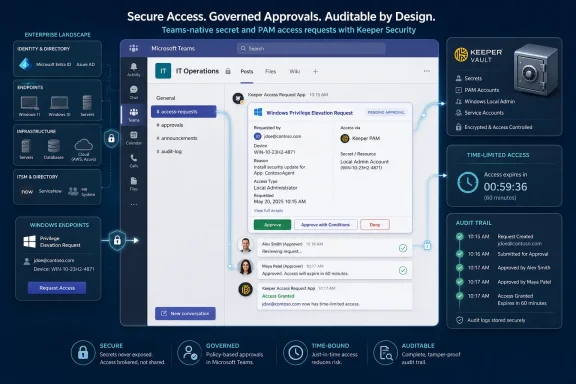
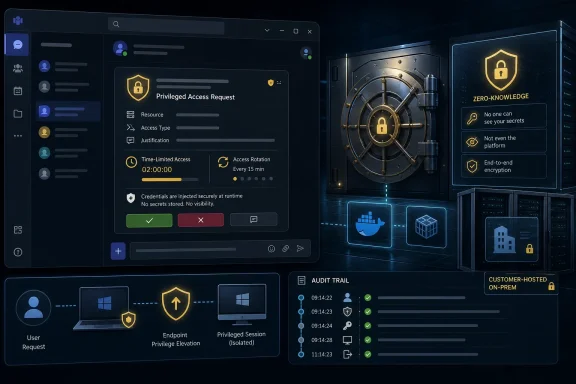
Keeper Security has launched a Microsoft Teams app for KeeperPAM and Keeper Secrets Manager that lets organizations request, approve, and time-limit privileged access from inside Teams, with customer-hosted infrastructure preserving Keeper’s zero-knowledge model and availability tied to eligible Keeper licenses. The pitch is simple: if employees already live in Teams, access governance should meet them there rather than forcing another portal into the workday. The deeper bet is that privileged access management is moving from a specialist console into the fabric of collaboration software. That is useful, but it also raises the stakes for how carefully IT treats Teams as an operational control plane.
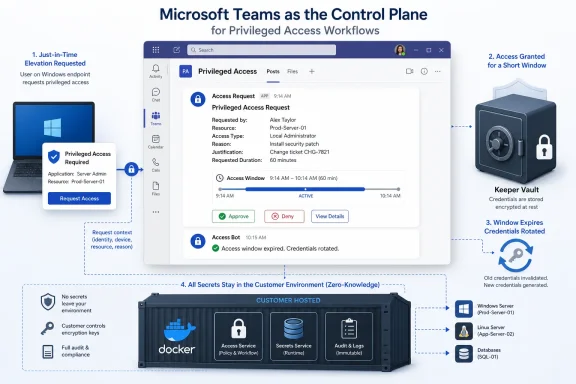
The Keeper Teams App is not merely another notification bot that tells an administrator to go somewhere else. It brings several access workflows directly into Microsoft Teams, including requests for vault records, shared folders, one-time shares, endpoint privilege elevation, SSO Cloud device approvals, and new login record creation with generated passwords. That matters because most access requests do not fail at the cryptographic layer. They fail in the messy handoff between the person who needs access, the person who can approve it, and the system that records what happened.
In many organizations, that handoff still sprawls across email, ticketing queues, chat messages, and half-remembered internal procedures. A developer asks for a database credential in a ticket, an approver replies in Teams, someone grants access in a vault, and the audit trail becomes a reconstruction exercise. Keeper’s move is aimed at that operational gap. It wants the approval event, the justification, the permission choice, and the time window to sit closer together.
The company’s CTO and co-founder Craig Lurey framed the problem as one of friction. When the approved route is slower than the workaround, users will eventually make the workaround feel normal. That is not a new observation, but it is a useful one: security controls rarely collapse because users hate security in the abstract. They collapse because the secure path is not the path of least resistance.
The Teams app tries to collapse that distance. If the user can ask for access in the collaboration tool they already have open, and the approver can approve it from a channel rather than switching into a privileged access console, the control becomes less like a checkpoint and more like a workflow. That is the strategic significance of the launch.
Keeper is not alone in seeing this. Its Teams launch follows integrations with platforms such as Slack, Jira, and ServiceNow, which together show a broader strategy: Keeper wants to remain the system of record for secrets and privileged access while letting requests originate in the systems of engagement. That distinction matters. The value proposition is not that Teams becomes the vault. It is that Teams becomes the place where access decisions are initiated, routed, and made visible.
For Windows-heavy organizations, Teams is an obvious target. Microsoft’s collaboration platform has become a fixture of enterprise work, especially in hybrid environments where informal hallway approval has been replaced by persistent chat. Keeper’s positioning around Asia-Pacific Teams usage reflects the same reality at regional scale, but the underlying point applies globally. Teams is no longer just a meeting application. It is where many organizations run operations.
That makes it a tempting place to put access approvals. It also makes it a place where mistakes can propagate quickly. A Teams app that routes privileged access requests is more consequential than a lunch-ordering bot or a project update tab. It participates in the chain of authorization. The convenience is real, but so is the need for governance around the app itself.
That is the difference between collaboration-enabled access and merely chat-enabled access. A chat message saying “approved” is weak evidence. A workflow that grants access for a defined period, records the justification, applies a permission model, and rotates the credential afterward is a control. Keeper’s argument is that just-in-time access should not be a special ceremony reserved for the most sensitive systems. It should become the normal shape of administrative work.
This aligns with the larger movement away from standing privilege. Traditional privileged access often assumes that administrators retain broad rights because they might need them. Modern identity security assumes the opposite: users should receive elevated rights only when they need them, for as long as they need them, and with enough context for review later. Keeper’s Teams app is one more attempt to make that principle less painful to operate.
The auto-rotation behavior is especially important. Time-limited access is only as strong as the cleanup that follows it. If a credential remains valid after the access window ends, the workflow has limited the user interface more than the underlying risk. Rotation after the window closes is a practical way to reduce the residue of temporary access.
Least privilege on endpoints has always been easier to recommend than to live with. Remove local admin rights and users will eventually need a driver installed, a tool updated, a diagnostic command run, or a legacy application placated. Leave local admin rights in place and every workstation becomes a larger blast radius. The policy answer is just-in-time elevation, but the operational answer depends on whether approvals happen fast enough to avoid user rebellion.
Teams-based approval does not solve every endpoint privilege problem. It does, however, address one of the obvious bottlenecks: the approval path. If an elevation request arrives in a monitored channel with the relevant context, the approver can act without waiting for a ticket refresh or a separate console login. That could make least privilege more tolerable for organizations that have resisted aggressive endpoint lockdown because the support burden looked too high.
There is still a cultural trap here. Fast approval is not the same as good approval. If the Teams channel becomes a rubber stamp, the organization has moved the weakness from the endpoint to the human process. The app can carry the request and preserve the audit trail; it cannot make an inattentive approver care.
That is consistent with Keeper’s long-running zero-knowledge positioning. In practical terms, it gives security teams a clearer story to tell risk committees: the collaboration workflow can touch Microsoft Teams, but the sensitive vault interactions are mediated through customer-controlled infrastructure. For regulated organizations, that difference can determine whether an integration is acceptable at all.
The trade-off is operational responsibility. A SaaS-only approval bot is easier to adopt because the vendor runs the moving parts. A customer-hosted service requires deployment, monitoring, patching, secrets configuration, and incident response ownership. Keeper’s setup command in Commander may simplify installation, but it does not eliminate the reality that the customer now owns another integration component.
For mature IT teams, that may be a reasonable bargain. They gain more control over the path that privileged credentials take, and they avoid inserting a vendor-hosted workflow service into the middle of secrets handling. For smaller teams, the Docker-and-Commander model may be a speed bump. The same architecture that reassures security architects can intimidate administrators looking for a button in an app store.
This is the sort of detail that sounds minor until you have lived through an enterprise migration. Real vaults are messy. They contain old sharing structures, newer folder models, exceptions created for urgent projects, and permission inheritance that made sense at the time. A workflow integration that assumes a pristine information architecture will fail in exactly the environments that most need it.
By exposing the different permission models rather than hiding them, Keeper is acknowledging that access governance has to meet the customer’s current state. That does not mean every legacy structure should remain forever. It does mean the approval workflow cannot pretend those structures do not exist.
There is also a useful transparency benefit. If approvers can see whether they are granting access through a Classic model or a Nested Shared Folder role, they have a better chance of understanding the scope of the decision. That is critical because the language of access control often hides real-world consequences. “Share-manager” and “full-manager” are not cosmetic labels; they can materially alter what a user can do with secrets.
Keeper’s Teams app can generate self-destructing links for passwords or secrets. That is a better pattern than pasting secrets into Teams messages, where retention, search, forwarding, screenshots, and eDiscovery can create a long afterlife for information that should have been ephemeral. A self-destructing link does not magically remove all risk, but it narrows the exposure window and keeps the secret anchored to the vault workflow rather than the chat transcript.
The danger is psychological. Once a secure sharing feature is easy, users may share more often. That is not necessarily bad; secure sharing is better than insecure sharing. But organizations should still watch for whether one-time shares become a bypass for more appropriate role-based access, especially when repeated shares point to a recurring operational need.
This is where audit data becomes more than compliance furniture. If the workflow records who requested a secret, who approved it, why it was shared, and when the link expired, the organization can look for patterns. Repeated emergency sharing of the same credential is not just a usage statistic. It is a signal that the underlying access model may be wrong.
Device approvals can become an awkward corner of identity operations. A user is legitimate, the device needs authorization, and the administrator needs to decide without turning the process into either a bottleneck or a loophole. Routing that approval into Teams may reduce delay, particularly for distributed support teams.
The caveat is that device approval can sit close to account recovery and identity assurance. If an attacker can social-engineer the approval path, convenience becomes a liability. Teams integration does not remove the need for strong identity verification, conditional access, and clear administrative procedure. It just moves the moment of decision into a place where humans may respond faster.
That is the recurring theme of the launch. Keeper is reducing friction in access governance, and that is valuable. But reduced friction must be paired with better context, not less scrutiny. The success of the app will depend on whether organizations configure Teams channels, approver groups, and escalation paths with the seriousness normally reserved for security consoles.
This is not an argument against the integration. It is an argument against treating deployment as a pure productivity decision. The Teams app catalogue, app permission policies, tenant-level consent, channel membership, and private channel configuration all become part of the access governance story. If the approver channel is misconfigured, the PAM workflow may be technically sound but operationally exposed.
The customer-hosted model helps by keeping secrets out of Keeper’s cloud, but it does not automatically solve Teams-side governance. Who can install the app? Who can access the approver channel? Who can add members to that channel? Who can modify the bot or its Azure application registration? These are not peripheral questions. They define who can influence the approval path.
For sysadmins, the practical lesson is to treat the Teams integration as an extension of the privileged access boundary. Document it, monitor it, and include it in change management. If Teams has become the place where access decisions happen, then Teams configuration has become part of security infrastructure.
That distinction is essential in access governance. If every platform becomes its own place to grant, track, and revoke secrets, the enterprise drifts toward fragmentation. If multiple platforms can initiate workflows while the vault remains authoritative, the sprawl is more manageable. Keeper’s challenge is to keep that boundary clean.
ServiceNow may be the right front end for formal IT service management. Jira may be right for engineering workflows. Slack or Teams may be right for real-time collaboration and incident response. None of those tools should become an unmanaged shadow vault. Keeper’s value depends on making the integration feel native without surrendering control of the underlying access state.
This is also where vendor claims need careful reading. “No context switching” is attractive marketing, but some context switching exists for a reason. Approvers sometimes need to leave the chat stream and examine the system, the role, the credential, or the blast radius. The ideal workflow reduces pointless switching without encouraging shallow decisions.
The strongest version of the argument is compelling. A user requests access with a justification. The approver sees the request in Teams, chooses the correct permission model, limits the window, and lets the credential rotate afterward. The event is captured for audit, and the user never has to ask for a password in a chat thread. That is meaningfully better than the informal systems many organizations still run.
The weaker version is also plausible. Teams becomes a high-speed approval conveyor belt. Approvers click through because the request appears in the flow of ordinary chat. Channel membership drifts. The organization celebrates reduced friction while quietly weakening review quality. The same integration can support either outcome.
This is why the launch should be judged less by the existence of a Teams app and more by the discipline around deployment. The technology provides a better route. The organization still has to decide whether the route is governed.
 Keeper Is Turning Teams Into an Approval Surface, Not Just a Chat Window
The Keeper Teams App is not merely another notification bot that tells an administrator to go somewhere else. It brings several access workflows directly into Microsoft Teams, including requests for vault records, shared folders, one-time shares, endpoint privilege elevation, SSO Cloud device approvals, and new login record creation with generated passwords. That matters because most access requests do not fail at the cryptographic layer. They fail in the messy handoff between the person who needs access, the person who can approve it, and the system that records what happened.In many organizations, that handoff still sprawls across email, ticketing queues, chat messages, and half-remembered internal procedures. A developer asks for a database credential in a ticket, an approver replies in Teams, someone grants access in a vault, and the audit trail becomes a reconstruction exercise. Keeper’s move is aimed at that operational gap. It wants the approval event, the justification, the permission choice, and the time window to sit closer together.
The company’s CTO and co-founder Craig Lurey framed the problem as one of friction. When the approved route is slower than the workaround, users will eventually make the workaround feel normal. That is not a new observation, but it is a useful one: security controls rarely collapse because users hate security in the abstract. They collapse because the secure path is not the path of least resistance.
The Teams app tries to collapse that distance. If the user can ask for access in the collaboration tool they already have open, and the approver can approve it from a channel rather than switching into a privileged access console, the control becomes less like a checkpoint and more like a workflow. That is the strategic significance of the launch.
The New Control Plane Is Wherever the Work Already Happens
The security industry has spent years telling enterprises to centralize privileged access, secrets, and identity controls. Yet the daily rhythm of work has moved in the opposite direction. Decisions are distributed across Slack channels, Teams chats, Jira tickets, ServiceNow workflows, GitHub pull requests, and incident bridges. The old model assumes administrators will return to a security console to act. The new model assumes the security console must project itself into the tools where work is already being coordinated.Keeper is not alone in seeing this. Its Teams launch follows integrations with platforms such as Slack, Jira, and ServiceNow, which together show a broader strategy: Keeper wants to remain the system of record for secrets and privileged access while letting requests originate in the systems of engagement. That distinction matters. The value proposition is not that Teams becomes the vault. It is that Teams becomes the place where access decisions are initiated, routed, and made visible.
For Windows-heavy organizations, Teams is an obvious target. Microsoft’s collaboration platform has become a fixture of enterprise work, especially in hybrid environments where informal hallway approval has been replaced by persistent chat. Keeper’s positioning around Asia-Pacific Teams usage reflects the same reality at regional scale, but the underlying point applies globally. Teams is no longer just a meeting application. It is where many organizations run operations.
That makes it a tempting place to put access approvals. It also makes it a place where mistakes can propagate quickly. A Teams app that routes privileged access requests is more consequential than a lunch-ordering bot or a project update tab. It participates in the chain of authorization. The convenience is real, but so is the need for governance around the app itself.
Time-Limited Access Is the Product’s Real Center of Gravity
The most important part of Keeper’s announcement is not that approvals happen in Teams. It is that the approvals are tied to time-bounded access. For record and folder requests, users can provide a justification, ask for specific permissions, and define an access window. When the request involves a PAM User record or folder, the approval screen exposes credential auto-rotation, enabled by default, with credentials rotating after the access window ends.That is the difference between collaboration-enabled access and merely chat-enabled access. A chat message saying “approved” is weak evidence. A workflow that grants access for a defined period, records the justification, applies a permission model, and rotates the credential afterward is a control. Keeper’s argument is that just-in-time access should not be a special ceremony reserved for the most sensitive systems. It should become the normal shape of administrative work.
This aligns with the larger movement away from standing privilege. Traditional privileged access often assumes that administrators retain broad rights because they might need them. Modern identity security assumes the opposite: users should receive elevated rights only when they need them, for as long as they need them, and with enough context for review later. Keeper’s Teams app is one more attempt to make that principle less painful to operate.
The auto-rotation behavior is especially important. Time-limited access is only as strong as the cleanup that follows it. If a credential remains valid after the access window ends, the workflow has limited the user interface more than the underlying risk. Rotation after the window closes is a practical way to reduce the residue of temporary access.
Endpoint Privilege Is Where the Windows Story Gets Sharper
For WindowsForum readers, the endpoint privilege elevation workflow may be the most immediately recognizable use case. Keeper Endpoint Privilege Manager can route just-in-time elevation requests to approvers through a dedicated Teams channel. That places a familiar Windows administration problem inside the same collaboration surface where help desk and operations teams already triage issues.Least privilege on endpoints has always been easier to recommend than to live with. Remove local admin rights and users will eventually need a driver installed, a tool updated, a diagnostic command run, or a legacy application placated. Leave local admin rights in place and every workstation becomes a larger blast radius. The policy answer is just-in-time elevation, but the operational answer depends on whether approvals happen fast enough to avoid user rebellion.
Teams-based approval does not solve every endpoint privilege problem. It does, however, address one of the obvious bottlenecks: the approval path. If an elevation request arrives in a monitored channel with the relevant context, the approver can act without waiting for a ticket refresh or a separate console login. That could make least privilege more tolerable for organizations that have resisted aggressive endpoint lockdown because the support burden looked too high.
There is still a cultural trap here. Fast approval is not the same as good approval. If the Teams channel becomes a rubber stamp, the organization has moved the weakness from the endpoint to the human process. The app can carry the request and preserve the audit trail; it cannot make an inattentive approver care.
Customer-Hosted Architecture Is the Quietly Important Security Choice
Keeper’s customer-hosted deployment model is more than an implementation detail. Organizations deploy the Teams app through Docker alongside Keeper Commander Service Mode on their own infrastructure, and configuration is secured and retrieved through Keeper Secrets Manager. Keeper says this design means credentials and secrets do not pass through Keeper’s cloud environment.That is consistent with Keeper’s long-running zero-knowledge positioning. In practical terms, it gives security teams a clearer story to tell risk committees: the collaboration workflow can touch Microsoft Teams, but the sensitive vault interactions are mediated through customer-controlled infrastructure. For regulated organizations, that difference can determine whether an integration is acceptable at all.
The trade-off is operational responsibility. A SaaS-only approval bot is easier to adopt because the vendor runs the moving parts. A customer-hosted service requires deployment, monitoring, patching, secrets configuration, and incident response ownership. Keeper’s setup command in Commander may simplify installation, but it does not eliminate the reality that the customer now owns another integration component.
For mature IT teams, that may be a reasonable bargain. They gain more control over the path that privileged credentials take, and they avoid inserting a vendor-hosted workflow service into the middle of secrets handling. For smaller teams, the Docker-and-Commander model may be a speed bump. The same architecture that reassures security architects can intimidate administrators looking for a button in an app store.
Mixed Vault Models Reveal the Messy Reality of Enterprise Migration
Keeper says the Teams app supports environments using both Classic shared records and Nested Shared Folder records. Search results identify which type of item is involved, and the approval screen presents the relevant permission model for each. Classic items use standard permissions, while Nested Shared Folder records expose role-based options such as viewer, share-manager, content-manager, and full-manager.This is the sort of detail that sounds minor until you have lived through an enterprise migration. Real vaults are messy. They contain old sharing structures, newer folder models, exceptions created for urgent projects, and permission inheritance that made sense at the time. A workflow integration that assumes a pristine information architecture will fail in exactly the environments that most need it.
By exposing the different permission models rather than hiding them, Keeper is acknowledging that access governance has to meet the customer’s current state. That does not mean every legacy structure should remain forever. It does mean the approval workflow cannot pretend those structures do not exist.
There is also a useful transparency benefit. If approvers can see whether they are granting access through a Classic model or a Nested Shared Folder role, they have a better chance of understanding the scope of the decision. That is critical because the language of access control often hides real-world consequences. “Share-manager” and “full-manager” are not cosmetic labels; they can materially alter what a user can do with secrets.
One-Time Shares Are Useful, Dangerous, and Inevitable
The one-time share workflow is another example of Keeper meeting users where they already behave. People need to transmit passwords, API tokens, recovery codes, and temporary credentials. If the official tool does not make that easy, they will invent their own mechanism, usually involving chat, email, screenshots, or a text file with a name that makes every security professional wince.Keeper’s Teams app can generate self-destructing links for passwords or secrets. That is a better pattern than pasting secrets into Teams messages, where retention, search, forwarding, screenshots, and eDiscovery can create a long afterlife for information that should have been ephemeral. A self-destructing link does not magically remove all risk, but it narrows the exposure window and keeps the secret anchored to the vault workflow rather than the chat transcript.
The danger is psychological. Once a secure sharing feature is easy, users may share more often. That is not necessarily bad; secure sharing is better than insecure sharing. But organizations should still watch for whether one-time shares become a bypass for more appropriate role-based access, especially when repeated shares point to a recurring operational need.
This is where audit data becomes more than compliance furniture. If the workflow records who requested a secret, who approved it, why it was shared, and when the link expired, the organization can look for patterns. Repeated emergency sharing of the same credential is not just a usage statistic. It is a signal that the underlying access model may be wrong.
SSO Device Approval Shows the Edge Cases Still Matter
The Teams app also supports SSO Cloud device approvals for administrators when Keeper Automator is not deployed. This is a narrower workflow than privileged record access or endpoint elevation, but it reveals something important about enterprise tooling: not every organization deploys every automation component, and manual approval paths still need to be secure and traceable.Device approvals can become an awkward corner of identity operations. A user is legitimate, the device needs authorization, and the administrator needs to decide without turning the process into either a bottleneck or a loophole. Routing that approval into Teams may reduce delay, particularly for distributed support teams.
The caveat is that device approval can sit close to account recovery and identity assurance. If an attacker can social-engineer the approval path, convenience becomes a liability. Teams integration does not remove the need for strong identity verification, conditional access, and clear administrative procedure. It just moves the moment of decision into a place where humans may respond faster.
That is the recurring theme of the launch. Keeper is reducing friction in access governance, and that is valuable. But reduced friction must be paired with better context, not less scrutiny. The success of the app will depend on whether organizations configure Teams channels, approver groups, and escalation paths with the seriousness normally reserved for security consoles.
Teams App Governance Becomes Part of PAM Governance
Any Teams app that participates in privileged access workflows deserves a different level of review from ordinary collaboration add-ons. Microsoft’s own Teams administration model gives organizations ways to evaluate app permissions, consent, privilege level, and access to organizational data. Those controls become directly relevant when the app is tied to secrets and privileged access approvals.This is not an argument against the integration. It is an argument against treating deployment as a pure productivity decision. The Teams app catalogue, app permission policies, tenant-level consent, channel membership, and private channel configuration all become part of the access governance story. If the approver channel is misconfigured, the PAM workflow may be technically sound but operationally exposed.
The customer-hosted model helps by keeping secrets out of Keeper’s cloud, but it does not automatically solve Teams-side governance. Who can install the app? Who can access the approver channel? Who can add members to that channel? Who can modify the bot or its Azure application registration? These are not peripheral questions. They define who can influence the approval path.
For sysadmins, the practical lesson is to treat the Teams integration as an extension of the privileged access boundary. Document it, monitor it, and include it in change management. If Teams has become the place where access decisions happen, then Teams configuration has become part of security infrastructure.
The Integration Race Is Really About System-of-Record Discipline
Keeper’s broader workflow strategy now spans multiple workplace and IT tools, including Jira, ServiceNow, Slack, and Teams. The obvious interpretation is that Keeper is chasing users across popular platforms. The more interesting interpretation is that Keeper is trying to defend its role as the system of record while allowing other systems to own the user experience.That distinction is essential in access governance. If every platform becomes its own place to grant, track, and revoke secrets, the enterprise drifts toward fragmentation. If multiple platforms can initiate workflows while the vault remains authoritative, the sprawl is more manageable. Keeper’s challenge is to keep that boundary clean.
ServiceNow may be the right front end for formal IT service management. Jira may be right for engineering workflows. Slack or Teams may be right for real-time collaboration and incident response. None of those tools should become an unmanaged shadow vault. Keeper’s value depends on making the integration feel native without surrendering control of the underlying access state.
This is also where vendor claims need careful reading. “No context switching” is attractive marketing, but some context switching exists for a reason. Approvers sometimes need to leave the chat stream and examine the system, the role, the credential, or the blast radius. The ideal workflow reduces pointless switching without encouraging shallow decisions.
The Fast Path Is Safer Only If It Stays Accountable
Keeper’s launch lands at a moment when enterprise security teams are under contradictory pressure. They are told to remove standing privilege, speed up developer and operations workflows, improve auditability, support distributed teams, and reduce tool fatigue. Those goals can conflict. The Teams app is an attempt to make them reinforce each other.The strongest version of the argument is compelling. A user requests access with a justification. The approver sees the request in Teams, chooses the correct permission model, limits the window, and lets the credential rotate afterward. The event is captured for audit, and the user never has to ask for a password in a chat thread. That is meaningfully better than the informal systems many organizations still run.
The weaker version is also plausible. Teams becomes a high-speed approval conveyor belt. Approvers click through because the request appears in the flow of ordinary chat. Channel membership drifts. The organization celebrates reduced friction while quietly weakening review quality. The same integration can support either outcome.
This is why the launch should be judged less by the existence of a Teams app and more by the discipline around deployment. The technology provides a better route. The organization still has to decide whether the route is governed.
The Practical Read for Windows Shops Running Teams and Keeper
For organizations already invested in Microsoft Teams and KeeperPAM or Keeper Secrets Manager, this launch is worth attention because it attacks a real daily pain point rather than a theoretical security architecture diagram. The deployment model will matter, the Teams governance will matter, and the quality of approver behavior will matter most of all. But the direction is right: access governance has to become easier to use without becoming easier to abuse.- Keeper’s Teams app brings access requests and approvals into Microsoft Teams while keeping Keeper Vault and Keeper Endpoint Privilege Manager as the underlying control systems.
- The most security-relevant workflows are time-limited record and folder access, just-in-time endpoint elevation, one-time shares, SSO Cloud device approvals, and credential creation in designated shared folders.
- The customer-hosted Docker and Commander Service Mode architecture is a deliberate security choice, not just a deployment quirk.
- Auto-rotation after PAM access windows helps reduce the leftover risk that often follows temporary privileged access.
- Teams administrators should treat the app, its permissions, and its approver channels as part of the privileged access boundary.
- The integration will improve security only if organizations preserve review quality instead of turning Teams approvals into another rubber stamp.
References
- Primary source: IT Brief Australia
Published: Thu, 25 Jun 2026 06:30:00 GMT
Keeper launches Teams app for access approval workflows
It lets organisations approve access requests inside Teams, reducing email trails and helping keep credentials and permissions under tighter control. itbrief.com.au
- Related coverage: keepersecurity.com
- Related coverage: docs.keeper.io
Teams App | KeeperPAM and Secrets Manager | Keeper Documentation Portal
Teams Approval Workflow Integration with the Keeper Vault and Endpoint Privilege Managerdocs.keeper.io - Related coverage: futureciso.tech
New Keeper tightens privilege approval workflows - FutureCISO
Keeper Security has added enterprise governance controls to its Endpoint Privilege Manager, strengthening approval workflows, audit visibility and operational enforcement for large, distributed organisations across Windows, macOS and Linux. The update is designed to help security teams apply...futureciso.tech - Related coverage: docs.keeper.app
- Related coverage: prnewswire.com
Keeper Security Introduces Universal Secrets Sync to Eliminate Credential Drift Across Cloud Environments
/PRNewswire/ -- Keeper Security, the leading zero-trust and zero-knowledge identity security and Privileged Access Management (PAM) platform, is announcing the... www.prnewswire.com
- Related coverage: content.shi.com
- Related coverage: keeper.io
1390835938
Studio interior with carbon fiber texture. Modern carbon fiber textured black interior with light. Background for mounting, product placement. Vector background, template, mockupwww.keeper.io