

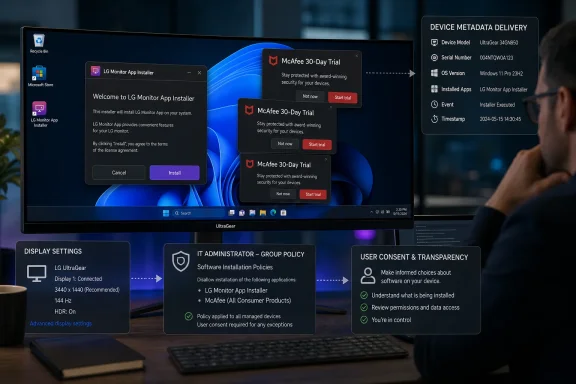
Windows 11 users who connect certain LG displays may receive the LG Monitor App Installer automatically through Windows’ device-metadata and Store delivery mechanisms—then see recurring prompts for a 30-day McAfee trial. A new Gamers Nexus investigation reports that the behavior occurred without an installation dialog on multiple test systems after it connected an LG UltraGear 34GX900A-B, a monitor priced around $1,200.
The immediate concern is not that Windows recognized a monitor or installed a driver. It is that a hardware-linked companion app reportedly arrived silently and functioned chiefly as a launcher for further LG software and a persistent antivirus promotion. Gamers Nexus said the McAfee offer appeared on 31 of 32 consecutive boots in its testing, turning a background device setup feature into a visible advertising channel.
Reports from LG owners had circulated since at least 2024, but the Gamers Nexus testing gives the issue a more concrete shape: plug in supported hardware, allow Windows to fetch its metadata, and an LG Store app can appear without a conventional consent prompt.
Microsoft’s documentation describes automatic installation for device-associated apps as an intended Windows capability. A manufacturer can associate a Microsoft Store app with peripheral-device metadata; when the device is first connected, Windows can download metadata, retrieve drivers where necessary, and install the associated app for the signed-in user.
Microsoft explicitly notes that this automatic-install path does not notify the user and warns developers that the experience can confuse or frustrate customers. The mechanism was designed for hardware support apps—utilities for configuration, firmware updates, diagnostics, or device-specific features—not as a blank check for post-purchase marketing.
That distinction matters. A monitor companion app that offers color modes, on-screen control, firmware delivery, or KVM configuration has a plausible relationship to the device. An app that foregrounds a paid McAfee trial, especially after silent installation, looks much harder to defend as essential monitor support.
The LG software reportedly identifies itself in its own support material as an app installer that Windows automatically deploys when an LG monitor is connected. That aligns with the Windows device-app workflow described by Microsoft, even if it does little to settle whether LG’s use of that workflow meets reasonable user expectations.
There is an important line here: broad Store-declared capabilities do not, by themselves, establish that an app is collecting every category of data that a listing may mention. Nor has Gamers Nexus reported evidence that the monitor software captures on-screen content. But permissions, startup behavior, network traffic, and the relationship between installer and promoted software are precisely the areas that deserve technical scrutiny when an application is added without a user deliberately seeking it out.
The practical security concern is one of trust boundaries. A user may reasonably accept that Windows Update installs a signed display driver needed for reliable operation. That same user may not accept that connecting a monitor grants the vendor an unattended route to place a promotional application on the desktop.
For administrators, this creates a more awkward problem. Many organizations permit driver and firmware servicing through Windows Update because it reduces support burden and mitigates hardware issues. If the same supply path can deliver nonessential companion software, IT teams must decide whether the convenience is worth the loss of precision.
That case concerns television viewing data, not Windows monitor software, and the two should not be treated as proof of a single technical system. Still, the overlap in consumer perception is unavoidable: a company facing a recent privacy settlement is now being criticized for pushing a monitor-related app into Windows with little or no user visibility.
Gamers Nexus also pointed to LG’s smart-TV AI terms, which address potential voice capture by certain features and require users to inform people around them. Again, that policy language does not demonstrate microphone or screen collection by the LG Monitor App Installer. It does, however, explain why the silent-installation report has moved beyond a routine “bloatware” complaint into a broader debate about product consent and connected-device data practices.
LG and Microsoft have not, as of publication, publicly detailed why the LG Monitor App Installer needs to be deployed automatically, which LG monitor models are covered, whether the rollout can be withdrawn centrally, or whether the McAfee campaign can be disabled independently.
On Windows 11 Pro, Enterprise, and Education systems, administrators can stop future device-metadata app downloads through Local Group Policy:
The broader lesson is that Windows device metadata should be treated as a software-distribution surface, not just a cosmetic mechanism for showing a branded device icon. Hardware inventory, procurement, endpoint baselines, and application allow-listing policies may need to account for it.
That is not merely a consumer-experience issue. Silent installs complicate incident triage, software asset management, privacy assessment, and change-control records. A help desk ticket about an unexpected McAfee pop-up can become difficult to diagnose when neither the user nor the technician realizes that a newly attached monitor was the trigger.
For now, LG display owners who see unexpected McAfee offers should check for the LG Monitor App Installer, remove it if it is unwanted, and apply the device-metadata policy where appropriate. The larger unresolved issue is whether Microsoft will continue to let peripheral vendors convert a trusted Windows setup path into an advertising channel.
The report also says the LG behavior appeared on an older UltraFine 32UN880-B bought three years earlier, reinforcing that the issue may affect previously sold displays rather than only new monitor models. For IT teams, the finding broadens the concern from one LG installer to a wider peripheral-software delivery channel that may need to be controlled at the Windows policy level.
The report also cites Notebookcheck’s finding that McAfee Scam Detector may be installed alongside the LG package—not merely advertised through its recurring trial prompts. Affected users and administrators should therefore check Installed apps for both the LG Monitor App Installer and McAfee Scam Detector when auditing systems connected to LG displays.
The underlying Windows delivery mechanism reportedly remains active. Connecting a compatible LG monitor may therefore still trigger automatic installation of the companion app without a conventional consent dialog, even if the McAfee promotion no longer appears.
For users and administrators, the change may eliminate the most visible symptom but not the software-management concern. Systems should still be checked for LG Monitor App Installer and previously installed McAfee components. Organizations that do not want device-associated Store apps should continue using the Windows policy that prevents automatic downloads of applications linked to device metadata.
The new option gives individual Windows 11 users an alternative to manually uninstalling the LG package and configuring the existing Group Policy restriction. Blocking device companion apps may also stop automatic software from other peripheral manufacturers, however, including potentially useful utilities for printers, docks, displays, and headsets.
Win11Debloat is an independent third-party utility rather than a Microsoft-supported management tool. Administrators should therefore review and test its changes before deploying it across managed systems. Organizations using Intune, Group Policy, application controls, or established remediation scripts may prefer those centrally managed methods, while home users should create a restore point and verify the selected Win11Debloat options before applying them.
The immediate concern is not that Windows recognized a monitor or installed a driver. It is that a hardware-linked companion app reportedly arrived silently and functioned chiefly as a launcher for further LG software and a persistent antivirus promotion. Gamers Nexus said the McAfee offer appeared on 31 of 32 consecutive boots in its testing, turning a background device setup feature into a visible advertising channel.
Reports from LG owners had circulated since at least 2024, but the Gamers Nexus testing gives the issue a more concrete shape: plug in supported hardware, allow Windows to fetch its metadata, and an LG Store app can appear without a conventional consent prompt.
 Windows has long supported this delivery path
Microsoft’s documentation describes automatic installation for device-associated apps as an intended Windows capability. A manufacturer can associate a Microsoft Store app with peripheral-device metadata; when the device is first connected, Windows can download metadata, retrieve drivers where necessary, and install the associated app for the signed-in user.Microsoft explicitly notes that this automatic-install path does not notify the user and warns developers that the experience can confuse or frustrate customers. The mechanism was designed for hardware support apps—utilities for configuration, firmware updates, diagnostics, or device-specific features—not as a blank check for post-purchase marketing.
That distinction matters. A monitor companion app that offers color modes, on-screen control, firmware delivery, or KVM configuration has a plausible relationship to the device. An app that foregrounds a paid McAfee trial, especially after silent installation, looks much harder to defend as essential monitor support.
The LG software reportedly identifies itself in its own support material as an app installer that Windows automatically deploys when an LG monitor is connected. That aligns with the Windows device-app workflow described by Microsoft, even if it does little to settle whether LG’s use of that workflow meets reasonable user expectations.
The software is the problem, not merely the pop-up
Gamers Nexus reported that the installer displayed McAfee as its default recommendation in nearly every boot test. The outlet also raised questions about the app’s Microsoft Store permission profile and whether the scope is appropriate for software attached to a display.There is an important line here: broad Store-declared capabilities do not, by themselves, establish that an app is collecting every category of data that a listing may mention. Nor has Gamers Nexus reported evidence that the monitor software captures on-screen content. But permissions, startup behavior, network traffic, and the relationship between installer and promoted software are precisely the areas that deserve technical scrutiny when an application is added without a user deliberately seeking it out.
The practical security concern is one of trust boundaries. A user may reasonably accept that Windows Update installs a signed display driver needed for reliable operation. That same user may not accept that connecting a monitor grants the vendor an unattended route to place a promotional application on the desktop.
For administrators, this creates a more awkward problem. Many organizations permit driver and firmware servicing through Windows Update because it reduces support burden and mitigates hardware issues. If the same supply path can deliver nonessential companion software, IT teams must decide whether the convenience is worth the loss of precision.
LG’s television privacy record intensifies the reaction
The monitor-app story is landing alongside separate, documented privacy concerns over LG smart TVs. In May, the Texas Attorney General announced a settlement with LG Electronics USA related to automated content recognition, or ACR, viewing-data collection on smart TVs. Under the agreement, LG committed to clearer disclosures, a simple opt-out path, and changes intended to prevent viewing data collection without informed consent.That case concerns television viewing data, not Windows monitor software, and the two should not be treated as proof of a single technical system. Still, the overlap in consumer perception is unavoidable: a company facing a recent privacy settlement is now being criticized for pushing a monitor-related app into Windows with little or no user visibility.
Gamers Nexus also pointed to LG’s smart-TV AI terms, which address potential voice capture by certain features and require users to inform people around them. Again, that policy language does not demonstrate microphone or screen collection by the LG Monitor App Installer. It does, however, explain why the silent-installation report has moved beyond a routine “bloatware” complaint into a broader debate about product consent and connected-device data practices.
LG and Microsoft have not, as of publication, publicly detailed why the LG Monitor App Installer needs to be deployed automatically, which LG monitor models are covered, whether the rollout can be withdrawn centrally, or whether the McAfee campaign can be disabled independently.
Windows administrators can block the companion-app channel
Affected users can remove the LG Monitor App Installer through Settings > Apps > Installed apps, then review Settings > Apps > Startup to ensure no remaining LG component launches at sign-in. Removing the app should not remove the monitor’s basic display function; Windows will continue to use its standard display stack and any required driver.On Windows 11 Pro, Enterprise, and Education systems, administrators can stop future device-metadata app downloads through Local Group Policy:
- Open
gpedit.mscand navigate to Computer Configuration > Administrative Templates > System > Device Installation. - Enable Prevent automatic download of applications associated with device metadata.
- Validate the policy on a pilot group first, because it can also block useful companion apps for printers, docks, headsets, and other peripherals.
The broader lesson is that Windows device metadata should be treated as a software-distribution surface, not just a cosmetic mechanism for showing a branded device icon. Hardware inventory, procurement, endpoint baselines, and application allow-listing policies may need to account for it.
Microsoft’s policy judgment is now under scrutiny
LG owns the content and behavior of its app, but Microsoft owns the Windows and Store mechanisms that permit its unattended delivery. Microsoft’s own developer guidance acknowledges that users receive no installation notification in this scenario. The LG episode is therefore likely to sharpen calls for a clearer boundary: driver and firmware packages may install automatically, while optional companion applications—particularly those containing third-party offers—should require affirmative user action.That is not merely a consumer-experience issue. Silent installs complicate incident triage, software asset management, privacy assessment, and change-control records. A help desk ticket about an unexpected McAfee pop-up can become difficult to diagnose when neither the user nor the technician realizes that a newly attached monitor was the trigger.
For now, LG display owners who see unexpected McAfee offers should check for the LG Monitor App Installer, remove it if it is unwanted, and apply the device-metadata policy where appropriate. The larger unresolved issue is whether Microsoft will continue to let peripheral vendors convert a trusted Windows setup path into an advertising channel.
Update: VideoCardz finds Dell uses a similar automatic app-install route (July 17, 2026)
VideoCardz reports that the same Windows device-associated app mechanism is not limited to LG. In its own testing, connecting a new Alienware monitor by DisplayPort repeatedly triggered installation of Alienware Command Center, which VideoCardz says required the same Group Policy setting to stop.The report also says the LG behavior appeared on an older UltraFine 32UN880-B bought three years earlier, reinforcing that the issue may affect previously sold displays rather than only new monitor models. For IT teams, the finding broadens the concern from one LG installer to a wider peripheral-software delivery channel that may need to be controlled at the Windows policy level.
Update: Testing identifies McAfee Scam Detector as an additional installed component (July 20, 2026)
CyberDigest reports that Windows Reliability Monitor recorded the LG Monitor App Installer arriving roughly one minute after an UltraGear monitor was connected, offering a more precise timeline for the unattended delivery process.The report also cites Notebookcheck’s finding that McAfee Scam Detector may be installed alongside the LG package—not merely advertised through its recurring trial prompts. Affected users and administrators should therefore check Installed apps for both the LG Monitor App Installer and McAfee Scam Detector when auditing systems connected to LG displays.
Update: LG reportedly removes McAfee promotions but retains silent installation (July 20, 2026)
Gadget Review reports that LG removed the McAfee advertising content from the LG Monitor App Installer on July 13, 2026, following criticism of the recurring trial prompts. This supersedes earlier reporting that treated the promotion’s removal as unresolved, although LG has not publicly detailed the change or issued a broader statement.The underlying Windows delivery mechanism reportedly remains active. Connecting a compatible LG monitor may therefore still trigger automatic installation of the companion app without a conventional consent dialog, even if the McAfee promotion no longer appears.
For users and administrators, the change may eliminate the most visible symptom but not the software-management concern. Systems should still be checked for LG Monitor App Installer and previously installed McAfee components. Organizations that do not want device-associated Store apps should continue using the Windows policy that prevents automatic downloads of applications linked to device metadata.
Update: Win11Debloat adds LG app removal and installation block (July 21, 2026)
Win11Debloat has added controls to detect and remove the LG Monitor App and prevent Windows from automatically downloading device-associated companion applications. Windows Report, citing Neowin, says the change was introduced in the tool’s latest update following scrutiny of LG’s silent app delivery.The new option gives individual Windows 11 users an alternative to manually uninstalling the LG package and configuring the existing Group Policy restriction. Blocking device companion apps may also stop automatic software from other peripheral manufacturers, however, including potentially useful utilities for printers, docks, displays, and headsets.
Win11Debloat is an independent third-party utility rather than a Microsoft-supported management tool. Administrators should therefore review and test its changes before deploying it across managed systems. Organizations using Intune, Group Policy, application controls, or established remediation scripts may prefer those centrally managed methods, while home users should create a restore point and verify the selected Win11Debloat options before applying them.
References
- Primary source: OtakuKart
Published: 2026-07-17T07:23:34+00:00
LG Monitor App Reportedly Installs Automatically Through Windows Update Without User Consent — OtakuKart
A new investigation by Gamers Nexus has raised concerns over reports that the LG Monitor App Installer is automatically installed through Windows Update after cotakukart.com - Related coverage: pcgamer.com
It looks like monitor manufacturers can download bloatware without consent that will serve you pop-up ads | PC Gamer
Here's hoping this doesn't become a trend.www.pcgamer.com - Related coverage: tomshardware.com
- Official source: learn.microsoft.com
Enroll a Windows device automatically using Group Policy | Microsoft Learn
Learn how to use a Group Policy to trigger autoenrollment to MDM for Active Directory (AD) domain-joined devices.learn.microsoft.com
Last edited:

