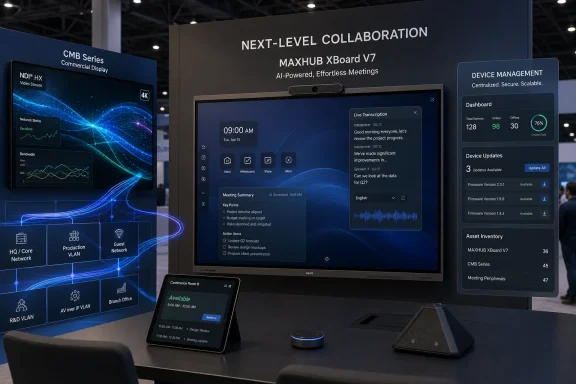
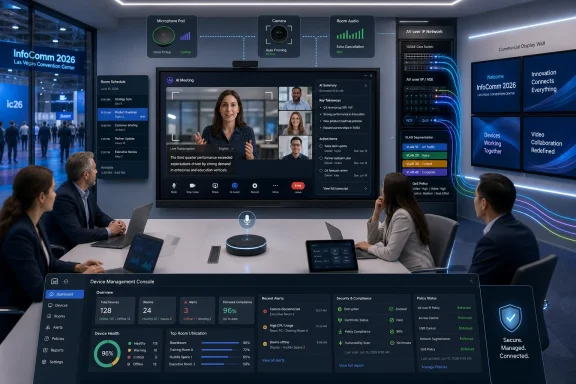
MAXHUB used InfoComm 2026, held June 17–19 at the Las Vegas Convention Center, to present an AI-heavy collaboration portfolio centered on the XBoard V7, CMB commercial displays, Pivot⁺ management software, and Microsoft Teams Rooms accessories. The pitch was not merely that conference-room hardware is getting smarter. It was that the meeting room, the display wall, and the device-management console are collapsing into one managed workplace platform. For WindowsForum readers, that matters because the next wave of meeting-room upgrades will look less like buying a screen and more like deploying a fleet of endpoint-like systems that sit at the intersection of AV, identity, networking, and AI governance.
The most important thing about MAXHUB’s InfoComm appearance is not any single display specification. It is the company’s attempt to turn the modern meeting space into a unified product category.
That is a subtle but important shift. For years, workplace AV purchasing has been fragmented across displays, cameras, microphones, compute modules, wireless presentation boxes, scheduling panels, signage screens, and device-management tools. MAXHUB’s booth message at C7036 was that customers should stop stitching those parts together one room at a time and instead buy into a connected stack.
The XBoard V7 sits at the center of that story. It is not simply an interactive flat panel; it is being positioned as a collaboration endpoint with display, audio, camera, whiteboarding, operating environment, and meeting intelligence wrapped into a single room device. That makes it more comparable to an enterprise endpoint than to the old conference-room TV on a cart.
That framing is exactly why this belongs in a Windows and IT conversation. The room system is no longer a passive peripheral. It has firmware, identity touchpoints, network dependencies, cloud management hooks, update cadences, meeting data, AI features, and user expectations that increasingly resemble the rest of the endpoint estate.
On a laptop, AI meeting features are often treated as personal productivity tools. In a room system, they become shared infrastructure. The transcription does not belong to one user’s app session in quite the same way; the summary may represent the room’s meeting output; the microphones and cameras are not personal peripherals but institutional sensors.
That raises the stakes. A smarter meeting room can reduce friction for hybrid teams, especially when remote participants are tired of being second-class attendees. Better framing, cleaner audio, speaker detection, captions, summaries, and action items can make distributed meetings less punishing.
But the same features also force IT and compliance teams to ask harder questions. Where is the transcript processed? Who controls retention? Can summaries be disabled by policy? Do external guests trigger a different data path? Does the system respect the controls already configured in Microsoft 365, Teams, or the organization’s collaboration platform?
MAXHUB’s demo is therefore best understood as part of a larger industry transition. AI in meeting rooms is no longer just a software add-on. It is becoming part of the hardware sales pitch, and that means the AV refresh cycle is becoming an AI deployment cycle whether buyers call it that or not.
That is not a minor detail. Networked video has been reshaping professional AV for years, but the integration of collaboration boards and commercial displays into the same content-distribution story hints at a more software-defined workplace environment. A meeting, presentation, training session, or town hall can move from room to display network without relying on a tangle of bespoke signal paths.
For IT departments, this can be both attractive and uncomfortable. The attractive part is flexibility: fewer fixed paths, easier distribution, and more opportunities to centralize control. The uncomfortable part is that AV traffic becomes one more thing the network must carry reliably, securely, and predictably.
That means VLAN design, multicast behavior, QoS, segmentation, and monitoring become part of the display deployment conversation. The old line between facilities AV and IT networking continues to fade. When meeting content is flowing across the network to commercial displays, the switch closet becomes part of the conference-room experience.
MAXHUB is hardly alone in moving this direction, but its InfoComm message reflects where the market is heading. The display is no longer just an output device. It is an addressable node in a broader collaboration fabric.
For Windows-heavy organizations, Teams Rooms has become a standardization mechanism. It gives IT a known user experience, a familiar administrative plane, and a path to integrate rooms with Microsoft 365 calendars, identity, policies, and meeting workflows. Vendors that want enterprise credibility therefore need to show that their hardware can live comfortably inside that ecosystem.
The interesting part is that MAXHUB is not presenting Teams Rooms as a single-room bundle only. The company’s broader pitch includes collaboration boards, scheduling panels, microphones, consoles, display distribution, and management software. That is the shape of a platform strategy, not a peripheral catalog.
The risk for buyers is lock-in by convenience. The more a vendor connects the room panel, the display, the mic pod, the management platform, and the meeting AI, the more attractive it becomes to standardize. But the more an organization standardizes, the harder it becomes to unwind if support, firmware quality, security posture, or roadmap alignment disappoints.
This is where IT pros should be appropriately skeptical. A Teams-certified or Teams-oriented device can still vary widely in update behavior, manageability, reliability, and support experience. The badge may get a product into the shortlist, but fleet operations determine whether it survives the next budget cycle.
That matters because meeting-room fleets are notoriously messy. A company may have executive boardrooms, huddle rooms, classrooms, digital signage zones, training spaces, shared lounges, and multipurpose areas, each with different hardware installed at different times by different integrators. When something fails, the first troubleshooting step is often figuring out what is actually in the room.
Centralized management promises to change that. Device status, content scheduling, configuration, updates, and remote control can reduce truck rolls and shorten downtime. In a world where hybrid work depends on rooms working the first time, every time, that operational layer becomes a selling point.
But management platforms also create new dependencies. If Pivot⁺ becomes the console of record for displays and collaboration systems, then its identity model, audit trails, access controls, logging, API behavior, and integration with existing management tools all matter. Admin convenience is valuable only if it does not create a shadow management plane outside normal IT governance.
This is the familiar endpoint-management lesson arriving in AV clothing. The dashboard is not just a dashboard. It is a control surface over devices that can display sensitive content, capture meeting data, and shape user experience across physical spaces.
The category name says the quiet part loudly: AI-powered products are now central to the installation conversation. For years, video bars competed on optics, beamforming microphones, speaker quality, mounting flexibility, and platform compatibility. Those still matter, but the new differentiator is whether the device can intelligently frame, filter, summarize, assist, or automate.
That shift changes the way buyers should evaluate room hardware. A camera or video bar is no longer just a camera or video bar. It may include onboard processing, cloud-connected features, model-driven behavior, and updateable intelligence that changes over time.
The upside is clear. Smaller rooms can get better meeting quality without complex custom integration. Larger rooms can become easier to deploy and support. Users can walk in, join a meeting, and get a more polished experience without touching a control panel full of cryptic AV logic.
The downside is equally real. AI features can be hard to benchmark before purchase and harder to explain after deployment. A device that works beautifully in a staged demo may behave differently in a glass-walled room, a noisy classroom, a multipurpose hall, or a conference space with difficult lighting. “AI-powered” is not a substitute for testing in the rooms where the product will actually live.
Scale suggests supply-chain maturity, channel reach, support investment, and a roadmap that will not vanish after one product cycle. MAXHUB also says it serves customers in more than 140 countries and supports them through local teams in 35 countries. Those figures are meant to reassure buyers that the company is not a niche display vendor trying to opportunistically ride the AI wave.
For global organizations, that matters. A collaboration-board standard that works in one headquarters but cannot be supported across regional offices is not really a standard. The same is true for all-in-one LED displays, where installation quality, service access, and replacement logistics can matter as much as the panel itself.
Still, market-share leadership does not eliminate due diligence. Large installed base does not automatically mean best fit, best support, best security posture, or best lifecycle value. It does, however, make MAXHUB harder to dismiss in a field crowded with vendors chasing the same hybrid-work refresh budgets.
The company’s InfoComm presence should therefore be read as a confidence play. MAXHUB is telling enterprise buyers that it has both breadth and scale: boards, displays, Teams Rooms hardware, LED, wireless sharing, management, and now AI meeting workflows under a single brand umbrella.
The XBoard V7 has been marketed as an all-in-one Windows-based interactive flat panel powered by MAXHUB OS, with a separate Windows PC module referenced in product materials. That hybrid identity is revealing. It is both an AV device and a computing endpoint, both a display and a managed collaboration surface.
That dual nature creates practical questions. How are Windows updates handled? Who owns driver validation? What happens when Teams Rooms requirements change? Can the device be enrolled, monitored, segmented, or secured in ways that match the organization’s endpoint policies? How long will firmware and OS components receive updates?
The meeting room used to be a place where IT was called only when the HDMI cable failed. Now it is a place where Windows, Android, embedded firmware, cloud services, identity systems, and AI features may all coexist. That is not a simple AV problem. It is an enterprise architecture problem with a touch panel attached.
For sysadmins, the lesson is to treat these systems as first-class managed assets from the beginning. If a room device can join meetings, capture audio, process video, generate transcripts, display corporate content, and receive remote commands, it deserves the same seriousness given to laptops, kiosks, and shared workstations.
That is a compelling argument because meeting rooms fail in mundane ways. The camera works, but the microphone input is wrong. The screen wakes, but the compute module does not. The scheduling panel shows the wrong room. The wireless sharing dongle behaves differently from the Teams console. The signage display is managed by a separate team using a separate tool.
A unified stack can reduce that friction. If the display, collaboration board, room console, mic pod, wireless sharing device, and management platform are designed to cooperate, the integrator has fewer seams to hide and IT has fewer vendors to chase when something breaks.
But simplicity can be expensive if it reduces flexibility. Organizations should be wary of replacing one kind of complexity with another: fewer boxes in the room, but deeper dependence on a single vendor’s management layer and product roadmap. The best deployments will be the ones that pair standardization with exit planning.
In practical terms, that means asking boring questions before buying exciting hardware. Can devices be monitored outside the vendor console? Are logs exportable? Are APIs available? What happens if the management service is unavailable? Can AI functions be governed centrally? How does the product behave in a locked-down network?
MAXHUB’s booth was a neat expression of that transition. The company was not simply showing screens. It was showing a workplace operating model: meetings captured and improved by AI, content distributed over the network, room hardware aligned with Teams, devices managed centrally, and displays treated as part of a connected estate.
That convergence is good news for organizations tired of brittle conference-room setups. It also means AV purchasing can no longer be left entirely to facilities teams or one-off integrators. The technology now touches too many systems that IT is expected to secure and support.
For Windows administrators, this is familiar territory. Every “simple” appliance eventually becomes a managed endpoint. Every “smart” room eventually needs policy. Every cloud dashboard eventually needs access control. Every AI feature eventually triggers a data-governance conversation.
MAXHUB’s showcase is therefore less about whether one booth had the shiniest panel in Las Vegas and more about the direction of the market. The next conference-room refresh will not be judged only by image quality. It will be judged by how well the room behaves as part of the enterprise.
 MAXHUB Is Selling the Room, Not the Screen
The most important thing about MAXHUB’s InfoComm appearance is not any single display specification. It is the company’s attempt to turn the modern meeting space into a unified product category.That is a subtle but important shift. For years, workplace AV purchasing has been fragmented across displays, cameras, microphones, compute modules, wireless presentation boxes, scheduling panels, signage screens, and device-management tools. MAXHUB’s booth message at C7036 was that customers should stop stitching those parts together one room at a time and instead buy into a connected stack.
The XBoard V7 sits at the center of that story. It is not simply an interactive flat panel; it is being positioned as a collaboration endpoint with display, audio, camera, whiteboarding, operating environment, and meeting intelligence wrapped into a single room device. That makes it more comparable to an enterprise endpoint than to the old conference-room TV on a cart.
That framing is exactly why this belongs in a Windows and IT conversation. The room system is no longer a passive peripheral. It has firmware, identity touchpoints, network dependencies, cloud management hooks, update cadences, meeting data, AI features, and user expectations that increasingly resemble the rest of the endpoint estate.
The AI Meeting Room Has Moved From Demo Trick to Procurement Line Item
MAXHUB’s headline demo was its AI Meeting Experience on the XBoard V7, with intelligent audio and video optimization, real-time transcription, AI-assisted meeting controls, and automated meeting summaries. Those are now familiar words in the collaboration market, but their presence in dedicated room hardware changes the buying calculus.On a laptop, AI meeting features are often treated as personal productivity tools. In a room system, they become shared infrastructure. The transcription does not belong to one user’s app session in quite the same way; the summary may represent the room’s meeting output; the microphones and cameras are not personal peripherals but institutional sensors.
That raises the stakes. A smarter meeting room can reduce friction for hybrid teams, especially when remote participants are tired of being second-class attendees. Better framing, cleaner audio, speaker detection, captions, summaries, and action items can make distributed meetings less punishing.
But the same features also force IT and compliance teams to ask harder questions. Where is the transcript processed? Who controls retention? Can summaries be disabled by policy? Do external guests trigger a different data path? Does the system respect the controls already configured in Microsoft 365, Teams, or the organization’s collaboration platform?
MAXHUB’s demo is therefore best understood as part of a larger industry transition. AI in meeting rooms is no longer just a software add-on. It is becoming part of the hardware sales pitch, and that means the AV refresh cycle is becoming an AI deployment cycle whether buyers call it that or not.
NDI Support Points to a More Network-Native AV Future
One of the more technically interesting pieces in MAXHUB’s showcase was the live streaming of meeting scenarios to CMB Series commercial displays using NDI. In plain English, that means the company is demonstrating low-latency video distribution over standard IP networks rather than treating displays as isolated endpoints fed by traditional point-to-point cabling.That is not a minor detail. Networked video has been reshaping professional AV for years, but the integration of collaboration boards and commercial displays into the same content-distribution story hints at a more software-defined workplace environment. A meeting, presentation, training session, or town hall can move from room to display network without relying on a tangle of bespoke signal paths.
For IT departments, this can be both attractive and uncomfortable. The attractive part is flexibility: fewer fixed paths, easier distribution, and more opportunities to centralize control. The uncomfortable part is that AV traffic becomes one more thing the network must carry reliably, securely, and predictably.
That means VLAN design, multicast behavior, QoS, segmentation, and monitoring become part of the display deployment conversation. The old line between facilities AV and IT networking continues to fade. When meeting content is flowing across the network to commercial displays, the switch closet becomes part of the conference-room experience.
MAXHUB is hardly alone in moving this direction, but its InfoComm message reflects where the market is heading. The display is no longer just an output device. It is an addressable node in a broader collaboration fabric.
Microsoft Teams Rooms Is the Enterprise Gravity Well
MAXHUB also used the show to highlight an expanded Microsoft Teams Rooms portfolio, including the Scheduling Panel SP10, Mic Pod DM30, and Universal Console TCP33T. That tells us something about the real center of gravity in enterprise collaboration: whatever vendors say about openness, Teams Rooms remains one of the most important routes into corporate meeting spaces.For Windows-heavy organizations, Teams Rooms has become a standardization mechanism. It gives IT a known user experience, a familiar administrative plane, and a path to integrate rooms with Microsoft 365 calendars, identity, policies, and meeting workflows. Vendors that want enterprise credibility therefore need to show that their hardware can live comfortably inside that ecosystem.
The interesting part is that MAXHUB is not presenting Teams Rooms as a single-room bundle only. The company’s broader pitch includes collaboration boards, scheduling panels, microphones, consoles, display distribution, and management software. That is the shape of a platform strategy, not a peripheral catalog.
The risk for buyers is lock-in by convenience. The more a vendor connects the room panel, the display, the mic pod, the management platform, and the meeting AI, the more attractive it becomes to standardize. But the more an organization standardizes, the harder it becomes to unwind if support, firmware quality, security posture, or roadmap alignment disappoints.
This is where IT pros should be appropriately skeptical. A Teams-certified or Teams-oriented device can still vary widely in update behavior, manageability, reliability, and support experience. The badge may get a product into the shortlist, but fleet operations determine whether it survives the next budget cycle.
Pivot⁺ Is the Quietly Important Part of the Pitch
The least glamorous product in MAXHUB’s InfoComm story may be the most consequential. Pivot⁺, the company’s centralized device and content management platform, is the piece that turns a room-by-room hardware sale into an estate-management proposition.That matters because meeting-room fleets are notoriously messy. A company may have executive boardrooms, huddle rooms, classrooms, digital signage zones, training spaces, shared lounges, and multipurpose areas, each with different hardware installed at different times by different integrators. When something fails, the first troubleshooting step is often figuring out what is actually in the room.
Centralized management promises to change that. Device status, content scheduling, configuration, updates, and remote control can reduce truck rolls and shorten downtime. In a world where hybrid work depends on rooms working the first time, every time, that operational layer becomes a selling point.
But management platforms also create new dependencies. If Pivot⁺ becomes the console of record for displays and collaboration systems, then its identity model, audit trails, access controls, logging, API behavior, and integration with existing management tools all matter. Admin convenience is valuable only if it does not create a shadow management plane outside normal IT governance.
This is the familiar endpoint-management lesson arriving in AV clothing. The dashboard is not just a dashboard. It is a control surface over devices that can display sensitive content, capture meeting data, and shape user experience across physical spaces.
The XBar W70 Award Shows Where “AI Hardware” Is Being Rewarded
MAXHUB also pointed to the XBar W70 Kit winning the SCN Installation Product Award for Most Innovative AI-Powered Product at InfoComm 2026. Awards at trade shows should always be read with caution; they are industry signals, not independent long-term reliability tests. Still, the recognition is useful because it shows what the AV market currently wants to reward.The category name says the quiet part loudly: AI-powered products are now central to the installation conversation. For years, video bars competed on optics, beamforming microphones, speaker quality, mounting flexibility, and platform compatibility. Those still matter, but the new differentiator is whether the device can intelligently frame, filter, summarize, assist, or automate.
That shift changes the way buyers should evaluate room hardware. A camera or video bar is no longer just a camera or video bar. It may include onboard processing, cloud-connected features, model-driven behavior, and updateable intelligence that changes over time.
The upside is clear. Smaller rooms can get better meeting quality without complex custom integration. Larger rooms can become easier to deploy and support. Users can walk in, join a meeting, and get a more polished experience without touching a control panel full of cryptic AV logic.
The downside is equally real. AI features can be hard to benchmark before purchase and harder to explain after deployment. A device that works beautifully in a staged demo may behave differently in a glass-walled room, a noisy classroom, a multipurpose hall, or a conference space with difficult lighting. “AI-powered” is not a substitute for testing in the rooms where the product will actually live.
MAXHUB’s Market-Share Claim Is a Confidence Play
MAXHUB says it holds the No. 1 global market share in collaboration boards and all-in-one LED displays, citing Futuresource and TrendForce. That is a major claim, and it functions as more than a bragging right. In enterprise procurement, scale is part of the product.Scale suggests supply-chain maturity, channel reach, support investment, and a roadmap that will not vanish after one product cycle. MAXHUB also says it serves customers in more than 140 countries and supports them through local teams in 35 countries. Those figures are meant to reassure buyers that the company is not a niche display vendor trying to opportunistically ride the AI wave.
For global organizations, that matters. A collaboration-board standard that works in one headquarters but cannot be supported across regional offices is not really a standard. The same is true for all-in-one LED displays, where installation quality, service access, and replacement logistics can matter as much as the panel itself.
Still, market-share leadership does not eliminate due diligence. Large installed base does not automatically mean best fit, best support, best security posture, or best lifecycle value. It does, however, make MAXHUB harder to dismiss in a field crowded with vendors chasing the same hybrid-work refresh budgets.
The company’s InfoComm presence should therefore be read as a confidence play. MAXHUB is telling enterprise buyers that it has both breadth and scale: boards, displays, Teams Rooms hardware, LED, wireless sharing, management, and now AI meeting workflows under a single brand umbrella.
The Windows Angle Is in the Room’s Operating Model
WindowsForum readers may reasonably ask why a commercial display showcase belongs in a Windows publication at all. The answer is that modern meeting spaces are increasingly part of the Windows-adjacent management universe, especially when Teams Rooms, Windows-based collaboration boards, and Microsoft 365 workflows are involved.The XBoard V7 has been marketed as an all-in-one Windows-based interactive flat panel powered by MAXHUB OS, with a separate Windows PC module referenced in product materials. That hybrid identity is revealing. It is both an AV device and a computing endpoint, both a display and a managed collaboration surface.
That dual nature creates practical questions. How are Windows updates handled? Who owns driver validation? What happens when Teams Rooms requirements change? Can the device be enrolled, monitored, segmented, or secured in ways that match the organization’s endpoint policies? How long will firmware and OS components receive updates?
The meeting room used to be a place where IT was called only when the HDMI cable failed. Now it is a place where Windows, Android, embedded firmware, cloud services, identity systems, and AI features may all coexist. That is not a simple AV problem. It is an enterprise architecture problem with a touch panel attached.
For sysadmins, the lesson is to treat these systems as first-class managed assets from the beginning. If a room device can join meetings, capture audio, process video, generate transcripts, display corporate content, and receive remote commands, it deserves the same seriousness given to laptops, kiosks, and shared workstations.
The Real Competition Is Operational Simplicity
MAXHUB’s biggest competitive argument is not that it has invented AI meetings. Microsoft, Zoom, Cisco, Logitech, Yealink, Neat, Crestron, Poly, and others are all fighting across overlapping parts of the same market. The more meaningful claim is that MAXHUB can simplify deployment by reducing the number of vendors and moving more of the room into one coordinated ecosystem.That is a compelling argument because meeting rooms fail in mundane ways. The camera works, but the microphone input is wrong. The screen wakes, but the compute module does not. The scheduling panel shows the wrong room. The wireless sharing dongle behaves differently from the Teams console. The signage display is managed by a separate team using a separate tool.
A unified stack can reduce that friction. If the display, collaboration board, room console, mic pod, wireless sharing device, and management platform are designed to cooperate, the integrator has fewer seams to hide and IT has fewer vendors to chase when something breaks.
But simplicity can be expensive if it reduces flexibility. Organizations should be wary of replacing one kind of complexity with another: fewer boxes in the room, but deeper dependence on a single vendor’s management layer and product roadmap. The best deployments will be the ones that pair standardization with exit planning.
In practical terms, that means asking boring questions before buying exciting hardware. Can devices be monitored outside the vendor console? Are logs exportable? Are APIs available? What happens if the management service is unavailable? Can AI functions be governed centrally? How does the product behave in a locked-down network?
InfoComm 2026 Shows the AV Industry Becoming an IT Industry
InfoComm has long been the place where the AV industry shows its future. In 2026, that future looks increasingly like IT: cloud-managed devices, AI features, IP video, platform certification, analytics, lifecycle services, and security questions hiding behind every convenience claim.MAXHUB’s booth was a neat expression of that transition. The company was not simply showing screens. It was showing a workplace operating model: meetings captured and improved by AI, content distributed over the network, room hardware aligned with Teams, devices managed centrally, and displays treated as part of a connected estate.
That convergence is good news for organizations tired of brittle conference-room setups. It also means AV purchasing can no longer be left entirely to facilities teams or one-off integrators. The technology now touches too many systems that IT is expected to secure and support.
For Windows administrators, this is familiar territory. Every “simple” appliance eventually becomes a managed endpoint. Every “smart” room eventually needs policy. Every cloud dashboard eventually needs access control. Every AI feature eventually triggers a data-governance conversation.
MAXHUB’s showcase is therefore less about whether one booth had the shiniest panel in Las Vegas and more about the direction of the market. The next conference-room refresh will not be judged only by image quality. It will be judged by how well the room behaves as part of the enterprise.
The Las Vegas Demo Leaves IT With a Shorter Shopping List and a Longer Checklist
MAXHUB’s InfoComm 2026 pitch is strongest when understood as a consolidation play: fewer disconnected room components, more integrated collaboration infrastructure, and AI features built into the meeting experience rather than bolted on afterward. That promise is attractive, but it should make buyers more disciplined, not less.- MAXHUB demonstrated its AI Meeting Experience on the XBoard V7 at Booth C7036 during InfoComm 2026 in Las Vegas.
- The company positioned AI audio, video, transcription, meeting controls, and automated summaries as part of the room system itself.
- The CMB Series displays with built-in NDI support point toward more network-native content distribution across workplaces.
- Pivot⁺ is strategically important because centralized management is what turns individual displays and boards into a supportable fleet.
- The expanded Microsoft Teams Rooms portfolio makes MAXHUB more relevant to Windows and Microsoft 365 environments.
- Buyers should validate privacy, update, support, network, and management behavior before treating any AI room system as enterprise-ready.
References
- Primary source: ANTARA News
Published: 2026-06-22T08:42:10.676205
MAXHUB Showcases AI-Powered Collaboration and Display Solutions at InfoComm 2026 - ANTARA News
As MAXHUB takes part in InfoComm 2026, the trusted solution provider in integrated commercial display and unified communications is showcasing its latest ...en.antaranews.com - Related coverage: maxhub.com
MAXHUB - XBoard V7 Series
MAXHUB focuses on developing collaboration solutions that enable immersive communications. We have enhanced team creativity and productivity worldwide by providing advanced audio-visual technologies and one-stop solutions.www.maxhub.com - Related coverage: streetinsider.com
MAXHUB Showcases AI-Powered Collaboration and Display Solutions at InfoComm 2026
LAS VEGAS, June 18, 2026 /PRNewswire/ -- As MAXHUB takes part in InfoComm 2026, the trusted...www.streetinsider.com - Related coverage: commercialintegrator.com
MAXHUB on AI & Connected Workplace at InfoComm 2026 - Commercial Integrator
MAXHUB heads to InfoComm 2026 with a connected workplace strategy, new product launches, a Microsoft fireside chat and more.www.commercialintegrator.com - Related coverage: libertyonline.com
Liberty - InfoComm 2026
Join Liberty at InfoComm 2026 in Las Vegas to experience simple, high-performance AV solutions. Visit booth C7248 to explore BYOM, USB‑C workflows, control systems, and more.www.libertyonline.com - Related coverage: xtenav.com
XTEN-AV at InfoComm 2026 | Booth N8256
Meet XTEN-AV at InfoComm 2026 Booth N8256 to see Audio visual (AV) design, proposals, project delivery, service and AI automation in one platform. xtenav.com
- Related coverage: boseprofessional.com
Infocomm | Bose Professional
Visit Bose Professional at InfoComm 2026. Join us at Booth N6645 and Demo Room N116 for new innovations, immersive demos, and a glimpse of what’s taking shape behind the scenes. Something big is on the horizon — and InfoComm is where it starts to come into focus.boseprofessional.com - Related coverage: comm-tec.de
- Related coverage: builders.intel.com
Intel® Core™ 11th-14th Gen Processor Badge
Intel® Core™ 11th-14th gen processor badge. Includes embedded 16x9, 4x3, 1x1 renditionsbuilders.intel.com
- Related coverage: sgp-cstore-pub.maxhub.com