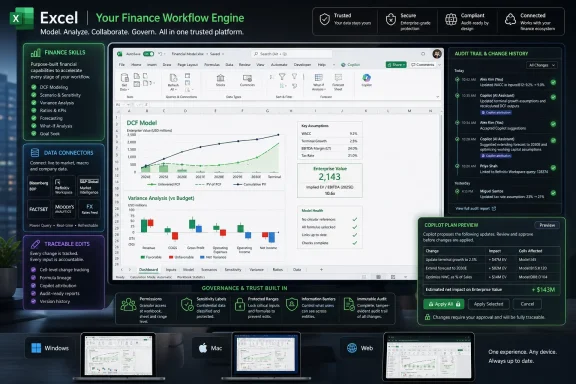
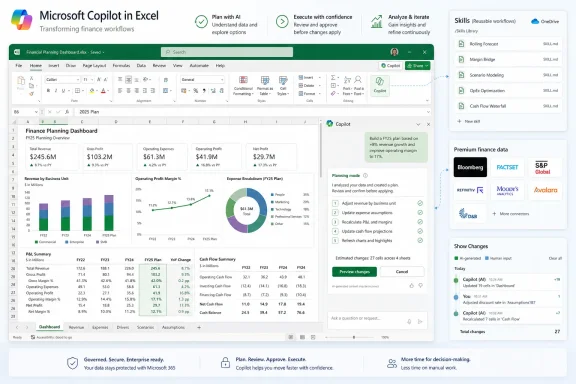
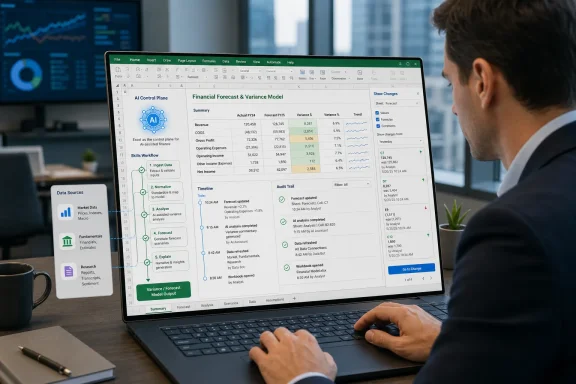
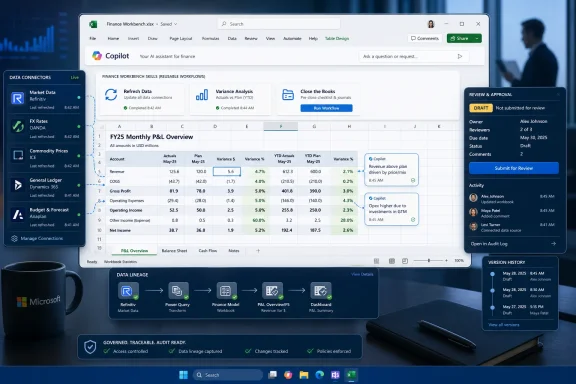
Microsoft announced on June 25, 2026, that Microsoft 365 Copilot in Excel is gaining finance-focused skills, new third-party financial data connectors, planning and traceability features, and availability across Excel for the web, Windows, and Mac for Microsoft 365 Copilot customers. The pitch is not that Excel has suddenly become an AI app. It is that Microsoft is trying to make AI behave more like Excel: structured, auditable, repeatable, and accountable to the cell. For finance teams, that distinction matters because the spreadsheet is not merely a canvas for numbers; it is the operating system of trust inside the enterprise.
The update lands at a moment when Microsoft’s Copilot story is shifting from generic productivity assistance toward domain-specific work. Drafting an email and summarizing a meeting were useful demonstrations of large language models in the office suite, but they were never the hard test. Finance is the hard test. If Copilot can help close the books, update forecasts, build valuation models, and explain the trail of changes without turning the workbook into a black box, Microsoft will have made a stronger case for AI inside the most conservative corners of the enterprise.
The most important thing about this release is not any single connector or prompt. It is Microsoft’s admission, implicit throughout the announcement, that finance users do not need a charming assistant so much as a controlled workflow engine. A finance analyst does not get paid for asking a model to “analyze revenue.” They get paid for producing a defensible model that survives review, revision, and interrogation by people who know exactly where the weak assumptions are hiding.
That is why the new Copilot in Excel features are framed around skills, trusted data, and traceable edits. Microsoft is trying to make Copilot less like an improvisational conversational agent and more like a junior analyst who has been handed a house style, access to approved data, and a mandate to leave a paper trail. In finance, the gap between those two models is the difference between a demo and a tool.
The company’s own language is revealing. Microsoft says its finance organization has been using Copilot in Excel across FP&A, accounting, tax, compliance, and treasury workflows before the capabilities reach customers. That is both marketing and product strategy. By presenting Microsoft Finance as an internal proving ground, the Excel team is arguing that these features have already been exposed to the kind of pressure most AI productivity features conveniently avoid: recurring deadlines, source data, internal controls, and managers who will ask why the number changed.
There is a reason Excel remains stubbornly central after decades of attempts to replace it with more governed systems. Databases are better at storing truth, ERP systems are better at enforcing process, and BI tools are better at presenting standardized metrics. But Excel remains where professionals reconcile competing versions of reality. Microsoft is now trying to place Copilot directly into that messy middle.
Prompting is too informal for serious recurring work. It depends too heavily on the memory, phrasing, and patience of the person at the keyboard. Finance teams already know how to standardize work through templates, checklists, review notes, naming conventions, workbook structures, and inherited models that nobody fully loves but everyone understands. Skills appear designed to bring Copilot into that culture rather than asking finance to adopt the culture of chat.
Microsoft says sample finance skills are available now, while custom skills can be created using an open-standard Markdown file named SKILL.md stored in OneDrive. That is a very Microsoft 365 answer: not a separate automation platform, not a new scripting language, but a document-like artifact living in the user’s existing cloud storage. For power users and administrators, the interesting question will be how quickly these files become governed assets rather than personal productivity hacks.
The partner angle points in the same direction. Microsoft says developers and partners will soon be able to build and deploy skills through Microsoft Marketplace and the Microsoft 365 Admin Center, with early partners including LSEG, Ramp, Rogo, samaya.ai, Velixo, and Vena. That suggests Microsoft sees skills not just as user-authored instructions, but as a distribution layer for packaged finance expertise.
This is where the story becomes larger than Excel. If skills become portable, governed, and centrally deployable, Microsoft is effectively building a marketplace for domain workflows that run inside Office. The workbook becomes the front end, Copilot becomes the execution layer, and the skill becomes the encoded process. That is not the death of Excel; it is Excel absorbing another layer of enterprise software.
This matters because finance teams do not merely need “answers.” They need answers derived from sources they are licensed to use, authorized to share, and able to inspect. A model that produces a plausible valuation summary is useless if the analyst cannot identify whether the revenue estimate came from a filing, a consensus dataset, a stale deck, or the model’s own statistical guesswork. In finance, provenance is not a nice-to-have. It is part of the work product.
Microsoft’s announcement explicitly notes that third-party connectors and data providers may require separate licensing or subscriptions. That caveat is more than procurement boilerplate. It is a reminder that enterprise AI will not flatten the data economy; it will route through it. The best financial data is expensive because it is collected, normalized, licensed, and maintained. Copilot’s job is not to make that data free. Its job is to make that data usable inside the workflow where decisions are already being made.
The FactSet detail is also worth noting. Microsoft says FactSet is in preview and will be generally available in July. That staggered rollout reflects the reality of this category: connectors are not just plug-ins, they are trust relationships. Finance departments will care about entitlement handling, data refresh behavior, auditability, and how citations or source references appear inside generated outputs. A connector that works beautifully in a demo but fails governance review is not a connector finance can use.
The inclusion of S&P Global’s Deterministic Retrieval is particularly interesting because the phrase itself is a critique of generic AI retrieval. Deterministic, structured access is the antidote to the “the model seemed confident” problem. Microsoft is signaling that at least some finance workflows need predictable retrieval, controlled orchestration, and cited results rather than a broad semantic rummage through vaguely relevant content.
That is the right design instinct. In Excel, the output is inseparable from the path taken to produce it. The question is not only whether the final number is correct, but which cells moved, which formulas changed, which assumptions were introduced, and whether the logic remains consistent with the workbook’s structure. A finance user reviewing a model does not want Copilot’s confidence; they want Copilot’s diff.
The planning step is especially important because it introduces a pause before execution. That pause is where judgment enters. Copilot can propose that it will update certain assumptions, refresh a forecast, or modify formulas, but the human analyst can still inspect the plan before the workbook changes. In a world obsessed with autonomous agents, Microsoft is emphasizing a more conservative pattern: supervised agency inside a controlled artifact.
This is also where Copilot must contend with Excel’s greatest strength and weakness: users can do almost anything. Workbooks carry years of inherited logic, hidden tabs, named ranges, broken links, external references, manual overrides, and formatting conventions that function as local law. A general AI assistant that cannot understand those conventions will make expensive mistakes. Workbook rules, which capture structure, naming, and formula conventions as a sheet that follows the file, are Microsoft’s attempt to give Copilot a map of that local law.
Still, traceability is not the same as correctness. Showing that Copilot changed a cell does not prove the change was right. Explaining which assumption was updated does not prove the assumption was appropriate. The real value is that Microsoft is reducing the cost of review. If Copilot can make its work inspectable, then finance teams can apply their existing review discipline instead of inventing an entirely new trust model from scratch.
The partnership with the Financial Modeling Institute adds a more objective note. Microsoft says FMI’s real-world financial modeling cases have become part of how it evaluates Copilot in Excel for finance work. That is the right kind of benchmark because generic spreadsheet tasks do not capture the complexity of professional modeling. A credible finance AI needs to handle multi-step reasoning, structured outputs, formula consistency, and reviewable methodology.
But benchmarks can only go so far. Finance work is contextual in a way that model tests often struggle to capture. Two companies may both ask for a variance analysis, but one means a clean management reporting package built on a stable chart of accounts, while the other means a frantic reconciliation across multiple planning versions and one spreadsheet maintained by someone who left in 2021. Copilot’s performance will depend heavily on the quality of the workbook, the availability of grounded data, and the clarity of the organization’s own processes.
That is not a reason to dismiss the release. It is a reason to deploy it with eyes open. The organizations that benefit first will be the ones that already understand their finance processes well enough to encode them. Copilot will not magically create a disciplined close process, a coherent forecasting model, or a clean data governance program. It will amplify what is already there.
That broad availability matters because Excel usage in finance is still heavily desktop-centric. Excel for the web has improved, but many financial professionals continue to live in the Windows desktop client, often with complex workbooks, add-ins, shortcuts, and muscle memory built over years. If Copilot finance features only worked well in the browser, the feature set would be strategically interesting but operationally limited.
The Mac support is also notable. Finance may be Windows-heavy in many enterprises, but the modern workplace is less uniform than it used to be. Cross-platform parity is not merely a consumer convenience; it affects collaboration. A model that behaves differently depending on which client opened it becomes another source of friction.
Progressive rollout language remains important. Microsoft says availability, supported regions, and licensing requirements may vary. That means administrators should expect the usual phased deployment reality: tenant settings, geography, update channels, app versions, connector entitlements, and Microsoft 365 Copilot licensing will all shape when a given user actually sees the features described. For IT teams, the announcement is the beginning of the rollout conversation, not the end.
This is where WindowsForum readers should be especially attentive. The feature may be marketed to finance, but its deployment is an IT problem. Admins will need to understand who can create skills, where those skills live, how partner-built skills are approved, how third-party connectors are governed, and how Copilot-generated changes appear in compliance and audit workflows.
A Copilot that can pull from internal planning decks, market data, analyst expectations, private company intelligence, and workbook formulas is powerful precisely because it sits near high-value information. The same integration that makes the tool useful also raises the stakes for permissions, logging, and review. If Copilot can see it, summarize it, and act on it, administrators need to know who authorized that visibility and where the output goes.
The connector ecosystem adds another layer. Each provider may bring its own licensing rules, entitlements, data terms, and usage constraints. Finance users may think of a connector as a convenience; legal and procurement teams may see it as a new path by which regulated or licensed data enters generated work product. Microsoft’s note about separate subscriptions is the polite version of a more complicated enterprise reality.
Skills will require similar attention. A SKILL.md file in OneDrive sounds lightweight and empowering, but lightweight mechanisms have a way of becoming shadow infrastructure. If a team encodes its close process or valuation methodology into a skill, that skill becomes a control surface. It should have ownership, versioning, review, and retirement practices, even if it begins life as a Markdown file written by a power user.
The governance challenge is not a reason to avoid the technology. It is the price of making AI useful in a real business process. Microsoft’s best argument is that by putting Copilot inside Excel, with planning, change attribution, workbook rules, and admin deployment paths, it can make AI more governable than the ad hoc use of external tools. That argument is plausible, but it will be tested tenant by tenant.
That is a pragmatic bet. Enterprises rarely replace their most embedded tools just because a cleaner architecture exists. They adopt capabilities that meet users where they already are. In finance, that place is still the workbook. If AI is going to matter in finance, it must learn the language of tabs, formulas, named ranges, assumptions, variance explanations, and review comments.
The sample workflows Microsoft describes are ambitious: closing the books, updating forecasts, building valuation models, finding acquisition candidates, analyzing portfolio performance, and monitoring earnings catalysts. These are not trivial automations. They combine internal context, external data, structured modeling, narrative explanation, and decision support. Even partial success could save time; careless overreach could create a new class of AI-generated spreadsheet risk.
The most realistic near-term use is not full automation. It is acceleration with review. Copilot can draft the variance narrative, propose the model update, pull the relevant market data, or identify the ranges it plans to touch. The analyst remains responsible for judgment, interpretation, and sign-off. That may sound less futuristic than autonomous finance, but it is much closer to how enterprise adoption actually happens.
This release also suggests where Microsoft 365 Copilot is heading more broadly. The generic assistant was only phase one. Phase two is domain specialization through skills, connectors, grounding, and control surfaces embedded in the apps people already use. Excel for finance is an obvious proving ground because the pain is real, the data is valuable, and the need for auditability is non-negotiable.
That distinction will matter as these features roll out. A Copilot-generated board package that looks polished may receive less scrutiny than a messy analyst draft, even if the polished version contains subtle errors. A model update that traces every changed cell may still embed a flawed assumption. A connector may bring fresher data into the workbook while also introducing licensing or entitlement complexities that users do not see.
The best finance teams will treat Copilot as a controlled collaborator. They will define skills carefully, govern connector access, use Plan with Copilot before allowing changes, and review Show Changes after the fact. They will also teach users where Copilot is helpful and where it remains risky. That training will be as important as the feature rollout.
Microsoft’s own framing helps here. The company is not promising that Copilot replaces finance professionals. It is promising that finance professionals can spend less time hunting for information and rebuilding analyses, and more time applying judgment. That is the right aspiration. The danger is that organizations hear only the productivity story and ignore the review discipline that makes productivity safe.
The update lands at a moment when Microsoft’s Copilot story is shifting from generic productivity assistance toward domain-specific work. Drafting an email and summarizing a meeting were useful demonstrations of large language models in the office suite, but they were never the hard test. Finance is the hard test. If Copilot can help close the books, update forecasts, build valuation models, and explain the trail of changes without turning the workbook into a black box, Microsoft will have made a stronger case for AI inside the most conservative corners of the enterprise.
 Microsoft Is Moving Copilot From Chatbot Theater to Spreadsheet Labor
The most important thing about this release is not any single connector or prompt. It is Microsoft’s admission, implicit throughout the announcement, that finance users do not need a charming assistant so much as a controlled workflow engine. A finance analyst does not get paid for asking a model to “analyze revenue.” They get paid for producing a defensible model that survives review, revision, and interrogation by people who know exactly where the weak assumptions are hiding.That is why the new Copilot in Excel features are framed around skills, trusted data, and traceable edits. Microsoft is trying to make Copilot less like an improvisational conversational agent and more like a junior analyst who has been handed a house style, access to approved data, and a mandate to leave a paper trail. In finance, the gap between those two models is the difference between a demo and a tool.
The company’s own language is revealing. Microsoft says its finance organization has been using Copilot in Excel across FP&A, accounting, tax, compliance, and treasury workflows before the capabilities reach customers. That is both marketing and product strategy. By presenting Microsoft Finance as an internal proving ground, the Excel team is arguing that these features have already been exposed to the kind of pressure most AI productivity features conveniently avoid: recurring deadlines, source data, internal controls, and managers who will ask why the number changed.
There is a reason Excel remains stubbornly central after decades of attempts to replace it with more governed systems. Databases are better at storing truth, ERP systems are better at enforcing process, and BI tools are better at presenting standardized metrics. But Excel remains where professionals reconcile competing versions of reality. Microsoft is now trying to place Copilot directly into that messy middle.
Skills Are Microsoft’s Bet That Finance Wants Repeatability, Not Magic
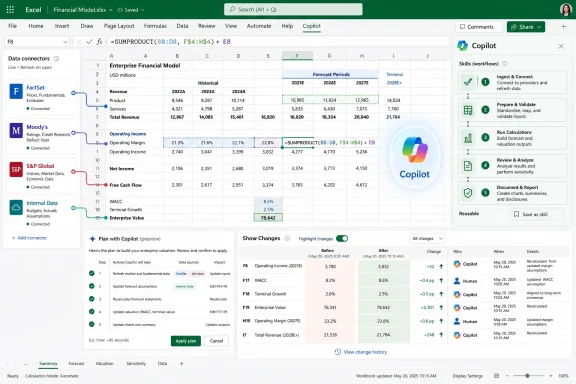
The headline feature is skills: reusable instructions that tell Copilot how to complete common finance processes such as building a discounted cash flow model, refreshing a monthly reporting package, preparing variance analysis, or closing the books. Instead of starting every interaction with a blank prompt, teams can define a process that Copilot follows repeatedly. That may sound like a small packaging change, but in enterprise finance it is the product moving in the right direction.Prompting is too informal for serious recurring work. It depends too heavily on the memory, phrasing, and patience of the person at the keyboard. Finance teams already know how to standardize work through templates, checklists, review notes, naming conventions, workbook structures, and inherited models that nobody fully loves but everyone understands. Skills appear designed to bring Copilot into that culture rather than asking finance to adopt the culture of chat.
Microsoft says sample finance skills are available now, while custom skills can be created using an open-standard Markdown file named SKILL.md stored in OneDrive. That is a very Microsoft 365 answer: not a separate automation platform, not a new scripting language, but a document-like artifact living in the user’s existing cloud storage. For power users and administrators, the interesting question will be how quickly these files become governed assets rather than personal productivity hacks.
The partner angle points in the same direction. Microsoft says developers and partners will soon be able to build and deploy skills through Microsoft Marketplace and the Microsoft 365 Admin Center, with early partners including LSEG, Ramp, Rogo, samaya.ai, Velixo, and Vena. That suggests Microsoft sees skills not just as user-authored instructions, but as a distribution layer for packaged finance expertise.
This is where the story becomes larger than Excel. If skills become portable, governed, and centrally deployable, Microsoft is effectively building a marketplace for domain workflows that run inside Office. The workbook becomes the front end, Copilot becomes the execution layer, and the skill becomes the encoded process. That is not the death of Excel; it is Excel absorbing another layer of enterprise software.
The Data Connectors Are the Real Boundary Between Toy AI and Work AI
The second major plank is data grounding. Microsoft says Copilot in Excel is expanding financial data connectors beyond LSEG and Moody’s, adding CB Insights, Daloopa, FactSet, Morningstar, PitchBook, and S&P Global’s Deterministic Retrieval technology developed by Kensho. The list is carefully chosen. It spans public markets, private company intelligence, fundamentals, analyst research, portfolio data, transaction histories, and structured retrieval for LLM and agent workflows.This matters because finance teams do not merely need “answers.” They need answers derived from sources they are licensed to use, authorized to share, and able to inspect. A model that produces a plausible valuation summary is useless if the analyst cannot identify whether the revenue estimate came from a filing, a consensus dataset, a stale deck, or the model’s own statistical guesswork. In finance, provenance is not a nice-to-have. It is part of the work product.
Microsoft’s announcement explicitly notes that third-party connectors and data providers may require separate licensing or subscriptions. That caveat is more than procurement boilerplate. It is a reminder that enterprise AI will not flatten the data economy; it will route through it. The best financial data is expensive because it is collected, normalized, licensed, and maintained. Copilot’s job is not to make that data free. Its job is to make that data usable inside the workflow where decisions are already being made.
The FactSet detail is also worth noting. Microsoft says FactSet is in preview and will be generally available in July. That staggered rollout reflects the reality of this category: connectors are not just plug-ins, they are trust relationships. Finance departments will care about entitlement handling, data refresh behavior, auditability, and how citations or source references appear inside generated outputs. A connector that works beautifully in a demo but fails governance review is not a connector finance can use.
The inclusion of S&P Global’s Deterministic Retrieval is particularly interesting because the phrase itself is a critique of generic AI retrieval. Deterministic, structured access is the antidote to the “the model seemed confident” problem. Microsoft is signaling that at least some finance workflows need predictable retrieval, controlled orchestration, and cited results rather than a broad semantic rummage through vaguely relevant content.
Traceability Is Where Microsoft Knows Excel Cannot Afford a Black Box
The most consequential part of the announcement may be the least glamorous: Plan with Copilot and attribution in Show Changes. Microsoft says users can now ask Copilot to outline which ranges, worksheets, formulas, and assumptions it intends to update before making changes. After edits are made, changes are traceable, linked back to affected cells, and attributed to Copilot alongside human collaborators in the Show Changes pane.That is the right design instinct. In Excel, the output is inseparable from the path taken to produce it. The question is not only whether the final number is correct, but which cells moved, which formulas changed, which assumptions were introduced, and whether the logic remains consistent with the workbook’s structure. A finance user reviewing a model does not want Copilot’s confidence; they want Copilot’s diff.
The planning step is especially important because it introduces a pause before execution. That pause is where judgment enters. Copilot can propose that it will update certain assumptions, refresh a forecast, or modify formulas, but the human analyst can still inspect the plan before the workbook changes. In a world obsessed with autonomous agents, Microsoft is emphasizing a more conservative pattern: supervised agency inside a controlled artifact.
This is also where Copilot must contend with Excel’s greatest strength and weakness: users can do almost anything. Workbooks carry years of inherited logic, hidden tabs, named ranges, broken links, external references, manual overrides, and formatting conventions that function as local law. A general AI assistant that cannot understand those conventions will make expensive mistakes. Workbook rules, which capture structure, naming, and formula conventions as a sheet that follows the file, are Microsoft’s attempt to give Copilot a map of that local law.
Still, traceability is not the same as correctness. Showing that Copilot changed a cell does not prove the change was right. Explaining which assumption was updated does not prove the assumption was appropriate. The real value is that Microsoft is reducing the cost of review. If Copilot can make its work inspectable, then finance teams can apply their existing review discipline instead of inventing an entirely new trust model from scratch.
Microsoft’s Internal Finance Story Is Useful, but It Is Not Proof
Microsoft leans heavily on the idea that its own finance organization has pressure-tested Copilot in Excel. That is useful evidence, but it should not be mistaken for independent validation. Microsoft Finance is a sophisticated, well-resourced internal customer with direct lines into the product teams building the software. Most companies will not have that feedback loop, and many will have messier data estates, older workbooks, weaker governance, and more fragmented licensing.The partnership with the Financial Modeling Institute adds a more objective note. Microsoft says FMI’s real-world financial modeling cases have become part of how it evaluates Copilot in Excel for finance work. That is the right kind of benchmark because generic spreadsheet tasks do not capture the complexity of professional modeling. A credible finance AI needs to handle multi-step reasoning, structured outputs, formula consistency, and reviewable methodology.
But benchmarks can only go so far. Finance work is contextual in a way that model tests often struggle to capture. Two companies may both ask for a variance analysis, but one means a clean management reporting package built on a stable chart of accounts, while the other means a frantic reconciliation across multiple planning versions and one spreadsheet maintained by someone who left in 2021. Copilot’s performance will depend heavily on the quality of the workbook, the availability of grounded data, and the clarity of the organization’s own processes.
That is not a reason to dismiss the release. It is a reason to deploy it with eyes open. The organizations that benefit first will be the ones that already understand their finance processes well enough to encode them. Copilot will not magically create a disciplined close process, a coherent forecasting model, or a clean data governance program. It will amplify what is already there.
The Windows and Mac Availability Story Shows Microsoft Wants This in the Mainstream Workflow
Microsoft says Personalization, workbook rules, pre-built skills, federated Copilot connectors, Plan with Copilot, and Copilot attribution in Show Changes are generally available for Microsoft 365 Copilot customers across Excel for the web, Windows, and Mac. Custom skills are available through the Insiders channel for Windows and Mac now, with general availability across Excel for the web, Windows, and Mac next month. Partner-built skills are coming in Q3 2026.That broad availability matters because Excel usage in finance is still heavily desktop-centric. Excel for the web has improved, but many financial professionals continue to live in the Windows desktop client, often with complex workbooks, add-ins, shortcuts, and muscle memory built over years. If Copilot finance features only worked well in the browser, the feature set would be strategically interesting but operationally limited.
The Mac support is also notable. Finance may be Windows-heavy in many enterprises, but the modern workplace is less uniform than it used to be. Cross-platform parity is not merely a consumer convenience; it affects collaboration. A model that behaves differently depending on which client opened it becomes another source of friction.
Progressive rollout language remains important. Microsoft says availability, supported regions, and licensing requirements may vary. That means administrators should expect the usual phased deployment reality: tenant settings, geography, update channels, app versions, connector entitlements, and Microsoft 365 Copilot licensing will all shape when a given user actually sees the features described. For IT teams, the announcement is the beginning of the rollout conversation, not the end.
This is where WindowsForum readers should be especially attentive. The feature may be marketed to finance, but its deployment is an IT problem. Admins will need to understand who can create skills, where those skills live, how partner-built skills are approved, how third-party connectors are governed, and how Copilot-generated changes appear in compliance and audit workflows.
The New Excel AI Is Also a Governance Test
Microsoft’s finance push arrives in the broader context of enterprise anxiety about AI agents. Companies want productivity gains, but they also worry about data leakage, unauthorized access, hallucinated outputs, and opaque automation. Excel magnifies those concerns because spreadsheets often contain sensitive forecasts, compensation models, acquisition targets, tax assumptions, and board-level reporting.A Copilot that can pull from internal planning decks, market data, analyst expectations, private company intelligence, and workbook formulas is powerful precisely because it sits near high-value information. The same integration that makes the tool useful also raises the stakes for permissions, logging, and review. If Copilot can see it, summarize it, and act on it, administrators need to know who authorized that visibility and where the output goes.
The connector ecosystem adds another layer. Each provider may bring its own licensing rules, entitlements, data terms, and usage constraints. Finance users may think of a connector as a convenience; legal and procurement teams may see it as a new path by which regulated or licensed data enters generated work product. Microsoft’s note about separate subscriptions is the polite version of a more complicated enterprise reality.
Skills will require similar attention. A SKILL.md file in OneDrive sounds lightweight and empowering, but lightweight mechanisms have a way of becoming shadow infrastructure. If a team encodes its close process or valuation methodology into a skill, that skill becomes a control surface. It should have ownership, versioning, review, and retirement practices, even if it begins life as a Markdown file written by a power user.
The governance challenge is not a reason to avoid the technology. It is the price of making AI useful in a real business process. Microsoft’s best argument is that by putting Copilot inside Excel, with planning, change attribution, workbook rules, and admin deployment paths, it can make AI more governable than the ad hoc use of external tools. That argument is plausible, but it will be tested tenant by tenant.
The Spreadsheet Is Becoming an Agent Workspace
For years, the knock on Excel has been that it is too flexible: too many critical business processes trapped in fragile workbooks, too much logic hidden in cells, too many manual interventions dressed up as models. Microsoft’s Copilot strategy does not reject that reality. It embraces it. Rather than trying to migrate finance work out of Excel, Microsoft is turning Excel into a place where agentic assistance can operate against the grain of existing spreadsheets.That is a pragmatic bet. Enterprises rarely replace their most embedded tools just because a cleaner architecture exists. They adopt capabilities that meet users where they already are. In finance, that place is still the workbook. If AI is going to matter in finance, it must learn the language of tabs, formulas, named ranges, assumptions, variance explanations, and review comments.
The sample workflows Microsoft describes are ambitious: closing the books, updating forecasts, building valuation models, finding acquisition candidates, analyzing portfolio performance, and monitoring earnings catalysts. These are not trivial automations. They combine internal context, external data, structured modeling, narrative explanation, and decision support. Even partial success could save time; careless overreach could create a new class of AI-generated spreadsheet risk.
The most realistic near-term use is not full automation. It is acceleration with review. Copilot can draft the variance narrative, propose the model update, pull the relevant market data, or identify the ranges it plans to touch. The analyst remains responsible for judgment, interpretation, and sign-off. That may sound less futuristic than autonomous finance, but it is much closer to how enterprise adoption actually happens.
This release also suggests where Microsoft 365 Copilot is heading more broadly. The generic assistant was only phase one. Phase two is domain specialization through skills, connectors, grounding, and control surfaces embedded in the apps people already use. Excel for finance is an obvious proving ground because the pain is real, the data is valuable, and the need for auditability is non-negotiable.
The Numbers Will Still Need a Human Owner
Microsoft’s announcement should excite finance teams, but it should not lull them into thinking accountability has been delegated to the model. A forecast is still a forecast. A valuation is still an argument. A variance explanation still reflects assumptions about the business. Copilot can help assemble, update, and explain the work, but the organization still owns the conclusion.That distinction will matter as these features roll out. A Copilot-generated board package that looks polished may receive less scrutiny than a messy analyst draft, even if the polished version contains subtle errors. A model update that traces every changed cell may still embed a flawed assumption. A connector may bring fresher data into the workbook while also introducing licensing or entitlement complexities that users do not see.
The best finance teams will treat Copilot as a controlled collaborator. They will define skills carefully, govern connector access, use Plan with Copilot before allowing changes, and review Show Changes after the fact. They will also teach users where Copilot is helpful and where it remains risky. That training will be as important as the feature rollout.
Microsoft’s own framing helps here. The company is not promising that Copilot replaces finance professionals. It is promising that finance professionals can spend less time hunting for information and rebuilding analyses, and more time applying judgment. That is the right aspiration. The danger is that organizations hear only the productivity story and ignore the review discipline that makes productivity safe.
The Close Process Now Has an AI Footnote
This release is not just another Copilot feature drop. It is Microsoft’s clearest statement yet that Excel will be one of the main battlegrounds for enterprise AI, especially in functions where trust, repeatability, and data lineage matter as much as speed. The practical message for Windows and Microsoft 365 shops is straightforward: finance AI is arriving not as a standalone application, but as a layer inside the spreadsheet estate you already manage.- Microsoft is making finance-specific Copilot features generally available across Excel for the web, Windows, and Mac for Microsoft 365 Copilot customers, with some capabilities still rolling out progressively.
- Skills are designed to turn recurring finance processes into reusable Copilot-guided workflows rather than one-off prompts.
- Custom skills use a SKILL.md file in OneDrive today through the Insiders channel, with broader general availability planned for next month.
- New connectors from CB Insights, Daloopa, FactSet, Morningstar, PitchBook, and S&P Global expand Copilot’s access to public market, private market, fundamentals, research, and investment data.
- Plan with Copilot and Show Changes attribution are the most important controls because they make proposed and completed workbook edits more reviewable.
- Administrators should treat skills, connectors, and Copilot-generated workbook changes as governance surfaces, not merely user-facing productivity features.
References
- Primary source: Microsoft
Published: 2026-06-25T13:42:08.764813
Copilot in Excel: Built for the era of Frontier Finance | Microsoft 365 Blog
- Discover how Copilot in Excel transforms finance workflows with skills, data connectors, and capabilities for traceability.www.microsoft.com