

Microsoft is rolling out new Microsoft 365 Copilot Notebooks capabilities in May 2026, including Excel spreadsheet generation in Frontier, forthcoming infographic creation, Teams meeting references, web URL references, Outlook email-thread support, and a redesigned workspace split between the Microsoft 365 Copilot app and OneNote. The feature list sounds like another incremental Copilot update, but it points to a larger Microsoft bet: the company wants Notebooks to become the place where enterprise work is assembled, reasoned over, and converted into artifacts. Google proved with NotebookLM that grounded AI feels dramatically more useful than a general chatbot. Microsoft’s answer is to make that same pattern live inside the Microsoft 365 permission model, where the documents, meetings, chats, and spreadsheets already are.
The important shift in Copilot Notebooks is not that it can now make another kind of file. It is that Microsoft is trying to move users away from the single-prompt interaction that defined the first wave of enterprise AI. A chat window is useful for a quick summary, but it is a poor home for work that lasts days, weeks, or quarters.
Notebooks are Microsoft’s attempt to solve that persistence problem. A user can attach a defined body of source material, ask Copilot to reason over it, and then return to the same context later without rebuilding the prompt from scratch. In plain English, Microsoft is trying to turn Copilot into a project room rather than a very expensive autocomplete pane.
That distinction matters because most knowledge work is not a one-shot question. A product launch, legal review, incident postmortem, procurement comparison, grant application, sales pursuit, or audit response is a pile of documents, meeting notes, messages, and half-finished drafts. The first generation of AI assistants asked users to bring that mess into the chat. Notebooks ask users to make the mess the workspace.
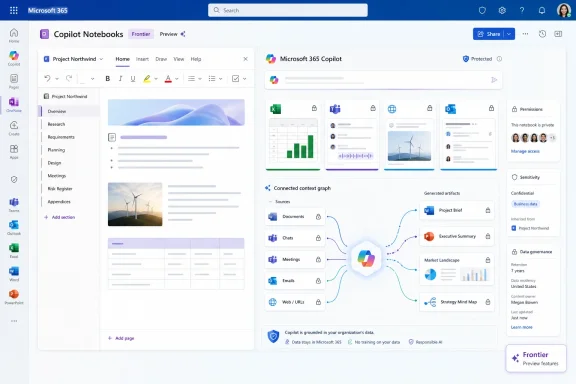
The new tools extend that logic. If Copilot can turn the same grounded source set into a Word document, PowerPoint deck, audio overview, mind map, study guide, spreadsheet, or infographic, the notebook becomes less like a note-taking feature and more like a production surface. That is the story Microsoft wants IT departments to buy.
Microsoft saw the same opening, but it is playing on different turf. NotebookLM is strongest as a research companion. Copilot Notebooks is designed to sit inside Microsoft 365, where the source material is not merely uploaded by a user but already governed by tenant permissions, SharePoint locations, OneDrive files, Teams meetings, OneNote pages, and eventually Outlook threads.
That is both Microsoft’s advantage and its burden. The company does not need to persuade enterprises to move their work into a new AI research tool; the work is already in Microsoft 365. But because the work is already there, Microsoft has to respect the messy realities of enterprise data: broken permissions, overshared folders, retention policies, sensitivity labels, legal holds, and the eternal question of who can see what.
For WindowsForum readers, that is where the real operational story begins. A consumer AI notebook is mostly a product-design problem. An enterprise AI notebook is an information-governance problem wearing a product-design costume.
That split is revealing. Microsoft knows OneNote still carries the muscle memory for many users who think in notebooks, pages, sections, and captured notes. At the same time, Copilot’s center of gravity is moving toward the Microsoft 365 Copilot app, where Microsoft can present chat, agents, generated artifacts, and references as one integrated AI surface.
The result is slightly awkward but strategically understandable. OneNote remains the familiar filing cabinet. The Copilot app becomes the command center. Microsoft is betting that users will tolerate the overlap because the same notebooks can travel between both.
The smaller OneNote navigation change, which brings actions such as “Create” and “Add Reference” higher in the left navigation bar, is not glamorous. But it signals that Microsoft understands the first-mile problem. If users cannot quickly add the right source material, Notebooks collapses back into ordinary chat.
That turns Notebooks into something more serious than a document summarizer. Meetings are where decisions are made but often poorly captured. Email threads are where institutional memory gets buried. Web pages are where external context lives. Bringing those into the same grounded workspace gives Copilot a better shot at reconstructing the shape of real work.
The Teams meeting support is especially important. A project notebook that includes the proposal, the spreadsheet, the customer deck, and the meeting transcript can answer a more useful question than any one file can. It can explain not only what the plan says, but how the team discussed it, what objections surfaced, and which files were shared along the way.
Outlook support may be even more consequential, precisely because email is still the enterprise’s most stubborn database. For all the talk of Teams replacing email, many organizations continue to make commitments, negotiate exceptions, and transmit approvals in threads that no project-management system ever sees. If Copilot Notebooks can ingest those threads cleanly, it can help expose context that today depends on the memory of whoever was copied.
A notebook that can turn a pile of meeting notes, documents, and references into a structured spreadsheet is not replacing Excel expertise. It is replacing the blank-sheet tax. Users still need to review the structure, validate the values, adjust formulas, and decide whether the output is meaningful. But they may no longer need to spend the first half-hour building the skeleton.
Infographics move in the same direction. Microsoft is not merely helping users summarize content; it is helping them package it. In enterprise life, the difference between “I understand the source material” and “I can communicate the source material to a stakeholder” is often a slide, a chart, a one-page visual, or a diagram.
That is why mind maps, audio overviews, study guides, PowerPoint decks, Word documents, Excel sheets, and infographics belong to the same strategic pattern. Microsoft wants Copilot to become the machine that converts grounded context into the next artifact. The prompt is no longer the product. The artifact is.
This is a sensible model for Microsoft, but it creates a planning challenge for administrators. Users hear “Copilot can do this now” and reasonably expect the feature to appear in their tenant. In practice, availability may depend on licensing, tenant settings, app surface, platform, region, rollout stage, and whether Frontier is enabled.
That gap between product marketing and admin reality is becoming a recurring Copilot theme. Microsoft’s AI roadmap is moving faster than the average enterprise change-management cycle. IT departments are left translating a moving feature list into policies, training, support scripts, and risk assessments.
The wise approach is to treat Frontier as a lab, not a mandate. Pilot the feature with users who understand the review burden, collect examples of where it works and fails, and decide whether the output quality justifies broader rollout. Copilot’s most impressive demos usually happen on clean source material. Enterprise deployments happen in the mud.
That is Microsoft acknowledging that source material does not always begin as a pristine Word document in SharePoint. Work often starts as a hallway conversation, a whiteboard sketch, a voice memo, a photo of a diagram, or a half-typed note during a meeting. If Copilot Notebooks is going to be the enterprise workbench, Microsoft needs easier ways to get raw material into it.
Mobile capture also moves Notebooks closer to frontline and hybrid scenarios. A consultant leaving a client workshop, an engineer photographing a whiteboard, a project manager dictating notes after a site visit, or a teacher capturing class discussion could all feed a notebook without waiting to reconstruct the session at a desktop.
The caveat is obvious: capture is only as good as cleanup. Audio, images, and hurried notes introduce transcription errors, missing context, and ambiguous references. Copilot can structure the chaos, but it cannot magically know whether the whiteboard photo included the critical detail outside the frame.
Copilot can only be as disciplined as the organization’s underlying information architecture. If SharePoint sites are overshared, if old project folders remain accessible to broad groups, if sensitivity labels are inconsistently applied, or if meeting transcripts include information that should not have been recorded, Notebooks will inherit those problems. AI does not create bad permissions; it makes them more visible and more consequential.
There is also a second-order risk around generated artifacts. An infographic, audio overview, spreadsheet, or study guide derived from confidential source material should be treated as confidential too. Users may not instinctively apply the same caution to a generated summary as they would to the original legal memo or HR spreadsheet.
This is where admins and compliance teams need to get ahead of the product. The question is not simply whether users can add references. It is whether the organization has a clear policy for which references should be added, who can share the resulting notebook, how generated files are stored, and how long those artifacts should survive.
In practice, that same integration creates friction. A user may not know which SharePoint folder is authoritative. Teams meeting transcripts may be missing because recording or transcription was disabled. Outlook threads may contain side conversations that should not be shared with the broader team. Web references may change or disappear. OneNote notebooks may be sprawling, inconsistent, and years out of date.
This is not a reason to dismiss the feature. It is a reason to be realistic about what makes it valuable. Copilot Notebooks will work best when teams curate their source material deliberately. Dumping every file into a notebook is not intelligence; it is another form of hoarding.
The teams that benefit most will likely be those that already understand project hygiene. They know where decisions are documented, which folder holds the current version, which meetings matter, and which stakeholders need the output. Copilot can accelerate that discipline. It cannot substitute for it.
If Microsoft gets this right, the notebook becomes a reusable context container. Instead of asking Copilot to “summarize the project” from a standing start, a user can open the project notebook and ask for a risk register, a meeting brief, a customer-ready update, or a spreadsheet of action items. The value compounds as the notebook accumulates better references.
That is a more durable AI workflow than prompt-and-forget chat. It also aligns with how enterprises already think about work. IT can govern notebooks by project, department, or group. Managers can standardize templates. Teams can decide what belongs in the notebook and what does not.
There is a danger, however, that Microsoft creates yet another workspace in an ecosystem already crowded with them. Between Teams, SharePoint, OneDrive, Loop, OneNote, Planner, Outlook, and the Microsoft 365 Copilot app, users already face a daily question: where does this work belong? Notebooks will need a crisp role, or they risk becoming one more well-intentioned container.
The competition is over trust. Users need to trust that the AI is drawing from the right material. Admins need to trust that permissions and compliance boundaries hold. Managers need to trust that generated outputs are good enough to save time rather than create review debt. Security teams need to trust that new formats do not become leakage paths.
Microsoft’s advantage is that it can embed trust into existing enterprise controls. Its disadvantage is that enterprise controls are often inconsistently implemented. Google’s advantage is product clarity and cultural momentum around NotebookLM. Its disadvantage, in Microsoft-heavy organizations, is distance from the work graph.
For many businesses, the decision will not be ideological. If the work lives in Microsoft 365, Copilot Notebooks has a structural advantage. If the work is more academic, open-ended, or individually curated, NotebookLM may remain more appealing. The market will not pick one winner so much as divide by workflow.
That is where users spend the workday. Word, Excel, PowerPoint, Outlook, Teams, OneNote, SharePoint, and the Microsoft 365 Copilot app are the practical terrain. A new Windows AI feature may change how a PC feels, but a good Notebooks workflow could change how a department produces reports, proposals, briefings, and analysis.
This also explains why Microsoft keeps weaving Copilot across application boundaries. A notebook that can pull from Teams, reason over SharePoint documents, absorb Outlook threads, and generate Excel or PowerPoint outputs is not a feature of one app. It is an argument for Microsoft 365 as an integrated work system.
That argument will land with some users and irritate others. The more Microsoft inserts Copilot into Office, the more it must avoid making the suite feel cluttered, coercive, or unpredictable. AI that appears when needed is helpful. AI that feels like an uninvited layer over every document quickly becomes another enterprise annoyance.
A legal team might build notebooks around matters. A sales organization might build them around strategic accounts. A product team might build them around launches. A security team might build them around incidents and postmortems. An education institution might build them around courses, readings, and student support material.
That is where adoption becomes measurable. The question is not whether a user clicked the Copilot button. The question is whether a notebook reduced the time to prepare a board update, compare vendors, onboard a new analyst, summarize a customer workshop, or turn meeting history into a usable project plan.
Admins should resist the temptation to roll this out as another generic AI feature. The better pattern is to pick a small number of repeatable workflows, define what sources belong in each notebook, decide what outputs are acceptable, and train users to verify the results. The notebook should have a job before it has an audience.
 Microsoft Is Turning Copilot From a Chat Box Into a Workbench
The important shift in Copilot Notebooks is not that it can now make another kind of file. It is that Microsoft is trying to move users away from the single-prompt interaction that defined the first wave of enterprise AI. A chat window is useful for a quick summary, but it is a poor home for work that lasts days, weeks, or quarters.Notebooks are Microsoft’s attempt to solve that persistence problem. A user can attach a defined body of source material, ask Copilot to reason over it, and then return to the same context later without rebuilding the prompt from scratch. In plain English, Microsoft is trying to turn Copilot into a project room rather than a very expensive autocomplete pane.
That distinction matters because most knowledge work is not a one-shot question. A product launch, legal review, incident postmortem, procurement comparison, grant application, sales pursuit, or audit response is a pile of documents, meeting notes, messages, and half-finished drafts. The first generation of AI assistants asked users to bring that mess into the chat. Notebooks ask users to make the mess the workspace.
The new tools extend that logic. If Copilot can turn the same grounded source set into a Word document, PowerPoint deck, audio overview, mind map, study guide, spreadsheet, or infographic, the notebook becomes less like a note-taking feature and more like a production surface. That is the story Microsoft wants IT departments to buy.
NotebookLM Set the Consumer Expectation, But Microsoft Owns the Office Terrain
Google’s NotebookLM changed the public conversation because it made AI feel trustworthy in a way generic chatbots often did not. Upload a few documents, ask questions about those documents, and receive answers that are constrained by a visible source set. Its viral audio overviews gave the product a hook, but the deeper appeal was simpler: users could see what the AI was supposed to know.Microsoft saw the same opening, but it is playing on different turf. NotebookLM is strongest as a research companion. Copilot Notebooks is designed to sit inside Microsoft 365, where the source material is not merely uploaded by a user but already governed by tenant permissions, SharePoint locations, OneDrive files, Teams meetings, OneNote pages, and eventually Outlook threads.
That is both Microsoft’s advantage and its burden. The company does not need to persuade enterprises to move their work into a new AI research tool; the work is already in Microsoft 365. But because the work is already there, Microsoft has to respect the messy realities of enterprise data: broken permissions, overshared folders, retention policies, sensitivity labels, legal holds, and the eternal question of who can see what.
For WindowsForum readers, that is where the real operational story begins. A consumer AI notebook is mostly a product-design problem. An enterprise AI notebook is an information-governance problem wearing a product-design costume.
The Redesign Reveals a Product Split Microsoft Could Not Avoid
Microsoft’s refreshed experience separates the notebook idea across two familiar places. In the Microsoft 365 Copilot app, chats, creations, and references are being brought together into one view, while the more traditional notebook-style workspace remains available in OneNote. Because notebooks sync across the Microsoft 365 Copilot app and OneNote, users can move between the newer Copilot-first interface and the older note-taking environment.That split is revealing. Microsoft knows OneNote still carries the muscle memory for many users who think in notebooks, pages, sections, and captured notes. At the same time, Copilot’s center of gravity is moving toward the Microsoft 365 Copilot app, where Microsoft can present chat, agents, generated artifacts, and references as one integrated AI surface.
The result is slightly awkward but strategically understandable. OneNote remains the familiar filing cabinet. The Copilot app becomes the command center. Microsoft is betting that users will tolerate the overlap because the same notebooks can travel between both.
The smaller OneNote navigation change, which brings actions such as “Create” and “Add Reference” higher in the left navigation bar, is not glamorous. But it signals that Microsoft understands the first-mile problem. If users cannot quickly add the right source material, Notebooks collapses back into ordinary chat.
References Are Becoming the Real Feature
The most meaningful additions are not the output formats. They are the new reference types. Frontier users can now add Teams meetings as references, including transcripts, notes, chats, and shared files. Web page URLs can also be added, and Outlook email-thread support is coming to Frontier.That turns Notebooks into something more serious than a document summarizer. Meetings are where decisions are made but often poorly captured. Email threads are where institutional memory gets buried. Web pages are where external context lives. Bringing those into the same grounded workspace gives Copilot a better shot at reconstructing the shape of real work.
The Teams meeting support is especially important. A project notebook that includes the proposal, the spreadsheet, the customer deck, and the meeting transcript can answer a more useful question than any one file can. It can explain not only what the plan says, but how the team discussed it, what objections surfaced, and which files were shared along the way.
Outlook support may be even more consequential, precisely because email is still the enterprise’s most stubborn database. For all the talk of Teams replacing email, many organizations continue to make commitments, negotiate exceptions, and transmit approvals in threads that no project-management system ever sees. If Copilot Notebooks can ingest those threads cleanly, it can help expose context that today depends on the memory of whoever was copied.
Output Formats Are Microsoft’s Quiet Attack on Office Busywork
The new Excel spreadsheet generation capability is easy to undersell. Creating a spreadsheet from notebook content sounds like a convenience feature until you consider how often knowledge workers manually translate messy source material into tables, trackers, matrices, estimates, and comparison sheets. That work is not intellectually glamorous, but it consumes an enormous amount of time.A notebook that can turn a pile of meeting notes, documents, and references into a structured spreadsheet is not replacing Excel expertise. It is replacing the blank-sheet tax. Users still need to review the structure, validate the values, adjust formulas, and decide whether the output is meaningful. But they may no longer need to spend the first half-hour building the skeleton.
Infographics move in the same direction. Microsoft is not merely helping users summarize content; it is helping them package it. In enterprise life, the difference between “I understand the source material” and “I can communicate the source material to a stakeholder” is often a slide, a chart, a one-page visual, or a diagram.
That is why mind maps, audio overviews, study guides, PowerPoint decks, Word documents, Excel sheets, and infographics belong to the same strategic pattern. Microsoft wants Copilot to become the machine that converts grounded context into the next artifact. The prompt is no longer the product. The artifact is.
Frontier Is Microsoft’s New Waiting Room for AI Features
Many of these capabilities are arriving first through Microsoft’s Frontier program, which has become the company’s staging ground for experimental Copilot functionality. That gives Microsoft a way to ship aggressively without calling every feature generally available on day one. It also gives customers a warning: the experience may change, and IT should not treat every Frontier feature as a stable production dependency.This is a sensible model for Microsoft, but it creates a planning challenge for administrators. Users hear “Copilot can do this now” and reasonably expect the feature to appear in their tenant. In practice, availability may depend on licensing, tenant settings, app surface, platform, region, rollout stage, and whether Frontier is enabled.
That gap between product marketing and admin reality is becoming a recurring Copilot theme. Microsoft’s AI roadmap is moving faster than the average enterprise change-management cycle. IT departments are left translating a moving feature list into policies, training, support scripts, and risk assessments.
The wise approach is to treat Frontier as a lab, not a mandate. Pilot the feature with users who understand the review burden, collect examples of where it works and fails, and decide whether the output quality justifies broader rollout. Copilot’s most impressive demos usually happen on clean source material. Enterprise deployments happen in the mud.
The iPhone Capture Flow Shows Microsoft Chasing the Front Door of Work
The OneNote iPhone update is a different kind of feature, but it fits the same thesis. Users can record live audio, capture images such as whiteboard photos, and type notes in a single session. Copilot can then turn those mixed inputs into a structured notebook page that can be queried or converted into other content.That is Microsoft acknowledging that source material does not always begin as a pristine Word document in SharePoint. Work often starts as a hallway conversation, a whiteboard sketch, a voice memo, a photo of a diagram, or a half-typed note during a meeting. If Copilot Notebooks is going to be the enterprise workbench, Microsoft needs easier ways to get raw material into it.
Mobile capture also moves Notebooks closer to frontline and hybrid scenarios. A consultant leaving a client workshop, an engineer photographing a whiteboard, a project manager dictating notes after a site visit, or a teacher capturing class discussion could all feed a notebook without waiting to reconstruct the session at a desktop.
The caveat is obvious: capture is only as good as cleanup. Audio, images, and hurried notes introduce transcription errors, missing context, and ambiguous references. Copilot can structure the chaos, but it cannot magically know whether the whiteboard photo included the critical detail outside the frame.
The Governance Problem Is Not a Footnote
Microsoft’s strongest argument for Copilot Notebooks is that it works inside Microsoft 365’s security and permissions model. That is a real advantage over ad hoc AI tools where users upload company documents into services IT may not control. But “inside the tenant” is not the same as “safe by default.”Copilot can only be as disciplined as the organization’s underlying information architecture. If SharePoint sites are overshared, if old project folders remain accessible to broad groups, if sensitivity labels are inconsistently applied, or if meeting transcripts include information that should not have been recorded, Notebooks will inherit those problems. AI does not create bad permissions; it makes them more visible and more consequential.
There is also a second-order risk around generated artifacts. An infographic, audio overview, spreadsheet, or study guide derived from confidential source material should be treated as confidential too. Users may not instinctively apply the same caution to a generated summary as they would to the original legal memo or HR spreadsheet.
This is where admins and compliance teams need to get ahead of the product. The question is not simply whether users can add references. It is whether the organization has a clear policy for which references should be added, who can share the resulting notebook, how generated files are stored, and how long those artifacts should survive.
Microsoft’s Enterprise Advantage Comes With Enterprise Friction
The appeal of Notebooks is obvious for Microsoft 365-heavy organizations. A user does not need to export files, manually upload everything to a separate AI tool, or worry that the assistant lacks access to the relevant meeting recap. In theory, the notebook sits where the work already lives.In practice, that same integration creates friction. A user may not know which SharePoint folder is authoritative. Teams meeting transcripts may be missing because recording or transcription was disabled. Outlook threads may contain side conversations that should not be shared with the broader team. Web references may change or disappear. OneNote notebooks may be sprawling, inconsistent, and years out of date.
This is not a reason to dismiss the feature. It is a reason to be realistic about what makes it valuable. Copilot Notebooks will work best when teams curate their source material deliberately. Dumping every file into a notebook is not intelligence; it is another form of hoarding.
The teams that benefit most will likely be those that already understand project hygiene. They know where decisions are documented, which folder holds the current version, which meetings matter, and which stakeholders need the output. Copilot can accelerate that discipline. It cannot substitute for it.
The Notebook Is Becoming the Unit of AI Work
The deeper product bet is that a notebook can become a unit of AI work, much like a Teams channel became a unit of collaboration and a SharePoint site became a unit of content management. A notebook can represent a client engagement, a policy review, a product launch, a research question, a class module, or a support escalation. It has sources, conversations, outputs, and eventually collaborators.If Microsoft gets this right, the notebook becomes a reusable context container. Instead of asking Copilot to “summarize the project” from a standing start, a user can open the project notebook and ask for a risk register, a meeting brief, a customer-ready update, or a spreadsheet of action items. The value compounds as the notebook accumulates better references.
That is a more durable AI workflow than prompt-and-forget chat. It also aligns with how enterprises already think about work. IT can govern notebooks by project, department, or group. Managers can standardize templates. Teams can decide what belongs in the notebook and what does not.
There is a danger, however, that Microsoft creates yet another workspace in an ecosystem already crowded with them. Between Teams, SharePoint, OneDrive, Loop, OneNote, Planner, Outlook, and the Microsoft 365 Copilot app, users already face a daily question: where does this work belong? Notebooks will need a crisp role, or they risk becoming one more well-intentioned container.
The Feature Race Is Really a Trust Race
The comparison with NotebookLM will continue because the products overlap in user imagination. Both promise grounded AI over a chosen body of material. Both can create summaries and study aids. Both are moving into richer media and visual formats. But the real competition is not over who adds the most output buttons.The competition is over trust. Users need to trust that the AI is drawing from the right material. Admins need to trust that permissions and compliance boundaries hold. Managers need to trust that generated outputs are good enough to save time rather than create review debt. Security teams need to trust that new formats do not become leakage paths.
Microsoft’s advantage is that it can embed trust into existing enterprise controls. Its disadvantage is that enterprise controls are often inconsistently implemented. Google’s advantage is product clarity and cultural momentum around NotebookLM. Its disadvantage, in Microsoft-heavy organizations, is distance from the work graph.
For many businesses, the decision will not be ideological. If the work lives in Microsoft 365, Copilot Notebooks has a structural advantage. If the work is more academic, open-ended, or individually curated, NotebookLM may remain more appealing. The market will not pick one winner so much as divide by workflow.
Windows Users Will Feel This Through Office, Not Through Windows
For Windows enthusiasts, the Copilot story has often been framed around the operating system: taskbar buttons, Copilot+ PCs, local AI features, Recall, NPUs, and the question of how much AI belongs in Windows itself. Copilot Notebooks is a reminder that Microsoft’s most consequential AI surface may not be Windows. It may be Office.That is where users spend the workday. Word, Excel, PowerPoint, Outlook, Teams, OneNote, SharePoint, and the Microsoft 365 Copilot app are the practical terrain. A new Windows AI feature may change how a PC feels, but a good Notebooks workflow could change how a department produces reports, proposals, briefings, and analysis.
This also explains why Microsoft keeps weaving Copilot across application boundaries. A notebook that can pull from Teams, reason over SharePoint documents, absorb Outlook threads, and generate Excel or PowerPoint outputs is not a feature of one app. It is an argument for Microsoft 365 as an integrated work system.
That argument will land with some users and irritate others. The more Microsoft inserts Copilot into Office, the more it must avoid making the suite feel cluttered, coercive, or unpredictable. AI that appears when needed is helpful. AI that feels like an uninvited layer over every document quickly becomes another enterprise annoyance.
The Admin Playbook Has to Move From Licenses to Use Cases
Many organizations still discuss Copilot as a licensing decision. Who gets it? How much does it cost? Which departments can justify the seat? Those questions matter, but Notebooks pushes the conversation toward use cases.A legal team might build notebooks around matters. A sales organization might build them around strategic accounts. A product team might build them around launches. A security team might build them around incidents and postmortems. An education institution might build them around courses, readings, and student support material.
That is where adoption becomes measurable. The question is not whether a user clicked the Copilot button. The question is whether a notebook reduced the time to prepare a board update, compare vendors, onboard a new analyst, summarize a customer workshop, or turn meeting history into a usable project plan.
Admins should resist the temptation to roll this out as another generic AI feature. The better pattern is to pick a small number of repeatable workflows, define what sources belong in each notebook, decide what outputs are acceptable, and train users to verify the results. The notebook should have a job before it has an audience.
The May Rollout Tells IT Where the Product Is Headed
The concrete message from this update is not that every organization should immediately rebuild its workflows around Copilot Notebooks. It is that Microsoft’s direction is now clear enough for IT teams to start planning around it. Notebooks are becoming a central surface for grounded, multi-source, multi-format AI work inside Microsoft 365.- Copilot Notebooks is expanding from document-grounded chat into a workspace that can produce Word documents, PowerPoint decks, audio overviews, mind maps, study guides, Excel spreadsheets, and infographics.
- Teams meeting references, web URLs, and upcoming Outlook email-thread support make Notebooks more useful for real projects, because real projects live across meetings, messages, files, and external context.
- The Microsoft 365 Copilot app is becoming the Copilot-first command center, while OneNote remains the familiar notebook-style home for users who already organize work there.
- Frontier availability means admins should treat some of these capabilities as preview-stage features that need pilots, user guidance, and output review before broad operational reliance.
- The governance burden increases as generated artifacts multiply, because a spreadsheet, infographic, or audio overview derived from sensitive material must be protected like the source material itself.
- The organizations most likely to benefit are those that curate project sources carefully rather than dumping every available file into an AI workspace and hoping synthesis will replace judgment.
References
- Primary source: Neowin
Published: 2026-05-26T18:24:13.385260
Microsoft 365 Copilot Notebooks gets new tools to turn documents into mind maps and more - Neowin
The refreshed interface of Copilot Notebooks in the Microsoft 365 Copilot app now consolidates chats, creations, and references in a single location. www.neowin.net
- Related coverage: windowscentral.com
Microsoft admits forcing the floating Copilot button on Office users was a mistake—but engagement went up anyway | Windows Central
After a wave of user backlash over "intrusive" design, Microsoft is rolling out a fix that allows Word and Excel users to move the AI assistant back to the ribbon.www.windowscentral.com - Official source: support.microsoft.com
Add references to your Microsoft 365 Copilot Notebook | Microsoft Support
Copilot Notebooks let you gather chats, Pages, links, and files into one place. Copilot suggests content as you build, grounding replies in your notebook.support.microsoft.com - Official source: microsoft.com
Get Started with Frontier | Microsoft Frontier
Learn how to utilize Frontier, Microsoft's early access program for experimental AI features in Word, Excel, and PowerPoint for web and desktop.www.microsoft.com
- Official source: learn.microsoft.com
What is Microsoft 365 Copilot? | Microsoft Learn
Learn about what Microsoft 365 Copilot is and common Copilot features in Microsoft 365 apps, like Word, Excel, PowerPoint, and Teams. This article answers common questions about Copilot, including what is Copilot, how Copilot works, and the benefits of using Copilot.learn.microsoft.com - Official source: techcommunity.microsoft.com
Copilot Notebooks: Enhancements to support creation, collaboration and learning | Microsoft Community Hub
See what’s new in Copilot Notebooks—create docs and decks, add SharePoint context, and explore ideas with new tools.   techcommunity.microsoft.com
- Related coverage: m365admin.handsontek.net
Copilot Notebooks: New features coming to Frontier Public - M365 Admin
New Copilot Notebooks features will launch in Frontier Public tenants starting March 23, 2026, including chat interactivity, study guides, SharePoint grounding, PowerPoint and Word agents, sharing to Microsoft 365 Groups, and Mind Maps. Features will become generally available by May 2026...m365admin.handsontek.net - Related coverage: techradar.com
'The era of Copilot execution is here': Microsoft's Copilot Cowork is here with Anthropic AI to conquer all your biggest work tasks | TechRadar
Microsoft wants Copilot to 'take action' with your workwww.techradar.com - Official source: adoption.microsoft.com
- Related coverage: its.uiowa.edu
- Related coverage: abmnow.com
Get started with Microsoft Copilot for Microsoft 365
Find access information, prompt suggestions, sample workflows, and everything else you need to unlock your productivity potential with Copilot for Microsoft 365, all in one convenient location.abmnow.com
- Related coverage: gethynellis.com
Copilot Notebooks: The Most Underused Workspace in M365 - Gethyn Ellis
Copilot Notebooks: The Most Underused Workspace in Microsoft 365. Why your team is still treating Copilot like a search box, and what changes when you start treating it like a project …www.gethynellis.com - Related coverage: penthara.com
What's new in Microsoft | March 2026 Updates - Penthara Technologies
Explore the latest Microsoft 365 updates including Copilot enhancements, AI meeting recaps, Teams improvements, and new productivity features.www.penthara.com - Related coverage: utilistech.co.uk
UK Microsoft 365 Copilot Consultant — AI Integration for M365 | Utilis Technologies
UK-based Microsoft 365 Copilot and AI integration consultant. Copilot readiness assessments, deployment, governance, and custom AI tools for Outlook, Teams, SharePoint and the wider M365 stack.www.utilistech.co.uk - Related coverage: slideshare.net
Using Copilot with Microsoft Office Apps | PDF
This presentation review how to use Copilot with M365 apps to make you workday easier. It covers best practices, prompts that work, limitations and how to use Auto columns in SharePoint. - Download as a PDF or view online for free www.slideshare.net
- Related coverage: chrome-stats.com
Analyze keyword ranking for "google docs" | Chrome-Stats
Listings of 20 Android apps for the "google docs" keyword, including Google Docs, Google Sheets, Microsoft Word: Edit Documents, and more. chrome-stats.com
