

Microsoft’s July 1, 2026 Intune licensing redistribution makes the immediate recommendation straightforward: organizations with Microsoft 365 E5 or E7 should validate that Endpoint Privilege Management is now covered before renewing or retaining a standalone EPM entitlement, while Microsoft 365 E3-only organizations should not assume they received EPM and should keep the required add-on coverage in place. The change is a licensing decision before it is a deployment decision—and cancelling the wrong subscription before confirming the replacement could disrupt a service that is already part of endpoint operations.
Microsoft announced the advanced-capability availability in its Intune blog on July 1, and its current Intune planning guidance now separates the new bundle entitlements clearly. Microsoft 365 E3 includes Intune Plan 2, Remote Help, and Advanced Analytics. Microsoft 365 E5 and E7 include those E3 capabilities plus Endpoint Privilege Management, Microsoft Cloud PKI, and Enterprise Application Management.
That means “E3 now includes more Intune” is true, but incomplete in the one place that matters most to Windows administrators evaluating least-privilege controls: Microsoft 365 E3 does not include Endpoint Privilege Management.
The easiest mistake is to treat the July 2026 change as a blanket expansion of Intune Suite capabilities into every enterprise SKU. Microsoft has not done that. It has redistributed selected capabilities across Microsoft 365 E3, E5, and E7, while keeping Intune Suite available as a separate subscription for customers on other plans.
For E3 organizations, the practical gain is meaningful. Intune Plan 2, Remote Help, and Advanced Analytics are now part of the Microsoft 365 E3 entitlement beginning July 2026. That may create an opportunity to revisit overlapping purchases for those particular capabilities, especially where separate licensing was retained solely to obtain them.
But Endpoint Privilege Management sits on the other side of the line. E5 and E7 customers gain it through their suite entitlement; E3 customers do not. A Windows estate can therefore have more advanced Intune functionality after July 1 without gaining the right to use EPM.
That distinction matters because EPM is not simply another reporting or support add-on. It is the Intune capability organizations use to manage elevation workflows without defaulting users to persistent local administrator rights. If it is already embedded in application installation, repair, developer tooling, or support processes, its licensing should be treated as production-critical.
That caveat is more important than it sounds. Many enterprises run mixed estates: E5 for security, IT, or executive cohorts; E3 for most knowledge workers; device-only licensing for shared endpoints; and separate subscriptions for contractors, subsidiaries, or frontline scenarios. A tenant can be “an E5 customer” without every EPM beneficiary being an E5 user.
The safe sequence is:
E3 administrators should still review their existing licensing position. The July 1 changes may affect purchases for the other newly included capabilities, and that can make an EPM-focused add-on strategy easier to justify. But the entitlement logic remains separate: E3’s expanded Intune package is not an EPM license.
This is also where internal communications can go wrong. A procurement note that says “Intune Suite functions are coming to E3” can be read as permission to retire all advanced Intune add-ons. The accurate message is narrower: E3 gains named Plan 2 capabilities, while EPM remains a separately licensed need unless users are covered by E5 or E7.
For these environments, avoid a tenant-wide conclusion. Build the review around cohorts:
In practical terms, do not limit the review to Intune administrators or to users who submit elevation requests manually. If EPM policy governs the software, process, or endpoint experience of a user or device, that beneficiary belongs in the licensing assessment.
The rule also undercuts a common operational shortcut: treating automation as outside the licensing boundary. API-driven administration may streamline Intune operations, but it does not remove the requirement for the users or devices benefiting from the service to have appropriate licensing.
Microsoft’s documentation also distinguishes administrator access from end-user and device licensing. Administrators can manage Intune without an assigned Intune license in supported configurations, but that administrative access does not replace feature or service licensing requirements. In other words, an unlicensed Intune administrator does not make an EPM deployment license-free.
Start the operational review in the Microsoft Intune admin center. Microsoft’s licensing guidance directs administrators to Tenant administration > Tenant status to view tenant details, including total licensed users and total Intune licenses. Use that as a baseline rather than as a complete entitlement verdict; it helps establish the tenant’s current Intune footprint, but it does not replace a SKU-by-SKU assessment of EPM beneficiaries.
Then map that baseline to the business processes EPM supports. For Windows teams, those may include approved installer elevation, controlled application execution, or exceptions that previously would have required permanent local administrator rights. The goal is not to redesign those processes because licensing changed. It is to ensure that the license plan still supports the process already in production.
This is especially relevant as endpoint management becomes more closely tied to security and identity controls. WindowsForum readers tracking Microsoft’s positioning of Intune as an endpoint-management control plane—and the related shift of Enterprise State Roaming management into policy management—have a reason to keep ownership clear. The team paying for licenses, the team assigning Microsoft 365 SKUs, and the team publishing Intune policy cannot treat this as three unrelated changes.
Before cancelling, validate all of the following:
The July 1 redistribution gives many organizations a chance to simplify Intune purchasing, but it does not eliminate the need to match EPM rights to the users and devices receiving the benefit. The next renewal conversation should begin with that population map—not with an assumption that every advanced Intune capability moved into Microsoft 365 E3.
Microsoft announced the advanced-capability availability in its Intune blog on July 1, and its current Intune planning guidance now separates the new bundle entitlements clearly. Microsoft 365 E3 includes Intune Plan 2, Remote Help, and Advanced Analytics. Microsoft 365 E5 and E7 include those E3 capabilities plus Endpoint Privilege Management, Microsoft Cloud PKI, and Enterprise Application Management.
That means “E3 now includes more Intune” is true, but incomplete in the one place that matters most to Windows administrators evaluating least-privilege controls: Microsoft 365 E3 does not include Endpoint Privilege Management.
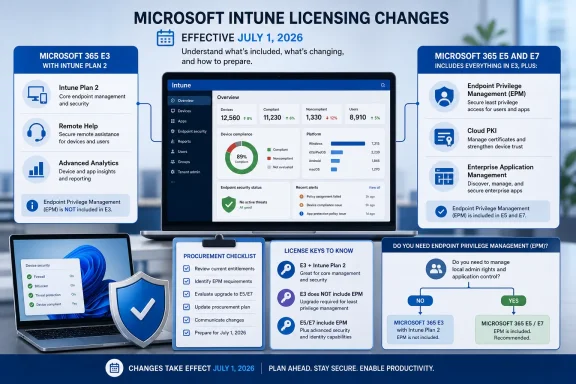 The July 1 change redraws the entitlement map
The easiest mistake is to treat the July 2026 change as a blanket expansion of Intune Suite capabilities into every enterprise SKU. Microsoft has not done that. It has redistributed selected capabilities across Microsoft 365 E3, E5, and E7, while keeping Intune Suite available as a separate subscription for customers on other plans.For E3 organizations, the practical gain is meaningful. Intune Plan 2, Remote Help, and Advanced Analytics are now part of the Microsoft 365 E3 entitlement beginning July 2026. That may create an opportunity to revisit overlapping purchases for those particular capabilities, especially where separate licensing was retained solely to obtain them.
But Endpoint Privilege Management sits on the other side of the line. E5 and E7 customers gain it through their suite entitlement; E3 customers do not. A Windows estate can therefore have more advanced Intune functionality after July 1 without gaining the right to use EPM.
That distinction matters because EPM is not simply another reporting or support add-on. It is the Intune capability organizations use to manage elevation workflows without defaulting users to persistent local administrator rights. If it is already embedded in application installation, repair, developer tooling, or support processes, its licensing should be treated as production-critical.
The decision tree starts with the SKU, not the Intune portal
The first task is to classify the people and devices benefiting from EPM according to the Microsoft 365 license actually assigned to them. Do not start by asking whether EPM policies still appear in the Intune admin center. Availability of a policy interface is not proof that every beneficiary is properly licensed.Microsoft 365 E5 and E7 customers can evaluate an EPM add-on retirement
Organizations that license the relevant users through Microsoft 365 E5 or E7 now have EPM included alongside the expanded E3 capabilities. For these customers, a standalone EPM purchase may be duplicative—but only after an entitlement and assignment review confirms that the population using EPM is actually covered by E5 or E7.That caveat is more important than it sounds. Many enterprises run mixed estates: E5 for security, IT, or executive cohorts; E3 for most knowledge workers; device-only licensing for shared endpoints; and separate subscriptions for contractors, subsidiaries, or frontline scenarios. A tenant can be “an E5 customer” without every EPM beneficiary being an E5 user.
The safe sequence is:
- Identify every user and device that benefits from Endpoint Privilege Management, including people whose applications or endpoint workflows are affected by EPM policy.
- Compare that population with current Microsoft 365 E5 and E7 assignments, rather than comparing only total license counts.
- Review the standalone EPM subscription’s renewal date, quantity, and any populations it was intended to cover.
- Keep the add-on active until the licensing owner, Intune owner, and procurement team agree that the E5/E7 entitlement covers the entire affected scope.
- Document the result so that a later true-up, renewal, or audit does not have to reconstruct the July 2026 decision.
Microsoft 365 E3-only customers should retain EPM-specific coverage
For organizations whose EPM beneficiaries are assigned only Microsoft 365 E3, the answer is simpler: do not cancel an EPM entitlement because E3 now includes Intune Plan 2, Remote Help, and Advanced Analytics. Microsoft’s published guidance places EPM in Microsoft 365 E5 and E7, not E3.E3 administrators should still review their existing licensing position. The July 1 changes may affect purchases for the other newly included capabilities, and that can make an EPM-focused add-on strategy easier to justify. But the entitlement logic remains separate: E3’s expanded Intune package is not an EPM license.
This is also where internal communications can go wrong. A procurement note that says “Intune Suite functions are coming to E3” can be read as permission to retire all advanced Intune add-ons. The accurate message is narrower: E3 gains named Plan 2 capabilities, while EPM remains a separately licensed need unless users are covered by E5 or E7.
Other plans and mixed licensing estates need a population-level review
Microsoft says Intune Suite remains available as a separate subscription for customers on other plans. That preserves a path for organizations that do not use Microsoft 365 E3, E5, or E7, as well as for mixed environments where only part of the tenant has E5/E7 coverage.For these environments, avoid a tenant-wide conclusion. Build the review around cohorts:
- Users assigned Microsoft 365 E5 or E7 may have EPM through those suites.
- Users assigned Microsoft 365 E3 receive the newly stated Plan 2, Remote Help, and Advanced Analytics capabilities, but not EPM.
- Users on other plans may still require Intune Suite or the applicable specific licensing for the capabilities they use.
- Devices managed without a named user require particular care because Microsoft’s licensing model also includes device-only scenarios.
Microsoft’s licensing rule is broader than direct portal use
Microsoft’s baseline rule is that every user or device benefiting directly or indirectly from Intune requires applicable Intune licensing, including access through Microsoft APIs. That wording means a narrow view of “who clicked the button” is not enough for EPM planning.In practical terms, do not limit the review to Intune administrators or to users who submit elevation requests manually. If EPM policy governs the software, process, or endpoint experience of a user or device, that beneficiary belongs in the licensing assessment.
The rule also undercuts a common operational shortcut: treating automation as outside the licensing boundary. API-driven administration may streamline Intune operations, but it does not remove the requirement for the users or devices benefiting from the service to have appropriate licensing.
Microsoft’s documentation also distinguishes administrator access from end-user and device licensing. Administrators can manage Intune without an assigned Intune license in supported configurations, but that administrative access does not replace feature or service licensing requirements. In other words, an unlicensed Intune administrator does not make an EPM deployment license-free.
Validate entitlement and operations as separate workstreams
The July redistribution should trigger two parallel reviews. One is commercial: which subscriptions remain necessary after the bundle changes? The other is operational: which policies, applications, devices, and users depend on EPM today?Start the operational review in the Microsoft Intune admin center. Microsoft’s licensing guidance directs administrators to Tenant administration > Tenant status to view tenant details, including total licensed users and total Intune licenses. Use that as a baseline rather than as a complete entitlement verdict; it helps establish the tenant’s current Intune footprint, but it does not replace a SKU-by-SKU assessment of EPM beneficiaries.
Then map that baseline to the business processes EPM supports. For Windows teams, those may include approved installer elevation, controlled application execution, or exceptions that previously would have required permanent local administrator rights. The goal is not to redesign those processes because licensing changed. It is to ensure that the license plan still supports the process already in production.
This is especially relevant as endpoint management becomes more closely tied to security and identity controls. WindowsForum readers tracking Microsoft’s positioning of Intune as an endpoint-management control plane—and the related shift of Enterprise State Roaming management into policy management—have a reason to keep ownership clear. The team paying for licenses, the team assigning Microsoft 365 SKUs, and the team publishing Intune policy cannot treat this as three unrelated changes.
The cancellation risk is highest in partially upgraded tenants
The riskiest scenario is not a clean E3-only tenant or a clean E5 tenant. It is a company that upgraded a subset of users to E5, sees that E5 now includes EPM, and assumes the tenant’s existing EPM add-on can disappear.Before cancelling, validate all of the following:
- The E5 and E7 assignments cover every person and device that benefits from EPM.
- The organization has accounted for contractors, subsidiaries, shared devices, and specialized endpoint populations.
- The review distinguishes EPM from the Plan 2, Remote Help, and Advanced Analytics capabilities now included with E3.
- The current add-on was not also covering users on another Microsoft 365 plan.
- Procurement and endpoint engineering agree on the effective date and replacement entitlement.
Frequently Asked Questions
Does Microsoft 365 E3 include Endpoint Privilege Management after July 1, 2026?
No. Microsoft’s current guidance says Microsoft 365 E3 includes Intune Plan 2, Remote Help, and Advanced Analytics. Endpoint Privilege Management is included with Microsoft 365 E5 and E7.Can an E5 organization cancel its EPM add-on immediately?
Only after confirming that every user or device benefiting from EPM is covered by Microsoft 365 E5 or E7. Mixed-license populations, shared-device scenarios, and separate business units can leave gaps behind a tenant-wide E5 label.Does Intune Suite still exist for customers outside E3, E5, and E7?
Yes. Microsoft says Intune Suite remains available as a separate subscription for customers on other plans. Specific EPM licensing requirements still apply.Do Intune administrators need an Intune license just to manage the portal?
Microsoft supports unlicensed administrator access in applicable tenant configurations, but that administrative access does not replace licensing for Intune features and services used by people or devices.The July 1 redistribution gives many organizations a chance to simplify Intune purchasing, but it does not eliminate the need to match EPM rights to the users and devices receiving the benefit. The next renewal conversation should begin with that population map—not with an assumption that every advanced Intune capability moved into Microsoft 365 E3.
References
- Primary source: learn.microsoft.com
Microsoft Intune Licensing Plans and Options - Microsoft Intune | Microsoft Learn
Microsoft Intune licensing options, plans, and the capabilities included with each Intune plan and Microsoft 365 license tier.learn.microsoft.com - Independent coverage: techcommunity.microsoft.com
- Independent coverage: microsoft.com
Microsoft Intune Pricing | Microsoft Security
Explore Microsoft Intune pricing and learn how it simplifies device management, secures access, and streamlines app deployment across your organization.www.microsoft.com
- Primary source: WindowsForum
Microsoft Intune Named Forrester Leader: Endpoint Management Becomes an AI Control Plane | Windows Forum
Microsoft said on June 25, 2026, that Forrester named it a Leader in The Forrester Wave: Endpoint Management Platforms, Q2 2026, crediting Microsoft...windowsforum.com
