

Microsoft 365 E3 and E5 customers should not cancel Intune or security add-ons simply because Microsoft plans to complete its new enterprise packaging rollout by August 1, 2026. The change creates a licensing and tool-consolidation decision, not an automatic migration mandate: inventory every overlapping product before renewal, verify the new service plans in the tenant, pilot Microsoft’s alternatives, and retire an incumbent only after operational gaps are closed.
Microsoft’s July 2026 licensing documentation draws a meaningful line between the two enterprise tiers. Microsoft 365 E3 gains Intune Plan 2, Remote Help, and Advanced Analytics, while Microsoft 365 E5 and E7 add Endpoint Privilege Management, Cloud PKI, and Enterprise Application Management on top of those capabilities.
That distinction is easy to miss amid broader reporting about Microsoft’s packaging and pricing changes. It also means there is no universal “E3 gets Intune Suite” conclusion: E3 receives selected components, while E5 receives the more expansive management package.
The first task is to establish what each currently deployed SKU actually gains. Microsoft says eligible customers receive the new Intune entitlements automatically, but an entitlement appearing in a tenant does not configure the service, train support staff, migrate certificate infrastructure, or replace an existing application catalog.
The Office 365 E3 row is particularly important. Office 365 E3 and Microsoft 365 E3 are not interchangeable names, and Microsoft’s packaging update does not give every “E3” tenant the same management tools. Office 365 E3 receives Defender for Office 365 Plan 1, but it does not inherit the Intune additions assigned to Microsoft 365 E3.
That difference can derail a consolidation project if procurement records shorten both products to “E3.” The audit must use exact subscription names and assigned service plans rather than spreadsheet shorthand, invoice descriptions, or assumptions based on the Office application bundle.
Microsoft also says standalone Intune Suite and add-ons will remain available after the change. Organizations with mixed licensing, users outside eligible suites, or requirements that exceed the packaged entitlement therefore retain a supported purchasing route rather than facing a forced all-or-nothing transition.
The financial context matters because renewal savings cannot be measured against last year’s prices. Effective July 1, 2026, the US commercial list price of Microsoft 365 E3 rose 8%, while Microsoft 365 E5 rose 5%. EMS E3 increased 13%, and EMS E5 increased 10%.
Those increases strengthen the case for finding genuine overlap, but they do not make every third-party replacement economical. Migration labor, help-desk retraining, certificate redesign, application testing, and parallel operation can consume more than the add-on savings during the first contract period. WindowsForum’s earlier coverage of the Microsoft 365 pricing changes provides the broader commercial context, while the immediate job for administrators is to calculate savings using the renewal quote actually in front of them.
Administrators should use a controlled sequence:
For organizations already reviewing Microsoft’s broader management changes, WindowsForum’s previous analysis of the Intune Suite additions to Microsoft 365 E3 and E5 offers useful rollout context. The new decision point is narrower: which duplicate contracts can be removed without turning a licensing saving into an operational regression?
Administrators should leave the incumbent remote-support platform in place during the pilot. Remote Help should initially be limited to designated technicians and test users, with session logging and escalation behavior reviewed before broader access is authorized. A newly available remote-control path is also a privileged administrative channel, not merely another desktop application.
Endpoint Privilege Management requires an even more deliberate rollout. Its presence in Microsoft 365 E5 and E7 does not justify immediately replacing local administrator practices or an established privilege-management product. Organizations first need to identify which applications require elevation, who approves exceptions, how elevation events are reviewed, and what happens when a rule fails.
The safest starting point is a narrow set of known applications and users. Broad elevation policies created to accelerate migration would undermine the security purpose of the product and could introduce a larger problem than the add-on consolidation was intended to solve.
Cloud PKI should be treated as an infrastructure project. A certificate service sits inside authentication, Wi-Fi, VPN, device trust, and application dependencies that may not be visible from the licensing portal. E5 entitlement therefore warrants a discovery and pilot phase, not an immediate shutdown notice for an existing public key infrastructure or managed PKI supplier.
Enterprise Application Management likewise should not be judged only by catalog size. IT teams need to compare the applications they actually deploy, packaging quality, update controls, release timing, assignment behavior, exception handling, and reporting. If a critical line-of-business application remains outside the catalog or requires custom packaging, the existing application-management service may still have a role.
These controls belong within the broader cloud governance model. As WindowsForum’s coverage of Microsoft 365 tenant takeover risk has emphasized, Microsoft 365 now concentrates identity, device policy, security operations, and administrative authority in one control plane. Consolidation can reduce product sprawl, but it also increases the impact of weak role assignments and configuration drift.
A sensible renewal outcome may be mixed. Remote Help could replace an external support tool, while the organization retains its PKI service because of complex certificate dependencies. Enterprise Application Management might cover standard Windows software, while a specialist deployment platform remains necessary for custom applications.
Microsoft Security Copilot should also remain outside the immediate Intune replacement calculation. Microsoft 365 E5 includes Security Copilot, but Microsoft describes its availability as a separate phased activation accompanied by advance notice. Its consumption is governed by monthly Security Compute Unit allocations, so the E5 inclusion should not be interpreted as unlimited capacity or proof that an existing security-operations product can be removed.
Timing deserves similar discipline. Microsoft’s August 1 target applies to the listed enterprise Intune and Defender packaging rollout described in its current licensing materials. Administrators should not generalize that deadline to every Microsoft 365 product family or assume every tenant will display every service simultaneously before its own Message Center notice. Business-suite backfill schedules extending beyond the enterprise milestone are a separate rollout issue and should not be used to delay an E3 or E5 entitlement audit.
The best immediate outcome is therefore not “migrate everything” or “wait for Microsoft.” It is a completed entitlement and overlap map before the next renewal, followed by controlled pilots for services that could produce real savings.
Organizations that perform that work may consolidate several contracts. Others will find that keeping selected add-ons is cheaper than forcing immature migrations. By August 1, the important change is that many E3 and E5 tenants will have more options—the burden on IT is to determine which of those options are genuinely ready to replace what they already run.
Microsoft’s July 2026 licensing documentation draws a meaningful line between the two enterprise tiers. Microsoft 365 E3 gains Intune Plan 2, Remote Help, and Advanced Analytics, while Microsoft 365 E5 and E7 add Endpoint Privilege Management, Cloud PKI, and Enterprise Application Management on top of those capabilities.
That distinction is easy to miss amid broader reporting about Microsoft’s packaging and pricing changes. It also means there is no universal “E3 gets Intune Suite” conclusion: E3 receives selected components, while E5 receives the more expansive management package.
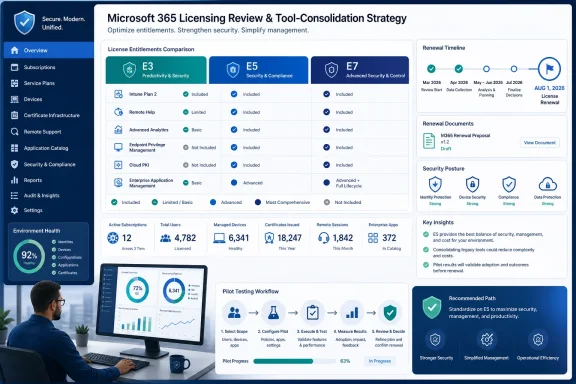 The Entitlement Matrix Should Drive the Renewal
The first task is to establish what each currently deployed SKU actually gains. Microsoft says eligible customers receive the new Intune entitlements automatically, but an entitlement appearing in a tenant does not configure the service, train support staff, migrate certificate infrastructure, or replace an existing application catalog.| Existing subscription | Newly packaged capabilities relevant to this decision |
|---|---|
| Microsoft 365 E3 | Intune Plan 2, Remote Help, and Advanced Analytics |
| Microsoft 365 E5 | Intune Plan 2, Remote Help, Advanced Analytics, Endpoint Privilege Management, Cloud PKI, and Enterprise Application Management |
| Microsoft 365 E7 | The same listed Intune additions as E5 |
| Office 365 E3 | Defender for Office 365 Plan 1, but none of the newly packaged Intune capabilities |
| Customers without eligible EMS E3, Microsoft 365 E3, or Microsoft 365 E5 plans | Standalone Intune Suite and individual add-ons remain available |
That difference can derail a consolidation project if procurement records shorten both products to “E3.” The audit must use exact subscription names and assigned service plans rather than spreadsheet shorthand, invoice descriptions, or assumptions based on the Office application bundle.
Microsoft also says standalone Intune Suite and add-ons will remain available after the change. Organizations with mixed licensing, users outside eligible suites, or requirements that exceed the packaged entitlement therefore retain a supported purchasing route rather than facing a forced all-or-nothing transition.
The financial context matters because renewal savings cannot be measured against last year’s prices. Effective July 1, 2026, the US commercial list price of Microsoft 365 E3 rose 8%, while Microsoft 365 E5 rose 5%. EMS E3 increased 13%, and EMS E5 increased 10%.
Those increases strengthen the case for finding genuine overlap, but they do not make every third-party replacement economical. Migration labor, help-desk retraining, certificate redesign, application testing, and parallel operation can consume more than the add-on savings during the first contract period. WindowsForum’s earlier coverage of the Microsoft 365 pricing changes provides the broader commercial context, while the immediate job for administrators is to calculate savings using the renewal quote actually in front of them.
Audit the Tenant Before Removing Anything
The practical audit should begin now, before purchasing teams interpret newly visible products as proof that existing contracts are redundant. Microsoft’s licensing resources say eligible Intune features are rolling out during the third quarter of calendar 2026 and should be complete by August 1, with advance notice delivered through Message Center.Administrators should use a controlled sequence:
- Export the organization’s paid Microsoft subscriptions, Intune Suite add-ons, individual Intune add-ons, remote-support licenses, PKI services, application-management products, and email-security subscriptions.
- Separate Microsoft 365 E3, Microsoft 365 E5, EMS E3, EMS E5, and Office 365 E3 populations. Do not combine them under a generic E3 or E5 category.
- Review Microsoft 365 admin center Message Center notices for the tenant’s packaging date and retain the notice as part of the renewal record.
- Inspect product assignments and service-plan visibility in the Microsoft 365 and Microsoft Entra administration experiences. Confirm what is assigned to representative users rather than relying only on the number of purchased seats.
- Check the Microsoft Intune admin center for the appearance of Remote Help, Advanced Analytics, Intune Plan 2 functions, Endpoint Privilege Management, Cloud PKI, and Enterprise Application Management as appropriate to the licensed tier.
- Document the roles, device populations, platform coverage, prerequisites, policy dependencies, logging requirements, and support workflows needed by each candidate service. Visibility in a portal is not proof that the service is ready for production.
- Build a gap record for every incumbent product. Mark each capability as retained, suitable for a pilot, blocked by an operational gap, or potentially redundant.
- Run a limited pilot before changing renewal quantities. The pilot should include ordinary users, support personnel, managed Windows endpoints, exception handling, audit review, and rollback procedures.
- Retire a license only after the replacement has passed acceptance testing and the organization has confirmed that affected users are covered by the correct entitlement.
For organizations already reviewing Microsoft’s broader management changes, WindowsForum’s previous analysis of the Intune Suite additions to Microsoft 365 E3 and E5 offers useful rollout context. The new decision point is narrower: which duplicate contracts can be removed without turning a licensing saving into an operational regression?
Four Capabilities Need Their Own Controls
Remote Help is the most tempting quick consolidation target because the comparison appears straightforward: Microsoft has added a remote-support product, and the organization already pays for one. The real comparison includes unattended or attended workflows, supported endpoints, technician experience, audit evidence, escalation procedures, network restrictions, and integration with the existing service desk.Administrators should leave the incumbent remote-support platform in place during the pilot. Remote Help should initially be limited to designated technicians and test users, with session logging and escalation behavior reviewed before broader access is authorized. A newly available remote-control path is also a privileged administrative channel, not merely another desktop application.
Endpoint Privilege Management requires an even more deliberate rollout. Its presence in Microsoft 365 E5 and E7 does not justify immediately replacing local administrator practices or an established privilege-management product. Organizations first need to identify which applications require elevation, who approves exceptions, how elevation events are reviewed, and what happens when a rule fails.
The safest starting point is a narrow set of known applications and users. Broad elevation policies created to accelerate migration would undermine the security purpose of the product and could introduce a larger problem than the add-on consolidation was intended to solve.
Cloud PKI should be treated as an infrastructure project. A certificate service sits inside authentication, Wi-Fi, VPN, device trust, and application dependencies that may not be visible from the licensing portal. E5 entitlement therefore warrants a discovery and pilot phase, not an immediate shutdown notice for an existing public key infrastructure or managed PKI supplier.
Enterprise Application Management likewise should not be judged only by catalog size. IT teams need to compare the applications they actually deploy, packaging quality, update controls, release timing, assignment behavior, exception handling, and reporting. If a critical line-of-business application remains outside the catalog or requires custom packaging, the existing application-management service may still have a role.
These controls belong within the broader cloud governance model. As WindowsForum’s coverage of Microsoft 365 tenant takeover risk has emphasized, Microsoft 365 now concentrates identity, device policy, security operations, and administrative authority in one control plane. Consolidation can reduce product sprawl, but it also increases the impact of weak role assignments and configuration drift.
E5 Does Not Make Every Add-On Obsolete
Microsoft 365 E5 now has the strongest consolidation case because it receives all six listed Intune capabilities. Even then, organizations should evaluate each workload separately rather than issuing one blanket cancellation order for the Intune Suite, remote support, PKI, application management, and privilege-management contracts.A sensible renewal outcome may be mixed. Remote Help could replace an external support tool, while the organization retains its PKI service because of complex certificate dependencies. Enterprise Application Management might cover standard Windows software, while a specialist deployment platform remains necessary for custom applications.
Microsoft Security Copilot should also remain outside the immediate Intune replacement calculation. Microsoft 365 E5 includes Security Copilot, but Microsoft describes its availability as a separate phased activation accompanied by advance notice. Its consumption is governed by monthly Security Compute Unit allocations, so the E5 inclusion should not be interpreted as unlimited capacity or proof that an existing security-operations product can be removed.
Timing deserves similar discipline. Microsoft’s August 1 target applies to the listed enterprise Intune and Defender packaging rollout described in its current licensing materials. Administrators should not generalize that deadline to every Microsoft 365 product family or assume every tenant will display every service simultaneously before its own Message Center notice. Business-suite backfill schedules extending beyond the enterprise milestone are a separate rollout issue and should not be used to delay an E3 or E5 entitlement audit.
The best immediate outcome is therefore not “migrate everything” or “wait for Microsoft.” It is a completed entitlement and overlap map before the next renewal, followed by controlled pilots for services that could produce real savings.
Organizations that perform that work may consolidate several contracts. Others will find that keeping selected add-ons is cheaper than forcing immature migrations. By August 1, the important change is that many E3 and E5 tenants will have more options—the burden on IT is to determine which of those options are genuinely ready to replace what they already run.
References
- Primary source: learn.microsoft.com
Planning guide to move to Microsoft Intune - Microsoft Intune | Microsoft Learn
Plan, design, implement, adopt, and move to Microsoft Intune. Get guidance and advice to determine goals, use-case scenarios and requirements, and create rollout and communication plans, support, testing, and validation plans.learn.microsoft.com - Independent coverage: microsoft.com
Microsoft 365 Packaging and Pricing Updates Public FAQ | Microsoft Licensing Resources
Answers to common questions about Microsoft 365 commercial pricing and packaging updates.www.microsoft.com
- Independent coverage: techcommunity.microsoft.com
- Independent coverage: mc.merill.net
MC1304290 - 2026 Microsoft 365 Packaging Update | Microsoft 365 Message Center Archive
The 2026 Microsoft 365 Packaging Update, rolling out mid-June to early August, adds enhanced security features like Microsoft Defender Plan 1, URL time-of-click protection,…mc.merill.net - Primary source: WindowsForum
Microsoft 365 Tenant Takeover Risk: Secure the Cloud Control Plane | Windows Forum
For most organizations in 2026, Microsoft 365 is no longer merely Office in a browser but the operating layer for identity, email, collaboration, device...windowsforum.com
