

Microsoft introduced Admin Insights for Windows 365 in public preview for commercial customers in May 2026, adding service-generated insight cards inside the Microsoft Intune admin center to help administrators spot Cloud PC issues, trends, and optimization opportunities without building custom alert rules. The feature sounds modest because it is not a new virtualization layer, a new license, or a new endpoint agent. But it marks a more important shift in how Microsoft wants enterprises to operate Windows in the cloud: less dashboard-hopping, more guided triage, and more trust in Microsoft’s own service intelligence.
For Windows 365, that is the right direction and the obvious pressure point. Cloud PCs promise to turn Windows endpoint management into a predictable service, but anyone who has managed a real tenant knows the lived experience is still full of provisioning states, network dependencies, license conditions, performance complaints, and “is it the device, the session, the user, or the service?” investigations. Admin Insights is Microsoft acknowledging that the next phase of Cloud PC management is not merely more data. It is better prioritization.
Windows 365 has always lived in an uneasy middle ground. It is marketed as a cloud service, consumed through Microsoft 365 licensing, dependent on Azure-era networking and identity, and administered through Intune. That makes sense architecturally, but it can make the administrator’s day feel like a scavenger hunt across reports, device records, alerts, provisioning views, and user complaints.
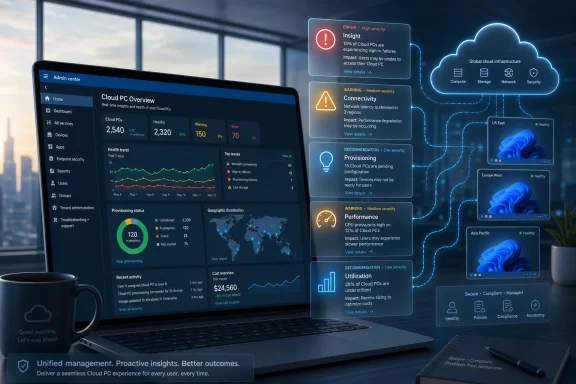
Admin Insights tries to collapse some of that sprawl into the Windows 365 experience inside the Intune admin center. The new section appears on the Cloud PC Overview page, under the Windows 365 management area, and presents cards generated by the Windows 365 service itself. Those cards are not tenant-defined alerts. They are Microsoft’s own read on what deserves attention.
That distinction matters. Traditional alerting asks administrators to decide what thresholds matter before the problem occurs. Admin Insights flips the model: Microsoft watches for predefined patterns across the Cloud PC environment and surfaces items when the service believes they meet the bar for review. It is less “configure your monitoring stack” and more “here is what the service thinks you should look at next.”
The feature is available to organizations with Windows 365 Enterprise or Windows 365 Flex licensing, the latter being Microsoft’s renamed Windows 365 Frontline offer. Administrators need read access to Windows 365 resources, typically through roles such as Cloud PC Reader, Cloud PC Administrator, or Windows 365 Administrator. In practice, this means the feature is aimed squarely at enterprise IT, help desk leads, operations teams, and managed service providers already living in Intune.
Microsoft says up to 15 insight cards can be displayed at a time. The cards can cover areas such as connectivity, provisioning and grace period conditions, Flex or Frontline scenarios, performance, and utilization. They are ranked by severity, with items such as errors, warnings, and recommendations intended to tell administrators not just what exists, but what deserves attention first.
That will frustrate some administrators. Mature IT teams like knobs, thresholds, notification rules, and the ability to tune noise to match their own operating model. Admin Insights deliberately does not offer that. Microsoft’s documentation is clear that the items are generated by Windows 365 and are not configured through customer-defined thresholds or alert rules.
That limitation is also the feature’s core identity. Admin Insights is not trying to replace Windows 365 alerts, reports, or custom monitoring. It is trying to sit above them as a first-look triage layer. If alerts are the configurable smoke detectors, Admin Insights is the morning briefing that says which smoke detectors, unusual patterns, or optimization signals deserve human attention.
This is where the product becomes interesting. Microsoft is effectively saying that it has enough telemetry and product context to tell administrators where to start. That is not a small claim. It means the value of Windows 365 is being framed not just as streamed Windows desktops, but as a managed environment where Microsoft can interpret operational signals at scale.
The cards also point administrators toward underlying reports where applicable, and tenants with Copilot in Intune can invoke Copilot for more context and guidance. That pairing reveals the longer-term roadmap. Admin Insights is the structured signal; Copilot is the explanatory layer Microsoft wants to put beside it. Together, they sketch a future where the admin center does not merely report state, but narrates operational risk.
For now, though, this remains a preview feature with preview-era constraints. Insight cards cannot be permanently dismissed; they can only be dismissed for 24 hours. Custom thresholds are not supported. If no cards meet the service-defined thresholds, administrators see an all-clear style message instead of a configurable empty dashboard.
That may be the right tradeoff for a preview. Microsoft needs to learn whether its prioritization is useful before it lets every tenant tune it into oblivion. The danger is that if the cards are too generic, too late, or too noisy, administrators will learn to ignore them before the feature reaches general availability.
A Cloud PC can be provisioned, warning, failed, in grace period, underutilized, oversized, poorly connected, affected by policy drift, or perfectly healthy in the service while the user still experiences a degraded session. Network health matters. License assignment matters. User entitlement matters. Device configuration matters. The state of the local endpoint may matter less than in a traditional PC model, but it does not disappear from the support chain.
That complexity is the tax enterprises pay for abstracting the PC into the cloud. The promise is that the endpoint becomes more standardized and recoverable. The reality is that standardization creates a different operational surface, one where the admin needs to understand the interaction between identity, Intune, Windows 365 provisioning, remote connectivity, and user experience.
Admin Insights is a response to that operational surface. It does not eliminate the complexity, but it tries to reduce the amount of manual correlation required before a human can act. In a small deployment, that may be convenient. In a large deployment, it can be the difference between seeing a pattern early and waiting for the help desk queue to become the monitoring system.
That is why Microsoft’s positioning around proactive management is not just marketing language. Reactive troubleshooting works badly for virtual desktops and Cloud PCs because the user’s complaint often arrives after several systems have already participated in the failure. By the time someone says “my Cloud PC is slow,” the root cause could be capacity, connectivity, assignment, policy, host performance, or a workload mismatch that has been visible in telemetry for days.
A useful insight layer can shorten that path. It can tell the administrator that a pattern exists before individual tickets scatter the evidence. It can point to outliers. It can reveal a class of devices or users that requires review. It can nudge teams toward right-sizing rather than treating every performance issue as a one-off support case.
This is especially true because the feature is explicitly not configurable. If a card appears, it appears because Microsoft’s service thresholds say it should. If a card does not appear, that does not mean a tenant has no problems. It means no supported insight met the criteria for display at that moment. Administrators will still need reports, alerts, audit trails, support processes, and direct troubleshooting workflows.
The inability to permanently dismiss cards is another preview-era reminder. A 24-hour dismissal is useful when an admin knows about an item and does not want it cluttering the page during the day. It is less useful if the tenant has a persistent condition that is accepted, deferred, or already tracked elsewhere. In those cases, the same insight may become a recurring nudge rather than a useful signal.
Still, Microsoft is right to be cautious. If permanent dismissal arrives too early, organizations may bury the very insights the feature was meant to surface. If custom thresholds arrive too early, every tenant may turn a guided experience into another bespoke monitoring project. The preview is a test of whether Microsoft’s default intelligence is good enough to deserve a permanent place in the admin workflow.
The best version of this feature would eventually support both modes: Microsoft-managed recommendations for common operational patterns, plus enough tenant-level control to reflect business context. A hospital, a call center, a seasonal retailer, and a software company may all run Windows 365, but the meaning of a utilization anomaly or provisioning delay can differ sharply between them.
That shift has been underway for years. Intune absorbed more endpoint management weight as Configuration Manager’s role changed, Windows Autopilot matured, Defender and Entra integrations deepened, and Microsoft pushed cloud-native management as the default architecture for modern Windows fleets. Windows 365 accelerates the trend because Cloud PCs make Intune not just a device management plane, but the administrative front door for a hosted Windows service.
The benefit is consolidation. Administrators increasingly expect one place to see device status, apply policy, monitor Cloud PCs, investigate endpoint health, and take action. Admin Insights fits that direction neatly. It puts prioritized Windows 365 information where admins are already expected to manage the service.
The risk is console gravity. As Intune becomes the place for everything, it also becomes easier for Microsoft to overload it with panels, previews, recommendations, AI prompts, reports, and role-dependent views. A unified admin center can still feel fragmented if every product team inserts its own experience without a coherent operating model.
Admin Insights succeeds only if it reduces cognitive load. If it becomes another widget to check, it has failed. If it becomes the first page an operations lead opens each morning to decide what needs attention in the Cloud PC estate, it has earned its place.
Microsoft is trying to make Windows 365 feel less like virtual desktop infrastructure and more like a managed productivity utility. Classic VDI required deep infrastructure expertise, capacity planning, image management, broker troubleshooting, and a strong stomach for edge cases. Windows 365’s pitch is different: buy the right Cloud PC license, assign users, manage through Intune, and let Microsoft handle much of the machinery.
But if the admin experience still requires a specialist to manually interpret scattered signals, the service has not fully escaped the VDI mindset. Admin Insights is part of Microsoft’s attempt to move the operational experience up a layer. The administrator should not have to begin every investigation by asking where the relevant data lives. The service should say, “Start here.”
That is also why this feature matters more for growing deployments than for pilots. In a pilot, administrators can eyeball every Cloud PC. In a tenant with hundreds or thousands of Cloud PCs across regions, departments, work patterns, and license types, eyeballing is not a process. The value shifts from raw visibility to prioritization.
The same logic applies to optimization. Cloud PCs cost real money, and the wrong size or usage pattern can quietly turn into waste. A Cloud PC that is oversized, underused, or misaligned with user needs is not just an endpoint concern. It is a recurring subscription cost. Insight cards that point to utilization patterns may eventually become a financial management tool as much as an IT health feature.
That is where Windows 365 differs from traditional PCs. A physical laptop is a capital purchase that may be inefficient but already bought. A Cloud PC is a service meter wrapped in a Windows desktop. Operational insight and cost discipline become inseparable.
An insight card might correctly identify a connectivity pattern, but it may not understand that the affected users are executives preparing for a board meeting. It might highlight underutilization, but not know that the Cloud PCs are assigned for disaster recovery, seasonal work, or a regulated workflow where availability matters more than daily usage. It might flag a provisioning condition, but not understand the internal change freeze that determines whether action should happen today or next week.
This is not a flaw unique to Microsoft. Every observability product has the same tension. The more the tool prioritizes, the more it needs context; the more context it requires, the harder it is to remain simple. Admin Insights begins on the simpler side of that line.
Administrators should treat the cards as prompts, not verdicts. The right response to an insight is not blind action, but investigation. The value is that the investigation starts with a service-identified pattern rather than a blank page.
That distinction is especially important for security-minded teams. Operational health and security posture overlap, but they are not the same thing. A Cloud PC insight may point to availability, performance, provisioning, or utilization concerns; it is not a replacement for security monitoring, identity governance, Defender signals, or conditional access review. The temptation to use one pane of glass as one pane of truth should be resisted.
In many organizations, the help desk is the first system to detect endpoint pain. Users report slowness, login trouble, missing access, or inconsistent behavior. Support staff then work backward through device status, assignments, policy, networking, and service health. That model is expensive because it turns every user into a sensor and every ticket into a miniature forensic exercise.
Cloud PCs should be better than that. A centralized service should be able to see fleet-level patterns before individual users assemble them into complaints. If a subset of Cloud PCs shows a provisioning issue, admins should know before onboarding stalls. If connectivity is degrading for a group, operations should see the pattern before the first-line queue fills. If utilization suggests waste, finance and IT should not need a spreadsheet archaeology project to find it.
Admin Insights is Microsoft’s attempt to make those patterns visible at the point of administration. It will not solve every support problem, but it may reduce the time between signal and action. In enterprise IT, that interval is often where user frustration accumulates.
There is a cultural change here as well. Reactive support teams measure themselves by closure rates. Proactive operations teams measure themselves by prevented incidents, reduced noise, and better service reliability. Microsoft is nudging Windows 365 administrators toward the second model.
That is easier said than done. Proactive management requires process ownership. Someone has to review the insights, decide what warrants action, route work to the right team, and verify that the underlying condition improved. A card without an operating rhythm is just decoration.
First, the insights must be accurate enough to build trust. False positives are costly because they train admins to ignore the feature. False negatives are worse because they create a false sense of calm. Microsoft does not need perfection, but it needs a strong signal-to-noise ratio.
Second, the insights must be timely. A card that appears after the help desk has already diagnosed the issue is not proactive. The value depends on surfacing patterns early enough for administrators to prevent or reduce user impact.
Third, the path from card to action must be short. If a card identifies a pattern but sends the admin into a maze of reports, filters, and manual correlation, the feature has only renamed the problem. The best cards will be those that explain the scenario clearly, show affected scope, link to the right report, and suggest a practical next step without pretending to automate judgment away.
The Copilot connection could help here, but only if Microsoft keeps it grounded. AI-generated guidance that restates generic documentation will not impress seasoned admins. Contextual explanation tied to the tenant’s actual condition might. The difference between those two experiences will determine whether Copilot becomes a useful co-pilot or another sidebar to close.
For Windows 365, that is the right direction and the obvious pressure point. Cloud PCs promise to turn Windows endpoint management into a predictable service, but anyone who has managed a real tenant knows the lived experience is still full of provisioning states, network dependencies, license conditions, performance complaints, and “is it the device, the session, the user, or the service?” investigations. Admin Insights is Microsoft acknowledging that the next phase of Cloud PC management is not merely more data. It is better prioritization.
 Microsoft Moves the Cloud PC Control Room Into Intune
Windows 365 has always lived in an uneasy middle ground. It is marketed as a cloud service, consumed through Microsoft 365 licensing, dependent on Azure-era networking and identity, and administered through Intune. That makes sense architecturally, but it can make the administrator’s day feel like a scavenger hunt across reports, device records, alerts, provisioning views, and user complaints.Admin Insights tries to collapse some of that sprawl into the Windows 365 experience inside the Intune admin center. The new section appears on the Cloud PC Overview page, under the Windows 365 management area, and presents cards generated by the Windows 365 service itself. Those cards are not tenant-defined alerts. They are Microsoft’s own read on what deserves attention.
That distinction matters. Traditional alerting asks administrators to decide what thresholds matter before the problem occurs. Admin Insights flips the model: Microsoft watches for predefined patterns across the Cloud PC environment and surfaces items when the service believes they meet the bar for review. It is less “configure your monitoring stack” and more “here is what the service thinks you should look at next.”
The feature is available to organizations with Windows 365 Enterprise or Windows 365 Flex licensing, the latter being Microsoft’s renamed Windows 365 Frontline offer. Administrators need read access to Windows 365 resources, typically through roles such as Cloud PC Reader, Cloud PC Administrator, or Windows 365 Administrator. In practice, this means the feature is aimed squarely at enterprise IT, help desk leads, operations teams, and managed service providers already living in Intune.
Microsoft says up to 15 insight cards can be displayed at a time. The cards can cover areas such as connectivity, provisioning and grace period conditions, Flex or Frontline scenarios, performance, and utilization. They are ranked by severity, with items such as errors, warnings, and recommendations intended to tell administrators not just what exists, but what deserves attention first.
The Card Is the Message
The most important design choice here is not the card layout. It is the decision to make the cards service-driven and non-configurable.That will frustrate some administrators. Mature IT teams like knobs, thresholds, notification rules, and the ability to tune noise to match their own operating model. Admin Insights deliberately does not offer that. Microsoft’s documentation is clear that the items are generated by Windows 365 and are not configured through customer-defined thresholds or alert rules.
That limitation is also the feature’s core identity. Admin Insights is not trying to replace Windows 365 alerts, reports, or custom monitoring. It is trying to sit above them as a first-look triage layer. If alerts are the configurable smoke detectors, Admin Insights is the morning briefing that says which smoke detectors, unusual patterns, or optimization signals deserve human attention.
This is where the product becomes interesting. Microsoft is effectively saying that it has enough telemetry and product context to tell administrators where to start. That is not a small claim. It means the value of Windows 365 is being framed not just as streamed Windows desktops, but as a managed environment where Microsoft can interpret operational signals at scale.
The cards also point administrators toward underlying reports where applicable, and tenants with Copilot in Intune can invoke Copilot for more context and guidance. That pairing reveals the longer-term roadmap. Admin Insights is the structured signal; Copilot is the explanatory layer Microsoft wants to put beside it. Together, they sketch a future where the admin center does not merely report state, but narrates operational risk.
For now, though, this remains a preview feature with preview-era constraints. Insight cards cannot be permanently dismissed; they can only be dismissed for 24 hours. Custom thresholds are not supported. If no cards meet the service-defined thresholds, administrators see an all-clear style message instead of a configurable empty dashboard.
That may be the right tradeoff for a preview. Microsoft needs to learn whether its prioritization is useful before it lets every tenant tune it into oblivion. The danger is that if the cards are too generic, too late, or too noisy, administrators will learn to ignore them before the feature reaches general availability.
Cloud PC Management Has a Visibility Problem, Not a Data Problem
Windows 365’s administrative challenge is not that Microsoft lacks signals. It is that Cloud PC operations generate too many signals across too many places.A Cloud PC can be provisioned, warning, failed, in grace period, underutilized, oversized, poorly connected, affected by policy drift, or perfectly healthy in the service while the user still experiences a degraded session. Network health matters. License assignment matters. User entitlement matters. Device configuration matters. The state of the local endpoint may matter less than in a traditional PC model, but it does not disappear from the support chain.
That complexity is the tax enterprises pay for abstracting the PC into the cloud. The promise is that the endpoint becomes more standardized and recoverable. The reality is that standardization creates a different operational surface, one where the admin needs to understand the interaction between identity, Intune, Windows 365 provisioning, remote connectivity, and user experience.
Admin Insights is a response to that operational surface. It does not eliminate the complexity, but it tries to reduce the amount of manual correlation required before a human can act. In a small deployment, that may be convenient. In a large deployment, it can be the difference between seeing a pattern early and waiting for the help desk queue to become the monitoring system.
That is why Microsoft’s positioning around proactive management is not just marketing language. Reactive troubleshooting works badly for virtual desktops and Cloud PCs because the user’s complaint often arrives after several systems have already participated in the failure. By the time someone says “my Cloud PC is slow,” the root cause could be capacity, connectivity, assignment, policy, host performance, or a workload mismatch that has been visible in telemetry for days.
A useful insight layer can shorten that path. It can tell the administrator that a pattern exists before individual tickets scatter the evidence. It can point to outliers. It can reveal a class of devices or users that requires review. It can nudge teams toward right-sizing rather than treating every performance issue as a one-off support case.
Preview Features Are Promises With Escape Clauses
The public preview label should not be ignored. Microsoft’s preview features are often functional enough for evaluation, but they are still subject to change before general availability. For production administrators, that means Admin Insights should be treated as an additional lens, not an operational dependency.This is especially true because the feature is explicitly not configurable. If a card appears, it appears because Microsoft’s service thresholds say it should. If a card does not appear, that does not mean a tenant has no problems. It means no supported insight met the criteria for display at that moment. Administrators will still need reports, alerts, audit trails, support processes, and direct troubleshooting workflows.
The inability to permanently dismiss cards is another preview-era reminder. A 24-hour dismissal is useful when an admin knows about an item and does not want it cluttering the page during the day. It is less useful if the tenant has a persistent condition that is accepted, deferred, or already tracked elsewhere. In those cases, the same insight may become a recurring nudge rather than a useful signal.
Still, Microsoft is right to be cautious. If permanent dismissal arrives too early, organizations may bury the very insights the feature was meant to surface. If custom thresholds arrive too early, every tenant may turn a guided experience into another bespoke monitoring project. The preview is a test of whether Microsoft’s default intelligence is good enough to deserve a permanent place in the admin workflow.
The best version of this feature would eventually support both modes: Microsoft-managed recommendations for common operational patterns, plus enough tenant-level control to reflect business context. A hospital, a call center, a seasonal retailer, and a software company may all run Windows 365, but the meaning of a utilization anomaly or provisioning delay can differ sharply between them.
Microsoft Is Quietly Rewriting the Role of Intune
Admin Insights also says something broader about Intune. The admin center is no longer just where policies are assigned and devices are inventoried. It is becoming Microsoft’s central operations console for endpoint experience, cloud-hosted Windows, security posture, remediation, and AI-assisted administration.That shift has been underway for years. Intune absorbed more endpoint management weight as Configuration Manager’s role changed, Windows Autopilot matured, Defender and Entra integrations deepened, and Microsoft pushed cloud-native management as the default architecture for modern Windows fleets. Windows 365 accelerates the trend because Cloud PCs make Intune not just a device management plane, but the administrative front door for a hosted Windows service.
The benefit is consolidation. Administrators increasingly expect one place to see device status, apply policy, monitor Cloud PCs, investigate endpoint health, and take action. Admin Insights fits that direction neatly. It puts prioritized Windows 365 information where admins are already expected to manage the service.
The risk is console gravity. As Intune becomes the place for everything, it also becomes easier for Microsoft to overload it with panels, previews, recommendations, AI prompts, reports, and role-dependent views. A unified admin center can still feel fragmented if every product team inserts its own experience without a coherent operating model.
Admin Insights succeeds only if it reduces cognitive load. If it becomes another widget to check, it has failed. If it becomes the first page an operations lead opens each morning to decide what needs attention in the Cloud PC estate, it has earned its place.
The Feature Is Small Because the Ambition Is Large
It is tempting to dismiss Admin Insights as another dashboard panel. That would miss the strategic context.Microsoft is trying to make Windows 365 feel less like virtual desktop infrastructure and more like a managed productivity utility. Classic VDI required deep infrastructure expertise, capacity planning, image management, broker troubleshooting, and a strong stomach for edge cases. Windows 365’s pitch is different: buy the right Cloud PC license, assign users, manage through Intune, and let Microsoft handle much of the machinery.
But if the admin experience still requires a specialist to manually interpret scattered signals, the service has not fully escaped the VDI mindset. Admin Insights is part of Microsoft’s attempt to move the operational experience up a layer. The administrator should not have to begin every investigation by asking where the relevant data lives. The service should say, “Start here.”
That is also why this feature matters more for growing deployments than for pilots. In a pilot, administrators can eyeball every Cloud PC. In a tenant with hundreds or thousands of Cloud PCs across regions, departments, work patterns, and license types, eyeballing is not a process. The value shifts from raw visibility to prioritization.
The same logic applies to optimization. Cloud PCs cost real money, and the wrong size or usage pattern can quietly turn into waste. A Cloud PC that is oversized, underused, or misaligned with user needs is not just an endpoint concern. It is a recurring subscription cost. Insight cards that point to utilization patterns may eventually become a financial management tool as much as an IT health feature.
That is where Windows 365 differs from traditional PCs. A physical laptop is a capital purchase that may be inefficient but already bought. A Cloud PC is a service meter wrapped in a Windows desktop. Operational insight and cost discipline become inseparable.
Admins Still Need Their Own Judgment
The obvious concern with service-generated insights is overreliance. If Microsoft ranks the issues, Microsoft shapes the admin’s attention. That can be useful, but it can also hide the assumptions behind the ranking.An insight card might correctly identify a connectivity pattern, but it may not understand that the affected users are executives preparing for a board meeting. It might highlight underutilization, but not know that the Cloud PCs are assigned for disaster recovery, seasonal work, or a regulated workflow where availability matters more than daily usage. It might flag a provisioning condition, but not understand the internal change freeze that determines whether action should happen today or next week.
This is not a flaw unique to Microsoft. Every observability product has the same tension. The more the tool prioritizes, the more it needs context; the more context it requires, the harder it is to remain simple. Admin Insights begins on the simpler side of that line.
Administrators should treat the cards as prompts, not verdicts. The right response to an insight is not blind action, but investigation. The value is that the investigation starts with a service-identified pattern rather than a blank page.
That distinction is especially important for security-minded teams. Operational health and security posture overlap, but they are not the same thing. A Cloud PC insight may point to availability, performance, provisioning, or utilization concerns; it is not a replacement for security monitoring, identity governance, Defender signals, or conditional access review. The temptation to use one pane of glass as one pane of truth should be resisted.
The Real Competition Is the Help Desk Queue
The strongest argument for Admin Insights is not technical elegance. It is ticket avoidance.In many organizations, the help desk is the first system to detect endpoint pain. Users report slowness, login trouble, missing access, or inconsistent behavior. Support staff then work backward through device status, assignments, policy, networking, and service health. That model is expensive because it turns every user into a sensor and every ticket into a miniature forensic exercise.
Cloud PCs should be better than that. A centralized service should be able to see fleet-level patterns before individual users assemble them into complaints. If a subset of Cloud PCs shows a provisioning issue, admins should know before onboarding stalls. If connectivity is degrading for a group, operations should see the pattern before the first-line queue fills. If utilization suggests waste, finance and IT should not need a spreadsheet archaeology project to find it.
Admin Insights is Microsoft’s attempt to make those patterns visible at the point of administration. It will not solve every support problem, but it may reduce the time between signal and action. In enterprise IT, that interval is often where user frustration accumulates.
There is a cultural change here as well. Reactive support teams measure themselves by closure rates. Proactive operations teams measure themselves by prevented incidents, reduced noise, and better service reliability. Microsoft is nudging Windows 365 administrators toward the second model.
That is easier said than done. Proactive management requires process ownership. Someone has to review the insights, decide what warrants action, route work to the right team, and verify that the underlying condition improved. A card without an operating rhythm is just decoration.
The Preview Microsoft Needs to Get Right
For Admin Insights to become more than a useful preview, Microsoft needs to prove three things.First, the insights must be accurate enough to build trust. False positives are costly because they train admins to ignore the feature. False negatives are worse because they create a false sense of calm. Microsoft does not need perfection, but it needs a strong signal-to-noise ratio.
Second, the insights must be timely. A card that appears after the help desk has already diagnosed the issue is not proactive. The value depends on surfacing patterns early enough for administrators to prevent or reduce user impact.
Third, the path from card to action must be short. If a card identifies a pattern but sends the admin into a maze of reports, filters, and manual correlation, the feature has only renamed the problem. The best cards will be those that explain the scenario clearly, show affected scope, link to the right report, and suggest a practical next step without pretending to automate judgment away.
The Copilot connection could help here, but only if Microsoft keeps it grounded. AI-generated guidance that restates generic documentation will not impress seasoned admins. Contextual explanation tied to the tenant’s actual condition might. The difference between those two experiences will determine whether Copilot becomes a useful co-pilot or another sidebar to close.
A Morning Briefing for the Cloud PC Era
The concrete value of Admin Insights is not that it replaces Windows 365 monitoring. It is that it gives administrators a prioritized place to begin.- Admin Insights is now in public preview for commercial Windows 365 customers using Enterprise or Flex licensing.
- The feature appears in the Microsoft Intune admin center on the Cloud PC Overview page.
- Insight cards are generated by the Windows 365 service rather than by customer-defined alert thresholds.
- Microsoft says up to 15 cards can appear, covering areas such as connectivity, provisioning, grace period conditions, performance, utilization, and Flex-related scenarios.
- Administrators can dismiss an insight for 24 hours, but preview limitations include no permanent dismissal and no custom threshold configuration.
- The feature should be treated as a triage and prioritization layer, not as a replacement for alerts, reports, security monitoring, or administrator judgment.
References
- Primary source: Petri IT Knowledgebase
Published: Tue, 09 Jun 2026 16:08:46 GMT
Microsoft Introduces Admin Insights For Windows 365
Microsoft introduces Admin Insights for Windows 365, helping IT teams monitor Cloud PC health, detect issues, and manage environments. petri.com
- Official source: learn.microsoft.com
Admin Insights for Windows 365 | Microsoft Learn
Learn how to view and use Admin Insights for Windows 365 on the Cloud PC Overview page in the Microsoft Intune admin center.learn.microsoft.com - Official source: techcommunity.microsoft.com
Admin Insights for Windows 365: Stay on top of what needs attention — now in public preview
Admin Insights brings signals into focus—so IT admins have better visibility and actionable steps. techcommunity.microsoft.com
- Related coverage: techradar.com
Not ready for Cloud PCs just yet? Microsoft will still let you stream individual apps to get you started | TechRadar
Windows 365 Cloud Apps are now in public previewwww.techradar.com
