

Microsoft announced Aion 1.0 Instruct and Aion 1.0 Plan at Build 2026 on June 2, positioning the new on-device small language models as part of a broader Windows 11 push to run AI workloads locally across CPUs, GPUs, and NPUs. The announcement is not just another model drop in a season full of AI branding. It is Microsoft’s clearest statement yet that Windows cannot remain merely the place where cloud AI clients run. If the company wants Windows to matter in the agent era, it has to make the PC itself feel like useful AI infrastructure.
For most users, the first wave of generative AI has felt less like a personal computing revolution than a new kind of remote procedure call. You type into a box, audio leaves the device, screenshots are uploaded, prompts are metered somewhere in a data center, and an answer comes back if the network and the quota cooperate. That model made sense while frontier systems were too large to run locally and while vendors were still proving that anyone wanted this software at all.
But the cloud-first AI era has also exposed its own limits. Latency is not just an engineering metric when a voice assistant pauses awkwardly, a writing tool stalls mid-sentence, or an accessibility feature depends on connectivity. Cost is not an abstraction when every token, transcription, and summarization request has to be paid for by someone. Privacy is not a talking point when the useful version of the product wants access to documents, calendars, messages, meetings, file systems, and application state.
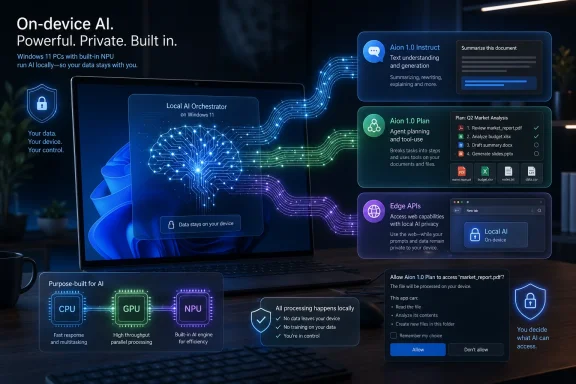
Aion 1.0 is Microsoft’s answer to that pressure. Aion 1.0 Instruct is meant to handle everyday text intelligence such as summarization, rewriting, intent detection, and accessibility scenarios. Aion 1.0 Plan is the more ambitious sibling: a 14-billion-parameter reasoning and tool-calling model with a 32K context window, intended to support local agentic workflows on capable Windows devices.
That distinction matters. Microsoft is not only saying that some language model can run on a Windows PC. It is carving up the AI stack into tiers: cheap local intelligence for routine work, heavier local reasoning where the hardware permits, and cloud models for the tasks that still need frontier-scale capability. That is the architecture Microsoft has been circling for years; at Build 2026, it finally gave the Windows side of that architecture a sharper name.
That may sound mundane compared with agent demos, but mundane is where platforms are built. The web did not become indispensable because every page was a dazzling application; it became indispensable because standard capabilities became available everywhere. Local AI will follow the same pattern if developers can assume that a baseline model exists on enough machines and can be invoked through stable APIs without shipping a bespoke inference stack.
Microsoft is also taking Aion Instruct beyond native Windows APIs by bringing it into Edge preview channels. That is a significant signal. If local AI remains confined to WinUI showcase apps and Copilot+ marketing pages, it will not become a platform. By exposing on-device model capabilities through browser-facing APIs, Microsoft is trying to make the web part of its local AI distribution story rather than letting browser apps default back to cloud services.
The planned open-weights availability also deserves attention. Microsoft has spent the last several years trying to balance its proprietary Copilot strategy with a more open model ecosystem through the Phi family, ONNX, DirectML, Windows ML, and Foundry tooling. If Aion Instruct becomes something developers can test, inspect, and deploy outside the narrow confines of a single Microsoft-controlled app surface, it has a better chance of becoming a real building block rather than another branded demo.
Still, “small” is not magic. Aion Instruct will not make every laptop into a frontier model workstation, and users should not expect local AI features to behave exactly like the best cloud chatbots. The bet is more modest and more important: that a local model good enough for frequent, bounded tasks can be more valuable than a remote model that is too expensive, too slow, or too invasive to call constantly.
The industry’s agent fever has often treated the local machine as little more than a display and input device for cloud-hosted intelligence. Microsoft’s Build 2026 messaging suggests a different future, where the PC becomes an agent runtime in its own right. That makes technical sense. Many useful tasks are local by nature: finding files, manipulating documents, interacting with installed applications, reading local state, and performing repetitive workflows that never needed to leave the machine in the first place.
But local agents raise harder questions than local summarizers. If an on-device model can call tools and manage files, the operating system has to decide what “permission” means when the actor is neither a traditional app nor a human directly clicking a button. Microsoft’s parallel work on agent security and execution containers is therefore not an optional accessory to Aion Plan; it is the precondition for making this tolerable outside a keynote.
The 14-billion-parameter size also hints at the hardware divide Microsoft is prepared to accept. Aion Plan will not be the universal baseline for every Windows 11 PC. It is aimed at capable devices, which likely means the best experience will arrive first on machines with modern GPUs, large memory pools, fast NPUs, or workstation-class silicon. That creates a familiar Windows ecosystem problem: developers can target the future, but they still have to survive the installed base.
The upside is that local planning models could make agents less brittle and less expensive. A cloud model does not need to plan every minor step if a capable local model can decompose tasks, route work, and handle routine orchestration. Microsoft’s emerging hybrid-compute story is built around that division of labor: frontier models for frontier problems, local models for the repetitive intelligence that should not require a meter running in the cloud.
Windows is not iOS. It is a sprawling hardware ecosystem full of corporate laptops, gaming desktops, creator workstations, thin-and-light machines, and aging but still serviceable PCs. A platform feature that only works well on a narrow slice of premium new devices risks becoming a demo feature, not a developer foundation. By extending more AI APIs to CPUs and GPUs, Microsoft is acknowledging that local AI has to meet Windows where Windows actually lives.
Speech-to-text support on CPUs and NPUs is one example. Voice commands, captions, transcription, dictation, meeting tools, and accessibility features all benefit from local execution. If those capabilities require a new NPU-equipped machine, developers will either ignore them or build cloud fallbacks. CPU support broadens the addressable market and makes local-first speech features less of a hardware lottery.
The GPU move may be even more important. Discrete GPUs are already common in gaming PCs, creator laptops, and professional workstations. They are not the same as NPUs in power profile or scheduling behavior, but they are extremely capable AI inference engines when properly targeted. By allowing on-device language model support on capable discrete GPUs, Microsoft is trying to turn existing Windows enthusiast hardware into a practical AI runtime.
Video Super Resolution coming to CPUs rounds out the message. AI enhancement features that once sounded tied to specialized accelerators are being moved into more general-purpose paths. That does not mean every CPU will deliver a good experience, but it does mean Microsoft wants developers to think in terms of capability detection and graceful scaling rather than a hard line between “AI PC” and “not an AI PC.”
But NPUs alone were never going to carry the Windows AI platform. The installed base is too diverse, the performance envelope is too uneven, and developers are too pragmatic. If a feature only works on a subset of machines purchased after a particular marketing cycle, it becomes a niche enhancement rather than a default assumption.
Microsoft’s Build 2026 pivot toward CPUs and GPUs is therefore less a retreat from NPUs than a correction. The company still wants NPUs to matter, especially for background and battery-sensitive workloads. But it also knows the Windows developer ecosystem is unlikely to reorganize itself around one accelerator class when millions of capable GPUs are already sitting in PCs and CPUs remain the universal fallback.
This is where Windows has an advantage over more vertically integrated platforms, but also a burden. Apple can optimize aggressively for a narrower matrix of chips. Microsoft has to abstract chaos without making performance unpredictable. Windows AI APIs are meant to hide enough of that complexity that developers can call a capability and let the platform choose the execution path.
The danger is that abstraction can become opacity. Developers will want to know not merely whether an API exists, but how it performs, what model version it invokes, what hardware it uses, how much memory it consumes, and how failure behaves. If Microsoft wants serious software vendors to build against these APIs, documentation and diagnostics will matter as much as keynote slides.
The economics are central. Cloud AI is powerful, but it changes software cost structures in uncomfortable ways. A traditional desktop app can be sold once, subscribed to monthly, or bundled into an enterprise license. A cloud-AI-heavy app incurs ongoing inference costs every time users use the feature. That forces vendors to throttle, upsell, degrade, or subsidize.
Local models change the equation. Once the model is on the device and the hardware has been purchased, routine inference is no longer billed per token by a remote provider. There are still costs in development, support, updates, power, and storage, but the marginal cost profile is different. That could make AI features less precious and more ambient.
This is especially important for agentic workflows. An agent that checks state, evaluates options, retries actions, and monitors results can consume many more model calls than a simple chatbot. If all of that planning runs in the cloud, the cost of autonomy rises quickly. If some of it runs locally, the cloud can be reserved for the parts that genuinely require larger models.
Of course, local AI is not free in the literal sense. It consumes battery, memory, storage, GPU cycles, and thermal headroom. On a gaming desktop plugged into the wall, that may be acceptable. On a corporate ultraportable during a flight, it may not be. Microsoft’s challenge is to make “unmetered” feel like empowerment rather than a new way for background processes to drain a laptop.
But privacy is not automatic just because inference happens locally. A local model still has to be invoked by software, and that software may log prompts, sync outputs, transmit diagnostics, or combine local and cloud processing in ways users do not fully understand. The privacy boundary is not the model; it is the product architecture around the model.
This is where Microsoft will need unusually clear user controls. If Windows applications can call inbox models, users and administrators should be able to understand which apps are doing so, what data they can access, whether cloud fallback is enabled, and how model downloads are managed. Enterprise IT will not accept a black box simply because it is labeled “local.”
The storage and bandwidth detail is also meaningful. Microsoft says Windows inbox models that power these APIs are not automatically downloaded to every device and are acquired when an application requests them. That is sensible. Users who never touch a feature should not silently lose disk space to AI payloads, and administrators will want policy control over model acquisition.
For regulated industries, local execution could be genuinely useful. Legal, healthcare, finance, government, and engineering teams often have data that they would rather not ship to third-party AI services. But those same organizations will demand auditability, update control, and predictable model behavior. Local AI lowers one class of risk while making another set of governance questions unavoidable.
That matters because the browser is where much of modern application development actually happens. If local AI is only available to packaged Windows apps, it misses a huge part of the developer world. If Edge can expose built-in models to web apps without requiring every site to bundle its own model or call a cloud API, Microsoft gains a new lever for making Windows AI feel ambient.
There is a competitive angle here, too. Browser vendors are all circling on-device AI, but Microsoft has the advantage of also controlling the underlying Windows platform, its AI APIs, and a large developer tooling ecosystem. Aion Instruct in Edge could become a bridge between native Windows capabilities and cross-platform web experiences, though that will depend on standards, compatibility, and whether developers trust Microsoft-specific browser APIs.
The web privacy story is delicate. On-device language detection, translation, and speech recognition can reduce the need to send content to remote servers, which is a real advantage. But web developers invoking local AI also raises consent and transparency questions. Users may need browser-level indicators and permissions that are as understandable as camera and microphone prompts, but less annoying than the permission spam that has plagued the web for years.
The hardware reach is equally important. Microsoft says Aion Instruct in Edge is intended to expand support to more devices, including machines with less capable GPUs and devices using CPU inference. That is the right direction if Microsoft wants web developers to experiment. A browser AI API that only works on premium AI PCs would be a curiosity; one that works tolerably across a broader range of Windows 11 machines could change default design assumptions.
The reality will be more complicated. Developers still need to know which capabilities exist on which machines, how to design experiences that degrade gracefully, and when to use local models versus cloud models. They will also have to test across CPUs, integrated GPUs, discrete GPUs, NPUs, memory configurations, driver versions, and Windows builds. Hardware abstraction reduces pain; it does not repeal Windows diversity.
Still, Microsoft’s direction is developer-friendly in a way that pure cloud AI is not. A local API allows software makers to build features that do not require users to bring their own API key, sign into a particular cloud service, or accept a new recurring inference cost. For independent developers, that could be the difference between shipping AI features and leaving them on the whiteboard.
The enterprise developer story is stronger still. Many internal Windows applications are workflow glue: forms, document processors, support tools, line-of-business front ends, compliance dashboards, and automation utilities. These are exactly the kinds of applications that could benefit from summarization, classification, voice input, translation, and local planning without needing frontier-level intelligence.
The risk is fragmentation by branding. Windows AI Foundry, Windows ML, Windows AI APIs, Aion, Phi, Copilot, Edge APIs, Foundry Local, Agent 365, and Microsoft Execution Containers all orbit the same story but can sound like separate planets. Microsoft has a habit of turning platform ambition into a vocabulary test. If it wants ordinary developers to adopt this stack, it must make the happy path boringly obvious.
Traditional Windows security assumes a mix of users, processes, permissions, files, network boundaries, and administrator controls. Agents complicate that model because they act on behalf of users but may interpret intent imperfectly, follow malicious instructions embedded in content, or chain together actions the user never explicitly approved. Prompt injection is not just a web-app problem when the agent has local reach.
Microsoft’s work on execution containers and policy-driven agent isolation is therefore essential. The company seems to understand that agents need constrained environments where their actions can be limited, observed, and rolled back. That is the right instinct. The open question is whether those controls will be usable by mainstream developers and enforceable by enterprise administrators.
This is where Windows history cuts both ways. Microsoft has decades of experience hardening a general-purpose OS used by everyone from gamers to governments. It also has decades of scars from features that proved too permissive, too confusing, or too dependent on users making good security decisions. AI agents will not be kind to vague permission prompts.
The most secure local AI feature may be the one that does less. A summarizer that reads text and returns a paragraph has a narrow blast radius. A planner that can coordinate tools needs far more discipline. Microsoft’s challenge is to make the path of least resistance also the safer path, or developers will route around friction in the name of convenience.
Aion and the expanded APIs make the sales pitch sharper. Buy better silicon and your PC can run more capable local models, faster speech recognition, richer video enhancement, and eventually more autonomous agents. That does not mean every claim will be persuasive, but it gives OEMs something closer to a software roadmap rather than a benchmark abstraction.
NVIDIA, AMD, Intel, and Qualcomm all have reasons to like this direction. Qualcomm benefits from NPU-forward Windows-on-Arm designs. Intel and AMD can tie NPUs and integrated graphics into mainstream laptops. NVIDIA can argue that the installed base of RTX GPUs is already a powerful local AI platform. Microsoft benefits if all of them compete to make Windows the easiest place to run local inference.
The workstation story is even more explicit. Microsoft’s Build messaging around developer hardware, including NVIDIA-powered deskside systems and developer boxes, points to a future where Windows is not only the client OS for office productivity but also a local AI development environment. That is a meaningful repositioning. Windows has long been a dominant desktop OS and a strong developer target, but much of serious AI development has lived in Linux-first workflows.
Windows Subsystem for Linux helped bridge that gap. Local AI tooling could narrow it further. If Microsoft can make Windows a credible environment for building, testing, and running agent workloads locally, it gives developers fewer reasons to leave the platform when their work shifts from app code to model-powered automation.
Aion Instruct is in preview through Edge Insider channels, with broader open-weights availability planned. Aion Plan is described as coming to capable devices. Windows AI API expansions are arriving in public preview across selected hardware paths. That is real movement, but it is still early-stage platform work.
The installed base question is the largest practical constraint. Windows 11 itself has hardware requirements that already exclude many older PCs. Within Windows 11, the local AI experience will vary widely depending on CPU, GPU, NPU, RAM, drivers, and OEM configuration. Developers may welcome broader API coverage, but they will still need to design for uneven capability.
Microsoft also needs to manage model updates carefully. Local models embedded into platform features have to improve over time, but updates can change behavior. For consumer features, that may be acceptable. For enterprise workflows, a model update that changes classification behavior or agent planning can become a compliance and support issue. Versioning, rollback, and policy controls will matter.
Then there is user trust. Microsoft’s AI ambitions have sometimes run ahead of user comfort, especially when features appear to blur the line between helpful context and invasive observation. Local execution can help rebuild trust, but only if Microsoft resists the temptation to treat the PC as an always-on sensor array for Copilot. The more powerful local AI becomes, the more important visible boundaries become.
 Microsoft Moves the AI Center of Gravity Back Toward the PC
For most users, the first wave of generative AI has felt less like a personal computing revolution than a new kind of remote procedure call. You type into a box, audio leaves the device, screenshots are uploaded, prompts are metered somewhere in a data center, and an answer comes back if the network and the quota cooperate. That model made sense while frontier systems were too large to run locally and while vendors were still proving that anyone wanted this software at all.But the cloud-first AI era has also exposed its own limits. Latency is not just an engineering metric when a voice assistant pauses awkwardly, a writing tool stalls mid-sentence, or an accessibility feature depends on connectivity. Cost is not an abstraction when every token, transcription, and summarization request has to be paid for by someone. Privacy is not a talking point when the useful version of the product wants access to documents, calendars, messages, meetings, file systems, and application state.
Aion 1.0 is Microsoft’s answer to that pressure. Aion 1.0 Instruct is meant to handle everyday text intelligence such as summarization, rewriting, intent detection, and accessibility scenarios. Aion 1.0 Plan is the more ambitious sibling: a 14-billion-parameter reasoning and tool-calling model with a 32K context window, intended to support local agentic workflows on capable Windows devices.
That distinction matters. Microsoft is not only saying that some language model can run on a Windows PC. It is carving up the AI stack into tiers: cheap local intelligence for routine work, heavier local reasoning where the hardware permits, and cloud models for the tasks that still need frontier-scale capability. That is the architecture Microsoft has been circling for years; at Build 2026, it finally gave the Windows side of that architecture a sharper name.
Aion Instruct Is the Practical Model, Not the Glamorous One
Aion 1.0 Instruct is the model most Windows developers are likely to touch first, because its value proposition is deliberately unromantic. It is smaller, faster, and more efficient than Microsoft’s previous Windows inbox small language model, and it is aimed at the workaday AI features that now appear in every product roadmap: summarize this, rewrite that, classify intent, improve accessibility, suggest an action.That may sound mundane compared with agent demos, but mundane is where platforms are built. The web did not become indispensable because every page was a dazzling application; it became indispensable because standard capabilities became available everywhere. Local AI will follow the same pattern if developers can assume that a baseline model exists on enough machines and can be invoked through stable APIs without shipping a bespoke inference stack.
Microsoft is also taking Aion Instruct beyond native Windows APIs by bringing it into Edge preview channels. That is a significant signal. If local AI remains confined to WinUI showcase apps and Copilot+ marketing pages, it will not become a platform. By exposing on-device model capabilities through browser-facing APIs, Microsoft is trying to make the web part of its local AI distribution story rather than letting browser apps default back to cloud services.
The planned open-weights availability also deserves attention. Microsoft has spent the last several years trying to balance its proprietary Copilot strategy with a more open model ecosystem through the Phi family, ONNX, DirectML, Windows ML, and Foundry tooling. If Aion Instruct becomes something developers can test, inspect, and deploy outside the narrow confines of a single Microsoft-controlled app surface, it has a better chance of becoming a real building block rather than another branded demo.
Still, “small” is not magic. Aion Instruct will not make every laptop into a frontier model workstation, and users should not expect local AI features to behave exactly like the best cloud chatbots. The bet is more modest and more important: that a local model good enough for frequent, bounded tasks can be more valuable than a remote model that is too expensive, too slow, or too invasive to call constantly.
Aion Plan Shows Where Microsoft Thinks Agents Are Going
Aion 1.0 Plan is the announcement with the bigger strategic shadow. Microsoft describes it as a reasoning and tool-calling model for local agentic capabilities, and that language should make Windows administrators sit up a little straighter. A model that writes a paragraph is one thing; a model that reasons over intent, invokes tools, manages files, and orchestrates sub-agents is another.The industry’s agent fever has often treated the local machine as little more than a display and input device for cloud-hosted intelligence. Microsoft’s Build 2026 messaging suggests a different future, where the PC becomes an agent runtime in its own right. That makes technical sense. Many useful tasks are local by nature: finding files, manipulating documents, interacting with installed applications, reading local state, and performing repetitive workflows that never needed to leave the machine in the first place.
But local agents raise harder questions than local summarizers. If an on-device model can call tools and manage files, the operating system has to decide what “permission” means when the actor is neither a traditional app nor a human directly clicking a button. Microsoft’s parallel work on agent security and execution containers is therefore not an optional accessory to Aion Plan; it is the precondition for making this tolerable outside a keynote.
The 14-billion-parameter size also hints at the hardware divide Microsoft is prepared to accept. Aion Plan will not be the universal baseline for every Windows 11 PC. It is aimed at capable devices, which likely means the best experience will arrive first on machines with modern GPUs, large memory pools, fast NPUs, or workstation-class silicon. That creates a familiar Windows ecosystem problem: developers can target the future, but they still have to survive the installed base.
The upside is that local planning models could make agents less brittle and less expensive. A cloud model does not need to plan every minor step if a capable local model can decompose tasks, route work, and handle routine orchestration. Microsoft’s emerging hybrid-compute story is built around that division of labor: frontier models for frontier problems, local models for the repetitive intelligence that should not require a meter running in the cloud.
The API Expansion Is the Real Platform Play
The headline model names are useful, but the more consequential Build 2026 change may be the expansion of Windows AI APIs across CPUs and GPUs. Until now, much of Microsoft’s AI-on-Windows story has been tangled up with Copilot+ PCs and NPUs. That made sense from a silicon-marketing perspective, but it narrowed the developer audience.Windows is not iOS. It is a sprawling hardware ecosystem full of corporate laptops, gaming desktops, creator workstations, thin-and-light machines, and aging but still serviceable PCs. A platform feature that only works well on a narrow slice of premium new devices risks becoming a demo feature, not a developer foundation. By extending more AI APIs to CPUs and GPUs, Microsoft is acknowledging that local AI has to meet Windows where Windows actually lives.
Speech-to-text support on CPUs and NPUs is one example. Voice commands, captions, transcription, dictation, meeting tools, and accessibility features all benefit from local execution. If those capabilities require a new NPU-equipped machine, developers will either ignore them or build cloud fallbacks. CPU support broadens the addressable market and makes local-first speech features less of a hardware lottery.
The GPU move may be even more important. Discrete GPUs are already common in gaming PCs, creator laptops, and professional workstations. They are not the same as NPUs in power profile or scheduling behavior, but they are extremely capable AI inference engines when properly targeted. By allowing on-device language model support on capable discrete GPUs, Microsoft is trying to turn existing Windows enthusiast hardware into a practical AI runtime.
Video Super Resolution coming to CPUs rounds out the message. AI enhancement features that once sounded tied to specialized accelerators are being moved into more general-purpose paths. That does not mean every CPU will deliver a good experience, but it does mean Microsoft wants developers to think in terms of capability detection and graceful scaling rather than a hard line between “AI PC” and “not an AI PC.”
The NPU Was Never Enough
The Copilot+ PC launch made the NPU the public face of Windows AI hardware, and for good reason. NPUs are power-efficient, integrated, and well suited to always-on workloads. They let laptop vendors sell local AI without asking users to accept workstation power draw.But NPUs alone were never going to carry the Windows AI platform. The installed base is too diverse, the performance envelope is too uneven, and developers are too pragmatic. If a feature only works on a subset of machines purchased after a particular marketing cycle, it becomes a niche enhancement rather than a default assumption.
Microsoft’s Build 2026 pivot toward CPUs and GPUs is therefore less a retreat from NPUs than a correction. The company still wants NPUs to matter, especially for background and battery-sensitive workloads. But it also knows the Windows developer ecosystem is unlikely to reorganize itself around one accelerator class when millions of capable GPUs are already sitting in PCs and CPUs remain the universal fallback.
This is where Windows has an advantage over more vertically integrated platforms, but also a burden. Apple can optimize aggressively for a narrower matrix of chips. Microsoft has to abstract chaos without making performance unpredictable. Windows AI APIs are meant to hide enough of that complexity that developers can call a capability and let the platform choose the execution path.
The danger is that abstraction can become opacity. Developers will want to know not merely whether an API exists, but how it performs, what model version it invokes, what hardware it uses, how much memory it consumes, and how failure behaves. If Microsoft wants serious software vendors to build against these APIs, documentation and diagnostics will matter as much as keynote slides.
“Unmetered Intelligence” Is a Cost Argument Wearing a Platform Costume
Microsoft’s phrase “unmetered intelligence” is clever because it speaks simultaneously to developers, enterprises, and consumers. To developers, it means fewer per-call cloud costs. To enterprises, it means less unpredictable usage billing. To users, it implies AI features that feel built into the device rather than rented from a remote service.The economics are central. Cloud AI is powerful, but it changes software cost structures in uncomfortable ways. A traditional desktop app can be sold once, subscribed to monthly, or bundled into an enterprise license. A cloud-AI-heavy app incurs ongoing inference costs every time users use the feature. That forces vendors to throttle, upsell, degrade, or subsidize.
Local models change the equation. Once the model is on the device and the hardware has been purchased, routine inference is no longer billed per token by a remote provider. There are still costs in development, support, updates, power, and storage, but the marginal cost profile is different. That could make AI features less precious and more ambient.
This is especially important for agentic workflows. An agent that checks state, evaluates options, retries actions, and monitors results can consume many more model calls than a simple chatbot. If all of that planning runs in the cloud, the cost of autonomy rises quickly. If some of it runs locally, the cloud can be reserved for the parts that genuinely require larger models.
Of course, local AI is not free in the literal sense. It consumes battery, memory, storage, GPU cycles, and thermal headroom. On a gaming desktop plugged into the wall, that may be acceptable. On a corporate ultraportable during a flight, it may not be. Microsoft’s challenge is to make “unmetered” feel like empowerment rather than a new way for background processes to drain a laptop.
Privacy Is the Selling Point Microsoft Cannot Afford to Overclaim
Local AI has an obvious privacy pitch: data can remain on the device. For Windows users who remember every controversy around telemetry, Recall, screenshots, cloud sync, and enterprise compliance, that is a potent argument. A local summarizer that never uploads the document is easier to defend than a cloud feature wrapped in assurances about retention and encryption.But privacy is not automatic just because inference happens locally. A local model still has to be invoked by software, and that software may log prompts, sync outputs, transmit diagnostics, or combine local and cloud processing in ways users do not fully understand. The privacy boundary is not the model; it is the product architecture around the model.
This is where Microsoft will need unusually clear user controls. If Windows applications can call inbox models, users and administrators should be able to understand which apps are doing so, what data they can access, whether cloud fallback is enabled, and how model downloads are managed. Enterprise IT will not accept a black box simply because it is labeled “local.”
The storage and bandwidth detail is also meaningful. Microsoft says Windows inbox models that power these APIs are not automatically downloaded to every device and are acquired when an application requests them. That is sensible. Users who never touch a feature should not silently lose disk space to AI payloads, and administrators will want policy control over model acquisition.
For regulated industries, local execution could be genuinely useful. Legal, healthcare, finance, government, and engineering teams often have data that they would rather not ship to third-party AI services. But those same organizations will demand auditability, update control, and predictable model behavior. Local AI lowers one class of risk while making another set of governance questions unavoidable.
Edge Turns the Browser Into an AI Distribution Channel
The Edge announcement around Aion Instruct may prove more disruptive than it first appears. Microsoft is not merely adding another browser experiment. It is trying to make on-device AI available to web developers through browser APIs, including prompt and writing assistance capabilities, language detection and translation, and experimental local speech recognition.That matters because the browser is where much of modern application development actually happens. If local AI is only available to packaged Windows apps, it misses a huge part of the developer world. If Edge can expose built-in models to web apps without requiring every site to bundle its own model or call a cloud API, Microsoft gains a new lever for making Windows AI feel ambient.
There is a competitive angle here, too. Browser vendors are all circling on-device AI, but Microsoft has the advantage of also controlling the underlying Windows platform, its AI APIs, and a large developer tooling ecosystem. Aion Instruct in Edge could become a bridge between native Windows capabilities and cross-platform web experiences, though that will depend on standards, compatibility, and whether developers trust Microsoft-specific browser APIs.
The web privacy story is delicate. On-device language detection, translation, and speech recognition can reduce the need to send content to remote servers, which is a real advantage. But web developers invoking local AI also raises consent and transparency questions. Users may need browser-level indicators and permissions that are as understandable as camera and microphone prompts, but less annoying than the permission spam that has plagued the web for years.
The hardware reach is equally important. Microsoft says Aion Instruct in Edge is intended to expand support to more devices, including machines with less capable GPUs and devices using CPU inference. That is the right direction if Microsoft wants web developers to experiment. A browser AI API that only works on premium AI PCs would be a curiosity; one that works tolerably across a broader range of Windows 11 machines could change default design assumptions.
Windows Developers Get a Better Story, but Not a Simpler One
For developers, the appeal is obvious. Instead of selecting a model, bundling it, optimizing it for multiple silicon vendors, writing inference plumbing, managing updates, handling model storage, and building cloud fallbacks from scratch, they can call Windows AI APIs and let Microsoft own much of the stack. That is the promise, anyway.The reality will be more complicated. Developers still need to know which capabilities exist on which machines, how to design experiences that degrade gracefully, and when to use local models versus cloud models. They will also have to test across CPUs, integrated GPUs, discrete GPUs, NPUs, memory configurations, driver versions, and Windows builds. Hardware abstraction reduces pain; it does not repeal Windows diversity.
Still, Microsoft’s direction is developer-friendly in a way that pure cloud AI is not. A local API allows software makers to build features that do not require users to bring their own API key, sign into a particular cloud service, or accept a new recurring inference cost. For independent developers, that could be the difference between shipping AI features and leaving them on the whiteboard.
The enterprise developer story is stronger still. Many internal Windows applications are workflow glue: forms, document processors, support tools, line-of-business front ends, compliance dashboards, and automation utilities. These are exactly the kinds of applications that could benefit from summarization, classification, voice input, translation, and local planning without needing frontier-level intelligence.
The risk is fragmentation by branding. Windows AI Foundry, Windows ML, Windows AI APIs, Aion, Phi, Copilot, Edge APIs, Foundry Local, Agent 365, and Microsoft Execution Containers all orbit the same story but can sound like separate planets. Microsoft has a habit of turning platform ambition into a vocabulary test. If it wants ordinary developers to adopt this stack, it must make the happy path boringly obvious.
The Security Story Has to Arrive Before the Agent Story
Aion Plan’s tool-calling ambitions make security the real test of Microsoft’s Windows AI strategy. Local agents that can manipulate files and invoke tools are useful precisely because they can affect the system. That is also why they are dangerous.Traditional Windows security assumes a mix of users, processes, permissions, files, network boundaries, and administrator controls. Agents complicate that model because they act on behalf of users but may interpret intent imperfectly, follow malicious instructions embedded in content, or chain together actions the user never explicitly approved. Prompt injection is not just a web-app problem when the agent has local reach.
Microsoft’s work on execution containers and policy-driven agent isolation is therefore essential. The company seems to understand that agents need constrained environments where their actions can be limited, observed, and rolled back. That is the right instinct. The open question is whether those controls will be usable by mainstream developers and enforceable by enterprise administrators.
This is where Windows history cuts both ways. Microsoft has decades of experience hardening a general-purpose OS used by everyone from gamers to governments. It also has decades of scars from features that proved too permissive, too confusing, or too dependent on users making good security decisions. AI agents will not be kind to vague permission prompts.
The most secure local AI feature may be the one that does less. A summarizer that reads text and returns a paragraph has a narrow blast radius. A planner that can coordinate tools needs far more discipline. Microsoft’s challenge is to make the path of least resistance also the safer path, or developers will route around friction in the name of convenience.
Hardware Vendors Just Got a New Windows Sales Pitch
The Aion announcement also gives PC makers and silicon vendors a more concrete story to tell. The last two years of “AI PC” marketing often suffered from a mismatch between hardware capability and visible user benefit. Consumers were told NPUs mattered, but many could not point to the daily feature that justified the label.Aion and the expanded APIs make the sales pitch sharper. Buy better silicon and your PC can run more capable local models, faster speech recognition, richer video enhancement, and eventually more autonomous agents. That does not mean every claim will be persuasive, but it gives OEMs something closer to a software roadmap rather than a benchmark abstraction.
NVIDIA, AMD, Intel, and Qualcomm all have reasons to like this direction. Qualcomm benefits from NPU-forward Windows-on-Arm designs. Intel and AMD can tie NPUs and integrated graphics into mainstream laptops. NVIDIA can argue that the installed base of RTX GPUs is already a powerful local AI platform. Microsoft benefits if all of them compete to make Windows the easiest place to run local inference.
The workstation story is even more explicit. Microsoft’s Build messaging around developer hardware, including NVIDIA-powered deskside systems and developer boxes, points to a future where Windows is not only the client OS for office productivity but also a local AI development environment. That is a meaningful repositioning. Windows has long been a dominant desktop OS and a strong developer target, but much of serious AI development has lived in Linux-first workflows.
Windows Subsystem for Linux helped bridge that gap. Local AI tooling could narrow it further. If Microsoft can make Windows a credible environment for building, testing, and running agent workloads locally, it gives developers fewer reasons to leave the platform when their work shifts from app code to model-powered automation.
The Fine Print Will Decide Whether This Becomes a Platform
Microsoft’s announcement is ambitious, but Windows users have learned to read AI promises with a raised eyebrow. The difference between “announced,” “in preview,” “available on capable devices,” and “works well on the machine you own” is not semantic. It is the difference between a platform and a press release.Aion Instruct is in preview through Edge Insider channels, with broader open-weights availability planned. Aion Plan is described as coming to capable devices. Windows AI API expansions are arriving in public preview across selected hardware paths. That is real movement, but it is still early-stage platform work.
The installed base question is the largest practical constraint. Windows 11 itself has hardware requirements that already exclude many older PCs. Within Windows 11, the local AI experience will vary widely depending on CPU, GPU, NPU, RAM, drivers, and OEM configuration. Developers may welcome broader API coverage, but they will still need to design for uneven capability.
Microsoft also needs to manage model updates carefully. Local models embedded into platform features have to improve over time, but updates can change behavior. For consumer features, that may be acceptable. For enterprise workflows, a model update that changes classification behavior or agent planning can become a compliance and support issue. Versioning, rollback, and policy controls will matter.
Then there is user trust. Microsoft’s AI ambitions have sometimes run ahead of user comfort, especially when features appear to blur the line between helpful context and invasive observation. Local execution can help rebuild trust, but only if Microsoft resists the temptation to treat the PC as an always-on sensor array for Copilot. The more powerful local AI becomes, the more important visible boundaries become.
The Windows AI Bet Comes Down to Five Concrete Tests
The Build 2026 announcement should be read neither as hype nor as a finished product. It is a platform marker: Microsoft is telling developers where Windows is going, and it is telling hardware vendors what kind of machines it wants them to build. The next year will show whether the stack matures into something ordinary software can depend on.- Aion 1.0 Instruct is the near-term developer opportunity because it targets common text tasks and is being exposed through both Windows and Edge paths.
- Aion 1.0 Plan is the strategic bet because local reasoning and tool use could make Windows PCs into agent runtimes rather than passive clients.
- Expanding Windows AI APIs to CPUs and GPUs is crucial because a Windows platform feature cannot depend solely on newly purchased NPU-equipped PCs.
- Local AI improves the privacy and cost story, but it does not eliminate the need for clear permissions, admin controls, model versioning, and cloud-fallback transparency.
- The success of Microsoft’s approach will depend less on model branding than on whether developers can ship reliable experiences across the messy Windows hardware ecosystem.
References
- Primary source: thewincentral.com
Published: 2026-06-02T17:41:10.705438
Microsoft Unveils Aion 1.0 AI Models for Windows 11 - WinCentral
Microsoft introduces Aion 1.0 Instruct and Plan models while expanding Windows AI APIs across CPUs, GPUs, and NPUs for local AI development. - Read in Latest News on WinCentral thewincentral.com
- Official source: blogs.windows.com
Build 2026: Furthering Windows as the trusted platform for development
Build is one of our favorite moments each year - a chance to connect with the global developer community and share what we’ve been building. Over the past year, we have connected with many developers pushing the boundaries of what’s possible onblogs.windows.com - Official source: build.microsoft.com
Your home for Microsoft Build
Go deep on real code and real systems with the teams building and scaling AI at Microsoft Build, June 2–3, 2026, in San Francisco and online.build.microsoft.com - Official source: learn.microsoft.com
What are Windows AI APIs? | Microsoft Learn
The Windows AI APIs support a variety of AI-powered features through machine learning (ML) models that run locally on Copilot+ PCs.learn.microsoft.com - Official source: microsoft.com
MWC 2026: Microsoft Helps Telecoms Realize AI ROI | The Microsoft Cloud Blog
At MWC 2026, Microsoft shares new AI investments enabling telecoms to move from pilots to real return on intelligence. Read more. www.microsoft.com
- Related coverage: cloudprice.net
- Official source: blogs.microsoft.com
Microsoft and OpenAI joint statement on continuing partnership - The Official Microsoft Blog
Since 2019, Microsoft and OpenAI have worked together to advance artificial intelligence responsibly and make its benefits broadly accessible. What began as a research partnership has grown into one of the most consequential collaborations in technology — grounded in mutual trust, deep technical...blogs.microsoft.com - Official source: appsource.microsoft.com
Adaion
AI-driven intelligence to optimize your grid today, so you’re always ready for what’s next.appsource.microsoft.com
- Official source: developer.microsoft.com
Before You Build: A Microsoft Build Preview | Microsoft Reactor
Learn new skills, meet new peers, and find career mentorship. Virtual events are running around the clock so join us anytime, anywhere!developer.microsoft.com - Related coverage: getmaxim.ai
aion-1.0 Cost Calculator - OpenRouter | Bifrost
Calculate the cost of using aion-1.0 from OpenRouter for Chat workloads. Input: $4.00 per 1M tokens, Output: $8.00 per 1M tokens Ranks 2150 of 2370 Chat models by cost.www.getmaxim.ai
- Related coverage: assets.aion.xyz
- Related coverage: hcltech.com
