

Anyone with a Microsoft 365 account can now use Copilot Chat as a document-creation workspace, while Microsoft 365 Copilot subscribers can invoke the Analyst agent to examine uploaded Excel and PowerPoint files, compare revisions, generate projections, and extract collaboration context from Office documents. The feature set sounds like a convenience layer, but it is really Microsoft’s latest attempt to move Office work out of individual applications and into a persistent conversational control plane. The prize is not merely a better spreadsheet assistant or a faster PowerPoint draft. It is a new default interface for business documents, where the chat box becomes the front door and Word, Excel, and PowerPoint become rendering engines.
For decades, Office has been organized around file types. A spreadsheet lived in Excel because it contained cells, formulas, filters, charts, and a mental model built around rows and columns. A deck lived in PowerPoint because it was a sequence of slides, and a document lived in Word because it was prose with structure, comments, and revisions.
Copilot Chat is Microsoft’s bet that this taxonomy matters less than the user’s intent. The user no longer starts with “open Excel” or “edit the slide deck.” The user starts with “find the trend,” “compare these two versions,” “make this into a slide,” or “tell me what changed.” That distinction sounds subtle until you realize it reverses the relationship between the worker and the application.
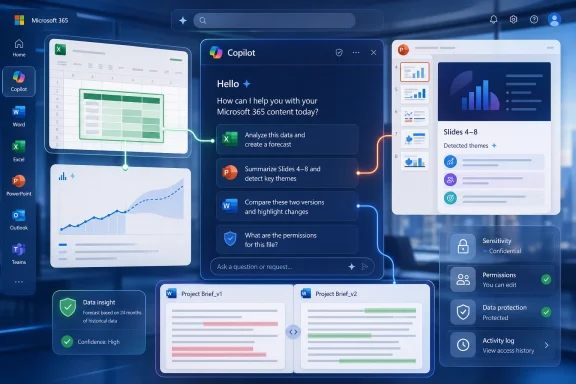
The Computerworld walkthrough of Copilot Chat’s document workflow shows this shift in miniature. The Analyst agent can be asked to inspect Excel and PowerPoint files, identify trends, explain anomalies, compare document versions, and even generate a one-slide forecast from historical data. The interface is still chat, but the object of work is no longer just a prompt response. It is the Office file itself.
This is why Microsoft keeps returning to agents. The company does not want Copilot to be a floating chatbot pasted onto the side of Office. It wants Copilot to be the layer that knows which file, which table, which slide, which comment, which person, and which business process you mean. Once that happens, the old application boundaries become less important than the agent’s ability to reach across them.
That matters because enterprise AI tools often fail at the edges, not the center. Summarizing a clean document is easy enough. Drawing a defensible conclusion from messy source material, missing data, inconsistent formatting, unclear ownership, and ambiguous business terminology is where confidence can outrun reality.
The guidance in the Computerworld piece is revealing: format Excel data as a table, make sure PowerPoint files are text-heavy, specify source ranges, and give Copilot boundaries. These are not incidental tips. They are the operating conditions under which the agent is more likely to behave like a helpful junior analyst rather than an overconfident autocomplete engine.
In other words, the future of AI-assisted Office work may depend less on magical reasoning than on mundane document hygiene. Tables matter. Slide structure matters. File naming matters. Comments and revisions matter. The better organized the source material, the more useful the agent becomes.
But Excel is also where AI mistakes become dangerous. A plausible paragraph about a sales trend is not the same thing as a reproducible workbook model. A forecast based on average growth from October through December may be useful as a sketch, but it is not a demand-planning system, a revenue model, or a finance-approved projection.
That is why the article’s caveat that these are simple projections is doing more work than it first appears. The Analyst agent can generate a January estimate from recent months, explain how it calculated the result, and revise the output based on follow-up instructions. That is valuable for exploration. It is not a substitute for statistical rigor, model governance, or review by someone who understands the data-generating process.
The risk is not that Copilot will be useless. The risk is that it will be useful enough to be trusted too quickly. In Excel, convenience has always had a shadow side: formulas copied without inspection, hidden rows missed in a review, stale linked workbooks, and spreadsheets that quietly become business-critical systems. AI adds another layer to that history, one that can summarize, infer, and format results faster than many users can validate them.
When Copilot identifies themes across slides 4 through 8, it is doing something many workers already do manually: scanning a deck for narrative drift. Are sales rising in one region but not another? Is the deck quietly shifting from growth to retention? Are product claims becoming more cautious between revisions? These are not merely formatting questions. They are questions about organizational intent.
That makes PowerPoint analysis potentially useful for managers inheriting a deck, sales teams preparing for a customer meeting, or executives trying to understand whether a presentation says what the team thinks it says. But it also means users should be careful about treating slide analysis as definitive. A slide deck is often a performance document, built for a room and a moment. Without the meeting, the presenter, and the political context, the agent can read the words but not always the stakes.
Still, this is an area where Copilot’s value may be less about deep intelligence and more about fast orientation. The agent does not need to be a strategy consultant to be useful. It only needs to reduce the time it takes to find the spine of a deck, the missing evidence, and the points where the story stops matching the data.
That is a different category of assistance. It moves from mechanical diffing to editorial judgment. In a collaborative environment, that can be enormously helpful. A product brief may become more customer-focused. A policy document may soften a compliance requirement. A proposal may shift from technical capability to business value. Those changes can be hard to spot if you are only scanning redlines.
For sysadmins and IT managers, this is where the feature intersects with governance. If Copilot can summarize what a colleague changed or commented on, it can accelerate review cycles and reduce context loss. But it also raises the premium on permissions, retention, and access boundaries. The tool is only as appropriate as the documents it can see.
Microsoft’s larger Copilot story has always depended on the Microsoft Graph and enterprise data controls. That is the right architecture for a product embedded in business workflows, but it does not remove the administrative burden. Organizations still need to decide who can use which agents, which files are eligible for analysis, and whether AI-generated summaries should be treated as records, drafts, or transient assistance.
That is a workflow, not a query. It is also a direct challenge to the way Office has traditionally taught users to think. Instead of learning where a feature lives in a ribbon, the user describes an outcome. Instead of manually moving data from Excel into PowerPoint, the user asks the agent to create a slide from the spreadsheet. Instead of opening a file to inspect comments, the user asks Copilot who changed what.
This has obvious appeal for occasional users. Many people do not live inside Excel deeply enough to remember the right charting, table, or forecasting tools. Many do not want to learn PowerPoint’s full feature set just to produce a single slide for a meeting. For them, Copilot is a translation layer between intent and application mechanics.
For power users, the equation is more complicated. The best Excel users, PowerPoint operators, and Word editors already know how to produce precise outputs. They may not want an agent that generates something plausible if it also obscures the steps. Microsoft’s challenge is to make Copilot transparent enough that experts can inspect its work, not merely accept or reject its answer.
The Computerworld article describes a split familiar to Microsoft 365 customers: many users can access Copilot Chat capabilities, but the Analyst agent belongs to users with a qualifying Microsoft subscription. In practice, that makes Analyst both a productivity feature and a licensing lever. Microsoft is not simply adding AI to Office; it is creating tiers of AI-mediated work.
This is classic Microsoft platform strategy. The company introduces a broad access point to normalize the behavior, then reserves the more valuable integrated capabilities for paid SKUs. It did this with collaboration, security, management, and analytics features across Microsoft 365. Copilot is following the same route, only faster and with a more visible user-facing component.
The risk for customers is fragmentation. One employee may have access to Analyst, another may only have basic chat, a third may see Copilot in some apps but not others, and admins may have to explain why the same prompt behaves differently across licenses or endpoints. In a small business, that is annoying. In a large enterprise, it becomes a support and change-management problem.
Admins will need to think about document readiness as much as feature deployment. If Copilot performs better on Excel tables, then teams need to know that ad hoc cell ranges and visually formatted sheets may produce weaker results. If it works better on text-heavy PowerPoint decks, then image-heavy presentations may be harder to analyze. If collaboration summaries depend on accessible comments and revision history, then file storage practices matter.
There is also a training issue. Users need to learn how to constrain prompts: name the table, specify the slides, define the timeframe, and ask for the calculation logic. That is not prompt-engineering theater. It is basic analytical hygiene. The agent can only stay grounded if the user gives it ground.
Security teams will have a different concern: overexposure. Copilot can only summarize what it can access, but many organizations already struggle with overshared SharePoint sites, permissive Teams workspaces, and old files with unclear ownership. An AI assistant makes that sprawl easier to query. That is useful when permissions are clean and risky when they are not.
Used well, the agent becomes a triage tool. It helps a manager decide which product category deserves attention, which slide range contains the story, which revision changed the direction of a document, or whether the source file lacks the data needed to answer the prompt. Those are valuable outputs precisely because they help humans spend time where judgment is needed.
Used badly, it becomes a laundering machine for weak assumptions. A user asks for a forecast, receives a chart, drops it into a deck, and the caveat disappears by the time the slide reaches leadership. This is not a hypothetical AI problem; it is a familiar office problem accelerated by AI. The machine makes it easier to produce polished artifacts before the underlying claim has earned that polish.
Microsoft can reduce that risk by showing methods, exposing source references inside the document context, and making it easy to inspect generated calculations. But organizations also need norms. A Copilot-generated forecast should be labeled as exploratory unless reviewed. A document comparison should be treated as a summary, not a legal redline. A trend analysis should be checked against the source table before decisions are made.
Copilot Chat offers an appealing answer to that mess. Attach the file. Ask the question. Let the agent summarize, compare, project, and draft. It is easy to see why Microsoft wants this to become the default behavior inside Microsoft 365.
But the mess is also what makes the product hard. Real organizations do not have pristine sample files. They have spreadsheets with merged cells, decks with screenshots of charts instead of live data, documents duplicated across OneDrive and SharePoint, and permission models that reflect years of exceptions. Copilot will be judged not by how it performs on the demo, but by how gracefully it handles the office landfill.
That is why the product’s best early guidance is so practical. Format data as tables. Use text where possible. Give the agent boundaries. Ask it to explain what it can and cannot infer. In the age of AI, the boring advice is still the advice that saves you.
 Microsoft Is Turning Office Into a Conversation Layer
For decades, Office has been organized around file types. A spreadsheet lived in Excel because it contained cells, formulas, filters, charts, and a mental model built around rows and columns. A deck lived in PowerPoint because it was a sequence of slides, and a document lived in Word because it was prose with structure, comments, and revisions.Copilot Chat is Microsoft’s bet that this taxonomy matters less than the user’s intent. The user no longer starts with “open Excel” or “edit the slide deck.” The user starts with “find the trend,” “compare these two versions,” “make this into a slide,” or “tell me what changed.” That distinction sounds subtle until you realize it reverses the relationship between the worker and the application.
The Computerworld walkthrough of Copilot Chat’s document workflow shows this shift in miniature. The Analyst agent can be asked to inspect Excel and PowerPoint files, identify trends, explain anomalies, compare document versions, and even generate a one-slide forecast from historical data. The interface is still chat, but the object of work is no longer just a prompt response. It is the Office file itself.
This is why Microsoft keeps returning to agents. The company does not want Copilot to be a floating chatbot pasted onto the side of Office. It wants Copilot to be the layer that knows which file, which table, which slide, which comment, which person, and which business process you mean. Once that happens, the old application boundaries become less important than the agent’s ability to reach across them.
The Analyst Agent Is Useful Because It Is Narrow
The strongest part of the Analyst agent is also the part Microsoft should resist overselling. It appears most useful when the task is constrained: look at slides 4 through 8, identify themes in a presentation, show sales trends over a defined period, compare two versions of a document, or create a simple projection from recent months of spreadsheet data. In those cases, the agent is not being asked to understand the entire business. It is being asked to perform a bounded analytical pass over a known artifact.That matters because enterprise AI tools often fail at the edges, not the center. Summarizing a clean document is easy enough. Drawing a defensible conclusion from messy source material, missing data, inconsistent formatting, unclear ownership, and ambiguous business terminology is where confidence can outrun reality.
The guidance in the Computerworld piece is revealing: format Excel data as a table, make sure PowerPoint files are text-heavy, specify source ranges, and give Copilot boundaries. These are not incidental tips. They are the operating conditions under which the agent is more likely to behave like a helpful junior analyst rather than an overconfident autocomplete engine.
In other words, the future of AI-assisted Office work may depend less on magical reasoning than on mundane document hygiene. Tables matter. Slide structure matters. File naming matters. Comments and revisions matter. The better organized the source material, the more useful the agent becomes.
Excel Remains the Place Where AI Confidence Meets Audit Reality
Excel is the natural proving ground for Analyst because spreadsheets contain the kind of semi-structured business data that organizations want to interrogate quickly. Sales trends, category growth, missing values, monthly projections, and outliers are exactly the sort of questions managers ask before a meeting. If Copilot can answer them without forcing users to build pivot tables or formulas from scratch, it will save real time.But Excel is also where AI mistakes become dangerous. A plausible paragraph about a sales trend is not the same thing as a reproducible workbook model. A forecast based on average growth from October through December may be useful as a sketch, but it is not a demand-planning system, a revenue model, or a finance-approved projection.
That is why the article’s caveat that these are simple projections is doing more work than it first appears. The Analyst agent can generate a January estimate from recent months, explain how it calculated the result, and revise the output based on follow-up instructions. That is valuable for exploration. It is not a substitute for statistical rigor, model governance, or review by someone who understands the data-generating process.
The risk is not that Copilot will be useless. The risk is that it will be useful enough to be trusted too quickly. In Excel, convenience has always had a shadow side: formulas copied without inspection, hidden rows missed in a review, stale linked workbooks, and spreadsheets that quietly become business-critical systems. AI adds another layer to that history, one that can summarize, infer, and format results faster than many users can validate them.
PowerPoint Analysis Exposes the Limits of Corporate Memory
PowerPoint is a stranger target for analysis, but a revealing one. The Analyst agent reportedly works best with text-heavy decks, which is both technically unsurprising and culturally damning. Corporate strategy often lives in slides, but much of its meaning is implied through charts, layouts, speaker notes, design conventions, and meeting context that may never make it into the file.When Copilot identifies themes across slides 4 through 8, it is doing something many workers already do manually: scanning a deck for narrative drift. Are sales rising in one region but not another? Is the deck quietly shifting from growth to retention? Are product claims becoming more cautious between revisions? These are not merely formatting questions. They are questions about organizational intent.
That makes PowerPoint analysis potentially useful for managers inheriting a deck, sales teams preparing for a customer meeting, or executives trying to understand whether a presentation says what the team thinks it says. But it also means users should be careful about treating slide analysis as definitive. A slide deck is often a performance document, built for a room and a moment. Without the meeting, the presenter, and the political context, the agent can read the words but not always the stakes.
Still, this is an area where Copilot’s value may be less about deep intelligence and more about fast orientation. The agent does not need to be a strategy consultant to be useful. It only needs to reduce the time it takes to find the spine of a deck, the missing evidence, and the points where the story stops matching the data.
Document Comparison Is Where Copilot Starts Acting Like an Editor
The comparison of document versions may be one of the more quietly important features. Traditional version comparison tells you what changed: a deleted sentence, a modified heading, a new paragraph, a shifted phrase. Copilot can try to explain why the change matters by summarizing the document’s altered direction, positioning, tone, or emphasis.That is a different category of assistance. It moves from mechanical diffing to editorial judgment. In a collaborative environment, that can be enormously helpful. A product brief may become more customer-focused. A policy document may soften a compliance requirement. A proposal may shift from technical capability to business value. Those changes can be hard to spot if you are only scanning redlines.
For sysadmins and IT managers, this is where the feature intersects with governance. If Copilot can summarize what a colleague changed or commented on, it can accelerate review cycles and reduce context loss. But it also raises the premium on permissions, retention, and access boundaries. The tool is only as appropriate as the documents it can see.
Microsoft’s larger Copilot story has always depended on the Microsoft Graph and enterprise data controls. That is the right architecture for a product embedded in business workflows, but it does not remove the administrative burden. Organizations still need to decide who can use which agents, which files are eligible for analysis, and whether AI-generated summaries should be treated as records, drafts, or transient assistance.
The Chat Box Is Becoming a Workflow Surface, Not a Search Bar
The most important design change here is not that Copilot can answer questions about documents. It is that Copilot Chat is becoming a place where work is initiated, transformed, and exported. You attach a file, call an agent, ask for a forecast, produce a slide, revise the result, and download the artifact.That is a workflow, not a query. It is also a direct challenge to the way Office has traditionally taught users to think. Instead of learning where a feature lives in a ribbon, the user describes an outcome. Instead of manually moving data from Excel into PowerPoint, the user asks the agent to create a slide from the spreadsheet. Instead of opening a file to inspect comments, the user asks Copilot who changed what.
This has obvious appeal for occasional users. Many people do not live inside Excel deeply enough to remember the right charting, table, or forecasting tools. Many do not want to learn PowerPoint’s full feature set just to produce a single slide for a meeting. For them, Copilot is a translation layer between intent and application mechanics.
For power users, the equation is more complicated. The best Excel users, PowerPoint operators, and Word editors already know how to produce precise outputs. They may not want an agent that generates something plausible if it also obscures the steps. Microsoft’s challenge is to make Copilot transparent enough that experts can inspect its work, not merely accept or reject its answer.
The Subscription Boundary Is the Product Strategy
Microsoft’s Copilot packaging has become a story in itself. The company has been steadily differentiating basic Copilot Chat experiences from the fuller Microsoft 365 Copilot subscription, especially where advanced agents, Office app integration, and richer model choices are concerned. That distinction matters because it shapes who gets the new workflow and who merely sees the marketing.The Computerworld article describes a split familiar to Microsoft 365 customers: many users can access Copilot Chat capabilities, but the Analyst agent belongs to users with a qualifying Microsoft subscription. In practice, that makes Analyst both a productivity feature and a licensing lever. Microsoft is not simply adding AI to Office; it is creating tiers of AI-mediated work.
This is classic Microsoft platform strategy. The company introduces a broad access point to normalize the behavior, then reserves the more valuable integrated capabilities for paid SKUs. It did this with collaboration, security, management, and analytics features across Microsoft 365. Copilot is following the same route, only faster and with a more visible user-facing component.
The risk for customers is fragmentation. One employee may have access to Analyst, another may only have basic chat, a third may see Copilot in some apps but not others, and admins may have to explain why the same prompt behaves differently across licenses or endpoints. In a small business, that is annoying. In a large enterprise, it becomes a support and change-management problem.
Admins Will Care Less About Magic Than About Boundaries
For WindowsForum’s audience, the obvious question is not whether Copilot can produce a neat demo. It is whether the feature can be governed, supported, audited, and explained when users start relying on it. AI tools fail politically before they fail technically if users do not understand where the boundaries are.Admins will need to think about document readiness as much as feature deployment. If Copilot performs better on Excel tables, then teams need to know that ad hoc cell ranges and visually formatted sheets may produce weaker results. If it works better on text-heavy PowerPoint decks, then image-heavy presentations may be harder to analyze. If collaboration summaries depend on accessible comments and revision history, then file storage practices matter.
There is also a training issue. Users need to learn how to constrain prompts: name the table, specify the slides, define the timeframe, and ask for the calculation logic. That is not prompt-engineering theater. It is basic analytical hygiene. The agent can only stay grounded if the user gives it ground.
Security teams will have a different concern: overexposure. Copilot can only summarize what it can access, but many organizations already struggle with overshared SharePoint sites, permissive Teams workspaces, and old files with unclear ownership. An AI assistant makes that sprawl easier to query. That is useful when permissions are clean and risky when they are not.
The Best Use Case Is Not Replacing Analysts
The name “Analyst” invites an obvious misunderstanding. It suggests the agent is meant to replace analysis, when its more realistic role is to compress the first pass. It can surface themes, identify likely trends, point out missing data, and draft a simple projection. That is not the end of analytical work. It is the beginning of a better question.Used well, the agent becomes a triage tool. It helps a manager decide which product category deserves attention, which slide range contains the story, which revision changed the direction of a document, or whether the source file lacks the data needed to answer the prompt. Those are valuable outputs precisely because they help humans spend time where judgment is needed.
Used badly, it becomes a laundering machine for weak assumptions. A user asks for a forecast, receives a chart, drops it into a deck, and the caveat disappears by the time the slide reaches leadership. This is not a hypothetical AI problem; it is a familiar office problem accelerated by AI. The machine makes it easier to produce polished artifacts before the underlying claim has earned that polish.
Microsoft can reduce that risk by showing methods, exposing source references inside the document context, and making it easy to inspect generated calculations. But organizations also need norms. A Copilot-generated forecast should be labeled as exploratory unless reviewed. A document comparison should be treated as a summary, not a legal redline. A trend analysis should be checked against the source table before decisions are made.
Copilot’s Real Competition Is the Messy Shared Drive
The enemy Microsoft is attacking is not Google Docs or Slack or a rival chatbot. It is the accumulated friction of modern knowledge work: files scattered across chats, half-remembered revisions, spreadsheets that only one person understands, decks that carry last quarter’s assumptions, and comments buried in documents nobody wants to reopen.Copilot Chat offers an appealing answer to that mess. Attach the file. Ask the question. Let the agent summarize, compare, project, and draft. It is easy to see why Microsoft wants this to become the default behavior inside Microsoft 365.
But the mess is also what makes the product hard. Real organizations do not have pristine sample files. They have spreadsheets with merged cells, decks with screenshots of charts instead of live data, documents duplicated across OneDrive and SharePoint, and permission models that reflect years of exceptions. Copilot will be judged not by how it performs on the demo, but by how gracefully it handles the office landfill.
That is why the product’s best early guidance is so practical. Format data as tables. Use text where possible. Give the agent boundaries. Ask it to explain what it can and cannot infer. In the age of AI, the boring advice is still the advice that saves you.
The New Office Skill Is Knowing When the Agent Has Enough to Work With
The immediate lesson from Copilot Chat’s Analyst workflow is not that every Office user suddenly has a data scientist in the browser. It is that Microsoft is making AI assistance more file-aware, more agentic, and more tightly bound to the documents that already run the workplace.- Copilot Chat is becoming a workspace for creating, revising, analyzing, and exporting Office artifacts rather than merely a place to ask general questions.
- The Analyst agent is most credible when users constrain it to specific files, tables, slides, date ranges, and comparison tasks.
- Excel forecasts generated by Copilot should be treated as exploratory projections unless the method and source data have been reviewed.
- PowerPoint analysis is useful for extracting themes and narrative shifts, but it depends heavily on how much textual context the deck contains.
- Document comparison may become one of the most practical enterprise uses because it explains directional changes rather than merely listing edits.
- Administrators should treat Copilot readiness as a permissions, data hygiene, licensing, and user-training project, not just a feature rollout.
References
- Primary source: Computerworld
Published: Tue, 19 May 2026 07:00:00 GMT
Copilot Chat: Your hub for document creation and analysis – Computerworld
Anyone with a Microsoft 365 account can use new AI agents in Copilot Chat to jump-start Word, Excel, and PowerPoint documents — and some users can enlist a special agent to analyze their M365 files. Here’s how. www.computerworld.com
- Official source: support.microsoft.com
How Copilot Chat works in Microsoft 365 apps | Microsoft Support
How Copilot Chat works in Microsoft 365 appssupport.microsoft.com - Official source: learn.microsoft.com
What is Microsoft 365 Copilot? | Microsoft Learn
Learn about what Microsoft 365 Copilot is and common Copilot features in Microsoft 365 apps, like Word, Excel, PowerPoint, and Teams. This article answers common questions about Copilot, including what is Copilot, how Copilot works, and the benefits of using Copilot.learn.microsoft.com - Official source: blogs.windows.com
リサーチツール および アナリスト が、Microsoft 365 Copilot において一般提供開始となりました。 - Windows Blog for Japan
※本ブログは、米国時間 2025 年 6 月 2 日に公開された、”Researcher and Analyst are now generally available in Microsoft 365 Copilot” を基に掲載しています。 本日、業務に特化して設計された初の推論エージェントである リサーチツール と アナリスト の一般提供を開始したことをお知らせします。これらのエージェントは、4 月に Frontier...blogs.windows.com - Official source: microsoft.com
Your request has been blocked. This could be due to several reasons.
www.microsoft.com
- Related coverage: thurrott.com
Research and Analyst Agents Are Now Available in Microsoft 365 Copilot - Thurrott.com
Microsoft's new AI reasoning agents are now generally available to those with a Microsoft 365 Copilot license.www.thurrott.com
- Related coverage: windowscentral.com
Microsoft 365 is paywalling most of Copilot in its Office apps | Windows Central
Commercial customers will soon need a Microsoft 365 Copilot license to use Copilot Chat in Word, Excel, PowerPoint, and OneNote.www.windowscentral.com - Related coverage: techradar.com
Microsoft 365 Copilot will be automatically installed on 365 Clients in October | TechRadar
Microsoft is pushing the Copilot app on more userswww.techradar.com - Related coverage: tomshardware.com
Microsoft will force install the Copilot AI app for users with desktop versions of 365 apps like Word and Excel — coming October, with no way to opt out for personal users | Tom's Hardware
More bloatware added to Windows, courtesy of Microsoft 365.www.tomshardware.com - Related coverage: pcgamer.com
Microsoft launches Copilot AI function in Excel, but warns not to use it in 'any task requiring accuracy or reproducibility' | PC Gamer
You can have Copilot generate your formulas in Excel now, but it doesn't sound ready for prime time.www.pcgamer.com - Related coverage: itpro.com
Satya Nadella says “our multi-model approach goes beyond choice’ as Microsoft adds Claude AI models to 365 Copilot | IT Pro
Users can choose between both OpenAI and Anthropic models in Microsoft 365 Copilotwww.itpro.com - Official source: cdn-dynmedia-1.microsoft.com
- Related coverage: press.spglobal.com
S&P Global Launches AI-Ready Commodities Data Integrated With Microsoft 365 Copilot - Apr 21, 2025
PDF documentpress.spglobal.com
- Related coverage: m365maps.com
- Related coverage: bpb-us-e1.wpmucdn.com
