

Microsoft-compatible antivirus protection in 2026 is less about finding a single “best” app than deciding whether Windows’ built-in Defender stack is enough for your risk profile, with third-party suites adding value mainly through extras such as VPNs, identity monitoring, password tools, parental controls, and broader cross-device management. That is the uncomfortable truth behind the annual antivirus-shopping ritual. Windows security has matured to the point where the default answer for many users is no longer “install something immediately,” but “understand what you already have.” The real question is not whether Microsoft Defender works; it is whether your household, workflow, or business needs more than Microsoft’s baseline.
For years, “Windows antivirus” meant a post-install chore. You bought a PC, endured the trialware, removed the worst of it, and installed the security suite you trusted. That muscle memory lingers, but it is increasingly out of sync with how modern Windows actually protects itself.
Microsoft Defender Antivirus is not a leftover utility bolted onto the operating system. It is part of the Windows Security app, enabled by default, updated through Windows Update, and tied into the same cloud intelligence and reputation systems that power other Microsoft security services. For ordinary users, that matters more than brand nostalgia.
The strongest argument for Defender is not that it is glamorous. It is that it is already there, already integrated, and already good enough for a large share of everyday threats. It watches downloads, scans files, monitors suspicious behavior, and works with Windows Firewall without asking users to become part-time security administrators.
That does not make it invincible. No consumer antivirus is. But the old assumption that a clean Windows install is naked until a third-party suite arrives is now badly dated.
Bitdefender, Norton, McAfee, ESET, Avast, AVG, Malwarebytes, Trend Micro, Sophos, and others compete on a mix of detection rates, false positives, performance impact, privacy tools, ransomware defenses, browser protection, and customer support. Their premium tiers increasingly resemble consumer security bundles rather than simple antivirus utilities.
That is why a 2026 buying decision should begin with a sharper distinction. If you only need malware protection on one Windows PC, Microsoft Defender is a credible default. If you want an all-in-one service covering several devices, dark web alerts, identity restoration, a VPN, parental controls, or managed protection for less technical family members, a paid suite may make sense.
The danger is buying a subscription because “Windows needs antivirus” rather than because the product solves a specific problem. In 2026, that is how users end up paying for duplicate protection while ignoring the risks antivirus cannot solve.
Smart App Control is a good example. Instead of waiting for malware to behave badly, it uses Microsoft’s reputation and cloud intelligence to decide whether an application should run in the first place. That changes the model from “scan and react” toward “block unknown or untrusted code before execution.”
Windows Hello attacks a different weakness: passwords. By pushing users toward facial recognition, fingerprints, or device-bound PINs, Microsoft reduces reliance on reusable credentials that can be phished, leaked, or guessed. This is not antivirus in the traditional sense, but it is security where users actually fail.
Then there is the hardware layer. Secured-core PCs and Microsoft Pluton move some trust decisions closer to the silicon, helping protect keys, credentials, and firmware-level integrity. That matters because modern attacks increasingly look below the operating system, not just at suspicious EXE files in the Downloads folder.
Smart App Control is Microsoft’s attempt to make that moment less dependent on user judgment. It checks whether an app is known, trusted, signed, and likely safe before allowing it to run. In practice, it is a reputation gate sitting closer to the operating system than a browser warning or download prompt.
That approach has obvious advantages. Malware authors constantly mutate files, shift hosting domains, and disguise payloads as legitimate tools. Blocking unknown code before execution can reduce the time window where traditional antivirus has not yet caught up.
It also has tradeoffs. Developers, hobbyists, power users, and people who frequently run unsigned utilities may find reputation-based controls irritating. Security that blocks bad software can also block obscure but legitimate software, which is why Microsoft has to balance protection against Windows’ long-standing openness.
Phishing remains effective because passwords are portable. If a user enters the same password into a fake login page, the attacker can try it elsewhere. If the password is reused, weak, or already leaked, the damage spreads quickly.
Windows Hello changes the authentication equation by tying sign-in to the device and a biometric or PIN-based gesture. The PIN is not just a shorter password; it is designed for that device. Facial recognition and fingerprints make sign-in easier while also reducing the temptation to reuse simple credentials.
This is where Microsoft’s built-in approach is strongest. Defender may compete with third-party antivirus products, but Windows Hello complements them. A paid antivirus suite cannot fully compensate for a user who signs into everything with the same password they created in 2016.
For ordinary buyers, the practical lesson is simple: a “Windows PC” is no longer a single security category. A newer Windows 11 machine with TPM 2.0, virtualization-based security, secure boot, Pluton support, and modern firmware protections is not equivalent to an old PC barely meeting the upgrade line.
That matters for both home users and IT departments. The antivirus product installed on top of Windows is only part of the risk profile. The age of the hardware, the update policy of the manufacturer, and the availability of firmware protections all affect how defensible the machine is over time.
It also means that some security advice ages badly. Telling users to install a third-party antivirus while ignoring unsupported hardware, disabled secure boot, stale firmware, and missing Windows updates is a poor trade. In 2026, the platform matters as much as the scanner.
A household with Windows laptops, Macs, iPhones, Android phones, and a few elderly relatives may benefit from one subscription dashboard. A parent may want stronger web filtering and time controls than Windows alone provides. A traveler may value a bundled VPN. A user worried about account takeovers may pay for identity monitoring and breach alerts.
There is also a trust argument. Some users and organizations prefer security diversity, where the operating system vendor is not the only line of defense. Others prefer Microsoft’s integration and want fewer third-party hooks running deep inside Windows. Both positions are defensible; neither should be reduced to fan loyalty.
The main mistake is treating every paid suite as automatically superior to Defender. The better question is whether the suite offers measurable advantages for your behavior. If it mostly duplicates what Windows already does, it may add cost and complexity without reducing much risk.
For users who want the strongest consumer suite with broad feature depth, Bitdefender and Norton remain obvious names to evaluate. They tend to perform well in independent testing and offer mature packages with ransomware defenses, web protection, VPN options, and multi-device coverage. The tradeoff is subscription cost, upsell pressure, and the need to manage yet another security ecosystem.
For families, McAfee and Norton often appeal because their bundles emphasize identity features, parental tools, and device coverage. That does not make them the lightest or most elegant options, but it explains their staying power in households where convenience beats minimalism.
For performance-sensitive users, especially gamers and owners of lower-end PCs, ESET and Malwarebytes are worth consideration depending on the exact package and use case. ESET has a long reputation for lighter endpoint protection, while Malwarebytes remains popular as a cleanup and anti-malware tool. The best answer here is less about brand absolutism and more about avoiding a bloated suite on a machine that already struggles.
This is especially important because antivirus software runs with deep privileges. A buggy security product can create performance problems, networking failures, browser issues, update conflicts, and in rare cases security weaknesses of its own. Installing antivirus is not like installing a note-taking app.
Good compatibility also means understanding what happens to Defender. When a reputable third-party antivirus becomes the active provider, Microsoft Defender Antivirus typically steps back rather than fighting for control. That is by design. Running multiple real-time antivirus engines at once can create conflicts, slowdowns, and confusing alerts.
The best Windows security setup is coherent. Either rely on Microsoft’s built-in stack and harden the surrounding habits, or choose a third-party suite and understand what it replaces. Half-configured overlap is not defense in depth; it is administrative noise.
But the most damaging incidents often blend technical compromise with human manipulation. A fake support call persuades a user to install remote access software. A phishing email leads to a real Microsoft 365 login page after stealing a session token. A fraudulent invoice convinces someone to pay the wrong account. A malicious ad impersonates a legitimate download.
Antivirus may help at the edges of these scenarios, but it cannot rescue every bad decision. It cannot know that a bank transfer is fraudulent if the user authorizes it. It cannot always distinguish a legitimate remote support tool from one misused by a scammer. It cannot prevent someone from typing a one-time code into a fake prompt.
This is why “best antivirus” articles can mislead when they stop at product names. The product is only one control. The rest is patching, authentication, backups, browser hygiene, account recovery, and skepticism.
Windows includes Controlled Folder Access, a ransomware-focused feature that can restrict unauthorized changes to protected folders. It is useful, but it is not a substitute for backups. The only ransomware recovery plan worth trusting is one that assumes prevention may fail.
That means keeping important files in a cloud service with version history, an external drive disconnected when not in use, or a backup system with restore points resistant to tampering. A backup that ransomware can encrypt from the same user session is not much of a backup. A backup no one has tested is a comforting theory.
For small businesses and home offices, this is where the consumer antivirus conversation intersects with professional IT discipline. Malware protection is important. Recovery is what turns a disaster into an inconvenience.
The same applies to browsers, Office apps, PDF readers, game launchers, messaging clients, and remote access tools. Attackers do not care whether a compromise begins in the operating system or a neglected application. They care whether the path works.
This is one reason Microsoft’s integrated model has an advantage. A default Windows installation has fewer moving parts than a pile of expired trialware, old browser extensions, and abandoned utilities. Simplicity is not just aesthetic; it reduces the number of things that can fall behind.
For IT pros, the lesson is familiar. Patch management beats heroic cleanup. For home users, the translation is equally plain: let Windows update, restart when required, and stop treating every reboot prompt as an enemy.
This is especially true for software downloaded through ads, mirrors, file-sharing sites, Discord links, Telegram channels, and fake support pages. The safest download path is still the vendor’s official site or a trusted store. The riskiest path is the first “download now” button found in a search result.
Power users sometimes dismiss warnings because they understand false positives. That confidence can become a vulnerability. Attackers increasingly target exactly the sort of user who installs unsigned utilities, developer tools, mod managers, and niche drivers.
Security software should not be treated as an obstacle course to click through. It is a system of friction designed to interrupt dangerous momentum.
Some organizations will standardize on Microsoft because they are already deep in Microsoft 365, Entra ID, Intune, Defender for Endpoint, and Sentinel. The appeal is unified visibility and fewer vendor consoles. Others will choose CrowdStrike, SentinelOne, Sophos, Bitdefender GravityZone, ESET, Trend Micro, or another endpoint platform because they want different detection logic, managed response, or operational separation from Microsoft.
That is a strategic choice, not just an antivirus pick. Security teams care about how fast alerts arrive, how noisy they are, how well the tool isolates a machine, how it handles lateral movement, and how it fits the organization’s response process. A consumer-style ranking cannot answer those questions.
Still, the consumer market affects enterprise expectations. Users now assume Windows ships secure by default. IT departments that weaken built-in protections, delay patches, or deploy intrusive tools without explaining the tradeoffs will meet more resistance than they did a decade ago.
That puts pressure on other free tools. Avast Free Antivirus, AVG AntiVirus Free, Avira Free Security, and similar products must justify themselves against something already included. Their value may lie in different web protection, a preferred interface, or additional features, but they are no longer competing against an empty chair.
The downside is that free security products can monetize attention. Pop-ups, bundled offers, browser extensions, privacy prompts, and upgrade campaigns can degrade trust. A free product that scares users into subscriptions may be worse for security literacy than Defender’s quieter approach.
For many WindowsForum readers, the best free setup in 2026 is boring: Microsoft Defender, Windows Firewall, Smart App Control where supported, Windows Hello, a modern browser, and disciplined updates. Boring is underrated in security.
Parental controls are another example. Some suites offer meaningful web filtering, location features, screen time tools, and reports. Others provide superficial controls that technically exist but are easy to bypass. Families should evaluate the specific controls they need rather than assuming “parental controls included” means the problem is solved.
Customer support also matters. A less technical user may benefit from a security company that offers clear cleanup help, account recovery guidance, and phone support. A Windows enthusiast may prefer lean software and no hand-holding. Both are rational choices.
The right product is the one whose extra features you will actually configure and use. Unused security features are marketing copy.
ESET is a sensible option for users who prioritize lighter traditional endpoint protection and granular controls. Malwarebytes remains useful for users who want extra anti-malware capability, especially as a companion or remediation-oriented tool depending on configuration. McAfee can make sense for families that want an expansive consumer bundle, though users should watch for renewal pricing and feature overlap.
The important point is that these are not moral identities. You are not “smart” because you use Defender or “serious” because you pay for a suite. You are secure when your tools match your risk, stay updated, and do not encourage careless behavior.
For Windows PCs in 2026, the shortlist starts with Microsoft and then branches outward only when the user has a reason to leave the default path.
There is also the question of tolerance. Some users want security software that disappears. Others want dashboards, reports, and controls. Some want the lowest possible performance impact. Others will trade a little speed for more web filtering and support.
What Windows users should avoid is a false sense of completion. Installing an antivirus is not the end of security. It is one layer among many.
That is where Microsoft’s direction is clear. Windows is trying to make baseline protection automatic, identity harder to steal, unknown apps harder to run, and hardware trust harder to subvert. Third-party vendors must then compete above that floor.
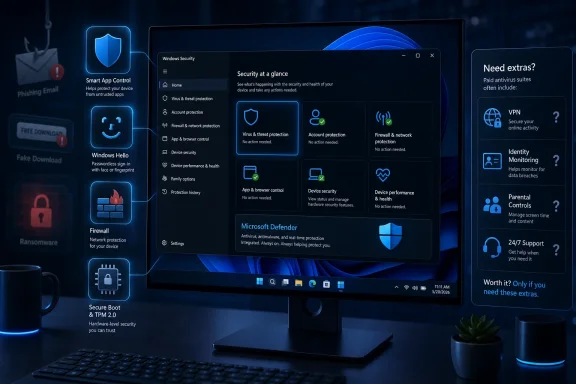 Defender Has Become the Default Antivirus Most People Forgot to Evaluate
For years, “Windows antivirus” meant a post-install chore. You bought a PC, endured the trialware, removed the worst of it, and installed the security suite you trusted. That muscle memory lingers, but it is increasingly out of sync with how modern Windows actually protects itself.Microsoft Defender Antivirus is not a leftover utility bolted onto the operating system. It is part of the Windows Security app, enabled by default, updated through Windows Update, and tied into the same cloud intelligence and reputation systems that power other Microsoft security services. For ordinary users, that matters more than brand nostalgia.
The strongest argument for Defender is not that it is glamorous. It is that it is already there, already integrated, and already good enough for a large share of everyday threats. It watches downloads, scans files, monitors suspicious behavior, and works with Windows Firewall without asking users to become part-time security administrators.
That does not make it invincible. No consumer antivirus is. But the old assumption that a clean Windows install is naked until a third-party suite arrives is now badly dated.
The Antivirus Market Has Shifted From Detection to Bundling
Independent antivirus tests still matter, and Microsoft Defender has spent years climbing from punchline to serious contender. The broader market, however, has changed in a way that makes “best antivirus” lists harder to interpret. Many paid products are no longer selling malware detection alone.Bitdefender, Norton, McAfee, ESET, Avast, AVG, Malwarebytes, Trend Micro, Sophos, and others compete on a mix of detection rates, false positives, performance impact, privacy tools, ransomware defenses, browser protection, and customer support. Their premium tiers increasingly resemble consumer security bundles rather than simple antivirus utilities.
That is why a 2026 buying decision should begin with a sharper distinction. If you only need malware protection on one Windows PC, Microsoft Defender is a credible default. If you want an all-in-one service covering several devices, dark web alerts, identity restoration, a VPN, parental controls, or managed protection for less technical family members, a paid suite may make sense.
The danger is buying a subscription because “Windows needs antivirus” rather than because the product solves a specific problem. In 2026, that is how users end up paying for duplicate protection while ignoring the risks antivirus cannot solve.
Microsoft’s Security Stack Is Bigger Than Defender
The most useful thing about the Analytics Insight guide is not its “best antivirus” framing. It is the reminder that modern Windows security is layered. Defender is the visible piece, but it is only one part of the platform.Smart App Control is a good example. Instead of waiting for malware to behave badly, it uses Microsoft’s reputation and cloud intelligence to decide whether an application should run in the first place. That changes the model from “scan and react” toward “block unknown or untrusted code before execution.”
Windows Hello attacks a different weakness: passwords. By pushing users toward facial recognition, fingerprints, or device-bound PINs, Microsoft reduces reliance on reusable credentials that can be phished, leaked, or guessed. This is not antivirus in the traditional sense, but it is security where users actually fail.
Then there is the hardware layer. Secured-core PCs and Microsoft Pluton move some trust decisions closer to the silicon, helping protect keys, credentials, and firmware-level integrity. That matters because modern attacks increasingly look below the operating system, not just at suspicious EXE files in the Downloads folder.
Smart App Control Is Microsoft’s Quiet Bet Against the Unknown App Problem
For home users, one of the riskiest moments on Windows is still the double-click. A free utility, a mod tool, a cracked installer, a fake driver updater, a suspicious PDF converter — these are not exotic enterprise threats. They are the daily texture of consumer compromise.Smart App Control is Microsoft’s attempt to make that moment less dependent on user judgment. It checks whether an app is known, trusted, signed, and likely safe before allowing it to run. In practice, it is a reputation gate sitting closer to the operating system than a browser warning or download prompt.
That approach has obvious advantages. Malware authors constantly mutate files, shift hosting domains, and disguise payloads as legitimate tools. Blocking unknown code before execution can reduce the time window where traditional antivirus has not yet caught up.
It also has tradeoffs. Developers, hobbyists, power users, and people who frequently run unsigned utilities may find reputation-based controls irritating. Security that blocks bad software can also block obscure but legitimate software, which is why Microsoft has to balance protection against Windows’ long-standing openness.
Windows Hello Solves a Problem Antivirus Never Could
Antivirus is useful against malware. It is much less useful when the user voluntarily gives away a password. That is why Windows Hello belongs in any serious discussion of PC security, even though it does not look like antivirus at all.Phishing remains effective because passwords are portable. If a user enters the same password into a fake login page, the attacker can try it elsewhere. If the password is reused, weak, or already leaked, the damage spreads quickly.
Windows Hello changes the authentication equation by tying sign-in to the device and a biometric or PIN-based gesture. The PIN is not just a shorter password; it is designed for that device. Facial recognition and fingerprints make sign-in easier while also reducing the temptation to reuse simple credentials.
This is where Microsoft’s built-in approach is strongest. Defender may compete with third-party antivirus products, but Windows Hello complements them. A paid antivirus suite cannot fully compensate for a user who signs into everything with the same password they created in 2016.
Hardware Security Is Becoming the New Baseline, but Only on Newer PCs
The least visible Windows security improvements are often the most important. Microsoft Pluton and Secured-core PC designs reflect a world where attackers do not always start with a malicious file. They may target firmware, credentials, boot integrity, or the trust chain beneath Windows itself.For ordinary buyers, the practical lesson is simple: a “Windows PC” is no longer a single security category. A newer Windows 11 machine with TPM 2.0, virtualization-based security, secure boot, Pluton support, and modern firmware protections is not equivalent to an old PC barely meeting the upgrade line.
That matters for both home users and IT departments. The antivirus product installed on top of Windows is only part of the risk profile. The age of the hardware, the update policy of the manufacturer, and the availability of firmware protections all affect how defensible the machine is over time.
It also means that some security advice ages badly. Telling users to install a third-party antivirus while ignoring unsupported hardware, disabled secure boot, stale firmware, and missing Windows updates is a poor trade. In 2026, the platform matters as much as the scanner.
Third-Party Suites Still Earn Their Keep in the Right Households
None of this means the paid antivirus industry has become pointless. It means the case has narrowed and become more specific. Third-party suites make the most sense when they provide protection Microsoft does not bundle cleanly into the Windows experience.A household with Windows laptops, Macs, iPhones, Android phones, and a few elderly relatives may benefit from one subscription dashboard. A parent may want stronger web filtering and time controls than Windows alone provides. A traveler may value a bundled VPN. A user worried about account takeovers may pay for identity monitoring and breach alerts.
There is also a trust argument. Some users and organizations prefer security diversity, where the operating system vendor is not the only line of defense. Others prefer Microsoft’s integration and want fewer third-party hooks running deep inside Windows. Both positions are defensible; neither should be reduced to fan loyalty.
The main mistake is treating every paid suite as automatically superior to Defender. The better question is whether the suite offers measurable advantages for your behavior. If it mostly duplicates what Windows already does, it may add cost and complexity without reducing much risk.
The Best Antivirus Pick Depends on the User, Not the Logo
For most mainstream Windows 11 users, Microsoft Defender is the starting recommendation. It is free, integrated, quiet, and backed by Microsoft’s update pipeline. Pair it with Windows Firewall, SmartScreen, Smart App Control where available, Windows Hello, and regular system updates, and the result is a solid baseline.For users who want the strongest consumer suite with broad feature depth, Bitdefender and Norton remain obvious names to evaluate. They tend to perform well in independent testing and offer mature packages with ransomware defenses, web protection, VPN options, and multi-device coverage. The tradeoff is subscription cost, upsell pressure, and the need to manage yet another security ecosystem.
For families, McAfee and Norton often appeal because their bundles emphasize identity features, parental tools, and device coverage. That does not make them the lightest or most elegant options, but it explains their staying power in households where convenience beats minimalism.
For performance-sensitive users, especially gamers and owners of lower-end PCs, ESET and Malwarebytes are worth consideration depending on the exact package and use case. ESET has a long reputation for lighter endpoint protection, while Malwarebytes remains popular as a cleanup and anti-malware tool. The best answer here is less about brand absolutism and more about avoiding a bloated suite on a machine that already struggles.
“Microsoft-Compatible” Should Mean More Than “Installs on Windows”
The phrase “Microsoft-compatible” can be marketing fluff unless buyers define it properly. At minimum, a Windows antivirus product should work cleanly with Windows Security, respect Defender’s passive-mode behavior, update reliably, and avoid destabilizing core Windows features.This is especially important because antivirus software runs with deep privileges. A buggy security product can create performance problems, networking failures, browser issues, update conflicts, and in rare cases security weaknesses of its own. Installing antivirus is not like installing a note-taking app.
Good compatibility also means understanding what happens to Defender. When a reputable third-party antivirus becomes the active provider, Microsoft Defender Antivirus typically steps back rather than fighting for control. That is by design. Running multiple real-time antivirus engines at once can create conflicts, slowdowns, and confusing alerts.
The best Windows security setup is coherent. Either rely on Microsoft’s built-in stack and harden the surrounding habits, or choose a third-party suite and understand what it replaces. Half-configured overlap is not defense in depth; it is administrative noise.
The Threats Antivirus Handles Well Are Not the Whole Threat Model
The Analytics Insight article correctly lists familiar categories: viruses, malware, Trojans, malicious downloads, phishing websites, infected attachments, and self-spreading attacks. Those remain real. Antivirus software is still valuable because malicious files still exist.But the most damaging incidents often blend technical compromise with human manipulation. A fake support call persuades a user to install remote access software. A phishing email leads to a real Microsoft 365 login page after stealing a session token. A fraudulent invoice convinces someone to pay the wrong account. A malicious ad impersonates a legitimate download.
Antivirus may help at the edges of these scenarios, but it cannot rescue every bad decision. It cannot know that a bank transfer is fraudulent if the user authorizes it. It cannot always distinguish a legitimate remote support tool from one misused by a scammer. It cannot prevent someone from typing a one-time code into a fake prompt.
This is why “best antivirus” articles can mislead when they stop at product names. The product is only one control. The rest is patching, authentication, backups, browser hygiene, account recovery, and skepticism.
Ransomware Makes Backups Part of Antivirus Strategy
Ransomware deserves special treatment because it exposes the limits of detection. If antivirus blocks the payload, the user wins. If it misses, the next question is whether the data survives.Windows includes Controlled Folder Access, a ransomware-focused feature that can restrict unauthorized changes to protected folders. It is useful, but it is not a substitute for backups. The only ransomware recovery plan worth trusting is one that assumes prevention may fail.
That means keeping important files in a cloud service with version history, an external drive disconnected when not in use, or a backup system with restore points resistant to tampering. A backup that ransomware can encrypt from the same user session is not much of a backup. A backup no one has tested is a comforting theory.
For small businesses and home offices, this is where the consumer antivirus conversation intersects with professional IT discipline. Malware protection is important. Recovery is what turns a disaster into an inconvenience.
Updates Remain the Least Glamorous Security Feature and the Most Important
Windows Update is not exciting, but it is central to the whole stack. Defender signatures, security intelligence, cumulative patches, browser fixes, driver updates, and firmware-related improvements all depend on a functioning update routine. Users who disable updates to avoid annoyance often trade short-term convenience for long-term exposure.The same applies to browsers, Office apps, PDF readers, game launchers, messaging clients, and remote access tools. Attackers do not care whether a compromise begins in the operating system or a neglected application. They care whether the path works.
This is one reason Microsoft’s integrated model has an advantage. A default Windows installation has fewer moving parts than a pile of expired trialware, old browser extensions, and abandoned utilities. Simplicity is not just aesthetic; it reduces the number of things that can fall behind.
For IT pros, the lesson is familiar. Patch management beats heroic cleanup. For home users, the translation is equally plain: let Windows update, restart when required, and stop treating every reboot prompt as an enemy.
Browser Warnings Are Security Controls, Not Interruptions
Many infections begin with a warning the user chose to ignore. Windows, Edge, Chrome, Firefox, Defender SmartScreen, and antivirus suites all surface reputation and download warnings because attackers abuse trust. The warning is not proof that a file is malicious, but it is a signal that should slow the user down.This is especially true for software downloaded through ads, mirrors, file-sharing sites, Discord links, Telegram channels, and fake support pages. The safest download path is still the vendor’s official site or a trusted store. The riskiest path is the first “download now” button found in a search result.
Power users sometimes dismiss warnings because they understand false positives. That confidence can become a vulnerability. Attackers increasingly target exactly the sort of user who installs unsigned utilities, developer tools, mod managers, and niche drivers.
Security software should not be treated as an obstacle course to click through. It is a system of friction designed to interrupt dangerous momentum.
Enterprise IT Reads the Same Story Differently
For businesses, the “Defender versus third-party antivirus” debate is not the same as it is for consumers. Microsoft Defender Antivirus on a home PC is one thing. Microsoft Defender for Endpoint, managed through enterprise tooling, is another. The enterprise question includes telemetry, incident response, policy enforcement, compliance, reporting, and integration with identity systems.Some organizations will standardize on Microsoft because they are already deep in Microsoft 365, Entra ID, Intune, Defender for Endpoint, and Sentinel. The appeal is unified visibility and fewer vendor consoles. Others will choose CrowdStrike, SentinelOne, Sophos, Bitdefender GravityZone, ESET, Trend Micro, or another endpoint platform because they want different detection logic, managed response, or operational separation from Microsoft.
That is a strategic choice, not just an antivirus pick. Security teams care about how fast alerts arrive, how noisy they are, how well the tool isolates a machine, how it handles lateral movement, and how it fits the organization’s response process. A consumer-style ranking cannot answer those questions.
Still, the consumer market affects enterprise expectations. Users now assume Windows ships secure by default. IT departments that weaken built-in protections, delay patches, or deploy intrusive tools without explaining the tradeoffs will meet more resistance than they did a decade ago.
Free Antivirus Is No Longer Automatically Second-Class
There was a time when free antivirus products felt like compromises: limited engines, ad-heavy interfaces, delayed features, and constant upgrade nags. Some of that remains, but the baseline has improved. Microsoft Defender changed the economics by giving every supported Windows user a competent free option.That puts pressure on other free tools. Avast Free Antivirus, AVG AntiVirus Free, Avira Free Security, and similar products must justify themselves against something already included. Their value may lie in different web protection, a preferred interface, or additional features, but they are no longer competing against an empty chair.
The downside is that free security products can monetize attention. Pop-ups, bundled offers, browser extensions, privacy prompts, and upgrade campaigns can degrade trust. A free product that scares users into subscriptions may be worse for security literacy than Defender’s quieter approach.
For many WindowsForum readers, the best free setup in 2026 is boring: Microsoft Defender, Windows Firewall, Smart App Control where supported, Windows Hello, a modern browser, and disciplined updates. Boring is underrated in security.
Paid Suites Should Be Judged by the Problems They Actually Solve
A paid antivirus subscription can be worthwhile, but only if its extras are real advantages rather than decorative checkboxes. VPNs vary in quality and privacy posture. Password managers bundled into suites may not be as strong or portable as dedicated options. Identity monitoring can alert you to exposed data, but it cannot erase the exposure. Dark web monitoring is useful mostly when paired with fast password resets and account hardening.Parental controls are another example. Some suites offer meaningful web filtering, location features, screen time tools, and reports. Others provide superficial controls that technically exist but are easy to bypass. Families should evaluate the specific controls they need rather than assuming “parental controls included” means the problem is solved.
Customer support also matters. A less technical user may benefit from a security company that offers clear cleanup help, account recovery guidance, and phone support. A Windows enthusiast may prefer lean software and no hand-holding. Both are rational choices.
The right product is the one whose extra features you will actually configure and use. Unused security features are marketing copy.
The 2026 Shortlist Looks Different When Defender Is the Baseline
If Defender is the baseline, the “top picks” become categories rather than a single crown. Microsoft Defender is the default choice for most everyday Windows users who want strong built-in protection without another subscription. Bitdefender is a strong paid-suite candidate for users who want broad protection and a polished security bundle. Norton is a strong household candidate for users who value identity features and multi-device coverage.ESET is a sensible option for users who prioritize lighter traditional endpoint protection and granular controls. Malwarebytes remains useful for users who want extra anti-malware capability, especially as a companion or remediation-oriented tool depending on configuration. McAfee can make sense for families that want an expansive consumer bundle, though users should watch for renewal pricing and feature overlap.
The important point is that these are not moral identities. You are not “smart” because you use Defender or “serious” because you pay for a suite. You are secure when your tools match your risk, stay updated, and do not encourage careless behavior.
For Windows PCs in 2026, the shortlist starts with Microsoft and then branches outward only when the user has a reason to leave the default path.
The Security Decision Windows Users Should Actually Make
The best way to choose antivirus is to inventory behavior before comparing logos. A user who mostly browses mainstream sites, uses Microsoft Store apps, keeps Windows updated, and stores files in OneDrive with version history may be well served by Defender. A user who downloads niche utilities, trades files, manages family devices, travels constantly, or worries about identity theft may reasonably want more.There is also the question of tolerance. Some users want security software that disappears. Others want dashboards, reports, and controls. Some want the lowest possible performance impact. Others will trade a little speed for more web filtering and support.
What Windows users should avoid is a false sense of completion. Installing an antivirus is not the end of security. It is one layer among many.
That is where Microsoft’s direction is clear. Windows is trying to make baseline protection automatic, identity harder to steal, unknown apps harder to run, and hardware trust harder to subvert. Third-party vendors must then compete above that floor.
The Real 2026 Antivirus Advice Fits on One Screen
By now, the antivirus market has become both simpler and more complicated. Simpler, because nobody needs to panic-install a scanner on a new Windows 11 PC before connecting to the internet. More complicated, because the remaining decisions are about identity, recovery, family management, privacy, and risk tolerance rather than malware signatures alone.- Microsoft Defender is the right starting point for most Windows 11 users because it is built in, updated automatically, and integrated with Windows Security.
- A paid antivirus suite is most useful when its extra features solve a real need, such as multi-device management, parental controls, identity monitoring, or bundled VPN access.
- Smart App Control, Windows Hello, Secure Boot, TPM-based protections, and newer hardware security features matter because many attacks never look like classic viruses.
- No antivirus product can reliably prevent scams, social engineering, fraudulent support calls, or users handing credentials to attackers.
- Backups, updates, strong authentication, and cautious downloading are not optional extras; they are the parts of PC security that decide how bad an incident becomes.
References
- Primary source: Analytics Insight
Published: 2026-06-23T18:10:08.334731
Microsoft Windows Security Features: Defender Antivirus, Smart App Control & PC Protection
Learn how Microsoft Defender, Smart App Control, Windows Hello, and built-in Windows security features help protect your PC from malware, phishing, ransomware, and cyber threats.www.analyticsinsight.net - Related coverage: tomsguide.com
The best antivirus software 2026: expert tested and reviewed | Tom's Guide
Protect your computer and smartphone right now without breaking the bank — one of the best antivirus apps is even free!www.tomsguide.com - Official source: support.microsoft.com
Stay protected with the Windows Security app - Microsoft Support
Learn about the Windows Security app and some of the most common tools you can use.support.microsoft.com - Official source: learn.microsoft.com
Microsoft Pluton security processor | Microsoft Learn
Learn more about Microsoft Pluton security processorlearn.microsoft.com - Official source: microsoft.com
Windows Security: Defender Antivirus, SmartScreen, and More | Microsoft Windows
Protect your privacy, identity, and devices with Windows Security. Explore Windows 11 security features like Microsoft Defender Antivirus that help keep you and your PC safe.www.microsoft.com - Related coverage: av-comparatives.org
Is Microsoft Defender Enough? An Independent View | AV-Comparatives
Is Microsoft Defender enough? An independent perspective on built-in protection, defense diversity, and the changing threat landscape in 2026.av-comparatives.org
- Related coverage: pcworld.com
New Windows 11 PC? Confirm this special security protection is active | PCWorld
The option used to only exist on PCs with a clean install of Windows 11—or freshly reset ones. But now you can activate it even after you've settled in.www.pcworld.com - Related coverage: av-test.org
Test antivirus software for Windows 11 - April 2026 | AV-TEST
The current tests of antivirus software for Windows 11 from April 2026 of AV-TEST, the leading international and independent service provider for antivirus software and malware.www.av-test.org
- Related coverage: windowscentral.com
Microsoft says Windows 11’s Defender is enough for most users but admits some third‑party tools still offer extras | Windows Central
While Windows 11’s Defender delivers strong built‑in security, Microsoft acknowledges that third‑party tools add extra layers of protection.www.windowscentral.com - Related coverage: tomshardware.com
Microsoft's Smart App Control blocks malware and has 'lighter impact on your PC’s performance' | Tom's Hardware
Guilty until proven innocent approach may save your CPU cycles.www.tomshardware.com - Related coverage: techradar.com
Best Antivirus Software in 2026 for PC: Ranked and Reviewed | TechRadar
TechRadar Pro have tested and ranked all the best antivirus software: Bitdefender remains the top choice.www.techradar.com
