

Microsoft has begun rolling out a Copilot-centered new tab page for Microsoft Edge that puts AI chat, web search, Microsoft 365 work content, calendar context, files, prompts, and quick links into the browser’s default starting surface across supported Edge versions. The feature is not merely another button in a toolbar. It is Microsoft’s clearest admission yet that the browser’s most valuable real estate is no longer the address bar alone, but the moment before a user decides where to go. Edge is being recast as a work launcher, an AI console, and a productivity dashboard — all before the first page loads.
For decades, the new tab page was treated as neutral space. It was a search box, a few tiles, maybe a news feed if the browser vendor was feeling ambitious. Microsoft’s Copilot new tab page is different because it changes the assumed first action: not “type a URL,” but “ask, search, resume, summarize, or act.”
That may sound like ordinary AI branding, but the placement matters. Microsoft is not hiding Copilot behind an icon, a sidebar, or a separate app. It is putting the assistant in the path of daily muscle memory: Ctrl+T, new tab, start working.
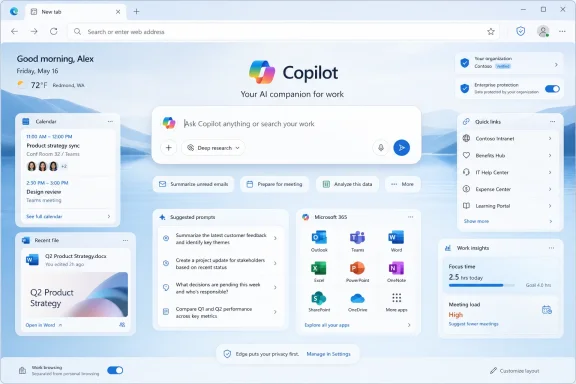
The new experience combines a single input surface for chat and search with cards that can surface relevant files, calendar events, suggested prompts, Microsoft 365 app access, pinned links, and a refreshed feed experience. In managed business environments, the feature is governed by an Edge policy called
That detail is important because it separates this from the usual consumer-browser experiment. Microsoft has built the feature with enterprise deployment in mind from the beginning. The Copilot new tab page is not just a shiny interface for enthusiasts; it is an administrable workplace surface.
When the new tab page shows work cards tied to calendar events and recent files, it nudges the browser away from being a generic portal to the web and toward being a contextual launcher for Microsoft’s cloud. Edge becomes the place where the day’s work is staged before the user opens Outlook, Teams, Word, SharePoint, OneDrive, or the intranet.
That is good product strategy because browsers have become the operating system for office work. The real desktop for many employees is not Windows Explorer; it is a thicket of SaaS tabs, document portals, admin consoles, dashboards, chat threads, and web apps. Microsoft is trying to make Edge the coordinating layer above that mess.
The company’s pitch is straightforward: instead of opening ten tabs to reconstruct your morning, open one and let Copilot suggest where to resume. The browser becomes less of a doorway and more of a briefing room.
A sidebar asks the user to remember that help exists. A new tab page interrupts nothing because it already sits in the user’s workflow. This is why the move is both more subtle and more aggressive than it first appears.
The assistant is not taking over the browser chrome. It is taking over the default state between tasks. That is where many knowledge workers lose time: switching contexts, hunting for the file they were just editing, re-running the same search, reconstructing the thread of a meeting, or deciding which tab matters.
If Copilot can make that liminal moment useful, Edge gains a practical advantage. If it cannot, the new tab page becomes another busy surface in a product already criticized by some users for clutter.
The Copilot new tab page could either clean up that history or intensify it. A focused AI input box with relevant work cards is a sensible evolution. A page overloaded with prompts, feed modules, tiles, branding, and nudges would repeat the mistake of turning the browser’s calmest space into a billboard.
Microsoft appears aware of this risk. The configuration documentation says users may see work cards, app launchers, pinned quick links, theme controls, and an updated search box. It also says that if work cards are turned off, users may instead see suggested chat prompts.
That sounds flexible, but flexibility is not the same as restraint. The success of this experience will depend less on whether Microsoft can technically place Copilot on the new tab page and more on whether it can resist filling every pixel with “helpful” suggestions.
That is exactly what IT departments need if Microsoft is going to make AI part of the browser’s default work surface. A school district, hospital, bank, or government agency cannot have a major productivity interface change appear without controls, testing, communications, and rollback options.
The catch is that the policy applies to Microsoft Entra ID profiles in Edge for Business, and Microsoft says it does not apply to the Copilot new tab page on Microsoft account profiles. That distinction makes sense architecturally, but it also reflects a broader complexity in modern Edge: the experience can vary sharply depending on profile type, license, tenant settings, region, device platform, and user choice.
Administrators will also need to review which new tab policies remain supported. Microsoft says most customization policies are supported, but some existing new tab page policies are unsupported or obsolete for the Copilot experience. In practical terms, that means IT teams should not assume their carefully tuned legacy new tab configuration will translate perfectly.
In organizations where some employees have Microsoft 365 Copilot and others do not, the same browser version may present different value. One employee sees relevant work cards, better prompts, and richer context. Another sees a thinner experience that looks similar but delivers less.
That creates the kind of uneven adoption pattern IT departments know well. Support desks will field questions that are not really browser issues, but licensing issues wearing a browser costume. Training materials will need caveats. Pilot groups may not reflect the experience of the broader workforce.
Microsoft’s business model makes this inevitable. Copilot is not just a feature; it is a monetization layer across Microsoft 365. The new tab page is therefore not only a productivity surface but a daily reminder of what the licensed version of Microsoft’s AI stack can do.
That concern grows as Microsoft adds capabilities that let Copilot work with tabs, summarize pages, generate study material, create podcasts from browsing sessions, and in some cases perform actions in the browser. These are useful features, but they bring the assistant closer to sensitive contexts: internal dashboards, HR systems, admin portals, banking pages, health records, customer data, legal documents, and private communications.
Microsoft’s documentation for Browse with Copilot is refreshingly cautious. It says the feature can select, type, scroll, and navigate in a tab, while allowing the user to monitor actions and take over. It also warns about prompt injection, unintended actions, financial risk, privacy risk, and the need to supervise the assistant.
That warning matters because the Copilot new tab page is only the front door. The bigger trajectory is agentic browsing, where the assistant does not merely answer but acts. Once the browser becomes an AI workspace, the difference between “help me find this” and “do this for me” becomes a governance problem.
Google has Gemini. Perplexity has been pushing AI-native browsing ideas. The Browser Company’s Dia has framed the browser itself as an AI environment. Arc experimented with rethinking tabs and workspaces before the market shifted toward assistants. Even smaller browser projects are increasingly judged by whether they reduce cognitive load rather than simply load pages quickly.
Microsoft has an advantage those challengers do not: Edge ships into Windows, integrates with Microsoft 365, and can be governed by enterprise policy. It also has a disadvantage: users are unusually sensitive to Microsoft using default surfaces to promote its own services.
That is why the Copilot new tab page is a risky bet. If it is genuinely useful, Microsoft can normalize AI-assisted browsing for millions of users almost overnight. If it feels coercive, it will reinforce the perception that Edge is less a browser than a distribution channel for Microsoft’s current strategic obsession.
“Find the Q2 deck,” “summarize this topic,” “open the project tracker,” “compare these vendors,” and “write a follow-up email” are not cleanly separated tasks. They may involve web search, internal files, browser history, calendar context, documents, and generated text. Microsoft’s goal is to make the new tab input box the place where those mixed intentions begin.
That threatens the traditional search box because it reframes search as only one possible output of a broader command. Users may still get links, but the first interaction is conversational and task-oriented. The browser becomes less about locating pages and more about orchestrating outcomes.
For Microsoft, this is also a way to make Bing more relevant without asking users to think about Bing. If Copilot mediates the query, the underlying search engine becomes infrastructure rather than a brand decision.
A new tab page that surfaces recent work, calendar context, and relevant prompts could reduce that tax. Edge’s related Journeys feature points in the same direction by grouping browsing history into topic cards so users can return to prior projects. Study and Learn mode, writing assistance, tab-based summaries, and podcast generation all fit the same thesis: browsing is not just consumption, but a work process.
The challenge is that context only helps when it is accurate. A bad suggestion is not neutral; it adds noise. A work card that surfaces the wrong file, a prompt that guesses the wrong intent, or a feed that distracts from the task at hand can make the experience feel like another layer of automation to manage.
This is where AI products often stumble. They demonstrate impressive capability in controlled examples, then become irritating in daily use because they appear at the wrong time, infer too much, or require too much correction. The new tab page gives Copilot a privileged position, but that also means its mistakes will be unusually visible.
A browser is intimate software. It sees habits, interests, mistakes, work rhythms, private searches, and half-formed thoughts. When the browser changes its starting page, users notice immediately because it alters a ritual repeated dozens of times a day.
If Microsoft lets people easily choose the traditional new tab page, the Copilot version can compete on usefulness. If the setting feels buried, overridden, or repeatedly reintroduced, users will treat the feature as another example of Microsoft deciding that adoption metrics matter more than consent.
Enterprise environments complicate this, because user choice may appropriately give way to organizational policy. A company may want a standardized AI-enabled work surface. But even there, the rollout has to be communicated as a business decision, not a surprise UI mutation.
An organization that enables the feature will need to decide who gets Microsoft 365 Copilot licenses, whether work cards are appropriate, how Discover feed settings fit internal policies, what support teams should tell users, and how to handle employees who do not want AI prompts on every new tab. Those are not purely technical choices.
Security teams will also want to evaluate how Copilot features behave around sensitive sites and internal applications. Microsoft’s safeguards around agentic browsing, restricted profile information, blocklists, and site-level controls are useful, but they do not remove the need for local risk assessment.
The most conservative organizations may disable the Copilot new tab page until they have a clearer policy framework. More aggressive ones may see it as a low-friction way to encourage Copilot adoption after paying for licenses. Most will end up somewhere in the middle: pilot first, document the differences, and brace for user feedback.
 Microsoft Turns the Blank Tab Into a Work Command Center
For decades, the new tab page was treated as neutral space. It was a search box, a few tiles, maybe a news feed if the browser vendor was feeling ambitious. Microsoft’s Copilot new tab page is different because it changes the assumed first action: not “type a URL,” but “ask, search, resume, summarize, or act.”That may sound like ordinary AI branding, but the placement matters. Microsoft is not hiding Copilot behind an icon, a sidebar, or a separate app. It is putting the assistant in the path of daily muscle memory: Ctrl+T, new tab, start working.
The new experience combines a single input surface for chat and search with cards that can surface relevant files, calendar events, suggested prompts, Microsoft 365 app access, pinned links, and a refreshed feed experience. In managed business environments, the feature is governed by an Edge policy called
CopilotNewTabPageEnabled, supported beginning with Edge version 148 across Windows, macOS, Android, and iOS.That detail is important because it separates this from the usual consumer-browser experiment. Microsoft has built the feature with enterprise deployment in mind from the beginning. The Copilot new tab page is not just a shiny interface for enthusiasts; it is an administrable workplace surface.
The Browser Is Becoming the Front Door to Microsoft 365
The most interesting part of the announcement is not that Copilot can answer questions from a new tab. Anyone who wanted a chatbot in a browser already had options. The strategic move is that Edge can now make Microsoft 365 content feel native to browsing.When the new tab page shows work cards tied to calendar events and recent files, it nudges the browser away from being a generic portal to the web and toward being a contextual launcher for Microsoft’s cloud. Edge becomes the place where the day’s work is staged before the user opens Outlook, Teams, Word, SharePoint, OneDrive, or the intranet.
That is good product strategy because browsers have become the operating system for office work. The real desktop for many employees is not Windows Explorer; it is a thicket of SaaS tabs, document portals, admin consoles, dashboards, chat threads, and web apps. Microsoft is trying to make Edge the coordinating layer above that mess.
The company’s pitch is straightforward: instead of opening ten tabs to reconstruct your morning, open one and let Copilot suggest where to resume. The browser becomes less of a doorway and more of a briefing room.
The AI Assistant Is Moving From Sidebar to Surface
Microsoft has spent years trying to find the right physical and psychological location for Copilot. It has been a Bing chat box, a Windows taskbar presence, a sidebar, a Microsoft 365 feature, a Teams companion, and a standalone app. The Edge new tab page suggests Microsoft has learned that AI assistants work best when they are not treated as destinations.A sidebar asks the user to remember that help exists. A new tab page interrupts nothing because it already sits in the user’s workflow. This is why the move is both more subtle and more aggressive than it first appears.
The assistant is not taking over the browser chrome. It is taking over the default state between tasks. That is where many knowledge workers lose time: switching contexts, hunting for the file they were just editing, re-running the same search, reconstructing the thread of a meeting, or deciding which tab matters.
If Copilot can make that liminal moment useful, Edge gains a practical advantage. If it cannot, the new tab page becomes another busy surface in a product already criticized by some users for clutter.
Microsoft’s Productivity Pitch Has a Clutter Problem
Edge has long lived with a tension between genuinely useful features and a persistent urge to add too much. Vertical tabs, sleeping tabs, Collections, password tools, PDF handling, enterprise controls, and security features have made Edge a strong Chromium browser. But the new tab page has often carried the baggage of Microsoft’s content ambitions: news feeds, widgets, shopping prompts, Bing integration, and promotional surfaces.The Copilot new tab page could either clean up that history or intensify it. A focused AI input box with relevant work cards is a sensible evolution. A page overloaded with prompts, feed modules, tiles, branding, and nudges would repeat the mistake of turning the browser’s calmest space into a billboard.
Microsoft appears aware of this risk. The configuration documentation says users may see work cards, app launchers, pinned quick links, theme controls, and an updated search box. It also says that if work cards are turned off, users may instead see suggested chat prompts.
That sounds flexible, but flexibility is not the same as restraint. The success of this experience will depend less on whether Microsoft can technically place Copilot on the new tab page and more on whether it can resist filling every pixel with “helpful” suggestions.
Enterprise IT Gets Policy, But Not Total Simplicity
For administrators, the good news is that Microsoft is treating the Copilot new tab page as a managed Edge for Business feature rather than a purely consumer toggle. TheCopilotNewTabPageEnabled policy can be mandatory or recommended, supports dynamic policy refresh, applies per profile, and can be configured through the Edge management service or traditional policy plumbing.That is exactly what IT departments need if Microsoft is going to make AI part of the browser’s default work surface. A school district, hospital, bank, or government agency cannot have a major productivity interface change appear without controls, testing, communications, and rollback options.
The catch is that the policy applies to Microsoft Entra ID profiles in Edge for Business, and Microsoft says it does not apply to the Copilot new tab page on Microsoft account profiles. That distinction makes sense architecturally, but it also reflects a broader complexity in modern Edge: the experience can vary sharply depending on profile type, license, tenant settings, region, device platform, and user choice.
Administrators will also need to review which new tab policies remain supported. Microsoft says most customization policies are supported, but some existing new tab page policies are unsupported or obsolete for the Copilot experience. In practical terms, that means IT teams should not assume their carefully tuned legacy new tab configuration will translate perfectly.
Licensing Will Shape the Experience More Than the Interface
The Copilot new tab page sounds simple until licensing enters the room. Microsoft says users without a Microsoft 365 Copilot license may see limitations in Copilot prompt card content. That is a small sentence with large implications.In organizations where some employees have Microsoft 365 Copilot and others do not, the same browser version may present different value. One employee sees relevant work cards, better prompts, and richer context. Another sees a thinner experience that looks similar but delivers less.
That creates the kind of uneven adoption pattern IT departments know well. Support desks will field questions that are not really browser issues, but licensing issues wearing a browser costume. Training materials will need caveats. Pilot groups may not reflect the experience of the broader workforce.
Microsoft’s business model makes this inevitable. Copilot is not just a feature; it is a monetization layer across Microsoft 365. The new tab page is therefore not only a productivity surface but a daily reminder of what the licensed version of Microsoft’s AI stack can do.
Privacy Is the Feature Users Will Test First
Microsoft’s public line is that Copilot in Edge respects user choice and privacy settings, and that data is not shared without permission. For many users, that will not settle the matter. The moment an AI assistant appears inside the browser’s starting page, the natural question becomes: what can it see?That concern grows as Microsoft adds capabilities that let Copilot work with tabs, summarize pages, generate study material, create podcasts from browsing sessions, and in some cases perform actions in the browser. These are useful features, but they bring the assistant closer to sensitive contexts: internal dashboards, HR systems, admin portals, banking pages, health records, customer data, legal documents, and private communications.
Microsoft’s documentation for Browse with Copilot is refreshingly cautious. It says the feature can select, type, scroll, and navigate in a tab, while allowing the user to monitor actions and take over. It also warns about prompt injection, unintended actions, financial risk, privacy risk, and the need to supervise the assistant.
That warning matters because the Copilot new tab page is only the front door. The bigger trajectory is agentic browsing, where the assistant does not merely answer but acts. Once the browser becomes an AI workspace, the difference between “help me find this” and “do this for me” becomes a governance problem.
Edge Is Chasing the Browser War’s Next Battlefield
The old browser war was about standards, rendering speed, extensions, memory use, and default search deals. The new one is about who owns the interface between intent and information. Microsoft wants that interface to be Copilot.Google has Gemini. Perplexity has been pushing AI-native browsing ideas. The Browser Company’s Dia has framed the browser itself as an AI environment. Arc experimented with rethinking tabs and workspaces before the market shifted toward assistants. Even smaller browser projects are increasingly judged by whether they reduce cognitive load rather than simply load pages quickly.
Microsoft has an advantage those challengers do not: Edge ships into Windows, integrates with Microsoft 365, and can be governed by enterprise policy. It also has a disadvantage: users are unusually sensitive to Microsoft using default surfaces to promote its own services.
That is why the Copilot new tab page is a risky bet. If it is genuinely useful, Microsoft can normalize AI-assisted browsing for millions of users almost overnight. If it feels coercive, it will reinforce the perception that Edge is less a browser than a distribution channel for Microsoft’s current strategic obsession.
The Address Bar Is No Longer the Only Place Search Happens
The Edge new tab change also reflects a deeper shift in search behavior. The classic browser model assumes the user knows whether they want a website, a search query, or an application. AI collapses those categories into one prompt.“Find the Q2 deck,” “summarize this topic,” “open the project tracker,” “compare these vendors,” and “write a follow-up email” are not cleanly separated tasks. They may involve web search, internal files, browser history, calendar context, documents, and generated text. Microsoft’s goal is to make the new tab input box the place where those mixed intentions begin.
That threatens the traditional search box because it reframes search as only one possible output of a broader command. Users may still get links, but the first interaction is conversational and task-oriented. The browser becomes less about locating pages and more about orchestrating outcomes.
For Microsoft, this is also a way to make Bing more relevant without asking users to think about Bing. If Copilot mediates the query, the underlying search engine becomes infrastructure rather than a brand decision.
The Practical Benefit Is Less Tab-Hopping, If Microsoft Earns It
The strongest argument for the Copilot new tab page is mundane: people waste too much time reorienting themselves. Modern work is a series of partial interruptions. You start researching a topic, jump into a meeting, answer a Teams message, open a spreadsheet, lose the useful tab, then try to remember what you were doing.A new tab page that surfaces recent work, calendar context, and relevant prompts could reduce that tax. Edge’s related Journeys feature points in the same direction by grouping browsing history into topic cards so users can return to prior projects. Study and Learn mode, writing assistance, tab-based summaries, and podcast generation all fit the same thesis: browsing is not just consumption, but a work process.
The challenge is that context only helps when it is accurate. A bad suggestion is not neutral; it adds noise. A work card that surfaces the wrong file, a prompt that guesses the wrong intent, or a feed that distracts from the task at hand can make the experience feel like another layer of automation to manage.
This is where AI products often stumble. They demonstrate impressive capability in controlled examples, then become irritating in daily use because they appear at the wrong time, infer too much, or require too much correction. The new tab page gives Copilot a privileged position, but that also means its mistakes will be unusually visible.
The Toggle Will Become a Trust Signal
Microsoft says users may be able to turn off the Copilot new tab experience depending on organizational settings, and administrators can disable or leave the policy unconfigured. That sounds like a small implementation note, but it is central to whether users accept the change.A browser is intimate software. It sees habits, interests, mistakes, work rhythms, private searches, and half-formed thoughts. When the browser changes its starting page, users notice immediately because it alters a ritual repeated dozens of times a day.
If Microsoft lets people easily choose the traditional new tab page, the Copilot version can compete on usefulness. If the setting feels buried, overridden, or repeatedly reintroduced, users will treat the feature as another example of Microsoft deciding that adoption metrics matter more than consent.
Enterprise environments complicate this, because user choice may appropriately give way to organizational policy. A company may want a standardized AI-enabled work surface. But even there, the rollout has to be communicated as a business decision, not a surprise UI mutation.
The Browser Admin’s Job Just Got More Political
For sysadmins, the Copilot new tab page is not merely another Edge policy to test. It is a collision point for AI governance, licensing strategy, data protection, user training, browser standardization, and workplace culture.An organization that enables the feature will need to decide who gets Microsoft 365 Copilot licenses, whether work cards are appropriate, how Discover feed settings fit internal policies, what support teams should tell users, and how to handle employees who do not want AI prompts on every new tab. Those are not purely technical choices.
Security teams will also want to evaluate how Copilot features behave around sensitive sites and internal applications. Microsoft’s safeguards around agentic browsing, restricted profile information, blocklists, and site-level controls are useful, but they do not remove the need for local risk assessment.
The most conservative organizations may disable the Copilot new tab page until they have a clearer policy framework. More aggressive ones may see it as a low-friction way to encourage Copilot adoption after paying for licenses. Most will end up somewhere in the middle: pilot first, document the differences, and brace for user feedback.
The New Tab Page Now Carries Microsoft’s AI Ambition
The concrete facts are easy to summarize, but their meaning is larger than the feature list. Microsoft is turning Edge’s first visible page into an AI workbench, and that decision tells us where the company thinks everyday computing is going.- The Copilot new tab page combines chat, search, work content, quick links, Microsoft 365 entry points, and suggested prompts into one starting surface.
- The managed business version is controlled by
CopilotNewTabPageEnabledand is supported in Edge version 148 and later across major desktop and mobile platforms. - Users without Microsoft 365 Copilot licensing may see a less relevant or more limited prompt-card experience.
- Existing Edge new tab policies do not all map cleanly to the Copilot version, so administrators should validate configurations before broad rollout.
- The feature’s success will depend on whether Microsoft keeps the page focused enough to feel like a productivity upgrade rather than another promotional surface.
- The privacy and governance debate will intensify as Copilot moves from answering questions to reading context and acting inside browser tabs.
References
- Primary source: thewincentral.com
Published: 2026-06-04T07:17:26.905578
Microsoft Edge Brings Copilot to the New Tab Page - WinCentral
Copilot now powers the Edge new tab page, helping users stay productive and informed from one place. - Read in AI News on WinCentral thewincentral.com
- Official source: learn.microsoft.com
Configure the Copilot new tab page | Microsoft Learn
Provides configuration guidance for the Copilot new tab page in Microsoft Edge.learn.microsoft.com - Official source: blogs.windows.com
New updates to Edge across desktop and mobile
Edge just made it easier to go from first tab to final plan, wherever you go. Your favorite Copilot experiences, plus new ones, are now available directly in Edge on desktop and, for the first time, in the Edge mobile app. This includes capabilitiesblogs.windows.com - Related coverage: techradar.com
Microsoft's Copilot can now peek into your open tabs in Edge — if you let it — as part of new AI features for the browser | TechRadar
It's a big change for Edge, but AI isn't going awaywww.techradar.com - Official source: microsoft.com

Copilot in Edge | Microsoft Edge
Compare, decide, and finish tasks without leaving your browser. Copilot in Microsoft Edge works across tabs to help you stay in your flow and move forward.
www.microsoft.com
- Related coverage: blog-en.topedia.com
New Copilot-inspired New Tab Page in Edge for Business | Topedia Blog
Microsoft Edge 148 introduces a Copilot-inspired New Tab Page for Edge for Business, combining search, chat, and work content in a single experience. If not configured, it's currently off by default, but users can enable it in the Edge settings.blog-en.topedia.com
- Official source: support.microsoft.com
- Related coverage: windowsreport.com
- Related coverage: pcworld.com
AI in a browser tab: How to use Copilot Mode in Edge | PCWorld
Edge offers a new Copilot mode that brings AI directly into new tabs. This allows you to compare content from multiple open web pages and summarize it clearly.www.pcworld.com - Related coverage: windowscentral.com
Microsoft Edge's New Tab Page might be getting a Copilot upgrade | Windows Central
The New Tab Page within Microsoft Edge will soon include Copilot prompts for some users. Microsoft is rolling out the new experience to Edge in May 2025.www.windowscentral.com - Related coverage: tomshardware.com
Edge browser's new Copilot Mode lets you talk to AI about your tabs if you opt in — but it's only free for 'a limited time' | Tom's Hardware
Copilot Mode in Edge will be available on Windows and macOSwww.tomshardware.com - Related coverage: tomsguide.com
Microsoft’s Edge just got a major AI makeover — meet Copilot Mode | Tom's Guide
Microsoft’s Edge browser just launched Copilot Mode — a voice-enabled AI assistant that helps you plan, research, and multitask across tabs. Here’s how it workswww.tomsguide.com - Related coverage: pcgamer.com
Microsoft rolls out 'experimental' AI mode for the Edge browser you can ask to spy on all your internetting and lend a helping hand. Yikes! | PC Gamer
But it's optional, for now. Phew!www.pcgamer.com - Related coverage: tei.forrester.com
New Technology: The Projected Total Economic Impactâ„¢ Of Microsoft Edge For Business
PDF documenttei.forrester.com
- Related coverage: spscc.edu
- Official source: news.microsoft.com
- Related coverage: techriver.com
