Microsoft Is Turning Agent Hype Into an Operating-System Problem
For the last two years, the AI industry has talked about agents as if they were simply more capable chatbots: tools that can reason through a task, choose actions, and report back when the work is done. That framing was always too small. The moment an agent can touch a filesystem, invoke a shell, install dependencies, edit a repo, or call a business application, it stops being a conversation partner and becomes a software actor.
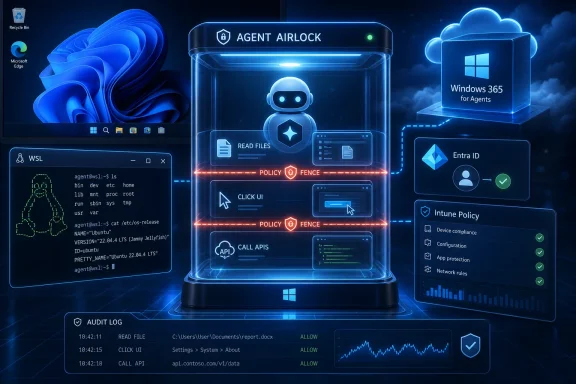
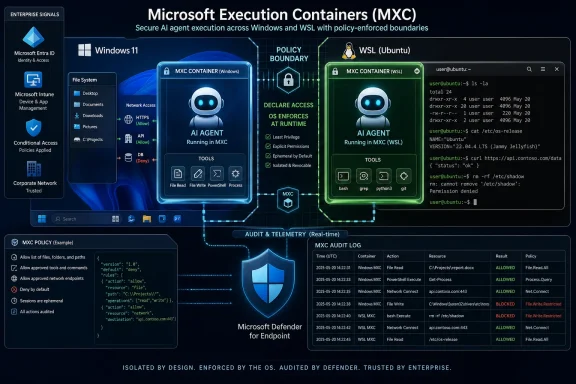
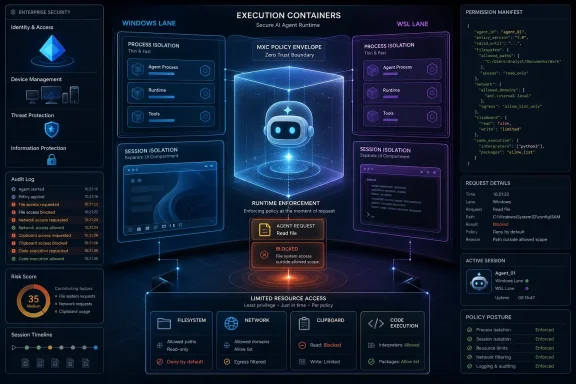
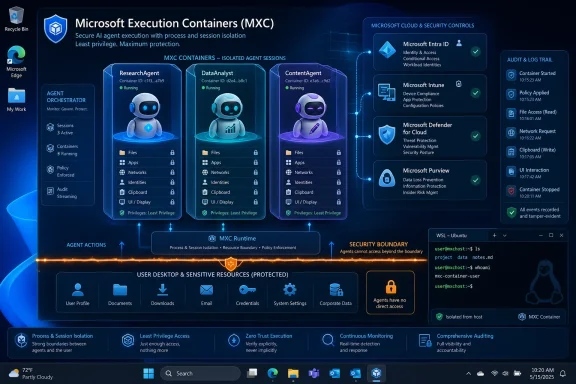
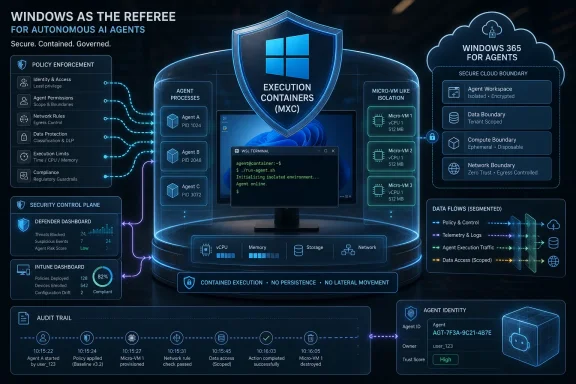
That is the real context for Microsoft’s latest Windows announcement. Microsoft Execution Containers, or MXC, is being positioned as a policy-driven execution layer for agents on Windows and Windows Subsystem for Linux. Developers define constraints; Windows enforces those constraints at runtime.
The important phrase is at runtime. Traditional endpoint controls are good at deciding whether an application is allowed to run, whether a binary is trusted, or whether a process trips a malware signature. Agents make that model wobble because the risky part may be generated in the moment: a model writes a script, chains several commands together, reads a sensitive file, calls a connector, and only then does the system discover whether “helpful” has become hazardous.
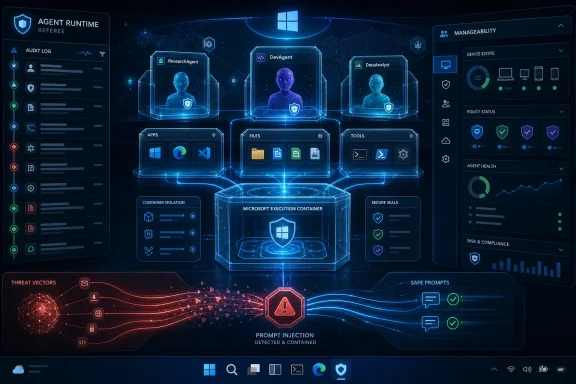
Microsoft’s answer is to move containment closer to the platform. MXC is not being sold as a single sandbox technology so much as a control surface across several isolation approaches: process boundaries, session isolation, Linux containers through WSL, micro-VM-style constructs for higher-risk workloads, and cloud-hosted Windows 365 environments for enterprise fleets. That is a more sober message than the old “AI will transform everything” pitch. It says transformation is meaningless unless the blast radius is bounded.
WSL Moves From Developer Convenience to Agent Substrate
The Windows-Linux angle matters because many of the most interesting agentic workflows are already Linux-first. Coding agents, ML toolchains, package ecosystems, shell automation, containerized services, and research frameworks often assume a Unix-like environment. Windows developers have lived with that tension for years, and WSL became the bridge.
Microsoft’s recent Windows strategy treats WSL less like a compatibility feature and more like a first-class part of the developer platform. The company open-sourced much of WSL in 2025, a symbolic and practical move designed to bring more community participation into the layer that lets Linux tooling run inside Windows. Now MXC extends the security story into that same territory.
That is a meaningful shift. If agents are going to run code, test software, install Python packages, use MCP servers, or operate against repos, many of them will naturally want the Linux side of the house. Without a coherent policy model, organizations would face a split-brain problem: Windows endpoint controls on one side, Linux-based agent behavior on the other, and a lot of dangerous ambiguity in between.
Microsoft is trying to collapse that distinction. The pitch is that a developer can use the same containment model across Windows and WSL, while IT can reason about access, audit, and policy without treating WSL as a shadow machine living inside the endpoint. For sysadmins who already worry about unmanaged developer environments, that is the most practical part of the announcement.
It also shows why Windows is unlikely to respond to Linux developer dominance by pretending Linux does not exist. The more realistic strategy is absorption: make Windows the workstation where Linux-native workflows run, but make Windows security and management the authority around them. That is classic Microsoft platform strategy, updated for the agent era.
The Agent Is Now a Security Principal, Whether Microsoft Says It That Simply or Not
One of the most important ideas in Microsoft’s broader Windows agent work is the separation between a user and the agent acting near that user. At Ignite 2025, Microsoft described Agent ID as a way to distinguish agent actions from human actions for auditing. That concept carries through the new MXC story even where the phrasing changes.
This distinction matters because “the user approved it” is not a durable security model for autonomous software. A user may approve an agent to “clean up my downloads,” “fix this project,” or “summarize these documents.” The agent may then choose a series of operations the user did not individually inspect, anticipate, or understand.
Enterprise security has spent decades trying to impose least privilege on humans and applications. Agents blur both categories. They may act on behalf of a person, but they are not the person. They may run inside an application, but they are not merely the application. They may use credentials, connectors, and tools in combinations that were never part of the original access-control design.
That is why Microsoft’s governance language matters. Agent 365, Defender, and Intune are being tied into discovery, inventory, policy enforcement, and runtime blocking. Microsoft says organizations will be able to see local and cloud agents, understand which devices they run on, map configured MCP servers, associate identities, and assess which cloud resources those identities can reach.
That turns agents into governable inventory. It also turns them into a new category of endpoint risk. The “shadow IT” era was about employees adopting unsanctioned SaaS apps. The “shadow AI” era is more volatile because the unsanctioned tool may not merely store data elsewhere; it may act, automate, rewrite, connect, and exfiltrate at machine speed.
Microsoft Is Selling Control Because It Knows Autonomy Scares IT
There is a tension in Microsoft’s message that should not be ignored. The company wants developers to move fast with agents, but it also knows enterprise buyers will not tolerate a fleet of autonomous tools roaming across endpoints and SaaS platforms without visibility. MXC is therefore both an engineering primitive and a sales objection handler.
Microsoft’s public examples are carefully chosen. A coding agent should be able to generate and execute code without inheriting unlimited access to a user’s full session. An enterprise data-processing agent may need access to a narrow set of files, services, or workflows without being allowed to wander. A cloud-hosted agent fleet may need disposable environments, centralized policy, and compliance evidence.
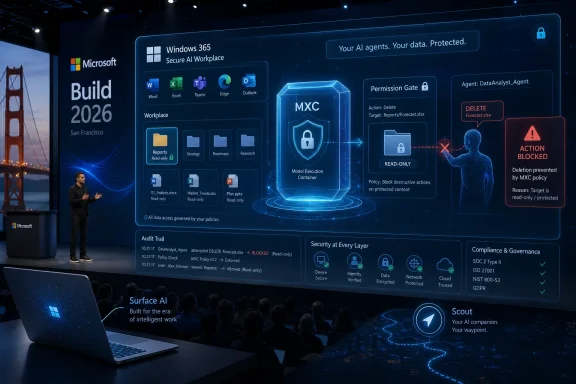
This is where Windows 365 for Agents becomes part of the same story. Microsoft is describing a spectrum that runs from local containment on a Windows PC to stronger cloud-hosted isolation in an Intune-managed Cloud PC. If an agent is compromised, the damage should be limited to a controlled environment rather than the user’s primary machine.
That framing is pragmatic. It does not pretend prompt injection is solved. It does not pretend every model output can be trusted. It assumes that agents will make mistakes, that hostile content will try to manipulate them, and that some workloads should be treated as untrusted code execution.
The question is whether Microsoft can make the controls usable enough that developers actually adopt them. Security frameworks that require too much friction often get bypassed, especially in developer tooling. The success of MXC will depend less on the elegance of its architecture than on whether agent builders can integrate it without turning every local workflow into an enterprise procurement exercise.
MCP Made the Connector Problem Too Big to Ignore
The Model Context Protocol has become one of the major connective tissues in the agent ecosystem. Its appeal is obvious: agents need a standard way to interact with tools, apps, files, and services. Without that, every agent integration becomes a bespoke adapter, and every platform tries to become its own walled garden.
Microsoft’s embrace of MCP on Windows is strategically important because it gives agents a standardized way to discover and use local capabilities. At Ignite 2025, Microsoft put native MCP support for Windows into public preview, along with an on-device registry and built-in connectors for File Explorer and System Settings. That set off the predictable alarm bells, because the same connector that lets an agent organize files can also become a path to unintended file access.
MXC is the missing counterweight to that expansion. Once agents can connect more easily, the platform needs a stronger way to decide what they can touch and under what conditions. Discovery without containment would be reckless; containment without discoverability would be sterile. Microsoft is trying to offer both.
The File Explorer and System Settings examples are instructive. They are ordinary, boring parts of Windows that become sensitive when an autonomous system can manipulate them. Changing a theme is trivial. Changing network settings, modifying security options, moving files, or acting across synced folders is not.
This is the uncomfortable truth behind “agentic Windows.” The PC’s value comes from the fact that everything is connected: local files, credentials, apps, browsers, shells, cloud sync, corporate policy, personal data, and developer tools. That same connectedness is what makes agent autonomy dangerous. Microsoft’s platform bet is that the OS is the only layer with enough context to mediate it.
The Partner List Shows Where Microsoft Thinks the Workloads Are Going
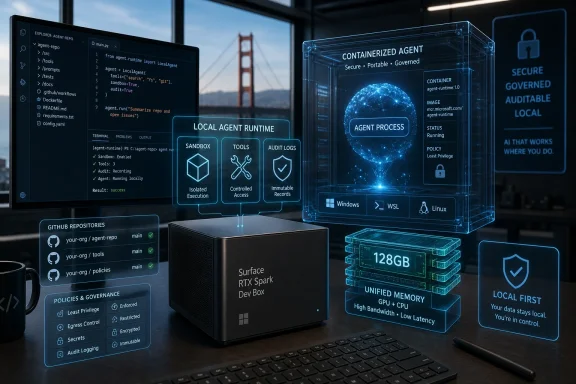
Microsoft’s partner names around MXC are not random decoration. OpenAI, NVIDIA, Manus, Hermes, and OpenClaw point toward the workloads Microsoft expects to matter: coding agents, always-on local assistants, autonomous developer environments, and agent frameworks that need safe execution rather than just chat UI.
The OpenAI angle is especially notable because coding agents are one of the earliest practical cases for agentic systems. They already read code, propose changes, run tests, inspect errors, and iterate. That is useful, but it is also exactly the pattern security teams worry about: dynamic code generation paired with local execution.
NVIDIA’s presence points to another part of the story: local AI workloads are not going away. Microsoft has been pushing Windows as a platform for on-device AI through Windows ML and Microsoft Foundry on Windows, with support across CPU, GPU, and NPU. If more inference and agent coordination happens locally, endpoint containment becomes more valuable.
Hermes and OpenClaw represent a different pressure: the rise of autonomous personal and organizational agents that users install because they are useful, not because IT approved them. Those tools can become the next wave of unmanaged software. Microsoft would rather make them visible and containable than watch them become the AI equivalent of unsanctioned remote-access tools.
The partner ecosystem also reveals Microsoft’s defensive posture. Windows is not the only place agents will run, and Microsoft knows it. By making Windows a safer host for agents that come from elsewhere, the company can remain central even when the agent itself is not a Microsoft product.
Defender and Intune Are Becoming Agent Traffic Controllers
For Windows administrators, the most consequential part of the announcement may not be MXC itself. It may be the way MXC fits into the existing management stack. Microsoft is not asking enterprises to govern agents through a completely separate console forever; it is wiring agent discovery and control into Defender, Intune, and Agent 365.
That is exactly what Microsoft customers expect, and it is also how Microsoft tends to win platform transitions. New category appears, Microsoft adds native visibility, Microsoft connects it to licensing and management, and suddenly the new category becomes part of the standard enterprise control plane.
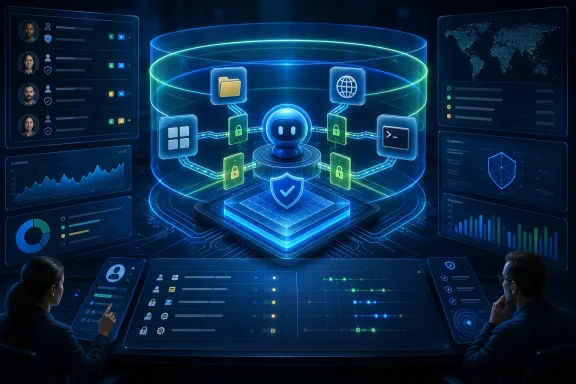
The operational promise is straightforward. Security teams should be able to see which agents are running, where they are running, what identities they use, what connectors they can reach, and what data or cloud resources may be exposed. Endpoint teams should be able to apply policies, block unmanaged agents, and enforce guardrails. Compliance teams should be able to produce evidence that agent activity is audited and constrained.
The harder question is how much of that will be available outside Microsoft’s higher-end licensing stack, and how well it will work in mixed environments. Agent sprawl will not respect vendor boundaries. Enterprises will use Microsoft agents, OpenAI tools, Anthropic-style MCP servers, Google and AWS platforms, SaaS agents, open-source projects, and internal automation. Microsoft is positioning Agent 365 as the control plane for that mess, but control planes are only as good as their coverage.
There is also a consumer version of this problem, even if Microsoft’s enterprise language dominates the announcement. Windows users do not want an “agentic OS” that silently turns their personal data into a playground for experimental automation. The same underlying concepts—explicit boundaries, visible permissions, isolation, and reversibility—will matter on home PCs, not just managed fleets.
The Security Claims Are Sensible, but the Trust Gap Remains
Microsoft deserves some credit for not presenting agents as magic. Its own security framing acknowledges the core problem: agent behavior is dynamic, often model-generated, and capable of chaining operations in ways that traditional app assumptions do not cover. That is the right starting point.
But Windows users have reason to be cautious. Microsoft’s recent AI push has often run ahead of user trust, especially when features appear to blur the line between helpful integration and unwanted intrusion. Recall, screenshots, Copilot entry points, taskbar AI, and background assistance have all produced varying degrees of skepticism. The technical controls may be real, but the trust deficit is also real.
MXC could help close that gap if Microsoft treats containment as a user-visible guarantee rather than a developer footnote. Users and admins need to know when an agent is running, what it can access, what it did, and how to stop it. A sandbox that exists only in architecture diagrams will not reassure anyone.
The other risk is complexity. Windows security already contains layers of permissions, policies, virtualization features, Defender controls, app isolation models, enterprise baselines, and identity systems. Adding agent containment across Windows, WSL, cloud PCs, MCP connectors, and Agent 365 could become powerful—or bewildering.
Microsoft’s challenge is to make the secure path the easy path. If MXC becomes the default way responsible developers ship Windows agents, it could meaningfully improve safety. If it becomes an optional enterprise add-on while the fastest-moving tools run outside it, then agent sprawl will continue under a new name.
Developers Get a Bigger Windows, but Also a More Opinionated One
For developers, Microsoft’s message is both liberating and constraining. Windows is becoming a more capable host for Linux tooling, local AI, MCP connectors, and agent execution. At the same time, Microsoft is making clear that autonomous software should not assume the full authority of the user session.
That trade-off is healthy. Developers building agents need primitives that let them say, with precision, what an agent should be allowed to do. A coding agent may need a repo, a package cache, a test runner, and network access to approved endpoints. It does not need a user’s photo library, password exports, browser cookies, or every mounted share.
The best version of MXC would make those boundaries normal. It would let developers ship agents with declared policies, let enterprises adjust those policies, and let users understand the difference between a confined assistant and a tool that can roam freely. That would move the ecosystem away from today’s awkward pattern, where many agents ask for broad local access because narrower, standardized access is hard.
There is a competitive angle too. Apple controls the consumer endpoint trust story tightly but has moved more slowly in developer-facing agent infrastructure. Linux dominates many AI development workflows but lacks a single desktop governance layer across enterprise endpoints. Microsoft’s opportunity is to combine Windows management, WSL flexibility, and cloud identity into something neither rival can easily copy.
That does not mean developers will automatically embrace it. Agent builders often optimize for speed, cross-platform reach, and low setup friction. Microsoft will need MXC to work cleanly with the tools developers already use rather than demanding that the ecosystem reorganize itself around Redmond’s preferred abstraction.
The Real Product Is the Boundary
The easiest way to misunderstand this announcement is to treat it as a sandbox SDK. The larger product is the boundary: between user and agent, agent and app, Windows and WSL, local machine and cloud PC, developer speed and enterprise control.
That boundary has to be flexible because not every agent carries the same risk. A local assistant that summarizes a folder is not the same as a coding agent executing generated shell commands. A disposable cloud-hosted browser agent is not the same as an agent operating inside a finance department’s document store. A hobbyist tool on a home PC is not the same as a fleet of agents acting with organizational credentials.
Microsoft’s composable approach reflects that reality. Process isolation may be enough for one workload. A separate session may be necessary for another. A Linux container may fit a WSL-heavy agent. A micro-VM may be the right answer for untrusted code. A Windows 365 for Agents environment may be preferable when enterprise management and disposability matter more than local convenience.
The danger is that “composable” can become a synonym for “complicated.” IT teams will need clear defaults, reference architectures, and policy templates. Developers will need understandable APIs. Users will need visible control. If Microsoft makes every organization invent its own agent security model from scratch, the platform will have failed the very customers it is courting.
Still, the direction is right. Agentic computing cannot be secured by vibes, disclaimers, or a checkbox that says the user consented once. It needs identity, audit, containment, policy, and a way to reduce damage when the model or toolchain behaves badly.
The Windows Agent Stack Finally Has a Shape
The practical meaning of Microsoft’s announcement is that the company’s scattered AI and developer bets are starting to resolve into a stack. WSL supplies Linux compatibility. Microsoft Foundry on Windows supplies local AI development and model deployment. MCP supplies a connector language. Agent 365 supplies governance. Defender and Intune supply security operations. MXC supplies execution containment.
That is a formidable package if Microsoft can make it coherent. It also explains why the Windows-Linux integration and AI agent tooling stories belong together rather than side by side. The future Microsoft is building assumes that agents will use Linux-fluent development tools on Windows machines, call standardized connectors, run local or cloud models, and need enterprise-grade guardrails.
The details Windows users and admins should keep in view are concrete:
- Microsoft Execution Containers is an early-preview SDK, not a finished universal shield for every Windows agent.
- The SDK is designed to apply policy-driven containment across Windows and WSL workloads.
- Microsoft is tying local agent visibility and control into Agent 365, Defender, and Intune rather than treating agents as ordinary unmanaged apps.
- WSL is becoming a strategic layer for AI and developer agents, not just a convenience feature for command-line users.
- Windows 365 for Agents gives Microsoft a cloud-hosted containment option when local isolation is not enough.
- The central risk is no longer whether an AI assistant can answer correctly, but whether an autonomous tool can act safely inside a user’s computing environment.
Microsoft’s announcement is best read as a line in the sand: if AI agents are going to become a normal part of Windows, they will need to become governable parts of Windows. That will not end the debate over whether users want an agentic PC, and it will not eliminate the security risks that come with tools capable of acting faster than humans can supervise. But it does move the conversation from novelty to infrastructure, which is where it always had to go. The next phase will be decided not by how many agents Microsoft can place on the taskbar, but by whether Windows can make autonomy feel bounded, auditable, and boring enough for real work.