Microsoft on June 2, 2026 announced an early preview of Microsoft Execution Containers, a cross-platform SDK meant to contain AI agents on Windows and WSL while tying local agent activity into Agent 365, Defender, Intune, and Windows 365 for Agents. The move is not just another developer-tooling release. It is Microsoft’s clearest admission yet that agentic AI on PCs creates a new security boundary problem, and that Windows cannot remain merely the place where agents happen to run. If autonomous tools are going to read files, execute code, call services, and modify workflows, Microsoft wants the operating system—not a browser tab or a chatbot sidebar—to become the referee.

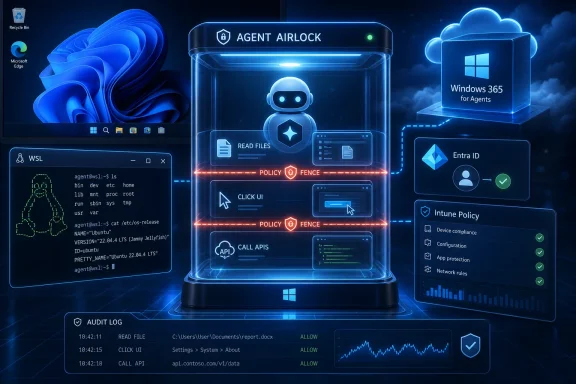
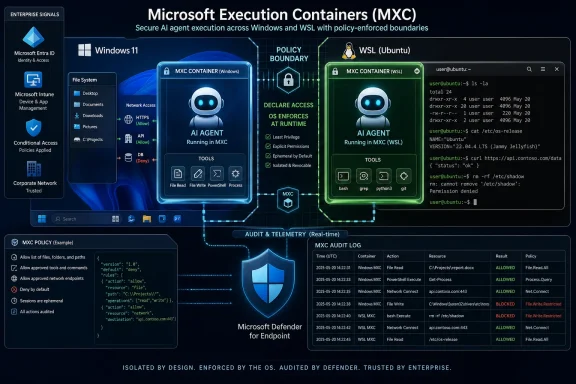
Diagram showing Windows-based secure, containerized execution and policy control for autonomous AI agents.Microsoft Is Turning Agent Hype Into an Operating-System Problem​

For the last two years, the AI industry has talked about agents as if they were simply more capable chatbots: tools that can reason through a task, choose actions, and report back when the work is done. That framing was always too small. The moment an agent can touch a filesystem, invoke a shell, install dependencies, edit a repo, or call a business application, it stops being a conversation partner and becomes a software actor.
That is the real context for Microsoft’s latest Windows announcement. Microsoft Execution Containers, or MXC, is being positioned as a policy-driven execution layer for agents on Windows and Windows Subsystem for Linux. Developers define constraints; Windows enforces those constraints at runtime.
The important phrase is at runtime. Traditional endpoint controls are good at deciding whether an application is allowed to run, whether a binary is trusted, or whether a process trips a malware signature. Agents make that model wobble because the risky part may be generated in the moment: a model writes a script, chains several commands together, reads a sensitive file, calls a connector, and only then does the system discover whether “helpful” has become hazardous.
Microsoft’s answer is to move containment closer to the platform. MXC is not being sold as a single sandbox technology so much as a control surface across several isolation approaches: process boundaries, session isolation, Linux containers through WSL, micro-VM-style constructs for higher-risk workloads, and cloud-hosted Windows 365 environments for enterprise fleets. That is a more sober message than the old “AI will transform everything” pitch. It says transformation is meaningless unless the blast radius is bounded.

WSL Moves From Developer Convenience to Agent Substrate​

The Windows-Linux angle matters because many of the most interesting agentic workflows are already Linux-first. Coding agents, ML toolchains, package ecosystems, shell automation, containerized services, and research frameworks often assume a Unix-like environment. Windows developers have lived with that tension for years, and WSL became the bridge.
Microsoft’s recent Windows strategy treats WSL less like a compatibility feature and more like a first-class part of the developer platform. The company open-sourced much of WSL in 2025, a symbolic and practical move designed to bring more community participation into the layer that lets Linux tooling run inside Windows. Now MXC extends the security story into that same territory.
That is a meaningful shift. If agents are going to run code, test software, install Python packages, use MCP servers, or operate against repos, many of them will naturally want the Linux side of the house. Without a coherent policy model, organizations would face a split-brain problem: Windows endpoint controls on one side, Linux-based agent behavior on the other, and a lot of dangerous ambiguity in between.
Microsoft is trying to collapse that distinction. The pitch is that a developer can use the same containment model across Windows and WSL, while IT can reason about access, audit, and policy without treating WSL as a shadow machine living inside the endpoint. For sysadmins who already worry about unmanaged developer environments, that is the most practical part of the announcement.
It also shows why Windows is unlikely to respond to Linux developer dominance by pretending Linux does not exist. The more realistic strategy is absorption: make Windows the workstation where Linux-native workflows run, but make Windows security and management the authority around them. That is classic Microsoft platform strategy, updated for the agent era.

The Agent Is Now a Security Principal, Whether Microsoft Says It That Simply or Not​

One of the most important ideas in Microsoft’s broader Windows agent work is the separation between a user and the agent acting near that user. At Ignite 2025, Microsoft described Agent ID as a way to distinguish agent actions from human actions for auditing. That concept carries through the new MXC story even where the phrasing changes.
This distinction matters because “the user approved it” is not a durable security model for autonomous software. A user may approve an agent to “clean up my downloads,” “fix this project,” or “summarize these documents.” The agent may then choose a series of operations the user did not individually inspect, anticipate, or understand.
Enterprise security has spent decades trying to impose least privilege on humans and applications. Agents blur both categories. They may act on behalf of a person, but they are not the person. They may run inside an application, but they are not merely the application. They may use credentials, connectors, and tools in combinations that were never part of the original access-control design.
That is why Microsoft’s governance language matters. Agent 365, Defender, and Intune are being tied into discovery, inventory, policy enforcement, and runtime blocking. Microsoft says organizations will be able to see local and cloud agents, understand which devices they run on, map configured MCP servers, associate identities, and assess which cloud resources those identities can reach.
That turns agents into governable inventory. It also turns them into a new category of endpoint risk. The “shadow IT” era was about employees adopting unsanctioned SaaS apps. The “shadow AI” era is more volatile because the unsanctioned tool may not merely store data elsewhere; it may act, automate, rewrite, connect, and exfiltrate at machine speed.

Microsoft Is Selling Control Because It Knows Autonomy Scares IT​

There is a tension in Microsoft’s message that should not be ignored. The company wants developers to move fast with agents, but it also knows enterprise buyers will not tolerate a fleet of autonomous tools roaming across endpoints and SaaS platforms without visibility. MXC is therefore both an engineering primitive and a sales objection handler.
Microsoft’s public examples are carefully chosen. A coding agent should be able to generate and execute code without inheriting unlimited access to a user’s full session. An enterprise data-processing agent may need access to a narrow set of files, services, or workflows without being allowed to wander. A cloud-hosted agent fleet may need disposable environments, centralized policy, and compliance evidence.
This is where Windows 365 for Agents becomes part of the same story. Microsoft is describing a spectrum that runs from local containment on a Windows PC to stronger cloud-hosted isolation in an Intune-managed Cloud PC. If an agent is compromised, the damage should be limited to a controlled environment rather than the user’s primary machine.
That framing is pragmatic. It does not pretend prompt injection is solved. It does not pretend every model output can be trusted. It assumes that agents will make mistakes, that hostile content will try to manipulate them, and that some workloads should be treated as untrusted code execution.
The question is whether Microsoft can make the controls usable enough that developers actually adopt them. Security frameworks that require too much friction often get bypassed, especially in developer tooling. The success of MXC will depend less on the elegance of its architecture than on whether agent builders can integrate it without turning every local workflow into an enterprise procurement exercise.

MCP Made the Connector Problem Too Big to Ignore​

The Model Context Protocol has become one of the major connective tissues in the agent ecosystem. Its appeal is obvious: agents need a standard way to interact with tools, apps, files, and services. Without that, every agent integration becomes a bespoke adapter, and every platform tries to become its own walled garden.
Microsoft’s embrace of MCP on Windows is strategically important because it gives agents a standardized way to discover and use local capabilities. At Ignite 2025, Microsoft put native MCP support for Windows into public preview, along with an on-device registry and built-in connectors for File Explorer and System Settings. That set off the predictable alarm bells, because the same connector that lets an agent organize files can also become a path to unintended file access.
MXC is the missing counterweight to that expansion. Once agents can connect more easily, the platform needs a stronger way to decide what they can touch and under what conditions. Discovery without containment would be reckless; containment without discoverability would be sterile. Microsoft is trying to offer both.
The File Explorer and System Settings examples are instructive. They are ordinary, boring parts of Windows that become sensitive when an autonomous system can manipulate them. Changing a theme is trivial. Changing network settings, modifying security options, moving files, or acting across synced folders is not.
This is the uncomfortable truth behind “agentic Windows.” The PC’s value comes from the fact that everything is connected: local files, credentials, apps, browsers, shells, cloud sync, corporate policy, personal data, and developer tools. That same connectedness is what makes agent autonomy dangerous. Microsoft’s platform bet is that the OS is the only layer with enough context to mediate it.

The Partner List Shows Where Microsoft Thinks the Workloads Are Going​

Microsoft’s partner names around MXC are not random decoration. OpenAI, NVIDIA, Manus, Hermes, and OpenClaw point toward the workloads Microsoft expects to matter: coding agents, always-on local assistants, autonomous developer environments, and agent frameworks that need safe execution rather than just chat UI.
The OpenAI angle is especially notable because coding agents are one of the earliest practical cases for agentic systems. They already read code, propose changes, run tests, inspect errors, and iterate. That is useful, but it is also exactly the pattern security teams worry about: dynamic code generation paired with local execution.
NVIDIA’s presence points to another part of the story: local AI workloads are not going away. Microsoft has been pushing Windows as a platform for on-device AI through Windows ML and Microsoft Foundry on Windows, with support across CPU, GPU, and NPU. If more inference and agent coordination happens locally, endpoint containment becomes more valuable.
Hermes and OpenClaw represent a different pressure: the rise of autonomous personal and organizational agents that users install because they are useful, not because IT approved them. Those tools can become the next wave of unmanaged software. Microsoft would rather make them visible and containable than watch them become the AI equivalent of unsanctioned remote-access tools.
The partner ecosystem also reveals Microsoft’s defensive posture. Windows is not the only place agents will run, and Microsoft knows it. By making Windows a safer host for agents that come from elsewhere, the company can remain central even when the agent itself is not a Microsoft product.

Defender and Intune Are Becoming Agent Traffic Controllers​

For Windows administrators, the most consequential part of the announcement may not be MXC itself. It may be the way MXC fits into the existing management stack. Microsoft is not asking enterprises to govern agents through a completely separate console forever; it is wiring agent discovery and control into Defender, Intune, and Agent 365.
That is exactly what Microsoft customers expect, and it is also how Microsoft tends to win platform transitions. New category appears, Microsoft adds native visibility, Microsoft connects it to licensing and management, and suddenly the new category becomes part of the standard enterprise control plane.
The operational promise is straightforward. Security teams should be able to see which agents are running, where they are running, what identities they use, what connectors they can reach, and what data or cloud resources may be exposed. Endpoint teams should be able to apply policies, block unmanaged agents, and enforce guardrails. Compliance teams should be able to produce evidence that agent activity is audited and constrained.
The harder question is how much of that will be available outside Microsoft’s higher-end licensing stack, and how well it will work in mixed environments. Agent sprawl will not respect vendor boundaries. Enterprises will use Microsoft agents, OpenAI tools, Anthropic-style MCP servers, Google and AWS platforms, SaaS agents, open-source projects, and internal automation. Microsoft is positioning Agent 365 as the control plane for that mess, but control planes are only as good as their coverage.
There is also a consumer version of this problem, even if Microsoft’s enterprise language dominates the announcement. Windows users do not want an “agentic OS” that silently turns their personal data into a playground for experimental automation. The same underlying concepts—explicit boundaries, visible permissions, isolation, and reversibility—will matter on home PCs, not just managed fleets.

The Security Claims Are Sensible, but the Trust Gap Remains​

Microsoft deserves some credit for not presenting agents as magic. Its own security framing acknowledges the core problem: agent behavior is dynamic, often model-generated, and capable of chaining operations in ways that traditional app assumptions do not cover. That is the right starting point.
But Windows users have reason to be cautious. Microsoft’s recent AI push has often run ahead of user trust, especially when features appear to blur the line between helpful integration and unwanted intrusion. Recall, screenshots, Copilot entry points, taskbar AI, and background assistance have all produced varying degrees of skepticism. The technical controls may be real, but the trust deficit is also real.
MXC could help close that gap if Microsoft treats containment as a user-visible guarantee rather than a developer footnote. Users and admins need to know when an agent is running, what it can access, what it did, and how to stop it. A sandbox that exists only in architecture diagrams will not reassure anyone.
The other risk is complexity. Windows security already contains layers of permissions, policies, virtualization features, Defender controls, app isolation models, enterprise baselines, and identity systems. Adding agent containment across Windows, WSL, cloud PCs, MCP connectors, and Agent 365 could become powerful—or bewildering.
Microsoft’s challenge is to make the secure path the easy path. If MXC becomes the default way responsible developers ship Windows agents, it could meaningfully improve safety. If it becomes an optional enterprise add-on while the fastest-moving tools run outside it, then agent sprawl will continue under a new name.

Developers Get a Bigger Windows, but Also a More Opinionated One​

For developers, Microsoft’s message is both liberating and constraining. Windows is becoming a more capable host for Linux tooling, local AI, MCP connectors, and agent execution. At the same time, Microsoft is making clear that autonomous software should not assume the full authority of the user session.
That trade-off is healthy. Developers building agents need primitives that let them say, with precision, what an agent should be allowed to do. A coding agent may need a repo, a package cache, a test runner, and network access to approved endpoints. It does not need a user’s photo library, password exports, browser cookies, or every mounted share.
The best version of MXC would make those boundaries normal. It would let developers ship agents with declared policies, let enterprises adjust those policies, and let users understand the difference between a confined assistant and a tool that can roam freely. That would move the ecosystem away from today’s awkward pattern, where many agents ask for broad local access because narrower, standardized access is hard.
There is a competitive angle too. Apple controls the consumer endpoint trust story tightly but has moved more slowly in developer-facing agent infrastructure. Linux dominates many AI development workflows but lacks a single desktop governance layer across enterprise endpoints. Microsoft’s opportunity is to combine Windows management, WSL flexibility, and cloud identity into something neither rival can easily copy.
That does not mean developers will automatically embrace it. Agent builders often optimize for speed, cross-platform reach, and low setup friction. Microsoft will need MXC to work cleanly with the tools developers already use rather than demanding that the ecosystem reorganize itself around Redmond’s preferred abstraction.

The Real Product Is the Boundary​

The easiest way to misunderstand this announcement is to treat it as a sandbox SDK. The larger product is the boundary: between user and agent, agent and app, Windows and WSL, local machine and cloud PC, developer speed and enterprise control.
That boundary has to be flexible because not every agent carries the same risk. A local assistant that summarizes a folder is not the same as a coding agent executing generated shell commands. A disposable cloud-hosted browser agent is not the same as an agent operating inside a finance department’s document store. A hobbyist tool on a home PC is not the same as a fleet of agents acting with organizational credentials.
Microsoft’s composable approach reflects that reality. Process isolation may be enough for one workload. A separate session may be necessary for another. A Linux container may fit a WSL-heavy agent. A micro-VM may be the right answer for untrusted code. A Windows 365 for Agents environment may be preferable when enterprise management and disposability matter more than local convenience.
The danger is that “composable” can become a synonym for “complicated.” IT teams will need clear defaults, reference architectures, and policy templates. Developers will need understandable APIs. Users will need visible control. If Microsoft makes every organization invent its own agent security model from scratch, the platform will have failed the very customers it is courting.
Still, the direction is right. Agentic computing cannot be secured by vibes, disclaimers, or a checkbox that says the user consented once. It needs identity, audit, containment, policy, and a way to reduce damage when the model or toolchain behaves badly.

The Windows Agent Stack Finally Has a Shape​

The practical meaning of Microsoft’s announcement is that the company’s scattered AI and developer bets are starting to resolve into a stack. WSL supplies Linux compatibility. Microsoft Foundry on Windows supplies local AI development and model deployment. MCP supplies a connector language. Agent 365 supplies governance. Defender and Intune supply security operations. MXC supplies execution containment.
That is a formidable package if Microsoft can make it coherent. It also explains why the Windows-Linux integration and AI agent tooling stories belong together rather than side by side. The future Microsoft is building assumes that agents will use Linux-fluent development tools on Windows machines, call standardized connectors, run local or cloud models, and need enterprise-grade guardrails.
The details Windows users and admins should keep in view are concrete:
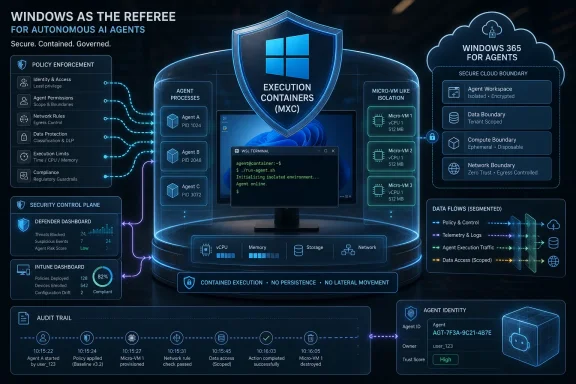
  • Microsoft Execution Containers is an early-preview SDK, not a finished universal shield for every Windows agent.
  • The SDK is designed to apply policy-driven containment across Windows and WSL workloads.
  • Microsoft is tying local agent visibility and control into Agent 365, Defender, and Intune rather than treating agents as ordinary unmanaged apps.
  • WSL is becoming a strategic layer for AI and developer agents, not just a convenience feature for command-line users.
  • Windows 365 for Agents gives Microsoft a cloud-hosted containment option when local isolation is not enough.
  • The central risk is no longer whether an AI assistant can answer correctly, but whether an autonomous tool can act safely inside a user’s computing environment.
Microsoft’s announcement is best read as a line in the sand: if AI agents are going to become a normal part of Windows, they will need to become governable parts of Windows. That will not end the debate over whether users want an agentic PC, and it will not eliminate the security risks that come with tools capable of acting faster than humans can supervise. But it does move the conversation from novelty to infrastructure, which is where it always had to go. The next phase will be decided not by how many agents Microsoft can place on the taskbar, but by whether Windows can make autonomy feel bounded, auditable, and boring enough for real work.

References​

  1. Primary source: harianbasis.co
    Published: 2026-06-02T20:57:07.540040
  2. Independent coverage: asatunews.co.id
    Published: 2026-06-02T20:35:07.541887
  3. Related coverage: techradar.com
  4. Official source: microsoft.com
  5. Related coverage: tomshardware.com
  6. Related coverage: techcrunch.com
  1. Related coverage: windowscentral.com
  2. Official source: blogs.windows.com
  3. Related coverage: venturebeat.com
  4. Related coverage: windowsreport.com
  5. Official source: news.microsoft.com
  6. Related coverage: axios.com
  7. Related coverage: geekwire.com
  8. Official source: azure.microsoft.com
  9. Related coverage: newsroom.workday.com
 

Microsoft announced on June 2, 2026, at Build 2026 that Windows will add Microsoft Execution Containers, a policy-driven SDK for containing AI agents across Windows, WSL, Agent 365, Intune, Entra, and Windows 365 for Agents. The pitch is simple enough: if agents are going to act like users, operating systems must stop treating them like ordinary apps. The bigger story is that Microsoft is trying to make Windows the enforcement layer for a new class of software that can read, click, write, execute, and improvise. That is both overdue and politically convenient, because the company is also asking enterprises to trust a wave of agentic automation before the industry has settled on what “safe” really means.

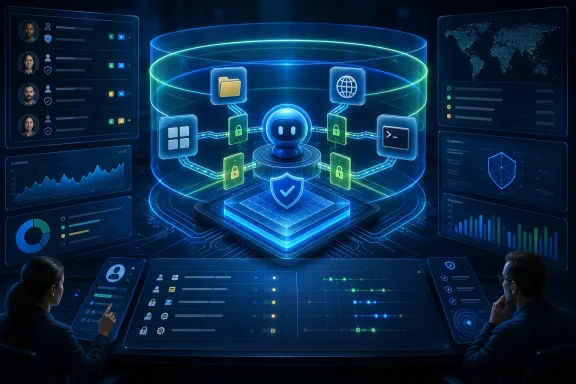
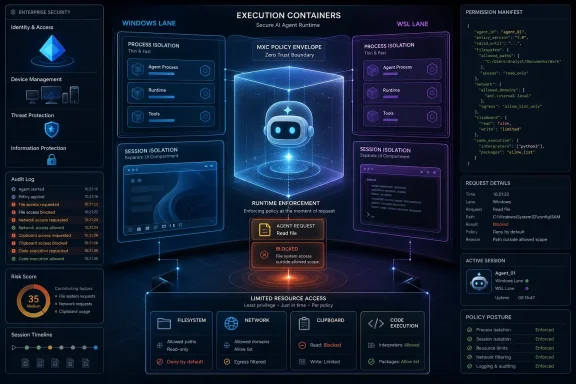
Blue “Agent AILock” AI assistant in a glass interface, securing Windows 365 for agents with audit logs and policies.Microsoft Wants Windows to Become the Agent Airlock​

The old Windows security model was built around users, applications, files, privileges, and networks. That world has not disappeared, but agentic AI complicates every boundary in it. A user launches a coding assistant, the assistant generates a shell command, the command reads a repository, a tool calls another service, and suddenly the question is not whether the user had permission, but whether the agent should have been allowed to exercise that permission in that way.
Microsoft’s answer is Microsoft Execution Containers, or MXC, an early-preview SDK meant to give developers a common way to describe what an agent can access and what Windows should enforce at runtime. The company is positioning MXC as a cross-platform execution layer for Windows and WSL, with policy controls that can later be applied through Agent 365, Microsoft Entra, and Intune. In plain English, Microsoft wants developers to declare the fence, and it wants Windows to become the fence post.
That matters because agents are not merely chatbots with better branding. Coding agents and desktop agents increasingly run commands, alter files, manipulate user interfaces, call APIs, and chain together actions at a speed that makes traditional “click OK to continue” security feel theatrical. The problem is not just malware; it is mis-scoped helpfulness. A well-intentioned agent that does too much can be nearly as destructive as a malicious one.
The novelty in Microsoft’s announcement is not the existence of sandboxing. Windows has spent decades accumulating process boundaries, user accounts, sessions, virtualization, Defender, AppContainer, WSL, Hyper-V, and enterprise policy plumbing. The novelty is the attempt to package that mess into a developer-facing and admin-governable model specifically for agents.

The User Account Is No Longer a Sufficient Security Boundary​

For decades, enterprise computing has relied on a rough bargain: authenticate the human, authorize the account, monitor the endpoint, and trust applications within controlled limits. That bargain becomes strained when an agent operates continuously on behalf of a person or organization. The agent may inherit context, credentials, files, and network reach, but it does not necessarily inherit judgment.
Microsoft’s blog makes the right diagnosis: containment must bound what agents can access and do because their behavior is dynamic and often generated at runtime. That phrase is doing a lot of work. Traditional applications are not perfectly predictable, but they generally ship with known code paths, known permissions, and known update channels. Agents can synthesize new steps in response to prompts, errors, tool outputs, and environmental state.
That makes least privilege harder to express. “This application may access Documents” is crude but understandable. “This agent may inspect project files, run tests, edit source code, call approved package registries, avoid secrets, never upload proprietary code, and ask before modifying production configuration” is closer to the real policy enterprises want. The operating system has historically not had a clean vocabulary for that level of intent.
Microsoft’s proposal is to split the difference. MXC does not magically understand business intent, but it can enforce concrete constraints around files, network domains, process boundaries, sessions, and identities. The bet is that if agent frameworks and tools express their needs through a common policy surface, Windows can enforce enough of the boring mechanics to make higher-level governance credible.
That is the right layer for Microsoft to target. Models will change, agents will change, and the framework-of-the-month will change. The operating system is one of the few places where the industry can still impose durable friction.

MXC Is Really a Translation Layer Between Developer Intent and Windows Primitives​

The most important phrase in Microsoft’s announcement is “composable sandbox.” That is not a consumer-friendly term, but it captures the strategic move. Microsoft is not saying every agent should run in the same kind of container. It is saying developers should use one policy model while Windows maps that policy to different isolation mechanisms depending on the workload.
A coding agent needs a fast inner loop. If every generated command had to run inside a heavy virtual machine with visible latency, developers would route around the system or disable it entirely. Microsoft’s initial process isolation target is aimed squarely at that problem: lightweight containment inside the user’s environment, restricting file and network access without wrecking responsiveness.
Session isolation is a different proposition. Some agents need to run long workflows, launch multiple processes, automate apps, or operate with their own desktop-like resources. Microsoft says Windows sessions can separate the agent’s execution from the human user’s interactive desktop, clipboard, input devices, UI, and active sessions. That is where the announcement begins to look less like an SDK feature and more like a new Windows operating model.
The distinction between process and session isolation is important because agent security will not be one-size-fits-all. A terminal coding assistant that edits a local repo has different risk than a finance workflow agent handling spreadsheets, browser sessions, and internal systems. A local personal assistant has different risk again. MXC’s value depends on whether Microsoft can make those choices easy enough for developers and enforceable enough for IT.
The company is also talking about future micro-VM support, Linux containers through WSL, and MXC integration for Windows 365 for Agents. That roadmap is an admission that sandbox strength is a spectrum. Process isolation is convenient, micro-VMs raise the barrier, Cloud PCs move the blast radius off the local device, and enterprise policy decides which tradeoff is tolerable.

Coding Agents Are the First Test Because Developers Break the Rules Fastest​

Microsoft says GitHub Copilot CLI has adopted MXC process isolation to constrain what dynamically generated and executed code can do. That is a telling first showcase. Developers are the ideal early audience for agentic tools because they understand terminals, permissions, package managers, scripts, and version control. They are also the worst-case audience because they will immediately push the system into edge cases.
A coding agent does not merely suggest text. It can run tests, install dependencies, modify files, open network connections, and generate scripts that execute more scripts. The risk is not science fiction. The ordinary software supply chain already struggles with malicious packages, dependency confusion, leaked secrets, and build-time compromise. Add an agent that can eagerly “fix” errors by trying commands it inferred from logs, and the attack surface widens.
That is why process isolation is the correct opening move. Developers will not accept a security regime that makes coding agents feel like remote desktops from 2009. But they may accept file and network policies that stop an agent from wandering outside a repository, exfiltrating environment variables, or hitting arbitrary domains. If MXC can provide those controls without making the tool feel sluggish, it could become a default expectation for agentic development on Windows.
The hard part will be incentives. Developers often disable guardrails when they block legitimate work, and coding agents are especially prone to running into missing permissions. Microsoft and GitHub will need to make the “safe path” productive enough that users do not treat MXC as another enterprise checkbox to bypass. Good containment is not just strong; it is tolerable.
There is also a competitive dimension. Microsoft’s own ecosystem now includes Copilot, Copilot CLI, GitHub tooling, Agent 365, Foundry, Windows 365, and Windows itself. By making Copilot CLI an early MXC adopter, Microsoft is not merely hardening an agent. It is demonstrating that the Windows platform can privilege tools that integrate with its governance stack.

Session Isolation Is Where Agent Security Becomes Enterprise Architecture​

The session isolation portion of Microsoft’s plan deserves more attention than the process-isolation headline because it addresses the ugliest problem in desktop automation: agents operating in the same lived-in environment as the human. If an agent can see the same screen, use the same clipboard, inject the same inputs, and access the same active sessions, then the boundary between “assistant” and “user” becomes dangerously thin.
Microsoft says session isolation separates an agent from the human user’s environment, including the interactive desktop, clipboard, UI, input devices, and active sessions. That targets several known failure modes at once: UI spoofing, input injection, accidental data leakage, and confusion over who did what. It also creates a cleaner audit trail, which is what enterprises actually need when something goes wrong.
The identity piece is crucial. Microsoft says Windows sessions can run with distinct user accounts, assigning either a local ID or a cloud-provisioned identity backed by Entra. That allows agent activity to be differentiated from human activity. Without that separation, logs become mush: the user account touched the file, the user account called the API, the user account changed the configuration. With separate agent identity, admins can begin asking whether the agent’s action was expected, authorized, and policy-compliant.
This is also where Intune becomes more than device management plumbing. Microsoft says Intune policies can require MXC isolation and apply guardrails such as filesystem rules. If that works as advertised, IT can move from discovering agent sprawl after the fact to setting baseline rules before agents run. That is the difference between agent governance as reporting and agent governance as control.
The catch is that Microsoft’s initial release will support non-interactive sessions, with additional capabilities planned later. That limitation matters. Many of the most compelling desktop agents are valuable precisely because they interact with applications, UI workflows, and user-like environments. Non-interactive sessions are safer and easier to reason about, but the industry is racing toward agents that can use software the way people do. Microsoft is building the runway while the planes are already taking off.

Windows 365 for Agents Is the Cleanest Blast-Radius Story​

Local containment is attractive because it keeps work close to the user’s files, tools, and hardware. Cloud containment is attractive because it makes compromise less intimate. Windows 365 for Agents, which Microsoft describes as generally available, extends the agent execution environment into an Intune-managed Cloud PC separate from the user’s machine. If an agent is compromised, the damage is theoretically bounded to a disposable or centrally managed cloud instance.
That is an easier story for enterprise risk teams to understand. A Cloud PC can be provisioned, governed, monitored, reset, and retired. It can sit behind conditional access, compliance policies, and data controls. It can be assigned to agent fleets without asking every employee’s laptop to become a semi-autonomous workbench.
The downside is cost, complexity, and latency. Local agents are appealing because they can use local context and feel immediate. Cloud PCs add another layer of infrastructure and another bill. For highly regulated workflows or high-risk automation, that may be worth it. For everyday developer tasks, it may be overkill.
Microsoft’s long-term ambition is to make those options feel like a continuum rather than separate products. MXC policies for lightweight local isolation, stronger boundaries through micro-VMs, Linux containers for WSL-based toolchains, and Cloud PCs for centrally managed agent fleets all point toward one governing idea: the agent should carry a policy envelope wherever it runs. That is a powerful architecture if Microsoft can execute it without making developers learn five different security systems.
This is also where the “Windows as an agent platform” narrative becomes more credible. Microsoft does not need every agent to be a Windows app in the old sense. It needs Windows, WSL, Entra, Intune, Defender, and Windows 365 to become the control fabric around agents. That is a subtler but more durable platform play.

The Partner List Shows Microsoft Is Trying to Avoid a Windows-Only Trap​

Microsoft’s partner list includes Hermes, Manus, NVIDIA, OpenAI, and OpenClaw. The specific names matter less than the pattern: Microsoft is trying to make MXC look like ecosystem infrastructure rather than a Copilot-only moat. That is necessary because agent development is already fragmented across CLI tools, browser controllers, local runtimes, model providers, MCP-style connectors, open-source projects, and enterprise platforms.
OpenClaw support is especially interesting because Microsoft says Agent 365 already began with local agent discovery for OpenClaw agents, with broader support expected for tools such as GitHub Copilot CLI and Claude Code. That implies Microsoft knows enterprise agent governance cannot stop at first-party agents. If employees and developers can install or build agents faster than IT can approve them, discovery and containment become survival features.
NVIDIA’s OpenShell on Windows, built on MXC, points to another front: always-on local agents. These are not simply command-line helpers invoked for a single task. They are background participants that need resource boundaries, identity, and policy over time. That kind of agent raises different security questions because persistence changes the risk profile. A transient tool can do damage; a persistent agent can accumulate context, observe behavior, and wait.
OpenAI’s presence in the announcement is also notable because it puts MXC in the path between frontier models and local execution. Microsoft’s quote from OpenAI frames MXC as an environment for moving from intent to reliable execution while maintaining enterprise control. Strip away the launch language, and the point is that model capability alone is not the product. The product is capability plus execution plus governance.
Still, partner announcements are not proof of a standard. Developers will adopt MXC if it solves real problems with little friction, not because Microsoft lined up quotes. The hard test will be whether independent agent builders see MXC as useful outside Microsoft’s sales motion and whether rival tools can integrate without feeling like second-class citizens.

Defender and Baseline Security Mode Are Necessary but Not Sufficient​

Microsoft ties the agent security story to its broader Windows security agenda: Secure Future Initiative work, passkeys, Hotpatch, Rust drivers, post-quantum cryptography in Insider builds, Secure Boot, Defender protections, and the recently announced Baseline Security Mode. That framing is understandable. The company wants enterprises to see agent containment as an extension of Windows hardening, not as a bolt-on experiment.
There is truth in that. Agents inherit the security posture of the system they run on. If the endpoint is compromised, the agent boundary is already suspect. If drivers are vulnerable, credentials are weak, updates are delayed, or malware has foothold, agent policy becomes just one layer in a damaged stack. Platform security is not marketing garnish here; it is prerequisite plumbing.
But the agent problem is not reducible to malware defense. Prompt injection, tool misuse, overbroad delegation, sensitive data leakage, and confused-deputy behavior do not always look like traditional endpoint compromise. An agent can be “working as designed” and still violate organizational intent. It can summarize the wrong document, send the wrong data, run the wrong script, or trust malicious instructions embedded in content it was asked to process.
Defender can help detect emerging threats, and Microsoft says it provides protection against prompt injection and other agent threats. Yet the most important controls will be preventive and architectural: separate identity, least privilege, constrained file access, network restrictions, auditable sessions, and policy enforcement that does not depend on the model making the right judgment every time. Security teams should welcome Defender’s role without confusing detection for containment.
Baseline Security Mode is relevant for the same reason. Raising the default Windows security floor reduces the number of weak configurations agents can exploit or amplify. But even a hardened Windows machine still needs a way to answer a narrower question: what is this specific agent allowed to do right now?

The Biggest Risk Is Governance Theater​

Every enterprise AI platform now speaks the language of governance. Observability, policy, control plane, compliance, lifecycle, auditability — the words arrive before the operational reality. Microsoft’s Agent 365 and MXC story is more concrete than most because it connects governance to operating-system enforcement, but it is not immune to theater.
The danger is that organizations will discover agents, assign labels, generate dashboards, and declare control while the practical permissions remain too broad. If an agent runs with a user’s effective access, can reach the same file shares, can invoke the same tools, and can act through the same browser sessions, the dashboard is mostly a mirror. Real governance requires saying no at runtime.
Microsoft appears to understand this. The announcement repeatedly emphasizes policy-based controls, containment, distinct identities, and runtime enforcement. Those are the right nouns. The unanswered questions are operational: how granular are the policies, how easy are they to test, how visible are denials, how portable are policies between agent tools, and how painful is exception handling?
There is also the question of defaults. Security platforms often ship powerful controls that enterprises fail to enable consistently. If MXC remains something only careful developers integrate and only mature IT departments enforce, agent sprawl will continue in the gaps. The best version of this story is one where agent frameworks adopt MXC or similar containment by default, and Windows makes unsafe execution feel increasingly abnormal.
Microsoft’s advantage is distribution. Windows remains the place where enormous amounts of business work actually happens. Intune and Entra are already embedded in enterprise management. GitHub has developer mindshare. Windows 365 gives Microsoft a cloud endpoint story. If any vendor can turn agent governance from a white paper into a managed fleet policy, Microsoft is on the short list.

The WSL Angle Matters More Than It Looks​

Including WSL in the MXC story is not a footnote. Much of the modern AI and developer tooling world is Linux-first, even when the user is sitting at a Windows machine. Python environments, package managers, model tooling, containers, CLI agents, and open-source frameworks often assume Linux semantics. If Microsoft had limited MXC to classic Windows execution, it would have missed a large share of the actual agent ecosystem.
Linux containers on the MXC roadmap suggest Microsoft wants Windows to enforce policy around Linux-first agent toolchains without forcing developers to abandon WSL. That is strategically smart. WSL has become one of Microsoft’s most important developer bridges, and agentic coding will likely deepen that dependence. A developer may use Windows as the desktop, WSL as the build environment, GitHub as the repository, Copilot CLI or Claude Code as the agent, and cloud services as the deployment target.
That hybrid workflow is exactly where security boundaries blur. Files cross between Windows and Linux views. Network calls originate from development tools. Secrets live in environment variables, config files, credential managers, and shell histories. An agent that can operate across that boundary needs more than a warning banner.
A coherent MXC policy model for Windows and WSL could help normalize cross-environment containment. It could let administrators express rules around what an agent may see and where it may connect without caring whether the command ran through PowerShell, a Windows process, or a Linux toolchain. That is the promise, anyway.
The risk is complexity. WSL already has its own mental model, and enterprise controls around it have historically varied by organization. Adding agent containment will require clear diagnostics and predictable behavior. If policies fail silently, break builds mysteriously, or differ too much between local and cloud environments, developers will blame the platform and move around it.

Microsoft Is Also Protecting Its Own AI Ambitions​

There is a commercial subtext running through the announcement. Microsoft is not merely responding to agent risk; it is building the trust layer for products it very much wants customers to deploy. Copilot, Agent 365, Windows 365 for Agents, Foundry, GitHub tooling, and Windows platform APIs all benefit if enterprises decide that Microsoft has the safest path to production agent adoption.
That does not make the security work cynical. Platform vendors often build real safety mechanisms because their business depends on customers accepting a new risk. The web browser sandbox was not an act of charity; it was a precondition for running untrusted web code at global scale. Mobile app permissions were not perfect, but they made app stores more viable. Agent containment may become the equivalent bargain for AI automation.
The concern is lock-in disguised as safety. If the best-governed agents are the ones that use Microsoft’s SDKs, identities, policies, Cloud PCs, and management plane, enterprises may find themselves nudged toward a vertically integrated Microsoft agent stack. That may be acceptable for many organizations, especially those already standardized on Microsoft 365 and Intune. But it will sharpen the need for open interfaces and third-party parity.
Microsoft’s partner framing is designed to blunt that critique. Support for OpenClaw, Claude Code discovery, OpenAI, Manus, NVIDIA, and other ecosystem players signals that Agent 365 and MXC are not intended solely for Copilot. But the proof will be in implementation details, licensing, documentation, and whether rival agents can use the same controls with the same fidelity.
For WindowsForum readers, the practical question is less ideological: will this make Windows a better place to run agents safely? If Microsoft can enforce meaningful local and cloud boundaries across mixed agent tools, the answer could be yes. If the platform works best only when every piece is Microsoft-branded, it will still be useful — just narrower than the company’s rhetoric suggests.

The Industry Is Finally Admitting Agents Need Operating-System Help​

The broader significance of MXC is that agent security is moving down the stack. For the first phase of generative AI, vendors tried to solve too many problems at the model and application layers: better prompts, safer completions, classifiers, refusals, logging, and human review. Those remain useful, but they cannot carry the burden alone once agents begin taking actions in real environments.
Operating systems exist to mediate access to resources. That job becomes more important, not less, when software becomes more autonomous. The agent should not be trusted simply because the model was aligned, the prompt was careful, or the vendor wrote a reassuring blog post. It should be constrained because constraints are what computers are good at enforcing.
This is where Microsoft’s announcement feels directionally correct. By focusing on containment, identity, and manageability, the company is treating agents as a systems problem rather than a chatbot feature. That is the right mental shift. The operating system cannot decide whether every agent action is wise, but it can make certain classes of damage harder, more visible, and more attributable.
The next challenge is standardization beyond Windows. macOS, Linux desktops, browsers, cloud IDEs, container platforms, and SaaS environments all face versions of the same problem. If every platform invents its own agent policy language, developers will drown in security adapters. Microsoft’s MXC could become influential, but only if its concepts map cleanly to other environments or inspire compatible models.
For now, Windows has an opening. It is still the dominant enterprise desktop, and it already sits under many workflows agents want to automate. If Microsoft makes agent containment practical there first, it can shape expectations for the rest of the industry.

The Real Test Will Be the First Contained Failure​

Security platforms prove themselves not when everything works, but when something goes wrong. The first time an MXC-contained agent tries to read a directory it should not read, call a domain it should not reach, inject input into the wrong session, or execute generated code beyond its policy, the user experience will matter. Does Windows block it clearly? Does the developer understand why? Does the admin see a useful event? Can the policy be adjusted without gutting the boundary?
Those details determine whether MXC becomes infrastructure or shelfware. Enterprise security teams do not need another console that says “agent risk detected” after the fact. They need enforcement with a paper trail. Developers do not need abstract safety claims. They need predictable constraints that do not ruin their workflows.
Microsoft’s staged approach is sensible. Start with process isolation shortly after Build, extend to session isolation, then broaden toward micro-VMs, WSL Linux containers, and Windows 365 integration. That gives the company room to learn from early adopters. It also means customers should treat the current announcement as the beginning of a platform transition, not a finished safety guarantee.
Windows Insiders and developers in preview programs will be the first to discover where the model is elegant and where it is awkward. Expect friction around permissions, file scopes, network allow lists, identity mapping, and policy inheritance. That friction is not necessarily failure. In agent security, some friction is the product.

The New Windows Rulebook Starts With Smaller Blast Radii​

Microsoft’s Build 2026 agent-security push does not settle the question of whether autonomous agents are ready for every workplace. It does, however, clarify what serious deployment will require. The era of letting agents borrow a user’s entire session and hoping the model behaves is ending, at least in managed environments.
  • Windows is becoming an enforcement layer for agent policy, not just a place where agent applications happen to run.
  • Microsoft Execution Containers are meant to let developers declare access boundaries while Windows applies the appropriate isolation primitive at runtime.
  • Process isolation is aimed at fast developer workflows such as coding agents, where heavy virtualization would likely be ignored.
  • Session isolation is the more consequential enterprise feature because it separates agent activity from the human desktop, clipboard, input path, and identity.
  • Windows 365 for Agents gives Microsoft a stronger blast-radius story for high-risk or centrally managed agent fleets.
  • The success of the model will depend less on launch partners than on defaults, diagnostics, third-party parity, and whether blocked agent behavior is understandable to users and admins.
The most important thing Microsoft said at Build is not that Windows can make agents trustworthy; it is that agents need containment, identity, and manageability before trust is even a serious conversation. MXC is early, and Microsoft’s commercial incentives are obvious, but the platform direction is right: agents should not inherit the full authority of the humans they assist simply because that was the easiest implementation path. If Windows can turn that principle into a default runtime expectation, the next phase of agentic computing may be less about demos that can do anything and more about systems that can prove what they were never allowed to do.

References​

  1. Primary source: Windows Blog
    Published: Tue, 02 Jun 2026 17:18:18 GMT
  2. Related coverage: windowscentral.com
  3. Official source: developer.microsoft.com
  4. Official source: microsoft.com
  5. Official source: techcommunity.microsoft.com
  6. Official source: news.microsoft.com
  1. Official source: opensource.microsoft.com
  2. Related coverage: vendordeep.com
  3. Related coverage: techradar.com
  4. Related coverage: tomshardware.com
  5. Official source: learn.microsoft.com
 

Microsoft announced Microsoft Execution Containers at Build 2026 on June 2 in San Francisco and online, positioning the Windows feature as an operating-system-enforced containment layer for AI agents that can access files, networks, applications, and local tools under declared runtime policy. The launch matters because Microsoft is trying to move agent security out of the realm of developer promises and into the kernel-backed machinery Windows already uses to police processes. If AI agents are going to become always-on coworkers rather than glorified chat panes, the operating system has to become an active security boundary again. MXC is Microsoft’s argument that Windows should be the place where that boundary is drawn.

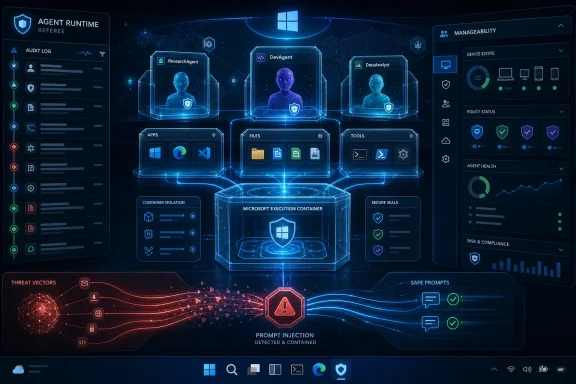
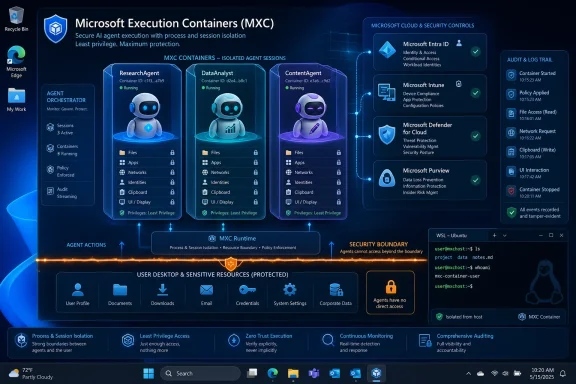
Futuristic cybersecurity dashboard with AI robot and lock icons protecting data on glowing displays.Microsoft Is Turning Agent Trust Into an OS Problem​

For the past two years, the AI industry has talked about agents as if the hard part were reasoning: better models, longer context windows, richer tool APIs, more reliable planning. That was always only half the story. The moment an agent can read your documents, launch applications, call web services, write code, or operate a shell, the central question stops being “how smart is it?” and becomes “who gave it the keys?”
MXC is Microsoft’s answer to that second question. Rather than treating an agent as a Python process, a browser extension, a cloud-hosted bot, or a loose bundle of scripts, Microsoft is describing a Windows-native execution layer where access to files, network resources, applications, and system capabilities can be declared and enforced by the platform. That distinction is not cosmetic. It shifts agent permissions from a convention into infrastructure.
The analogy Microsoft clearly wants developers to reach for is mobile app security. On iOS and Android, users have been trained to understand that applications must ask for camera, location, contacts, microphone, and storage permissions. Desktop operating systems have historically been more permissive, especially for traditional Win32 software. AI agents make that old desktop bargain look dangerous.
An agent is not merely an app with a UI. It is software that may decide what to do next, invoke tools in sequence, and operate across data boundaries that a human user would normally cross consciously. If the industry wants agents to become durable, local, semi-autonomous workers, then the local OS has to know what they are allowed to do before they do it.

The Kernel Boundary Is the Message​

The most important thing about MXC is not that Microsoft has found a new name for sandboxing. It is that the company is framing containment as a native Windows responsibility. That matters because most current agent sandboxes live too far away from the resources they are trying to protect.
Cloud VMs can isolate workloads, but they do not solve the local endpoint problem. Language-level sandboxes can restrict some behavior, but they often rely on framework discipline and can become brittle when agents call external tools. Container-like patterns can help developers package execution, but agents are not just services waiting for HTTP requests. They are increasingly actors on a user’s machine.
A kernel-enforced model changes the security conversation. If Windows can mediate agent access through operating system primitives, administrators gain a control plane closer to the actual risk: files, local apps, credentials, network routes, shell execution, and enterprise data. The point is not that OS-level enforcement is magically invulnerable. The point is that it gives defenders a more serious place to stand.
That is why Microsoft’s partner list is part of the product message. OpenAI, Nvidia, Manus, Nous Research’s Hermes work, and OpenClaw are not window dressing. They represent the kinds of agent ecosystems that need a runtime security story before enterprises allow them to roam across real endpoints.
Nvidia’s OpenShell is especially revealing. Nvidia has been pushing the idea of always-on local agents running across powerful client hardware, particularly as RTX Spark and Windows on Arm ambitions converge. OpenShell on Windows built on MXC suggests a stack where the agent runtime, hardware acceleration, and OS-level containment are meant to arrive together, not as separate procurement decisions.

This Is Not Docker for Chatbots​

It would be easy to misread Microsoft Execution Containers as another container service with a more fashionable AI label. That would miss the product’s strategic point. MXC is not being sold as a cloud-native packaging mechanism; it is being pitched as a policy-defined execution environment inside Windows for agents that may run continuously and interact with the user’s machine.
That distinction matters to IT departments. Traditional containers are excellent at isolating services, standardizing deployments, and keeping workloads portable. But enterprise endpoint risk is different. An agent may need to search a user’s local project directory, open a browser, call an internal API, interact with Microsoft 365 content, invoke a model, and write output back into a repository. That is not simply a container scheduling problem.
Microsoft’s framing also suggests a different administrative model. A developer should be able to describe what an agent needs. An administrator should be able to constrain what agents are permitted to request. Windows should enforce the result at runtime. If that model matures, agent deployment begins to look less like installing a clever automation script and more like approving a managed application with scoped privileges.
That is the correct direction. Enterprises do not need another honor-system prompt that says an agent “should not” access sensitive directories. They need policy that survives model mistakes, malicious prompts, compromised dependencies, and overenthusiastic developers. MXC is a bet that agent containment must become declarative, inspectable, and centrally manageable.

The Desktop Is Becoming a Runtime Again​

Windows has spent much of the cloud era being treated as the place where developers open browsers, terminals, and IDEs to reach someone else’s runtime. Build 2026’s agent story pushes in the opposite direction. Microsoft wants the PC itself to become an AI execution surface again.
That shift is bigger than MXC. Microsoft is also pushing Windows agent primitives, local AI development, WSL improvements, GPU acceleration, and closer Nvidia integration. The idea is that a modern Windows machine can run local models, local tools, local agents, and local containers without forcing every workflow into the public cloud. MXC is the security layer that makes that ambition less reckless.
There is a practical reason for this. Enterprises are not going to send every internal document, codebase, CAD file, financial model, or customer record to a remote agent service if they can avoid it. Local and hybrid agents promise lower latency, better data residency, and potentially lower operating costs. But they also place more dangerous automation directly on endpoints.
That is the bargain Microsoft is trying to broker. Windows can host the agent, Windows can expose the tools, Windows can apply the policies, and Windows can report back to enterprise management. If that works, Microsoft gains a platform advantage that cloud-only agent frameworks cannot easily duplicate.
The uncomfortable truth is that the desktop never stopped being important. It merely became less fashionable to say so. Agents bring it back because the user’s machine is where context, credentials, files, workflows, and decisions already live.

Nvidia’s OpenShell Gives MXC Its First Serious Test​

Nvidia’s involvement makes the announcement feel less like a Windows security feature and more like a platform alignment. The company has spent 2026 describing agentic computing as the next interface shift: local models, specialized agents, GPU-accelerated workflows, and autonomous software that can operate across tools. That vision is exciting, but it is also a security nightmare without containment.
OpenShell is Nvidia’s attempt to provide a runtime for autonomous agents with policy enforcement, sandboxed execution, permissions, and privacy routing. By bringing OpenShell to Windows on top of MXC, Nvidia is effectively accepting Microsoft’s premise that the OS should provide foundational containment. Nvidia can build the agent layer; Microsoft can enforce the boundary.
That division of labor is sensible. Nvidia wants developers to use its hardware and software stack for local AI work. Microsoft wants Windows to remain the default place where that work happens. Enterprises want a way to say yes to agents without giving them unrestricted endpoint access. MXC becomes the handshake among those interests.
The risk is that the stack becomes too complex too quickly. Developers will have to understand agent frameworks, model behavior, OpenShell policies, Windows containment, enterprise management, and user consent flows. If Microsoft and Nvidia bury that complexity under glossy demos, administrators will discover it later in production.
Still, this is the right kind of complexity. Security boundaries for autonomous software were never going to be simple. The choice is between complexity that is visible and governed, or complexity hidden inside brittle toolchains and optimistic README files.

Enterprise IT Finally Gets a Place to Attach Policy​

For sysadmins, the most interesting part of MXC is not what it does for a single developer demo. It is what it could become when wired into device management, identity, auditing, and group policy-style controls. Microsoft has not merely announced a sandbox; it has opened the door to an administrative model for agents.
That is crucial because enterprise AI adoption is currently caught between executive enthusiasm and operational dread. Business leaders want agents that can summarize meetings, reconcile spreadsheets, update tickets, inspect repositories, and automate workflows. Security teams see agents as software that can be socially engineered, over-permissioned, and chained into lateral movement.
A Windows-native policy layer gives both sides something to work with. Developers can request scopes. Users can be prompted for permissions. Administrators can set defaults, block dangerous capabilities, and monitor runtime behavior. Compliance teams can ask not only what an agent was designed to do, but what it was technically allowed to do.
The mobile-app comparison is useful but incomplete. Enterprise agent policy will need to be more granular than camera-or-no-camera prompts. A coding agent may need access to one repository but not another. A finance agent may need read-only access to a reports folder but no outbound network calls except to approved services. A support agent may need to launch diagnostic tools but not export logs to arbitrary endpoints.
If MXC is going to succeed, Microsoft will need to make those boundaries understandable. The best security primitive in the world will fail if every installer asks for broad access and every user clicks through because the prompt blocks their work.

Developers Will Have to Design for Permission, Not Just Capability​

For Windows developers building agents, MXC should force an architectural change. The old question was “what can my agent do?” The new question is “what can my agent justify asking for?”
That is a healthier model. Agent developers have often treated permissions as an implementation detail, especially in prototypes. A local coding assistant gets a workspace path, a shell, a package manager, and network access. A document agent gets a directory and a cloud API key. A browser agent gets session access and automation hooks. Each step makes sense in isolation; the combined risk can be enormous.
With MXC, Microsoft is nudging developers toward least privilege as a product requirement. If an agent needs network access only for package registries, that should be declared. If it needs write access only to a workspace, that should be scoped. If it needs to launch applications, that should be explicit. If it can run continuously in the background, that should be visible.
This will make some early agent experiences more annoying. Permission prompts, access denials, and policy debugging are not glamorous. But they are the cost of moving from demos to deployment. The alternative is an agent ecosystem where every serious enterprise installation begins with “run this as admin and trust us.”
Developers should also expect a new kind of review from customers. Security questionnaires will ask which MXC scopes an agent uses. Procurement teams will compare vendors based on permission design. Endpoint teams will reject products that request broad filesystem or network access without a compelling reason. In that sense, MXC could turn restraint into a competitive feature.

The Cross-Platform Gap Is Now Impossible to Ignore​

MXC is Windows-first by design, and that is both its strength and its limitation. Microsoft can build deep enforcement because it controls the operating system. But agent development is not Windows-only. Many AI engineering teams live across macOS, Linux, containers, WSL, and cloud environments.
That creates an awkward reality for cross-platform vendors. A Windows agent may eventually rely on MXC for containment, while the macOS version uses Apple’s sandboxing and privacy controls, the Linux version uses namespaces, seccomp, AppArmor, SELinux, containers, or custom wrappers, and the cloud version uses VM isolation. The product may look unified to users while depending on very different security models underneath.
That fragmentation is not automatically bad. Native security primitives are often stronger than lowest-common-denominator abstractions. But it does mean agent vendors will need to explain their platform-specific guarantees. “Sandboxed” will not be enough. Customers will ask how, where, and by whom.
Microsoft may also use this asymmetry as leverage. If Windows becomes the first mainstream desktop platform with a developer-friendly, enterprise-manageable agent containment story, it gives Microsoft a fresh reason to argue that serious local agents belong on Windows. That is a classic platform move: define the primitive, recruit the ecosystem, then make absence of the primitive look like a risk.
For Linux-heavy teams, the lesson is not to dismiss MXC as Windows plumbing. It is to recognize that local agent isolation is becoming a purchasing criterion. If the Linux story is a pile of bespoke containers and shell wrappers, it will look weak next to a managed OS policy layer.

The Node.js 20 Deadline Is a Reminder That Platforms Move Under You​

The stray but relevant calendar pressure in the background is Node.js 20’s end-of-life transition, which has already forced many global teams to revisit runtime assumptions. Node 20’s EOL date has been a reminder that infrastructure bets have clocks attached. Agent platforms will be no different.
That matters because many agent tools are stitched together from fast-moving runtimes: Node.js services, Python workers, browser automation, local shells, model SDKs, native extensions, and cloud APIs. When one layer ages out, the whole security posture changes. An agent sandbox cannot compensate for abandoned dependencies, stale runtimes, or unpatched package chains.
The arrival of MXC should therefore not be read as permission to relax on application hygiene. It is one boundary in a larger system. Teams migrating Node services, updating CI pipelines, or auditing agent dependencies should treat runtime lifecycle management and agent containment as connected work.
The same global teams that learned to track Node LTS schedules will now need to track agent runtime permissions, Windows preview maturity, OpenShell integrations, and management-plane support. The operational burden is real. So is the alternative: autonomous software running on endpoints with yesterday’s assumptions.

Microsoft’s Preview Still Has to Survive Contact With Admin Reality​

The biggest unanswered question is not whether MXC is conceptually sound. It is whether Microsoft can make it usable at enterprise scale. Preview announcements are cheap compared with policy models that administrators trust.
There are hard implementation questions ahead. How granular will file and network scopes be? How will MXC policies interact with existing Windows security features? Can administrators audit agent actions in a way that is useful rather than noisy? What happens when an agent’s requested permissions change after an update? How will Microsoft handle consumer machines, unmanaged PCs, and mixed enterprise fleets?
There is also the question of defaults. A containment model that requires every organization to design policies from scratch will favor only the most mature IT shops. A model with sensible templates, management integration, and clear risk tiers could travel much further. Microsoft’s history includes both outcomes.
The partner ecosystem will matter here. If OpenShell, Hermes, Manus, OpenClaw, and OpenAI integrations treat MXC as a serious boundary, the model gains credibility. If they merely use it as a checkbox while asking for expansive permissions, administrators will see through it quickly. The ecosystem’s first implementations will shape trust more than Microsoft’s launch language.
Enterprises should pilot MXC with skepticism, not cynicism. The right test is not whether a demo agent runs successfully. It is whether the organization can answer a harder question after deployment: what exactly could this agent access, and what stopped it from doing more?

The Practical Reading for Windows Shops​

MXC is not yet a reason to redeploy every endpoint around agents, but it is a clear signal about where Microsoft wants Windows administration to go. The agent era will not be governed only in SaaS consoles. It will reach the endpoint, the shell, the filesystem, and the network stack.
For Windows shops, that means agent readiness should become part of endpoint strategy. Security teams should start mapping which workflows could safely tolerate local agents and which should remain off-limits. Developers should begin designing agent permissions as part of product architecture. Procurement teams should ask vendors how they will support Windows-native containment rather than accepting generic claims about safe automation.
The organizations that wait for agent sprawl before defining policy will repeat the mistakes of shadow IT, only with software that can take actions instead of merely store files. The organizations that treat MXC as an early control point will be better positioned when agents move from pilots into daily operations.

The Windows Agent Era Now Has Its First Gatekeeper​

MXC’s significance is easiest to see in concrete terms:
  • Microsoft introduced MXC at Build 2026 as a preview policy layer for agent containment enforced through native Windows operating-system primitives.
  • Nvidia is bringing OpenShell to Windows on top of MXC, making the feature part of a broader push toward local, always-on AI agents.
  • Developers should expect agent installation and deployment to involve explicit scopes for files, networking, application launch, and runtime behavior.
  • Enterprise security teams should treat MXC as an emerging management hook for agent policy, not as a finished replacement for endpoint defense.
  • Cross-platform agent vendors will need to explain how their Windows containment story compares with their macOS, Linux, and cloud isolation models.
  • Runtime lifecycle work, including migrations away from older platforms such as Node.js 20, remains part of the same security discipline agents now demand.
MXC is Microsoft’s clearest admission yet that AI agents cannot be secured by vibes, prompts, and optimistic framework documentation. If Windows is going to host autonomous software with access to real work, then Windows must also become the place where that software is constrained, audited, and denied. The preview will need to prove itself in policy consoles, developer workflows, and messy enterprise fleets, but the direction is right: the next generation of Windows security will not just protect users from applications; it will protect users, data, and organizations from the agents acting in their name.

References​

  1. Primary source: abhs.in
    Published: 2026-06-02T19:39:10.843318
  2. Related coverage: windowscentral.com
  3. Related coverage: tomshardware.com
  4. Official source: blogs.windows.com
  5. Official source: blogs.microsoft.com
  6. Related coverage: developer.nvidia.com
  1. Official source: news.microsoft.com
  2. Related coverage: blogs.nvidia.com
  3. Related coverage: techcrunch.com
  4. Related coverage: investor.nvidia.com
  5. Related coverage: investor.cisco.com
 

Microsoft used Build 2026 on June 2 to frame Windows as a secure runtime for AI agents, introducing operating-system primitives for containment, agent identity, and enterprise manageability while naming OpenClaw as an early project taking advantage of those protections. The announcement is not just another Copilot flourish. It is Microsoft admitting that autonomous software needs a different security model than ordinary desktop apps. If agents are going to click, read, write, summarize, execute, and negotiate across a user’s machine, Windows has to become less of a passive host and more of an active referee.

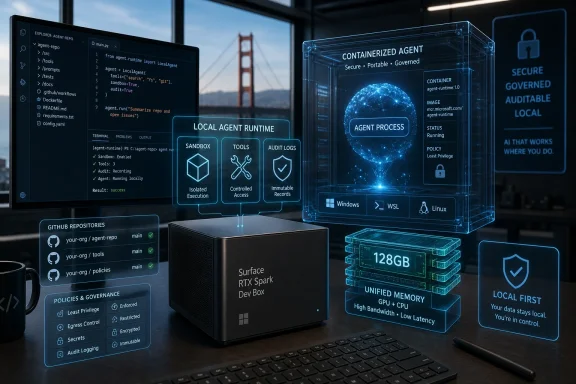
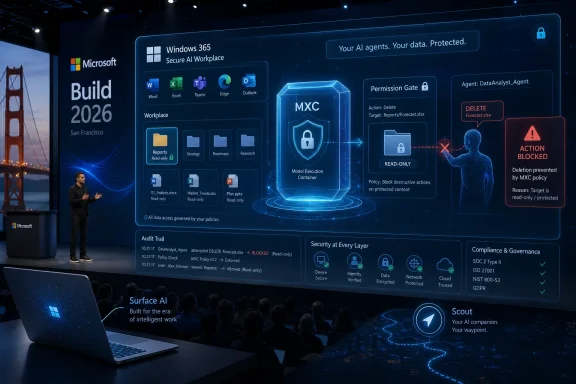
Futuristic cybersecurity dashboard showing agent runtime, secure containers, and threat detection visuals.Microsoft Moves the Agent Fight Down Into Windows​

For most of the generative AI boom, Windows has been treated as the place where AI features appear rather than the place where AI safety is enforced. Copilot could live in the shell, Office could gain assistants, and developers could call cloud models from applications, but the operating system itself was not always the central policy boundary. Build 2026 changes that framing.
Microsoft’s pitch is that the next wave of computing will be agentic: software will not merely answer prompts but perform sequences of actions. That means the old distinction between “an app with AI” and “an app that can act on your behalf” starts to matter. A chatbot that drafts a paragraph is one kind of risk; an agent that can browse files, invoke tools, run commands, talk to services, and make changes is another.
This is why the company’s language around containment, identity, and manageability matters. Those are not decorative enterprise words. They are the minimum vocabulary of trust when software stops being a passive window on the screen and starts behaving like a junior employee with a keyboard.
The bet is clear: if Windows can provide the guardrails, developers can build more capable agents without each inventing a bespoke sandbox, a half-finished audit trail, and a panicked enterprise deployment story. Microsoft wants Windows to be the platform where agents can be useful without being ungovernable.

The Desktop Has Always Been Too Trusting for Autonomous Software​

Windows was designed around users, applications, accounts, files, and permissions. That model has been stretched many times, from browser sandboxes to UAC prompts to enterprise device management, but AI agents expose a more awkward gap. An agent may act for a user, inside an app, across apps, against local files, and through cloud services, all within the same task.
That is a messy security shape. If an agent sends an email, modifies a spreadsheet, calls a command-line tool, or reads a folder, who exactly did the thing? Was it the user, the application, the model, the agent framework, a plug-in, or a compromised prompt chain? Traditional desktop logging was not built to answer that question cleanly.
The problem becomes sharper in enterprise environments. Administrators do not merely need to know whether an executable is trusted. They need to know what an agent can reach, what it can change, which identity it is using, whether its actions can be audited, and how policy can be enforced at scale. A clever agent that cannot be governed is not a productivity breakthrough for IT; it is a change-management incident waiting to happen.
Microsoft’s answer is to push agent security into the operating system itself. That is the right layer for many of these controls, because the OS already mediates files, processes, credentials, device state, and management policy. If agentic computing is real, then agent boundaries cannot live only in the good intentions of app developers.

Containment Is the New Price of Admission​

Containment is the easiest of Microsoft’s three pillars to understand, because the industry has learned this lesson repeatedly. Browsers needed sandboxes. Mobile apps needed permission prompts. Cloud workloads needed isolation. Now agents need boundaries that assume they may be powerful, confused, manipulated, or simply wrong.
The key idea is not that an agent is malicious by default. It is that an agent may be asked to do ambiguous work in an environment full of sensitive data. It may process a poisoned document, follow a misleading instruction embedded in a web page, or combine permissions in ways the user did not anticipate. Autonomy magnifies small mistakes.
By describing containment as an operating-system primitive, Microsoft is trying to avoid a future where every agent framework ships its own fragile approximation of safety. A real containment model should restrict where an agent can operate, what it can touch, how long permissions last, and what happens when a task strays outside its approved boundary. The important phrase here is OS-enforced boundaries: controls that do not depend entirely on the agent obeying instructions.
That matters for projects like OpenClaw, which represent the exciting and uncomfortable edge of the agent movement. OpenClaw-style systems are valuable precisely because they can connect to tools and carry out multi-step workflows. But the same ability that makes them useful also makes them difficult to trust on an ordinary workstation without a stronger security substrate.

Identity Turns the Agent From a Ghost Into an Actor​

Containment limits where an agent can go. Identity answers a different question: who, or what, is acting?
That sounds philosophical until it becomes operational. If an agent deletes files, queries a database, opens a ticket, summarizes a Teams thread, or changes a configuration, an administrator needs an audit trail that distinguishes the human user from the software delegate. “Alice did it” is no longer a sufficient answer if Alice delegated the task to an agent operating under scoped authority.
Microsoft’s focus on agent identity suggests a future in which agents become first-class security subjects rather than anonymous behavior hidden inside app processes. That is essential if agents are going to interact with enterprise resources. A company may want a finance agent to read invoices but not payroll data, or a developer agent to inspect a repository but not rotate production secrets.
This also matters for accountability. The security industry has spent decades telling organizations to reduce shared accounts, improve logging, and apply least privilege. Agents threaten to reintroduce ambiguity at machine speed unless they have identities that can be authenticated, authorized, monitored, and revoked. An agent without identity is a ghost in the audit log.
The harder question is how fine-grained Microsoft can make this model without making it unusable. If every agent action becomes a permission prompt, users will click through blindly. If permissions are too broad, the model collapses into old-fashioned overprivilege. The product challenge is to make agent identity meaningful without turning Windows into a consent-dialog casino.

Manageability Is Where the Consumer Demo Meets the IT Department​

Consumer AI demos tend to show a single user asking a helpful assistant to complete a task. Enterprise IT sees a different picture: thousands of endpoints, dozens of agent frameworks, multiple identity systems, compliance obligations, data-loss risks, and executives demanding productivity gains by next quarter. That is why Microsoft’s third pillar, manageability, may be the least glamorous and most important.
Manageability is the difference between “a cool agent runs on my laptop” and “this can be deployed across a regulated organization.” IT needs policy, inventory, telemetry, controls, and a way to say no. It also needs a way to say yes selectively, because a blanket ban on agentic tools will be hard to sustain if employees find them genuinely useful.
Microsoft’s natural advantage is that Windows already sits inside a larger management estate. Entra, Intune, Defender, Purview, Microsoft 365, and related tools give the company a distribution and governance story that smaller agent vendors cannot easily match. The Build 2026 message is that Windows agents should eventually plug into the management fabric administrators already use.
That is also Microsoft’s commercial strategy. The company is not merely trying to make Windows friendlier to agents. It is trying to make Windows the place where agent usage becomes visible, governable, and therefore purchasable by enterprises. In Microsoft’s world, the agent platform and the management plane are inseparable.

OpenClaw Gives the Story a Useful Edge​

OpenClaw is a smart example for Microsoft to cite because it evokes both the promise and the anxiety around agentic software. It is not just another assistant tucked into a productivity app. It represents the broader open-source push toward agents that can connect channels, use skills, run workflows, and interact with the user’s digital environment in ways that feel closer to delegated labor than ordinary automation.
That makes it a useful test case for Windows. If Windows security primitives can support something as ambitious as OpenClaw, Microsoft can argue that its platform is not just optimized for its own Copilot stack. It can claim to be building a neutral runtime for the messy, pluralistic agent ecosystem developers are actually using.
The move also signals a softening of the usual platform reflex. Microsoft could have tried to frame third-party agents as risky competitors to Copilot. Instead, the Build story positions Windows as the trusted place where competing agent frameworks can run under common rules. That is a more credible platform strategy than pretending one assistant will own every workflow.
Still, OpenClaw’s presence underlines the tension. The more capable the agent, the less comforting traditional app trust becomes. Running an autonomous agent locally is not like installing a calculator. It is more like inviting a very fast intern onto your machine and then asking Windows to make sure the intern cannot wander into HR, finance, and production credentials.

Microsoft Execution Containers Are the Practical Mechanism Behind the Pitch​

The most concrete piece of Microsoft’s announcement is Microsoft Execution Containers, or MXC, now in preview. The name is dry, but the idea is central: developers and administrators need a simpler way to create sandboxed environments for agents, with containment enforced by Windows rather than improvised in each app.
This is an important distinction. Many developers can build an agent that works. Far fewer can build an agent that is safely isolated, observable, policy-compliant, and deployable across enterprise machines. If MXC becomes a standard way to run untrusted or semi-trusted agent workflows locally, it could become one of those platform features that quietly shapes the next decade of Windows software.
The analogy is not perfect, but MXC has the same strategic flavor as earlier shifts toward virtualization-based security, application containers, and browser process isolation. Each represented a recognition that trust boundaries had to become more explicit. Agents push that same lesson into local automation and AI-driven workflows.
The preview status matters. Microsoft is not declaring the problem solved. It is putting a framework in developers’ hands and asking the ecosystem to build around it. That means early adopters should treat this as a direction of travel, not a finished compliance shield.

The Security Model Has to Survive Prompt Injection, Not Just Malware​

The agent security debate is often framed like traditional endpoint security: keep bad code out, isolate risky workloads, monitor behavior. That is necessary, but it is not sufficient. Agents introduce a stranger failure mode, because instructions can arrive through ordinary content.
A malicious email, a web page, a document, a support ticket, or a chat message can contain text that attempts to redirect the agent. This is the world of prompt injection, where the attack surface is not only executable code but also language interpreted by a model. If an agent can read and act, then content becomes a potential control channel.
This is why OS-level containment is so important. You cannot solve prompt injection by telling the model to be careful. Models can be improved, filters can help, and agent frameworks can add policy checks, but the outer boundary has to assume that some instructions will get through. The system needs hard stops that are not merely suggestions to the model.
Identity and manageability complete the picture. If an injected instruction causes an agent to attempt a forbidden action, policy should block it, logs should show the attempted behavior, and administrators should be able to adjust controls. The point is not to make agents incapable of mistakes. The point is to make mistakes survivable.

Developers Get a Platform, But Also a New Set of Responsibilities​

For Windows developers, Microsoft’s announcement is both a gift and a warning. The gift is obvious: if the operating system provides agent identity, containment, and management hooks, developers can build richer AI experiences without shouldering every security burden themselves. That could accelerate a generation of local-first agents that use Windows hardware, files, apps, and peripherals more intelligently.
The warning is that the bar is going up. Once platform primitives exist, customers and administrators will expect serious agent apps to use them. “Trust us” will not be an acceptable security architecture for software that can act across a user’s machine.
This may create a split in the Windows AI ecosystem. Professional, enterprise-ready agent apps will integrate with OS containment, identity, and management. Hobby projects, quick demos, and lightly maintained tools may continue to run with broad permissions and vague boundaries. Users will need to learn the difference, and Microsoft will likely have to expose that difference clearly in Windows.
There is also a developer-experience challenge. Security primitives only become ecosystem standards if they are usable. If MXC and related APIs are too complex, developers will route around them. If they are simple, well-documented, and visibly rewarded by Windows and enterprise management tools, they could become a default expectation for agentic apps.

Windows Wants to Be the Agent Runtime, Not Just the Copilot Shell​

Microsoft has spent the last few years pushing Copilot into Windows, Edge, Microsoft 365, GitHub, and its cloud stack. That sometimes made the AI strategy look like a feature rollout attached to existing products. Build 2026 suggests a deeper ambition: Windows itself as the runtime for agentic computing.
That is a much bigger claim. A runtime is where developers build, where administrators govern, and where users come to trust—or distrust—the entire category. If Microsoft can make Windows the secure local execution layer for agents, it can remain central even in a world where the models, frameworks, and user interfaces are fragmented.
This is also a defensive move. Developers are already experimenting with agent frameworks that span macOS, Linux, browsers, cloud containers, and messaging platforms. If Windows does not provide a credible native story, the next generation of automation could treat the desktop as just another endpoint to be remote-controlled. Microsoft does not want Windows to become an afterthought in its own user workflows.
The company’s advantage is installed base and enterprise gravity. Its disadvantage is user skepticism. Windows users have seen ambitious platform shifts before, and they know that “integrated” can sometimes mean “hard to disable,” “noisy,” or “built for Microsoft’s priorities before yours.” The success of this agent security push will depend on whether it feels like empowerment or encroachment.

The Enterprise Opportunity Is Real Because the Fear Is Real​

The strongest argument for Microsoft’s approach is not that enterprises are eager to run autonomous agents everywhere. It is that they are worried employees will do it anyway. Shadow AI is already a management problem; agentic AI makes it more consequential.
A worker using a chatbot to draft text is one risk profile. A worker running a local agent with access to files, messages, browser sessions, terminals, and business systems is another. Even if the employee’s intent is harmless, the organization inherits data exposure, compliance, and operational risks.
Microsoft is positioning Windows as the compromise. Instead of forcing companies to choose between banning agents or accepting chaos, it wants to offer governed adoption. That is exactly the kind of middle path enterprise buyers tend to prefer, especially when productivity pressure comes from leadership and risk pressure comes from security teams.
But the company will have to prove that its controls are not merely policy theater. Administrators will ask hard questions: Can agents be discovered reliably? Can their permissions be scoped and revoked? Can logs distinguish agent action from human action? Can data boundaries be enforced across local and cloud contexts? Can third-party agents be managed as cleanly as Microsoft’s own?

Users Need Control They Can Understand​

The consumer side of the story is simpler and more delicate. Most users do not think in terms of containment primitives or agent identities. They want to know whether an AI tool can see their files, change their settings, send messages, spend money, or make a mess.
Windows will need to communicate agent permissions in a way ordinary people can understand. Mobile operating systems trained users to think about camera, microphone, location, and contacts access. Agents require a more complex vocabulary: folders, apps, accounts, tools, actions, duration, and delegation. Microsoft has to make those controls legible without drowning users in prompts.
There is a danger here. If the interface is too permissive, users may accidentally grant broad access to agents they barely understand. If it is too restrictive, agents will feel broken and users will disable protections. The design problem is not just security engineering; it is human factors.
The best outcome would be a Windows model where agent capabilities are visible, revocable, and contextual. Users should be able to see what an agent can do before it acts, review what it did afterward, and shut it down without spelunking through administrative tools. Trust requires memory as well as permission.

The Build 2026 Message Is Ambitious, But the Details Will Decide It​

Microsoft’s Build 2026 framing is coherent. Agents need containment because they can act. They need identity because their actions must be attributable. They need manageability because organizations cannot govern what they cannot see. Those principles are sound.
The unresolved question is implementation. Platform security announcements often sound strongest on stage, where diagrams are clean and edge cases are absent. The real test comes when developers try to ship apps, administrators try to write policy, and users try to understand what is happening on their PCs.
There is also the competitive layer. Microsoft will want Windows to support third-party agents, but it will also want Copilot and Microsoft 365 agents to feel deeply integrated. If the company gives its own agents privileged paths while third-party agents face heavier friction, developers will notice. A trusted agent platform has to look fair enough to attract the ecosystem.
At the same time, Microsoft is right that this problem cannot be solved solely at the app layer. The desktop is becoming a workspace for autonomous software. If Windows does not define the rules, the rules will be defined inconsistently by every framework that lands on the machine.

The Windows Agent Stack Now Has a Shape IT Can Test​

The practical significance of the announcement is that Microsoft has moved the discussion from AI enthusiasm to deployment architecture. That gives Windows developers, security teams, and administrators something concrete to evaluate as previews mature.
  • Microsoft is treating AI agents as operating-system citizens that need containment, identity, and management rather than as ordinary apps with a model attached.
  • Microsoft Execution Containers are the clearest mechanism so far for running agent workflows inside Windows-enforced boundaries.
  • OpenClaw’s involvement shows that Microsoft wants the Windows agent story to include prominent third-party and open-source frameworks, not only Copilot-branded experiences.
  • Enterprise adoption will depend on whether agents can be inventoried, governed, audited, and restricted through familiar management channels.
  • Consumer trust will depend on whether Windows can explain agent permissions and activity in plain language without burying users in prompts.
  • The preview nature of these tools means early excitement should be balanced with testing, threat modeling, and a cautious rollout strategy.
Microsoft’s Windows agent push is best understood as a recognition that the AI desktop cannot be secured with vibes, disclaimers, and oversized permission grants. If agents become a normal part of computing, the operating system must know what they are, what they can touch, and how to stop them when they exceed their brief. Build 2026 does not prove that Microsoft has solved agent security, but it does show the company has identified the right battleground: not the chatbot window, but the trust boundary underneath it.

References​

  1. Primary source: thewincentral.com
    Published: 2026-06-03T08:37:37.247964
  2. Related coverage: axios.com
  3. Related coverage: techradar.com
  4. Related coverage: windowscentral.com
  5. Related coverage: tomsguide.com
  6. Official source: blogs.microsoft.com
  1. Official source: blogs.windows.com
  2. Related coverage: bighatgroup.com
  3. Related coverage: openclawroadmap.com
  4. Related coverage: windowslatest.com
  5. Related coverage: docs.openclaw.ai
  6. Related coverage: computerbase.de
  7. Official source: devblogs.microsoft.com
  8. Related coverage: tomshardware.com
  9. Related coverage: labs.cloudsecurityalliance.org
  10. Related coverage: techxplore.com
 

Back
Top