The Outage Hit the Workday Where Microsoft 365 Is Supposed to Disappear
The notable thing about this incident is not that Microsoft 365 had a problem. Cloud services have problems, and Microsoft’s estate is large enough that some part of it is always being patched, tuned, throttled, investigated, or recovered. The notable thing is where the user-facing break appeared: Office files and Teams, the daily muscle memory of modern work.
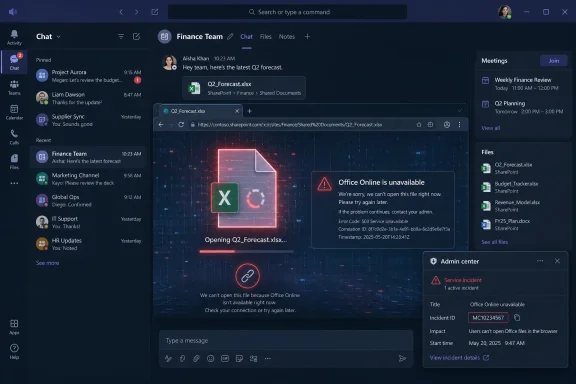
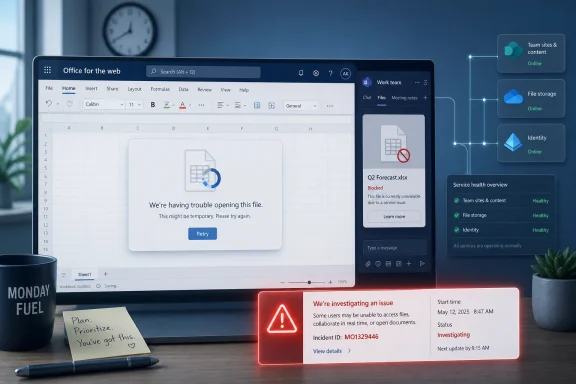
Microsoft’s public status messaging said it was investigating reports that some users could not open files in Office for the web or Microsoft Teams. A follow-up said the company had identified elevated error rates across Office for the web experiences and was correlating those patterns across service dependencies to determine next steps. That phrasing is careful, technical, and familiar: telemetry first, dependency mapping second, mitigation later.
For users, the experience is much simpler. You click a spreadsheet in Teams, SharePoint, OneDrive, or a browser session and the file does not open. The abstraction collapses, and what was sold as seamless collaboration becomes a chain of services where a failure in one link may look like an application bug, a permissions issue, a browser problem, or a local network fault.
That ambiguity is why even a “some users” outage matters. Microsoft 365 is not merely software running somewhere else; it is the working surface for millions of organizations. When files fail to open, the problem is not confined to one app tile. It interrupts meetings, approvals, finance workflows, classroom assignments, help desk triage, and every business process that quietly moved from email attachments to shared links.
Office for the Web Is Now the Front Door, Not the Backup Plan
There was a time when Office for the web was easy to dismiss as the lightweight version: useful in a pinch, good enough for edits, but not the center of gravity. That era is over. In many organizations, web Office is the default interaction layer for shared documents because it is where Teams, SharePoint, OneDrive, Outlook, and Microsoft Loop-style collaboration naturally converge.
That shift changes the meaning of an outage. If Word, Excel, or PowerPoint on the desktop has a bad day, a user may still have cached files, local save paths, or alternative ways to get work done. If the web file-opening path breaks, the disruption can appear at the entrance to the document itself, before the user has a chance to choose a workaround.
Teams makes this more acute. Microsoft has spent years turning Teams into the front end for work: chat, meetings, files, channels, apps, phone, webinars, and increasingly Copilot-assisted collaboration. But Teams is not a monolith. Its file experience leans on SharePoint and OneDrive, its identity depends on Microsoft Entra ID, its meetings and messaging depend on Teams services, and its browser-like surfaces rely on modern web plumbing that most users never see.
That integration is the selling point. It is also the blast radius. When Microsoft says it is correlating error patterns across service dependencies, it is describing the real architecture customers bought into. The user sees “Teams won’t open my file.” The administrator sees a possible intersection of Teams, Office for the web, SharePoint Online, identity, policy, browser behavior, caching, and tenant-specific service health.
The old enterprise instinct was to ask whether the desktop client still works. That remains a useful question, but it no longer captures the operational reality. Work has moved into shared cloud contexts where the file is often less a static object than a live collaboration session with permissions, presence, comments, co-authoring, sensitivity labels, and policy enforcement wrapped around it.
Microsoft’s Status Language Tells Admins More Than It Tells Users
The public Microsoft 365 Status account gave enough information to confirm the incident, but not enough to answer the questions users and help desks immediately care about: who is affected, where, for how long, and what workarounds are reliable. That gap is not accidental. Microsoft’s more detailed incident communications live in the Microsoft 365 admin center, and the incident ID exists so tenant administrators can track the service-health entry relevant to them.
This is a rational model for enterprise support, but it produces a familiar communication mismatch. End users see a broken product and a short social post. Administrators see an incident number, service-health updates, telemetry language, and sometimes tenant-specific impact indicators. Everyone else fills in the space with Downdetector reports, Reddit threads, Slack chatter, and guesses.
Microsoft’s official service-health model distinguishes between advisories and incidents, and the admin center is supposed to give organizations a more targeted view than a public status page can. That matters because cloud failures are rarely uniform. One tenant may be heavily affected while another sees only intermittent failures. One region may experience high error rates while another hums along. One scenario, such as opening Excel files in a browser from Teams, may fail while another, such as opening a local desktop file, still works.
But the language of “some users” and “elevated error rates” also reflects the uncomfortable truth of hyperscale cloud operations: Microsoft may know something is wrong before it knows exactly what customers will experience. Telemetry can show a failure pattern before the company has mapped the dependency chain. In that window, the vendor is investigating while customers are already in incident response.
For sysadmins, the practical lesson is to treat Microsoft’s status posts as a starting signal, not a complete diagnosis. If MO1329446 appears in the admin center, the first job is not to solve Microsoft’s outage. It is to separate cloud-side symptoms from local noise, identify affected user groups, and stop the help desk from burning hours on endpoint troubleshooting that cannot fix a service dependency.
The Cloud Productivity Bargain Keeps Getting More One-Sided
Microsoft 365’s value proposition is still compelling. The suite reduces local infrastructure, centralizes collaboration, simplifies update delivery, and gives organizations a common identity and policy plane. For many businesses, the alternative to cloud Office is not a beautifully resilient local system; it is a mess of aging file shares, VPN problems, version conflicts, and unmanaged attachments.
But the bargain has changed. Customers gave up a measure of local control in exchange for scale, convenience, security investment, and rapid feature delivery. In return, they now depend on Microsoft not only for software quality but for service orchestration, regional capacity, identity uptime, dependency management, and incident transparency.
That dependence is more visible when the failure is basic. Users can tolerate some advanced feature being temporarily unavailable. They are less forgiving when they cannot open the file needed for a Monday morning meeting. The more Microsoft positions 365 as the operating layer for work, the less patience customers will have for incidents that interrupt ordinary file access.
This is not unique to Microsoft. Google Workspace, Slack, Zoom, Salesforce, AWS, and countless SaaS platforms all share the same structural weakness: cloud centralization makes routine work easier until a shared dependency fails. But Microsoft’s footprint gives its outages a particular weight. A Teams or Office for the web incident touches not only communication but the documents, spreadsheets, presentations, lists, and approvals that surround communication.
That is why every Microsoft 365 outage becomes a referendum on operational trust. It is rarely enough to say that the service is usually available. Customers want to know whether Microsoft can detect failures quickly, communicate clearly, contain blast radius, provide credible workarounds, and explain what happened after the fact. The larger the cloud, the more the quality of failure becomes part of the product.
Teams Has Become the Place Where Other Outages Show Up
Teams is often blamed for problems it did not independently cause. That is the price of becoming the workspace container. If a file preview fails, Teams gets blamed. If a SharePoint permission edge case blocks a document, Teams gets blamed. If identity token refreshes misbehave, Teams gets blamed. If Office for the web experiences elevated error rates, Teams becomes one of the places users feel it first.
This incident appears to fit that pattern. Microsoft’s own wording tied the user impact to opening files in Office for the web or Microsoft Teams, while the telemetry update emphasized elevated error rates across Office for the web experiences. That suggests Teams may have been less the root of the problem than one of the major surfaces exposing it.
For IT teams, that distinction matters. Telling users “Teams is down” may be emotionally satisfying, but it may lead responders down the wrong path. If chat and meetings work while embedded or linked Office files fail, the incident should be framed around file access and web Office dependencies, not the entire Teams service.
The difference affects workaround advice. Users may still be able to download a file, open it in the desktop app, access it directly through SharePoint or OneDrive, or wait for the browser session to recover. Or they may not, depending on the failure path. A disciplined help desk will avoid promising a universal workaround until it has tested the exact scenario in the affected tenant.
Teams also complicates executive perception. When the CEO’s meeting chat works but the Excel workbook in the channel does not, the outage feels random. In reality, that randomness is often the visible edge of modular service architecture. Modern Microsoft 365 is stitched together well enough that users forget the seams exist. Outages remind them.
Admin Centers Are Useful, but They Are Not an Incident Plan
Microsoft tells administrators to use the Service health page in the Microsoft 365 admin center to determine whether a cloud problem is known and under investigation. That is good advice. It is also insufficient if it is the only step in an organization’s response playbook.
The admin center can confirm that Microsoft is working an incident, but it cannot automatically tell a business which board meeting deck is blocked, which payroll spreadsheet is inaccessible, which classroom assignment cannot be opened, or which legal review deadline is now at risk. That mapping belongs to the customer. In many organizations, it does not exist until the outage starts.
A mature Microsoft 365 incident plan should include a few boring but essential habits. Help desks should know where to check service health and how to reference incident IDs in tickets. Communications teams should have plain-English templates ready for users. Departmental owners should understand when to switch from cloud co-authoring to local copies or alternate channels. Security teams should be involved because outages often lead users toward risky workarounds, including personal email, unmanaged file sharing, or unsanctioned chat apps.
The worst response is performative troubleshooting. Reinstalling Office, clearing every browser cache, rebooting laptops, resetting passwords, and blaming Wi-Fi may make the queue feel active, but it can obscure the real incident and erode user trust. Once a vendor-side issue is confirmed, the internal response should pivot from repair to containment: document the symptoms, identify viable alternatives, and communicate the limits of what IT can control.
This is where Microsoft’s service-health tooling is both helpful and politically awkward. It gives admins evidence that the problem is real and external. It also reminds leadership that cloud outsourcing does not outsource accountability to users. Someone inside the organization still has to translate a Microsoft incident into operational decisions.
The Browser Has Become a Critical Business Dependency
Office for the web outages expose another quiet shift: the browser is now enterprise productivity infrastructure. For years, browsers were treated as generic windows onto the internet. Today, they are runtime environments for office suites, line-of-business apps, identity flows, security controls, virtual desktops, and AI assistants.
That creates new fragility. A file-opening failure may involve Microsoft’s service, but the user’s visible experience is shaped by browser version, extensions, conditional access policy, third-party security tools, network inspection, cache state, and authentication cookies. The more work moves into browser-mediated cloud sessions, the harder it becomes to explain failures in simple application terms.
This is one reason outages can feel inconsistent inside the same company. One user may fail in Edge but succeed in a desktop app. Another may fail in Teams but succeed through OneDrive. A third may be blocked by a policy interaction that only becomes visible when Microsoft’s service is degraded. Each case may be real, and none may be the root cause.
Microsoft benefits from this complexity because it can honestly say impact is limited or scenario-specific. Customers suffer from it because scenario-specific impact is still impact. If the scenario is “open the shared spreadsheet everyone needs right now,” the distinction between full outage and degraded experience does not matter much to the team waiting on the file.
The browser’s centrality also argues for more deliberate contingency planning. Organizations that standardize everything around web access should test desktop Office fallback. Organizations that push all file collaboration through Teams should ensure users know how to reach the underlying SharePoint or OneDrive location. Organizations that rely on sensitivity labels and data-loss prevention should understand whether emergency workarounds preserve those controls or bypass them.
The First Monday Problem Is About Timing, Not Irony
The Neowin report’s wry line about Microsoft giving users a reason to procrastinate on the first Monday of the month lands because timing matters. A productivity outage on a Monday morning is not just inconvenient; it collides with weekly planning, month-start reporting, billing cycles, status meetings, and school or government workflows that often reset on the calendar.
Cloud vendors often measure incidents in duration, affected service, and percentage of users. Customers experience them through timing. A 45-minute interruption during a quiet afternoon may be a footnote. The same interruption during payroll close, a board meeting, an exam window, or a public-sector filing deadline can become a business incident.
That is why raw uptime percentages can mislead. High availability over a quarter says something useful about platform reliability, but it does not capture the operational value of the minutes that fail. Some minutes are worth more than others. Microsoft knows this, which is why its enterprise communications emphasize targeted updates and admin-facing service health. But customers should know it too.
The timing problem also cuts against the lazy view that users can simply wait. In collaborative systems, delay compounds. If one person cannot open a workbook, five others may be unable to finish their part. If a Teams file needed for a meeting does not load, the meeting may be rescheduled, decisions delayed, and downstream work pushed. Productivity suites create productivity dependencies.
In that sense, the outage is not merely a service hiccup. It is a reminder that the cloud has made coordination cheaper but also more synchronized. When the shared layer stumbles, many people can lose momentum at once.
Microsoft’s AI Future Makes Reliability Less Optional
This incident is about Office files and Teams, not Copilot. Still, it lands in the middle of Microsoft’s broader push to make Microsoft 365 the substrate for AI-assisted work. Copilot depends on the same basic promise as Teams file collaboration: your documents, permissions, identity, conversations, and organizational data are available when needed and stitched together securely.
If users cannot reliably open files, the higher-level AI story becomes harder to sell. No CIO wants to hear about autonomous agents drafting summaries from inaccessible documents. No admin wants to debug a Copilot workflow while the underlying Office for the web experience is throwing errors. AI may be the strategic narrative, but file access remains the load-bearing wall.
This is the tension in Microsoft’s current product strategy. The company is layering new intelligence onto an already complex service estate. Each new layer may add value, but it also increases the number of dependencies that must be observable, supportable, and explainable. When something fails, customers need to know whether the problem is the model, the graph, the app, the file service, the identity layer, the browser, or the network.
Microsoft can argue, fairly, that large-scale cloud services are more resilient than what most customers could run themselves. But resilience is not just infrastructure redundancy. It is the ability to degrade gracefully. If a web experience fails, can the desktop app continue cleanly? If Teams cannot render a file, can the user reach it another way? If a service dependency is degraded, can the interface explain that without making users guess?
Those questions will matter more as Copilot and agents become embedded in Microsoft 365 workflows. The more Microsoft automates work around files and conversations, the more visible any interruption in the underlying substrate becomes. Reliability is not the boring part of the AI platform. It is the precondition.
The Practical Lesson Is to Design for Microsoft Being Mostly Right and Occasionally Down
For WindowsForum readers, the useful response is not cloud fatalism. Running everything on-premises is not a magic shield against outages, and many organizations moved to Microsoft 365 because their previous collaboration model was worse. The better lesson is to assume Microsoft 365 will usually work, sometimes fail, and occasionally fail in ways that are hard to localize at first glance.
That assumption should shape everyday IT practice. Keep desktop Office deployed where business processes require it. Teach users that Teams files live in SharePoint or OneDrive, not in a mystical Teams-only vault. Make sure service-health access is delegated to more than one administrator. Build incident messages that distinguish “Microsoft is investigating” from “your laptop is broken.” Test workarounds before the outage.
There is also a governance angle. Organizations should decide in advance which emergency alternatives are acceptable. If users cannot access a Teams-hosted Excel file, is downloading a local copy allowed? If co-authoring is unavailable, who owns the master version? If a sensitive document must be sent another way, which channels remain compliant? These are not philosophical questions during an outage. They are help-desk tickets with legal and operational consequences.
The best Microsoft 365 shops already treat SaaS outages like weather events: not preventable, but forecastable in broad terms and manageable with preparation. They monitor service health, communicate early, avoid over-troubleshooting endpoints, and maintain enough fallback muscle memory that a degraded cloud service does not immediately become organizational paralysis.
The weakest shops treat the cloud as someone else’s computer in the most literal and least useful sense. When it works, they enjoy the convenience. When it fails, they have no local runbook, no user guidance, no tested alternatives, and no way to explain the difference between a vendor incident and an internal problem.
The Small Incident Number Carries a Bigger Warning
The concrete facts are narrow: Microsoft tracked the issue as MO1329446, described problems opening files in Office for the web or Microsoft Teams, and said it was investigating elevated error rates across Office for the web experiences. The broader meaning is harder to ignore because the affected actions sit at the center of modern work.
- Microsoft 365 administrators should check the Microsoft 365 admin center rather than relying only on public social posts when users report Office for the web or Teams file failures.
- Help desks should classify the symptom precisely, because Teams chat working while Teams-hosted files fail points to a different incident path than a total Teams outage.
- Users should be given tested fallback instructions for opening critical files through desktop Office, OneDrive, or SharePoint when the web experience is degraded.
- Organizations should avoid risky improvisation during outages, especially moving sensitive files into personal email, consumer storage, or unsanctioned messaging tools.
- Microsoft’s continued push into AI-powered work makes basic file availability more important, not less, because advanced automation depends on the same cloud substrate.
The story of MO1329446 is not that Microsoft 365 is uniquely unreliable or that cloud productivity was a mistake. The story is that Microsoft has succeeded so completely in making Teams, Office for the web, SharePoint, and OneDrive feel like one workspace that even a partial file-opening outage now lands as a disruption to the workday itself. The next phase of Microsoft 365 will be judged not only by how much intelligence Microsoft can add on top, but by how calmly and transparently the platform behaves when the ordinary act of opening a file stops being ordinary.