

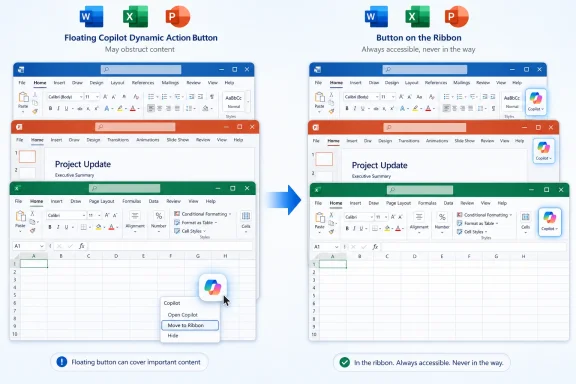
Microsoft said on May 22, 2026, that it will update Word, Excel, and PowerPoint next week so users can move the floating Copilot “Dynamic Action Button” back to the ribbon instead of leaving it on top of documents. The change sounds minor, almost comically so, until you remember where Microsoft chose to put the button: directly inside the work surface. For many Office users, especially Excel users, this was not an argument about artificial intelligence. It was an argument about whether the software still belongs to the person doing the work.
The floating Copilot button was Microsoft’s latest attempt to make AI impossible to miss inside Office. It appeared in Word, Excel, and PowerPoint as a persistent on-canvas control, hovering near the lower-right area of the document, spreadsheet, or slide. Microsoft called it the Dynamic Action Button, a name that manages to be both technically descriptive and emotionally tone-deaf.
The company’s rationale was straightforward: if Copilot is meant to become part of everyday work, it cannot hide in a corner of the ribbon like a macro recorder or mail merge wizard. It has to be present where the work happens. In interface-design language, this is discoverability. In user language, it can feel like an ad taped to the inside of your windshield.
That tension is the entire story. Microsoft is not backing away from Copilot in Office. It is backing away from one particularly aggressive expression of the idea that Copilot should be ambient, persistent, and nudging users from inside the canvas itself.
The new option will let users right-click the floating button and move it back to the ribbon. That is not the same thing as removing Copilot from Office, and it is not the same thing as giving administrators a universal “make this go away forever” switch. But it is a concession that the canvas is not neutral territory.
Excel is not just another Office app. It is a grid, a database stand-in, a finance engine, a scratchpad for scientists, an operational dashboard, and in many businesses, the place where unofficial systems become official by sheer endurance. Its interface has tolerated decades of toolbar changes because the grid itself remained sacred. You could curse the ribbon, ignore Clippy, or hide panes, but the cells were the cells.
Microsoft’s floating Copilot control violated that implicit contract. Even if the button occupied only a small patch of screen, it turned part of the spreadsheet into promotional real estate. The problem was not merely that the button existed. The problem was that it appeared to place Microsoft’s product strategy above the user’s immediate task.
That is why the backlash had such a familiar tone among IT pros. Nobody in a spreadsheet-heavy shop needs a lecture about the theoretical upside of AI-assisted formulas. They need to know why a button appeared over their worksheets without a clear, user-controlled opt-out.
The floating Copilot button broke that settlement by moving a command out of the command surface and into the content surface. That may make sense for contextual editing tools, comments, or formatting handles that directly relate to a selected object. It makes less sense for a generalized AI entry point that is partly assistant, partly search box, partly automation layer, and partly Microsoft’s most important growth story.
By allowing the button to return to the ribbon, Microsoft is tacitly admitting that the old grammar of Office still matters. Users understand that the ribbon is where commands live. They also understand that their document, workbook, or deck is where their work lives. Collapsing those two zones may be good for engagement metrics, but it is risky for trust.
The shift also exposes a deeper design dilemma for AI features. If Copilot is hidden, Microsoft worries users will not discover it. If Copilot is everywhere, users begin to experience it as clutter. The company is trying to turn AI into a new layer of Office, but Office’s most loyal users are precisely the ones most likely to notice when that layer gets in the way.
But “more control” is doing a lot of work here. Control over placement is not the same as control over presence. Moving Copilot back to the ribbon may satisfy users who simply hated the floating button, but it will not satisfy organizations that want clearer governance over AI entry points, licensing boundaries, data exposure, and user training.
This distinction matters because Copilot is not a cosmetic add-on. It is a cloud-connected assistant that sits across Microsoft 365 experiences, with different capabilities depending on license, tenant configuration, app, and data access. For a home user, the question may be, “How do I hide this button?” For an administrator, the question is, “What does this button imply about availability, support burden, policy, and user expectations?”
Microsoft has spent years training customers to think of Office UI changes as ordinary service evolution. Copilot changes carry a different charge because they are bound up with security, privacy, productivity claims, and cost. A misplaced button becomes a proxy battle for a much larger governance problem.
A button that covers a cell, steals attention, or returns after an update becomes a daily reminder that the vendor is steering the environment. Users may tolerate that when the value is obvious. They are much less forgiving when the value is speculative, unevenly licensed, or still being evaluated by the organization.
Microsoft’s problem is that Copilot is both a product and a campaign. The company wants users to see it as a natural part of work, but the rollout pattern often makes it feel like a mandate arriving through interface changes. That is a dangerous line to walk, especially in Office, where muscle memory is not nostalgia but operational infrastructure.
The best AI tools tend to disappear until invoked. The worst ones behave like growth hacks. The floating Copilot button was not necessarily the worst version of that instinct, but it was close enough to trigger the reaction Microsoft should have anticipated.
That is a notable shift. During the first phase of Microsoft’s AI push, the company behaved as though presence itself was progress. Copilot in Windows, Copilot in Edge, Copilot in Microsoft 365, Copilot keys on keyboards, Copilot buttons in apps: the strategy was saturation.
Saturation works when the product instantly proves itself. It backfires when users feel they are being drafted into a behavioral experiment. Office users do not need to be reminded that AI exists. They need AI to justify its interruption.
The retreat from unnecessary entry points suggests Microsoft is learning that AI affordances must be earned. The company can still make Copilot prominent, but prominence has to be contextual, reversible, and respectful of the work surface. Otherwise, every new button becomes a referendum on whether Microsoft is listening.
But administrators still need predictable policy. In Microsoft 365 environments, the question is rarely whether one user can hide one control on one machine. It is whether the organization can define a consistent experience across update channels, user groups, licensing tiers, compliance requirements, and support documentation.
The Copilot rollout has already been complicated by licensing distinctions between Copilot Chat, Microsoft 365 Copilot, in-app experiences, and paid advanced features. A visible button can create the impression that a capability is available even when it is not, or that the organization has approved a workflow when policy is still unsettled. That confusion lands on IT, not on the product manager who chose the default.
This is where Microsoft’s consumer-style deployment habits collide with enterprise expectations. Office is now a continuously updated service, but many organizations still need change management that looks more like infrastructure governance than app-store iteration. If a new AI control appears in the default UI, somebody has to explain it.
That argument depends on confidence. Users need confidence that Copilot will help rather than intrude. Admins need confidence that policy will behave predictably. Buyers need confidence that Microsoft will not convert every surface of Office into an upsell experiment.
The floating button undermined that confidence because it made Copilot feel less like an assistant and more like a tenant. It occupied space. It demanded accommodation. It forced users to think about Microsoft’s AI strategy while they were trying to finish a spreadsheet.
The fix is therefore symbolically important even if it is technically small. Moving the button back to the ribbon restores a boundary. It tells users that the work surface still has priority over the assistant.
 Microsoft Mistook Visibility for Consent
The floating Copilot button was Microsoft’s latest attempt to make AI impossible to miss inside Office. It appeared in Word, Excel, and PowerPoint as a persistent on-canvas control, hovering near the lower-right area of the document, spreadsheet, or slide. Microsoft called it the Dynamic Action Button, a name that manages to be both technically descriptive and emotionally tone-deaf.The company’s rationale was straightforward: if Copilot is meant to become part of everyday work, it cannot hide in a corner of the ribbon like a macro recorder or mail merge wizard. It has to be present where the work happens. In interface-design language, this is discoverability. In user language, it can feel like an ad taped to the inside of your windshield.
That tension is the entire story. Microsoft is not backing away from Copilot in Office. It is backing away from one particularly aggressive expression of the idea that Copilot should be ambient, persistent, and nudging users from inside the canvas itself.
The new option will let users right-click the floating button and move it back to the ribbon. That is not the same thing as removing Copilot from Office, and it is not the same thing as giving administrators a universal “make this go away forever” switch. But it is a concession that the canvas is not neutral territory.
Excel Users Found the Weak Point First
It is no accident that Excel users were the loudest constituency here. A floating button in Word is annoying; a floating button in PowerPoint is distracting. A floating button in Excel can literally cover the thing you are trying to inspect, select, calculate, or edit.Excel is not just another Office app. It is a grid, a database stand-in, a finance engine, a scratchpad for scientists, an operational dashboard, and in many businesses, the place where unofficial systems become official by sheer endurance. Its interface has tolerated decades of toolbar changes because the grid itself remained sacred. You could curse the ribbon, ignore Clippy, or hide panes, but the cells were the cells.
Microsoft’s floating Copilot control violated that implicit contract. Even if the button occupied only a small patch of screen, it turned part of the spreadsheet into promotional real estate. The problem was not merely that the button existed. The problem was that it appeared to place Microsoft’s product strategy above the user’s immediate task.
That is why the backlash had such a familiar tone among IT pros. Nobody in a spreadsheet-heavy shop needs a lecture about the theoretical upside of AI-assisted formulas. They need to know why a button appeared over their worksheets without a clear, user-controlled opt-out.
The Ribbon Was Supposed to Contain This Fight
The irony is that Microsoft already had a place for commands that users may or may not want: the ribbon. The ribbon has been controversial since its arrival in Office 2007, but over time it became the negotiated settlement between feature bloat and interface structure. It says, in effect, that Office may contain a thousand tools, but they will at least live in a predictable command surface.The floating Copilot button broke that settlement by moving a command out of the command surface and into the content surface. That may make sense for contextual editing tools, comments, or formatting handles that directly relate to a selected object. It makes less sense for a generalized AI entry point that is partly assistant, partly search box, partly automation layer, and partly Microsoft’s most important growth story.
By allowing the button to return to the ribbon, Microsoft is tacitly admitting that the old grammar of Office still matters. Users understand that the ribbon is where commands live. They also understand that their document, workbook, or deck is where their work lives. Collapsing those two zones may be good for engagement metrics, but it is risky for trust.
The shift also exposes a deeper design dilemma for AI features. If Copilot is hidden, Microsoft worries users will not discover it. If Copilot is everywhere, users begin to experience it as clutter. The company is trying to turn AI into a new layer of Office, but Office’s most loyal users are precisely the ones most likely to notice when that layer gets in the way.
The “More Control” Language Says More Than Microsoft Intended
Microsoft’s public explanation is carefully phrased. The company says it is seeing increased engagement with Copilot in Office apps, while also hearing that users want more control over how Copilot appears. That is classic platform-company language: the metric went up, the complaints were real, and the compromise is to keep the feature while adjusting its presentation.But “more control” is doing a lot of work here. Control over placement is not the same as control over presence. Moving Copilot back to the ribbon may satisfy users who simply hated the floating button, but it will not satisfy organizations that want clearer governance over AI entry points, licensing boundaries, data exposure, and user training.
This distinction matters because Copilot is not a cosmetic add-on. It is a cloud-connected assistant that sits across Microsoft 365 experiences, with different capabilities depending on license, tenant configuration, app, and data access. For a home user, the question may be, “How do I hide this button?” For an administrator, the question is, “What does this button imply about availability, support burden, policy, and user expectations?”
Microsoft has spent years training customers to think of Office UI changes as ordinary service evolution. Copilot changes carry a different charge because they are bound up with security, privacy, productivity claims, and cost. A misplaced button becomes a proxy battle for a much larger governance problem.
AI Adoption Is Being Fought at the Pixel Level
There is a temptation to dismiss the whole episode as a small UI flap. That would be a mistake. Enterprise software adoption often turns on tiny frictions because tiny frictions repeat thousands of times a day.A button that covers a cell, steals attention, or returns after an update becomes a daily reminder that the vendor is steering the environment. Users may tolerate that when the value is obvious. They are much less forgiving when the value is speculative, unevenly licensed, or still being evaluated by the organization.
Microsoft’s problem is that Copilot is both a product and a campaign. The company wants users to see it as a natural part of work, but the rollout pattern often makes it feel like a mandate arriving through interface changes. That is a dangerous line to walk, especially in Office, where muscle memory is not nostalgia but operational infrastructure.
The best AI tools tend to disappear until invoked. The worst ones behave like growth hacks. The floating Copilot button was not necessarily the worst version of that instinct, but it was close enough to trigger the reaction Microsoft should have anticipated.
This Is the Same Retreat We Saw in Windows
The Office adjustment also fits a broader pattern. Microsoft has recently been pruning some Copilot entry points from Windows 11 apps after a period in which Copilot buttons seemed to appear wherever a toolbar had spare oxygen. The message from Redmond is not that Copilot is less important. It is that indiscriminate Copilot placement has become counterproductive.That is a notable shift. During the first phase of Microsoft’s AI push, the company behaved as though presence itself was progress. Copilot in Windows, Copilot in Edge, Copilot in Microsoft 365, Copilot keys on keyboards, Copilot buttons in apps: the strategy was saturation.
Saturation works when the product instantly proves itself. It backfires when users feel they are being drafted into a behavioral experiment. Office users do not need to be reminded that AI exists. They need AI to justify its interruption.
The retreat from unnecessary entry points suggests Microsoft is learning that AI affordances must be earned. The company can still make Copilot prominent, but prominence has to be contextual, reversible, and respectful of the work surface. Otherwise, every new button becomes a referendum on whether Microsoft is listening.
Administrators Are Left Managing the Aftertaste
For IT departments, the immediate change is helpful but incomplete. A user-level right-click option will reduce help desk noise from people who simply want the floating button out of the way. It may also calm the specific anger among Excel users who felt the button was obstructing their work.But administrators still need predictable policy. In Microsoft 365 environments, the question is rarely whether one user can hide one control on one machine. It is whether the organization can define a consistent experience across update channels, user groups, licensing tiers, compliance requirements, and support documentation.
The Copilot rollout has already been complicated by licensing distinctions between Copilot Chat, Microsoft 365 Copilot, in-app experiences, and paid advanced features. A visible button can create the impression that a capability is available even when it is not, or that the organization has approved a workflow when policy is still unsettled. That confusion lands on IT, not on the product manager who chose the default.
This is where Microsoft’s consumer-style deployment habits collide with enterprise expectations. Office is now a continuously updated service, but many organizations still need change management that looks more like infrastructure governance than app-store iteration. If a new AI control appears in the default UI, somebody has to explain it.
The Real Product Is Confidence
Microsoft’s strongest argument for Copilot is not that it can summarize text or generate formulas. Those are features. The stronger argument is that Microsoft can integrate AI into the tools people already use, with the identity, security, and data controls enterprises already depend on.That argument depends on confidence. Users need confidence that Copilot will help rather than intrude. Admins need confidence that policy will behave predictably. Buyers need confidence that Microsoft will not convert every surface of Office into an upsell experiment.
The floating button undermined that confidence because it made Copilot feel less like an assistant and more like a tenant. It occupied space. It demanded accommodation. It forced users to think about Microsoft’s AI strategy while they were trying to finish a spreadsheet.
The fix is therefore symbolically important even if it is technically small. Moving the button back to the ribbon restores a boundary. It tells users that the work surface still has priority over the assistant.
The Button Is Moving, but the Argument Is Staying
The concrete change is easy to understand, and that is why it will probably be welcomed quickly. The broader lesson is messier: Microsoft is still negotiating how forceful it can be in making Copilot part of Office’s default experience.- Microsoft is rolling out Office updates next week that let users move the floating Copilot Dynamic Action Button back to the ribbon in Word, Excel, and PowerPoint.
- The backlash was strongest in Excel because the floating control could obstruct cells, turning a discoverability feature into a direct workspace annoyance.
- The change does not remove Copilot from Office, and it should not be mistaken for a full administrative opt-out or a reversal of Microsoft’s AI strategy.
- The episode shows that AI features need stricter UI discipline than ordinary commands because they carry licensing, privacy, support, and governance implications.
- The safest path for Microsoft is to make Copilot easy to invoke, easy to hide, and predictable enough that IT departments can explain it before users complain about it.
References
- Primary source: The Verge
Published: Fri, 22 May 2026 09:52:19 GMT

Microsoft is letting Office users remove an annoying Copilot button
A floating Copilot button has irritated Excel users the most. www.theverge.com
- Independent coverage: PCMag
Published: Fri, 22 May 2026 10:07:35 GMT

Sick of Copilot In Office Apps? Microsoft Finally Lets You Move Its Floating Button
The new option lets you move the Copilot button back up to the top bar, away from what you're doing.www.pcmag.com
- Related coverage: windowscentral.com

Microsoft is moving the best Copilot features in Office behind a paywall
The "free" access to Copilot inside Word and Excel is ending as Microsoft splits the assistant into "Basic" and "Premium" tiers. www.windowscentral.com
- Related coverage: office-watch.com

Copilot Floating Button Now Hovers Over Word, Excel and PowerPoint
Microsoft has added a Copilot floating button to Word, Excel and PowerPoint, parking a persistent icon in the bottom right corner of every document, spreadsheetoffice-watch.com
- Official source: support.microsoft.com
How Copilot Chat works in Microsoft 365 apps | Microsoft Support
How Copilot Chat works in Microsoft 365 apps support.microsoft.com
- Official source: learn.microsoft.com

Turn off Copilot in all Office applications - Microsoft Q&A
How do I turn off Copilot in all Office applications?learn.microsoft.com
- Official source: techcommunity.microsoft.com
A more discoverable Copilot experience in Word, Excel, and PowerPoint
The ability for Copilot to better connect to your content when using a keyboard and screen readers has evolved. techcommunity.microsoft.com
- Related coverage: techbuzz.ai
- Related coverage: letsdatascience.com
Microsoft lets Office users remove Copilot button
Microsoft is rolling out Office app updates that let users move the floating **Copilot** Dynamic Action Button back to the ribbon, the company wrote on the **Microsoft 365 Insider Blog**. The floating button had appeared in **Word**, **Excel**, and **PowerPoint** and drew complaints because it... letsdatascience.com
- Official source: microsoft.com
