

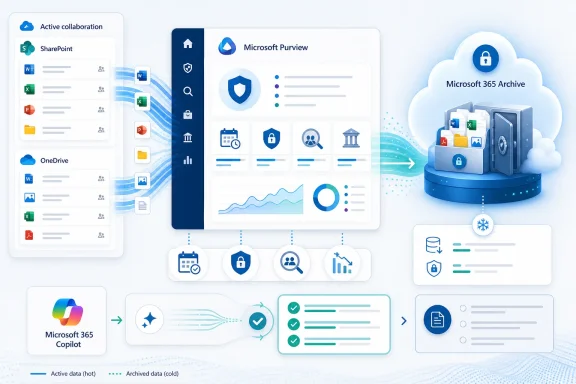
Microsoft is turning retention policy from a largely legal and records-management control into an active storage optimization engine. Microsoft 365 Roadmap ID 561208 adds an Archive action to Microsoft Purview Data Lifecycle Management, allowing organizations to move inactive files covered by retention policies from OneDrive and SharePoint into lower-cost Microsoft 365 Archive storage while preserving compliance discovery. Preview is currently scheduled for August 2026, followed by worldwide general availability in September 2026, and the change could materially reshape how administrators manage storage growth, stale information, eDiscovery, and the quality of Microsoft 365 Copilot responses.
Microsoft 365 has historically made it easier to accumulate information than to retire it. SharePoint Online and OneDrive encourage users to collaborate, synchronize documents, preserve versions, restore deleted items, and retain regulated records, but every one of those capabilities contributes to long-term storage growth.
Retention policies compound the issue by preventing organizations from permanently deleting content that must remain available for legal, regulatory, or operational reasons. A file might no longer have everyday business value, yet deleting it could violate a seven-year financial retention requirement, an eDiscovery hold, or a records-management policy.
Microsoft Purview Data Lifecycle Management provides the policy framework for deciding how long Microsoft 365 information must be retained and what should happen when the retention period ends. Until now, the principal outcomes have centered on retaining content, deleting it, or retaining it before eventual deletion.
The forthcoming Archive action introduces a useful middle state. Instead of treating retained information as either active or deleted, Microsoft will let administrators classify inactive files as retained but archived.
Whole-site archiving is less suitable when a live SharePoint site contains a mixture of current and historical information. A finance site, for example, might hold active fiscal-year documents alongside contracts and reports from the previous decade. Taking the entire site offline would disrupt users, while leaving every document in active storage wastes capacity.
File-level archiving addresses that granularity problem. The Purview integration goes further by making archiving an outcome of centrally managed retention policy rather than a sequence of manually initiated storage operations.
Administrators should therefore treat earlier June or August rollout references in Message Center archives and planning documents as superseded. As always, roadmap dates describe Microsoft’s current intentions rather than an unconditional delivery commitment.
That distinction matters because the value and activity level of a document usually decline long before its legal retention obligation expires. A contract might be actively negotiated for three months, referenced occasionally for two years, and then remain untouched for another five years while the organization waits for its mandatory retention period to conclude.
With policy-driven archiving, the inactive portion of that lifecycle can move to a storage tier designed for rarely accessed content. The document remains governed, but the organization no longer has to treat it operationally like an active collaboration file.
Existing retention policies and compliance configurations should remain unchanged unless an administrator edits them. That is an important safeguard because an unexpected archive operation could interrupt applications, synchronization clients, workflows, and users who still depend on a file.
Organizations should not design business processes around an assumption that a file becomes archived at an exact time of day. Retention-based archiving is a governance mechanism, not a real-time hierarchical storage system for latency-sensitive applications.
Administrators will need clear documentation describing how Archive interacts with records, regulatory records, eDiscovery holds, disposition review, adaptive scopes, and overlapping policies. Archiving must never be mistaken for permission to weaken an existing preservation obligation.
That qualification is easy to overlook. Moving files into archive does not necessarily create a new charge if the tenant’s total consumption remains within its licensed allocation, nor does it magically erase the physical volume of retained data.
Instead, archiving changes the category in which excess data is billed. A tenant with several terabytes of inactive retained content may therefore replace relatively expensive active capacity with a lower-cost archive meter.
For illustration, 10 TB billed at $0.05 per GB each month would cost roughly $512 monthly when calculated as 10,240 GB. Actual invoices will depend on licensed capacity, metering conventions, regional pricing, billing configuration, and the amount by which combined consumption exceeds the tenant allocation.
Archived files cease consuming the tenant’s active storage quota in the same way, but they contribute to Microsoft 365 Archive storage consumption. The economic advantage comes from tiering data, not making data disappear.
Microsoft also warns that archived content can count as active storage consumption while the service or billing relationship is unavailable. FinOps monitoring must therefore become part of the operational design rather than an afterthought delegated entirely to the compliance team.
The Archive action should operate within this architecture rather than around it. It changes the storage tier of inactive information, but it does not cancel a hold, shorten a retention period, or convert a regulated record into an ordinary file.
That distinction will be particularly important during audits. Organizations must be able to demonstrate not only that information was archived, but that the policy governing it remained active throughout the storage transition.
Exports involving archived material may also take longer. Legal teams should test realistic cases during preview, especially where discovery deadlines, regulatory requests, or internal investigations demand rapid collection of large datasets.
Generative AI changes that interaction. Copilot can combine information from multiple permitted sources and present a synthesized answer, potentially making it harder for a user to recognize that part of the response came from an obsolete procedure or superseded policy.
A seven-year-old document may be legally important but operationally dangerous. It could describe retired infrastructure, former pricing, outdated security requirements, or a process that is no longer approved. Retention-based archiving creates a practical way to preserve such a file for compliance while preventing it from competing with current knowledge in everyday Copilot answers.
Archiving reduces the active information set, but it does not repair excessive permissions, missing ownership, duplicate documents, weak sensitivity labeling, or poorly designed SharePoint sites. Organizations still need a broader data hygiene program.
Engineering standards, legal precedents, product specifications, and disaster-recovery instructions may remain authoritative for years while receiving few user interactions. Automatically archiving them solely because they have not been opened recently could reduce Copilot’s ability to answer legitimate questions.
The best policy design will combine inactivity signals with content type, ownership, business function, retention category, and carefully selected exceptions.
The exact visual treatment can vary by client. This is especially relevant when content is copied or moved between SharePoint and OneDrive, where archive status may not always be represented consistently in the user interface.
Clear status indicators, actionable error messages, and a straightforward reactivation path will be essential. If an Office application merely reports that a file cannot load, help desks will receive incidents that look like corruption, permissions failures, or synchronization problems.
Other services that import or process files may fail when the source has been archived. Clipchamp, Power BI, third-party backup products, migration tools, workflow engines, indexing utilities, and custom applications all deserve testing.
That restriction discourages repeated movement between hot and cold storage and limits billing or service abuse. It also means administrators need sensible thresholds: a policy that repeatedly targets content users still need will generate months of active storage consumption after every reactivation.
OneDrive-related billing and reactivation behavior can differ from SharePoint scenarios. Organizations should verify the final terms that accompany the Purview preview rather than assuming that all existing SharePoint archive rules transfer unchanged to OneDrive files.
A native Microsoft 365 cold tier preserves more of the existing context. Permissions, metadata, retention controls, and discovery remain within the Microsoft cloud ecosystem, reducing the need for disruptive migrations.
This does not eliminate the case for specialized records repositories. Some organizations require immutable storage models, physical transfer controls, specialized file formats, jurisdiction-specific services, or permanent preservation capabilities that Microsoft 365 Archive may not provide.
Purview policies can make tiering more predictable. Instead of running one-time cleanup campaigns, IT can establish repeatable lifecycle rules aligned with business and compliance requirements.
A technically valid policy can still fail if it archives operationally critical data. Conversely, a business unit may resist archiving everything indefinitely even when the financial and AI-quality consequences have become unsustainable.
Policy-driven archiving could reduce that administrative burden after an initial governance design. However, licensing eligibility, pay-as-you-go setup, Purview permissions, and archive billing can make the solution more complex than simply buying additional storage for a modest tenant.
Microsoft must also ensure that accidental archiving can be diagnosed and reversed without requiring obscure PowerShell commands or multiple administrative portals.
A stronger model can consider:
Global Administrator should not become the routine role for archive management. More limited Purview, compliance, records-management, SharePoint, and billing roles should be assigned according to the tasks each operator performs.
The native approach has obvious integration advantages. Metadata, permissions, Purview policies, search, and eDiscovery remain connected, while users can reactivate files in their original location.
Third-party products will still differentiate through backup independence, immutable copies, ransomware recovery, cross-tenant management, richer analytics, and support for non-Microsoft repositories. Microsoft 365 Archive is not automatically a substitute for backup, nor is retention a complete disaster-recovery strategy.
That may prove to be the feature’s strongest strategic impact. An archive policy can now be presented not merely as back-office housekeeping, but as an AI grounding control that separates current operational truth from historical evidence.
Enterprises should preserve export procedures and data portability plans even when the native platform is the most economical option today.
Granular exceptions will be crucial. Organizations need to exclude particular file types, libraries, sites, labels, owners, and business functions without creating an unmanageable collection of policies.
OneDrive is not merely another SharePoint library from the user’s perspective. It is tightly connected to individual endpoints, known-folder backup, offline work, sharing links, and employee identity lifecycles.
Reporting would help organizations verify that archive policies actually improve AI relevance. Without measurable evidence, administrators may find it difficult to balance reduced noise against the possibility of removing useful institutional knowledge.
Recovery must be equally transparent. Help desks should be able to determine that a file is archived, identify the governing policy, explain why it was selected, and initiate an approved reactivation without escalating every request to a global administrator.
Microsoft Purview’s retention-based file archiving represents a logical but consequential evolution of Microsoft 365 data governance. If Microsoft delivers dependable policy targeting, clear user experiences, strong reporting, and consistent application support, organizations will gain a native way to preserve regulated information at a lower cost while improving the active knowledge base available to Copilot. The opportunity is substantial, but the safest adopters will treat Archive not as a universal cleanup button, but as a carefully governed lifecycle state between active collaboration and final disposition.
 Background
Microsoft 365 has historically made it easier to accumulate information than to retire it. SharePoint Online and OneDrive encourage users to collaborate, synchronize documents, preserve versions, restore deleted items, and retain regulated records, but every one of those capabilities contributes to long-term storage growth.Retention policies compound the issue by preventing organizations from permanently deleting content that must remain available for legal, regulatory, or operational reasons. A file might no longer have everyday business value, yet deleting it could violate a seven-year financial retention requirement, an eDiscovery hold, or a records-management policy.
Microsoft Purview Data Lifecycle Management provides the policy framework for deciding how long Microsoft 365 information must be retained and what should happen when the retention period ends. Until now, the principal outcomes have centered on retaining content, deleting it, or retaining it before eventual deletion.
The forthcoming Archive action introduces a useful middle state. Instead of treating retained information as either active or deleted, Microsoft will let administrators classify inactive files as retained but archived.
From site-level to policy-driven file archiving
Microsoft 365 Archive began primarily as a way to place entire inactive SharePoint sites into a colder storage tier. That works well for completed projects, abandoned workspaces, former departmental sites, and other locations where almost everything has become inactive.Whole-site archiving is less suitable when a live SharePoint site contains a mixture of current and historical information. A finance site, for example, might hold active fiscal-year documents alongside contracts and reports from the previous decade. Taking the entire site offline would disrupt users, while leaving every document in active storage wastes capacity.
File-level archiving addresses that granularity problem. The Purview integration goes further by making archiving an outcome of centrally managed retention policy rather than a sequence of manually initiated storage operations.
A revised rollout schedule
Microsoft originally communicated earlier rollout expectations for this capability, but the Microsoft 365 Roadmap entry was updated on July 20, 2026. The latest published schedule now places preview availability in August 2026 and general availability in September 2026 for Worldwide Standard Multi-Tenant environments.Administrators should therefore treat earlier June or August rollout references in Message Center archives and planning documents as superseded. As always, roadmap dates describe Microsoft’s current intentions rather than an unconditional delivery commitment.
What Microsoft Is Introducing
The core change is deceptively simple: Purview retention policies will gain an option that archives qualifying OneDrive and SharePoint files. Administrators will be able to use lifecycle rules to identify inactive content and move it to Microsoft 365 Archive without deleting it or stripping away the compliance controls that justify retaining it.Archive becomes a lifecycle action
An Archive action changes what retention policy can accomplish. A policy will no longer merely answer, “How long must this content survive?” It can also help answer, “Where should the content reside while it survives?”That distinction matters because the value and activity level of a document usually decline long before its legal retention obligation expires. A contract might be actively negotiated for three months, referenced occasionally for two years, and then remain untouched for another five years while the organization waits for its mandatory retention period to conclude.
With policy-driven archiving, the inactive portion of that lifecycle can move to a storage tier designed for rarely accessed content. The document remains governed, but the organization no longer has to treat it operationally like an active collaboration file.
The feature is opt-in
Microsoft is not expected to archive existing content automatically merely because the feature reaches a tenant. Administrators must configure the new Archive option and associate it with appropriate retention policy logic.Existing retention policies and compliance configurations should remain unchanged unless an administrator edits them. That is an important safeguard because an unexpected archive operation could interrupt applications, synchronization clients, workflows, and users who still depend on a file.
Four Microsoft 365 systems converge
The capability connects four previously distinct administrative concerns:- Microsoft Purview determines which content qualifies under organizational lifecycle and retention rules.
- SharePoint Online and OneDrive provide the active content locations and permissions model.
- Microsoft 365 Archive supplies the lower-cost storage tier for inactive files.
- Microsoft 365 Copilot benefits when obsolete information is removed from its active grounding set.
How Retention-Based Archiving Should Work
Microsoft has not yet published every production detail for the September release, and preview behavior may change. The announced model nevertheless indicates that Purview will periodically evaluate covered content, identify files that satisfy the configured criteria, and invoke Microsoft 365 Archive as the storage destination.The likely policy sequence
A successful deployment will generally follow a sequence similar to this:- Administrators identify a SharePoint or OneDrive population that is subject to a defined retention requirement.
- A Purview retention policy applies governance controls to that population, preserving the information for the required period.
- The policy evaluates inactivity or another supported condition to determine when a retained file should leave active storage.
- Qualifying files move to Microsoft 365 Archive, where they no longer consume the same active storage allocation.
- Compliance tools continue to discover the archived information, even though ordinary access may require reactivation.
- The retention lifecycle eventually reaches its final outcome, which may involve deletion, disposition review, or continued preservation depending on the governing configuration.
Policy processing will not be instantaneous
Purview retention already depends on background processing and timer jobs. Depending on the operation, policy evaluation can take days rather than minutes, and deletion workflows can involve the Preservation Hold library and SharePoint recycle bins.Organizations should not design business processes around an assumption that a file becomes archived at an exact time of day. Retention-based archiving is a governance mechanism, not a real-time hierarchical storage system for latency-sensitive applications.
Precedence remains important
A single file can be affected by multiple policies, labels, holds, and records-management controls. Microsoft’s retention principles generally favor preservation when configurations conflict, preventing a delete action from overriding an obligation to retain the same item.Administrators will need clear documentation describing how Archive interacts with records, regulatory records, eDiscovery holds, disposition review, adaptive scopes, and overlapping policies. Archiving must never be mistaken for permission to weaken an existing preservation obligation.
The Storage Economics
The most immediately measurable benefit will be lower storage expenditure for tenants whose active and archived data exceeds their licensed SharePoint storage allocation. Microsoft 365 Archive currently uses consumption-based billing, with archive storage priced below standard additional SharePoint storage.Why the savings can be substantial
Microsoft’s documented archive rate is currently $0.05 per GB per month for applicable storage consumption. The meter applies when the tenant’s combined active and archived SharePoint storage exceeds its included or licensed storage capacity.That qualification is easy to overlook. Moving files into archive does not necessarily create a new charge if the tenant’s total consumption remains within its licensed allocation, nor does it magically erase the physical volume of retained data.
Instead, archiving changes the category in which excess data is billed. A tenant with several terabytes of inactive retained content may therefore replace relatively expensive active capacity with a lower-cost archive meter.
For illustration, 10 TB billed at $0.05 per GB each month would cost roughly $512 monthly when calculated as 10,240 GB. Actual invoices will depend on licensed capacity, metering conventions, regional pricing, billing configuration, and the amount by which combined consumption exceeds the tenant allocation.
Archive does not mean zero storage
Some administrators may initially interpret archiving as a way to make files stop counting altogether. That is incorrect.Archived files cease consuming the tenant’s active storage quota in the same way, but they contribute to Microsoft 365 Archive storage consumption. The economic advantage comes from tiering data, not making data disappear.
Billing health becomes an operational dependency
Microsoft 365 Archive requires pay-as-you-go billing configuration. If the archive service is disabled or the associated billing subscription becomes unhealthy, archived content remains archived and can still be reactivated, but new archive operations may be blocked.Microsoft also warns that archived content can count as active storage consumption while the service or billing relationship is unavailable. FinOps monitoring must therefore become part of the operational design rather than an afterthought delegated entirely to the compliance team.
Compliance and eDiscovery
The most important promise is that moving a file into cheaper storage will not remove it from the compliance boundary. Archived files are expected to remain discoverable through supported Microsoft Purview workflows, including Content Search and eDiscovery.Preservation remains intact
Retention exists to ensure that information survives for a required duration even when a user edits or deletes the visible item. In SharePoint and OneDrive, Purview can preserve copies in the Preservation Hold library and apply deletion behavior only after retention requirements have been satisfied.The Archive action should operate within this architecture rather than around it. It changes the storage tier of inactive information, but it does not cancel a hold, shorten a retention period, or convert a regulated record into an ordinary file.
That distinction will be particularly important during audits. Organizations must be able to demonstrate not only that information was archived, but that the policy governing it remained active throughout the storage transition.
Searchable does not mean immediately usable
Microsoft describes archived content as discoverable, but discovery and ordinary user access are different experiences. Compliance searches may locate archived files, and eDiscovery processes may export them, while users are unable to open the content directly until it is reactivated.Exports involving archived material may also take longer. Legal teams should test realistic cases during preview, especially where discovery deadlines, regulatory requests, or internal investigations demand rapid collection of large datasets.
Chain of custody and audit evidence
A defensible deployment should preserve evidence of:- The policy that selected the file for archiving.
- The date and reason the archive action occurred.
- The retention label or policy in effect at that time.
- Any holds that applied before, during, or after archiving.
- The identity of administrators who changed the policy.
- Reactivation, export, disposition, and deletion events.
Copilot Relevance and Information Quality
Microsoft is explicitly positioning retention-based archiving as a way to improve Microsoft 365 Copilot results. Archived content will be excluded from Copilot indexing or active grounding, reducing the chance that old documents influence answers intended to reflect current organizational knowledge.Stale content is an AI governance problem
Traditional enterprise search can show users a list of results containing publication dates, file paths, and authors. The user then decides which document appears authoritative.Generative AI changes that interaction. Copilot can combine information from multiple permitted sources and present a synthesized answer, potentially making it harder for a user to recognize that part of the response came from an obsolete procedure or superseded policy.
A seven-year-old document may be legally important but operationally dangerous. It could describe retired infrastructure, former pricing, outdated security requirements, or a process that is no longer approved. Retention-based archiving creates a practical way to preserve such a file for compliance while preventing it from competing with current knowledge in everyday Copilot answers.
Archiving is not a cure for bad permissions
Copilot respects existing Microsoft 365 access controls. If users can access overshared, incorrectly classified, or obsolete content in active SharePoint and OneDrive locations, Copilot can potentially use that content within the same permission boundary.Archiving reduces the active information set, but it does not repair excessive permissions, missing ownership, duplicate documents, weak sensitivity labeling, or poorly designed SharePoint sites. Organizations still need a broader data hygiene program.
Too much exclusion creates another risk
Administrators could also overcorrect. A document may be old without being obsolete, and infrequent access does not necessarily indicate low business value.Engineering standards, legal precedents, product specifications, and disaster-recovery instructions may remain authoritative for years while receiving few user interactions. Automatically archiving them solely because they have not been opened recently could reduce Copilot’s ability to answer legitimate questions.
The best policy design will combine inactivity signals with content type, ownership, business function, retention category, and carefully selected exceptions.
User and Application Experience
Policy-driven archiving changes the apparent availability of files, so the end-user experience will determine whether the feature feels like intelligent lifecycle management or unexplained data loss. Microsoft’s existing file-level archive documentation already identifies client and application limitations that administrators should take seriously.Archived files are not ordinary files
An archived file can remain represented in its original information architecture, but its content resides in a cold tier. Users may see the file while being unable to open or process it normally until reactivation occurs.The exact visual treatment can vary by client. This is especially relevant when content is copied or moved between SharePoint and OneDrive, where archive status may not always be represented consistently in the user interface.
Clear status indicators, actionable error messages, and a straightforward reactivation path will be essential. If an Office application merely reports that a file cannot load, help desks will receive incidents that look like corruption, permissions failures, or synchronization problems.
Client compatibility remains uneven
Microsoft’s currently documented file-archive limitations include possible problems with Word and PowerPoint for the web, mobile SharePoint and OneDrive applications, older Office builds, and some synchronization scenarios. macOS and Windows devices that are not receiving frequent updates can also encounter inconsistent behavior.Other services that import or process files may fail when the source has been archived. Clipchamp, Power BI, third-party backup products, migration tools, workflow engines, indexing utilities, and custom applications all deserve testing.
Reactivation is part of the lifecycle
For SharePoint archived content, Microsoft removed the reactivation fee in March 2025. However, reactivated files cannot immediately cycle back into archive; Microsoft currently documents a 120-day waiting period before they can be archived again.That restriction discourages repeated movement between hot and cold storage and limits billing or service abuse. It also means administrators need sensible thresholds: a policy that repeatedly targets content users still need will generate months of active storage consumption after every reactivation.
OneDrive-related billing and reactivation behavior can differ from SharePoint scenarios. Organizations should verify the final terms that accompany the Purview preview rather than assuming that all existing SharePoint archive rules transfer unchanged to OneDrive files.
Enterprise Impact
Large organizations stand to gain the most because they typically combine rapid SharePoint growth with long retention periods and complex regulatory obligations. At the same time, their application dependencies and policy environments make deployment more difficult.Records managers gain a missing middle tier
Records teams have long faced a choice between preserving information in active collaboration systems and exporting it into a separate archive platform. External archives may lower storage costs, but they can fragment security, metadata, search, legal discovery, and administrative responsibility.A native Microsoft 365 cold tier preserves more of the existing context. Permissions, metadata, retention controls, and discovery remain within the Microsoft cloud ecosystem, reducing the need for disruptive migrations.
This does not eliminate the case for specialized records repositories. Some organizations require immutable storage models, physical transfer controls, specialized file formats, jurisdiction-specific services, or permanent preservation capabilities that Microsoft 365 Archive may not provide.
IT departments can slow storage growth
SharePoint storage growth often becomes an infrastructure issue only after a tenant approaches its allocation. Administrators then scramble to delete versions, purchase capacity, chase site owners, or export files to unsupported locations.Purview policies can make tiering more predictable. Instead of running one-time cleanup campaigns, IT can establish repeatable lifecycle rules aligned with business and compliance requirements.
Compliance, IT, and finance must cooperate
No single department should own the implementation in isolation. Compliance understands why information must be retained, IT understands application dependencies, business owners understand whether content remains useful, and finance understands the cost model.A technically valid policy can still fail if it archives operationally critical data. Conversely, a business unit may resist archiving everything indefinitely even when the financial and AI-quality consequences have become unsustainable.
Consumer and Small-Business Impact
The roadmap item is chiefly an enterprise administration capability rather than a consumer OneDrive feature. Personal Microsoft accounts should not expect a new end-user archive button governed by Purview retention policy.Smaller tenants may still benefit
Small and midsize organizations using Microsoft 365 compliance capabilities can face the same accumulation problem as global enterprises, particularly in legal, financial, healthcare, engineering, and professional-services environments. They may also lack dedicated storage administrators who can continuously review inactive sites and libraries.Policy-driven archiving could reduce that administrative burden after an initial governance design. However, licensing eligibility, pay-as-you-go setup, Purview permissions, and archive billing can make the solution more complex than simply buying additional storage for a modest tenant.
Simplicity will determine adoption
Smaller organizations need sensible templates, understandable cost estimates, and reports that show what will be archived before enforcement begins. A simulation or audit-only period is especially important when there is no full-time records-management team to review policy behavior.Microsoft must also ensure that accidental archiving can be diagnosed and reversed without requiring obscure PowerShell commands or multiple administrative portals.
Deployment and Governance Planning
Organizations should use the period before preview to inventory their data and define candidate policies. Enabling Archive without preparation would turn a potentially valuable governance control into a broad compatibility experiment.Build an inactivity model
“Inactive” needs a business definition. Last modification date is useful, but it does not prove that nobody reads or depends on the file.A stronger model can consider:
- The date on which the file was last modified or accessed.
- Whether the document has a current owner.
- The SharePoint site’s business purpose and lifecycle state.
- The file’s retention label, record status, or content type.
- Whether workflows, applications, or reports reference the file.
- Whether the document is declared authoritative or forms part of a knowledge base.
- Whether a legal hold or investigation requires rapid access.
- Whether the content is synchronized to endpoints or used offline.
Start with a controlled pilot
A sensible preview deployment would progress through a limited sequence:- Select a noncritical SharePoint environment with well-understood content.
- Inventory file types, permissions, retention controls, and application integrations.
- Define conservative archive thresholds and explicit exclusions.
- Estimate storage savings before changing policy.
- Test search, eDiscovery, export, reactivation, synchronization, and Office clients.
- Collect user and help-desk feedback.
- Review audit events and billing behavior.
- Expand only after the organization can measure both savings and disruption.
Apply least privilege
Purview policy changes can affect enormous amounts of regulated information. Organizations should separate policy design, approval, implementation, and audit review where practical.Global Administrator should not become the routine role for archive management. More limited Purview, compliance, records-management, SharePoint, and billing roles should be assigned according to the tasks each operator performs.
Competitive and Strategic Implications
Microsoft is bringing a familiar cloud-storage concept—automatic movement from hot to cold tiers—into the Microsoft 365 compliance plane. This narrows a gap between collaboration platforms and dedicated information lifecycle management systems.Microsoft strengthens platform retention
Third-party archive vendors often compete by promising cheaper storage, advanced discovery, independent preservation, or multi-cloud governance. Native policy-driven archiving gives Microsoft a stronger answer for customers that primarily want to reduce SharePoint storage costs without exporting data from Microsoft 365.The native approach has obvious integration advantages. Metadata, permissions, Purview policies, search, and eDiscovery remain connected, while users can reactivate files in their original location.
Third-party products will still differentiate through backup independence, immutable copies, ransomware recovery, cross-tenant management, richer analytics, and support for non-Microsoft repositories. Microsoft 365 Archive is not automatically a substitute for backup, nor is retention a complete disaster-recovery strategy.
Copilot changes the value proposition
Archive systems were traditionally justified through regulatory compliance and storage savings. Copilot introduces a third justification: controlling the quality of organizational knowledge used by AI.That may prove to be the feature’s strongest strategic impact. An archive policy can now be presented not merely as back-office housekeeping, but as an AI grounding control that separates current operational truth from historical evidence.
Lock-in becomes deeper
The closer the integration among Purview, SharePoint, OneDrive, Archive, eDiscovery, and Copilot, the harder it becomes to move governed information elsewhere. Customers gain convenience, but they also become more dependent on Microsoft’s pricing, service availability, APIs, policy behavior, and roadmap decisions.Enterprises should preserve export procedures and data portability plans even when the native platform is the most economical option today.
Strengths and Opportunities
Retention-based archiving could become one of Purview’s most practically valuable lifecycle features because it connects compliance policy with tangible operational and financial outcomes.- It lowers the cost of retaining inactive information. Organizations can move qualifying files out of the active tier without prematurely deleting them.
- It introduces file-level precision. Active sites can remain usable while selected historical documents move to cold storage.
- It preserves compliance discovery. Archived files remain available to supported Purview search and eDiscovery processes.
- It improves Copilot relevance. Obsolete material can be excluded from active AI grounding while remaining preserved for legal purposes.
- It reduces dependence on manual cleanup projects. Policy can automate recurring lifecycle decisions across large content estates.
- It keeps content inside Microsoft 365. Metadata, permissions, governance, and discovery remain more closely integrated than with many export-based approaches.
- It encourages better information architecture. To use the feature safely, organizations must define ownership, authority, inactivity, and retention more clearly.
- It creates a measurable governance business case. Compliance programs can demonstrate storage savings and AI-quality improvements rather than being viewed solely as cost centers.
Risks and Concerns
The feature also introduces operational consequences that administrators must not minimize.- Inactive does not always mean irrelevant. Rarely accessed standards, policies, contracts, and technical documents may still be authoritative.
- Archived content is not instantly available to users. Reactivation can interrupt work and create support incidents.
- Application compatibility is incomplete. Office clients, mobile apps, synchronization tools, workflows, and third-party services may handle archived files inconsistently.
- Search behavior can be misunderstood. Compliance discovery may continue even when Copilot and ordinary file access no longer treat the content as active.
- Storage savings may be overstated. Archive data still consumes metered capacity, and savings depend on the tenant’s licensed allocation and excess usage.
- Billing is a service dependency. An unhealthy subscription can block new archive actions and affect how storage consumption is counted.
- Policy mistakes can operate at scale. A poorly scoped rule could archive millions of files before users recognize the impact.
- Archiving can deepen platform dependence. Native integration may make future migration or independent preservation more difficult.
- Archive is not backup. It does not by itself provide an independent recovery copy against every corruption, compromise, deletion, or tenant-level incident.
- Rollout details may change. The feature remains in development, and Microsoft has already revised its availability schedule.
What to Watch Next
The August preview should reveal whether Microsoft has solved the practical issues that separate an appealing roadmap concept from a dependable enterprise service. Administrators should pay close attention to policy conditions, simulation support, client behavior, reporting, billing, and the exact relationship between archived files and Copilot.Policy criteria and scope
Microsoft needs to clarify which retention policy conditions can trigger Archive, how inactivity is measured, and whether last-accessed data is sufficiently reliable across SharePoint, OneDrive, synchronization clients, APIs, and applications. Customers will also want to know how adaptive scopes, retention labels, records, and event-based retention interact with the new action.Granular exceptions will be crucial. Organizations need to exclude particular file types, libraries, sites, labels, owners, and business functions without creating an unmanageable collection of policies.
OneDrive implementation details
Existing Microsoft 365 Archive documentation has focused heavily on SharePoint site and file scenarios, while the roadmap specifically promises retention-based archiving for both OneDrive and SharePoint files. The preview should clarify visual indicators, synchronization behavior, reactivation charges, departed-user scenarios, and the treatment of content moved between the two services.OneDrive is not merely another SharePoint library from the user’s perspective. It is tightly connected to individual endpoints, known-folder backup, offline work, sharing links, and employee identity lifecycles.
Copilot exclusion behavior
Microsoft says archived content will be excluded from Copilot indexing, but administrators will need precise boundaries. They must understand whether exclusion applies immediately, how previously indexed content ages out, and whether references survive in chats, generated summaries, semantic indexes, agents, connectors, or cached experiences.Reporting would help organizations verify that archive policies actually improve AI relevance. Without measurable evidence, administrators may find it difficult to balance reduced noise against the possibility of removing useful institutional knowledge.
Reporting and recovery
A production-ready service should offer reports showing eligible content, completed archive actions, failures, storage movement, estimated savings, reactivations, and blocked operations. Administrators also need alerts for unusually large policy effects and tools to suspend rollout rapidly.Recovery must be equally transparent. Help desks should be able to determine that a file is archived, identify the governing policy, explain why it was selected, and initiate an approved reactivation without escalating every request to a global administrator.
Microsoft Purview’s retention-based file archiving represents a logical but consequential evolution of Microsoft 365 data governance. If Microsoft delivers dependable policy targeting, clear user experiences, strong reporting, and consistent application support, organizations will gain a native way to preserve regulated information at a lower cost while improving the active knowledge base available to Copilot. The opportunity is substantial, but the safest adopters will treat Archive not as a universal cleanup button, but as a carefully governed lifecycle state between active collaboration and final disposition.
References
- Primary source: Microsoft 365 Roadmap
Published: 2026-07-20T22:37:15.9046041Z
Microsoft 365 Roadmap | Microsoft 365
The Microsoft 365 Roadmap lists updates that are currently planned for applicable subscribers. Check here for more information on the status of new features and updates.www.microsoft.com
- Official source: learn.microsoft.com
Pricing model for Microsoft 365 Archive - Microsoft 365 Archive | Microsoft Learn
Learn about the pricing model for storage consumption and site reactivation in Microsoft 365 Archive.learn.microsoft.com - Official source: cdn-dynmedia-1.microsoft.com
- Official source: techcommunity.microsoft.com
- Official source: adoption.microsoft.com
