

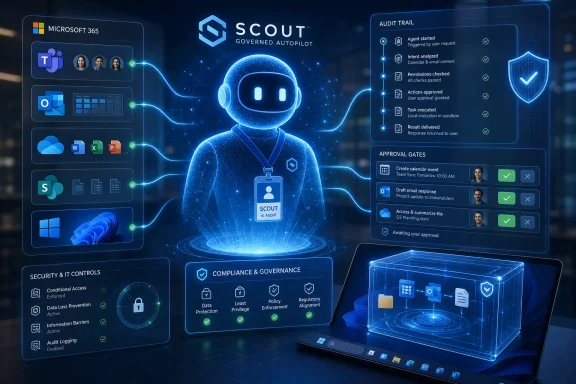
Microsoft unveiled Scout on June 2, 2026, as an experimental “Autopilot” AI agent for Microsoft 365 that can work across Teams, Outlook, OneDrive, SharePoint, browsers, local files, and managed desktops for enrolled Frontier customers. The announcement matters less because Scout can schedule meetings or prepare documents, and more because Microsoft is trying to turn the AI assistant from a chat window into a governed actor inside the enterprise. This is Copilot’s logical next step: not a helper waiting for a prompt, but a persistent software colleague with identity, permissions, memory, and audit trails. For Windows users and IT administrators, that is both the promise and the problem.
The first generation of Copilot was easy to understand because it lived mostly inside familiar boundaries. You asked it to summarize an email thread, draft a paragraph, explain a spreadsheet, or generate a meeting recap. Even when the answers were imperfect, the mental model was simple: the human initiated the task, judged the response, and took the final action.
Scout changes that model. Microsoft describes it as the first member of a new category it calls Autopilots: always-on agents that act autonomously, operate with their own identity, and carry out work within permissions and policies defined by the user and organization. That wording is doing a lot of work. It is Microsoft’s attempt to normalize the idea that an AI system should not merely respond to work, but continue it.
The difference between “Copilot, draft this email” and “Scout, keep this project moving” is not cosmetic. One is a command. The other is a delegation. Delegation introduces ambiguity, and ambiguity is where enterprise software becomes politically interesting.
Microsoft is not pitching Scout as a consumer plaything that books restaurants or orders groceries. The first public version is a workplace agent, released through the Frontier program and tied to managed devices, Microsoft 365 work accounts, Intune policy, and GitHub Copilot Business or Enterprise licensing. That tells us the real launch audience is not the casual Windows user; it is the IT department that has spent the past two years being asked why the AI revolution still looks like a glorified autocomplete box.
Microsoft says Scout runs under its own governed Entra identity rather than a vague shared service account. That is a crucial architectural choice because enterprise IT cannot manage what it cannot name. If an autonomous agent sends a Teams message, updates a calendar, touches a SharePoint document, or triggers a browser workflow, administrators need to know which actor performed the action and under whose delegated authority.
This is where Microsoft’s decades of enterprise plumbing become an advantage. The company can wrap Scout in Entra, Purview, Defender, Intune, and Microsoft 365 policy because those systems already define how most organizations understand access, compliance, and device management. Scout is not being sold as a rebel agent that slips around corporate bureaucracy. It is being sold as a creature of that bureaucracy.
That may sound dull, but dullness is the point. The enterprise does not need an AI agent that behaves like a clever intern with root access and no paper trail. It needs an AI agent that can be suspended, audited, scoped, investigated, and blamed in a way that fits existing security operations.
Microsoft’s language around sensitive actions is therefore revealing. Scout can support user approval before external-facing actions such as sending email, posting Teams messages, updating calendar events, or running privileged operations. In other words, Microsoft knows the risk is not that an AI drafts something wrong. The risk is that it does something wrong while appearing to be you.
That is a meaningful shift after years in which the most important productivity surfaces seemed to move into the browser. If the agent needs to touch local files, browser sessions, Microsoft 365 data, MCP servers, and enterprise credentials, the desktop becomes relevant again as a controlled execution environment. The operating system is no longer just where apps run; it becomes where agents are confined.
For Windows administrators, this could create a new management layer that feels familiar in theory but messy in practice. Devices will not just have users, apps, services, and scheduled tasks. They may have semi-autonomous agents operating through policy, identity, and sandbox boundaries. The old question “what software is installed on this machine?” becomes “which agents are allowed to act from this machine, with what tools, and under whose authority?”
That is why Scout’s Frontier requirements matter. Microsoft is forcing early adopters through enrollment, admin opt-in, access groups, Intune configuration, and attestation. That is not just friction; it is institutional choreography. Microsoft is teaching customers that autonomous agents are not another download button. They are a managed workload.
Open-source agent frameworks have moved quickly because they are not bound by the slow certification cycles of enterprise software. They are where developers experiment with browser control, tool use, multi-step planning, and agents that persist beyond a single chat session. They are also where risk accumulates fastest: credential leakage, prompt injection, unbounded tool access, and unclear auditability are not theoretical problems when an agent can operate across applications.
Microsoft’s bet is that it can industrialize that energy. Scout takes the agentic pattern and wraps it in Microsoft 365’s governance fabric. The pitch is not “we invented autonomy.” It is “we can make autonomy administrable.”
That distinction matters. Microsoft has spent much of the Copilot era defending the value of its distribution advantage. Competitors can build clever models and slick apps, but Microsoft can place AI inside Outlook, Teams, Word, Excel, SharePoint, GitHub, Windows, and Azure. Scout extends that strategy from interface placement to operational authority. If Copilot was about meeting the user where they work, Scout is about acting where the work actually happens.
Meeting preparation is a good example. An agent that notices tomorrow’s customer call, pulls the relevant emails, checks the latest shared files, summarizes open decisions, and blocks prep time is not revolutionary in the cinematic sense. It is, however, exactly the kind of administrative residue that makes knowledge work feel slower than it should.
Scheduling across time zones is another. Anyone who has watched a Teams thread decay into “does Thursday work?” understands why even modest autonomy could be useful. If Scout can identify constraints, propose slots, prepare background material, and flag conflicts while leaving final approval to the user, it may save time without demanding blind trust.
The more ambitious feature is risk spotting. Microsoft says Scout can identify stalled decisions and upcoming deliverables. That moves the agent from convenience into management territory. A system that notices a blocked decision is not just helping with tasks; it is forming a view of organizational momentum.
That is where users may begin to feel the line blur. An assistant that reminds you of a deadline is helpful. An agent that infers which decisions are stalled may be helpful, political, or wrong depending on the context. Enterprise AI does not merely automate work; it can reshape who is seen as responsive, prepared, or behind.
That dual identity will be the source of much of Scout’s adoption friction. Workers may like the idea of an agent that protects their focus and handles routine coordination. They may be less enthusiastic about a system that continuously observes work patterns and turns them into machine-readable context. Even if Microsoft builds strong privacy and compliance controls, perception will matter.
The enterprise version of “memory” is not the same as the consumer version. In a consumer assistant, memory is often framed as personalization. In a workplace agent, memory becomes a record of priorities, relationships, recurring behaviors, and perhaps mistakes. Employees will want to know what Scout remembers, who can inspect it, how it is deleted, and whether its conclusions can follow them across roles or managers.
Administrators will have a different set of concerns. They will ask how Scout handles sensitivity labels, DLP policies, external sharing, privileged operations, retention, eDiscovery, and incident response. They will also need to know whether Scout’s actions are clearly distinguishable from human actions in logs and compliance workflows. If an agent makes a change, the organization cannot afford a mystery.
Microsoft’s advantage is that it already owns much of the compliance stack. Its challenge is that user trust is not inherited automatically from admin trust. A feature can be compliant and still feel invasive.
That gives Scout an experimental character, but it also reveals Microsoft’s commercial direction. Autonomous agents are likely to become a premium layer above traditional productivity software. The more they can take action, the easier it becomes to justify pricing based on saved time, automated workflows, or reduced coordination overhead.
For businesses, that raises a familiar Microsoft question: where does useful end and upsell begin? Copilot licensing has already forced organizations to decide which employees deserve AI assistance. Scout may sharpen that debate because its value depends on access to broad context. An agent assigned only to a few executives may reinforce hierarchy. An agent deployed broadly may become expensive and operationally complex.
Small businesses may eventually be the most interesting test case. A large enterprise has IT staff, compliance teams, and process owners to absorb the governance burden. A 25-person company may want Scout precisely because nobody has time to coordinate everything manually. But the same small company may lack the administrative maturity to safely deploy autonomous agents across email, files, browsers, and calendars.
That gap is where Microsoft will need to simplify. If Scout remains an elite Frontier experiment with enterprise prerequisites, it will influence the roadmap more than daily work. If Microsoft can turn it into a manageable product for ordinary Microsoft 365 Business customers, the implications become much broader.
This is why Scout’s promise to operate within existing policies should not be treated as marketing fluff. The entire category depends on whether vendors can make agents less like unpredictable browser macros and more like governed enterprise services. Identity, scoping, approval gates, sandboxing, logging, and data-loss prevention are not accessories; they are the minimum viable product.
The hard problem is that agents are useful precisely because they cross boundaries. A human worker can read an email, inspect a document, open a browser tab, check a calendar, and send a message. Scout is valuable only if it can perform similar connective tissue work. But every additional tool expands the blast radius of a mistake.
Human-in-the-loop approval is a necessary compromise, but it is not a complete solution. If every meaningful action requires approval, the agent becomes a faster draft generator. If too many actions are automatic, the agent becomes a liability. The art will be in policy granularity: allowing low-risk background work while forcing confirmation for external, irreversible, privileged, or reputationally sensitive actions.
IT departments should expect a new class of configuration debates. Which actions can Scout take silently? Which require user approval? Which require administrator approval? Which are forbidden? Which users are allowed to create habits and skills? Which data sources can be used for context? These are not philosophical questions. They are the operating manual for agentic work.
Expect more Microsoft apps to expose agent-friendly hooks. Expect more emphasis on structured work context, not just documents and messages. Expect administrators to see new policy surfaces for AI actors. Expect Windows to receive more sandboxing and runtime features intended not for traditional apps, but for agents that need to execute multi-step tasks safely.
This is where Windows enthusiasts should pay attention. The AI PC story has often been reduced to NPUs, local models, and Recall-adjacent controversy. Scout points to a more consequential layer: what happens when Windows becomes a place where semi-autonomous work is initiated, constrained, and observed. Local compute matters, but local control may matter more.
There is also a developer angle. Microsoft’s broader Build announcements around model context, agent services, execution containers, and agent governance suggest that Scout is not a one-off product. It is a reference implementation for the kind of agent Microsoft wants developers and enterprises to build. If Copilot showed what Microsoft could add to apps, Scout shows what Microsoft thinks apps may become.
In that future, software is less about opening a tool and more about assigning intent. The agent chooses tools, sequences steps, and reports back. That sounds elegant until something breaks. Then the user needs transparency, replay, logs, rollback, and a way to understand why the agent did what it did.
That is Microsoft’s opening. It does not need Scout to be the most dazzling agent on day one. It needs Scout to be the agent a CIO can pilot without rewriting the organization’s security model. If Microsoft wins that trust layer, it can afford to iterate on the interface.
The danger is complacency. Enterprise integration can make products sticky, but it can also make them bureaucratic. If Scout feels slow, over-permissioned, under-capable, or trapped behind licensing tiers, users will route around it with lighter tools. The history of workplace software is full of official platforms that employees tolerate while using something else to get work done.
Microsoft also has to prove that Scout’s autonomy is real enough to matter. The word “agent” has been stretched nearly to meaninglessness. A system that merely bundles reminders, summaries, and templates will not justify the governance ceremony. To deserve the Autopilot label, Scout must reliably carry work forward without constant prompting, while staying inside boundaries that users and administrators understand.
That is a narrow path. Too little autonomy and Scout is Copilot with a calendar. Too much autonomy and it becomes the thing security teams warned about.
The company’s broader Build framing makes this explicit. Microsoft is not presenting AI progress as a single model breakthrough. It is presenting a stack: in-house models, partner models, Work IQ, Web IQ, Foundry, Windows execution containers, Agent 365, Purview, Entra, Defender, Copilot Studio, and Microsoft 365. Scout sits near the top of that stack, where the user can finally see whether the machinery produces something useful.
That also means Scout’s failures will be stack failures. If context is wrong, Work IQ will be blamed. If permissions are confusing, Entra and admin policy will be blamed. If an agent action leaks data, Purview and DLP will be scrutinized. If the desktop app behaves unpredictably, Windows will be implicated. Microsoft is binding its AI narrative together, which makes the story stronger and the accountability broader.
For IT pros, the prudent response is neither panic nor blind adoption. Scout should be treated like a new class of endpoint workload. It needs pilot groups, scoped permissions, logging review, user education, incident procedures, and clear rules for what the agent may never do. The organizations that get value from agents will not be the ones that simply turn them on. They will be the ones that define the boundaries before the boundary is tested.
It is also a change that will make some people uneasy for good reasons. Work is not just a set of tasks. It is judgment, timing, relationships, hesitation, politics, and responsibility. The more an agent participates in that environment, the more it must be evaluated not only as software, but as an actor inside an organization.
Microsoft’s use of a separate agent identity is an acknowledgement of that reality. Scout is not merely a feature hiding inside Outlook. It is something that acts. Once software acts, it needs accountability.
That accountability will determine whether Scout becomes a milestone or another AI curiosity. If users can see what it is doing, correct it, constrain it, and trust it with low-level coordination, it may gradually become part of the workday. If it feels opaque or presumptuous, it will be disabled by the same administrators Microsoft is trying to reassure.
 Microsoft Moves the AI Assistant Out of the Prompt Box
The first generation of Copilot was easy to understand because it lived mostly inside familiar boundaries. You asked it to summarize an email thread, draft a paragraph, explain a spreadsheet, or generate a meeting recap. Even when the answers were imperfect, the mental model was simple: the human initiated the task, judged the response, and took the final action.Scout changes that model. Microsoft describes it as the first member of a new category it calls Autopilots: always-on agents that act autonomously, operate with their own identity, and carry out work within permissions and policies defined by the user and organization. That wording is doing a lot of work. It is Microsoft’s attempt to normalize the idea that an AI system should not merely respond to work, but continue it.
The difference between “Copilot, draft this email” and “Scout, keep this project moving” is not cosmetic. One is a command. The other is a delegation. Delegation introduces ambiguity, and ambiguity is where enterprise software becomes politically interesting.
Microsoft is not pitching Scout as a consumer plaything that books restaurants or orders groceries. The first public version is a workplace agent, released through the Frontier program and tied to managed devices, Microsoft 365 work accounts, Intune policy, and GitHub Copilot Business or Enterprise licensing. That tells us the real launch audience is not the casual Windows user; it is the IT department that has spent the past two years being asked why the AI revolution still looks like a glorified autocomplete box.
Scout Is Really a Governance Product Wearing an Assistant Costume
The most important parts of Scout are not the demos. They are the identity and control plane.Microsoft says Scout runs under its own governed Entra identity rather than a vague shared service account. That is a crucial architectural choice because enterprise IT cannot manage what it cannot name. If an autonomous agent sends a Teams message, updates a calendar, touches a SharePoint document, or triggers a browser workflow, administrators need to know which actor performed the action and under whose delegated authority.
This is where Microsoft’s decades of enterprise plumbing become an advantage. The company can wrap Scout in Entra, Purview, Defender, Intune, and Microsoft 365 policy because those systems already define how most organizations understand access, compliance, and device management. Scout is not being sold as a rebel agent that slips around corporate bureaucracy. It is being sold as a creature of that bureaucracy.
That may sound dull, but dullness is the point. The enterprise does not need an AI agent that behaves like a clever intern with root access and no paper trail. It needs an AI agent that can be suspended, audited, scoped, investigated, and blamed in a way that fits existing security operations.
Microsoft’s language around sensitive actions is therefore revealing. Scout can support user approval before external-facing actions such as sending email, posting Teams messages, updating calendar events, or running privileged operations. In other words, Microsoft knows the risk is not that an AI drafts something wrong. The risk is that it does something wrong while appearing to be you.
The Desktop Returns as the Battlefield
Scout’s early desktop app supports Windows 11 and macOS, but the Windows implications are obvious. Microsoft has been repositioning Windows as an agent-native runtime, not merely an operating system with AI features glued onto the Start menu. The company’s Build messaging around execution containers, sandboxed environments, and local agent workflows all points in the same direction: Windows is being prepared to host AI actors that do more than answer questions.That is a meaningful shift after years in which the most important productivity surfaces seemed to move into the browser. If the agent needs to touch local files, browser sessions, Microsoft 365 data, MCP servers, and enterprise credentials, the desktop becomes relevant again as a controlled execution environment. The operating system is no longer just where apps run; it becomes where agents are confined.
For Windows administrators, this could create a new management layer that feels familiar in theory but messy in practice. Devices will not just have users, apps, services, and scheduled tasks. They may have semi-autonomous agents operating through policy, identity, and sandbox boundaries. The old question “what software is installed on this machine?” becomes “which agents are allowed to act from this machine, with what tools, and under whose authority?”
That is why Scout’s Frontier requirements matter. Microsoft is forcing early adopters through enrollment, admin opt-in, access groups, Intune configuration, and attestation. That is not just friction; it is institutional choreography. Microsoft is teaching customers that autonomous agents are not another download button. They are a managed workload.
The OpenClaw Connection Signals Both Confidence and Caution
Microsoft says Scout is powered by OpenClaw open-source technology, and the company is contributing policy conformance work upstream. That is a fascinating move because it lets Microsoft borrow credibility from the open-source agent movement while still presenting its own version as the safer enterprise package.Open-source agent frameworks have moved quickly because they are not bound by the slow certification cycles of enterprise software. They are where developers experiment with browser control, tool use, multi-step planning, and agents that persist beyond a single chat session. They are also where risk accumulates fastest: credential leakage, prompt injection, unbounded tool access, and unclear auditability are not theoretical problems when an agent can operate across applications.
Microsoft’s bet is that it can industrialize that energy. Scout takes the agentic pattern and wraps it in Microsoft 365’s governance fabric. The pitch is not “we invented autonomy.” It is “we can make autonomy administrable.”
That distinction matters. Microsoft has spent much of the Copilot era defending the value of its distribution advantage. Competitors can build clever models and slick apps, but Microsoft can place AI inside Outlook, Teams, Word, Excel, SharePoint, GitHub, Windows, and Azure. Scout extends that strategy from interface placement to operational authority. If Copilot was about meeting the user where they work, Scout is about acting where the work actually happens.
The Useful Version of Scout Will Be Boring
The temptation with every new autonomous agent is to imagine science-fiction productivity: an AI that plans your week, negotiates your meetings, builds presentations, reviews contracts, and keeps projects alive while you sleep. The more realistic value is less glamorous. Scout’s first compelling use cases are likely to be the quiet, irritating coordination tasks that consume white-collar workdays.Meeting preparation is a good example. An agent that notices tomorrow’s customer call, pulls the relevant emails, checks the latest shared files, summarizes open decisions, and blocks prep time is not revolutionary in the cinematic sense. It is, however, exactly the kind of administrative residue that makes knowledge work feel slower than it should.
Scheduling across time zones is another. Anyone who has watched a Teams thread decay into “does Thursday work?” understands why even modest autonomy could be useful. If Scout can identify constraints, propose slots, prepare background material, and flag conflicts while leaving final approval to the user, it may save time without demanding blind trust.
The more ambitious feature is risk spotting. Microsoft says Scout can identify stalled decisions and upcoming deliverables. That moves the agent from convenience into management territory. A system that notices a blocked decision is not just helping with tasks; it is forming a view of organizational momentum.
That is where users may begin to feel the line blur. An assistant that reminds you of a deadline is helpful. An agent that infers which decisions are stalled may be helpful, political, or wrong depending on the context. Enterprise AI does not merely automate work; it can reshape who is seen as responsive, prepared, or behind.
Personal Automation Meets Corporate Surveillance Anxiety
Microsoft’s phrase “personal agent for work” is carefully chosen, but it contains a tension. If Scout learns how you work, what you care about, whom you meet, which deliverables matter, and where decisions stall, it becomes deeply personal. If it does so inside a corporate tenant, under enterprise policy, it is also organizational infrastructure.That dual identity will be the source of much of Scout’s adoption friction. Workers may like the idea of an agent that protects their focus and handles routine coordination. They may be less enthusiastic about a system that continuously observes work patterns and turns them into machine-readable context. Even if Microsoft builds strong privacy and compliance controls, perception will matter.
The enterprise version of “memory” is not the same as the consumer version. In a consumer assistant, memory is often framed as personalization. In a workplace agent, memory becomes a record of priorities, relationships, recurring behaviors, and perhaps mistakes. Employees will want to know what Scout remembers, who can inspect it, how it is deleted, and whether its conclusions can follow them across roles or managers.
Administrators will have a different set of concerns. They will ask how Scout handles sensitivity labels, DLP policies, external sharing, privileged operations, retention, eDiscovery, and incident response. They will also need to know whether Scout’s actions are clearly distinguishable from human actions in logs and compliance workflows. If an agent makes a change, the organization cannot afford a mystery.
Microsoft’s advantage is that it already owns much of the compliance stack. Its challenge is that user trust is not inherited automatically from admin trust. A feature can be compliant and still feel invasive.
The Licensing Signal Is Easy to Miss
Scout’s early availability through Frontier and its requirement for GitHub Copilot Business or Enterprise licensing are not incidental. Microsoft is linking workplace agents to the developer and enterprise AI economy rather than simply bundling them into every Microsoft 365 subscription on day one.That gives Scout an experimental character, but it also reveals Microsoft’s commercial direction. Autonomous agents are likely to become a premium layer above traditional productivity software. The more they can take action, the easier it becomes to justify pricing based on saved time, automated workflows, or reduced coordination overhead.
For businesses, that raises a familiar Microsoft question: where does useful end and upsell begin? Copilot licensing has already forced organizations to decide which employees deserve AI assistance. Scout may sharpen that debate because its value depends on access to broad context. An agent assigned only to a few executives may reinforce hierarchy. An agent deployed broadly may become expensive and operationally complex.
Small businesses may eventually be the most interesting test case. A large enterprise has IT staff, compliance teams, and process owners to absorb the governance burden. A 25-person company may want Scout precisely because nobody has time to coordinate everything manually. But the same small company may lack the administrative maturity to safely deploy autonomous agents across email, files, browsers, and calendars.
That gap is where Microsoft will need to simplify. If Scout remains an elite Frontier experiment with enterprise prerequisites, it will influence the roadmap more than daily work. If Microsoft can turn it into a manageable product for ordinary Microsoft 365 Business customers, the implications become much broader.
The Security Model Is the Product
Autonomous agents create a new attack surface because they combine language understanding, tool access, credentials, and persistence. A chatbot that hallucinates is embarrassing. An agent that reads a malicious instruction hidden in a document and then takes action is dangerous.This is why Scout’s promise to operate within existing policies should not be treated as marketing fluff. The entire category depends on whether vendors can make agents less like unpredictable browser macros and more like governed enterprise services. Identity, scoping, approval gates, sandboxing, logging, and data-loss prevention are not accessories; they are the minimum viable product.
The hard problem is that agents are useful precisely because they cross boundaries. A human worker can read an email, inspect a document, open a browser tab, check a calendar, and send a message. Scout is valuable only if it can perform similar connective tissue work. But every additional tool expands the blast radius of a mistake.
Human-in-the-loop approval is a necessary compromise, but it is not a complete solution. If every meaningful action requires approval, the agent becomes a faster draft generator. If too many actions are automatic, the agent becomes a liability. The art will be in policy granularity: allowing low-risk background work while forcing confirmation for external, irreversible, privileged, or reputationally sensitive actions.
IT departments should expect a new class of configuration debates. Which actions can Scout take silently? Which require user approval? Which require administrator approval? Which are forbidden? Which users are allowed to create habits and skills? Which data sources can be used for context? These are not philosophical questions. They are the operating manual for agentic work.
Windows Users Will Feel Scout Indirectly Before They Use It Directly
Most Windows users will not install Scout today. The early release is limited, managed, and experimental. But Scout’s design will still influence the Microsoft ecosystem quickly because it represents the direction of travel for Copilot, Windows, and Microsoft 365.Expect more Microsoft apps to expose agent-friendly hooks. Expect more emphasis on structured work context, not just documents and messages. Expect administrators to see new policy surfaces for AI actors. Expect Windows to receive more sandboxing and runtime features intended not for traditional apps, but for agents that need to execute multi-step tasks safely.
This is where Windows enthusiasts should pay attention. The AI PC story has often been reduced to NPUs, local models, and Recall-adjacent controversy. Scout points to a more consequential layer: what happens when Windows becomes a place where semi-autonomous work is initiated, constrained, and observed. Local compute matters, but local control may matter more.
There is also a developer angle. Microsoft’s broader Build announcements around model context, agent services, execution containers, and agent governance suggest that Scout is not a one-off product. It is a reference implementation for the kind of agent Microsoft wants developers and enterprises to build. If Copilot showed what Microsoft could add to apps, Scout shows what Microsoft thinks apps may become.
In that future, software is less about opening a tool and more about assigning intent. The agent chooses tools, sequences steps, and reports back. That sounds elegant until something breaks. Then the user needs transparency, replay, logs, rollback, and a way to understand why the agent did what it did.
Microsoft Is Trying to Win the Trust Layer Before Rivals Win the Interface
The AI agent market is crowded with startups promising autonomous workers, personal assistants, sales agents, research agents, coding agents, and browser agents. Many move faster than Microsoft. Some are more imaginative. Few can walk into an enterprise and say, with a straight face, that their agent already fits the customer’s directory, compliance, device management, and productivity estate.That is Microsoft’s opening. It does not need Scout to be the most dazzling agent on day one. It needs Scout to be the agent a CIO can pilot without rewriting the organization’s security model. If Microsoft wins that trust layer, it can afford to iterate on the interface.
The danger is complacency. Enterprise integration can make products sticky, but it can also make them bureaucratic. If Scout feels slow, over-permissioned, under-capable, or trapped behind licensing tiers, users will route around it with lighter tools. The history of workplace software is full of official platforms that employees tolerate while using something else to get work done.
Microsoft also has to prove that Scout’s autonomy is real enough to matter. The word “agent” has been stretched nearly to meaninglessness. A system that merely bundles reminders, summaries, and templates will not justify the governance ceremony. To deserve the Autopilot label, Scout must reliably carry work forward without constant prompting, while staying inside boundaries that users and administrators understand.
That is a narrow path. Too little autonomy and Scout is Copilot with a calendar. Too much autonomy and it becomes the thing security teams warned about.
The Scout Pilot Will Test Microsoft’s Entire AI Strategy
Scout is not just another Microsoft 365 feature. It is a stress test for Microsoft’s claim that enterprise AI needs a complete system: models, context, identity, governance, endpoints, developer tools, and productivity surfaces all working together. If that system works, Microsoft has an answer to the central criticism of generative AI in the workplace: that it is impressive in demos but fragmented in production.The company’s broader Build framing makes this explicit. Microsoft is not presenting AI progress as a single model breakthrough. It is presenting a stack: in-house models, partner models, Work IQ, Web IQ, Foundry, Windows execution containers, Agent 365, Purview, Entra, Defender, Copilot Studio, and Microsoft 365. Scout sits near the top of that stack, where the user can finally see whether the machinery produces something useful.
That also means Scout’s failures will be stack failures. If context is wrong, Work IQ will be blamed. If permissions are confusing, Entra and admin policy will be blamed. If an agent action leaks data, Purview and DLP will be scrutinized. If the desktop app behaves unpredictably, Windows will be implicated. Microsoft is binding its AI narrative together, which makes the story stronger and the accountability broader.
For IT pros, the prudent response is neither panic nor blind adoption. Scout should be treated like a new class of endpoint workload. It needs pilot groups, scoped permissions, logging review, user education, incident procedures, and clear rules for what the agent may never do. The organizations that get value from agents will not be the ones that simply turn them on. They will be the ones that define the boundaries before the boundary is tested.
The Real News Is Not Scout’s Debut, but Microsoft’s New Default Assumption
The old default assumption in productivity software was that humans operate tools. Scout introduces a different assumption: software can operate tools for humans, continuously, if the enterprise can govern it. That is a profound change in how Microsoft wants work to be organized.It is also a change that will make some people uneasy for good reasons. Work is not just a set of tasks. It is judgment, timing, relationships, hesitation, politics, and responsibility. The more an agent participates in that environment, the more it must be evaluated not only as software, but as an actor inside an organization.
Microsoft’s use of a separate agent identity is an acknowledgement of that reality. Scout is not merely a feature hiding inside Outlook. It is something that acts. Once software acts, it needs accountability.
That accountability will determine whether Scout becomes a milestone or another AI curiosity. If users can see what it is doing, correct it, constrain it, and trust it with low-level coordination, it may gradually become part of the workday. If it feels opaque or presumptuous, it will be disabled by the same administrators Microsoft is trying to reassure.
The First Scout Deployments Will Belong to the Brave and the Well-Managed
Scout’s near-term impact will be limited by its Frontier status, licensing requirements, and administrative prerequisites, but its strategic importance is larger than its initial install base. The organizations that test it now will be helping define the norms for AI agents inside Microsoft 365 tenants. They will also discover that agent deployment is less about novelty than operational discipline.- Scout is currently an experimental Microsoft Frontier experience rather than a general Microsoft 365 feature for every user.
- The agent is designed to work across Microsoft 365 services, local files, browsers, and managed desktop environments while keeping sensitive actions under user or policy control.
- Microsoft is positioning Scout as its first “Autopilot,” meaning an always-on agent with its own governed identity and the ability to act without being prompted every time.
- The most important enterprise features are identity, approval gates, policy enforcement, auditability, and integration with Microsoft’s existing security and compliance stack.
- Windows administrators should view Scout as an early signal that endpoints will increasingly host governed AI agents, not merely traditional applications.
- The practical value will come from mundane coordination work first, while higher-risk autonomous actions will require careful policy design and user trust.
References
- Primary source: bgnes.com
Published: 2026-06-03T03:55:11.678644

Microsoft has unveiled a new autonomous AI agent called "Scout" for personal and business automation
Microsoft announced a new series of AI features during the Microsoft Build 2026 conference, with one of the most significant announcements being the new autonomous agent "Microsoft Scout," accordin www.bgnes.com
- Related coverage: techradar.com
- Official source: microsoft.com

Introducing Microsoft Scout: Your always-on personal agent | Microsoft 365 Blog
Microsoft introduces a new, always-on personal agent, Microsoft Scout, integrated across the Microsoft 365 apps you use every day. www.microsoft.com
- Related coverage: techcrunch.com

Microsoft launches Scout, an OpenClaw-inspired personal assistant | TechCrunch
Launched at Build, Microsoft Scout is a new AI assistant meant to bring the power and flexibility of OpenClaw into the Microsoft 365 system. techcrunch.com
- Official source: blogs.microsoft.com

AI alone won't change your business. The system running it will. - The Official Microsoft Blog
Become an AI-first enterprise with Microsoft’s agent platform. blogs.microsoft.com
- Related coverage: pcworld.com

Microsoft’s Scout AI agent is aimed directly at your workplace
Unlike Gemini Spark, which aims to be a 24/7 AI agent for everyone, Microsoft is aiming its always-on Scout agent directly at the workplace. www.pcworld.com
- Related coverage: entarabi.com

Microsoft Launches Scout, a Personal AI Assistant Inspired by OpenClaw for Microsoft 365 - إنت عربي | entARABI
Microsoft has launched Scout, a new personal AI assistant designed to bring the flexibility and power of agentic AI into the Microsoft 365 ecosystem. The entarabi.com
- Related coverage: technobezz.com

Microsoft Launches Scout Personal Assistant Built on OpenClaw Technology
Microsoft launches Scout, an autonomous AI assistant built on OpenClaw, operating across cloud and desktop with persistent identity. www.technobezz.com
- Related coverage: thenewstack.io

Microsoft debuts "Scout" at Build, a new personal agent for work
Available now for Frontier customers, the personal agent understands how you work and proactively handles routine tasks without being asked. thenewstack.io
- Related coverage: axios.com

Microsoft debuts Scout agent, homegrown reasoning model
Microsoft is seeking to show it is a serious player in AI.www.axios.com
- Related coverage: numerama.com

Cette nouvelle IA de Windows réorganise votre agenda sans rien demander
Microsoft a présenté Scout, un agent d’IA autonome et toujours actif intégré à l'écosystème Windows. Capable de gérer de manière proactive vos réunions et vos tâches sur Teams et Outlook sans aucune commande manuelle, cet assistant propulsé par OpenClaw et Work IQ est disponible dès à présent... www.numerama.com
- Related coverage: windowscentral.com

Microsoft 365 Copilot "Wave 3" expands with more agentic AI control
Microsoft is rolling out more AI agent control, expanded model support, and a new subscription tier to Microsoft 365. www.windowscentral.com
- Related coverage: techxplore.com
- Official source: cdn-dynmedia-1.microsoft.com
- Official source: wwps.microsoft.com
- Official source: marketingassets.microsoft.com
