

A small Tamil primary school in Pontian, Johor, is making a powerful case that meaningful AI-aided learning is not reserved for large urban campuses with extensive budgets and dedicated IT departments. SJK (T) Jalan Parit Ibrahim has been recognised as a Microsoft Showcase School, marking a significant achievement for a school serving just 33 pupils while using Microsoft 365, Teams, Learning Accelerators and Copilot to make classroom learning more personalised, measurable and engaging.
SJK (T) Jalan Parit Ibrahim’s achievement is notable for more than the Microsoft recognition itself. The school is described as Malaysia’s first Tamil school to attain Microsoft Showcase School status and the country’s only under-enrolled school in the programme. That places it in a category often overlooked in technology discussions: smaller schools that may face tighter staffing, infrastructure and funding constraints, yet can be agile enough to build coherent digital learning practices.
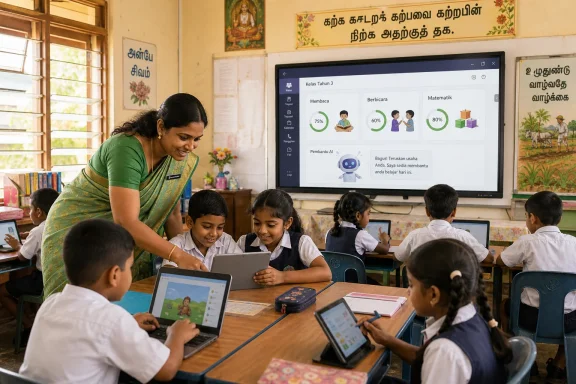
The school’s model combines one-device-per-pupil access, teacher training, classroom displays and Microsoft’s education platform. Instead of treating AI as a stand-alone subject or an occasional novelty, the staff have embedded digital tools into ordinary teaching routines.
That distinction matters. Many schools acquire laptops, smartboards or AI subscriptions without changing how lessons are planned, assessed or adapted. The result can be expensive technology sitting at the edge of the classroom rather than becoming part of the learning process.
At Jalan Parit Ibrahim, the stated objective is more practical: identify where each pupil needs support, provide feedback more quickly, and let teachers spend a greater share of their time on direct instruction and human interaction.
That is an important distinction for school leaders and IT administrators. A modern classroom is not defined by the number of screens in a room. It is defined by whether those screens support stronger teaching decisions, better student participation and more equitable access to learning.
Jalan Parit Ibrahim reportedly progressed through Microsoft’s incubator pathway before earning Showcase School standing, then retained its recognition across consecutive years. That journey suggests a gradual implementation model rather than a rushed rollout of generative AI tools.
This sequencing is sensible for several reasons:
For a small school, a single platform reduces fragmentation. Pupils do not need to move between unrelated messaging apps, file-sharing services and assessment tools. Teachers gain a clearer overview of whether work has been opened, submitted, returned or left incomplete.
Teams can also make continuity easier when pupils are absent. Lessons, resources and assignments remain accessible through the class workspace instead of depending entirely on paper handouts or verbal instructions.
From a Windows administration perspective, the value is also clear. A Microsoft 365-based environment can work naturally with managed Windows devices, Microsoft Entra identity controls, OneDrive storage, Intune policies and familiar Office applications. That does not remove the need for careful administration, but it reduces the complexity of assembling a digital learning stack from disconnected products.
The appeal is not that software can judge a child’s reading perfectly. It cannot. Speech recognition can struggle with accents, dialects, background noise, code-switching and younger voices. In a multilingual environment, that limitation deserves special attention.
The real advantage is that teachers receive a structured starting point. They can review recordings, correct automated detections where needed and use the resulting information to identify patterns over time. A pupil who repeatedly struggles with a particular sound, word type or reading pace can receive targeted practice instead of a generic worksheet.
This can be especially useful in a school where every teacher must make the most of limited time. The software helps organise evidence, while the educator remains responsible for interpreting it.
That can be valuable for young learners who are reluctant to speak in front of a class. Rehearsing before submitting a recording gives pupils a lower-pressure environment in which to practice. Feedback becomes immediate rather than delayed until the next lesson.
For a school seeking to build confidence and prepare pupils for international presentations, the tool has a natural role. Still, the system should be used carefully. Speech and presentation norms vary between languages and cultures, and a technically detected issue should never automatically be treated as a communication failure.
Teachers must ensure that the goal is clearer, more confident expression—not forcing pupils to imitate a narrow model of how they should sound.
In a conventional classroom, a teacher may discover a learning gap only after checking a full stack of exercise books or receiving poor results on an assessment. Digital progress tools can surface those signals earlier.
For example, if several pupils struggle with a certain type of fraction, arithmetic operation or word problem, the teacher can adapt the next lesson quickly. Pupils who demonstrate readiness can receive more challenging work instead of waiting for the rest of the class to catch up.
This is where the phrase personalised learning becomes meaningful. It should not mean every child learns alone in front of a laptop. It should mean the teacher has better evidence for deciding who needs an explanation, who needs practice and who is ready to extend their learning.
Generating a first draft of a quiz, several difficulty levels of a worksheet or a creative classroom activity can save time. For teachers in small schools, who may handle multiple subjects, administrative tasks and extracurricular responsibilities, that time-saving potential is substantial.
However, Copilot-generated material must never be accepted without review. AI can produce inaccurate facts, misleading explanations, unsuitable examples or content that does not match the local curriculum. It can also generate material that appears polished while containing subtle errors.
The right model is teacher-led AI assistance. Copilot can accelerate preparation, but it cannot replace professional judgment, subject knowledge or awareness of a particular class’s needs.
Individual device access matters because shared technology often introduces friction. If pupils must wait in groups for a computer, personalised feedback becomes harder to deliver. A reading recording, mathematics activity or Teams assignment may become a once-a-week event rather than a regular part of learning.
One-device-per-pupil access does not mean pupils must stare at screens for every minute of the day. The strongest digital classrooms alternate between device-based tasks, teacher explanation, discussion, handwriting, practical activities and collaborative work.
This is why technology leadership in schools cannot be reduced to procurement. It is an ongoing service-management responsibility.
That commitment is essential because AI tools are only as useful as the educators directing them. A dashboard filled with progress data does not automatically improve learning. Teachers need to know what the data means, when it may be unreliable and how to convert it into an effective next lesson.
Immediate feedback can motivate pupils. Data dashboards can help teachers respond faster. Better access to devices can give young learners opportunities to present, create and collaborate in ways that were previously unavailable.
Yet there is also a need for discipline when evaluating AI in education. Improved results should not automatically be credited to AI alone. Technology adoption often arrives alongside stronger teacher collaboration, upgraded facilities, fresh leadership attention, new training and greater pupil enthusiasm. All of these factors may contribute to improvement.
This is not a criticism of Jalan Parit Ibrahim. It is a reminder that education technology needs evidence as well as enthusiasm.
A stronger long-term evaluation would track outcomes such as:
Schools must treat this information with the same care they would apply to assessment records or student files.
AI is strongest when it handles repetitive drafting, initial pattern recognition and rapid feedback. Teachers are strongest where education is most human: motivation, care, explanation, judgment, cultural understanding and relationship-building.
No algorithm can replace the moment a teacher recognises that a pupil is frustrated, embarrassed, distracted or suddenly ready to excel.
A practical rollout can be built around:
A device fleet without a learning goal becomes a maintenance burden. A well-defined learning goal supported by reliable devices, trained teachers and sensible policies can become a genuine transformation.
The school did receive support, including a reported RM10,000 allocation to deepen its AI culture and digital learning environment. Funding matters, and no school should be expected to build sustainable technology programmes without resources.
But the more important asset appears to be a culture of continuous improvement. The school moved from limited computing access to a more connected learning environment by developing its teachers, improving infrastructure, adopting tools gradually and connecting technology use to specific classroom needs.
That is a more durable model than a one-off smart classroom launch.
The strongest part of the school’s approach is not the presence of Copilot, smartboards or learning analytics in isolation. It is the effort to make those technologies serve teachers and pupils through targeted feedback, differentiated materials, increased confidence and stronger digital literacy.
The risks are real. AI can be inaccurate, biased, invasive or distracting when deployed carelessly. Data protection, teacher oversight, equitable access and critical thinking must remain non-negotiable. Recognition should also be followed by transparent, long-term evidence of educational impact.
Still, the school’s journey offers a practical lesson for the wider Windows and Microsoft Education community: digital transformation succeeds when technology is introduced with purpose, maintained with discipline and guided by educators who remain firmly in charge of learning.
 Overview: A Small School With an Ambitious Digital Model
SJK (T) Jalan Parit Ibrahim’s achievement is notable for more than the Microsoft recognition itself. The school is described as Malaysia’s first Tamil school to attain Microsoft Showcase School status and the country’s only under-enrolled school in the programme. That places it in a category often overlooked in technology discussions: smaller schools that may face tighter staffing, infrastructure and funding constraints, yet can be agile enough to build coherent digital learning practices.The school’s model combines one-device-per-pupil access, teacher training, classroom displays and Microsoft’s education platform. Instead of treating AI as a stand-alone subject or an occasional novelty, the staff have embedded digital tools into ordinary teaching routines.
That distinction matters. Many schools acquire laptops, smartboards or AI subscriptions without changing how lessons are planned, assessed or adapted. The result can be expensive technology sitting at the edge of the classroom rather than becoming part of the learning process.
At Jalan Parit Ibrahim, the stated objective is more practical: identify where each pupil needs support, provide feedback more quickly, and let teachers spend a greater share of their time on direct instruction and human interaction.
What Microsoft Showcase School Recognition Represents
A Microsoft Showcase School designation is intended to identify institutions that demonstrate sustained innovation using Microsoft’s education technologies. It is not simply an award for deploying Teams or purchasing Windows laptops. Schools in the programme are expected to show progress in leadership, educator development, digital culture, accessibility, learning design and measurable technology integration.That is an important distinction for school leaders and IT administrators. A modern classroom is not defined by the number of screens in a room. It is defined by whether those screens support stronger teaching decisions, better student participation and more equitable access to learning.
Jalan Parit Ibrahim reportedly progressed through Microsoft’s incubator pathway before earning Showcase School standing, then retained its recognition across consecutive years. That journey suggests a gradual implementation model rather than a rushed rollout of generative AI tools.
Why gradual adoption is the smarter approach
The school’s digital transformation began with Microsoft 365 and Microsoft Teams, which established the basic environment for communication, assignments, files and collaboration. AI-enabled tools were introduced later, after teachers and pupils had become comfortable working digitally.This sequencing is sensible for several reasons:
- Teachers need time to redesign lessons around digital feedback and individual progress data.
- Pupils need consistent device habits, account security awareness and confidence using educational software.
- Schools need reliable Wi-Fi, charging arrangements, device management and support processes before expanding usage.
- Administrators need policies governing assessment, recording, privacy and the use of generative AI.
- AI tools work best when they enhance an already functioning instructional workflow rather than trying to replace one.
The AI-Powered Classroom: Tools With Defined Roles
The school’s classroom model reportedly uses several Microsoft Education tools, each aligned with a specific teaching task. This is a far more convincing use of AI than simply allowing pupils to ask a chatbot for answers.Microsoft Teams as the learning hub
Microsoft Teams for Education serves as the central digital classroom. Teachers can distribute materials, create assignments, organise class discussions, return feedback and track work in one managed environment.For a small school, a single platform reduces fragmentation. Pupils do not need to move between unrelated messaging apps, file-sharing services and assessment tools. Teachers gain a clearer overview of whether work has been opened, submitted, returned or left incomplete.
Teams can also make continuity easier when pupils are absent. Lessons, resources and assignments remain accessible through the class workspace instead of depending entirely on paper handouts or verbal instructions.
From a Windows administration perspective, the value is also clear. A Microsoft 365-based environment can work naturally with managed Windows devices, Microsoft Entra identity controls, OneDrive storage, Intune policies and familiar Office applications. That does not remove the need for careful administration, but it reduces the complexity of assembling a digital learning stack from disconnected products.
Reading Progress: Turning reading practice into usable feedback
Reading Progress is one of the more practical tools in the school’s approach. Pupils can record themselves reading assigned passages aloud, while teachers review performance and identify issues involving accuracy, pace, pronunciation and expression.The appeal is not that software can judge a child’s reading perfectly. It cannot. Speech recognition can struggle with accents, dialects, background noise, code-switching and younger voices. In a multilingual environment, that limitation deserves special attention.
The real advantage is that teachers receive a structured starting point. They can review recordings, correct automated detections where needed and use the resulting information to identify patterns over time. A pupil who repeatedly struggles with a particular sound, word type or reading pace can receive targeted practice instead of a generic worksheet.
This can be especially useful in a school where every teacher must make the most of limited time. The software helps organise evidence, while the educator remains responsible for interpreting it.
Speaker Progress: Supporting confidence, not just correctness
Speaker Progress adds another dimension to AI-aided learning by focusing on oral presentations. Pupils can rehearse and record spoken work, then receive feedback related to delivery factors such as speaking pace, filler words, pronunciation and presentation habits.That can be valuable for young learners who are reluctant to speak in front of a class. Rehearsing before submitting a recording gives pupils a lower-pressure environment in which to practice. Feedback becomes immediate rather than delayed until the next lesson.
For a school seeking to build confidence and prepare pupils for international presentations, the tool has a natural role. Still, the system should be used carefully. Speech and presentation norms vary between languages and cultures, and a technically detected issue should never automatically be treated as a communication failure.
Teachers must ensure that the goal is clearer, more confident expression—not forcing pupils to imitate a narrow model of how they should sound.
Math Progress: Finding gaps before they become barriers
Math Progress supports teachers in building assignments around foundational mathematics skills and reviewing progress through dashboards and insights. It can help educators spot where pupils are succeeding, where they are stuck and which concepts need to be revisited.In a conventional classroom, a teacher may discover a learning gap only after checking a full stack of exercise books or receiving poor results on an assessment. Digital progress tools can surface those signals earlier.
For example, if several pupils struggle with a certain type of fraction, arithmetic operation or word problem, the teacher can adapt the next lesson quickly. Pupils who demonstrate readiness can receive more challenging work instead of waiting for the rest of the class to catch up.
This is where the phrase personalised learning becomes meaningful. It should not mean every child learns alone in front of a laptop. It should mean the teacher has better evidence for deciding who needs an explanation, who needs practice and who is ready to extend their learning.
Microsoft Copilot for teachers
The school also uses Microsoft Copilot to assist with lesson planning, differentiated learning materials, quizzes and classroom activities. This is potentially one of the most productive applications of generative AI in education, provided that teachers remain accountable for final decisions.Generating a first draft of a quiz, several difficulty levels of a worksheet or a creative classroom activity can save time. For teachers in small schools, who may handle multiple subjects, administrative tasks and extracurricular responsibilities, that time-saving potential is substantial.
However, Copilot-generated material must never be accepted without review. AI can produce inaccurate facts, misleading explanations, unsuitable examples or content that does not match the local curriculum. It can also generate material that appears polished while containing subtle errors.
The right model is teacher-led AI assistance. Copilot can accelerate preparation, but it cannot replace professional judgment, subject knowledge or awareness of a particular class’s needs.
The Importance of “One Student, One Device”
Jalan Parit Ibrahim’s “One Student, One Device” concept provides the hardware foundation for its digital learning strategy. With 24 laptops and 15 tablets available to 33 pupils, alongside smartboards and smart TVs across six classrooms, the school has built an unusually well-equipped environment for its size.Individual device access matters because shared technology often introduces friction. If pupils must wait in groups for a computer, personalised feedback becomes harder to deliver. A reading recording, mathematics activity or Teams assignment may become a once-a-week event rather than a regular part of learning.
One-device-per-pupil access does not mean pupils must stare at screens for every minute of the day. The strongest digital classrooms alternate between device-based tasks, teacher explanation, discussion, handwriting, practical activities and collaborative work.
Devices are only one part of the equation
The headline hardware numbers are impressive, but they should not obscure the operational requirements behind them. A school running daily device use needs a sustainable approach to:- Wi-Fi coverage and bandwidth
- Battery charging and safe storage
- Device repairs and replacement cycles
- Windows updates and security patches
- User account management
- Content filtering and child-safe browsing
- Backup and recovery planning
- Accessibility settings for pupils with different needs
- Clear rules for responsible technology use
This is why technology leadership in schools cannot be reduced to procurement. It is an ongoing service-management responsibility.
Teacher Training Is the Real Transformation Engine
The most important part of the school’s story may be its emphasis on professional development. Teachers reportedly received continuing training in Microsoft Education technologies, AI integration and digital teaching practices, while the school’s educators gained Microsoft Innovative Educator qualifications.That commitment is essential because AI tools are only as useful as the educators directing them. A dashboard filled with progress data does not automatically improve learning. Teachers need to know what the data means, when it may be unreliable and how to convert it into an effective next lesson.
Training must go beyond button-clicking
A successful AI training programme should cover more than how to create an assignment or generate a prompt. Educators also need support in areas such as:- Prompt design and verification
Teachers should understand how to request useful draft materials from Copilot and how to check every output for factual, pedagogical and cultural accuracy. - Assessment integrity
AI can help create formative exercises, but schools need clear boundaries on when pupils may use AI and when independently demonstrated work is required. - Data interpretation
Reading or mathematics analytics must be treated as signals for professional investigation, not as unquestionable verdicts. - Privacy and safeguarding
Teachers must know what pupil data can be entered into systems, what should remain confidential and when parent consent or additional controls are required. - Inclusive teaching practice
Digital tools should support pupils with different abilities, language backgrounds and confidence levels rather than creating new barriers. - AI literacy for pupils
Children should learn that an AI-generated answer can be incomplete, biased or wrong—and that verification remains a human responsibility.
Measurable Benefits—and the Need for Careful Claims
The school reports stronger classroom assessment performance, higher pupil confidence and increased opportunities for pupils to participate in international presentations. Those outcomes are promising, particularly in a small-school setting where a focused intervention may have a visible effect.Immediate feedback can motivate pupils. Data dashboards can help teachers respond faster. Better access to devices can give young learners opportunities to present, create and collaborate in ways that were previously unavailable.
Yet there is also a need for discipline when evaluating AI in education. Improved results should not automatically be credited to AI alone. Technology adoption often arrives alongside stronger teacher collaboration, upgraded facilities, fresh leadership attention, new training and greater pupil enthusiasm. All of these factors may contribute to improvement.
Recognition is not the same as independent proof
Microsoft Showcase School status is a meaningful recognition of digital transformation, but it should not be confused with an independent, controlled evaluation of academic outcomes. The designation indicates that a school has demonstrated innovation and alignment with programme criteria. It does not, by itself, prove that a particular AI feature caused a specific increase in performance.This is not a criticism of Jalan Parit Ibrahim. It is a reminder that education technology needs evidence as well as enthusiasm.
A stronger long-term evaluation would track outcomes such as:
- Reading fluency and comprehension over multiple terms
- Mathematics proficiency by skill area
- Attendance and assignment completion
- Pupil confidence and participation levels
- Teacher preparation time
- Equity of access across different learners
- Device uptime and technical support needs
- Parent confidence in the digital learning model
Privacy, Safety and the Risks of AI-Enabled Learning
The school’s AI-powered classroom should also prompt a serious discussion about privacy. Reading and speaking tools can involve pupil voice recordings, video, performance data and learning analytics. Generative AI platforms involve prompts and responses that may contain educational content, lesson material or other sensitive context.Schools must treat this information with the same care they would apply to assessment records or student files.
Key risks schools must manage
Several risks deserve close attention as AI becomes more common in primary education:- Speech-recognition bias: Automated feedback may be less reliable for regional accents, multilingual speech or Tamil language contexts not fully represented in training data.
- Over-reliance on dashboards: Quantitative measures can be useful, but they may not capture comprehension, creativity, effort or emotional well-being.
- Generative AI errors: Copilot and similar tools can invent facts, calculations or citations with convincing confidence.
- Data exposure: Teachers must avoid entering unnecessary personal or sensitive pupil information into AI prompts.
- Digital inequality beyond school: One-device-per-pupil access at school does not automatically mean every family has strong connectivity or device access at home.
- Reduced human interaction: A poorly designed programme could shift too much time toward individual screen work rather than discussion, play, collaboration and teacher guidance.
- Assessment confusion: Schools need clear rules about when AI assistance is permitted and how original learning will be evaluated.
The human teacher remains central
The school’s stated principle that AI should remain a learning partner rather than a replacement for human thinking is exactly right. A reading tool can identify likely pronunciation errors; a teacher understands why a child may be struggling. A chatbot can suggest a quiz; a teacher knows whether the questions will inspire curiosity or create confusion.AI is strongest when it handles repetitive drafting, initial pattern recognition and rapid feedback. Teachers are strongest where education is most human: motivation, care, explanation, judgment, cultural understanding and relationship-building.
No algorithm can replace the moment a teacher recognises that a pupil is frustrated, embarrassed, distracted or suddenly ready to excel.
Lessons for Windows-Based School Technology Programmes
For Windows schools considering a similar initiative, Jalan Parit Ibrahim offers a useful operational blueprint. The key is to focus on a manageable Microsoft ecosystem instead of accumulating disconnected applications.A practical rollout can be built around:
- Windows laptops or tablets with standardised configurations
- Microsoft 365 Education for identity, productivity and cloud storage
- Microsoft Teams for Education for classes, assignments and collaboration
- Learning Accelerators for targeted reading, speaking and mathematics support
- Microsoft Copilot for teacher productivity under clear governance rules
- Microsoft Intune or equivalent management tools for device policies, updates and security
- Professional learning communities that let teachers share effective lesson designs
A device fleet without a learning goal becomes a maintenance burden. A well-defined learning goal supported by reliable devices, trained teachers and sensible policies can become a genuine transformation.
A Model That Challenges Assumptions About Rural Schools
The wider significance of the Johor school’s achievement lies in what it challenges. It challenges the idea that smaller schools must wait for large-scale national programmes or major corporate investment before they can embrace modern learning technology.The school did receive support, including a reported RM10,000 allocation to deepen its AI culture and digital learning environment. Funding matters, and no school should be expected to build sustainable technology programmes without resources.
But the more important asset appears to be a culture of continuous improvement. The school moved from limited computing access to a more connected learning environment by developing its teachers, improving infrastructure, adopting tools gradually and connecting technology use to specific classroom needs.
That is a more durable model than a one-off smart classroom launch.
Conclusion: AI Should Expand Educational Opportunity, Not Just Add Screens
SJK (T) Jalan Parit Ibrahim’s Microsoft Showcase School recognition is a compelling example of how a small Malaysian school can use AI-powered classroom tools, Microsoft Teams and individual device access to create more responsive learning experiences. Its achievement is particularly meaningful because it demonstrates that Tamil schools, rural communities and under-enrolled campuses can lead rather than follow in digital education.The strongest part of the school’s approach is not the presence of Copilot, smartboards or learning analytics in isolation. It is the effort to make those technologies serve teachers and pupils through targeted feedback, differentiated materials, increased confidence and stronger digital literacy.
The risks are real. AI can be inaccurate, biased, invasive or distracting when deployed carelessly. Data protection, teacher oversight, equitable access and critical thinking must remain non-negotiable. Recognition should also be followed by transparent, long-term evidence of educational impact.
Still, the school’s journey offers a practical lesson for the wider Windows and Microsoft Education community: digital transformation succeeds when technology is introduced with purpose, maintained with discipline and guided by educators who remain firmly in charge of learning.
References
- Primary source: The Star
Published: 2026-07-24T16:00:00+00:00
