

AOL republished a BuzzFeed workplace-humor roundup on June 22, 2026, built around 28 social posts about Microsoft Teams notifications, Slack pings, email overload, office jargon, and the ritualized absurdity of pretending modern knowledge work is always urgent. The premise is disposable by design, but the reason it lands is not. Teams notifications have become a punchline because they are also infrastructure: a sound, banner, badge, and vibration layer that now mediates office authority. The joke is not that work apps are annoying; it is that they have become the nervous system of work itself.
Every generation of office technology produces its own ambient dread. The landline had its ring, Outlook had the new-mail chime, BlackBerry had the red blinking light, and Teams has the particular ability to make a normal Tuesday feel like a low-grade emergency.
That is why a lightweight BuzzFeed list can travel through AOL and still say something real about Microsoft’s workplace empire. The article is not product criticism in the formal sense. It is cultural telemetry, the sort of thing that shows when a tool has moved from useful software into shared emotional vocabulary.
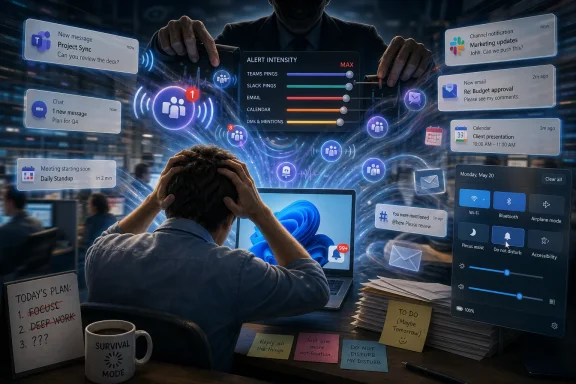
Teams is especially vulnerable to this treatment because it collapses too many signals into one surface. A direct message, a meeting reminder, a channel mention, a reaction, an app notification, a file comment, a calendar nudge, and a call can all arrive with the same basic demand: look here now.
The result is a workday in which urgency is not assigned so much as implied. If the box appears in the corner of the screen, the organization has spoken.
That history matters because Teams carries two identities at once. To Microsoft, it is the connective tissue of modern work. To many workers, it is the app that converted “available” into a permanent state.
The AOL/BuzzFeed framing leans into nausea, exhaustion, and absurdity, but the emotional target is broader than Teams alone. Slack gets named. Email gets mocked. Excel becomes part of the same theater. What unites the jokes is the sense that work has become a cycle of context switching disguised as collaboration.
That is a problem for Microsoft because Teams is no longer merely competing with Slack or Zoom. It is competing with the human capacity to tolerate interruption.
Teams notifications intensify that fiction by giving it a sensory form. The ping tells the worker that something has happened. The worker must then decide whether that something matters, who sent it, whether ignoring it is risky, and whether the visible delay will be socially interpreted.
This is not a Microsoft bug in the narrow sense. It is the logical outcome of putting presence, messaging, meetings, calling, file collaboration, apps, bots, and organizational announcements into one pane of glass. The pane becomes a mirror, and what it reflects is not always flattering.
The modern office has grown unusually good at creating activity that resembles productivity. Teams did not invent that condition, but it made the evidence searchable, timestamped, and audible.
But the presence of controls does not solve the deeper issue. A notification setting is a personal answer to a collective problem. If a team culture treats every message as urgent, the individual who mutes alerts is not simply optimizing focus; they may be accepting political risk.
That is why so much advice about Teams notifications feels both useful and inadequate. Turn off banners for noisy channels. Keep mentions visible. Use the activity feed as a backlog. Schedule quiet time on mobile. These are sensible moves, but they do not change the fact that every organization eventually encodes its hierarchy into its alert patterns.
A message from a peer can wait. A message from a director may not. A channel post may be noise until a manager asks why nobody saw it. The software presents these as configurable notification categories, but employees experience them as social obligations.
Windows 11’s notification center, Do Not Disturb controls, focus features, calendar integration, and app permissions all sit underneath Teams. In theory, that gives users layered control. In practice, it can create a maze where Teams settings, Windows settings, mobile settings, tenant policies, and status presence each influence what breaks through.
That complexity creates two opposite complaints. Some users say Teams never stops interrupting them. Others say notifications do not appear when they should. Both can be true, depending on which layer has been configured, overridden, muted, or forgotten.
The irony is that Microsoft has spent years making Windows and Microsoft 365 feel more integrated. But the tighter the integration becomes, the harder it is for users to understand where responsibility lives when attention management fails. Is it Teams? Windows? Outlook? Intune? A focus rule? A mobile quiet-hours policy? A channel someone followed three years ago?
The enterprise answer is “it depends.” The human answer is “please make it stop.”
This is where Microsoft’s design challenge becomes sharper. Collaboration software has historically erred on the side of visibility. Show the badge. Surface the mention. Nudge the user. Bring the meeting to the front. Preserve engagement. Avoid missed messages.
That bias made sense when digital collaboration needed adoption. It makes less sense when the collaboration layer is already mandatory. Once a tool becomes the place where work happens, the product’s job changes from increasing engagement to protecting judgment.
The Teams ping is not just a notification. It is a tiny claim on working memory. Multiply that claim across an eight-hour day, and the user is not merely distracted; they are being trained to treat interruption as normal.
But workplace humor often surfaces what official surveys sand down. Employees may not tell management that half the communication stack feels like a pantomime of urgency. They will, however, share a joke about needing a lottery ticket after hearing the first notification of the morning.
That matters because Microsoft’s biggest collaboration problem is no longer feature parity. Teams can chat, call, meet, record, transcribe, integrate, notify, and automate. The problem is whether users believe the tool makes work more coherent or merely more immediate.
A product can be indispensable and resented at the same time. In fact, that may now be Teams’ defining position in the office: too embedded to abandon, too noisy to love.
But admins cannot fully repair a workplace that refuses to distinguish urgency from visibility. If every department creates channels without ownership, if every project treats chat as the system of record, and if every manager expects instant replies, the tenant will become noisy no matter how carefully Teams is configured.
The same applies to “quiet hours” and Do Not Disturb. These tools are valuable, especially for mobile users and distributed teams. Yet their success depends on whether the organization respects absence. A quiet-hours policy that silences notifications after work is meaningful only if employees are not punished for responding the next morning.
The lesson for IT is uncomfortable but useful: notification management is governance, not decoration. It belongs in onboarding, team norms, executive behavior, and security policy. It is not a preference screen users should be expected to discover after burnout.
That pitch depends on trust. If users already feel overwhelmed by ordinary notifications, they may not welcome more proactive prompts, summaries, suggested replies, meeting recaps, and AI-generated nudges. Intelligence that arrives as another interruption is not intelligence users will celebrate.
This is the next frontier for Teams and Microsoft 365 more broadly. The question is no longer whether the suite can connect people. It plainly can. The question is whether it can help organizations decide when connection should be delayed, summarized, batched, suppressed, or never sent at all.
The best future version of Teams may be one that interrupts less confidently. That sounds like a small product-design point, but it is closer to a philosophy of work.
There is no single magic toggle that turns Teams from a source of dread into a humane collaboration layer. There is, however, a set of obvious truths that many organizations still avoid.
Microsoft Teams is not going away, and neither is the office’s talent for turning every tool into a ritual of status, urgency, and mild panic. But the companies that get the next decade of work right will be the ones that stop measuring collaboration by the number of signals sent and start measuring it by the number of decisions made without needless interruption.
 The Teams Ping Has Become the Sound of Managerial Weather
Every generation of office technology produces its own ambient dread. The landline had its ring, Outlook had the new-mail chime, BlackBerry had the red blinking light, and Teams has the particular ability to make a normal Tuesday feel like a low-grade emergency.That is why a lightweight BuzzFeed list can travel through AOL and still say something real about Microsoft’s workplace empire. The article is not product criticism in the formal sense. It is cultural telemetry, the sort of thing that shows when a tool has moved from useful software into shared emotional vocabulary.
Teams is especially vulnerable to this treatment because it collapses too many signals into one surface. A direct message, a meeting reminder, a channel mention, a reaction, an app notification, a file comment, a calendar nudge, and a call can all arrive with the same basic demand: look here now.
The result is a workday in which urgency is not assigned so much as implied. If the box appears in the corner of the screen, the organization has spoken.
Microsoft Won the Collaboration War, Then Inherited the Mood
Microsoft Teams did not become central to office life because users collectively went shopping for the most serene collaboration product. It became central because Microsoft 365 was already there, because Outlook and Office were already embedded, and because the pandemic years turned video meetings and chat channels from optional add-ons into the default workplace substrate.That history matters because Teams carries two identities at once. To Microsoft, it is the connective tissue of modern work. To many workers, it is the app that converted “available” into a permanent state.
The AOL/BuzzFeed framing leans into nausea, exhaustion, and absurdity, but the emotional target is broader than Teams alone. Slack gets named. Email gets mocked. Excel becomes part of the same theater. What unites the jokes is the sense that work has become a cycle of context switching disguised as collaboration.
That is a problem for Microsoft because Teams is no longer merely competing with Slack or Zoom. It is competing with the human capacity to tolerate interruption.
The Funny Part Is That Everyone Knows the System Is Fake
Office humor works when it says aloud what the workplace can only imply. The roundup’s jokes about urgent emails, performative busyness, “let’s take this offline,” and the endless shuffle between Slack, email, and spreadsheets are funny because they describe a shared fiction: that every message is meaningful, every status indicator is truthful, and every meeting is necessary.Teams notifications intensify that fiction by giving it a sensory form. The ping tells the worker that something has happened. The worker must then decide whether that something matters, who sent it, whether ignoring it is risky, and whether the visible delay will be socially interpreted.
This is not a Microsoft bug in the narrow sense. It is the logical outcome of putting presence, messaging, meetings, calling, file collaboration, apps, bots, and organizational announcements into one pane of glass. The pane becomes a mirror, and what it reflects is not always flattering.
The modern office has grown unusually good at creating activity that resembles productivity. Teams did not invent that condition, but it made the evidence searchable, timestamped, and audible.
Notification Settings Are a User Interface for Organizational Anxiety
Microsoft does give users controls. Teams has notification settings, channel-specific controls, activity-feed behavior, Do Not Disturb, priority access, mobile quiet hours, and operating-system-level notification management in Windows. Administrators also have some policy levers, especially around mobile app behavior and data exposure.But the presence of controls does not solve the deeper issue. A notification setting is a personal answer to a collective problem. If a team culture treats every message as urgent, the individual who mutes alerts is not simply optimizing focus; they may be accepting political risk.
That is why so much advice about Teams notifications feels both useful and inadequate. Turn off banners for noisy channels. Keep mentions visible. Use the activity feed as a backlog. Schedule quiet time on mobile. These are sensible moves, but they do not change the fact that every organization eventually encodes its hierarchy into its alert patterns.
A message from a peer can wait. A message from a director may not. A channel post may be noise until a manager asks why nobody saw it. The software presents these as configurable notification categories, but employees experience them as social obligations.
Windows Makes the Problem Feel System-Level
For WindowsForum readers, the Teams notification debate is not just about Teams. It is about the modern Windows desktop as a productivity cockpit that increasingly assumes cloud-connected attention is the default.Windows 11’s notification center, Do Not Disturb controls, focus features, calendar integration, and app permissions all sit underneath Teams. In theory, that gives users layered control. In practice, it can create a maze where Teams settings, Windows settings, mobile settings, tenant policies, and status presence each influence what breaks through.
That complexity creates two opposite complaints. Some users say Teams never stops interrupting them. Others say notifications do not appear when they should. Both can be true, depending on which layer has been configured, overridden, muted, or forgotten.
The irony is that Microsoft has spent years making Windows and Microsoft 365 feel more integrated. But the tighter the integration becomes, the harder it is for users to understand where responsibility lives when attention management fails. Is it Teams? Windows? Outlook? Intune? A focus rule? A mobile quiet-hours policy? A channel someone followed three years ago?
The enterprise answer is “it depends.” The human answer is “please make it stop.”
The Real Enemy Is the Default
Defaults matter because most people do not manage their notification settings as a hobby. They inherit them. They tolerate them. They complain about them in group chats and then forward the funniest post to a coworker.This is where Microsoft’s design challenge becomes sharper. Collaboration software has historically erred on the side of visibility. Show the badge. Surface the mention. Nudge the user. Bring the meeting to the front. Preserve engagement. Avoid missed messages.
That bias made sense when digital collaboration needed adoption. It makes less sense when the collaboration layer is already mandatory. Once a tool becomes the place where work happens, the product’s job changes from increasing engagement to protecting judgment.
The Teams ping is not just a notification. It is a tiny claim on working memory. Multiply that claim across an eight-hour day, and the user is not merely distracted; they are being trained to treat interruption as normal.
Humor Is the Unauthorized Employee Survey
It would be easy to dismiss the AOL/BuzzFeed post as internet filler, and in one sense it is. The piece is a list of jokes, not a white paper. It does not quantify alert fatigue, survey IT departments, or benchmark productivity losses.But workplace humor often surfaces what official surveys sand down. Employees may not tell management that half the communication stack feels like a pantomime of urgency. They will, however, share a joke about needing a lottery ticket after hearing the first notification of the morning.
That matters because Microsoft’s biggest collaboration problem is no longer feature parity. Teams can chat, call, meet, record, transcribe, integrate, notify, and automate. The problem is whether users believe the tool makes work more coherent or merely more immediate.
A product can be indispensable and resented at the same time. In fact, that may now be Teams’ defining position in the office: too embedded to abandon, too noisy to love.
The Admin Console Cannot Fix a Bad Communication Culture
IT administrators can reduce some of the damage. They can standardize guidance, document recommended notification settings, educate users on channel hygiene, and use mobile management policies where appropriate. They can also push executives to stop treating broad mentions as a substitute for leadership.But admins cannot fully repair a workplace that refuses to distinguish urgency from visibility. If every department creates channels without ownership, if every project treats chat as the system of record, and if every manager expects instant replies, the tenant will become noisy no matter how carefully Teams is configured.
The same applies to “quiet hours” and Do Not Disturb. These tools are valuable, especially for mobile users and distributed teams. Yet their success depends on whether the organization respects absence. A quiet-hours policy that silences notifications after work is meaningful only if employees are not punished for responding the next morning.
The lesson for IT is uncomfortable but useful: notification management is governance, not decoration. It belongs in onboarding, team norms, executive behavior, and security policy. It is not a preference screen users should be expected to discover after burnout.
Microsoft Has to Sell Calm, Not Just Connection
Microsoft’s incentive structure is complicated. Teams sits at the center of Microsoft 365, and Microsoft 365 is increasingly tied to Copilot, Graph-powered insights, meeting intelligence, workflow automation, and cross-app surfaces. The company’s long-term pitch is that work becomes more intelligent when the system understands more of it.That pitch depends on trust. If users already feel overwhelmed by ordinary notifications, they may not welcome more proactive prompts, summaries, suggested replies, meeting recaps, and AI-generated nudges. Intelligence that arrives as another interruption is not intelligence users will celebrate.
This is the next frontier for Teams and Microsoft 365 more broadly. The question is no longer whether the suite can connect people. It plainly can. The question is whether it can help organizations decide when connection should be delayed, summarized, batched, suppressed, or never sent at all.
The best future version of Teams may be one that interrupts less confidently. That sounds like a small product-design point, but it is closer to a philosophy of work.
The Office Joke Has a Policy Agenda Hiding Inside It
The AOL/BuzzFeed roundup is funny because it recognizes the absurdity of the current arrangement. Yet buried in the jokes is a practical agenda for anyone who runs, supports, or depends on a Microsoft 365 environment.There is no single magic toggle that turns Teams from a source of dread into a humane collaboration layer. There is, however, a set of obvious truths that many organizations still avoid.
- Teams notifications should be treated as an organizational design problem, not merely as a user preference problem.
- Broad mentions and noisy channels should be considered governance failures when they become routine.
- Do Not Disturb, quiet hours, and mobile notification controls only work when managers respect delayed responses.
- Windows and Teams settings need clearer internal guidance because users experience them as one attention system.
- Microsoft’s next collaboration challenge is reducing unnecessary interruption, not inventing more ways to surface activity.
Microsoft Teams is not going away, and neither is the office’s talent for turning every tool into a ritual of status, urgency, and mild panic. But the companies that get the next decade of work right will be the ones that stop measuring collaboration by the number of signals sent and start measuring it by the number of decisions made without needless interruption.
References
- Primary source: aol.com
Published: Mon, 22 Jun 2026 11:26:11 GMT
If Microsoft Teams Notifications Make You Nauseous, These 28 Posts Are For You - AOL
Don't forget to keep your mouse hovering on a spreadsheet tab in case your boss walks by.www.aol.com - Official source: support.microsoft.com
Manage notifications in Microsoft Teams | Microsoft Support
Mark a notification as read or unread or unfollow the channel it appears in in Microsoft Teams.support.microsoft.com - Related coverage: techyorker.com
How to Customize Notifications in Microsoft Teams - TechYorker
×Recommended: Maximize Your PC's Performance with Chipps AI Assistant →Recommended: Click Here to Fix Windows Issues and Optimize System Performance... techyorker.com
- Related coverage: theitagency.com.au
Are Teams notifications destroying your focus | The IT Agency
Microsoft Teams notifications are creating constant interruption across SMBs. Learn how small Microsoft 365 changes improve focus and productivity. www.theitagency.com.au
- Official source: microsoft.com
Your request has been blocked. This could be due to several reasons.
www.microsoft.com
- Related coverage: officefixhub.com
- Related coverage: howtogeek.com
How to Configure Microsoft Teams Notifications
Tired of Microsoft Teams alerting you all the time? Here's how to decide what Teams should and shouldn't alert you about. www.howtogeek.com
- Related coverage: windowslatest.com
Microsoft Teams bug could be blocking or delaying your notifications
Following the latest Microsoft Teams updates, there’s a growing number of users who are seeing a handful of different issues with Microsoft Teams notifications. The notifications issues are different from device to device, but most users have reported delayed notifications and other... www.windowslatest.com
- Related coverage: buralog.jp
Root Causes of Notification Fatigue in Microsoft Teams and Sequenced Remediation Steps | buralog|ITトラブルと業務改善の実務メモ
SummaryThis article explains common root causes of "notification fatigue" in Teams operations and provides a prioritized...buralog.jp
