

Microsoft will retire Together Mode in Microsoft Teams meetings worldwide during June 2026, removing the shared-scene meeting layout, custom Together Mode scenes, and seat assignments while leaving gallery view as the primary multi-participant meeting experience. The cutoff is not a crisis for most tenants, but it is a useful marker of where Teams is going. Microsoft is pruning a memorable pandemic-era feature in favor of a simpler meeting surface, more predictable client behavior, and engineering priorities that increasingly revolve around performance, reliability, and AI-assisted work.
Together Mode was never just another view in Teams. It was one of the company’s most visible attempts to answer a very specific 2020 problem: how do you make a grid of exhausted remote workers feel a little less like a grid of exhausted remote workers?
The answer, at least for a while, was theatrical. Teams could cut each participant out of their video background and place them into a shared space — an auditorium, a conference room, a coffee shop, or a custom-branded scene. It was part collaboration tool, part stage set, and part psychological experiment.
That context matters because the retirement lands differently from an ordinary menu cleanup. Microsoft is not merely removing a layout that some users ignored. It is retiring one of the clearest artifacts of the period when every collaboration vendor was racing to make video meetings feel more human, more spatial, and less punishing.
The official administrative message is much drier. Together Mode begins retiring in early June 2026 and is expected to be gone by late June. The View menu loses the option, custom scenes disappear, seat assignment functionality goes with it, and there is no admin policy to keep the feature alive.
That last point is the one IT departments should circle. This is not a deprecation where a tenant can buy time with a registry key, a Teams policy, or a legacy client. Microsoft is making a product-level decision, and the supported path is migration to gallery, pin, spotlight, backgrounds, and other meeting controls that remain part of the modern Teams experience.
The feature made sense in that moment. Millions of workers had been pushed into remote meetings with little warning, and the grid view had become a daily symbol of both continuity and burnout. Zoom fatigue was a cultural phrase before it was an IT metric, and vendors were under pressure to show that software could do more than simply connect cameras.
Together Mode also gave Microsoft a distinctive demo. It looked good in screenshots, which matters more than anyone likes to admit. It could be shown in a keynote, an NBA broadcast experiment, a classroom scenario, or an all-hands meeting and immediately communicate that Teams was trying to be more than a Skype successor with corporate governance.
But features born in emergencies often age badly once normal operational discipline returns. The more Microsoft hardens Teams as infrastructure, the less patience it has for meeting experiences that add rendering complexity, client variation, support questions, and edge cases without becoming essential daily tools. The virtual auditorium was charming, but charm is a weak defense in a platform that now carries meetings, phones, webinars, files, apps, Copilot surfaces, and compliance obligations.
The retirement says something uncomfortable about the collaboration software boom of 2020: not every humanizing experiment became a durable workplace primitive. Some were bridges across a strange period. Together Mode may have helped Microsoft tell a story when the world needed one, but the Teams of 2026 is being optimized for a different story.
That matters more than it sounds. A meeting layout has to work across desktop, web, mobile, rooms, different camera qualities, network conditions, accessibility needs, and organizational policies. It has to behave consistently when people join late, turn cameras off, share content, spotlight speakers, pin participants, or move between devices.
Together Mode was more fragile as a concept because it depended on making a meeting look like something it was not. The illusion worked best when cameras were on, framing was decent, participants were still, and everyone accepted the shared scene as the dominant visual metaphor. In messy real-world meetings, that is a narrow lane.
Gallery view is less ambitious and therefore more resilient. It does not have to persuade anyone that they are sitting in an auditorium. It simply has to show the people in the call, scale reasonably, and coexist with screen sharing, chat, reactions, captions, transcription, and meeting intelligence.
For users who loved Together Mode, this will feel like a downgrade. For administrators, it is easier to understand as standardization. Microsoft is compressing the number of meeting experiences it must maintain so the ones that remain can be more reliable.
The affected population is smaller but more exposed. It includes companies that built custom Together Mode scenes for leadership meetings, schools that used visual seating for classes, event teams that relied on seat assignments for structured panels, and internal communications groups that treated the shared scene as part of a branded meeting experience.
Those groups are exactly the kind of stakeholders who may not read Message Center notices. They remember the meeting template, the runbook, or the executive producer’s checklist, not the underlying feature lifecycle. That is how a low-severity retirement becomes a high-visibility embarrassment at 9:02 a.m. during a global all-hands.
The cleanup work is therefore mundane but important. Admins should inventory internal documentation, organizer guidance, meeting production templates, training decks, and helpdesk scripts for references to Together Mode. If custom scenes were distributed or promoted internally, those owners need direct notice rather than a generic “Teams is changing” message.
The safest posture is to treat Together Mode as retired infrastructure now, not on June 30. Any recurring meeting that depends on it should be rehearsed in gallery or another supported layout before the deadline. Any event organizer who used seat assignments should test spotlight, pinning, presenter modes, and production workflows instead of assuming there is a one-click equivalent.
The retirement does not mean Teams can no longer carry corporate identity. It means the branding has to move elsewhere. Organization-approved backgrounds, event graphics, PowerPoint templates, lobby screens, SharePoint-backed materials, and presenter modes become more important because the shared-room canvas is going away.
That shift is less glamorous but arguably healthier. Together Mode branding was tied to a meeting layout that participants had to select and that Microsoft had to keep supporting as a distinct experience. Backgrounds and content design are more portable. They work across more meeting types and do not require the entire call to buy into the same illusion.
Still, there is a loss here. Together Mode gave organizers a sense of place. A branded scene could make a remote event feel intentionally staged rather than merely hosted. Gallery view, even when polished, tends to return meetings to the familiar rectangle economy of modern work.
This is where Microsoft’s priorities become visible. The company is choosing the meeting experience that is easier to maintain at scale over the one that offered a more expressive shared visual identity. That is not irrational. It is just less sentimental.
That does not make video irrelevant. If anything, it raises the bar for the parts of video that matter: stability, quality, device compatibility, latency, accessibility, and predictable layouts. Microsoft has little incentive to keep investing in a specialized visual mode if the strategic center of gravity has shifted toward making meetings searchable, resumable, summarized, and integrated into workflows.
This is the quiet bargain of modern productivity software. Users get more automation around the meeting, but often fewer eccentric features inside the meeting. The interface becomes less playful as the system around it becomes more powerful.
For Teams administrators, that tradeoff will be familiar. Microsoft has spent years adding capabilities while also retiring, renaming, consolidating, and relocating features. The service is not static software; it is a managed cloud platform with a moving surface area. The price of getting new intelligence quickly is accepting that some older experiences will be removed on Microsoft’s schedule.
Together Mode is a tidy example because it is emotionally legible. People remember it. It had a look. It belonged to a particular era. But under the hood, it is the same lifecycle story admins already know: measure usage, reduce complexity, steer users to supported patterns, and reserve engineering calories for the roadmap Microsoft believes will matter next.
It was not a gimmick in the lazy sense. Microsoft built it on real research into social cues, eye contact, spatial awareness, and the cognitive strain of video meetings. The company’s original messaging around the feature was unusually ambitious, arguing that a shared scene could help people interpret gestures and group dynamics more naturally.
But workplace behavior is ruthless. Features survive when they become habits, not when they make good launch stories. For many Teams users, Together Mode was something to try once, laugh about, maybe use during a social meeting, and then abandon for the layouts that fit screen sharing and routine work.
That does not mean the feature failed. It means its main value may have been temporal. In 2020 and 2021, the symbolic act of making people appear together had power. By 2026, the average Teams meeting has different pain points: too many meetings, too much context switching, too many recordings, too much follow-up, and too little clarity about what actually changed because the meeting happened.
Microsoft’s answer to those problems is not a better auditorium. It is AI-generated notes, recap experiences, agents, search, integrations, and workflow automation. Whether that answer is sufficient is another argument, but it explains why Together Mode is expendable.
That said, boring does not mean irrelevant. Documentation drift is a real operational risk, especially in regulated or highly procedural organizations. If a training guide, event checklist, or support article tells users to select Together Mode, it becomes wrong the moment the feature disappears.
The helpdesk angle is also predictable. Some users will assume the missing option is a client bug, a licensing problem, or a policy change made by IT. Frontline support should have a short answer ready: Microsoft retired the feature, it cannot be re-enabled, and supported alternatives include gallery view, pin, spotlight, approved backgrounds, and presenter-oriented meeting options.
There is also a mild governance lesson here. Custom scenes may have been created outside the usual design and documentation process because they felt cosmetic. Once those cosmetic assets become part of executive events or training workflows, they become operational dependencies. The retirement is a good moment to ask where else that has happened.
The practical risk is not data loss. It is expectation loss. Users expect a meeting to look a certain way because it did last quarter, and IT gets blamed when the cloud service no longer offers that visual contract.
That matters in environments where Teams is treated like part of the standard workstation image. You can patch Windows, manage Office channels, control device drivers, and validate peripherals, but a service-side retirement still changes the user experience. The Teams client may be current and healthy while a familiar control simply vanishes.
There is a positive interpretation. Fewer meeting modes can mean fewer rendering paths, fewer UI branches, fewer training screenshots, and fewer “why does my Teams look different?” tickets. In a product that has sometimes struggled under the weight of its own feature density, simplification is not automatically bad.
There is also a skeptical interpretation. Microsoft often frames removals as simplification, but users experience them as loss when the removed feature served a niche Microsoft did not prioritize. Admins have learned to read “no action required” as “no control offered,” which is not the same thing.
Both interpretations can be true. Together Mode’s removal may improve Microsoft’s ability to focus on the meeting experiences most people use, while still frustrating the smaller group that had turned it into part of their event production toolkit.
Together Mode’s retirement is a manageable change precisely because Microsoft has telegraphed it before the deadline. Tenants that act early can absorb it with little drama. Tenants that wait may discover the dependency only when an organizer opens the View menu and finds the stage missing.
The sensible checklist is short, but it should be owned by someone. Teams administrators, internal communications teams, training departments, and executive support staff all have a stake in making sure the retirement is uneventful.
Microsoft’s retirement of Together Mode is a small end to a very specific era: the moment when collaboration software tried to heal the shock of remote work by making rectangles pretend to be rooms. The next version of Teams is more likely to summarize the meeting than stage it, more likely to automate the follow-up than simulate the auditorium, and more likely to judge features by whether they scale cleanly across a sprawling Microsoft 365 estate. For admins, that future is easier to operate if they accept the signal now: in Teams, nostalgia is not a support policy.
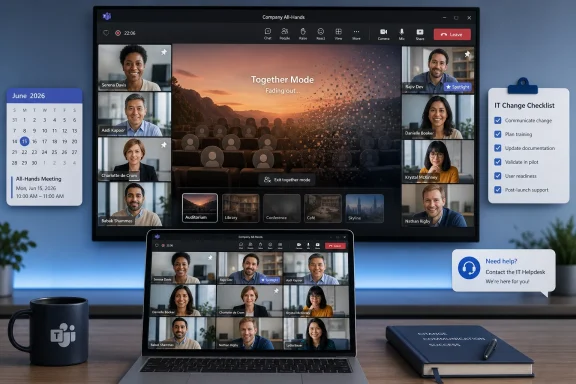 Microsoft Closes the Virtual Auditorium
Together Mode was never just another view in Teams. It was one of the company’s most visible attempts to answer a very specific 2020 problem: how do you make a grid of exhausted remote workers feel a little less like a grid of exhausted remote workers?The answer, at least for a while, was theatrical. Teams could cut each participant out of their video background and place them into a shared space — an auditorium, a conference room, a coffee shop, or a custom-branded scene. It was part collaboration tool, part stage set, and part psychological experiment.
That context matters because the retirement lands differently from an ordinary menu cleanup. Microsoft is not merely removing a layout that some users ignored. It is retiring one of the clearest artifacts of the period when every collaboration vendor was racing to make video meetings feel more human, more spatial, and less punishing.
The official administrative message is much drier. Together Mode begins retiring in early June 2026 and is expected to be gone by late June. The View menu loses the option, custom scenes disappear, seat assignment functionality goes with it, and there is no admin policy to keep the feature alive.
That last point is the one IT departments should circle. This is not a deprecation where a tenant can buy time with a registry key, a Teams policy, or a legacy client. Microsoft is making a product-level decision, and the supported path is migration to gallery, pin, spotlight, backgrounds, and other meeting controls that remain part of the modern Teams experience.
A Feature Born From Video Fatigue Dies in the Age of Meeting Automation
Together Mode arrived in July 2020, when Microsoft was selling a vision of Teams as the office’s emergency operating system. The pitch was that AI segmentation and a shared background could restore some of the spatial cues lost when people were flattened into separate boxes. In Microsoft’s framing, the goal was not novelty; it was reducing fatigue and helping people read the room.The feature made sense in that moment. Millions of workers had been pushed into remote meetings with little warning, and the grid view had become a daily symbol of both continuity and burnout. Zoom fatigue was a cultural phrase before it was an IT metric, and vendors were under pressure to show that software could do more than simply connect cameras.
Together Mode also gave Microsoft a distinctive demo. It looked good in screenshots, which matters more than anyone likes to admit. It could be shown in a keynote, an NBA broadcast experiment, a classroom scenario, or an all-hands meeting and immediately communicate that Teams was trying to be more than a Skype successor with corporate governance.
But features born in emergencies often age badly once normal operational discipline returns. The more Microsoft hardens Teams as infrastructure, the less patience it has for meeting experiences that add rendering complexity, client variation, support questions, and edge cases without becoming essential daily tools. The virtual auditorium was charming, but charm is a weak defense in a platform that now carries meetings, phones, webinars, files, apps, Copilot surfaces, and compliance obligations.
The retirement says something uncomfortable about the collaboration software boom of 2020: not every humanizing experiment became a durable workplace primitive. Some were bridges across a strange period. Together Mode may have helped Microsoft tell a story when the world needed one, but the Teams of 2026 is being optimized for a different story.
Gallery View Wins Because Predictability Beats Whimsy
Microsoft’s replacement is not a replacement in the emotional sense. Gallery view does not recreate a shared room, does not preserve seating assignments, and does not give internal comms teams a branded stage for executive town halls. It wins because it is the lowest-friction visual contract between Teams and its users.That matters more than it sounds. A meeting layout has to work across desktop, web, mobile, rooms, different camera qualities, network conditions, accessibility needs, and organizational policies. It has to behave consistently when people join late, turn cameras off, share content, spotlight speakers, pin participants, or move between devices.
Together Mode was more fragile as a concept because it depended on making a meeting look like something it was not. The illusion worked best when cameras were on, framing was decent, participants were still, and everyone accepted the shared scene as the dominant visual metaphor. In messy real-world meetings, that is a narrow lane.
Gallery view is less ambitious and therefore more resilient. It does not have to persuade anyone that they are sitting in an auditorium. It simply has to show the people in the call, scale reasonably, and coexist with screen sharing, chat, reactions, captions, transcription, and meeting intelligence.
For users who loved Together Mode, this will feel like a downgrade. For administrators, it is easier to understand as standardization. Microsoft is compressing the number of meeting experiences it must maintain so the ones that remain can be more reliable.
The Admin Impact Is Small Until It Hits a Live Event
Microsoft says no admin action is required, which is technically true and operationally incomplete. If a tenant never used Together Mode, nothing meaningful changes. Users who occasionally clicked it for fun will lose a novelty; the meeting still starts, cameras still work, and the organization moves on.The affected population is smaller but more exposed. It includes companies that built custom Together Mode scenes for leadership meetings, schools that used visual seating for classes, event teams that relied on seat assignments for structured panels, and internal communications groups that treated the shared scene as part of a branded meeting experience.
Those groups are exactly the kind of stakeholders who may not read Message Center notices. They remember the meeting template, the runbook, or the executive producer’s checklist, not the underlying feature lifecycle. That is how a low-severity retirement becomes a high-visibility embarrassment at 9:02 a.m. during a global all-hands.
The cleanup work is therefore mundane but important. Admins should inventory internal documentation, organizer guidance, meeting production templates, training decks, and helpdesk scripts for references to Together Mode. If custom scenes were distributed or promoted internally, those owners need direct notice rather than a generic “Teams is changing” message.
The safest posture is to treat Together Mode as retired infrastructure now, not on June 30. Any recurring meeting that depends on it should be rehearsed in gallery or another supported layout before the deadline. Any event organizer who used seat assignments should test spotlight, pinning, presenter modes, and production workflows instead of assuming there is a one-click equivalent.
Branding Moves From the Room to the Edges
One reason Together Mode lingered in some organizations was branding. A custom virtual auditorium or conference room could make a Teams meeting feel like a company event rather than another calendar block. That visual layer was especially attractive for all-hands meetings, onboarding sessions, training programs, and external-facing presentations.The retirement does not mean Teams can no longer carry corporate identity. It means the branding has to move elsewhere. Organization-approved backgrounds, event graphics, PowerPoint templates, lobby screens, SharePoint-backed materials, and presenter modes become more important because the shared-room canvas is going away.
That shift is less glamorous but arguably healthier. Together Mode branding was tied to a meeting layout that participants had to select and that Microsoft had to keep supporting as a distinct experience. Backgrounds and content design are more portable. They work across more meeting types and do not require the entire call to buy into the same illusion.
Still, there is a loss here. Together Mode gave organizers a sense of place. A branded scene could make a remote event feel intentionally staged rather than merely hosted. Gallery view, even when polished, tends to return meetings to the familiar rectangle economy of modern work.
This is where Microsoft’s priorities become visible. The company is choosing the meeting experience that is easier to maintain at scale over the one that offered a more expressive shared visual identity. That is not irrational. It is just less sentimental.
Teams Is Being Remade Around Intelligence, Not Atmosphere
The retirement also fits the broader arc of Microsoft 365. The most valuable real estate in Teams is no longer the visual novelty of the meeting stage. It is the data exhaust around the meeting: transcripts, summaries, action items, shared files, chat context, calendar signals, and Copilot-assisted follow-up.That does not make video irrelevant. If anything, it raises the bar for the parts of video that matter: stability, quality, device compatibility, latency, accessibility, and predictable layouts. Microsoft has little incentive to keep investing in a specialized visual mode if the strategic center of gravity has shifted toward making meetings searchable, resumable, summarized, and integrated into workflows.
This is the quiet bargain of modern productivity software. Users get more automation around the meeting, but often fewer eccentric features inside the meeting. The interface becomes less playful as the system around it becomes more powerful.
For Teams administrators, that tradeoff will be familiar. Microsoft has spent years adding capabilities while also retiring, renaming, consolidating, and relocating features. The service is not static software; it is a managed cloud platform with a moving surface area. The price of getting new intelligence quickly is accepting that some older experiences will be removed on Microsoft’s schedule.
Together Mode is a tidy example because it is emotionally legible. People remember it. It had a look. It belonged to a particular era. But under the hood, it is the same lifecycle story admins already know: measure usage, reduce complexity, steer users to supported patterns, and reserve engineering calories for the roadmap Microsoft believes will matter next.
The Pandemic Software Hangover Continues
The early remote-work boom produced a lot of features that were both sincere and opportunistic. Vendors were trying to solve real problems, but they were also trying to differentiate themselves in a suddenly explosive market. Together Mode sat at the intersection of those instincts.It was not a gimmick in the lazy sense. Microsoft built it on real research into social cues, eye contact, spatial awareness, and the cognitive strain of video meetings. The company’s original messaging around the feature was unusually ambitious, arguing that a shared scene could help people interpret gestures and group dynamics more naturally.
But workplace behavior is ruthless. Features survive when they become habits, not when they make good launch stories. For many Teams users, Together Mode was something to try once, laugh about, maybe use during a social meeting, and then abandon for the layouts that fit screen sharing and routine work.
That does not mean the feature failed. It means its main value may have been temporal. In 2020 and 2021, the symbolic act of making people appear together had power. By 2026, the average Teams meeting has different pain points: too many meetings, too much context switching, too many recordings, too much follow-up, and too little clarity about what actually changed because the meeting happened.
Microsoft’s answer to those problems is not a better auditorium. It is AI-generated notes, recap experiences, agents, search, integrations, and workflow automation. Whether that answer is sufficient is another argument, but it explains why Together Mode is expendable.
Security and Compliance Teams Will Mostly Shrug
From a security and compliance perspective, this retirement is refreshingly boring. Microsoft’s message says there are no identified compliance considerations, and that tracks with the nature of the feature. Together Mode changed presentation, not meeting creation, identity, retention, recording, transcript policy, or access control.That said, boring does not mean irrelevant. Documentation drift is a real operational risk, especially in regulated or highly procedural organizations. If a training guide, event checklist, or support article tells users to select Together Mode, it becomes wrong the moment the feature disappears.
The helpdesk angle is also predictable. Some users will assume the missing option is a client bug, a licensing problem, or a policy change made by IT. Frontline support should have a short answer ready: Microsoft retired the feature, it cannot be re-enabled, and supported alternatives include gallery view, pin, spotlight, approved backgrounds, and presenter-oriented meeting options.
There is also a mild governance lesson here. Custom scenes may have been created outside the usual design and documentation process because they felt cosmetic. Once those cosmetic assets become part of executive events or training workflows, they become operational dependencies. The retirement is a good moment to ask where else that has happened.
The practical risk is not data loss. It is expectation loss. Users expect a meeting to look a certain way because it did last quarter, and IT gets blamed when the cloud service no longer offers that visual contract.
The WindowsForum Reader’s View: Less Magic, Fewer Moving Parts
For Windows enthusiasts and IT pros, Together Mode’s retirement is another reminder that Teams is not just an app installed on Windows. It is a service that can change out from under the desktop. The client is the local expression of a cloud decision.That matters in environments where Teams is treated like part of the standard workstation image. You can patch Windows, manage Office channels, control device drivers, and validate peripherals, but a service-side retirement still changes the user experience. The Teams client may be current and healthy while a familiar control simply vanishes.
There is a positive interpretation. Fewer meeting modes can mean fewer rendering paths, fewer UI branches, fewer training screenshots, and fewer “why does my Teams look different?” tickets. In a product that has sometimes struggled under the weight of its own feature density, simplification is not automatically bad.
There is also a skeptical interpretation. Microsoft often frames removals as simplification, but users experience them as loss when the removed feature served a niche Microsoft did not prioritize. Admins have learned to read “no action required” as “no control offered,” which is not the same thing.
Both interpretations can be true. Together Mode’s removal may improve Microsoft’s ability to focus on the meeting experiences most people use, while still frustrating the smaller group that had turned it into part of their event production toolkit.
The June Cutoff Rewards Tenants That Treat Meetings Like Infrastructure
The most concrete lesson is that meetings now deserve the same lifecycle discipline as any other collaboration dependency. A recurring executive broadcast, quarterly business review, training session, or classroom workflow is not just a calendar item. It is a stack of assumptions about features, permissions, devices, layouts, content, and human roles.Together Mode’s retirement is a manageable change precisely because Microsoft has telegraphed it before the deadline. Tenants that act early can absorb it with little drama. Tenants that wait may discover the dependency only when an organizer opens the View menu and finds the stage missing.
The sensible checklist is short, but it should be owned by someone. Teams administrators, internal communications teams, training departments, and executive support staff all have a stake in making sure the retirement is uneventful.
- Organizations should assume Together Mode will be unavailable by the end of June 2026 and should stop building any new meeting workflow around it now.
- Custom Together Mode scenes should be inventoried and replaced with supported branding approaches such as approved backgrounds, event graphics, and presentation templates.
- Recurring meetings, webinars, classrooms, and all-hands runbooks should be checked for instructions that mention Together Mode, custom scenes, or seat assignments.
- Event organizers who used seat assignments should rehearse alternatives such as spotlight, pinning, presenter modes, and structured speaking roles before live sessions.
- Helpdesk teams should be given a concise explanation that the feature was retired by Microsoft and cannot be restored through a tenant policy.
- User-facing documentation should point people toward gallery view as the primary multi-participant layout and explain where other supported meeting controls fit.
Microsoft’s retirement of Together Mode is a small end to a very specific era: the moment when collaboration software tried to heal the shock of remote work by making rectangles pretend to be rooms. The next version of Teams is more likely to summarize the meeting than stage it, more likely to automate the follow-up than simulate the auditorium, and more likely to judge features by whether they scale cleanly across a sprawling Microsoft 365 estate. For admins, that future is easier to operate if they accept the signal now: in Teams, nostalgia is not a support policy.
References
- Primary source: TechRepublic
Published: 2026-05-18T10:42:08.268966
Microsoft Teams Together Mode Retires June 2026 - TechRepublic
Microsoft Teams Together Mode ends June 30, 2026. Here’s what disappears, what replaces it, and what admins should update now.www.techrepublic.com
- Official source: news.microsoft.com
Microsoft Teams釋出兩大新功能 重塑現代化虛實整合的協作樣貌 – 微軟新聞中心
 news.microsoft.com
- Related coverage: pcworld.com
Microsoft Teams adds 'Together mode' in massive update | PCWorld
Microsoft adds a number of features to Microsoft Teams, including a new "Together mode" with avatar-like images, new transcription and chat options, filters, and even some hardware.www.pcworld.com - Related coverage: computerworld.com
Microsoft Teams’ new ‘Together mode’ aims to make video calls more engaging – Computerworld
In an effort to make video calls more “inclusive, engaging and reflective," Microsoft is rolling out a host of new Teams features – including a viewing mode that puts everyone in the same room. www.computerworld.com
- Official source: microsoft.com
NBA Fans Connect With Microsoft Teams | Microsoft 365 Blog
Together mode in Microsoft Teams is helping NBA fans reimagine how they experience the game of basketball. Learn how we use AI segmentation to make it happen.www.microsoft.com - Related coverage: techcrunch.com
Microsoft makes Teams video meetings less tiring with its new Together mode | TechCrunch
Video meetings. While the move to remote work during the COVID-19 pandemic may have made them mainstream, they are not without issues and more and moretechcrunch.com
- Related coverage: windowsreport.com
Microsoft Removes Together Mode From Teams After Nearly Six Years
Microsoft Teams is losing Together Mode as Microsoft shifts focus toward Gallery View and meeting performance improvements. windowsreport.com
- Related coverage: geekwire.com
Will your meeting suck less in a virtual auditorium? Microsoft unveils 'Together' mode for Teams – GeekWire
Microsoft is launching a new feature for video meetings that places participants against a shared virtual background, removing individual backdrops in anwww.geekwire.com - Related coverage: axios.com
Microsoft unveils new features to make video calls less miserable
They include a new "together mode" that puts all participants in a single virtual environment.www.axios.com
- Related coverage: windowscentral.com
Microsoft replaces Designer in Teams with Copilot | Windows Central
Microsoft kills Teams Designer bot as Copilot takes the crown for all your creative needs.www.windowscentral.com - Official source: techcommunity.microsoft.com
- Related coverage: 365a.com.au
