

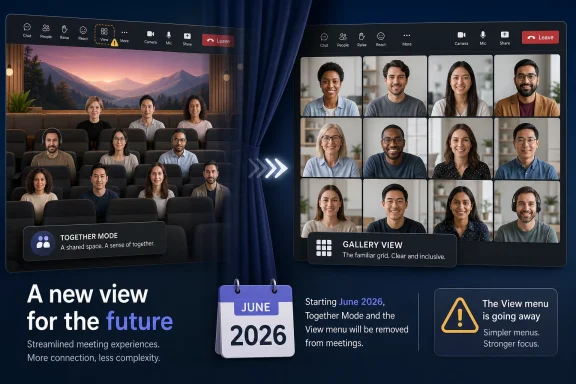
Microsoft will retire Together Mode in Microsoft Teams beginning in early June 2026, with the rollout expected to finish by late June, removing the shared-scene meeting layout, custom scenes, seat assignments, and the Together Mode option from the Teams meeting View menu. The Gallery view becomes the default answer to a question Microsoft once tried to solve with research, theatricality, and a little pandemic-era magic. This is not just the death of a quirky meeting feature. It is a sign that collaboration software has moved from simulating presence to compressing work.
Together Mode deserved better than to be remembered as a gimmick, because it was one of the few video-meeting ideas from 2020 that tried to attack the psychology of remote work rather than simply add more buttons. But its retirement is also unsurprising. The feature was born for a crisis in which the world needed to feel together; Teams in 2026 is being rebuilt for a workplace that mostly wants meetings to end faster, produce usable records, and feed Microsoft’s AI layer.
The practical change is straightforward. Together Mode is going away from Teams meetings, and with it the auditorium-style scenes, custom backgrounds built for shared seating arrangements, and manual seat assignments that made the feature feel closer to a virtual stage than a conventional video grid.
Microsoft’s stated rationale is equally plain: fewer meeting layouts mean a simpler user experience, less backend complexity, and more engineering time for features that affect every meeting. In Microsoft’s telling, Gallery view now satisfies the core need that Together Mode was meant to address: keeping participants visible in a predictable, widely supported layout.
That explanation is credible, but incomplete. Enterprise software features do not usually die because they are impossible to maintain. They die when the product strategy changes and their cost, however modest, can no longer be justified against the direction of the platform.
Together Mode was a feature about presence. Modern Teams is increasingly a feature factory for summarization, automation, governance, and Copilot-driven context recovery. The former makes a meeting feel less alien. The latter makes the meeting less expensive, at least in theory, because it turns conversation into artifacts the organization can search, summarize, and act on.
The feature’s origin story mattered because it captured that moment. Jaron Lanier, the Microsoft Research scientist widely associated with the phrase “virtual reality,” was thinking about what performers lose when the audience disappears. A comedian talking to a camera in an empty room was an extreme version of what workers were discovering everywhere: human communication does not work well when every face is trapped in an isolated rectangle.
Microsoft’s researchers and collaborators diagnosed something that ordinary users felt before they could describe it. Traditional video grids flatten social cues. They make eye contact strange, turn attention into a performance, and erase the subtle spatial awareness people use to understand who is talking to whom.
Together Mode tried to reverse that by placing participants into a shared virtual environment. The auditorium view became the signature image, but the idea was broader: if people appeared to occupy the same scene, perhaps the brain would stop treating the meeting as a wall of disconnected feeds.
That was not a frivolous premise. It drew from decades of work on virtual presence, social perception, and video fatigue. Microsoft framed the feature as a research-backed attempt to reduce cognitive load and increase cohesion. In the summer of 2020, that sounded not only plausible but humane.
Most users tried it, smiled at the novelty, and returned to the grid. That is not a failure of imagination so much as a familiar law of enterprise UX: any meeting feature that requires participants to notice it, select it, understand its constraints, and tolerate occasional visual weirdness is already fighting uphill.
Together Mode was best in meetings that resembled performances or classrooms. Large all-hands sessions, lectures, training events, and team rituals benefited from the shared-stage illusion. The feature had a way of turning passive video tiles into a visible crowd, which was exactly what some pandemic gatherings needed.
But the average Teams meeting is not a TED Talk or a seminar. It is five people reviewing a spreadsheet, three people deciding whether a ticket is blocked, or a manager running through updates while someone shares a deck. In those rooms, the grid is boring but useful. It does not aspire to social magic, and that is part of why it survives.
The grid also improved. Gallery layouts became more capable, large gallery views normalized bigger meetings, and users learned to manage video calls with camera discipline, background blur, reactions, chat, and screen sharing. Together Mode solved a 2020 pain point, but by 2026 the pain had mutated.
That is where Copilot changes the product logic. AI meeting recaps, action items, transcript-based search, summaries without recordings, and in-meeting assistants are all aimed at a different user anxiety: not “I feel disconnected,” but “I cannot keep up.” In that frame, a shared virtual auditorium is charming but peripheral.
This is the hard commercial truth behind the retirement. Together Mode was a differentiator when Microsoft needed Teams to feel less like a clone of every other video app. Copilot is the differentiator now, and it sits much closer to Microsoft’s revenue strategy.
There is also a maintenance argument that administrators will recognize. Every layout option is another surface to test across clients, devices, accessibility scenarios, network conditions, and meeting types. Custom scenes add another layer of governance and support. Seat assignments sound simple until they must behave consistently across tenants, clients, policies, and edge cases.
Microsoft is not saying Together Mode broke Teams. It is saying the feature no longer earns its place in the complexity budget. For a company pushing Teams as both a communications hub and an AI work surface, that budget is being spent elsewhere.
Custom Together Mode scenes let companies create a shared visual identity for internal events, classrooms, partner meetings, and staged presentations. That mattered in environments where the meeting was not merely a conversation but a broadcast-like experience. A branded virtual room could signal ceremony in a medium that otherwise makes everything feel like the same call.
Microsoft’s suggested replacement is branded backgrounds, including more polished effects such as frosted glass. That is practical advice, but it is not equivalent. A personal background brands the individual tile; a Together Mode scene brands the room.
That distinction matters for communications teams. Together Mode created a shared frame, and shared frames are powerful in events. They tell participants that they are part of one staged experience rather than a set of individual webcams. Losing that option narrows Teams’ visual vocabulary.
Still, the number of organizations deeply invested in custom Together Mode scenes was likely small. If the feature had become a core production layer for enterprise events, Microsoft would be steering customers through a longer migration story. Instead, this feels like a quiet retirement notice for a capability that never escaped the margins.
That is not inherently bad. Teams improves because Microsoft can update it constantly. But the same mechanism that delivers new features also removes old ones. Administrators can configure, document, train, and standardize, but they cannot freeze a SaaS product at the moment their organization happens to like it.
Together Mode is a relatively low-risk example. Nobody’s compliance archive depends on the virtual auditorium. No line-of-business process should fail because a meeting layout disappears. But the pattern is familiar: features arrive with fanfare, become part of some workflows, then vanish when the platform strategy shifts.
For WindowsForum readers who manage Microsoft 365 tenants, the operational work is modest but real. Internal documentation should be updated. Training materials that mention Together Mode should be cleaned up. Any custom scenes used for recurring events should be replaced before June. Help desk teams should know enough to explain that the disappearance is planned, not a client bug.
The bigger lesson is architectural. If a workflow depends on a presentational feature in Teams, it should have a fallback. Cloud software rewards adoption, but it punishes assumptions of permanence.
To be fair, Together Mode is not the reason anyone buys Teams. Its absence will not define the value of Microsoft 365. Most organizations would rather have better performance, more reliable meetings, stronger audio and video, improved governance, and useful AI summaries than a virtual lecture hall.
But software value is emotional as well as functional. Users notice when features disappear, especially features that carried symbolic weight. Together Mode was one of the few Teams capabilities that felt distinctly tied to a collective memory of 2020. Removing it is rational product management, but it also sands off a little personality.
Microsoft’s challenge is that “we are simplifying” can sound suspiciously like “we are taking things away.” That is especially true when the company is simultaneously steering customers toward paid AI experiences. The more Copilot becomes the gravitational center of Microsoft 365, the more every retirement will be read through that lens.
The feature belonged to a brief window when collaboration vendors were willing to experiment with the emotional shape of work. Zoom backgrounds, virtual whiteboards, reactions, breakout rooms, spatial audio experiments, avatars, and shared scenes all came from the same pressure: remote work had become too central to remain sterile.
Some of those ideas stuck because they addressed recurring needs. Background blur solved privacy and visual noise. Reactions gave participants a lightweight way to respond without interrupting. Transcripts and recordings became core infrastructure. Together Mode, by contrast, depended on a more fragile proposition: that people would want meetings to feel like shared places.
For a while, they did. During lockdowns, the feeling of being together had obvious value. A virtual auditorium could be silly and moving at the same time, because the alternative was isolation.
Then hybrid work hardened into routine. The existential novelty faded. Employees did not need Teams to simulate a room as much as they needed it to respect their time. The collaboration market stopped chasing presence and started chasing productivity, or at least the measurable appearance of it.
The difference is philosophical. Together Mode tried to restore social context. Copilot tries to restore cognitive bandwidth.
That makes Copilot more useful to executives and IT buyers. Time saved can be measured, modeled, and folded into ROI claims. Meeting summaries can be demonstrated in procurement decks. Action items can be audited. AI features can be bundled, licensed, and expanded across the Microsoft 365 estate.
A virtual auditorium is harder to monetize because its benefit is softer. It might make people smile. It might reduce fatigue. It might help a class feel like a class. Those are real outcomes, but they sit awkwardly in the spreadsheet logic that governs enterprise software.
This is why the retirement feels like a marker. Microsoft is not simply removing an old meeting view. It is choosing the kind of problem Teams is supposed to solve. In 2020, Teams needed to make digital work feel human. In 2026, it needs to make digital work machine-readable.
Together Mode challenged that convention. It asked whether videoconferencing had inherited the wrong metaphor and whether people might communicate better if software arranged them as a group instead of as isolated boxes. Even if the answer turned out to be “only sometimes,” the question was worth asking.
The lesson should not be that ambitious meeting interfaces are doomed. It should be that they need to disappear into the flow of work rather than announce themselves as special modes. A future version of this idea might use spatial layouts automatically, adapt to meeting type, preserve accessibility, and require no user decision at all.
That future may arrive through mixed reality, AI-driven camera composition, room systems, or something less theatrical than the auditorium. But Together Mode’s fate suggests that users will not repeatedly switch into a special experience unless the payoff is obvious every time.
For now, the grid remains the default because defaults are destiny. It is always there, always understood, and good enough across nearly every meeting. Enterprise software history is full of better ideas that lost to good enough.
Microsoft’s decision will not break Teams, and it probably will not provoke much user revolt. But it closes a chapter that is worth remembering clearly. Together Mode was one of the pandemic’s more thoughtful software experiments: imperfect, occasionally awkward, but rooted in a serious attempt to make digital work feel less lonely. Its disappearance tells us that the collaboration wars have moved on, from the theater of being together to the machinery of getting things done. The next big idea in Teams will not be a better room; it will be a better memory of what happened in the room, whether anyone felt present there or not.
Together Mode deserved better than to be remembered as a gimmick, because it was one of the few video-meeting ideas from 2020 that tried to attack the psychology of remote work rather than simply add more buttons. But its retirement is also unsurprising. The feature was born for a crisis in which the world needed to feel together; Teams in 2026 is being rebuilt for a workplace that mostly wants meetings to end faster, produce usable records, and feed Microsoft’s AI layer.
 Microsoft Pulls the Curtain on the Virtual Auditorium
The practical change is straightforward. Together Mode is going away from Teams meetings, and with it the auditorium-style scenes, custom backgrounds built for shared seating arrangements, and manual seat assignments that made the feature feel closer to a virtual stage than a conventional video grid.Microsoft’s stated rationale is equally plain: fewer meeting layouts mean a simpler user experience, less backend complexity, and more engineering time for features that affect every meeting. In Microsoft’s telling, Gallery view now satisfies the core need that Together Mode was meant to address: keeping participants visible in a predictable, widely supported layout.
That explanation is credible, but incomplete. Enterprise software features do not usually die because they are impossible to maintain. They die when the product strategy changes and their cost, however modest, can no longer be justified against the direction of the platform.
Together Mode was a feature about presence. Modern Teams is increasingly a feature factory for summarization, automation, governance, and Copilot-driven context recovery. The former makes a meeting feel less alien. The latter makes the meeting less expensive, at least in theory, because it turns conversation into artifacts the organization can search, summarize, and act on.
The Pandemic Feature That Was More Serious Than It Looked
Together Mode arrived in July 2020, when videoconferencing had become the workplace, the classroom, the family reunion, the therapy session, and the birthday party. It was an odd moment for interface design: suddenly, the video grid was not a convenience but a social environment in which millions of people were spending much of their day.The feature’s origin story mattered because it captured that moment. Jaron Lanier, the Microsoft Research scientist widely associated with the phrase “virtual reality,” was thinking about what performers lose when the audience disappears. A comedian talking to a camera in an empty room was an extreme version of what workers were discovering everywhere: human communication does not work well when every face is trapped in an isolated rectangle.
Microsoft’s researchers and collaborators diagnosed something that ordinary users felt before they could describe it. Traditional video grids flatten social cues. They make eye contact strange, turn attention into a performance, and erase the subtle spatial awareness people use to understand who is talking to whom.
Together Mode tried to reverse that by placing participants into a shared virtual environment. The auditorium view became the signature image, but the idea was broader: if people appeared to occupy the same scene, perhaps the brain would stop treating the meeting as a wall of disconnected feeds.
That was not a frivolous premise. It drew from decades of work on virtual presence, social perception, and video fatigue. Microsoft framed the feature as a research-backed attempt to reduce cognitive load and increase cohesion. In the summer of 2020, that sounded not only plausible but humane.
The Grid Won Because Good Enough Usually Wins
The problem is that workplace software is not adopted because a feature is conceptually elegant. It is adopted when the feature becomes habitual, and Together Mode rarely crossed that line.Most users tried it, smiled at the novelty, and returned to the grid. That is not a failure of imagination so much as a familiar law of enterprise UX: any meeting feature that requires participants to notice it, select it, understand its constraints, and tolerate occasional visual weirdness is already fighting uphill.
Together Mode was best in meetings that resembled performances or classrooms. Large all-hands sessions, lectures, training events, and team rituals benefited from the shared-stage illusion. The feature had a way of turning passive video tiles into a visible crowd, which was exactly what some pandemic gatherings needed.
But the average Teams meeting is not a TED Talk or a seminar. It is five people reviewing a spreadsheet, three people deciding whether a ticket is blocked, or a manager running through updates while someone shares a deck. In those rooms, the grid is boring but useful. It does not aspire to social magic, and that is part of why it survives.
The grid also improved. Gallery layouts became more capable, large gallery views normalized bigger meetings, and users learned to manage video calls with camera discipline, background blur, reactions, chat, and screen sharing. Together Mode solved a 2020 pain point, but by 2026 the pain had mutated.
Microsoft Is Optimizing Teams for Meeting Aftermath, Not Meeting Atmosphere
The clearest reason Together Mode feels expendable is that Microsoft’s collaboration bet has moved downstream from the meeting itself. The new center of gravity is not how people look during a call. It is what the system can extract from the call afterward.That is where Copilot changes the product logic. AI meeting recaps, action items, transcript-based search, summaries without recordings, and in-meeting assistants are all aimed at a different user anxiety: not “I feel disconnected,” but “I cannot keep up.” In that frame, a shared virtual auditorium is charming but peripheral.
This is the hard commercial truth behind the retirement. Together Mode was a differentiator when Microsoft needed Teams to feel less like a clone of every other video app. Copilot is the differentiator now, and it sits much closer to Microsoft’s revenue strategy.
There is also a maintenance argument that administrators will recognize. Every layout option is another surface to test across clients, devices, accessibility scenarios, network conditions, and meeting types. Custom scenes add another layer of governance and support. Seat assignments sound simple until they must behave consistently across tenants, clients, policies, and edge cases.
Microsoft is not saying Together Mode broke Teams. It is saying the feature no longer earns its place in the complexity budget. For a company pushing Teams as both a communications hub and an AI work surface, that budget is being spent elsewhere.
The Custom Scene Crowd Loses More Than a Novelty
For most users, the retirement will be a shrug. For a smaller set of organizations, it removes a real branding and production tool.Custom Together Mode scenes let companies create a shared visual identity for internal events, classrooms, partner meetings, and staged presentations. That mattered in environments where the meeting was not merely a conversation but a broadcast-like experience. A branded virtual room could signal ceremony in a medium that otherwise makes everything feel like the same call.
Microsoft’s suggested replacement is branded backgrounds, including more polished effects such as frosted glass. That is practical advice, but it is not equivalent. A personal background brands the individual tile; a Together Mode scene brands the room.
That distinction matters for communications teams. Together Mode created a shared frame, and shared frames are powerful in events. They tell participants that they are part of one staged experience rather than a set of individual webcams. Losing that option narrows Teams’ visual vocabulary.
Still, the number of organizations deeply invested in custom Together Mode scenes was likely small. If the feature had become a core production layer for enterprise events, Microsoft would be steering customers through a longer migration story. Instead, this feels like a quiet retirement notice for a capability that never escaped the margins.
Admins Get Another Small Reminder That Cloud UX Is Rented
The retirement is also a useful reminder for IT departments: in cloud collaboration suites, the user interface is not a fixed asset. It is a rented experience, continuously revised by the vendor’s roadmap.That is not inherently bad. Teams improves because Microsoft can update it constantly. But the same mechanism that delivers new features also removes old ones. Administrators can configure, document, train, and standardize, but they cannot freeze a SaaS product at the moment their organization happens to like it.
Together Mode is a relatively low-risk example. Nobody’s compliance archive depends on the virtual auditorium. No line-of-business process should fail because a meeting layout disappears. But the pattern is familiar: features arrive with fanfare, become part of some workflows, then vanish when the platform strategy shifts.
For WindowsForum readers who manage Microsoft 365 tenants, the operational work is modest but real. Internal documentation should be updated. Training materials that mention Together Mode should be cleaned up. Any custom scenes used for recurring events should be replaced before June. Help desk teams should know enough to explain that the disappearance is planned, not a client bug.
The bigger lesson is architectural. If a workflow depends on a presentational feature in Teams, it should have a fallback. Cloud software rewards adoption, but it punishes assumptions of permanence.
The Price Problem Makes the Optics Worse
There is an uncomfortable timing issue around Microsoft 365 and Teams. Customers are being asked to accept higher costs, heavier AI positioning, and a steady reshuffling of product capabilities. Against that backdrop, even the removal of a lightly used feature can feel like subtraction dressed up as simplification.To be fair, Together Mode is not the reason anyone buys Teams. Its absence will not define the value of Microsoft 365. Most organizations would rather have better performance, more reliable meetings, stronger audio and video, improved governance, and useful AI summaries than a virtual lecture hall.
But software value is emotional as well as functional. Users notice when features disappear, especially features that carried symbolic weight. Together Mode was one of the few Teams capabilities that felt distinctly tied to a collective memory of 2020. Removing it is rational product management, but it also sands off a little personality.
Microsoft’s challenge is that “we are simplifying” can sound suspiciously like “we are taking things away.” That is especially true when the company is simultaneously steering customers toward paid AI experiences. The more Copilot becomes the gravitational center of Microsoft 365, the more every retirement will be read through that lens.
Together Mode Was a Product of Emergency Optimism
What made Together Mode interesting was not that it succeeded. It was that Microsoft tried something unusually ambitious inside a mainstream enterprise product.The feature belonged to a brief window when collaboration vendors were willing to experiment with the emotional shape of work. Zoom backgrounds, virtual whiteboards, reactions, breakout rooms, spatial audio experiments, avatars, and shared scenes all came from the same pressure: remote work had become too central to remain sterile.
Some of those ideas stuck because they addressed recurring needs. Background blur solved privacy and visual noise. Reactions gave participants a lightweight way to respond without interrupting. Transcripts and recordings became core infrastructure. Together Mode, by contrast, depended on a more fragile proposition: that people would want meetings to feel like shared places.
For a while, they did. During lockdowns, the feeling of being together had obvious value. A virtual auditorium could be silly and moving at the same time, because the alternative was isolation.
Then hybrid work hardened into routine. The existential novelty faded. Employees did not need Teams to simulate a room as much as they needed it to respect their time. The collaboration market stopped chasing presence and started chasing productivity, or at least the measurable appearance of it.
Copilot Is the New Together Mode, but Colder
There is a direct line from Together Mode to Copilot, though Microsoft might not frame it that way. Both are attempts to compensate for the limits of digital work. Both promise to make meetings less punishing. Both are sold as ways to restore something the modern workplace has lost.The difference is philosophical. Together Mode tried to restore social context. Copilot tries to restore cognitive bandwidth.
That makes Copilot more useful to executives and IT buyers. Time saved can be measured, modeled, and folded into ROI claims. Meeting summaries can be demonstrated in procurement decks. Action items can be audited. AI features can be bundled, licensed, and expanded across the Microsoft 365 estate.
A virtual auditorium is harder to monetize because its benefit is softer. It might make people smile. It might reduce fatigue. It might help a class feel like a class. Those are real outcomes, but they sit awkwardly in the spreadsheet logic that governs enterprise software.
This is why the retirement feels like a marker. Microsoft is not simply removing an old meeting view. It is choosing the kind of problem Teams is supposed to solve. In 2020, Teams needed to make digital work feel human. In 2026, it needs to make digital work machine-readable.
The Grid’s Victory Is Also a Defeat for Interface Imagination
There is something bleak about the grid winning so completely. The video tile layout is efficient, legible, and universal, but it is also a concession. It says the best we can do for remote presence is a stack of faces around a shared screen.Together Mode challenged that convention. It asked whether videoconferencing had inherited the wrong metaphor and whether people might communicate better if software arranged them as a group instead of as isolated boxes. Even if the answer turned out to be “only sometimes,” the question was worth asking.
The lesson should not be that ambitious meeting interfaces are doomed. It should be that they need to disappear into the flow of work rather than announce themselves as special modes. A future version of this idea might use spatial layouts automatically, adapt to meeting type, preserve accessibility, and require no user decision at all.
That future may arrive through mixed reality, AI-driven camera composition, room systems, or something less theatrical than the auditorium. But Together Mode’s fate suggests that users will not repeatedly switch into a special experience unless the payoff is obvious every time.
For now, the grid remains the default because defaults are destiny. It is always there, always understood, and good enough across nearly every meeting. Enterprise software history is full of better ideas that lost to good enough.
The June Cutover Is Small, but the Signal Is Large
For organizations still using Together Mode, the action plan is simple and time-sensitive.- Together Mode begins retiring from Microsoft Teams in early June 2026 and is expected to be gone by late June 2026.
- The View menu will no longer offer Together Mode once the retirement reaches a tenant.
- Custom Together Mode scenes and seat assignments should be treated as deprecated now, not as safe assets through the end of June.
- Teams Gallery view will remain the primary multi-participant meeting layout.
- Communications teams that used shared scenes for branded events should move to branded backgrounds or a dedicated event-production workflow.
- Help desks should prepare for a brief wave of “missing feature” tickets when users discover the change during live meetings.
Microsoft’s decision will not break Teams, and it probably will not provoke much user revolt. But it closes a chapter that is worth remembering clearly. Together Mode was one of the pandemic’s more thoughtful software experiments: imperfect, occasionally awkward, but rooted in a serious attempt to make digital work feel less lonely. Its disappearance tells us that the collaboration wars have moved on, from the theater of being together to the machinery of getting things done. The next big idea in Teams will not be a better room; it will be a better memory of what happened in the room, whether anyone felt present there or not.
References
- Primary source: UC Today
Published: 2026-05-18T11:06:06.798439
Microsoft Kills Teams Together Mode - UC Today
Microsoft is retiring Teams Together Mode in June 2026. Here's the feature's pandemic origin story, why it failed to stick, and what it signals for Teams' future.www.uctoday.com - Related coverage: office365itpros.com
Together Mode for Teams Meetings to Retire in June 2026
Microsoft plans to retire the Together mode feature for Teams meetings in June 2026. It seems like not very many people used Together mode.office365itpros.com - Official source: techcommunity.microsoft.com
Setting Together Mode as view for all participants? | Microsoft Community Hub
Can the leader/organizer of a Teams meeting set Together Mode as the default view for all participants in the meeting, or do individual participants have to... techcommunity.microsoft.com
- Related coverage: windowsreport.com
Microsoft Removes Together Mode From Teams After Nearly Six Years
Microsoft Teams is losing Together Mode as Microsoft shifts focus toward Gallery View and meeting performance improvements. windowsreport.com
- Related coverage: pcworld.com
Microsoft Teams adds 'Together mode' in massive update | PCWorld
Microsoft adds a number of features to Microsoft Teams, including a new "Together mode" with avatar-like images, new transcription and chat options, filters, and even some hardware.www.pcworld.com - Official source: support.microsoft.com
Moderate a Q&A in a live event in Microsoft Teams | Microsoft Support
Learn how to include a Q&A in a live event in Microsoft Teams. Get steps to open the Q&A and respond to questions, and then send a Q&A report after the event.support.microsoft.com
- Related coverage: makeuseof.com
How to Enable Together Mode on Microsoft Teams App and Web
Want to get everyone in one huge, virtual room together? That's an easy job for Microsoft Teams. www.makeuseof.com
- Related coverage: windowsforum.com
Microsoft Teams Retires Legacy External Meeting Controls (June 30, 2026) | Windows Forum
Microsoft’s latest Teams cleanup is another sign that Redmond is actively pruning older client-side integrations in the name of security, even when those...windowsforum.com - Related coverage: scc.kit.edu
KIT - SCC - Services - Collaborate and communicate - Microsoft Cloud (M365) - Teams - Current changes & information
SCC - wissenschaftliches Rechenzentrum und modernes IT-Service-Zentrum mit eigener Forschung und Entwicklungwww.scc.kit.edu
- Related coverage: projectinsight.com
- Related coverage: windowscentral.com
Microsoft Teams now has '145 million daily active users,' says Microsoft | Windows Central
Microsoft Teams isn't shy about showing off how popular it is. Microsoft's corporate vice president Jeff Teper revealed the platform's massive 145-million-strong daily userbase size on ...www.windowscentral.com - Official source: microsoft.com
Bringing Us Together (Remotely)
How Microsoft built a new way to meet online—and changed the world of work in the processwww.microsoft.com - Official source: news.microsoft.com
Video fatigue and a late-night host with no audience inspire a new way to help people feel together, remotely - Source
When the global pandemic hit and everyone turned to video calls for work, school and happy hour, Jeremy Bailenson thought he was prepared. Video conferencing had been around for years, after all, and the Stanford University professor had spent two decades studying and writing about digital...news.microsoft.com - Related coverage: geekwire.com
Microsoft Teams hits 145M daily active users, up from 115M in October and 75M a year ago – GeekWire
The news: Microsoft said there are now 145 million daily active users on Microsoft Teams, its fast-growing collaboration software. That's up from 115www.geekwire.com - Related coverage: techradar.com
Microsoft Teams isn't going away as it hits another major milestone | TechRadar
Microsoft Teams forms a key part of the company's outlook nowwww.techradar.com - Related coverage: petri.com
Microsoft Teams Hits 145 Million Daily Active Users - Petri IT Knowledgebase
Microsoft has released their Q3 earnings release and the company posted big results yet again. It's clear that the company is one of the big winners in the petri.com
- Related coverage: focusonbusiness.eu
Microsoft Teams Grew Over 90% in 2020 Due To Pandemic; 145M Daily Active Users in 2021 | News | FOCUS ON Business - Created by Pro Progressio
Microsoft Teams surged in popularity as a direct result of the Coronavirus outbreak in 2020. According to data presented by Tranding Platforms the Daily Active Users (DAU) of Microsoft Teams in April 2021 increased by over 93% compared to a similar period in 2020 – 145M DAU.www.focusonbusiness.eu - Official source: blogs.microsoft.com
Reimagining virtual collaboration for the future of work and learning | Microsoft Conexiones
We’ve reached an inflection point. As the global response to COVID-19 evolves, communities around the world have moved from an era of “remote everything” into a more hybrid model of work, learning, and life. And as we all scramble to keep up, the future of work and education is being shaped...blogs.microsoft.com - Related coverage: onmsft.com
Microsoft Teams added 10M daily active users a month in Q3, tops 145M - OnMSFT
In an earnings report rife with positive highlights, few may come close to Microsoft's corporate heart like knowing Microsoft Teams has hits 145 million daily active users. While revenue is off the ch...onmsft.com - Related coverage: theregister.com
Keep it Together, Microsoft: New mode for vid-chat app Teams reminds everyone why Zoom rules the roost
Video: If you have to play by Redmond's strict rules, people are likely to go elsewherewww.theregister.com - Related coverage: axios.com
Microsoft Teams adding new features as demand increases
It's a key moment for the three year-old product.www.axios.com
- Related coverage: secure.logitech.com
881484382
Top view of multiracial young creative people in modern office. Group of young business people are working together with laptop, tablet, smart phone, notebook. Successful hipster team in coworking. Freelancers.secure.logitech.com
- Related coverage: gflesch.com
