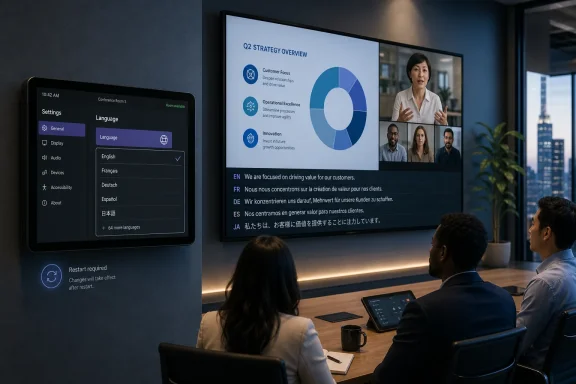
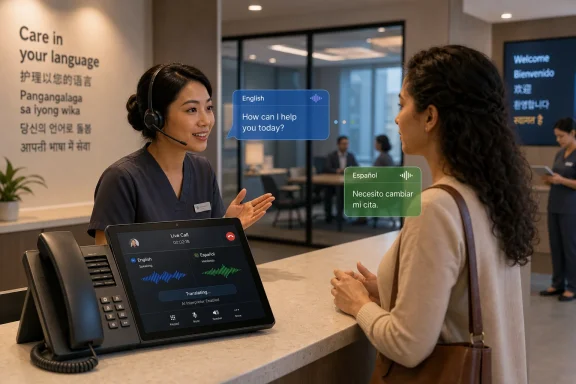
Microsoft is adding Interpreter agent support to Microsoft Teams Rooms on Android in August 2026 for Teams Rooms Pro-licensed devices across Worldwide, GCC, GCC High, and DoD clouds, extending real-time meeting translation from personal Teams clients and Windows-based rooms into Android meeting spaces. The move is less about one more Teams feature than about Microsoft deciding that AI translation belongs in the room itself. For IT departments, that turns multilingual collaboration from an individual accommodation into shared infrastructure. It also turns licensing, privacy, audio quality, and room design into part of the translation stack.
The important shift in Roadmap ID 562665 is not that Teams can translate speech. Microsoft has been building that story for a while through the Interpreter agent in Teams meetings, where participants can listen in a chosen language and, depending on policy and settings, hear translated speech rendered through either a preset automated voice or simulated voice.
What changes with Teams Rooms on Android is the location of the experience. Translation is no longer only something a remote participant enables on a desktop client or mobile app. It becomes a capability of the shared meeting room endpoint: the device on the wall, on the table, or under the display that represents everyone sitting together.
That matters because conference rooms are still where many organizations discover the limits of their hybrid-work assumptions. A multinational project call may include people in five countries, but the most politically important participants may be the three executives sitting in one room. If the room endpoint cannot participate fully in AI-mediated translation, the meeting’s center of gravity stays with individual laptops.
Microsoft’s bet is that Teams Rooms should become an intelligent meeting node rather than a glorified speakerphone. Interpreter support on Android fits the same pattern as intelligent cameras, voice recognition, recap features, and room-aware Copilot scenarios. The room is being asked to understand more of the meeting, not merely transmit it.
The roadmap item says the feature is in development, targeted for general availability in August 2026, and planned for Teams and Surface Devices under the General Availability release ring. It covers commercial and government clouds, including Worldwide Standard Multi-Tenant, GCC, GCC High, and DoD. That breadth is significant because translation features are not just a convenience for global sales calls; they are also relevant to public-sector, defense, and regulated environments where multilingual work is routine and procurement cycles are slow.
The requirement that the room be licensed for Teams Rooms Pro is equally important. Microsoft is not positioning this as a baseline feature for every Android room appliance. It is part of the premium room experience, alongside the broader strategy of using Teams Rooms Pro as the gateway to advanced management and AI-assisted meeting capabilities.
That will not surprise administrators who have watched Microsoft segment the Teams Rooms portfolio. Basic licensing remains useful for core join, schedule, share, and whiteboard scenarios. But Microsoft’s message is becoming clearer: if the room is expected to be intelligent, centrally managed, and AI-capable, it belongs on Pro.
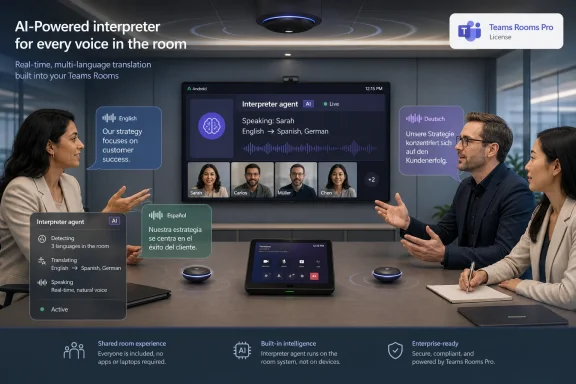
Microsoft describes Interpreter as real-time speech-to-speech translation. In practice, that means the system has to identify spoken language, convert audio to text, translate that text, and synthesize translated speech back into the meeting. Each step introduces both latency and the possibility of error.
This is why the meeting-room context is harder than the personal-client context. A laptop headset gives the system a relatively clean audio stream from a single speaker. A room device may hear several people, side conversations, echo, HVAC noise, table taps, and participants who are not always facing the microphone. If Interpreter on Android rooms is going to feel natural, the room’s audio capture quality will matter as much as Microsoft’s cloud model.
Voice simulation adds another layer of sensitivity. Microsoft’s documentation for Interpreter emphasizes that users can choose whether translated speech is represented through simulated personal voice or preset automated voices, and that administrators can control default behavior. That is not merely a user-experience toggle; it is a trust boundary.
There is a powerful inclusivity argument for voice simulation. Hearing a colleague’s translated speech in a voice that resembles their own can make a multilingual conversation feel less mediated and less robotic. But it also forces organizations to answer a question they may not have had to confront before: when does translation become voice representation?
The messier reality is that Interpreter has its own relationship with Microsoft 365 Copilot licensing for users. Microsoft’s current documentation for Teams Interpreter describes the feature as part of Microsoft 365 Copilot for users, while Teams Rooms documentation has already treated room-side AI capabilities as part of the Teams Rooms Pro value proposition. For room deployments, that creates an important distinction between what the room account can do, what individual participants can do, and what policy permits.
In a simple meeting, a Teams Rooms Pro-licensed Android room may provide the in-room translation experience. In a more complex meeting, individual participants may also use Interpreter from their own clients, captions, transcripts, or recap features. The administrative challenge is not merely enabling one feature; it is making sure the licensing model produces predictable behavior for the people in the meeting.
This is where Microsoft’s bundling strategy shows through. Interpreter is a showcase feature for Copilot-era Teams because it is easy to understand, hard to reproduce well, and valuable to executives. But by placing advanced room support behind Teams Rooms Pro, Microsoft also reinforces a recurring enterprise software pattern: AI features arrive first where the license stack is richest.
For smaller organizations, that may be frustrating. A nonprofit with a multilingual staff could benefit enormously from room-level translation, but may be more price-sensitive than a multinational enterprise. Microsoft can argue that the compute, cloud processing, administration, and compliance work justify premium packaging. Customers will judge the value based on whether the feature works reliably enough to replace informal workarounds.
That does not mean every agency or contractor will turn it on immediately. AI translation raises practical concerns around data processing, voice handling, retention, auditability, and user consent. Even if voice samples are not stored, administrators still need to understand how audio is transmitted, processed, and governed inside their tenant configuration.
The government-cloud commitment does, however, indicate that Microsoft does not see Interpreter as a consumer-grade novelty stapled onto Teams. It is being promoted as enterprise collaboration infrastructure. That brings more scrutiny, but it also makes the feature harder to dismiss.
Regulated organizations will likely move slowly. They will test the feature with low-risk meetings, review policies around voice simulation, and decide whether automated translation can be used for formal proceedings, customer communications, or only internal collaboration. The first question will be whether it works. The second will be whether it is allowed.
Meetings often default to the language of headquarters, the largest customer, or the most senior executive. Participants who are not fully fluent may contribute less, defer more, or spend the meeting translating mentally instead of debating the substance. Real-time translation can make that imbalance less severe.
But translation technology does not automatically create equal participation. It may help someone follow a discussion, but it may not capture nuance, humor, domain-specific vocabulary, legal phrasing, or cultural context. The risk is that an organization mistakes intelligibility for understanding.
That risk is especially sharp in rooms. If several people in a physical room rely on a shared translation stream, the meeting may appear smooth while errors pass unnoticed. A mistranslated objection, a softened warning, or an ambiguous commitment can still shape decisions.
The best case for Interpreter in Teams Rooms is not that it replaces human fluency or professional interpretation. It is that it raises the floor for everyday collaboration. For routine project meetings, cross-region updates, status reviews, and mixed-language working sessions, that floor can be transformative.
This is where Android Teams Rooms deployments will need real operational discipline. Certified hardware matters, but so does room layout. Table microphones, soundbars, ceiling arrays, camera placement, acoustic treatment, and firmware cadence all become part of the Interpreter experience.
The problem is not limited to accuracy. Latency and turn-taking are just as important. If translated audio arrives late enough to interrupt conversation flow, users will abandon it for captions, chat, or side-channel summaries. If it works smoothly only when one person speaks at a time, meeting culture will need to adapt.
That is not a reason to dismiss the feature. It is a reason to test it in the rooms where it will actually be used. A pristine demo room tells IT very little about a cramped huddle space with a rattling air vent and six people joining from one end of the table.
Administrators should expect the pilot phase to look more like an audio engineering exercise than a Teams policy rollout. The rooms that perform best for transcription and speaker attribution will probably perform best for Interpreter. The rooms that already struggle with captions are unlikely to become multilingual collaboration hubs overnight.
The room is a crucial part of that object because hybrid meetings are still asymmetrical. Remote participants are individually represented, logged in, captioned, and often easier for AI systems to distinguish. In-room participants can become a collective blob unless the room system can identify speakers, separate audio, and present participants clearly.
Interpreter adds another reason for Microsoft to improve that room intelligence. Translation is more useful when the system knows who is speaking, which language they are using, and how to route the output to listeners. It is also more trustworthy when participants understand what the system is doing and can control how their voice is represented.
This is the deeper product story: Teams Rooms is becoming the hardware edge of Microsoft 365 Copilot. The Android support matters because Android rooms represent a large class of appliance-style deployments that cannot be left behind if Microsoft wants AI meetings to be ubiquitous.
That ubiquity is strategic. If AI translation becomes a normal part of Teams Rooms, Microsoft makes Teams stickier not just as a chat and meeting app, but as the operational layer for global collaboration. Replacing a video vendor becomes harder when the room is tied into translation, recap, policy, identity, and compliance.
Microsoft gives administrators policy controls for Interpreter and voice simulation defaults. Those controls should be treated as governance settings, not merely feature switches. Voice simulation in particular deserves a written stance before it is used in executive, HR, legal, customer, or government meetings.
Organizations will also need helpdesk preparation. A user who hears delayed translation may report an audio problem. A participant who cannot access a language may assume the room is broken. A meeting organizer may not understand whether the issue is licensing, policy, cloud availability, device firmware, or the meeting type.
The August 2026 target gives IT teams time to prepare, assuming the schedule holds. Roadmap dates are planning signals, not contractual promises, and Microsoft can move them. Still, the prudent path is to identify candidate Android rooms now and check whether they are Pro-licensed, centrally managed, and already performing well with transcription and captions.
There is also a training burden. Users need to know that automated translation is not a legal transcript, not a certified interpreter, and not a guarantee of nuance. That caveat does not weaken the feature; it protects it from being oversold.
What Microsoft has is distribution. Teams is already embedded in Microsoft 365, governed by Entra ID, managed by Teams admin policies, and deployed in conference rooms through certified hardware. For enterprises, that matters more than having the flashiest translation demo.
The company’s advantage is not that its translation will always be perfect. It is that Interpreter can live inside the same meeting workflow that already handles scheduling, room accounts, chat, transcription, recap, compliance, and device management. If the feature is good enough, convenience will do a lot of the selling.
That creates pressure on competitors who may offer strong translation but lack the same room footprint. It also raises the stakes for Microsoft. When a feature is integrated into the default enterprise meeting environment, failures are not isolated experiments; they are helpdesk tickets, executive complaints, and adoption blockers.
The Android expansion is therefore both an opportunity and a test. Microsoft is extending a premium AI feature into a device category where reliability expectations are unforgiving. Nobody praises a conference room system for working; they only notice when it fails.
For WindowsForum readers, the Android angle is worth watching even if your organization mostly runs Windows rooms. Microsoft often stages room capabilities unevenly across platforms, and parity has operational consequences. Mixed fleets are common, and a feature that works in the boardroom but not the regional huddle room creates user confusion.
The broader signal is that Teams Rooms Pro is becoming the line Microsoft uses to separate commodity meeting access from AI-enhanced meeting infrastructure. That may be commercially rational, but it also means IT departments need to revisit room licensing as part of AI readiness. A room that was “good enough” for joining meetings may not be good enough for the next phase of Teams.
The other signal is that Microsoft wants translation to be normal. Not a special event setup. Not a third-party bridge. Not a separate dial-in workflow. Normal means available from the meeting experience users already know.
That is ambitious, and ambition is where enterprise collaboration features often get into trouble. Translation must be fast, accurate, policy-compliant, explainable, and reliable across messy rooms and diverse accents. Getting most of that right most of the time would still be a meaningful achievement.
A sensible deployment plan starts with the rooms where multilingual meetings already happen, where audio quality is strong, and where the business value is obvious. Then IT can expand once the support model is clear.
Microsoft’s August 2026 target for Interpreter agent support on Teams Rooms on Android is a narrow roadmap commitment with a broad implication: the intelligent meeting room is becoming a first-class participant in Microsoft’s AI strategy. If the feature arrives on schedule and works well on real hardware in real rooms, Teams Rooms Pro gains one of its clearest arguments yet. If it stumbles, it will be a reminder that the future of AI collaboration still depends on microphones, licenses, policies, and the messy human habit of talking over one another.
 Microsoft Moves Translation From the Laptop to the Room
The important shift in Roadmap ID 562665 is not that Teams can translate speech. Microsoft has been building that story for a while through the Interpreter agent in Teams meetings, where participants can listen in a chosen language and, depending on policy and settings, hear translated speech rendered through either a preset automated voice or simulated voice.What changes with Teams Rooms on Android is the location of the experience. Translation is no longer only something a remote participant enables on a desktop client or mobile app. It becomes a capability of the shared meeting room endpoint: the device on the wall, on the table, or under the display that represents everyone sitting together.
That matters because conference rooms are still where many organizations discover the limits of their hybrid-work assumptions. A multinational project call may include people in five countries, but the most politically important participants may be the three executives sitting in one room. If the room endpoint cannot participate fully in AI-mediated translation, the meeting’s center of gravity stays with individual laptops.
Microsoft’s bet is that Teams Rooms should become an intelligent meeting node rather than a glorified speakerphone. Interpreter support on Android fits the same pattern as intelligent cameras, voice recognition, recap features, and room-aware Copilot scenarios. The room is being asked to understand more of the meeting, not merely transmit it.
Android Rooms Finally Get a Feature the Platform Could Not Ignore
Teams Rooms on Android has always existed in a delicate position. It is often cheaper, simpler, and more appliance-like than Windows-based room systems, but it has also had to fight the perception that it receives advanced Teams capabilities later or in a more constrained form. Interpreter agent support lands squarely in that history.The roadmap item says the feature is in development, targeted for general availability in August 2026, and planned for Teams and Surface Devices under the General Availability release ring. It covers commercial and government clouds, including Worldwide Standard Multi-Tenant, GCC, GCC High, and DoD. That breadth is significant because translation features are not just a convenience for global sales calls; they are also relevant to public-sector, defense, and regulated environments where multilingual work is routine and procurement cycles are slow.
The requirement that the room be licensed for Teams Rooms Pro is equally important. Microsoft is not positioning this as a baseline feature for every Android room appliance. It is part of the premium room experience, alongside the broader strategy of using Teams Rooms Pro as the gateway to advanced management and AI-assisted meeting capabilities.
That will not surprise administrators who have watched Microsoft segment the Teams Rooms portfolio. Basic licensing remains useful for core join, schedule, share, and whiteboard scenarios. But Microsoft’s message is becoming clearer: if the room is expected to be intelligent, centrally managed, and AI-capable, it belongs on Pro.
The Interpreter Agent Is Really Three AI Systems in a Trench Coat
The plain-language pitch is simple: someone speaks, Teams translates, and other participants listen in the language they prefer. Underneath that simplicity is a chain of speech recognition, machine translation, and text-to-speech generation that must work quickly enough not to wreck the cadence of a meeting.Microsoft describes Interpreter as real-time speech-to-speech translation. In practice, that means the system has to identify spoken language, convert audio to text, translate that text, and synthesize translated speech back into the meeting. Each step introduces both latency and the possibility of error.
This is why the meeting-room context is harder than the personal-client context. A laptop headset gives the system a relatively clean audio stream from a single speaker. A room device may hear several people, side conversations, echo, HVAC noise, table taps, and participants who are not always facing the microphone. If Interpreter on Android rooms is going to feel natural, the room’s audio capture quality will matter as much as Microsoft’s cloud model.
Voice simulation adds another layer of sensitivity. Microsoft’s documentation for Interpreter emphasizes that users can choose whether translated speech is represented through simulated personal voice or preset automated voices, and that administrators can control default behavior. That is not merely a user-experience toggle; it is a trust boundary.
There is a powerful inclusivity argument for voice simulation. Hearing a colleague’s translated speech in a voice that resembles their own can make a multilingual conversation feel less mediated and less robotic. But it also forces organizations to answer a question they may not have had to confront before: when does translation become voice representation?
The License Line Is Where Microsoft Draws the Product Boundary
The roadmap note says Teams Rooms on Android support is available for devices licensed with Teams Rooms Pro. That is the clean sentence administrators will care about when budget season arrives.The messier reality is that Interpreter has its own relationship with Microsoft 365 Copilot licensing for users. Microsoft’s current documentation for Teams Interpreter describes the feature as part of Microsoft 365 Copilot for users, while Teams Rooms documentation has already treated room-side AI capabilities as part of the Teams Rooms Pro value proposition. For room deployments, that creates an important distinction between what the room account can do, what individual participants can do, and what policy permits.
In a simple meeting, a Teams Rooms Pro-licensed Android room may provide the in-room translation experience. In a more complex meeting, individual participants may also use Interpreter from their own clients, captions, transcripts, or recap features. The administrative challenge is not merely enabling one feature; it is making sure the licensing model produces predictable behavior for the people in the meeting.
This is where Microsoft’s bundling strategy shows through. Interpreter is a showcase feature for Copilot-era Teams because it is easy to understand, hard to reproduce well, and valuable to executives. But by placing advanced room support behind Teams Rooms Pro, Microsoft also reinforces a recurring enterprise software pattern: AI features arrive first where the license stack is richest.
For smaller organizations, that may be frustrating. A nonprofit with a multilingual staff could benefit enormously from room-level translation, but may be more price-sensitive than a multinational enterprise. Microsoft can argue that the compute, cloud processing, administration, and compliance work justify premium packaging. Customers will judge the value based on whether the feature works reliably enough to replace informal workarounds.
Government Cloud Support Changes the Risk Conversation
The inclusion of GCC, GCC High, and DoD in the roadmap is not a footnote. Translation in meetings often involves sensitive content, and government availability signals that Microsoft wants Interpreter to be considered suitable for environments with stricter compliance expectations.That does not mean every agency or contractor will turn it on immediately. AI translation raises practical concerns around data processing, voice handling, retention, auditability, and user consent. Even if voice samples are not stored, administrators still need to understand how audio is transmitted, processed, and governed inside their tenant configuration.
The government-cloud commitment does, however, indicate that Microsoft does not see Interpreter as a consumer-grade novelty stapled onto Teams. It is being promoted as enterprise collaboration infrastructure. That brings more scrutiny, but it also makes the feature harder to dismiss.
Regulated organizations will likely move slowly. They will test the feature with low-risk meetings, review policies around voice simulation, and decide whether automated translation can be used for formal proceedings, customer communications, or only internal collaboration. The first question will be whether it works. The second will be whether it is allowed.
Translation Is an Accessibility Feature With Enterprise Politics Attached
Microsoft frames Interpreter as a way to remove language barriers so people can understand and collaborate more effectively. That framing is correct, but incomplete. In enterprises, language is also power.Meetings often default to the language of headquarters, the largest customer, or the most senior executive. Participants who are not fully fluent may contribute less, defer more, or spend the meeting translating mentally instead of debating the substance. Real-time translation can make that imbalance less severe.
But translation technology does not automatically create equal participation. It may help someone follow a discussion, but it may not capture nuance, humor, domain-specific vocabulary, legal phrasing, or cultural context. The risk is that an organization mistakes intelligibility for understanding.
That risk is especially sharp in rooms. If several people in a physical room rely on a shared translation stream, the meeting may appear smooth while errors pass unnoticed. A mistranslated objection, a softened warning, or an ambiguous commitment can still shape decisions.
The best case for Interpreter in Teams Rooms is not that it replaces human fluency or professional interpretation. It is that it raises the floor for everyday collaboration. For routine project meetings, cross-region updates, status reviews, and mixed-language working sessions, that floor can be transformative.
Room Audio Becomes the New Translation Bottleneck
Anyone who has managed conference rooms knows the dirty secret of meeting AI: the model is only as good as the audio it receives. A premium translation service cannot rescue a room where microphones are poorly placed, firmware is stale, speakers talk over one another, and the device is picking up reflections from a glass wall.This is where Android Teams Rooms deployments will need real operational discipline. Certified hardware matters, but so does room layout. Table microphones, soundbars, ceiling arrays, camera placement, acoustic treatment, and firmware cadence all become part of the Interpreter experience.
The problem is not limited to accuracy. Latency and turn-taking are just as important. If translated audio arrives late enough to interrupt conversation flow, users will abandon it for captions, chat, or side-channel summaries. If it works smoothly only when one person speaks at a time, meeting culture will need to adapt.
That is not a reason to dismiss the feature. It is a reason to test it in the rooms where it will actually be used. A pristine demo room tells IT very little about a cramped huddle space with a rattling air vent and six people joining from one end of the table.
Administrators should expect the pilot phase to look more like an audio engineering exercise than a Teams policy rollout. The rooms that perform best for transcription and speaker attribution will probably perform best for Interpreter. The rooms that already struggle with captions are unlikely to become multilingual collaboration hubs overnight.
Microsoft’s AI Meeting Stack Is Becoming Room-Centric
Interpreter support on Android should be read alongside Microsoft’s broader work on Teams Rooms, Copilot, intelligent recap, voice recognition, and AI-generated meeting artifacts. The company is gradually converting the meeting from a stream into a structured object: who spoke, what was said, what language it was in, what decisions were made, and what should happen next.The room is a crucial part of that object because hybrid meetings are still asymmetrical. Remote participants are individually represented, logged in, captioned, and often easier for AI systems to distinguish. In-room participants can become a collective blob unless the room system can identify speakers, separate audio, and present participants clearly.
Interpreter adds another reason for Microsoft to improve that room intelligence. Translation is more useful when the system knows who is speaking, which language they are using, and how to route the output to listeners. It is also more trustworthy when participants understand what the system is doing and can control how their voice is represented.
This is the deeper product story: Teams Rooms is becoming the hardware edge of Microsoft 365 Copilot. The Android support matters because Android rooms represent a large class of appliance-style deployments that cannot be left behind if Microsoft wants AI meetings to be ubiquitous.
That ubiquity is strategic. If AI translation becomes a normal part of Teams Rooms, Microsoft makes Teams stickier not just as a chat and meeting app, but as the operational layer for global collaboration. Replacing a video vendor becomes harder when the room is tied into translation, recap, policy, identity, and compliance.
Admins Will Need Policy Before the First Translated Meeting
The worst way to deploy Interpreter is to let users discover it during an important multilingual meeting without guidance. The second-worst way is to enable it everywhere without deciding how voice simulation, consent, support, and troubleshooting will be handled.Microsoft gives administrators policy controls for Interpreter and voice simulation defaults. Those controls should be treated as governance settings, not merely feature switches. Voice simulation in particular deserves a written stance before it is used in executive, HR, legal, customer, or government meetings.
Organizations will also need helpdesk preparation. A user who hears delayed translation may report an audio problem. A participant who cannot access a language may assume the room is broken. A meeting organizer may not understand whether the issue is licensing, policy, cloud availability, device firmware, or the meeting type.
The August 2026 target gives IT teams time to prepare, assuming the schedule holds. Roadmap dates are planning signals, not contractual promises, and Microsoft can move them. Still, the prudent path is to identify candidate Android rooms now and check whether they are Pro-licensed, centrally managed, and already performing well with transcription and captions.
There is also a training burden. Users need to know that automated translation is not a legal transcript, not a certified interpreter, and not a guarantee of nuance. That caveat does not weaken the feature; it protects it from being oversold.
The Competitive Pressure Is Obvious, but Microsoft Has the Enterprise Advantage
Real-time translation is becoming one of the most visible AI features in collaboration software. It is easy to demo, emotionally resonant, and immediately understandable to anyone who has sat through a meeting in a language they only partly understand. Microsoft is not alone in chasing that future.What Microsoft has is distribution. Teams is already embedded in Microsoft 365, governed by Entra ID, managed by Teams admin policies, and deployed in conference rooms through certified hardware. For enterprises, that matters more than having the flashiest translation demo.
The company’s advantage is not that its translation will always be perfect. It is that Interpreter can live inside the same meeting workflow that already handles scheduling, room accounts, chat, transcription, recap, compliance, and device management. If the feature is good enough, convenience will do a lot of the selling.
That creates pressure on competitors who may offer strong translation but lack the same room footprint. It also raises the stakes for Microsoft. When a feature is integrated into the default enterprise meeting environment, failures are not isolated experiments; they are helpdesk tickets, executive complaints, and adoption blockers.
The Android expansion is therefore both an opportunity and a test. Microsoft is extending a premium AI feature into a device category where reliability expectations are unforgiving. Nobody praises a conference room system for working; they only notice when it fails.
The August Roadmap Item Is Small, but the Direction Is Not
On paper, this is a tidy Microsoft 365 Roadmap entry: one product, one platform family, one licensing requirement, one general availability month. In practice, it marks another step toward meetings where AI is not an add-on panel but part of the room fabric.For WindowsForum readers, the Android angle is worth watching even if your organization mostly runs Windows rooms. Microsoft often stages room capabilities unevenly across platforms, and parity has operational consequences. Mixed fleets are common, and a feature that works in the boardroom but not the regional huddle room creates user confusion.
The broader signal is that Teams Rooms Pro is becoming the line Microsoft uses to separate commodity meeting access from AI-enhanced meeting infrastructure. That may be commercially rational, but it also means IT departments need to revisit room licensing as part of AI readiness. A room that was “good enough” for joining meetings may not be good enough for the next phase of Teams.
The other signal is that Microsoft wants translation to be normal. Not a special event setup. Not a third-party bridge. Not a separate dial-in workflow. Normal means available from the meeting experience users already know.
That is ambitious, and ambition is where enterprise collaboration features often get into trouble. Translation must be fast, accurate, policy-compliant, explainable, and reliable across messy rooms and diverse accents. Getting most of that right most of the time would still be a meaningful achievement.
The Rooms That Benefit First Will Be the Ones IT Already Trusts
The practical lesson is that Interpreter on Teams Rooms on Android should not be treated as a magic upgrade for every shared space. It will reward organizations that already manage rooms carefully and expose the ones that have been skating by on “join button works” standards.A sensible deployment plan starts with the rooms where multilingual meetings already happen, where audio quality is strong, and where the business value is obvious. Then IT can expand once the support model is clear.
- Organizations should verify which Android Teams Rooms are assigned Teams Rooms Pro licenses before assuming they will receive Interpreter support.
- Administrators should review Interpreter and voice simulation policies before the feature reaches general availability.
- Pilot rooms should be tested with real multilingual meetings, not only scripted demos or single-speaker trials.
- Helpdesk teams should be trained to distinguish licensing, policy, device, audio, and meeting-type issues.
- Business users should be told that AI translation improves everyday collaboration but does not replace certified interpretation for high-stakes proceedings.
Microsoft’s August 2026 target for Interpreter agent support on Teams Rooms on Android is a narrow roadmap commitment with a broad implication: the intelligent meeting room is becoming a first-class participant in Microsoft’s AI strategy. If the feature arrives on schedule and works well on real hardware in real rooms, Teams Rooms Pro gains one of its clearest arguments yet. If it stumbles, it will be a reminder that the future of AI collaboration still depends on microphones, licenses, policies, and the messy human habit of talking over one another.
References
- Primary source: Microsoft 365 Roadmap
Published: 2026-06-25T23:15:45.5477468Z
Microsoft 365 Roadmap | Microsoft 365
The Microsoft 365 Roadmap lists updates that are currently planned for applicable subscribers. Check here for more information on the status of new features and updates.www.microsoft.com
- Official source: support.microsoft.com
Interpreter in Microsoft Teams meetings and calls | Microsoft Support
Use Interpreter, an AI-powered translator, during multilingual Microsoft Teams meetings for more clear, effective communication between participants.support.microsoft.com - Official source: learn.microsoft.com
Manage Interpreter agent for your organization - Microsoft Teams | Microsoft Learn
Learn how to manage Interpreter agent in Microsoft Teams to provide translation during meetings.learn.microsoft.com - Related coverage: blog-en.topedia.com
Interpreter agent in Teams now supports a new consecutive interpretation mode | Topedia Blog
The Interpreter agent in Teams now supports a new consecutive interpretation mode for turn-based speech-to-speech translation for meetings in two languages.blog-en.topedia.com - Related coverage: knowledge.interprefy.com

Interprefy Agent for Microsoft Teams
Seamless audio capture for effortless multilingual meetings
knowledge.interprefy.com
- Official source: marketplace.microsoft.com
KUDO for Microsoft Teams
Add Live Translation to your Microsoft Teams Meetings and Eventsmarketplace.microsoft.com
- Related coverage: imaginetraining.biz
AI Interpreter: Real-Time Translation in Microsoft Teams
Discover how Microsoft Teams’ new AI Interpreter agent delivers real-time, bidirectional translation, making multilingual meetings more inclusive.www.imaginetraining.biz - Related coverage: world-today-journal.com
Microsoft Teams Rooms: Real-Time Transcription & Translation Now on Android - World Today Journal
Microsoft is expanding the accessibility of its collaboration tools with the upcoming release of real-time transcription and translation capabilities forwww.world-today-journal.com - Related coverage: supersimple365.com
Copilot Interpreter agent for Teams meetings - Super Simple 365
Short VersionThe Copilot Interpreter agent allows each Teams meeting attendee to speak and listen in the language of their choice. Targeted Release: Now due early June to late July 2025. DetailsThe Interpreter agent in Teams will allow you to enable real-time speech-to-speech translation during... supersimple365.com
- Related coverage: windowscentral.com
Microsoft 365 Copilot AI agents expand to more apps | Windows Central
Microsoft expands Copilot with collaborative agents in Teams, SharePoint and more to boost productivity and reshape teamwork.www.windowscentral.com