

Microsoft said in June 2026 that recent Teams updates cut chat-switching latency by about 20 percent, reduced several freeze and scrolling bugs, and improved video responsiveness, while the desktop app continues to draw criticism for heavy memory use on Windows and macOS. The announcement is less a victory lap than an admission that Teams’ biggest problem was never one catastrophic defect. It is the accumulated friction of an app that sits in the foreground of modern office life all day, every day. Microsoft is making Teams faster, but it is also defending the architecture that made many users suspicious of the app in the first place.
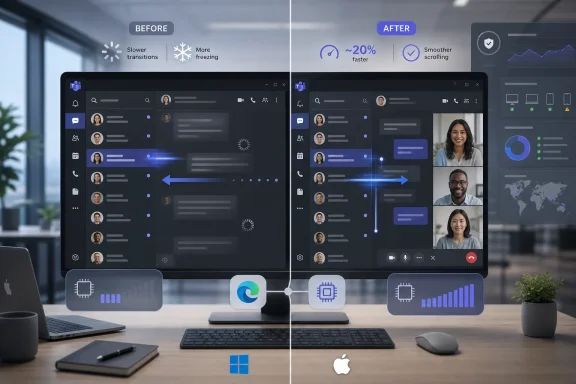
The headline number is straightforward: Microsoft says switching between chats is now roughly 20 percent faster than it was at the start of the year. That matters because chat switching is one of the highest-frequency gestures in Teams, and small delays become maddening when repeated dozens or hundreds of times per day.
Microsoft’s framing is important. The company is not claiming that Teams has suddenly become a featherweight native desktop application. It is saying that specific paths through the app — opening conversations, rendering views, recovering from hangs, and initializing WebView2 components — have been profiled and optimized.
That is the right kind of engineering work, but it is also the kind users rarely celebrate. Nobody thanks a collaboration app for merely keeping up with typing, scrolling, and clicking. Performance improvements in Teams are noticed only because the baseline experience has so often felt heavier than it should.
The work appears especially focused on “cold” interactions, where Teams must open or rebuild a view that is not already warm in memory. That is where many users on modest laptops feel the app most: click a chat, wait for the UI to catch up, then remember what you were going to say.
That ambition explains some of the bulk. Teams has to authenticate against Microsoft 365, render files, host third-party apps, manage notifications, route calls, process video, preserve state across tenants, and increasingly surface Copilot-era features. A simple native chat client would not do all of that.
But that same ambition also explains the user frustration. The average employee does not experience Teams as a grand unified productivity platform. They experience it as the thing that opens when a colleague says “quick call?” and then consumes hundreds of megabytes before anyone has shared a screen.
Microsoft’s challenge is that Teams is both critical infrastructure and a daily annoyance. The more central it becomes to work, the less tolerance users have for delays that might have been acceptable in an occasional conferencing tool.
That decision will disappoint users who see every Teams process in Task Manager as evidence of modern software’s decadence. But from Microsoft’s perspective, the WebView2 strategy is rational. It gives Teams a shared foundation across platforms, lets the company reuse web technologies, and allows features to move faster than they would through separate native clients.
The trade-off is trust. When a desktop app feels sluggish, users blame the architecture even if the immediate cause is a database query, a rendering path, a bad cache, or an overloaded main thread. WebView2 becomes the symbol of everything people dislike about “web apps pretending to be desktop apps.”
Microsoft can argue that WebView2 is not the same as Electron, that Chromium components are shared, and that modern web runtimes can be optimized aggressively. Those points are technically fair. They do not change the emotional reality that users expect a Microsoft communication app on Windows to feel like it belongs on Windows.
Microsoft can counter that unused RAM is not inherently wasted RAM, and that caching makes future interactions faster. That is true in principle. It is also cold comfort on an 8GB laptop running Outlook, Edge, OneDrive sync, security tooling, browser tabs, and perhaps a remote desktop session.
The real issue is not just the number in Task Manager. It is the lack of confidence that Teams will behave proportionally. Users can accept a heavy app during a meeting with video, screen sharing, transcription, and background effects. They are less forgiving when the same app appears expensive while doing nothing visible.
This is why the latest optimizations matter but do not settle the argument. A faster Teams that still feels greedy remains a reputational problem for Microsoft, especially as the company pushes more Microsoft 365 workloads toward web-backed desktop shells.
That sounds like plumbing, and it is. But plumbing is precisely where modern collaboration apps win or lose. A user does not care whether a freeze was caused by JavaScript scheduling, native bridge initialization, database contention, or a library load on the wrong thread. The app froze.
Shared infrastructure makes it easier for Microsoft to apply lessons across platforms. It also means the stack has more layers where small decisions can produce visible friction. Teams is not one app in the old sense; it is a negotiated settlement between web code, native wrappers, operating-system services, media pipelines, and cloud state.
That makes performance work harder to explain and harder to market. “We reduced main-thread blocking during environment creation” is meaningful to engineers. To everyone else, it translates to: Teams should stop ignoring your clicks as often.
Microsoft has said internal measurements showed video loading time improvements and fewer frozen video frames after changes to the Teams media experience. That is exactly where the company needs measurable gains, because meetings are Teams’ highest-stakes workload. A delayed message can be forgiven. A frozen executive briefing cannot.
The architectural direction also hints at where Teams is heading. Microsoft has acknowledged that keeping too much calling and meeting work inside shared app infrastructure can degrade performance, and the company has discussed moving some calling capabilities into separate processes.
That is a pragmatic compromise. Microsoft gets to keep the WebView2-centered shell while isolating the most demanding real-time workloads. It is not the pure native rewrite critics want, but it may be the more realistic way to make Teams tolerable at enterprise scale.
A 20 percent chat latency improvement is welcome, but admins care about what happens across thousands of managed endpoints with different RAM profiles, security agents, display drivers, VPN clients, and peripheral stacks. A small inefficiency multiplied across a large organization becomes help-desk volume, device refresh pressure, and lost time.
Teams also occupies an unusual place in the managed desktop. It is both a productivity app and a communications lifeline. If it misbehaves, users often cannot simply close it for the afternoon. They need it for calls, approvals, incident channels, and calendar-driven meetings.
That gives Microsoft a burden other software vendors do not always carry. Teams performance is not merely a product-quality issue. It is part of the operational baseline for Microsoft 365 shops, and Microsoft has trained customers to expect that baseline to improve without requiring a wholesale platform rethink.
That is still valuable. Software performance work without measurement often turns into superstition. Microsoft’s willingness to publish specific numbers suggests the Teams team is treating responsiveness as an engineering discipline rather than a vibes problem.
But users measure performance through interruption. The one freeze before a client call outweighs fifty chat switches that felt fine. The meeting that starts with no camera matters more than an average video-loading metric. The day Teams eats RAM while a laptop fan spins is remembered longer than the week it behaved.
This gap between telemetry and lived experience is where Microsoft has struggled. The company can be right that Teams is improving and users can be right that it still feels too heavy.
A native Teams would need to keep pace with Microsoft 365 feature velocity, support cross-platform parity, host extensibility, integrate AI features, and reflect constant changes in meetings, compliance, security, and tenant policy. That is a large engineering commitment, not a weekend rewrite in WinUI and Swift.
Microsoft’s current answer is to optimize the hybrid model rather than replace it. That answer serves Microsoft’s business needs: faster feature delivery, shared code, common debugging, and closer alignment with the web version. It also serves administrators who prefer consistent behavior across Windows, Mac, and browser clients.
Still, the native-app argument persists because it is really about accountability. Users want desktop apps to obey desktop expectations: fast launch, modest idle footprint, predictable memory behavior, good offline handling, and UI responsiveness under load. If WebView2 can deliver that, the debate fades. If it cannot, the runtime remains on trial.
That makes Teams performance more than a Teams story. It is a referendum on whether Microsoft can make hybrid applications feel first-class on the desktop. If the answer is yes, the company gets speed, reach, and consistency. If the answer is no, users get a future full of apps that feel connected to the cloud but alien to the machine.
The irony is that Microsoft understands desktop performance better than almost anyone. Windows, Office, Visual Studio, Edge, and Xbox all contain deep native engineering cultures. Teams’ struggles are not proof that Microsoft cannot build fast software. They are proof that organizational priorities shape technical outcomes.
For years, Teams’ priority was growth: more features, more meetings, more integration, more Microsoft 365 surface area. The latest performance push suggests Microsoft knows the bill for that growth has come due.
But Teams is competing against a user expectation that has hardened over time. After years of complaints, Microsoft no longer gets much credit for making Teams “less slow.” The bar is now whether Teams can become boringly reliable.
That is the standard for infrastructure. Nobody wants to think about DNS, authentication, Wi-Fi roaming, or display drivers during a meeting. Teams has to become part of that invisible layer, even as Microsoft keeps expanding it into something more ambitious.
The company’s problem is that every new feature risks reopening the wound. AI summaries, agents, richer apps, and deeper workflow integrations may make Teams more valuable, but they also add more code, more state, more background work, and more opportunities for drag.
 Microsoft Fixes the Lag It Can Measure
The headline number is straightforward: Microsoft says switching between chats is now roughly 20 percent faster than it was at the start of the year. That matters because chat switching is one of the highest-frequency gestures in Teams, and small delays become maddening when repeated dozens or hundreds of times per day.Microsoft’s framing is important. The company is not claiming that Teams has suddenly become a featherweight native desktop application. It is saying that specific paths through the app — opening conversations, rendering views, recovering from hangs, and initializing WebView2 components — have been profiled and optimized.
That is the right kind of engineering work, but it is also the kind users rarely celebrate. Nobody thanks a collaboration app for merely keeping up with typing, scrolling, and clicking. Performance improvements in Teams are noticed only because the baseline experience has so often felt heavier than it should.
The work appears especially focused on “cold” interactions, where Teams must open or rebuild a view that is not already warm in memory. That is where many users on modest laptops feel the app most: click a chat, wait for the UI to catch up, then remember what you were going to say.
Teams Is No Longer Just a Chat App, and That Is the Problem
Teams began life as Microsoft’s answer to Slack, but the product Microsoft now ships is closer to an operating environment for work. It is chat, calling, meetings, calendar, files, apps, workflow entry point, AI recap surface, and identity-aware corporate dashboard.That ambition explains some of the bulk. Teams has to authenticate against Microsoft 365, render files, host third-party apps, manage notifications, route calls, process video, preserve state across tenants, and increasingly surface Copilot-era features. A simple native chat client would not do all of that.
But that same ambition also explains the user frustration. The average employee does not experience Teams as a grand unified productivity platform. They experience it as the thing that opens when a colleague says “quick call?” and then consumes hundreds of megabytes before anyone has shared a screen.
Microsoft’s challenge is that Teams is both critical infrastructure and a daily annoyance. The more central it becomes to work, the less tolerance users have for delays that might have been acceptable in an occasional conferencing tool.
WebView2 Remains the Bet Microsoft Refuses to Walk Back
The most controversial part of the story is what Microsoft is not doing. It is not abandoning WebView2 for a fully native Windows or macOS client.That decision will disappoint users who see every Teams process in Task Manager as evidence of modern software’s decadence. But from Microsoft’s perspective, the WebView2 strategy is rational. It gives Teams a shared foundation across platforms, lets the company reuse web technologies, and allows features to move faster than they would through separate native clients.
The trade-off is trust. When a desktop app feels sluggish, users blame the architecture even if the immediate cause is a database query, a rendering path, a bad cache, or an overloaded main thread. WebView2 becomes the symbol of everything people dislike about “web apps pretending to be desktop apps.”
Microsoft can argue that WebView2 is not the same as Electron, that Chromium components are shared, and that modern web runtimes can be optimized aggressively. Those points are technically fair. They do not change the emotional reality that users expect a Microsoft communication app on Windows to feel like it belongs on Windows.
The Memory Problem Survives the Performance Story
The performance update lands awkwardly because memory use remains the complaint that refuses to die. Reports of Teams sitting near a gigabyte of RAM while apparently idle are not hard to find, and video calls can push consumption much higher.Microsoft can counter that unused RAM is not inherently wasted RAM, and that caching makes future interactions faster. That is true in principle. It is also cold comfort on an 8GB laptop running Outlook, Edge, OneDrive sync, security tooling, browser tabs, and perhaps a remote desktop session.
The real issue is not just the number in Task Manager. It is the lack of confidence that Teams will behave proportionally. Users can accept a heavy app during a meeting with video, screen sharing, transcription, and background effects. They are less forgiving when the same app appears expensive while doing nothing visible.
This is why the latest optimizations matter but do not settle the argument. A faster Teams that still feels greedy remains a reputational problem for Microsoft, especially as the company pushes more Microsoft 365 workloads toward web-backed desktop shells.
macOS Freezes Show the Cost of Shared Architecture
Microsoft’s fixes for hangs and input freezes, particularly on macOS and iOS, illustrate the benefit and risk of a shared codebase. One optimization reportedly involved changing how a WebView2-related dynamic library was loaded, moving work away from a path that could block responsiveness.That sounds like plumbing, and it is. But plumbing is precisely where modern collaboration apps win or lose. A user does not care whether a freeze was caused by JavaScript scheduling, native bridge initialization, database contention, or a library load on the wrong thread. The app froze.
Shared infrastructure makes it easier for Microsoft to apply lessons across platforms. It also means the stack has more layers where small decisions can produce visible friction. Teams is not one app in the old sense; it is a negotiated settlement between web code, native wrappers, operating-system services, media pipelines, and cloud state.
That makes performance work harder to explain and harder to market. “We reduced main-thread blocking during environment creation” is meaningful to engineers. To everyone else, it translates to: Teams should stop ignoring your clicks as often.
Video Improvements Attack the Meeting Room Pain Point
The earlier Teams architecture work, including video rendering improvements, goes after a different kind of frustration. Chat lag is irritating, but frozen video in a meeting is socially disruptive. It makes users look absent, confused, or technically unprepared even when the client is at fault.Microsoft has said internal measurements showed video loading time improvements and fewer frozen video frames after changes to the Teams media experience. That is exactly where the company needs measurable gains, because meetings are Teams’ highest-stakes workload. A delayed message can be forgiven. A frozen executive briefing cannot.
The architectural direction also hints at where Teams is heading. Microsoft has acknowledged that keeping too much calling and meeting work inside shared app infrastructure can degrade performance, and the company has discussed moving some calling capabilities into separate processes.
That is a pragmatic compromise. Microsoft gets to keep the WebView2-centered shell while isolating the most demanding real-time workloads. It is not the pure native rewrite critics want, but it may be the more realistic way to make Teams tolerable at enterprise scale.
The Enterprise View Is Less Emotional but More Severe
Home users judge Teams by feel. Enterprise IT judges it by fleet impact.A 20 percent chat latency improvement is welcome, but admins care about what happens across thousands of managed endpoints with different RAM profiles, security agents, display drivers, VPN clients, and peripheral stacks. A small inefficiency multiplied across a large organization becomes help-desk volume, device refresh pressure, and lost time.
Teams also occupies an unusual place in the managed desktop. It is both a productivity app and a communications lifeline. If it misbehaves, users often cannot simply close it for the afternoon. They need it for calls, approvals, incident channels, and calendar-driven meetings.
That gives Microsoft a burden other software vendors do not always carry. Teams performance is not merely a product-quality issue. It is part of the operational baseline for Microsoft 365 shops, and Microsoft has trained customers to expect that baseline to improve without requiring a wholesale platform rethink.
Microsoft’s Numbers Are Useful, but Users Measure Irritation Differently
Performance claims from Microsoft should be read as directional, not universal. A 20 percent improvement measured over a defined window does not mean every user will feel Teams as 20 percent faster. It means Microsoft has instrumented a scenario, changed the code path, and seen aggregate improvement.That is still valuable. Software performance work without measurement often turns into superstition. Microsoft’s willingness to publish specific numbers suggests the Teams team is treating responsiveness as an engineering discipline rather than a vibes problem.
But users measure performance through interruption. The one freeze before a client call outweighs fifty chat switches that felt fine. The meeting that starts with no camera matters more than an average video-loading metric. The day Teams eats RAM while a laptop fan spins is remembered longer than the week it behaved.
This gap between telemetry and lived experience is where Microsoft has struggled. The company can be right that Teams is improving and users can be right that it still feels too heavy.
The Native App Debate Misses the Harder Question
The easy argument is that Microsoft should build a fully native Teams client. The harder question is what such a client would have to give up.A native Teams would need to keep pace with Microsoft 365 feature velocity, support cross-platform parity, host extensibility, integrate AI features, and reflect constant changes in meetings, compliance, security, and tenant policy. That is a large engineering commitment, not a weekend rewrite in WinUI and Swift.
Microsoft’s current answer is to optimize the hybrid model rather than replace it. That answer serves Microsoft’s business needs: faster feature delivery, shared code, common debugging, and closer alignment with the web version. It also serves administrators who prefer consistent behavior across Windows, Mac, and browser clients.
Still, the native-app argument persists because it is really about accountability. Users want desktop apps to obey desktop expectations: fast launch, modest idle footprint, predictable memory behavior, good offline handling, and UI responsiveness under load. If WebView2 can deliver that, the debate fades. If it cannot, the runtime remains on trial.
Teams Has Become a Test Case for Microsoft’s App Future
Teams is not the only Microsoft app carrying this tension. The new Outlook has faced similar criticism, and Windows itself increasingly hosts web-powered surfaces through Edge components. Microsoft’s direction is clear: web-backed experiences are not an exception but a strategy.That makes Teams performance more than a Teams story. It is a referendum on whether Microsoft can make hybrid applications feel first-class on the desktop. If the answer is yes, the company gets speed, reach, and consistency. If the answer is no, users get a future full of apps that feel connected to the cloud but alien to the machine.
The irony is that Microsoft understands desktop performance better than almost anyone. Windows, Office, Visual Studio, Edge, and Xbox all contain deep native engineering cultures. Teams’ struggles are not proof that Microsoft cannot build fast software. They are proof that organizational priorities shape technical outcomes.
For years, Teams’ priority was growth: more features, more meetings, more integration, more Microsoft 365 surface area. The latest performance push suggests Microsoft knows the bill for that growth has come due.
The Improvements Are Real, but the Bar Has Moved
It would be unfair to dismiss Microsoft’s work as cosmetic. Reducing chat-switching latency, fixing hangs, improving video behavior, and isolating performance bottlenecks are real improvements. They will help users, especially on slower networks and lower-memory machines.But Teams is competing against a user expectation that has hardened over time. After years of complaints, Microsoft no longer gets much credit for making Teams “less slow.” The bar is now whether Teams can become boringly reliable.
That is the standard for infrastructure. Nobody wants to think about DNS, authentication, Wi-Fi roaming, or display drivers during a meeting. Teams has to become part of that invisible layer, even as Microsoft keeps expanding it into something more ambitious.
The company’s problem is that every new feature risks reopening the wound. AI summaries, agents, richer apps, and deeper workflow integrations may make Teams more valuable, but they also add more code, more state, more background work, and more opportunities for drag.
The Teams Speed-Up Still Leaves IT With a RAM Bill
Microsoft’s latest work gives administrators and power users a better story to tell, but not a clean ending. Teams is improving in measurable ways, while the resource-footprint debate remains unresolved.- Microsoft says Teams chat switching has become about 20 percent faster during the first half of 2026.
- The improvements target common irritants such as delayed conversation loading, freezes, scrolling stalls, and WebView2-related blocking.
- Microsoft is continuing to rely on WebView2 rather than rewriting Teams as a fully native Windows or macOS application.
- Memory use remains the main unresolved complaint, particularly on 8GB systems and during video-heavy workflows.
- Separating some calling functions into dedicated processes may improve reliability, but it could also make Teams’ process model look even busier to users.
- The practical test is not whether Teams benchmarks better, but whether it stops interrupting work.
References
- Primary source: Research Snipers
Published: 2026-06-18T13:56:07.614395
Teams: Microsoft is finally working on performance improvements – Research Snipers
Microsoft says it has significantly improved the performance of its Teams communications platform. In the...researchsnipers.com - Official source: techcommunity.microsoft.com
Making Microsoft Teams more responsive, reliable, and ready for work | Microsoft Community Hub
In our November 2025 update, we shared gains across video rendering, memory efficiency, and platform-level optimizations that improved the experience across... techcommunity.microsoft.com
- Related coverage: windowscentral.com
Microsoft fixed the issues that made Teams feel slow, but is it enough? | Windows Central
Microsoft has rolled out engineering changes that speed up chat switching, reduce app hangs, and make people search faster across Teams.www.windowscentral.com - Related coverage: windowsforum.com
Microsoft Teams Gets Faster in 2026: 20% Less Chat Latency, 35% Fewer iOS/Mac Hangs | Windows Forum
Microsoft says it spent the first half of 2026 cutting Microsoft Teams chat-switching latency by 20 percent across devices, while reducing app hangs on...windowsforum.com - Official source: learn.microsoft.com
The New Microsoft Teams Client - Teams | Microsoft Learn
Learn about the new Microsoft Teams, advantages, timelines, rollout, limitations, versions, deprecated features, and latest updates.learn.microsoft.com - Related coverage: techspot.com
Microsoft says the revamped Teams app is twice as fast, uses half the memory | TechSpot
Microsoft has released a revamped and redesigned Teams app for Windows and macOS. The preview version was launched back in March, with the company planning for a...www.techspot.com
- Related coverage: windowslatest.com
Microsoft admits Microsoft Teams eats RAM on Windows doing nothing, and “fix” is just another EXE
Microsoft told Windows Latest that it's testing a new update to help with Teams startup time, and more, especially when calling. www.windowslatest.com
- Related coverage: techrepublic.com
Microsoft Teams Performance Update Launching in January 2026
Microsoft is splitting the Teams calling stack into a new background process on Windows to cut launch times and improve reliability in busy meetings.www.techrepublic.com
- Official source: support.microsoft.com
What's new in Microsoft Teams | Microsoft Support
Get the latest info on new features for Microsoft Teams with these regularly updated release notes.support.microsoft.com - Related coverage: ad-hoc-news.de
Microsoft Teams: 20% schneller, 35% weniger Abstürze
Microsoft Teams erhält ein Performance-Update mit schnelleren Ladezeiten und einem Effizienzmodus für ältere Hardware.www.ad-hoc-news.de - Official source: microsoft.com
- Official source: adoption.microsoft.com
