

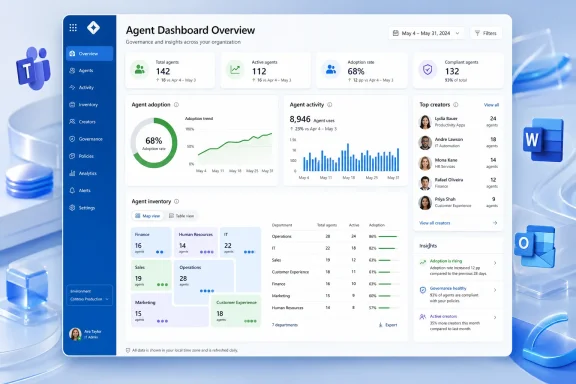
Microsoft is rolling out a new Overview page for the Agent Dashboard in Microsoft Viva in June 2026, giving Microsoft 365 Copilot customers a web-based view of agent adoption, agent activity, and the people creating agents used across their organizations. The feature is small on the surface, but it lands at the center of a much larger shift: Microsoft is turning Copilot agents from a novelty into an estate that IT is expected to measure, govern, and explain. In other words, the age of “some employees are trying AI” is giving way to the age of agent inventory.
The new Overview experience is not a splashy end-user feature. It will not write a better email, summarize a longer meeting, or turn a SharePoint site into a chatbot by magic. Its purpose is more administrative and more revealing: it gives organizations an at-a-glance way to understand the “agent landscape” forming inside Microsoft 365.
That phrase matters. Microsoft is no longer talking about Copilot simply as a single assistant embedded in Word, Excel, Teams, Outlook, and the Microsoft 365 app. It is increasingly presenting Copilot as a platform on which employees, departments, partners, and Microsoft itself can create purpose-built agents that perform narrower jobs.
Once that happens, the old dashboard model breaks down. Counting Copilot usage by active users or prompts may tell leadership whether people are trying the product, but it says little about which agents are becoming operationally important, who built them, and whether adoption is concentrating around sanctioned workflows or spreading through unmanaged experimentation.
The Overview page is Microsoft’s answer to that visibility gap. It gives customers a higher-level view of adoption and exposes who is creating agents used in the organization. That is the kind of signal IT teams need before they can make defensible decisions about training, governance, licensing, risk, and whether the company’s AI strategy is actually producing useful work.
That is a logical move. Copilot’s promise has never been limited to individual productivity. Microsoft has sold it as a tool that can reshape collaboration, surface organizational knowledge, and reduce friction across everyday work. Those are broad claims, and broad claims eventually invite measurement.
The Agent Dashboard sits inside that measurement story. It connects agent usage to organizational patterns rather than treating every interaction as an isolated chat. For customers that have invested heavily in Microsoft 365 Copilot licenses, the question is no longer whether AI can generate text; it is whether employees are building and using agents that map to real business processes.
This is where Viva’s role becomes politically useful for Microsoft. A CIO may care about architecture, a security team may care about permissions, and a finance leader may care about utilization. Viva gives Microsoft a single venue to show that all of those concerns can be turned into charts, trends, and management views.
AI agents make that old rule more urgent. A Word macro, a Power Automate flow, or a SharePoint list application could certainly create governance headaches. But agents are different because they are designed to mediate knowledge work directly: answering questions, taking actions, drawing on organizational data, and packaging a workflow behind a conversational interface.
That creates a new class of shadow IT. Employees who would never file a request for a custom app may build or adopt an agent if the tools are available and the productivity payoff is immediate. Departments may create agents for onboarding, sales enablement, HR policy, procurement, customer support, or internal knowledge search before central IT has built a formal governance model.
Microsoft’s new Overview page does not solve that problem by itself. But it acknowledges the problem exists. By showing adoption and creator visibility, it nudges organizations toward treating agents as managed digital assets rather than disposable experiments.
That changes the internal conversation. If an agent is heavily used and was created by a central IT team, the governance path is familiar. If a widely used agent was created by a business unit, a power user, or an unexpected corner of the company, leadership has a different question to answer: is this a success story, a risk, or both?
In healthy organizations, creator visibility can help identify the people closest to useful workflows. The employee who builds a widely used internal policy agent may understand the actual pain points better than a distant transformation office. The sales operations team that creates a useful account research agent may be revealing a repeatable pattern worth formalizing.
But the same visibility can also surface uncomfortable dependencies. An agent may become popular before anyone validates its data sources, prompt design, ownership model, or maintenance plan. It may answer questions based on stale documentation. It may encode a department’s informal process in a way that looks authoritative but was never reviewed.
That is why the creator field matters. It is not just a credit line. It is the beginning of accountability.
For Microsoft, the risk is obvious. If agents multiply faster than organizations can understand them, IT will slow adoption, restrict creation, or demand heavier approval mechanisms. That would undercut the low-friction story Microsoft wants to tell about AI-powered work.
The Agent Dashboard is therefore part reassurance and part pressure. It reassures administrators that Microsoft is not simply unleashing an agent free-for-all. It also pressures organizations to accept that agent creation is becoming a normal part of Microsoft 365, not a fringe developer activity.
This is a familiar Microsoft pattern. First, a capability arrives as an exciting productivity feature. Then it becomes extensible. Then extensibility creates sprawl. Then Microsoft ships management surfaces, admin controls, analytics, and compliance hooks to make the sprawl look governable.
That does not make the pattern cynical. It is how large platforms evolve. But it does mean customers should treat the Overview page as an early sign of a much larger administrative burden that is only beginning to show up in dashboards.
The question is whether those numbers will tell the whole story. High adoption can mean real productivity gains, but it can also mean curiosity, duplication, or poorly governed experimentation. A department may use many agents without improving outcomes. Another may rely on a smaller number of carefully designed agents that become deeply embedded in daily work.
Microsoft’s challenge is to avoid letting dashboard visibility become dashboard theater. IT leaders have seen this movie before with collaboration analytics, Teams usage reports, and productivity graphs that measure activity more easily than impact. A rising line can be useful, but it is not the same as a business result.
Still, adoption data has value when used honestly. It can identify where training is working, where employees are experimenting without support, and where agents are becoming part of routine work. The Overview page will be most useful to organizations that treat it as a diagnostic tool rather than a victory counter.
This is not a theoretical concern. Many organizations already struggle with SharePoint permissions, Teams sprawl, legacy file shares, stale groups, and documents that are technically accessible to more people than intended. Copilot and agents do not create those problems, but they can make them easier to discover and act upon.
An agent that surfaces sensitive information from poorly governed content can feel like an AI failure when the underlying issue is access control. An agent that gives confident answers from outdated material can feel like a model problem when the real culprit is information lifecycle management. The more agents an organization creates, the more often these old administrative sins reappear in conversational form.
That is why the Overview page is a governance milestone even if it is not branded as a security feature. Knowing which agents are used and who created them is a prerequisite for asking harder questions: what data do they touch, who can access them, how are they reviewed, and what happens when their creator changes roles or leaves the company?
That is where many organizations will discover they are behind. They may have approved Copilot licenses without defining what kinds of agents employees may create. They may have encouraged experimentation without creating review paths for agents that become widely used. They may have security standards for applications but no equivalent lifecycle for business-built AI agents.
The practical work is not glamorous. It means deciding who can create agents, when an agent needs review, how ownership is assigned, what naming conventions apply, what data sources are acceptable, and how inactive or risky agents are retired. It also means creating a process that does not crush useful experimentation under heavyweight bureaucracy.
The best governance model will likely be tiered. A small personal productivity agent should not face the same review as an agent used by hundreds of employees for HR, finance, legal, or customer-facing work. Microsoft’s Overview page can help identify when an agent crosses from experiment to infrastructure.
This is both promising and dangerous. Power users are often the people who understand the work best. They see bottlenecks before IT does, and they can prototype solutions faster than a centralized team. If agent creation tools are usable enough, they could unlock a wave of practical automation that formal projects would never prioritize.
But power-user systems also have a history. They become mission critical without documentation. They depend on one employee’s knowledge. They bypass architecture review. They solve a local problem while creating an organizational dependency.
The new Overview experience makes those dynamics more visible. It gives IT and business leaders a way to spot where the next generation of power users is already shaping AI adoption. The challenge will be to support them without pretending that every useful agent is ready to become enterprise infrastructure.
The status is rolling out, which in Microsoft 365 language still requires patience. Tenants rarely receive every cloud feature at the same moment, and admins know that roadmap dates are best read as deployment windows rather than appointment times. Some organizations may see the experience earlier than others depending on service rollout mechanics, licensing, and eligibility.
The feature also lands in the intersection of Microsoft Viva and Microsoft 365 Copilot, which is important for procurement and administration. This is not just a Viva nicety; it is part of the management layer for Copilot’s agent ecosystem. Customers evaluating Copilot should therefore pay attention not only to end-user features, but to the dashboards and controls that arrive around them.
The created and updated dates on the roadmap also show how quickly Microsoft is iterating in this area. A feature created in early April and updated in late June reflects the compressed cadence around Copilot-era product development. For admins, that speed is a mixed blessing: useful capabilities arrive quickly, but governance models must keep moving as well.
That distinction matters here. The roadmap description tells us the Overview page provides at-a-glance insights into adoption and visibility into creators. It does not, by itself, define every metric, retention period, privacy boundary, export option, role requirement, or policy dependency that customers may care about.
Organizations should therefore avoid over-reading the announcement. The Overview experience is an important signal, but admins will still need to inspect the live dashboard, review Microsoft documentation, and test how the metrics map to their tenant’s configuration. A dashboard can look straightforward in a roadmap sentence and still raise complicated questions once real organizational data appears.
This is not a criticism so much as a warning about the Copilot era. AI management features are arriving in stages. Customers should expect dashboards to evolve, categories to shift, and reporting semantics to become more precise as Microsoft learns how organizations actually use agents at scale.
The more interesting signal will be where adoption appears unexpectedly. A compliance team may find that employees are relying on an agent built to interpret internal procedures. A regional office may create a localized knowledge agent that becomes more useful than the global equivalent. A frontline operations group may adopt an agent that central IT did not know existed.
Those surprises are not failures. They are evidence that employees are translating AI into local work. The question is whether the organization can learn from those patterns without either ignoring them or smothering them.
A good dashboard should provoke investigation, not just admiration. If an agent is widely used, someone should ask why. If an agent has no adoption, someone should ask whether it was unnecessary, undiscoverable, poorly designed, or solving the wrong problem. If one creator or department is responsible for a large share of useful agents, the organization should ask what they know that others do not.
For WindowsForum’s core audience of admins and IT pros, the immediate task is pragmatic. When the feature appears, confirm who can access it, what roles are required, which agents appear, how creator information is displayed, and whether the adoption signals match known activity in the tenant. Treat the first review as an audit, not a celebration.
There is also a communication job. Business leaders may see a new dashboard and ask for simple interpretations. IT should resist the temptation to reduce agent adoption to a single green-or-red number. The more useful conversation is about where agents are becoming meaningful, where they are risky, and where organizational support is missing.
Microsoft has given customers a better window into agent activity. It has not removed the need for judgment.
Microsoft’s new Viva Overview page will not decide whether Copilot agents succeed in the enterprise, but it marks the moment when agent adoption becomes something organizations are expected to see and manage. The next phase will be harder than the rollout itself: turning visibility into governance without killing the experimentation that makes agents useful in the first place.
 Microsoft Turns Agent Sprawl Into a Management Problem
The new Overview experience is not a splashy end-user feature. It will not write a better email, summarize a longer meeting, or turn a SharePoint site into a chatbot by magic. Its purpose is more administrative and more revealing: it gives organizations an at-a-glance way to understand the “agent landscape” forming inside Microsoft 365.That phrase matters. Microsoft is no longer talking about Copilot simply as a single assistant embedded in Word, Excel, Teams, Outlook, and the Microsoft 365 app. It is increasingly presenting Copilot as a platform on which employees, departments, partners, and Microsoft itself can create purpose-built agents that perform narrower jobs.
Once that happens, the old dashboard model breaks down. Counting Copilot usage by active users or prompts may tell leadership whether people are trying the product, but it says little about which agents are becoming operationally important, who built them, and whether adoption is concentrating around sanctioned workflows or spreading through unmanaged experimentation.
The Overview page is Microsoft’s answer to that visibility gap. It gives customers a higher-level view of adoption and exposes who is creating agents used in the organization. That is the kind of signal IT teams need before they can make defensible decisions about training, governance, licensing, risk, and whether the company’s AI strategy is actually producing useful work.
Viva Becomes the Place Where Copilot Has to Prove Itself
Microsoft Viva has always occupied an unusual place in the Microsoft 365 portfolio. It is part employee experience suite, part analytics layer, part internal communications hub, and part executive dashboard. With Copilot analytics and agent reporting, Viva is becoming something else as well: the place where Microsoft tries to make AI adoption legible to management.That is a logical move. Copilot’s promise has never been limited to individual productivity. Microsoft has sold it as a tool that can reshape collaboration, surface organizational knowledge, and reduce friction across everyday work. Those are broad claims, and broad claims eventually invite measurement.
The Agent Dashboard sits inside that measurement story. It connects agent usage to organizational patterns rather than treating every interaction as an isolated chat. For customers that have invested heavily in Microsoft 365 Copilot licenses, the question is no longer whether AI can generate text; it is whether employees are building and using agents that map to real business processes.
This is where Viva’s role becomes politically useful for Microsoft. A CIO may care about architecture, a security team may care about permissions, and a finance leader may care about utilization. Viva gives Microsoft a single venue to show that all of those concerns can be turned into charts, trends, and management views.
The Real Feature Is Not the Page, It Is the Inventory
The Overview page sounds like a convenience feature, but its strategic value is inventory. In traditional software management, inventory is the first step toward control. You cannot secure what you cannot see, rationalize what you cannot count, or retire what nobody has admitted exists.AI agents make that old rule more urgent. A Word macro, a Power Automate flow, or a SharePoint list application could certainly create governance headaches. But agents are different because they are designed to mediate knowledge work directly: answering questions, taking actions, drawing on organizational data, and packaging a workflow behind a conversational interface.
That creates a new class of shadow IT. Employees who would never file a request for a custom app may build or adopt an agent if the tools are available and the productivity payoff is immediate. Departments may create agents for onboarding, sales enablement, HR policy, procurement, customer support, or internal knowledge search before central IT has built a formal governance model.
Microsoft’s new Overview page does not solve that problem by itself. But it acknowledges the problem exists. By showing adoption and creator visibility, it nudges organizations toward treating agents as managed digital assets rather than disposable experiments.
Creator Visibility Changes the Governance Conversation
The most interesting part of the rollout is not that customers can see adoption. Adoption metrics are table stakes for enterprise software. The sharper edge is visibility into who is creating agents used in the organization.That changes the internal conversation. If an agent is heavily used and was created by a central IT team, the governance path is familiar. If a widely used agent was created by a business unit, a power user, or an unexpected corner of the company, leadership has a different question to answer: is this a success story, a risk, or both?
In healthy organizations, creator visibility can help identify the people closest to useful workflows. The employee who builds a widely used internal policy agent may understand the actual pain points better than a distant transformation office. The sales operations team that creates a useful account research agent may be revealing a repeatable pattern worth formalizing.
But the same visibility can also surface uncomfortable dependencies. An agent may become popular before anyone validates its data sources, prompt design, ownership model, or maintenance plan. It may answer questions based on stale documentation. It may encode a department’s informal process in a way that looks authoritative but was never reviewed.
That is why the creator field matters. It is not just a credit line. It is the beginning of accountability.
Microsoft Is Preparing Customers for an Agent-Saturated Microsoft 365
This rollout should be read alongside Microsoft’s broader Copilot direction. The company has been pushing agents as the next phase of Microsoft 365 Copilot: specialized assistants that can be created, shared, discovered, and used inside the flow of work. That strategy only scales if customers believe they can govern it.For Microsoft, the risk is obvious. If agents multiply faster than organizations can understand them, IT will slow adoption, restrict creation, or demand heavier approval mechanisms. That would undercut the low-friction story Microsoft wants to tell about AI-powered work.
The Agent Dashboard is therefore part reassurance and part pressure. It reassures administrators that Microsoft is not simply unleashing an agent free-for-all. It also pressures organizations to accept that agent creation is becoming a normal part of Microsoft 365, not a fringe developer activity.
This is a familiar Microsoft pattern. First, a capability arrives as an exciting productivity feature. Then it becomes extensible. Then extensibility creates sprawl. Then Microsoft ships management surfaces, admin controls, analytics, and compliance hooks to make the sprawl look governable.
That does not make the pattern cynical. It is how large platforms evolve. But it does mean customers should treat the Overview page as an early sign of a much larger administrative burden that is only beginning to show up in dashboards.
The Dashboard Is Also a Licensing Argument
Every Copilot dashboard is, inevitably, a licensing conversation. Microsoft 365 Copilot is a premium product, and customers that buy it at scale need evidence that usage is spreading beyond early adopters. A dashboard that shows agent adoption gives Microsoft’s champions inside the enterprise something to take into budget meetings.The question is whether those numbers will tell the whole story. High adoption can mean real productivity gains, but it can also mean curiosity, duplication, or poorly governed experimentation. A department may use many agents without improving outcomes. Another may rely on a smaller number of carefully designed agents that become deeply embedded in daily work.
Microsoft’s challenge is to avoid letting dashboard visibility become dashboard theater. IT leaders have seen this movie before with collaboration analytics, Teams usage reports, and productivity graphs that measure activity more easily than impact. A rising line can be useful, but it is not the same as a business result.
Still, adoption data has value when used honestly. It can identify where training is working, where employees are experimenting without support, and where agents are becoming part of routine work. The Overview page will be most useful to organizations that treat it as a diagnostic tool rather than a victory counter.
The Security Stakes Sit Just Below the Surface
Microsoft’s announcement language emphasizes adoption and creator visibility, not security. But administrators will immediately see the security implications. Agents that interact with Microsoft 365 data inherit the messy realities of identity, permissions, content hygiene, and overshared information.This is not a theoretical concern. Many organizations already struggle with SharePoint permissions, Teams sprawl, legacy file shares, stale groups, and documents that are technically accessible to more people than intended. Copilot and agents do not create those problems, but they can make them easier to discover and act upon.
An agent that surfaces sensitive information from poorly governed content can feel like an AI failure when the underlying issue is access control. An agent that gives confident answers from outdated material can feel like a model problem when the real culprit is information lifecycle management. The more agents an organization creates, the more often these old administrative sins reappear in conversational form.
That is why the Overview page is a governance milestone even if it is not branded as a security feature. Knowing which agents are used and who created them is a prerequisite for asking harder questions: what data do they touch, who can access them, how are they reviewed, and what happens when their creator changes roles or leaves the company?
Admins Will Need Policies Before the Charts Get Interesting
The arrival of better visibility does not automatically create better governance. In fact, dashboards often expose the absence of policy. Once leaders can see agent creation and adoption, they will ask what the numbers mean, who owns them, and what thresholds should trigger action.That is where many organizations will discover they are behind. They may have approved Copilot licenses without defining what kinds of agents employees may create. They may have encouraged experimentation without creating review paths for agents that become widely used. They may have security standards for applications but no equivalent lifecycle for business-built AI agents.
The practical work is not glamorous. It means deciding who can create agents, when an agent needs review, how ownership is assigned, what naming conventions apply, what data sources are acceptable, and how inactive or risky agents are retired. It also means creating a process that does not crush useful experimentation under heavyweight bureaucracy.
The best governance model will likely be tiered. A small personal productivity agent should not face the same review as an agent used by hundreds of employees for HR, finance, legal, or customer-facing work. Microsoft’s Overview page can help identify when an agent crosses from experiment to infrastructure.
The Agent Creator Is the New Power User
For years, Microsoft’s ecosystem has been shaped by the rise of the power user: the employee who builds Excel models, Access databases, SharePoint lists, Power Apps, Power Automate flows, and departmental reporting systems outside traditional software development. Copilot agents are the next chapter in that story.This is both promising and dangerous. Power users are often the people who understand the work best. They see bottlenecks before IT does, and they can prototype solutions faster than a centralized team. If agent creation tools are usable enough, they could unlock a wave of practical automation that formal projects would never prioritize.
But power-user systems also have a history. They become mission critical without documentation. They depend on one employee’s knowledge. They bypass architecture review. They solve a local problem while creating an organizational dependency.
The new Overview experience makes those dynamics more visible. It gives IT and business leaders a way to spot where the next generation of power users is already shaping AI adoption. The challenge will be to support them without pretending that every useful agent is ready to become enterprise infrastructure.
The Roadmap Timing Signals General Availability, Not Experimentation
The roadmap entry places this feature in General Availability for June 2026, with worldwide standard multi-tenant cloud availability and web platform support. That matters because it frames the Overview page as something Microsoft expects mainstream customers to use, not a limited preview for adventurous tenants.The status is rolling out, which in Microsoft 365 language still requires patience. Tenants rarely receive every cloud feature at the same moment, and admins know that roadmap dates are best read as deployment windows rather than appointment times. Some organizations may see the experience earlier than others depending on service rollout mechanics, licensing, and eligibility.
The feature also lands in the intersection of Microsoft Viva and Microsoft 365 Copilot, which is important for procurement and administration. This is not just a Viva nicety; it is part of the management layer for Copilot’s agent ecosystem. Customers evaluating Copilot should therefore pay attention not only to end-user features, but to the dashboards and controls that arrive around them.
The created and updated dates on the roadmap also show how quickly Microsoft is iterating in this area. A feature created in early April and updated in late June reflects the compressed cadence around Copilot-era product development. For admins, that speed is a mixed blessing: useful capabilities arrive quickly, but governance models must keep moving as well.
Roadmap Entries Are Promises With Fine Print
Microsoft 365 Roadmap entries are useful, but they are not architecture documents. They tell customers what Microsoft intends to ship, roughly when, and for which clouds, platforms, and release phases. They do not usually answer every operational question an admin will have before enabling or relying on a feature.That distinction matters here. The roadmap description tells us the Overview page provides at-a-glance insights into adoption and visibility into creators. It does not, by itself, define every metric, retention period, privacy boundary, export option, role requirement, or policy dependency that customers may care about.
Organizations should therefore avoid over-reading the announcement. The Overview experience is an important signal, but admins will still need to inspect the live dashboard, review Microsoft documentation, and test how the metrics map to their tenant’s configuration. A dashboard can look straightforward in a roadmap sentence and still raise complicated questions once real organizational data appears.
This is not a criticism so much as a warning about the Copilot era. AI management features are arriving in stages. Customers should expect dashboards to evolve, categories to shift, and reporting semantics to become more precise as Microsoft learns how organizations actually use agents at scale.
The Best Signal May Be the Agents Nobody Expected
Once the Overview page is available, the most valuable discoveries may not be the obvious ones. Leadership may expect to see usage around IT help, HR policy, sales enablement, or meeting workflows. Those are natural first-wave use cases for enterprise agents.The more interesting signal will be where adoption appears unexpectedly. A compliance team may find that employees are relying on an agent built to interpret internal procedures. A regional office may create a localized knowledge agent that becomes more useful than the global equivalent. A frontline operations group may adopt an agent that central IT did not know existed.
Those surprises are not failures. They are evidence that employees are translating AI into local work. The question is whether the organization can learn from those patterns without either ignoring them or smothering them.
A good dashboard should provoke investigation, not just admiration. If an agent is widely used, someone should ask why. If an agent has no adoption, someone should ask whether it was unnecessary, undiscoverable, poorly designed, or solving the wrong problem. If one creator or department is responsible for a large share of useful agents, the organization should ask what they know that others do not.
The New Page Gives IT a Starting Line, Not a Finish Line
The Overview experience will be most valuable when it becomes part of a wider operating model for agents. That model should connect dashboard insights to governance decisions, training plans, data cleanup, and business outcome reviews. Otherwise, the page risks becoming another pane of glass that everyone admires and nobody acts on.For WindowsForum’s core audience of admins and IT pros, the immediate task is pragmatic. When the feature appears, confirm who can access it, what roles are required, which agents appear, how creator information is displayed, and whether the adoption signals match known activity in the tenant. Treat the first review as an audit, not a celebration.
There is also a communication job. Business leaders may see a new dashboard and ask for simple interpretations. IT should resist the temptation to reduce agent adoption to a single green-or-red number. The more useful conversation is about where agents are becoming meaningful, where they are risky, and where organizational support is missing.
Microsoft has given customers a better window into agent activity. It has not removed the need for judgment.
The Agent Dashboard Starts Asking the Questions IT Cannot Avoid
The most concrete implications of the rollout are not hard to spot. They are the ordinary administrative questions that become urgent once AI agents start spreading through production work.- Organizations should treat the new Overview page as the beginning of an agent inventory, not merely a usage chart.
- Admins should compare visible agent adoption against known business processes to identify where agents are becoming operationally important.
- Creator visibility should be used to establish ownership, review paths, and accountability for agents that gain meaningful adoption.
- Security teams should assume that agent usefulness will expose existing permission and content-governance weaknesses inside Microsoft 365.
- Leaders should avoid equating high usage with high value until agent adoption is connected to measurable business outcomes.
- Tenant rollouts should be verified directly because Microsoft 365 roadmap timing describes a deployment window, not a guarantee that every customer sees the feature at the same instant.
Microsoft’s new Viva Overview page will not decide whether Copilot agents succeed in the enterprise, but it marks the moment when agent adoption becomes something organizations are expected to see and manage. The next phase will be harder than the rollout itself: turning visibility into governance without killing the experimentation that makes agents useful in the first place.
References
- Primary source: Microsoft 365 Roadmap
Published: 2026-06-26T22:01:51.0909953Z
Microsoft 365 Roadmap | Microsoft 365
The Microsoft 365 Roadmap lists updates that are currently planned for applicable subscribers. Check here for more information on the status of new features and updates.www.microsoft.com
- Official source: learn.microsoft.com
Connect to the Agent Dashboard | Microsoft Learn
Explains how to set up and use the Agent Dashboard, which provides leaders and analysts with actionable insights into Copilot agent adoption and associated Copilot Credit usage.learn.microsoft.com - Official source: directionsonmicrosoft.com
- Related coverage: m365admin.handsontek.net
Microsoft Viva: Copilot Analytics - Agent Dashboard - M365 Admin
Viva Insights is creating an Agent Dashboard, designed to be a central place for leaders, delegates and analysts to understand how your organization is adopting agents. #copilotcontrolsystem Product Microsoft Viva Release phase Preview Release date February CY2026Preview date: November CY2025...m365admin.handsontek.net - Official source: techcommunity.microsoft.com
Using the Microsoft 365 Roadmap | Microsoft Community Hub
This guide helps you navigate the Microsoft 365 roadmap including filter definitions and information on how to share, follow and download. techcommunity.microsoft.com
- Official source: cdn-dynmedia-1.microsoft.com
